
The 6 Best Cross Browser Testing Tools & How to Use Them
The challenge of wading through the browser jungle is real, but the right cross-browser testing tools can make it a walk in the park.
We’ve teamed up with our QA Engineer Dmitriy Borisov to pinpoint top cross browser testing tools that excel across a wide range of browsers and devices, ensuring effectiveness for diverse testing needs.
Key Features of Effective Cross Browser Testing Tools
How do you know which tool is best for cross browser testing?
A good cross browser testing tool is like having a master key, ensuring that your visitors have access to a seamless experience no matter the lock.
Therefore, the ideal cross browser testing tool should offer a blend of comprehensive browser and device coverage, ensuring compatibility across a wide range of environments.
The best cross browser testing tool should also:
- Cater to different testing requirements by supporting automated and manual testing modes.
- Offer real-time testing capabilities and the ability to simulate different devices and network conditions are essential for thorough analysis.
- Provide a user-friendly interface and integration options with other development tools.
- Generate detailed reports and analytics to aid in quickly identifying and resolving issues.
- Meet your budget and organization needs.
- Match your team’s skill level.
With these aspects in mind, let’s jump into the best cross browser testing tools to make your job easier and ensure your websites are as user friendly as possible.
1. Website Testing
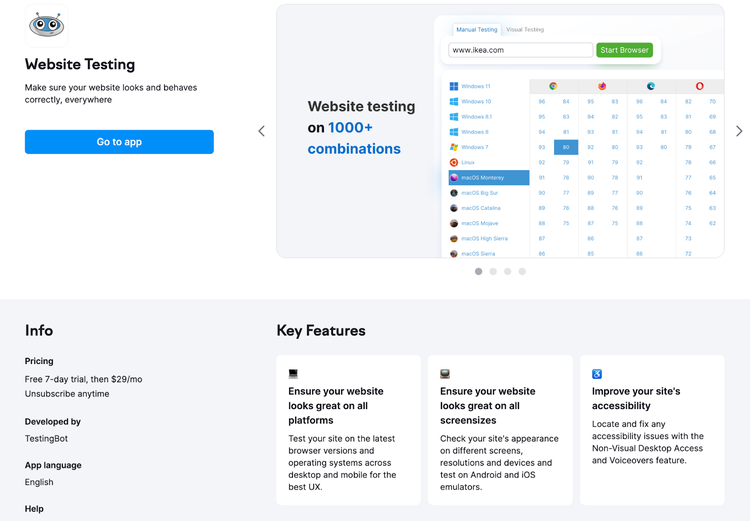
Website Testing in the Semrush App Center offers a straightforward solution for testing across different browsers. From your remote desk, you can test across various browsers, their versions, operating systems, devices, screen sizes, and even geolocations.
Here are some of the other key features of Website Testing:
- Extensive Browser Range: Choose from over 1,000 current and legacy browser combinations.
- Interactive Manual Testing: Engage in real-time with your site in a hands-on testing environment.
- Efficient Screenshot Capture: Generate screenshots in visual mode for quick, comparative analysis.
- Responsive Design Testing: Test responsiveness across different screen resolutions.
- Geolocation Testing: Examine how your website performs in various geographical locations.
- Mobile Device Emulation: Use Android and iOS simulators for comprehensive mobile testing.
- Easy Bug Reporting: Capture and share screenshots of bugs and errors effortlessly.
- Accessibility Testing Support: Integrated NVDA and VoiceOver features to test for accessibility compliance.
Getting Started with Website Testing:
The app allows for manual and visual testing methods. Dive into manual mode for an immersive experience. Here, you can navigate a cloud-based virtual environment, mirroring real user interactions across different browsers and devices for some hands on insight.
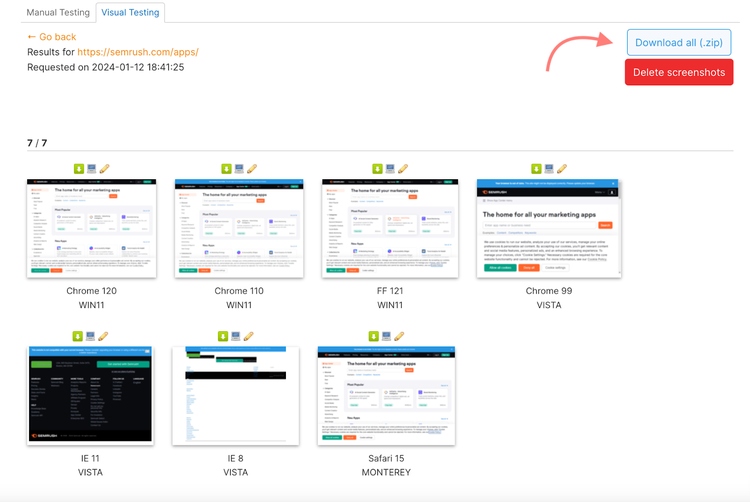
Switch to visual testing for a rapid, snapshot-driven approach. This mode offers a series of browser-specific screenshots, providing a swift comparative glance at how your site looks across various settings.
To start, choose between manual and visual testing and enter your URL in the search bar.
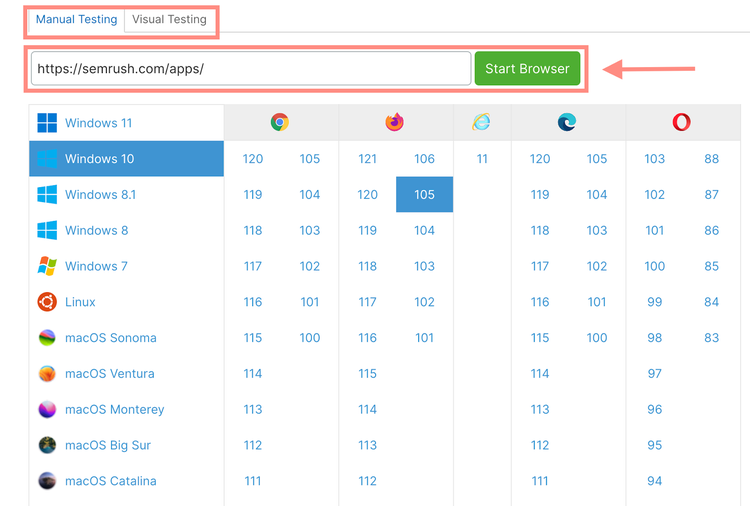
For manual testing, select the operating system, browser, and browser version you want to check and hit “Start Browser.”
You can now navigate the site and start looking for issues.
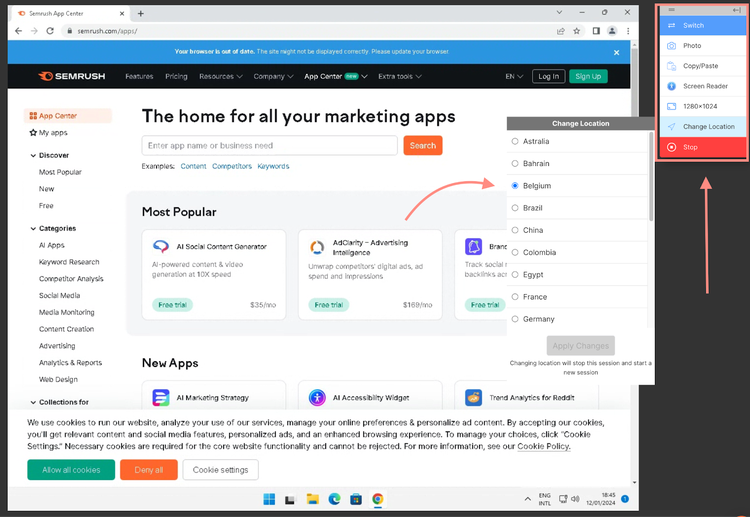
In manual mode, the right-hand menu offers testing tools, including browser switching, screenshot taking, text copying/pasting, audio screen reader tests, and adjustments in resolution or location.
For visual testing:
Enter your site’s URL in the address bar to begin visual testing. Then click the “Settings” button to define your screen resolution, location, wait time, and page view.
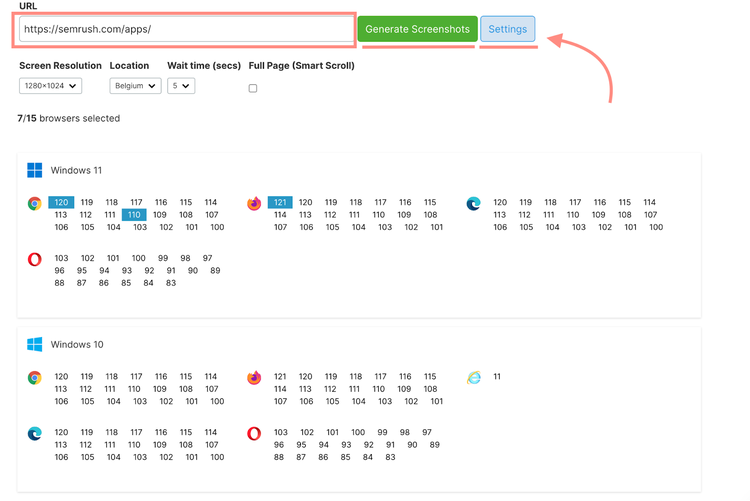
From here, start selecting your browser, version, and OS combinations (you can choose up to 15 at a time) and select “Generate Screenshots.”
Once the app generates the screenshots, you can download each image as a PNG file or the entire set as a single ZIP file.
Pros:
- Diverse browser and OS support ensuring thorough compatibility testing
- Includes mobile testing on iOS and Android simulators
- Remote geolocation testing from 24 countries
- Lower cost option
Cons:
- There is no automatic bug storage; the user needs to capture bugs using the photo function manually
- The device camera can be accessed when using Android emulators, but not all iOS Simulators provide this feature
Pricing: An unlimited subscription to the Website Testing app is available for $29 per month.
2. Mobile App Tester
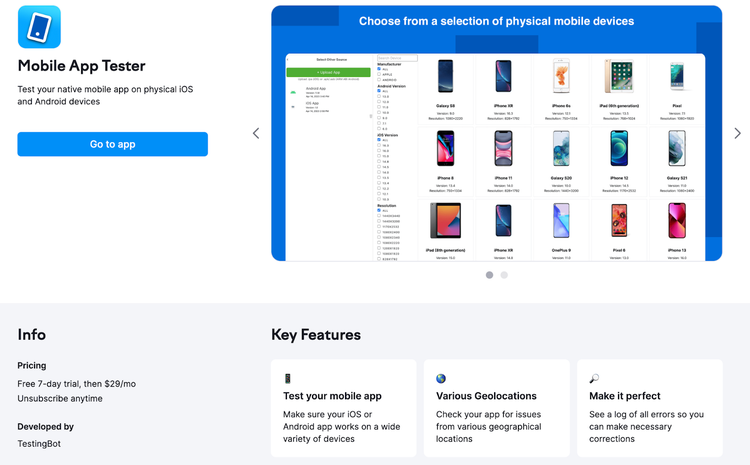
Mobile App Tester is your streamlined solution for rigorously testing mobile apps across a spectrum of devices, operating systems, and network scenarios – all without the need to stockpile Apple or Android devices.
Efficiency is at the core of this tool, with features like network environment simulation. These ensure a top-notch UI/UX experience and save developers and agencies significant time and resources.
Highlights of Mobile App Tester:
- Error Detection: Pinpoint bugs, errors, and warnings efficiently.
- Real-Time Log Monitoring: Track app performance and issues as they occur.
- Multi-Language and Location Testing: Test your app's adaptability across languages and global locations.
- Versatile Performance Testing: Assess app behavior under various network conditions, including different connection speeds and low connectivity areas.
- Essential Kill Switch Feature: Simulate force quitting the app, a crucial aspect of real-world user interaction.
Getting Started with Mobile App Tester:
To use Mobile App Tester, upload your app files. Then, choose your manufacturer, device operating system, and resolution.
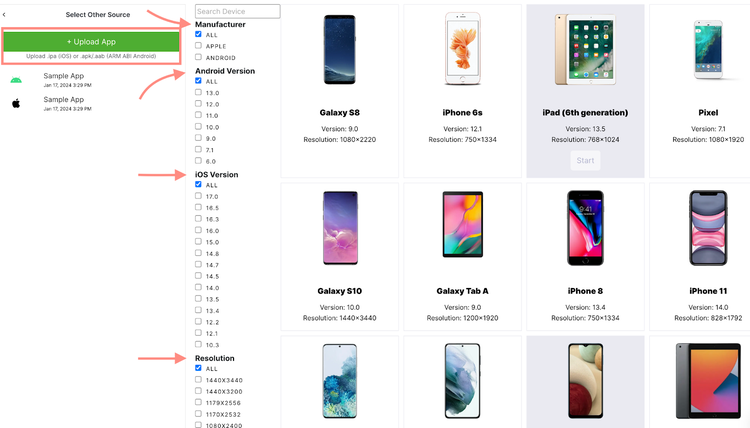
Select your desired device type and click “Start.”
From here, you can choose the Inspector view or the Realtime Logs.
The Inspector view offers the opportunity to review bugs, errors, or warnings regarding the mobile app.
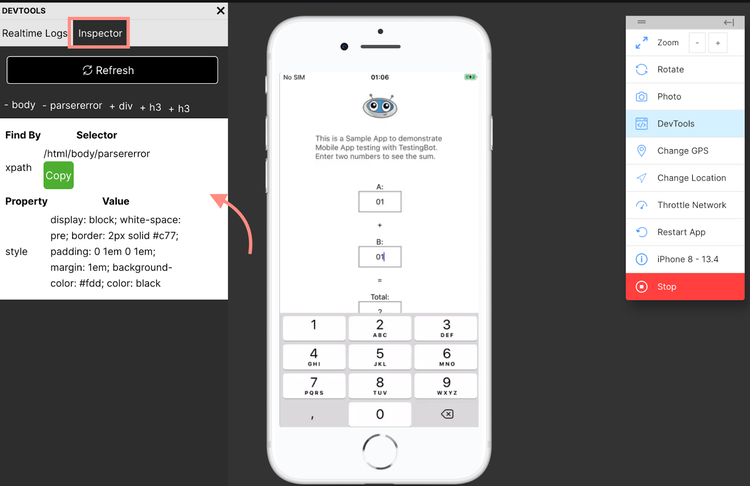
The Realtime Log view presents live logs on the left-hand side. In case of a crash, error, or warning, it will be visible in the sidebar where live logs are displayed.
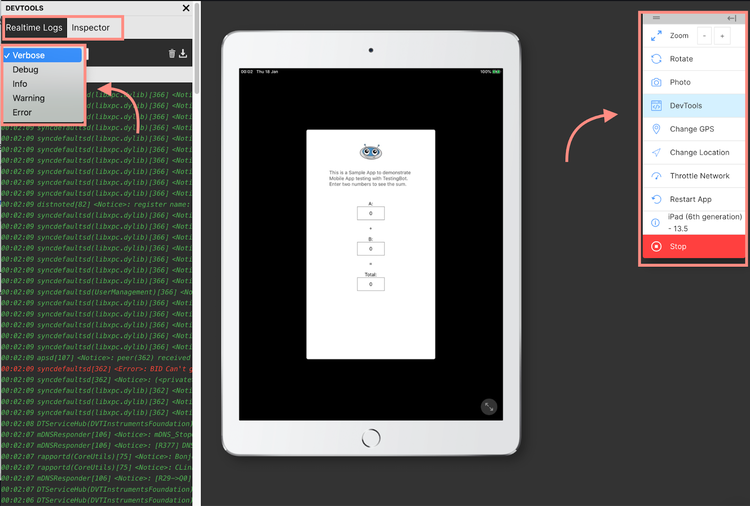
In the DevTools menu on the left, there is a dropdown with options for filtering out issues you may be having with your app. This makes it easier to isolate problems without reading through the entire log.
You can also use the right hand menu to manipulate the environment and interact with the app.
Pros:
- Supports multiple languages and locations
- Offers privacy throughout the testing process; no app info is stored
- New device options added every six weeks
- Lower price option
Cons:
- Sessiontime limit
- Devices are shared, which may cause occasional wait times
Pricing: $29/month after a 7 day free trial. A Semrush account is needed to purchase this app.
3. BrowserStack
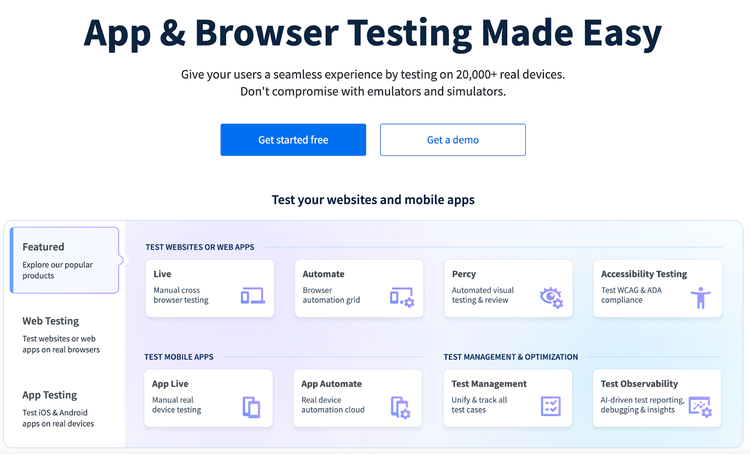
BrowserStack stands out as a cloud-based powerhouse for web and mobile application testing.
It's a favorite among developers and QA teams, allowing them to test on over 3,000 real devices and browsers. And the best part is you can do all this without requiring extensive in-house infrastructure.
BrowserStack is more than just a testing tool; it's a comprehensive platform that streamlines the testing process, ensuring your apps and websites excel.
Key Highlights of BrowserStack:
- Real Device Testing: Access to a vast inventory of real iOS and Android devices for accurate testing
- Interactive Live Testing: Allows for manual testing in real browser environments
- Automated Testing: Supports automated tests in the cloud with frameworks like Selenium and Appium
- Local Testing: Secure testing of local and internal servers or dev environments
- Integrations: Compatible with various CI/CD tools and project management software
- Debugging Tools: Offers a range of debugging tools to identify and fix issues quickly
Getting Started with BrowserStack:
To get started with BrowserStack, choose your testing platform.
For live testing, the interface is user friendly and allows for manual interaction with your website on different browsers and devices. Simply choose the browser, version, and operating system you want to test on.
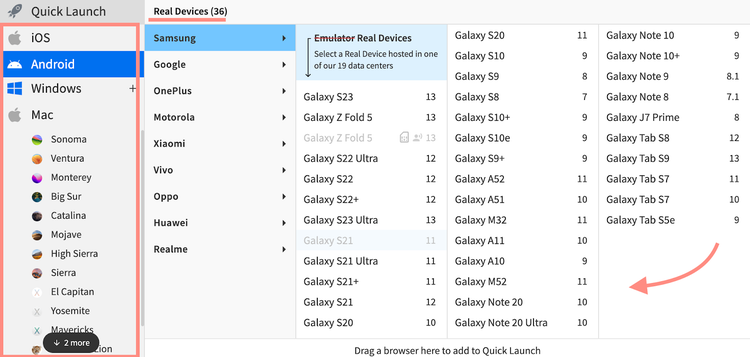
Enter the URL of your website and begin interacting with it as if you were on a real device.
For automated testing, you’ll need to write test scripts using a framework like Selenium or Appium.
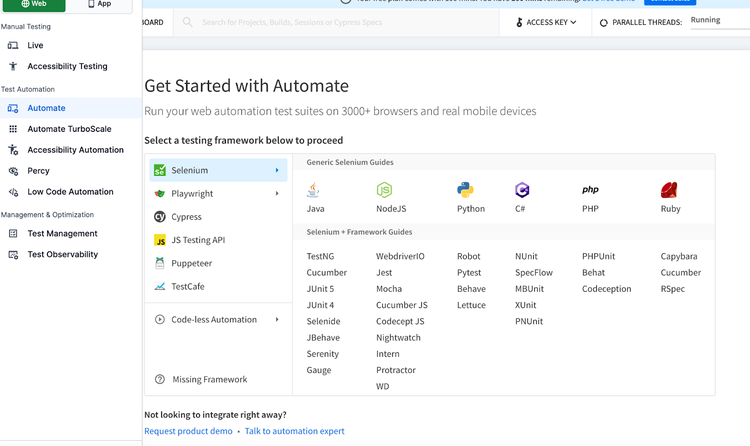
After setting up your test scripts and establishing a connection with BrowserStack's servers, you can initiate tests on the specific browser and operating system combinations mentioned in your script.
Pros:
- Extensive device and browser range
- Stable and reliable performance
- User-friendly interface and setup
- Strong customer and technical support
Cons:
- Can get expensive, particularly for small teams or individual developers
- Some limitations in terms of environment customization
Pricing: BrowserStack offers various pricing tiers, including a free trial option. Their plans range from a $29 individual plan to enterprise levels costing several hundred dollars per month.
4. Selenium
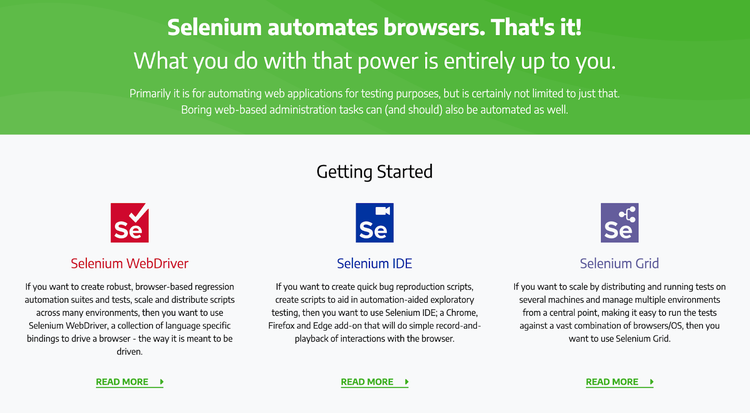
Selenium is a powerful and free tool for cross-browser testing. It mainly automates web applications, but it's not just about testing; Selenium also handles web-based administrative tasks.
The suite includes three key components, each serving a unique purpose in the testing landscape:
- Selenium WebDriver: Selenium WebDriver is the backbone for creating robust browser-based automated tests and suites. WebDriver excels in executing complex scenarios and interactions within the browser.
- Selenium IDE: This component is ideal for quickly reproducing bugs and aiding in exploratory testing with automation support. It's a boon for testers needing a fast and effective way to verify bug reports.
- Selenium Grid: Need to scale your tests? Grid allows you to distribute and run tests across different machines and environments, enhancing testing efficiency.
Getting Started with Selenium:
Selenium requires some basic programming knowledge. For those looking to leverage Selenium to its fullest, Selenium's official documentation provides a wealth of information for detailed implementation and best practices.
Pros:
- Open source and free to use
- Powerful, you can automate many scenarios with Selenium
- Compatible with multiple programming languages
- Supports parallel tests in multiple browsers
- Strong community support and resources for learning/troubleshooting
- Free option
Cons:
- Configuration is time consuming
- Programming skills needed
Pricing: Free (open source)
5. Playwright
Playwright is your go-to end-to-end testing tool designed for the demands of modern web applications. It excels in cross-browser testing, covering Chromium, WebKit, and Firefox, and allows testing across diverse platforms and languages.
Whether you're working on Windows, Linux, or macOS, Playwright adapts to your environment. Test locally or on CI, in headless or headed modes, and experience the precision of native mobile emulation for Google Chrome for Android and Mobile Safari.
Key Features of Playwright:
- Native Mobile Emulation: Test with high fidelity on mobile browsers
- Auto-Wait for Elements: Smartly waits for elements to be ready before executing actions
- Web-First Assertions: Tailored for the modern web, ensuring robust testing
- Multi-Context Testing: Easily manage multiple tabs, users, and origins
- Full Test Isolation: Delivers rapid execution without interference
- Test Generation Tools: Streamline test creation with powerful tools
- Comprehensive Debugging Suite: A full set of tools to debug efficiently
Getting Started with Playwright:
To get started with Playwright, install it using a package manager like npm, yarn, or a VS Code Extension. Once set up, you'll write a script to initialize and conduct tests across multiple browsers, leveraging Playwright’s robust capabilities for a thorough cross-browser testing experience.
For a deeper dive into advanced features and step-by-step guides, refer to the Playwright documentation for detailed and advanced usage.
Pros:
- Extensive support for testing across different environments and languages
- Fast testing in complex environments
- Powerful Debugging Tools
- Multilanguage support
- Test Retries
Cons:
- Doesn’t support native mobile apps
- Doesn’t run on real devices, only emulators
Pricing: Free (open source)
6. LambdaTest
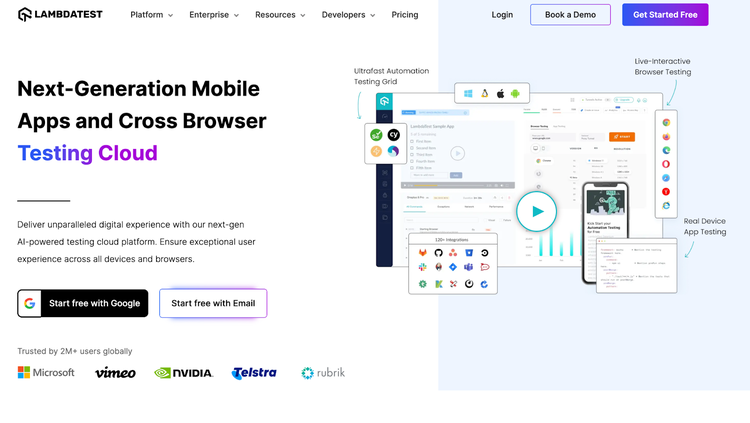
LambdaTest is a versatile cloud-based testing platform that offers a wide range of testing solutions for web and mobile applications. Designed to enhance testing workflows, LambdaTest provides tools for both automated and live interactive testing across various browsers and devices.
Key features of LambdaTest include:
- Real Device Testing: Test on actual iOS and Android devices for true-to-life results
- Visual Regression Testing: Easily identify visual changes in different application versions
- Automated Screenshot Functionality: Capture and compare screenshots across multiple browsers
- CI/CD and Project Management Integrations: Streamline your development process with integrations that fit into your workflow
- Flexible Testing Modes: Switch between automated and manual testing depending on your project's needs
LambdaTest also offers the ability to run parallel tests, which is particularly useful when working with tools like Selenium and Playwright. This feature allows for the simultaneous execution of test scripts across various browser environments, reducing the time required for thorough testing.
Getting started with LambdaTest:
To get started with LambdaTest, choose your environment and testing mode.
In Web Browser Testing, you can run tests on various browsers and devices and review the outcomes. You can also review the mobile version of your website.
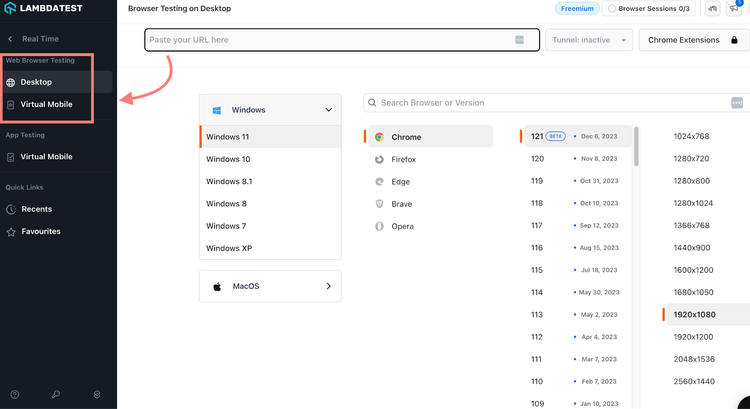
LambdaTest also provides testing services for mobile apps.
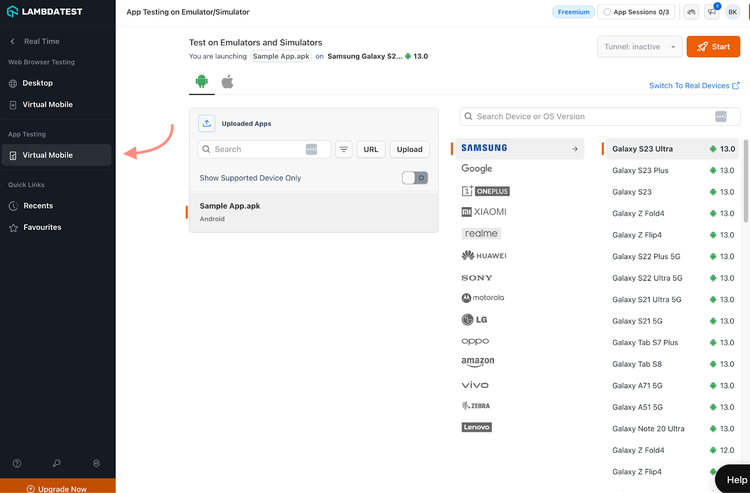
For a better understanding of LambdaTest's capabilities and how to utilize it effectively, their documentation provides detailed guidance and instructions.
Pros:
- Comprehensive testing on over 3,000 browsers and operating systems
- Integration with various development tools
- Versatility in testing modes
- Advanced screenshot
Cons:
- Can be resource-intensive for complex testing scenarios
- Learning curve for beginners
- Can become more expensive than other options
Pricing: Lamdatest offers a free trial, after which you can find a range of pricing options that are determined by your specific needs and the number of tests you’ll be running.
Cross Browser Testing Benefits
Cross browser testing is critical for ensuring web applications perform consistently across various browsers and the process is more streamlined with the right tools.
These tools are specifically designed to make life easier for developers and QA teams by guaranteeing that websites provide a uniform and functional experience on all platforms.
Other key benefits include:
- Efficient Bug Detection: Testing swiftly identifies and fixes browser-specific issues that may have otherwise flown under the radar
- Performance Enhancement: Optimizes load times and responsiveness on all browsers, old and new
- Quality Assurance: Maintains uniform functionality and design, crucial for user experience
- Brand Consistency: Ensures your branding remains consistent across platforms
- Accessibility Compliance: Make sure your website is useable for people with disabilities
- Competitive Edge: Gives your website an edge by ensuring a consistent user experience across all platforms
These tools are not just about compatibility but about making web development workflows more efficient and ensuring high-quality user experiences on any browser.
Cross Browser Testing Best Practices
By following these best practices, you can easily identify and address any issues that may arise on different browsers and navigate cross browser testing like a pro.
- Understand Your Users and Prioritize Browsers: Focus on the most popular browsers first, based on your audience analytics. However, don’t neglect to test less common browsers over time.
- Automate When Possible: Implement automated testing for routine checks, saving time and resources.
- Manual Test When Necessary: To explore nuances and specific user experience aspects, use manual testing.
- Responsive Design Testing: Ensure your site is responsive on different devices, screen sizes, resolutions, and networks.
- Regularly Update Test Cases: Keep your test cases updated with the latest browser versions and features.
- Utilize Browser Developer Tools: Leverage built-in developer tools for in-depth testing and debugging.
- Test Early and Often: Integrate testing into early development stages and conduct it regularly for ongoing improvements.
- Incorporate Real User Monitoring (RUM): Use real user data to guide your testing priorities and scenarios.
- Conduct Stress Testing: Test under extreme conditions across browsers to ensure your website's scalability and robustness.
- Collaborative Testing Approach: Foster a collaborative environment between developers, designers, and QA teams for more effective testing.
- Integrate with Continuous Integration (CI): Seamlessly blend cross-browser tests into CI pipelines for ongoing quality assurance.
These practices will help maintain a high-quality user experience across all browsing platforms, enhancing user satisfaction and engagement.

Brenna is a Content Writer for Semrush focusing on educational marketing content that empowers readers to unlock and maximize their SEO potential.

Tells Google to show you more from Semrush in AI, Search, and Discover.