
How to Find & Fix ChatGPT 404 Referrals
A case study documented on LinkedIn found that over 3% of visitors from ChatGPT landed on a 404 page instead of real content. These “phantom URLs” waste valuable clicks, damage user trust, and can affect SEO.
The fix? Audit your analytics, patch phantom links, and optimize your 404 page so lost visitors still convert. This guide walks you through the process step by step.
Why Does ChatGPT Create 404 Referrals?
ChatGPT doesn’t crawl the web like a search engine. The model predicts patterns based on training data rather than pulling live, verified links. Because of that, it sometimes generates “hallucinated” links that look real but don’t exist.
Phantom URLs cause problems for site owners, including:
- Lost traffic: Users who click a broken link often leave
- Eroded trust: Visitors may blame your brand, not the AI
- SEO risks: Search engines can treat excessive redirects or soft-404s as poor site quality
- Missed opportunities: Each phantom click is a lost potential customer
Google’s John Mueller has cautioned that hallucinated links may spike for months before leveling off.
Further reading: What Is a 404 Error? How It Affects SEO & How to Fix It
Are AI Referrals Worth Optimizing For?
Dan Hinckley, co-founder of Go Fish Digital, analyzed 18,000+ landing pages ChatGPT sent traffic to. About 3.35% returned a 404 page.
But it gets worse.
Alex Galinos, an international SEO expert, found an even higher number: 57% of one client’s ChatGPT referrals landed on 404s.
These numbers represent new customers who are lost before they ever see your content.
So yes, AI referrals are worth addressing.
Here’s how to find them.
How to Identify Phantom URLs in Google Analytics 4
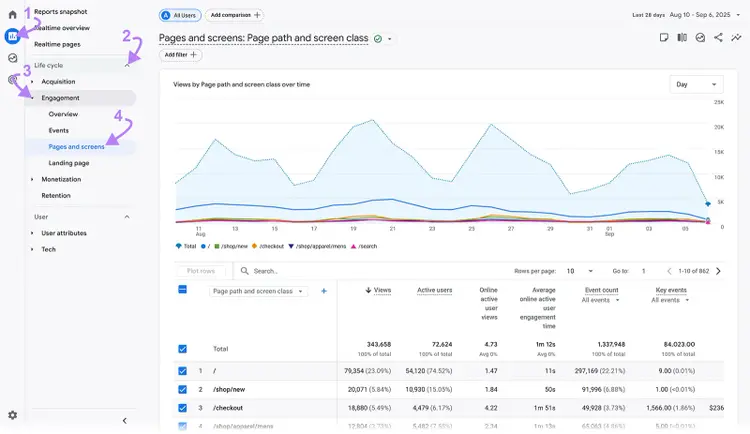
To find ChatGPT-generated 404s, open GA4 and go to Reports → Life cycle → Engagement → Pages and screens. This report shows the pages users visit on your site.
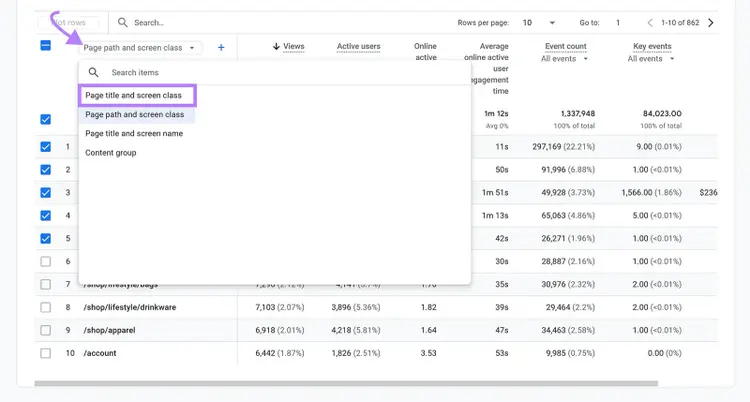
Inside the report, set the primary dimension to Page title and screen class. This groups pages by their titles.
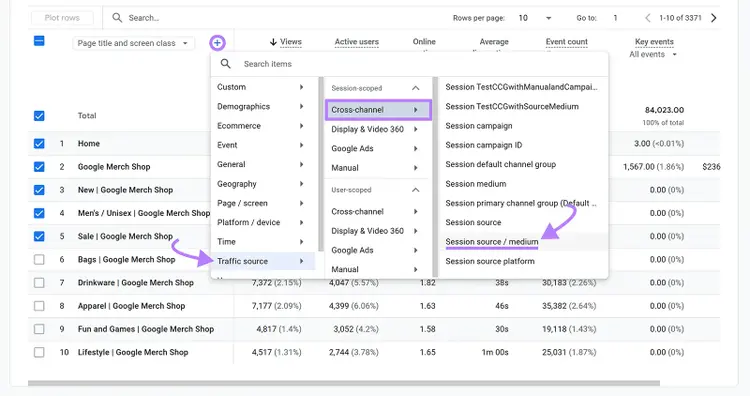
Next, add a secondary dimension by clicking the “+” icon and selecting Session source / medium under Traffic source → Cross-channel.
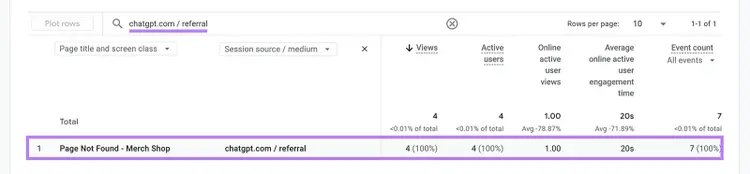
In the search bar above the table, insert chatgpt.com / referral. GA4 will now only display visits referred by ChatGPT.
If your 404 page is titled “Page Not Found,” it will appear in the table alongside ChatGPT as the referral source.
This confirms whether ChatGPT traffic is hitting broken or phantom URLs.
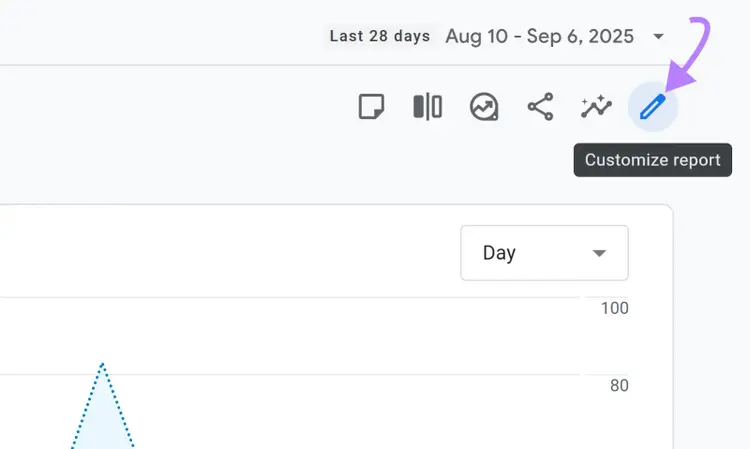
Save this report to avoid rebuilding it every time. Click the pencil icon in the top-right corner.
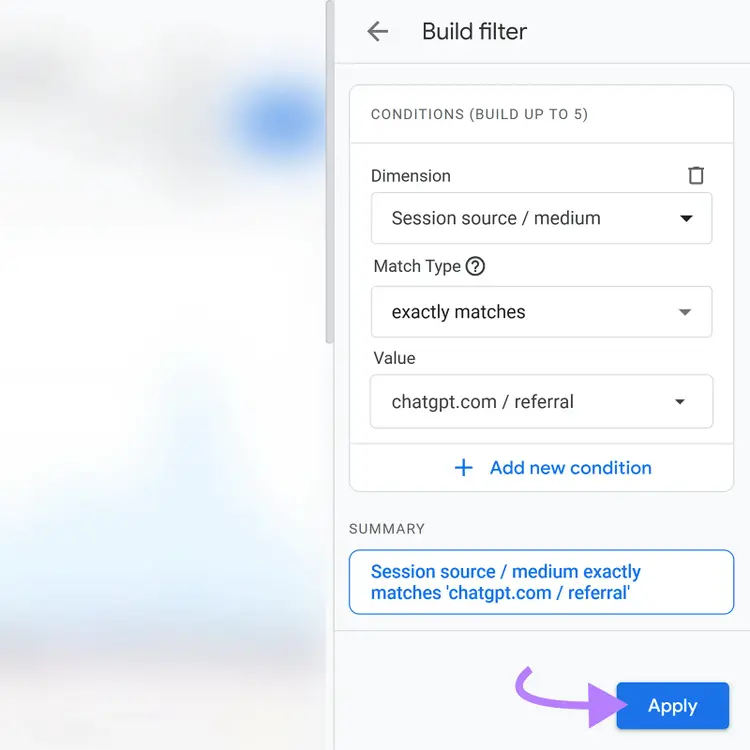
In the right sidebar, add a filter for Session source / medium. Set it to Exactly matches, then insert chatgpt.com / referral, and click “Apply.”
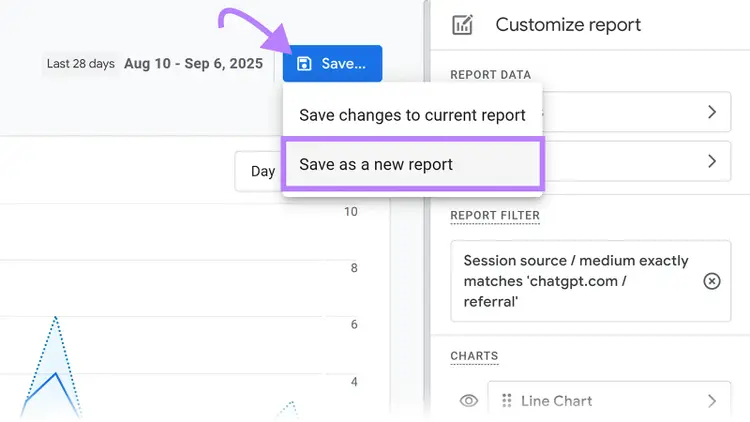
Click “Save,” then “Save as a new report” with a clear name like ChatGPT Referrals or ChatGPT Landing Pages.
Finally, go to Library at the bottom of the Reports panel. In the Life cycle collection, drag your new report into the Engagement folder and click “Save.”
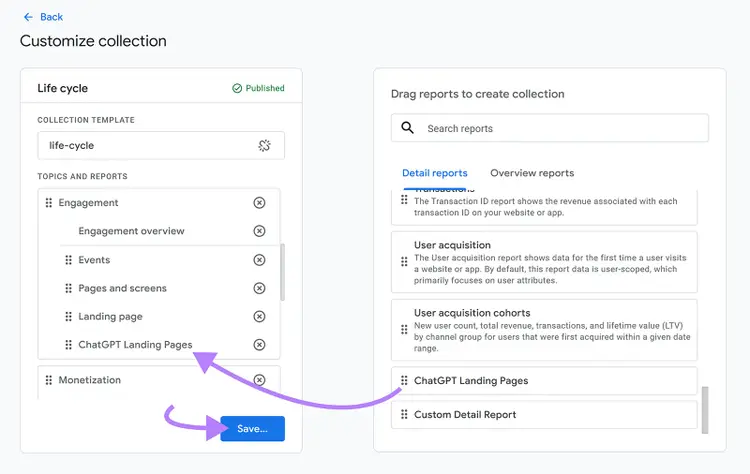
From now on, you’ll have a dedicated ChatGPT referral report in your GA4 sidebar. Each time you open it, you’ll see ChatGPT traffic, which pages users landed on, and whether those visits resulted in 404 errors.
Should You Redirect or Leave the 404 Page?
Google may treat bulk redirects to irrelevant pages (like the homepage) as soft 404s. Soft 404s waste crawl efficiency (how easily bots can crawl and index your site) and dilute site quality.
For larger sites with thousands of URLs, this inefficiency can compound. If AI referrals generate hundreds of phantom URLs, bots may crawl dead ends instead of your most important pages.
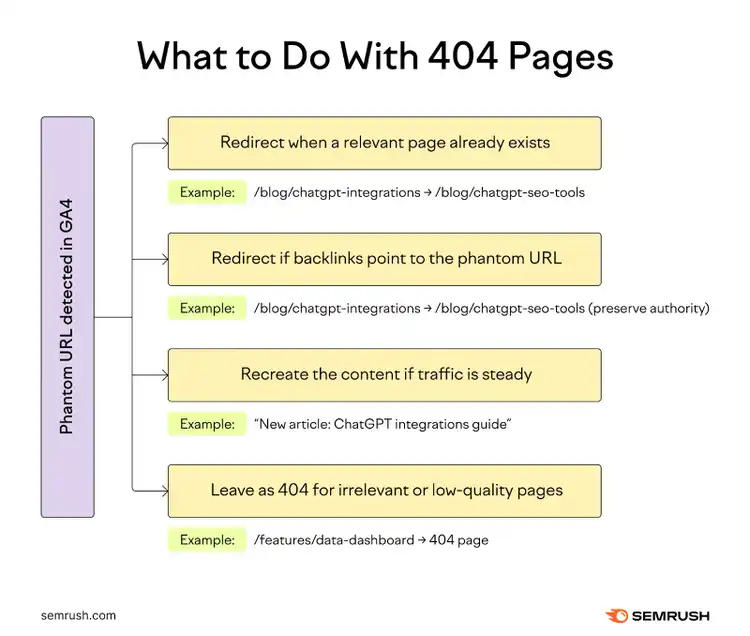
Use this simple decision framework for handling phantom URLs:
- Redirect when the page (or a close match) exists. Example: “/blog/chatgpt-integrations” doesn’t exist, but you have a live post on ChatGPT SEO tools. Redirecting helps users find relevant content and preserves link equity (more on that below).
- Redirect when the page has backlinks pointing to it. Even if you don’t plan to build the page, backlinks passing authority to a 404 are wasted equity. Redirect those URLs to the most relevant live page to preserve site authority.
- Create (or recreate) the content if the phantom URL suggests real demand. If GA4 shows steady traffic to a phantom page, it might be worth building the page. This turns phantom clicks into new content and engagement opportunities.
- Leave it as a 404 if the URL is irrelevant or low quality. Example: “/features/data-dashboard” was never a real page and has no backlinks. Redirecting it would only confuse users and send weak signals to Google. A clean 404 is the better choice.
Let’s break down how to understand this using real data.
How to Use Semrush to Prioritize Phantom URL Fixes
GA4 shows which ChatGPT links sent traffic, but Semrush shows why those pages broke and how to fix them without harming SEO.
For example, imagine you’ve built your ChatGPT referral report in GA4 and spot three key referrals:
- /pricing received 150 visits and worked normally
- /blog/chatgpt-integrations got 60 visits, all landing on a 404 page
- /features/data-dashboard had 20 visits and also showed as a 404
At first glance, GA4 tells you what happened: ChatGPT sent traffic, and two URLs didn’t exist.
But GA4 alone doesn’t show if the pages ever existed, if they should be redirected, or if they create SEO risks.
This is where Semrush’s Site Audit tool helps.
First, export your GA4 referral report as a CSV.
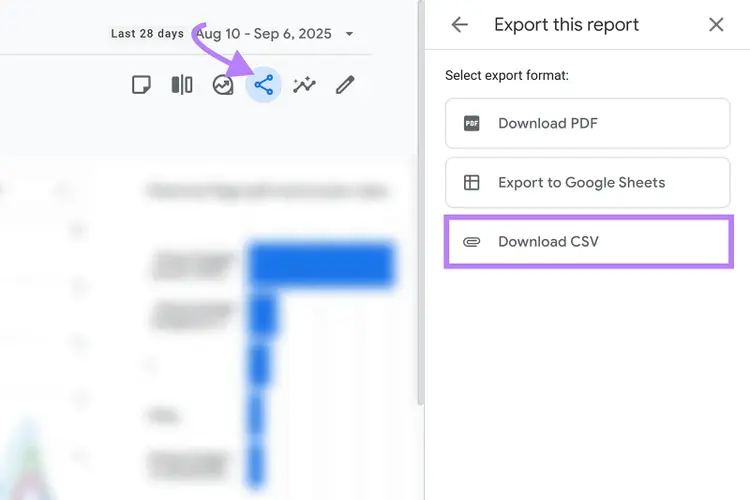
Next, upload that CSV into a Site Audit crawl and navigate to the “Issues” tab. Click “X pages” next “returned 4XX status code” under Errors.
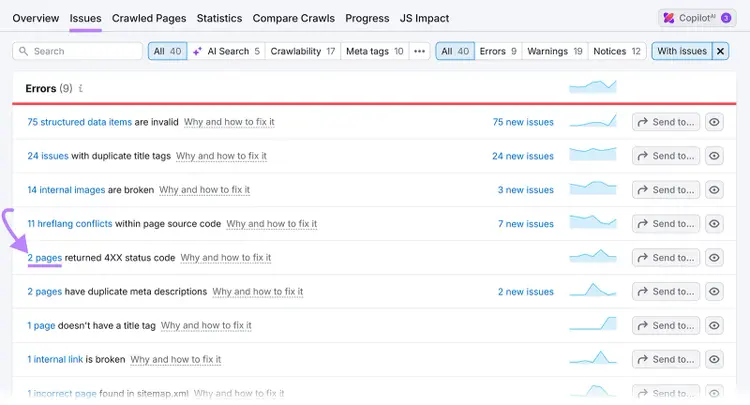
Now you can see the technical reality behind the traffic:
- /blog/chatgpt-integrations shows as a 404 Not Found, but it has 10 backlinks pointing to it. That means you should either recreate the content or 301 redirect the page to preserve link equity.
- /features/data-dashboard shows up as a soft 404. This is essentially a thin placeholder page that Google recognizes as low quality, and so it shouldn’t be redirected. Leaving it as a clean 404 is the better SEO move.
- /pricing is a 200 OK, but Site Audit flags a duplicate title tag. Not a broken page, but still something worth fixing to avoid SEO crawl efficiency issues.
By combining GA4 and Semrush, you move from “We know ChatGPT sent users to a broken page” to “We know which broken pages matter most, why they broke, and the right action to take.”
Further reading: Redirects: What They Are & How to Use Them
Find & Fix Phantom URLs
with the Site Audit Tool
Turn Phantom Links into Content Opportunities
If ChatGPT sends traffic to a nonexistent page, that’s a signal of real user interest. GA4 referral data helps you decide whether to create new content.
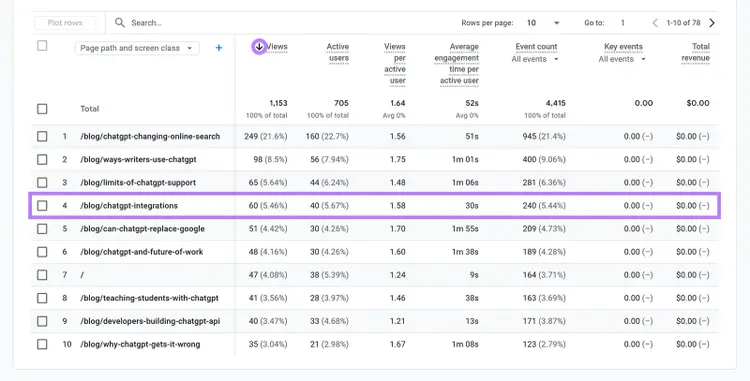
Take the “/blog/chatgpt-integrations” example. GA4 showed 60 visits from ChatGPT, all hitting a 404 error.
This proves demand exists. Instead of losing those clicks, capture them by publishing content on the missing topic.
Here’s the simplest way to prioritize which pieces to create:
- Open your saved ChatGPT referral report in GA4
- Sort by “Views” to see which URLs got the most visits
- Flag the 404s with significant traffic. These are your best candidates for new content.
If a phantom URL gets one or two clicks a month, it’s not worth building out.
But if a phantom URL gets dozens or even hundreds of visits, building that page can turn wasted traffic into engagement and conversions.
But create content only if you can make it strong and useful. Thin or rushed content won’t perform.
Further reading: Quality Content: What It Is + 10 Actionable Tips for Success
Designing an AI-Optimized 404 Page
When you can’t redirect or rebuild a phantom URL, your 404 page acts as the safety net. A strong 404 page can keep users engaged instead of bouncing.
Most default 404s say “Page Not Found” and leave users stranded.

But with AI referrals, users expect a real page. Your 404 needs to guide them forward, not just apologize.
Here’s what to include in an AI-optimized 404:
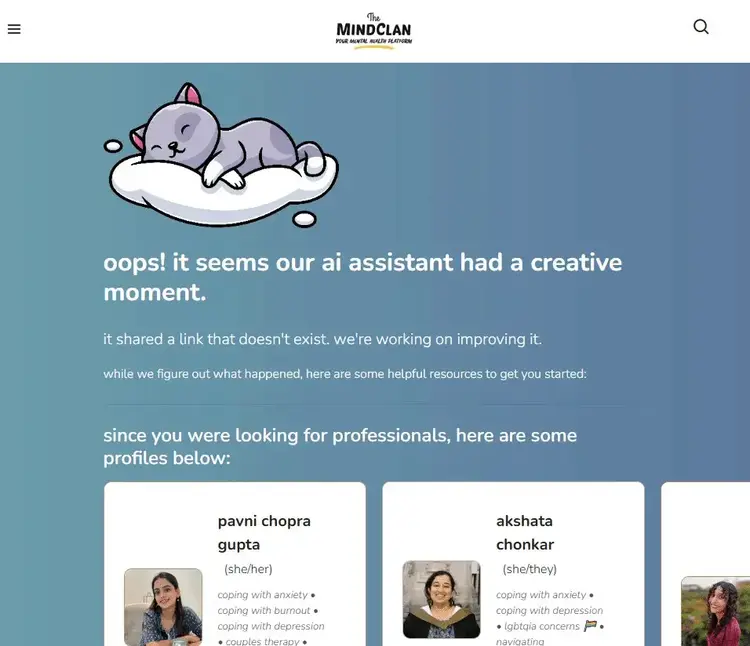
- Educate users about AI hallucinations. Add a short, clear note: “AI may have generated this link. Here’s what we do have on this topic.” Acknowledge the issue to build trust.
- Use the URL as a search query. If the phantom link is “/blog/chatgpt-integrations,” display related content or search results for “ChatGPT integrations.” This gives users a next step.
- Offer navigation and helpful links. Add links to top articles, product pages, or a search bar. Make recovery simple.
- Keep the design clean and on-brand. A polished 404 page shows professionalism and reduces frustration.
Here’s an excellent example by Mani from The Mind Clan:
Fix ChatGPT 404 Referrals Today
ChatGPT referrals can bring new visitors, but some will land on phantom URLs. Fixing these errors improves crawl efficiency, builds trust, and saves conversions.
Here’s how:
- Use GA4 to find phantom URLs and measure traffic
- Run a Semrush Site Audit to confirm which URLs are broken
- Redirect, recreate, or leave as 404 depending on the page’s relevance and value
- Optimize your 404 page to guide users back into your site
- Monitor AI referrals over time and turn hallucinated links into opportunities
Find and Fix ChatGPT 404 Referrals
with the Site Audit Tool

Cecilia is a senior editor and strategist with more than 12 years of experience shaping editorial strategies, refining brand messaging, and leading high-impact teams. She began her career in print and digital editorial leadership roles before transitioning to SEO and digital marketing, focusing on data-driven strategies. She‘s passionate about ensuring operational efficiency, upholding editorial standards, and mentoring writers to deliver top-quality, brand-aligned content.
Cecilia Meis
Cecilia is a senior editor and strategist with 12+ years of experience spanning print, digital, and SEO. She’s passionate about optimizing editorial processes, upholding quality standards, and mentoring writers to deliver brand-aligned content.

Tells Google to show you more from Semrush in AI, Search, and Discover.