
My 11 Favorite ChatGPT Alternatives for 2026 (Tested Manually)
Many of us use ChatGPT as shorthand to refer to any generative AI.
But there are many alternatives that offer better outputs and more specialized experiences for different use cases.
Think content creation, online research, coding, creative writing, project management—even emotional support.
I've spent months testing dozens of free and paid ChatGPT alternatives to find the best solution for each situation.
In this guide, I've listed my top 11 picks for you to consider—with output examples, top features, and feedback for each.
My 11 Favorite ChatGPT Alternatives for 2026
The Best ChatGPT Alternatives
- Claude for human-like writing
- Semrush Content Toolkit for SEO-friendly content
- Copilot for Microsoft users
- Gemini for Google integrations
- Meta AI for connecting with social platforms and experimentation
- Perplexity AI for online research
- GitHub’s Copilot for coding assistance
- NotebookLM for research and learning
- Jasper AI for enterprise content creation
- Pi.ai for emotional support
- Otter for project management
Let's review each of them in detail.
1. Claude: The Best ChatGPT Alternative for Human-Like Writing
- What does it do? Helps you analyze, summarize, and generate human-like texts
- Who is it for? Users looking to generate engaging copy in various formats
Anthropic’s Claude can chat with you, answer questions, and lend a hand with all sorts of tasks.
It now includes web search and a new Research feature, giving it live internet access and the ability to provide citations.
But what really sets Claude apart from ChatGPT is how well it matches your tone and style.
I like using it for quick writing tasks and creative content. It sounds more human, less robotic.
Let's look at an example.
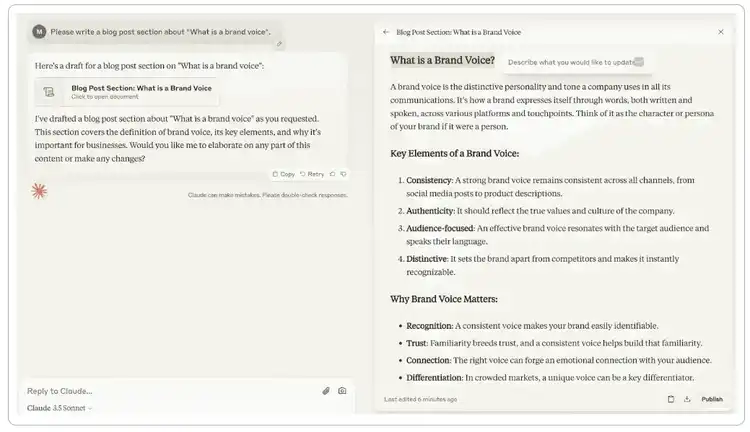
I gave Claude and ChatGPT the same guidelines and prompts to write a blog post section entitled 'What is a brand voice?'.
Claude generated text that was highly structured, informative, and easy to read. It maintained a neutral tone of voice that didn't sound at all robotic.
ChatGPT, on the other hand, generated a wall of text that was quite hard to read and follow. The information was helpful, but the tone felt too formal and too formulaic.
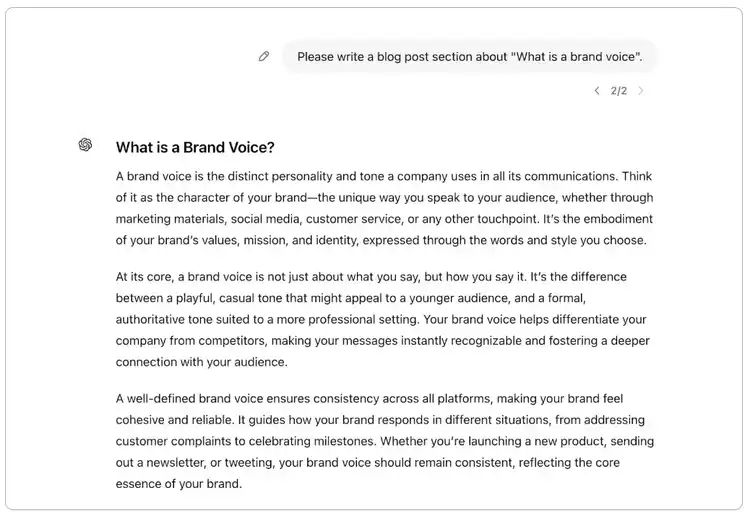
For long-form content, ChatGPT tends to write content that feels more like an outline than a finished piece. Claude, however, usually produces copy that flows well and looks more complete.
Pros and Cons
Pricing
- Claude offers a free version
- For $20/month, Claude Pro will give you five times more usage
2. Semrush Content Toolkit: The Best ChatGPT Alternative for Content Creation and SEO
- What does it do? Long-form SEO content creation
- Who is it for? Small businesses, marketers, agencies, and content creators who want their content to rank in search engines
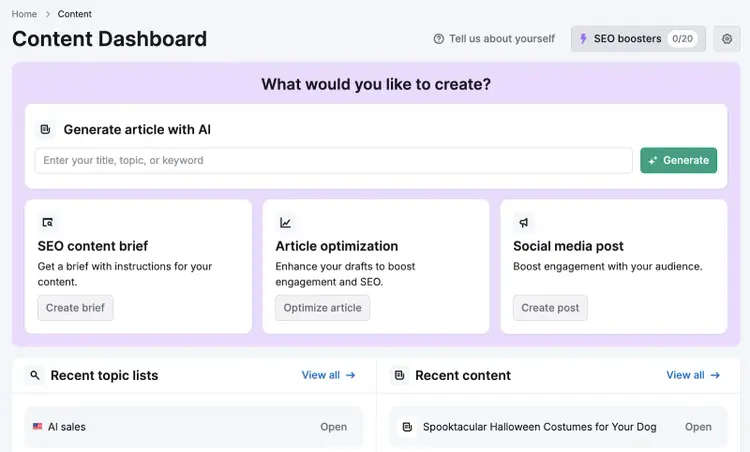
Content Toolkit is the AI writing tool we’ve developed here at Semrush. It combines powerful AI with Semrush’s SEO data to help you write great long-form content.
I love that it automates the entire process—from finding content ideas to writing and optimizing content.
It’s especially useful for users who don't have deep SEO expertise.
For example, it finds target keywords for each content piece and then optimizes your copy to reflect search intent and rank highly.
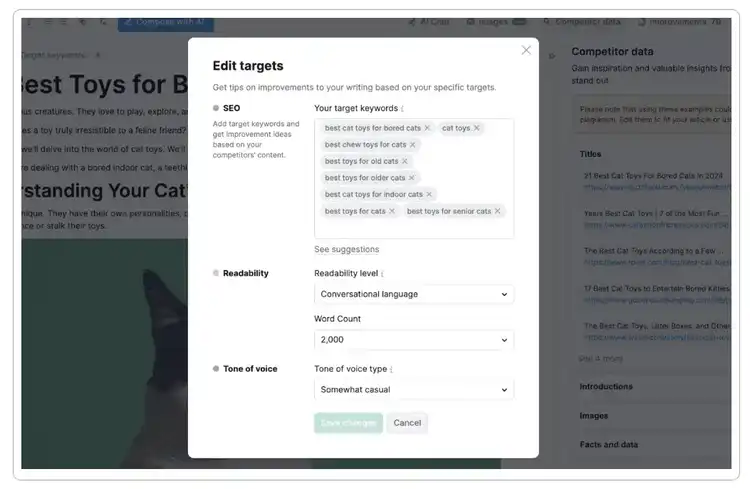
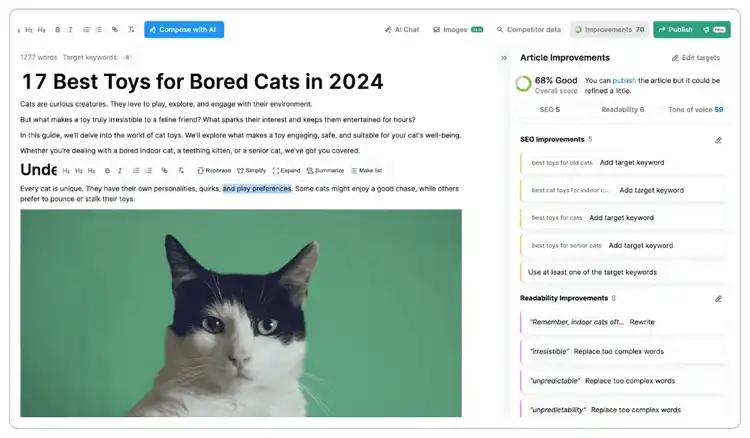
You can then add changes and enhancements using Content Toolkit’s integratedAI chat, optimization tips, and its user-friendly blog editor.
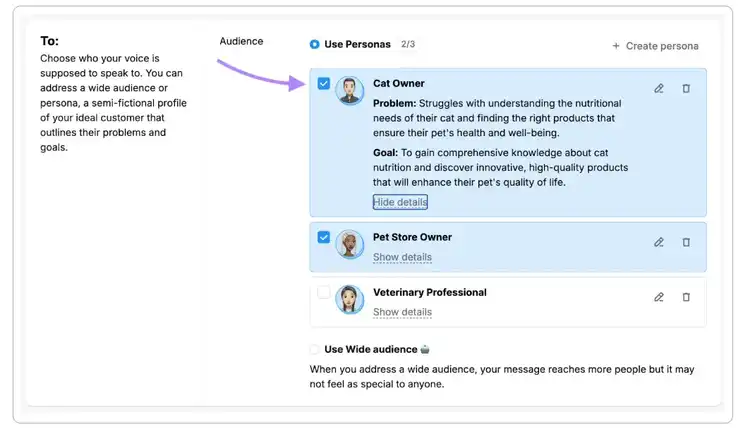
It even lets you define your unique brand voice directly in the tool.
Just upload your writing samples, and all your future content will be automatically adjusted to sound like you and your brand.
Pros and Cons
Pricing
- Explore Content Toolkit with a seven-day free trial
- After that, get the paid plan for $60/month
3. Copilot: The Best Conversational AI for Microsoft Users
- What does it do? Conversational and creative text and image generation
- Who is it for? Researchers, users of Microsoft 365 apps, and businesses needing text and image generation
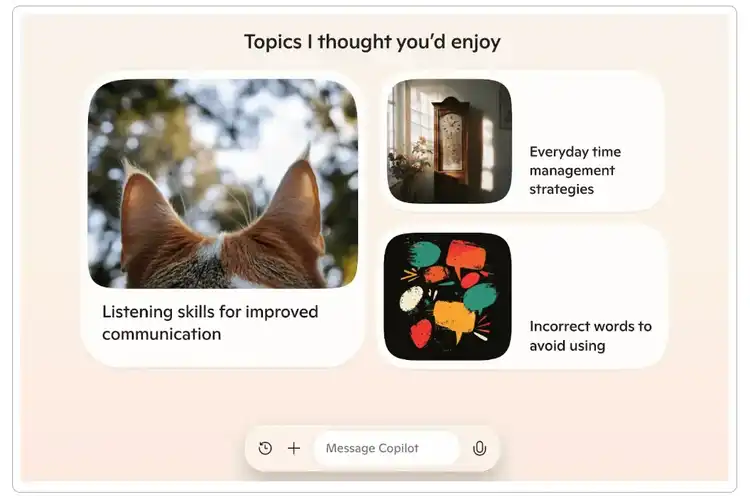
Microsoft Copilot is a large language model (LLM) that allows you to generate text, create images, and interact with Microsoft products and services.
Copilot is powered by OpenAI’s language models: Pro users get access to GPT-4 Turbo and DALL-E 3 for AI image generation.
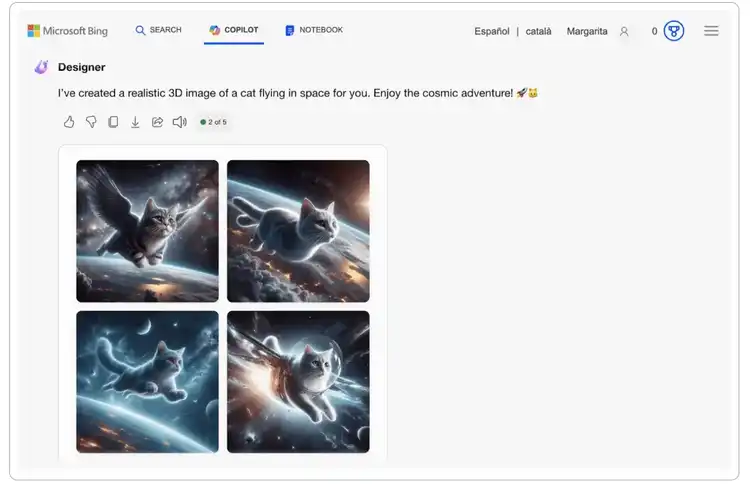
Copilot is also deeply integrated with Microsoft products for different use cases:
- Microsoft Teams, Microsoft Security, and Microsoft 365 have their own tailored versions of Copilot
- Data from Microsoft Graph and your Microsoft ecosystem lets Copilot provide personalized and contextually relevant responses
- Copilot also works with Microsoft applications like Edge, Dynamics, and Power Platform
For example, you can use Copilot within Microsoft Teams to summarize conversations and find important information faster:
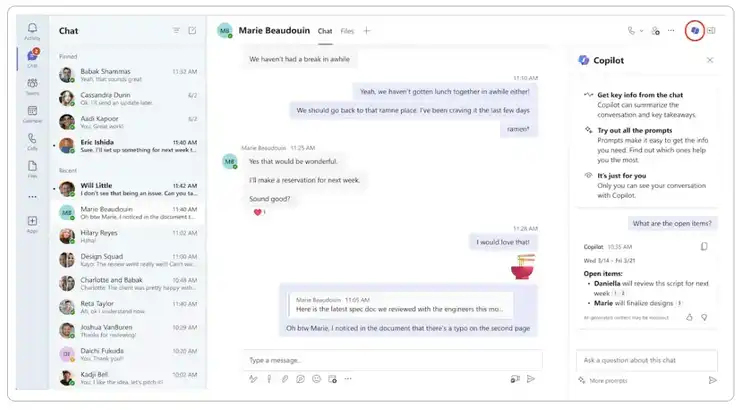
Source: Microsoft
The bottom line? If you’re already using Microsoft 365 tools, Copilot is one of the best alternatives to ChatGPT.
Pros and Cons
Pricing
- The basic plan comes with a free Microsoft account and offers access to Copilot on the web and in Windows, macOS, and iPadOS
- Copilot Pro costs $20 per user/month. This gives you higher usage limits, priority access to different AI models such as ChatGPT-4o and DALL-3, and access to Copilot in Microsoft 365 apps.
4. Gemini: The Best ChatGPT Alternative for Integrating with Google’s Ecosystem
- What does it do? Analyzes and generates text and images and connects with Google apps
- Who is it for? Google Workspace users and those looking for more human-like text generation
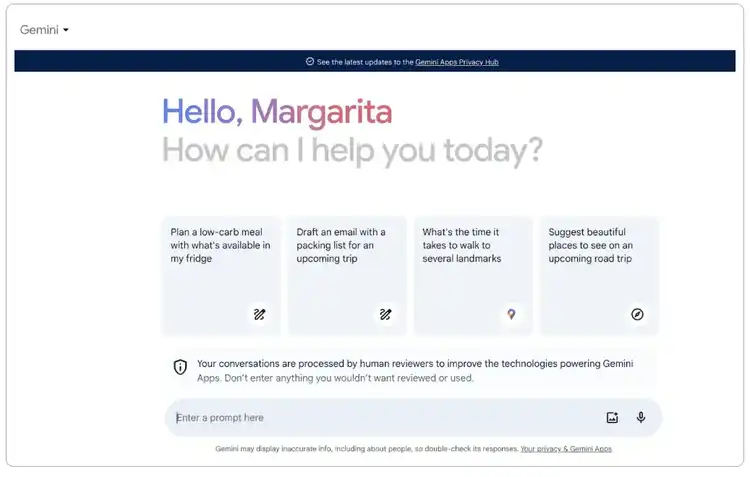
Google's Gemini is a multimodal large language model that analyzes and generates text, code, and images with its new Imagen 3 model. It’s powered by Google's own family of LLMs, developed by Google DeepMind.
Gemini works great for structuring information and producing more human-sounding language. I’ve always felt that it works better than ChatGPT when it comes to content writing.
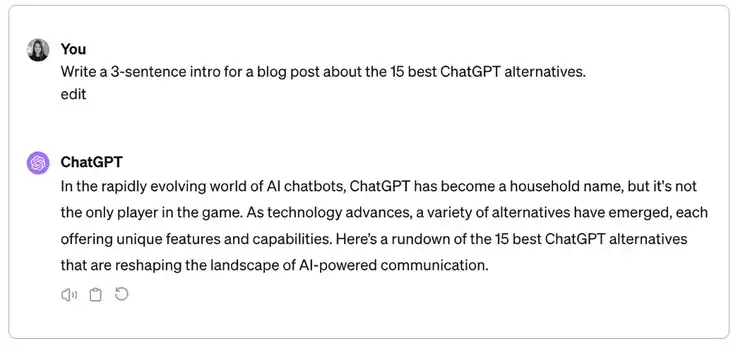
To put this to the test, I asked both AI chatbots to write a blog intro.
While Gemini did come up with a few AI cliches, it was easy to read and used a casual tone of voice:
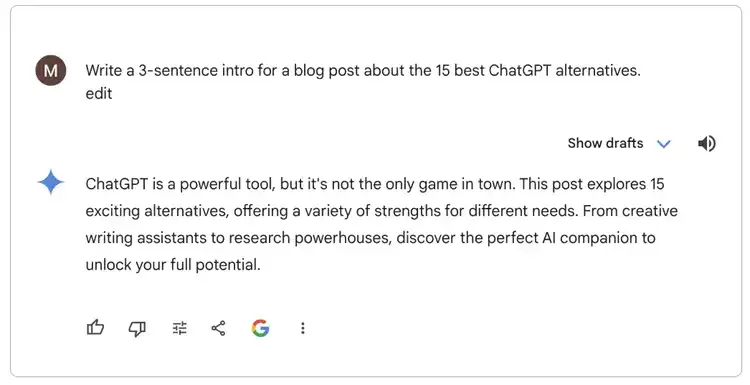
ChatGPT, by comparison, began with its all-time favorite intro line, “In the rapidly evolving world of…” The tone was more formal and the language more convoluted—which is always a red flag for me.
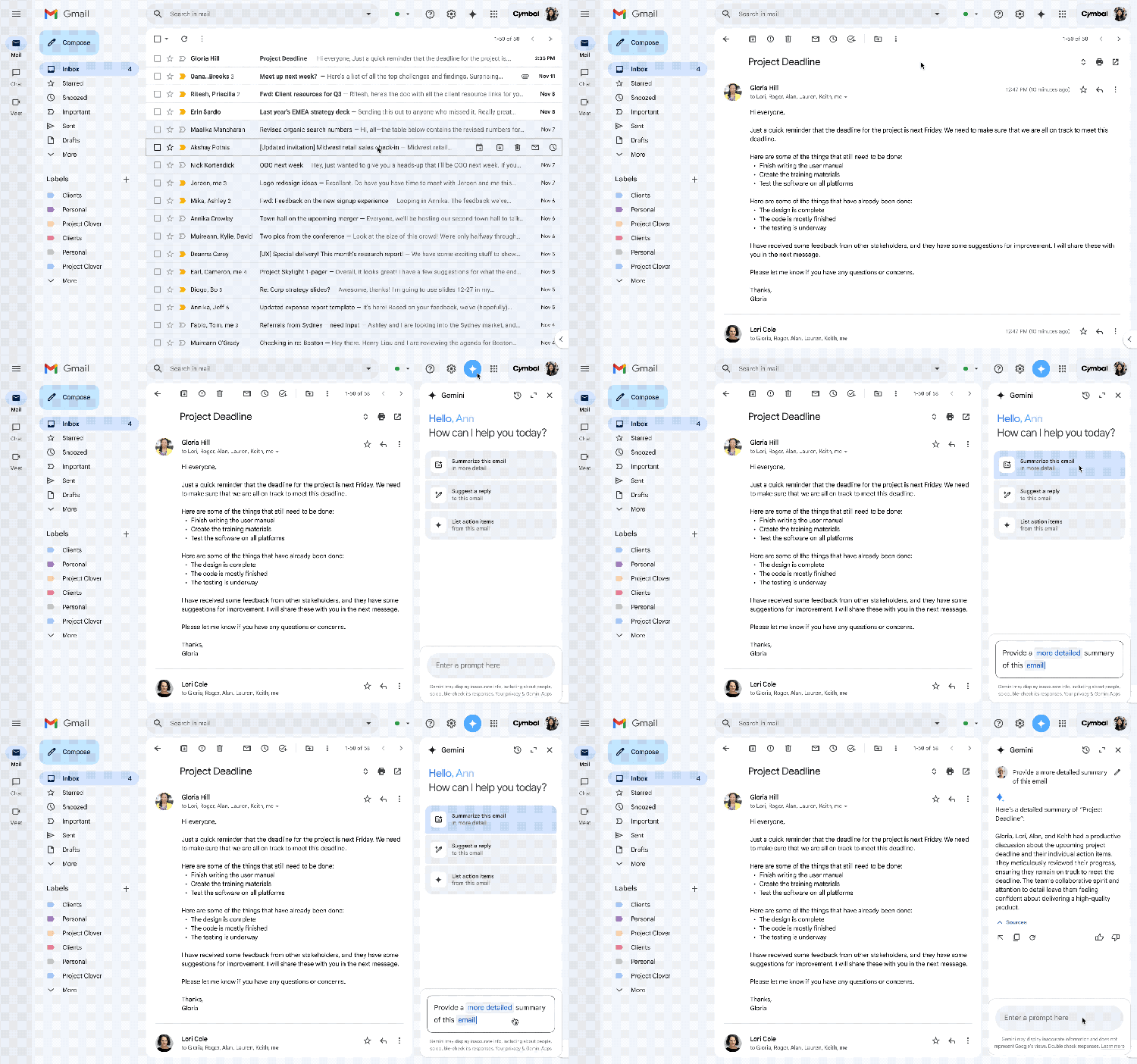
Another key advantage Gemini has over ChatGPT is how deeply it connects with Google's ecosystem. It accesses your content across Google Workspace, drawing directly from Gmail, Docs, Drive, Calendar, Keep, and Tasks.
This means Gemini can help draft emails, summarize documents, locate files, check your calendar, take notes, and manage your to-do list—all within the Google apps you already use.
Pros and Cons
Pricing
- The free version of Gemini is available to all users with a Google account and now includes access to Gemini 2.5 Pro (Experimental), though with some usage limits
- The Gemini Advanced plan costs $19.99/month and provides full access to Gemini 2.5 Pro with higher limits and extended capabilities
5. Llama 4 by Meta: The Best Open Source ChatGPT Alternative
- What does it do? A free open-source AI assistant integrated into Meta's platforms for content creation, image generation, and social interactions
- Who is it for? Meta platform users, developers looking for customizable AI solutions, and users who want a free ChatGPT alternative
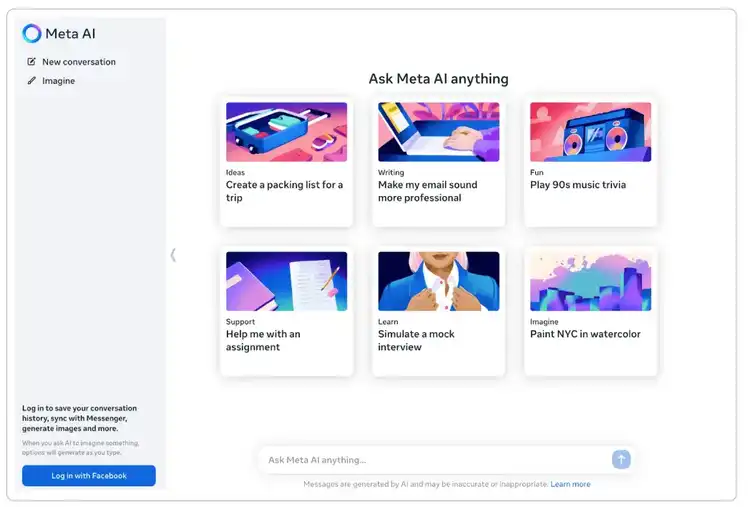
Meta AI now runs on Llama 4, the newest model released in April 2025.
It’s a big upgrade—Llama 4 is faster, smarter, and better at understanding both text and images. It also works in more languages and handles longer, more complex conversations without glitching out.
Just like before, it’s built into Facebook, Instagram, WhatsApp, and Messenger. For example, here’s what it looks like for Instagram users:
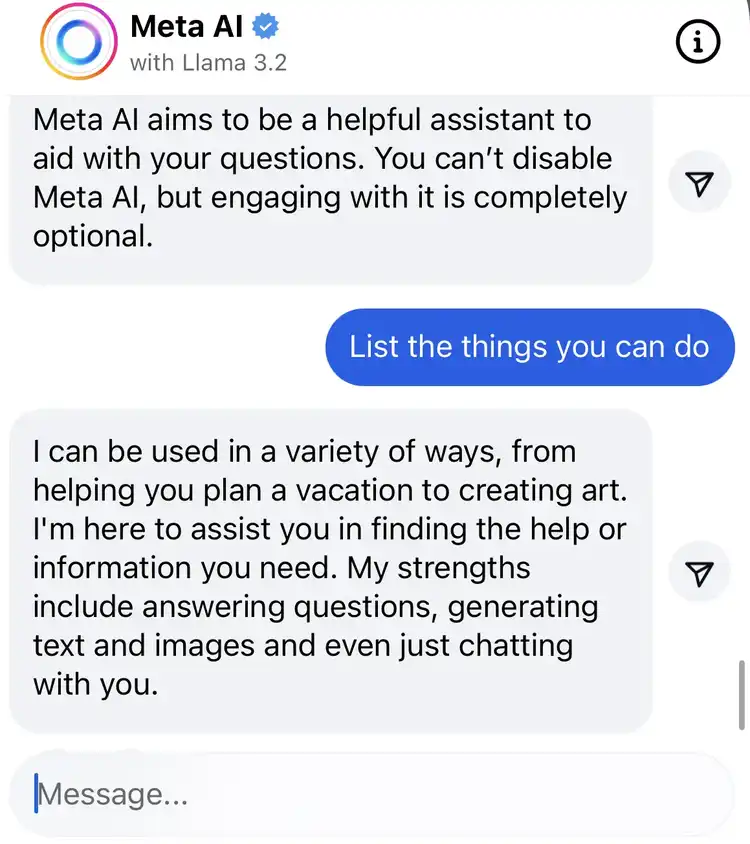
But now it responds more naturally, understands context better, and can even help with things like coding or more advanced content creation.
You can also use it on the web at Meta.ai, or plug it into your own tools if you want to customize how it works—that’s the upside of it being open source.
Pros and Cons
Pricing
- Llama 3.2 is an open-source model. It’s free to download and use for research and commercial purposes.
6. Perplexity AI: The Best ChatGPT Alternative for Online Research
- What does it do? Helps users search for and analyze information from the web
- Who is it for? Researchers, marketing managers, and students
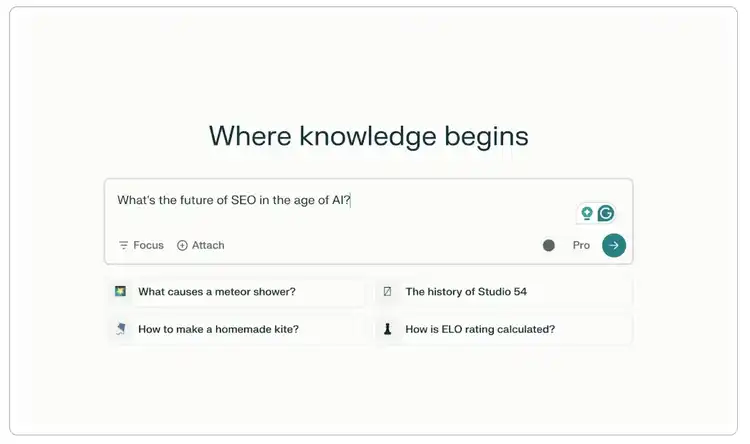
Perplexity AI is one of the best ChatGPT alternatives for online research.
It allows you to use multiple models in one platform, such as the latest versions of GPT 4, Claude, Mistral, and its own in-house models.
It also draws answers from different live sources and provides source citations.
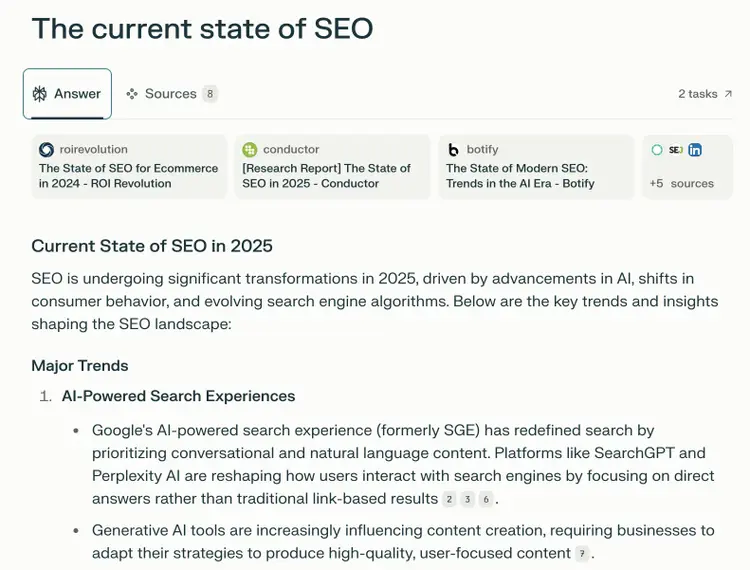
If you're wondering if it’s any better than ChatGPT’s SearchGPT feature, I think so.
Based on my experience, Perplexity is more suited for research tasks.
It pulls information from many different sources and is more reliable for fact-checking. You can also choose the types of sources you want to use (e.g., web or social) directly in the interface.
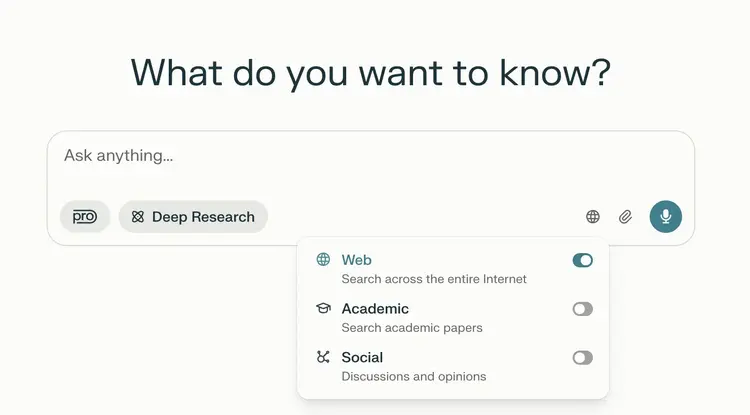
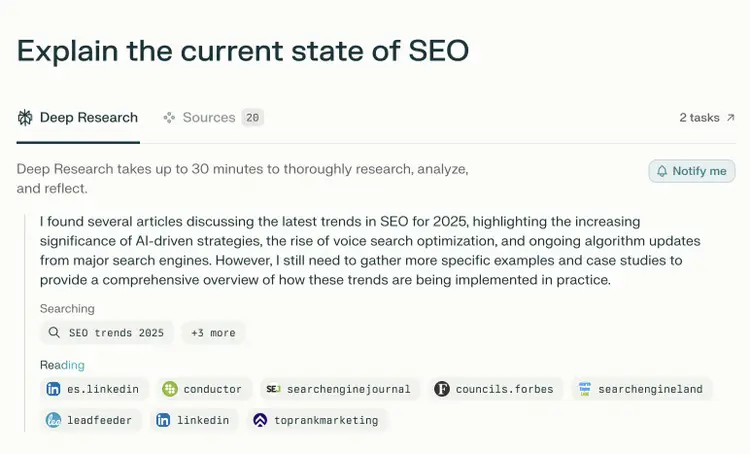
And just like ChatGPT, it now provides free users with access to OpenAI's Deep Research.
This feature lets you dive into real-time sources, browse the web, and pull citations from academic papers, news sites, and forums.
Pros and Cons
Pricing
- Perplexity offers a free plan with standard features
- Perplexity Pro costs $20/month
7. GitHub’s Copilot: The Best ChatGPT Alternative for Coding Assistance
- What does it do? Helps developers with code completion, pulls request summaries, and provides a chat interface for coding-related queries
- Who is it for? Developers, programmers, and software engineers
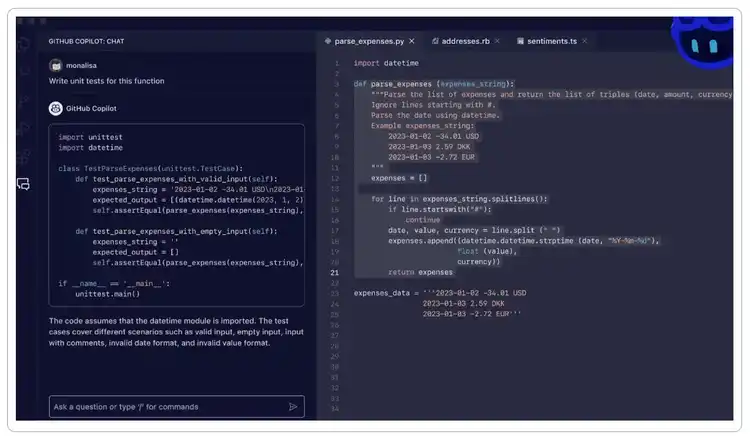
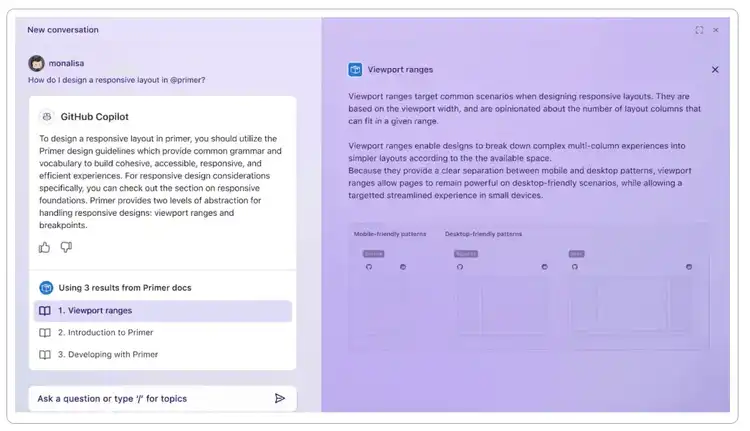
GitHub Copilot is an AI-powered coding assistant created by GitHub and OpenAI to help improve developers’ productivity.
It has been trained on many open-source projects using different programming languages from GitHub.
Unlike ChatGPT, it integrates directly into your integrated development environment (IDE). This means it can suggest code and help you fix bugs in real-time as you type.
You can use it for various development projects and tasks, such as:
- Unit test and comment generation
- Code refactoring
- Codebase onboarding
- Language learning
- Terminal assistance
It also helps you improve your workflows and explore various coding-related topics.
Pros and Cons
Pricing
- Github Copilot offers three plans: Individual at $10 user/month, Business at $19 user/month, and Enterprise at $39 user/month.
8. NotebookLM: The Best ChatGPT Alternative for Academic Research and Learning
- What does it do? Analyzes your documents and answers questions based solely on those sources
- Who is it for? Researchers, strategists, students and writers
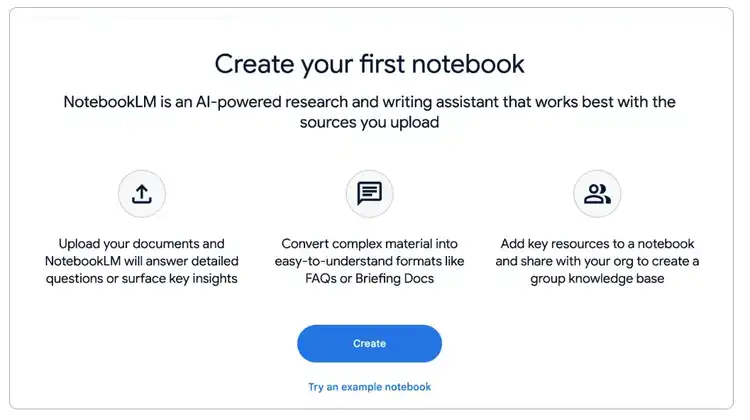
NotebookLM is an AI research assistant created by Google. It’s built on Gemini 1.5 and leverages its multimodal and LLM capabilities.
Unlike traditional AI chatbots, it only uses documents you upload (PDFs, Google Docs, or pasted text) to provide answers.
NotebookLM differs from ChatGPT in its focused approach:
- Only references user-provided documents, rather than a broad knowledge base
- Provides clear citations for every response
- Integrates seamlessly with Google Workspace
- Includes audio overview features for document summaries
This makes it a perfect tool if, for example, you need to write a research paper.
It summarizes the key points of each source and allows you to create tables and quizzes, and ask questions based on its content.
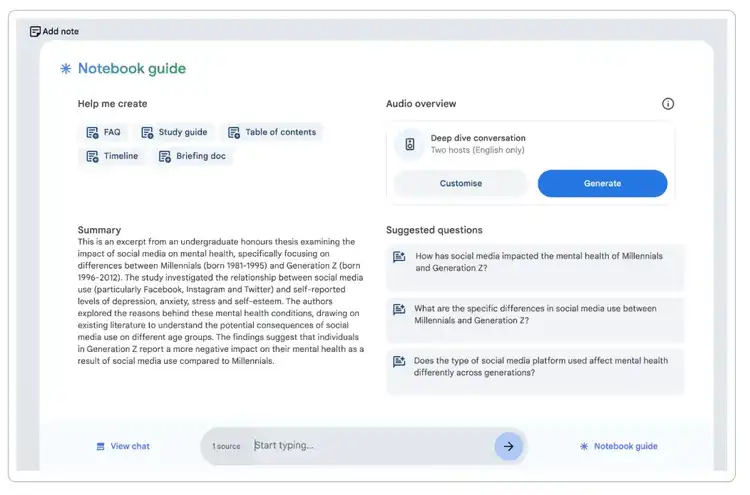
As a content marketer, I also use it when researching complex topics and reading industry reports.
Pros and Cons
Pricing
- NotebookLM is available for free and includes core features such as document upload, content summaries, and question responses
- NotebookLM Plus is now part of the Google One AI Premium plan ($19.99/month), offering higher usage limits, enhanced customization, and collaboration tools
9. Jasper AI: The Best ChatGPT Alternative for Enterprise Content Creation
- What does it do? Helps you generate AI content for marketing and business in various formats
- Who is it for? Content teams, and marketers in large companies
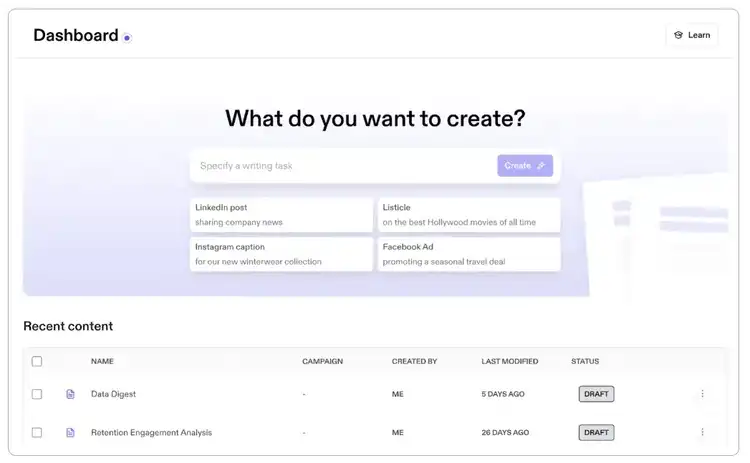
Jasper AI is an AI writer that can produce large volumes of short-form text to help you scale your content production—for example, multiple variations for an ad or an email campaign.
Thanks to its marketing features, it’s better adapted to mass content production than ChatGPT.
For example, Jasper’s Brand Voice and Knowledge Base features can capture your brand’s style and information and use them as a reference when generating content.
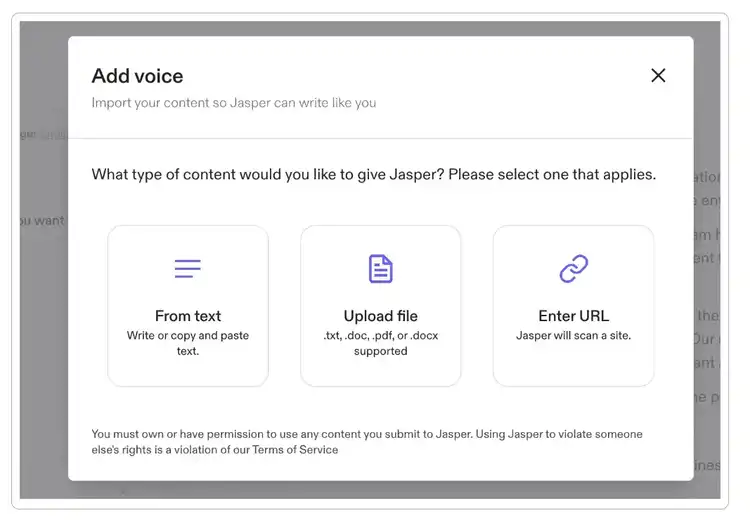
Moreover, while ChatGPT only has access to OpenAI’s model, Jasper draws on over a dozen other models, such as Google, and Anthropic.
Pros and Cons
Pricing
- The Creator plan with one seat costs $49/month
- The Pro plan costs $69/month for each seat, and the Business plan offers custom pricing
Looking for the best AI writing tool? Check out this step-by-step comparison of Jasper and Semrush’s Content Toolkit.
10. Pi.ai: The Best ChatGPT Alternative for Emotional Support
- What does it do? Empathetic conversations and emotional support
- Who is it for? Users seeking a supportive AI companion for conversations, advice, and general discussion

The Pi chatbot by Inflection AI is a great ChatGPT alternative for those needing emotional support and engaging AI conversations.
It focuses less on giving you straight answers and more on having real, thoughtful dialogue.
You can ask it a question about life or vent about something, and it will respond in a calm, natural tone—like someone who actually listens. For example:
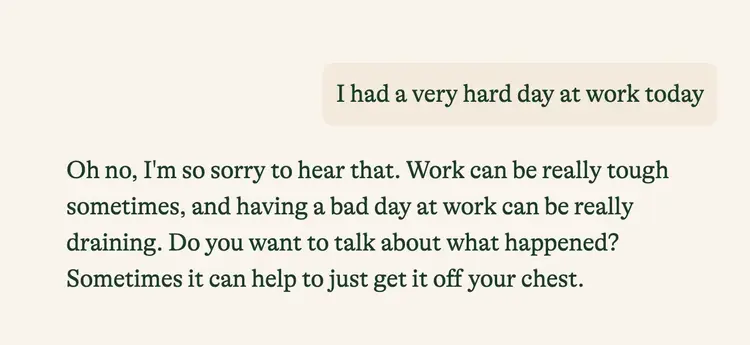
While ChatGPT can be quite formal and impersonal, Pi.ai is designed to have natural-sounding and empathetic responses.
It also adapts its communication style based on user preferences and emphasizes emotional support over task completion.
Pros and Cons
Pricing
- Pi is currently completely free
11. Otter: The Best ChatGPT Alternative for Project Management
- What does it do? AI-powered meeting and project assistant
- Who is it for? Teams, project managers, and professionals engaging with multiple stakeholders
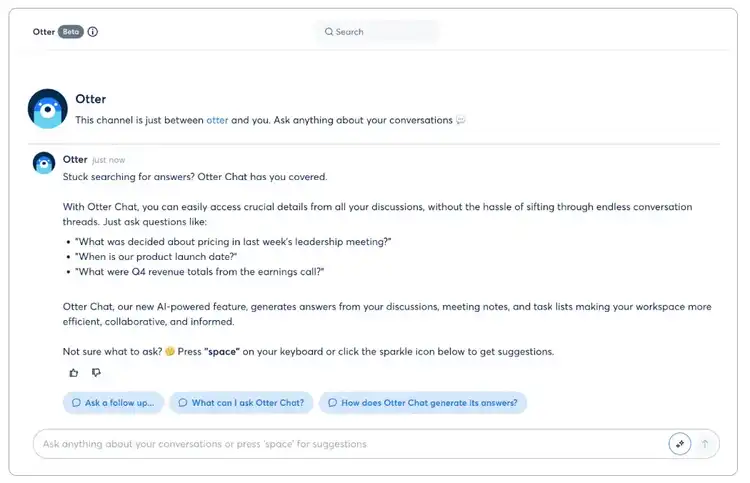
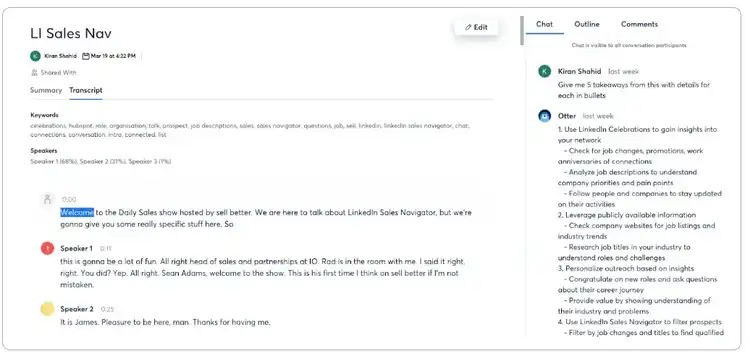
Otter, or Otter AI Chat, combines real-time transcription, collaboration, and content generation.
You can use it for your team meetings and virtual conferences.
For example, it lets you ask questions about previous meetings during a live chat with your teammates.
It also integrates with popular video conferencing platforms like Zoom and Google Meet and generates automated meeting summaries.
My favorite out-of-the-box use case? Asking Otter to summarize key takeaways from audio files such as podcasts.
Pros and Cons
Pricing
- Otter offers a free plan with standard features
- Otter Pro costs $16.99/month, the Business plan is $30/month, and there’s an Enterprise plan with custom pricing
Other ChatGPT Alternatives to Try
If none of these 15 alternatives to ChatGPT have ticked all your boxes, here are some other honorable mentions that you might find useful.
- Character.AI: Create and chat with a whole range of customizable AI characters. You can have engaging contextual conversations with tons of AI-powered personas, from fictional characters to historical figures and celebrities.
- Grok AI: Elon Musk's chatbot creates natural and engaging conversations. With Grok, you can summarize website content, translate languages, research and answer questions, and even use a "rebellious streak" to tackle "spicy" topics.
- Poe: Poe is a generative AI tool developed by Quora. It gives you access to multiple language models such as GPT-4o, Llama, Claude, Gemini, Hailuo. It’s fine-tuned to feel human-like and keep the conversation going.
FAQs
How Did You Create This List of ChatGPT Alternatives?
I’ve been using AI chatbots since day one, and I continue to test new tools and analyze their performance.
This review is based on my hands-on, extensive experience with each of these AI apps.
In addition to testing them, I read numerous reviews, technical documentation, and important updates about each tool.
I also update this list every time I learn about new features and other important updates.
Why Should I Look for a ChatGPT Alternative?
ChatGPT might be the household name in the AI space, but it’s definitely not the best for some specific use cases.
Each ChatGPT competitor brings unique features to the table, depending on your needs.
Whether you want high-quality images, expert coding assistance, improved copywriting, or up-to-date research, there are other tools that deliver better results than ChatGPT.
How Do You Choose a ChatGPT Alternative?
Now that you’ve seen what a spectrum of AI options there are, you don’t have to settle for ChatGPT or tools that ride on its coattails.
But how do you narrow down your choices?
Here are some key factors to consider when selecting the right AI tool for you:
- Innovation and features: Is the tool innovative, or does it offer similar functionalities to ChatGPT? Look for features or applications that make it distinct from the competition.
- AI models: Does it use established language models like GPT, or BERT, or something else? Each model has its pros and cons, so this can tell you what the tool is good at.
- Open source vs closed source: For example, you might want to use an open-source tool if you’re looking for advanced customization.
- Focus and use cases: Does it tackle all sorts of tasks? Or is it a pro in specific areas like writing code, creating content, or automating tasks?
- Cost and value: Are you getting good value for money?
The Bottom Line
Whatever your workflow demands, there’s an AI tool that’s right for you. The top ChatGPT alternatives include:
- Semrush Content Toolkit for content marketing and SEO-rich content
- Claude for human-like short-form content writing
- Gemini for writing text and integrating with Google Workspace products
- Microsoft Copilot for working with Microsoft 365
- Github Copilot for coding
- Perplexity AI for research
- Pi.ai for personal use
The key is to match the tool to the task—whether you’re looking for creative support, deep research, productivity boosts, or just a smart companion.

Margarita is a passionate Content Marketer with over 6 years of experience in various tech industries and 3 countries. She also holds two MBA degrees in Marketing.

Tells Google to show you more from Semrush in AI, Search, and Discover.
Table of contents
-
1. Claude: The Best ChatGPT Alternative for Human-Like Writing
-
2. Semrush Content Toolkit: The Best ChatGPT Alternative for Content Creation and SEO
-
4. Gemini: The Best ChatGPT Alternative for Integrating with Google’s Ecosystem
-
5. Llama 4 by Meta: The Best Open Source ChatGPT Alternative
-
6. Perplexity AI: The Best ChatGPT Alternative for Online Research
-
7. GitHub’s Copilot: The Best ChatGPT Alternative for Coding Assistance
-
8. NotebookLM: The Best ChatGPT Alternative for Academic Research and Learning
-
9. Jasper AI: The Best ChatGPT Alternative for Enterprise Content Creation
-
10. Pi.ai: The Best ChatGPT Alternative for Emotional Support
-
11. Otter: The Best ChatGPT Alternative for Project Management