
Semrush Report Examples & Templates Made Easy
Semrush report templates can turn hours of manual SEO reporting into minutes of automated, professional deliverables.
Copying data between tools and formatting slides or spreadsheets is time that could be better spent on strategy and execution.
Semrush My Reports solves this by giving you four clear paths to faster, more streamlined SEO reporting:
- One-click PDF exports:Instantly share insights without setup
- Ready-made templates: Ensure consistent monthly reporting and automation
- Customizable templates:Maintain your brand while saving setup time
- Fully custom reports: Create tailored reports or presentations
From quick Site Audit summaries to full monthly reviews, My Reports turns Semrush data into professional PDFs that highlight your SEO impact.
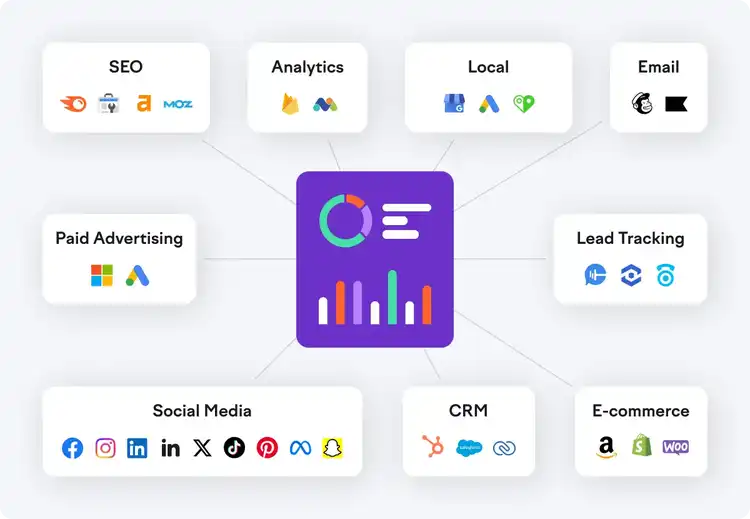
Plus, with 35+ external integrations available, you can combine SEO data with metrics from your entire marketing stack.
Note: See the Knowledge Base for a full list of integrations.
Semrush Reporting Examples
The right reporting approach depends on your situation. Let’s look at when you’d use each option.
Get Quick Insights with One-Click PDF Reports
When you need data immediately, you can't wait for custom reports or worry about formatting.
One-click exports give you polished results with zero setup, so you can respond to requests in real time instead of adding them to your to-do list.
To instantly export your metrics into a ready-made PDF, click the “Export to PDF" button in the top right corner.
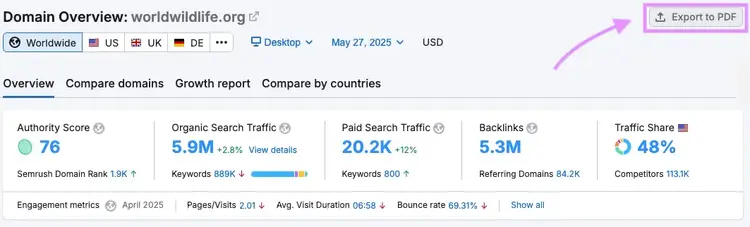
You’ll find one-click export options in many of Semrush’s core tools, including:
- Position Tracking: Keyword rankings and visibility trends
- Website Audit: Technical SEO issues and site health scores
- Domain Overview: High-level summary of organic and paid performance
- Organic Rankings: Keyword rankings, traffic trends, and competitor insights
- Backlinks: Link profile analysis and backlink reports
- Advertising Research: Paid search strategies and competitor pay-per-click (PPC) activity
- Keyword Overview: Search volume, keyword difficulty, cost per click (CPC), and more
- Keyword Gap: Side-by-side keyword comparisons to spot ranking opportunities
How it works: Click the PDF button, choose basic layout options, and get a clean, shareable report in seconds. The report pulls current data from that tool and formats it into a professional PDF.
Best for: Ad-hoc reports, quick check-ins, or internal snapshots that don't need customization or branding.
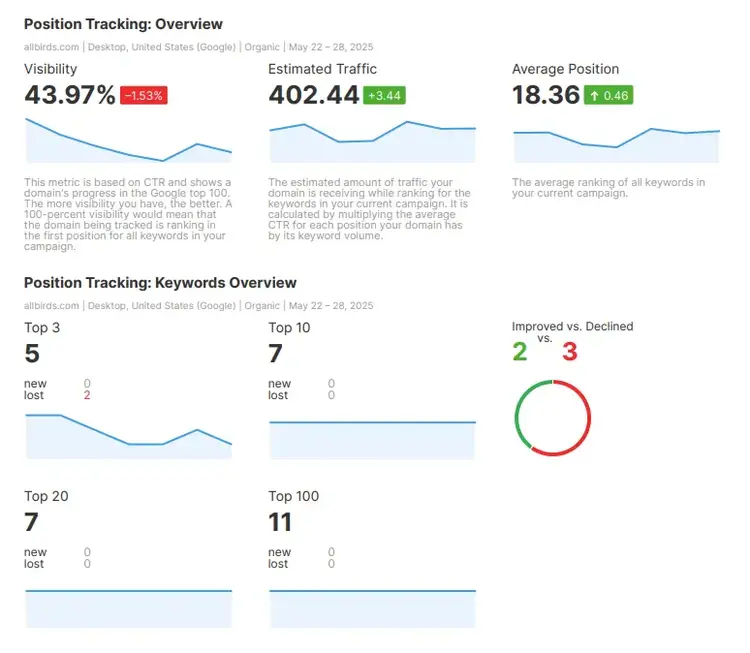
For example, say someone asks about keyword rankings during a call.
Instead of sharing your screen or promising to "send something later," you generate a Position Tracking PDF in seconds and email it immediately.
Build Consistency with Ready-Made Templates
For recurring updates like monthly SEO reports or campaign recaps, Semrush’s prebuilt templates save time and reduce errors.
They follow a consistent layout that makes it easier for clients and stakeholders to understand what’s changed—and why it matters.
Each template automatically pulls fresh data from connected tools, so there’s no need to copy, paste, or reformat anything.
If you’d like to preview a Semrush sample report, the Template Gallery gives you a quick look at the layouts before you build your own.
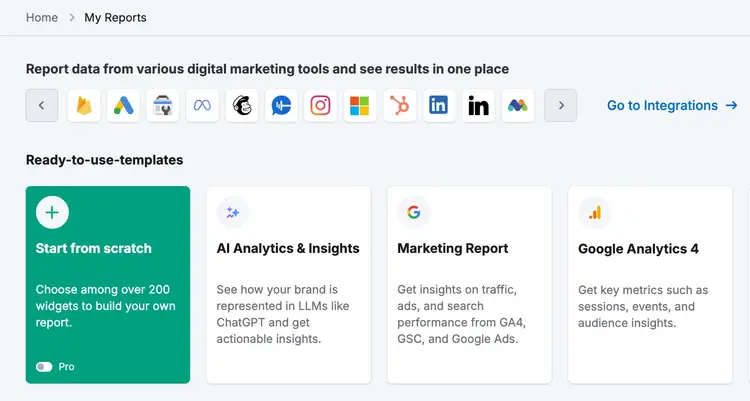
Popular templates include:
- AI Analytics & Insights: AI visibility and brand sentiment analysis
- Monthly Marketing Report:Cross-channel performance overview
- Monthly SEO:Regular SEO performance tracking
- Site Audit Full Report: Technical health assessment
- Organic Search Positions: Keyword ranking analysis
- Google Analytics 4 (GA4): Add GA4 metrics (sessions, users, conversions)
- Google Search Console (GSC):Insert key GSC metrics (clicks, impressions, and click-through rates)
- Google Business Profile (GBP): Highlight local SEO metrics such as views, calls, and directions
Build Your First Report
with a Semrush free trial
How it works: Choose a template from the Template Gallery, enter your domain, and click "Create Report." The template automatically populates with current data from your connected tools and integrations.
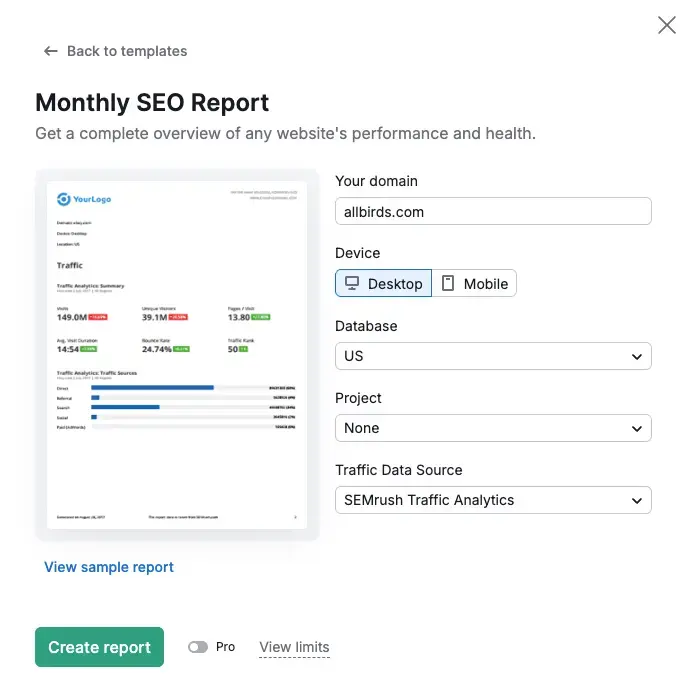
Best for: Monthly client reports, recurring internal updates, or any situation where you need the same type of analysis repeatedly.
For example, say a marketing team conducts monthly performance reviews, but each team member brings data in different formats from various tools.
Using the Monthly SEO template ensures everyone sees the same metrics in the same layout, making it easier to spot trends and compare month-to-month performance.
Add Your Brand with Template Customization
Prebuilt templates are a great starting point. But sometimes, you need more control.
With Semrush’s customization options, you can tailor any template to match your brand, add context, and structure the report to suit your audience.
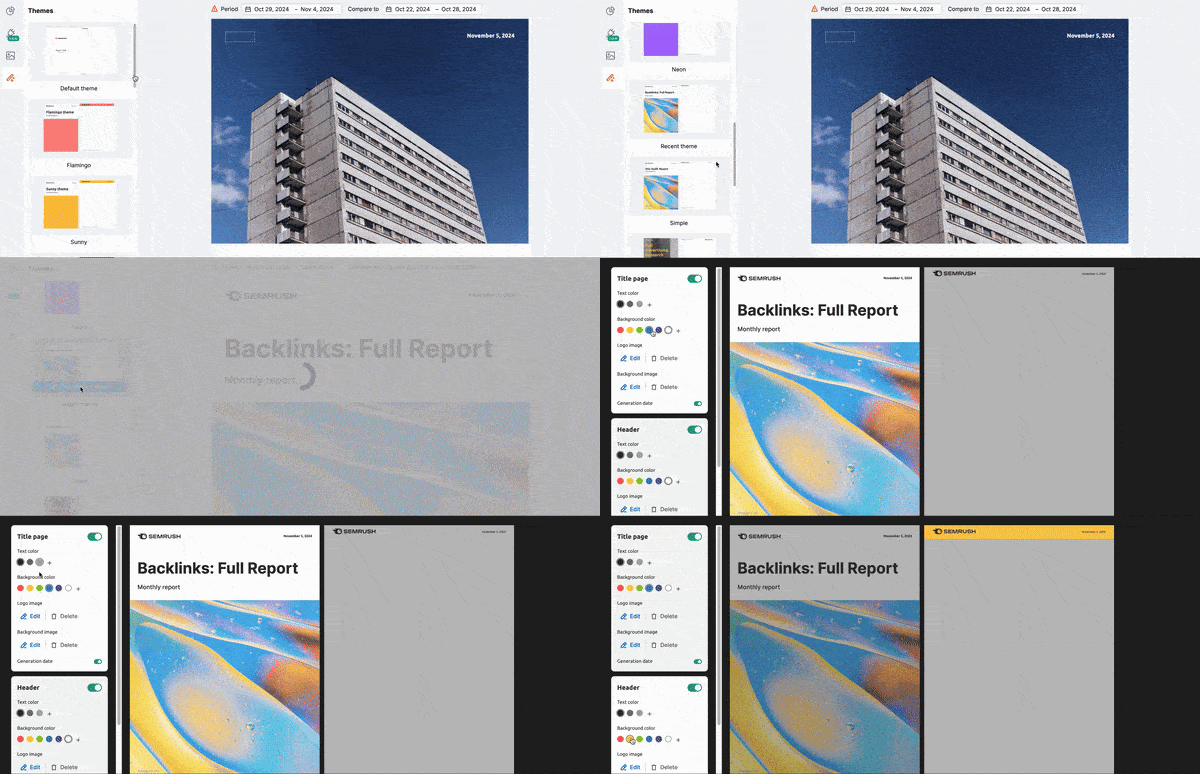
Customize elements like:
- Branding: Add your logo, brand colors, and fonts (Pro reports only)
- Content: Include custom headlines, commentary, and your own analysis
- Layout: Rearrange sections, remove widgets, or add new data points
- Integrations: Pull in metrics from Google Analytics, GSC, and more
Note: Branding requires Pro Reports.
How it works: You can start with any existing template, make your changes in the Report Builder, then save it as a new template for future use. Your custom template will pull fresh data each time while maintaining your branding and structure.
Best for: Work requiring branded deliverables, internal reports with specific commentary requirements, or when you need the same custom analysis repeatedly.
For example, say your stakeholders keep asking what the technical SEO scores mean and want context for the numbers.
You customize the Site Audit template to add explanation text above each section and include a "What This Means" summary at the end.
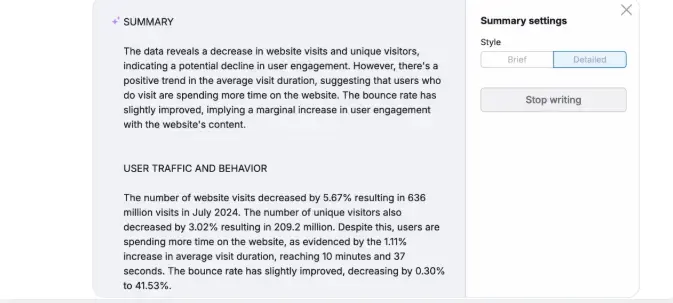
You can write these manually or use AI to generate them automatically.
Tell Your Story with SEO Reports from Scratch
Sometimes, a standard template won’t cut it—especially when you need to connect SEO results to broader business outcomes.
You might need to pull in data from multiple sources: organic traffic from Semrush, ad spend from Google Ads, engagement from social platforms, or even sales data from your CRM, all in one report that ties SEO directly to business results.
Custom reports let you drag and drop the exact data points needed to make your case.
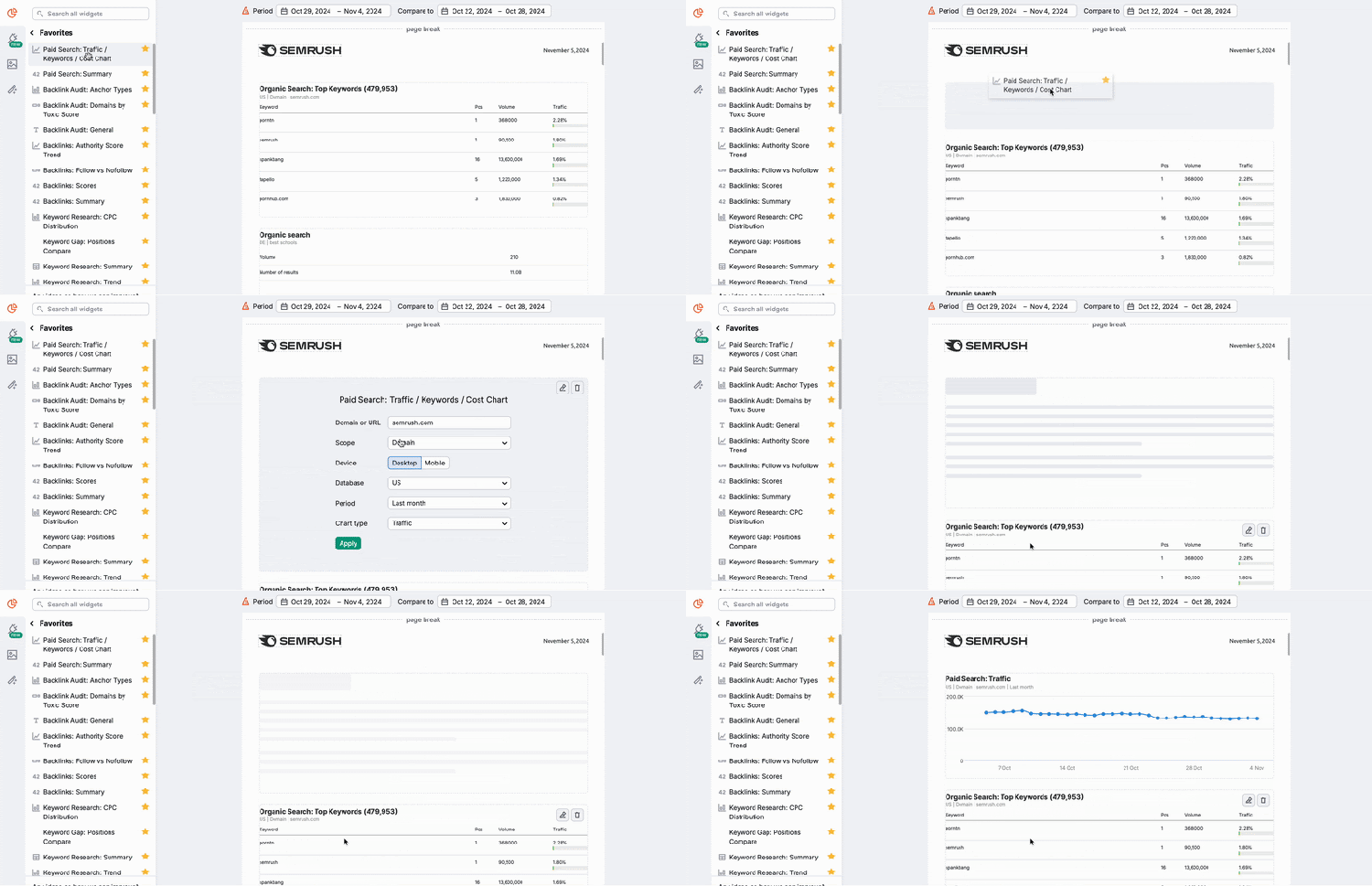
Instead of sending three separate reports, you create one narrative that connects SEO performance to business outcomes.
How it works: Head to the Template gallery and click on the “Start from scratch” square.
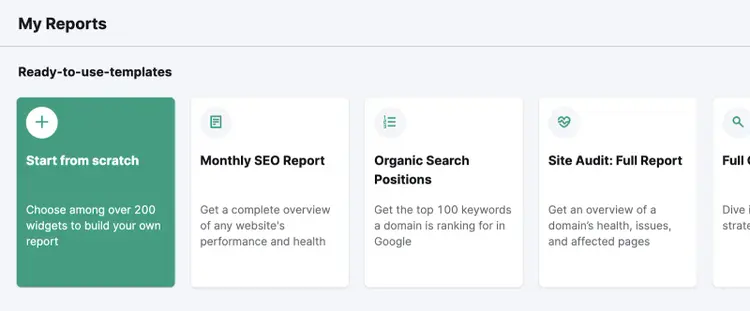
This opens the Report Builder, where you can populate your report with modules of Semrush data and custom images.
Use the left menu to drag data blocks for Semrush tools (Site Audit, Organic Rankings, etc.) or external integrations like GA4, GSC, or CRM data.
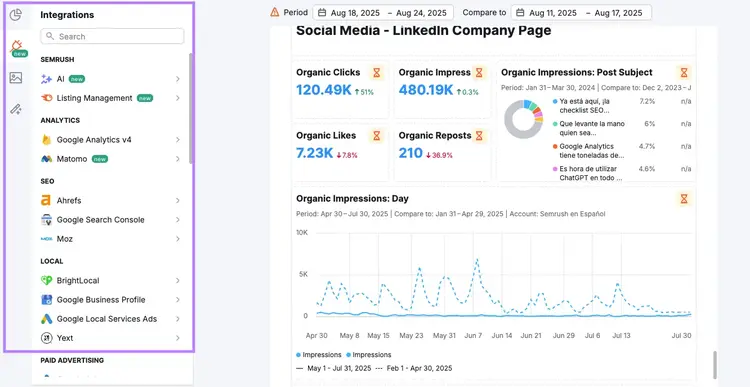
Then, customize your layout with branding by rearranging sections, applying your logo and colors, and saving the structure for future use.
Finally, export as a PDF or schedule it for automated delivery to your stakeholders.
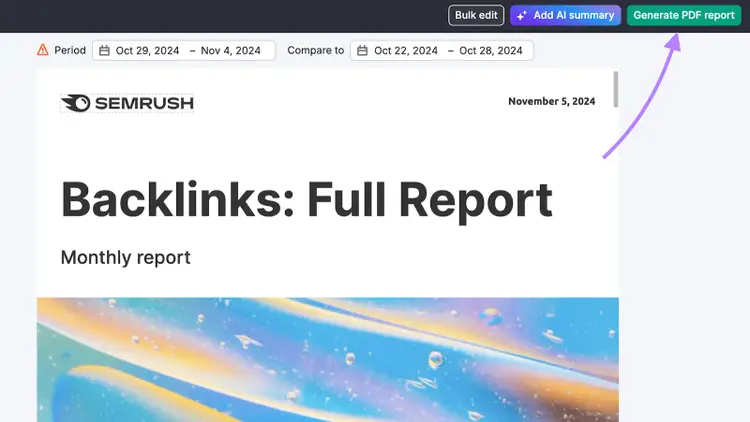
Best for: One-off reports, executive presentations, or when you need complete control over structure and content.
Once your custom report is built, automation ensures it updates and delivers itself. So, you get the benefits without the manual work.
Eliminate Manual Work with Automation
Once you've built the perfect report, whether from a template or from scratch, you can schedule it to generate and send automatically.
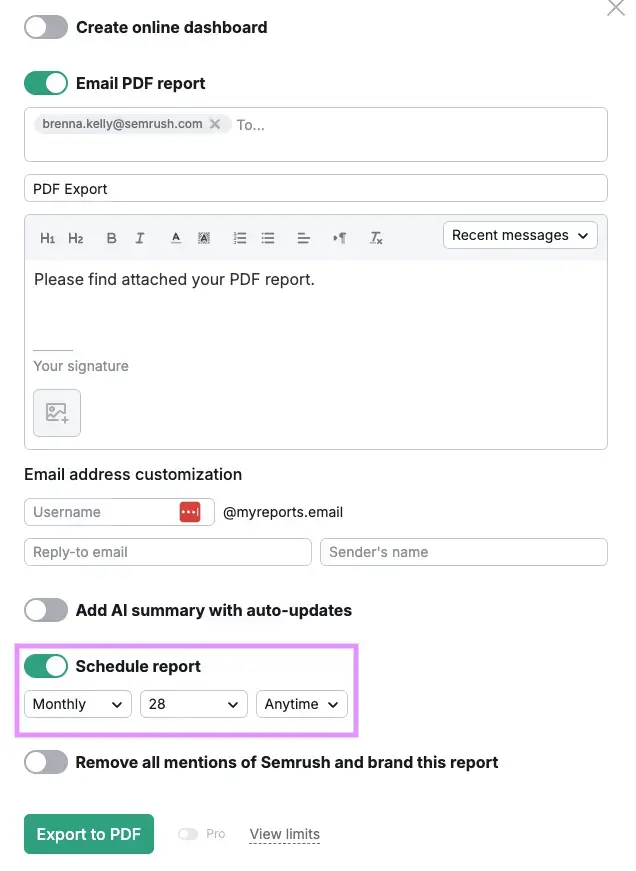
Automation takes reporting off your plate. Reports update with fresh data and get delivered automatically, so you never miss a deadline, and your team always knows when to expect them.
Automation options:
- Schedule frequency: Daily, weekly, or monthly delivery
- Time of day: Set specific delivery times (Pro reports only)
- Email customization: Custom sender name, reply-to address, and message text
- Multiple recipients: Send to different stakeholders simultaneously
How it works: Once you’ve built your report, you can schedule it to run automatically. Each time it runs, the report pulls fresh data from your connected tools. The structure stays consistent, but the numbers update automatically. So, your recipients always get the latest insights without you lifting a finger.
Best for: Recurring reports, regular stakeholder updates, or any situation where you need consistent reporting without manual effort.
For instance, say you want to send a Site Audit report on the first Monday of every month.
Once scheduled, Semrush generates the report with up-to-date technical data and automatically emails it. The recipients know to expect it, and you don’t have to remember a thing.
Best Practices: Make Reports That Drive Action
Having the right tool is only half the battle. The most effective reports don’t just show numbers; they explain what those numbers mean and what to do next.
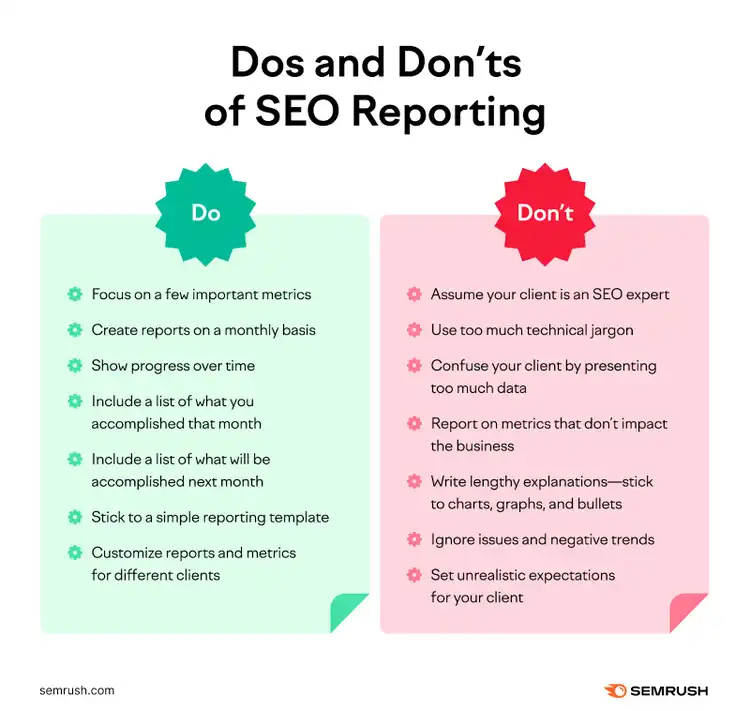
Here’s how to turn your reports into decision-making tools:
- Lead with insight, not numbers.Data needs context. Instead of saying traffic is up 15%, explain why—was it a new campaign, seasonality, or a change in strategy?
- Tailor content to your audience.Use business outcomes for execs (leads, conversions, ROI) and save technical metrics (crawl issues, keyword difficulty) for SEO teams.
- Be consistent with comparisons.Stick to matching timeframes and data types—don’t compare this month’s organic traffic to last quarter’s paid clicks.
- Focus on what matters.Too many metrics can overwhelm. Highlight the few KPIs your audience actually needs to make decisions.
- Don’t send data without guidance.A chart alone won’t tell the story. Use short summaries or commentary to highlight what’s important and what actions to take.
By combining these practices with Semrush’s automated reporting, you ensure your reports aren’t just informative, they’re actionable.
Semrush Reporting Limits and Pricing
My Reports uses a pay-per-report model with two tiers: Base and Pro. Each comes with different features and levels of customization.
Base reports: $10/month
Includes Semrush tool integrations, Google Analytics and Search Console connections, weekly/monthly scheduling, PDF exports, and shareable links.
Pro reports: $20/month
Adds 35+ external integrations, daily/hourly scheduling, full branding and white labeling, custom themes, AI summaries, and link sharing with custom domains.
If you have a paid Semrush toolkit, you automatically get three Base reports included. Each additional toolkit grants two more Base reports. Even free plans get one Base report.
You can add more reports à la carte to any subscription level.
Build Better Reports, Share Stronger Results
The best SEO reporting system is the one you'll actually stick with.
Start simple—whether that means exporting a quick PDF or using a prebuilt template for monthly updates.
As your needs grow, you can always layer in more customization, automation, and branding to match.
Show real SEO results. And spend less time doing it.
Create Your Own Semrush Report
with the My Reports Builder

Brenna is a Content Writer for Semrush focusing on educational marketing content that empowers readers to unlock and maximize their SEO potential.

Tells Google to show you more from Semrush in AI, Search, and Discover.