
What Is the Google 3 Pack? And How to Rank in It
What Is the Google 3 Pack?
The Google 3 pack (also called the “local pack” or “map pack”) is a feature that highlights the top three local business listings for location-based searches. These results appear alongside a map and include key business details like the name, address, and opening hours.
For example, when someone searches “best pizza in New York,” the 3 pack shows some top-rated pizza places in the city:
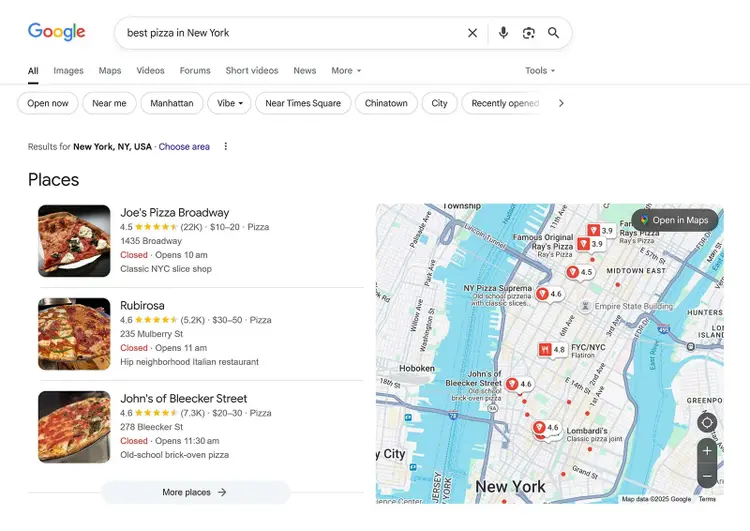
Each listing in the Google 3 pack includes the business name, star rating, price range, address, and opening hours. Along with a clickable map that makes it easy to get directions or explore more nearby options.
A wide range of local query structures can trigger the 3 pack, including:
- “[service] near me” (e.g., “dentist near me”)
- “Best [service] in [city]” (e.g., “best gym in San Diego”)
- “[service] [location]” (e.g., “plumber Brooklyn”)
These variations all signal local intent. In other words, someone in a specific area is looking for a specific place or service. And Google responds by showing relevant local businesses in the 3 pack.
Google is also testing AI local packs, which include AI-generated summaries for the top ranking businesses.
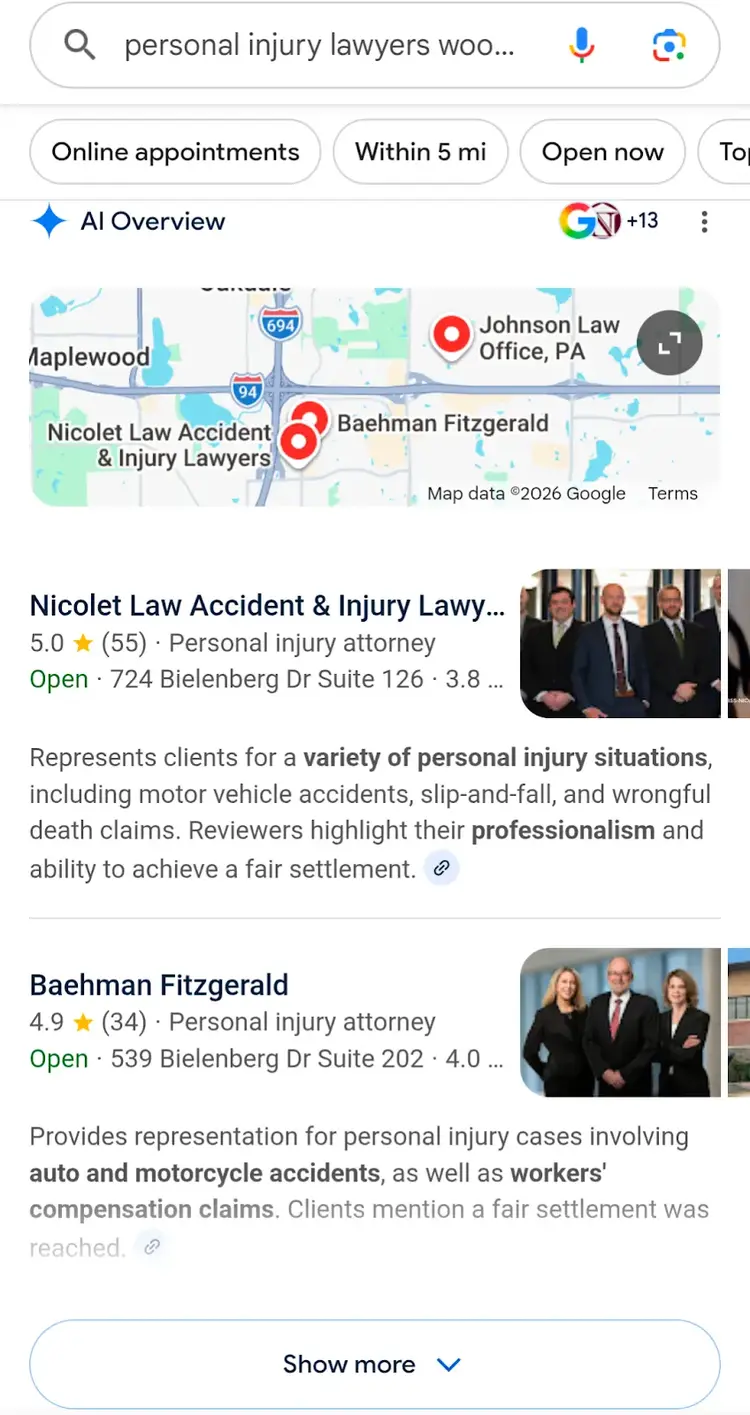
AI local packs are still in limited testing and haven't rolled out broadly. For now, Google is still majorly using the traditional 3-pack format, making it essential to optimize for.
Benefits of Ranking in the Google 3 Pack
Landing a spot in the Google 3 pack puts your business in front of local customers right when they’re searching for what you offer.
This has three key benefits for your business:
- More visibility: The 3 pack appears at the top of local search results, typically above the traditional blue organic links. That means you’re more likely to show up when potential customers search for businesses like yours.
- More customers: When more people see your business in search results, they’re more likely to visit your site, call your number, or walk through your door.
- More trust: Winning a spot in the Google 3 pack indicates that Google may see your business as credible and trustworthy. This can build trust with searchers, too, and it encourages potential customers to engage with your business.
7 Steps to Rank in the Google 3 Pack
Follow these tactics to win a spot in the Google 3 pack:
1. Create & Verify Your Google Business Profile (GBP)
To appear in the Google 3 pack, you must have a verified Google Business Profile listing.
Google Business Profile is a free tool that lets you create your business listing and manage how it appears on Google Search and Maps.
It lets you add, update, or remove business information like your address, opening hours, phone number, website, and more. You can also post updates and respond to customer reviews.
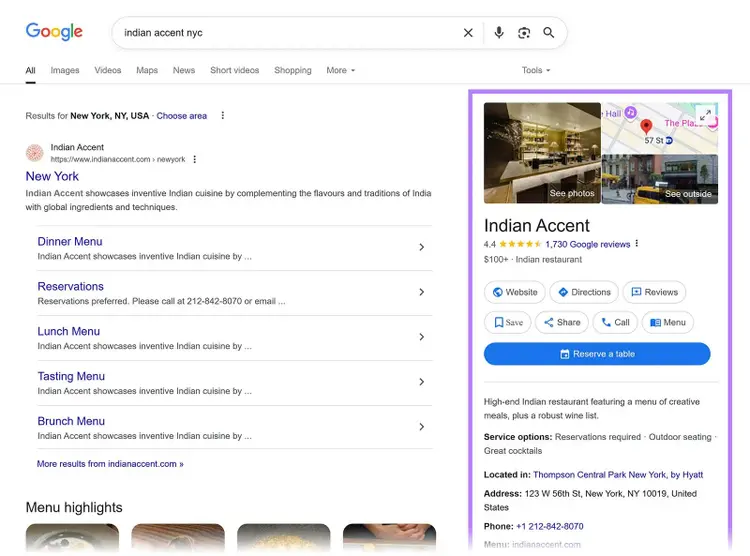
Here’s what a GBP listing can look like in search results:
To create your listing, visit google.com/business and sign in to your Google account.
Then, search your business name. If it appears and is unclaimed, you can claim it directly. Google will guide you through the steps to verify the listing.
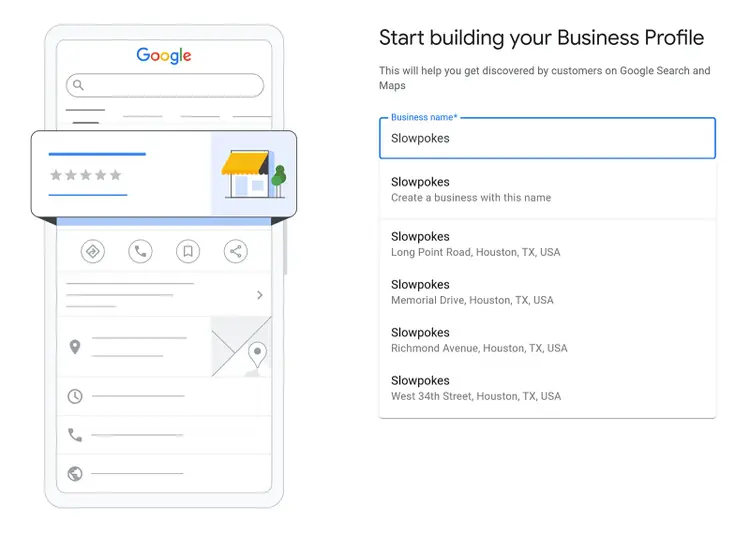
If it doesn’t show up, you’ll need to create a new listing from scratch.
That includes entering your business name, selecting a category, and adding your address (or service area). You’ll also need to add contact details, operating hours, and any other information Google asks for.
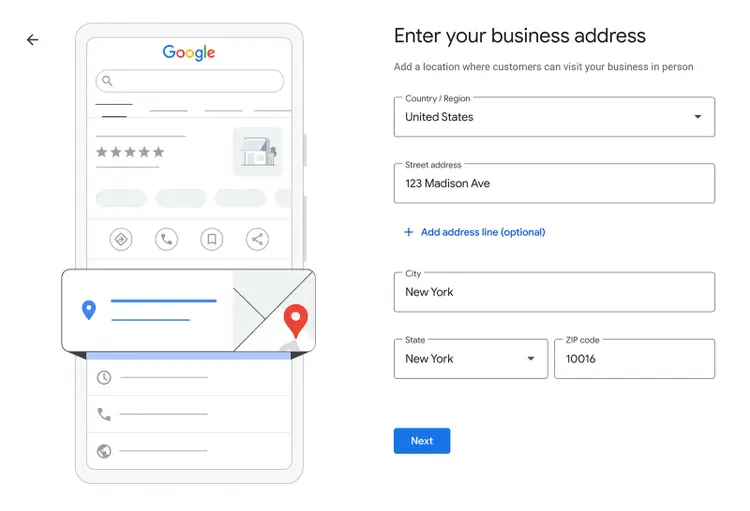
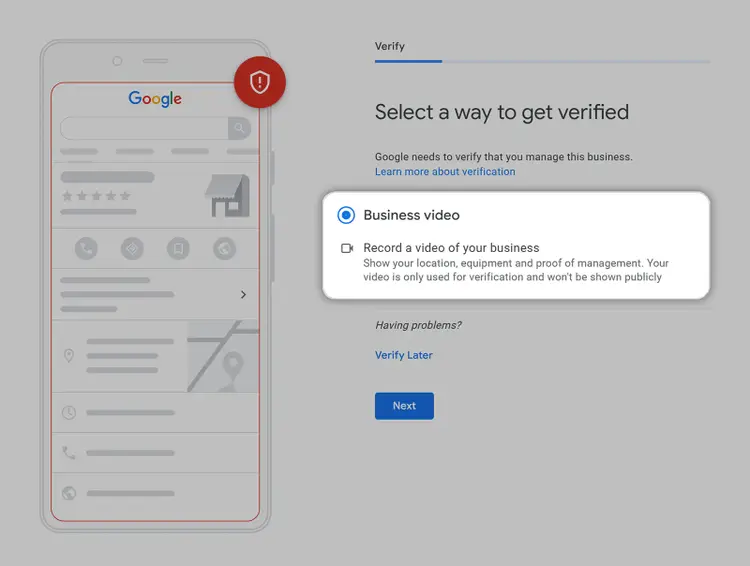
Next, Google will ask you to verify your business.
There are several ways to verify your listing, depending on your business type and location, including by:
- Phone
- Postcard
- Video recording
- Live video call
Not all options are available to every business. Google will show you what’s possible for your specific case.
Note
You can create multiple GBP for a single business as long as that business services multiple locations and those locations don’t overlap. Multiple GBPs with overlapping locations often result in verification issues or account suspensions.
2. Optimize Your GBP
When your profile is active, complete, and regularly updated, it signals to Google that your business is relevant and trustworthy.
Here’s what an optimized GBP looks like:
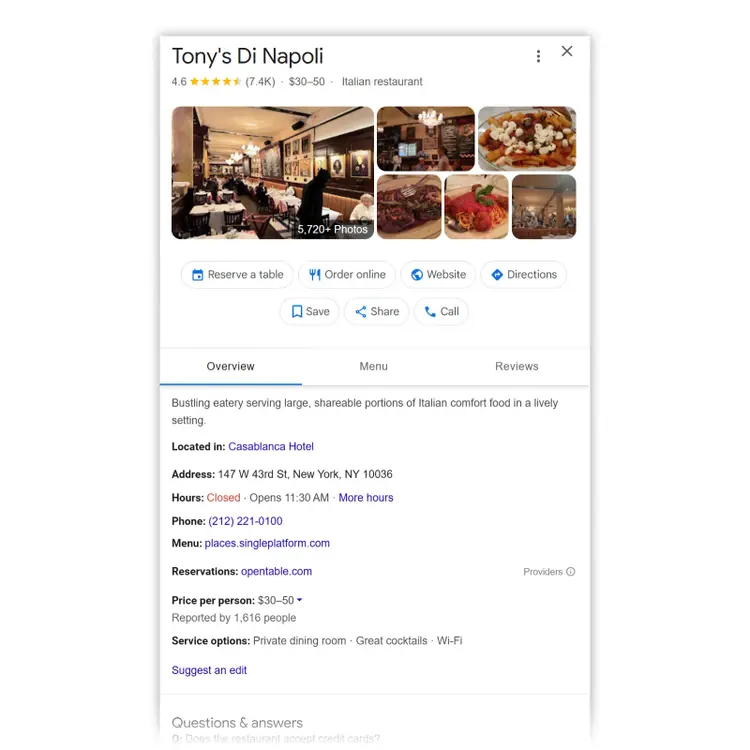
This is well optimized because it has:
- A clear business description
- Operating hours
- A list of service options
- Menu and reservation links
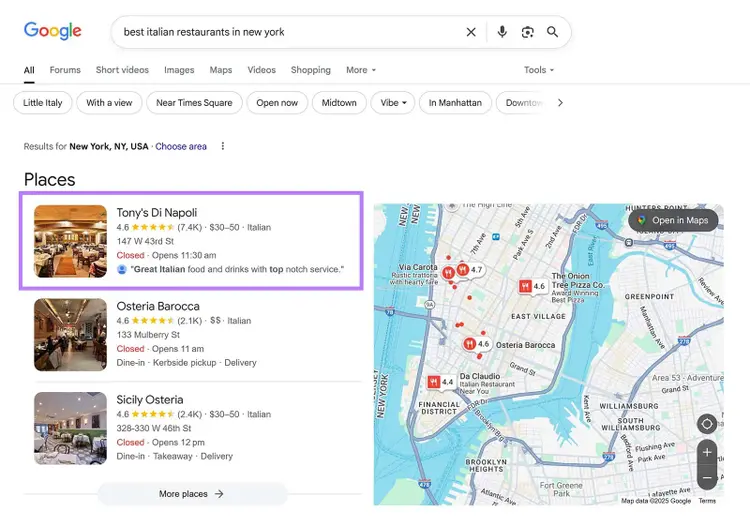
Most importantly, it also has 7,400+ reviews and a strong 4.6 rating.
That’s likely why it appears in the Google 3 pack for the keyword “best italian restaurants in new york”:
Use Semrush’s GBP Optimization tool to optimize your own Google Business Profile with ease.
Simply enter your business info. The tool will provide insights to help you boost your local visibility. And increase your chances of appearing in the Google 3 pack.
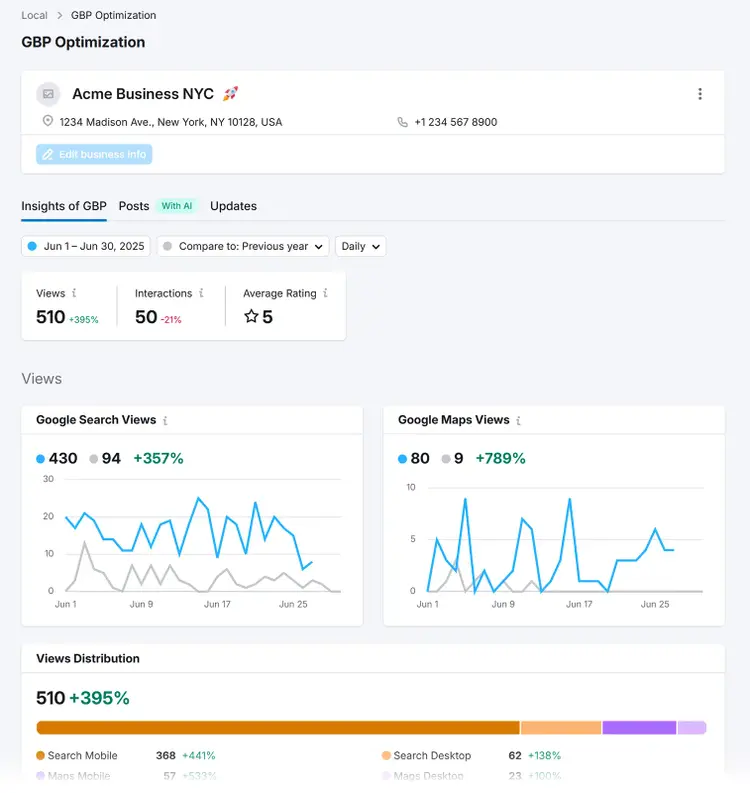
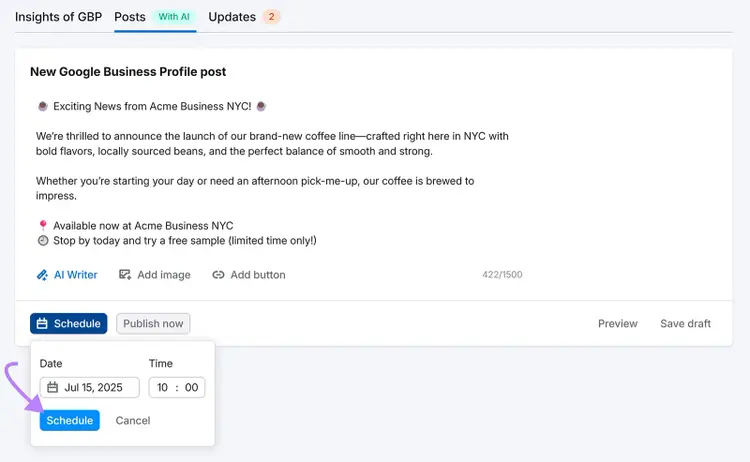
You can also use it to schedule posts to keep your customers up to date. And do it fast with the help of AI:
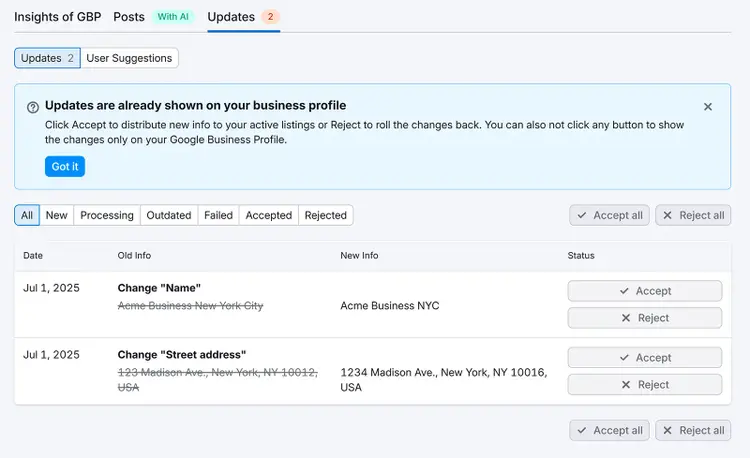
The tool even makes it easy to accept and reject changes to your important business information:
Improve Your Google Business Profile
with the GBP Optimization Tool
3. Target Local Keywords on Your Site
Local keywords are phrases or queries people type into search engines when they’re looking for a specific product or service in a specific location. Like “plumber in Brooklyn” or “vegan bakery near Times Square.”
While Google still shows a 3 pack at the top for these types of queries, targeting local keywords on your site can strengthen your business’s overall visibility in search results.
Why?
Because it signals to search engines that your business is trustworthy and relevant to that location.
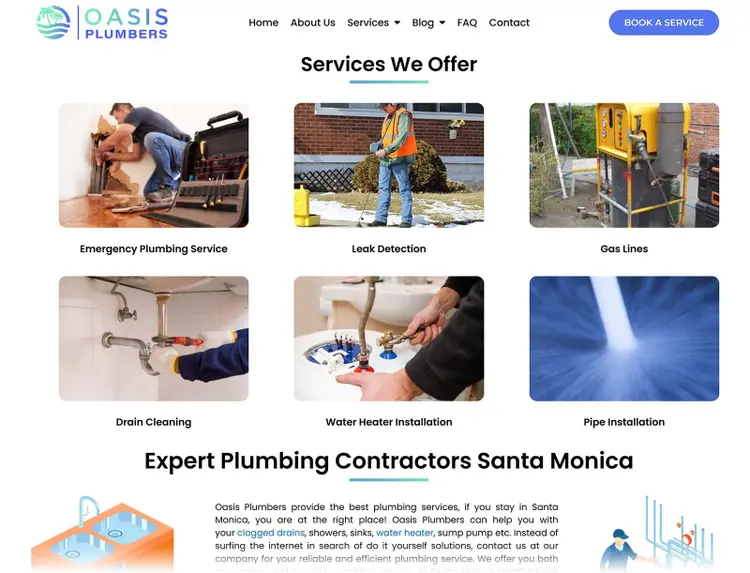
For example, Oasis Plumbers ranks in the Google 3 pack for “emergency plumber santa monica”:
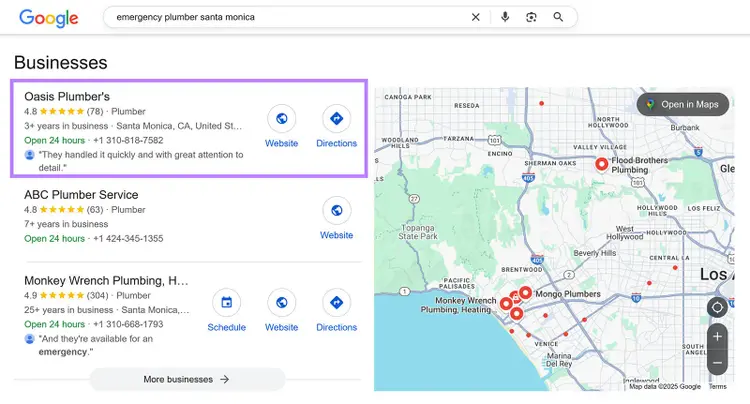
And if you look at their website, they have keyword-optimized service pages for key plumbing terms in that location:
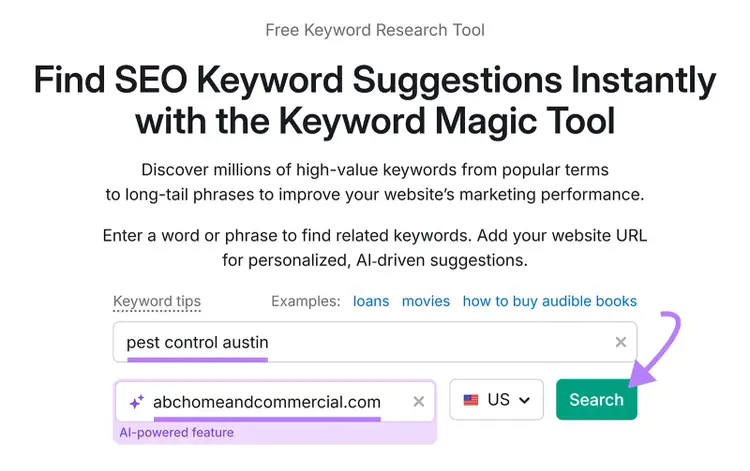
To find local keywords to target for your business, use Semrush Keyword Magic Tool.
Simply enter a broad term that includes both your niche and your location (like your city, state, or neighborhood). Then, enter your country and click “Search.”
You can also enter your website URL to get personalized data.
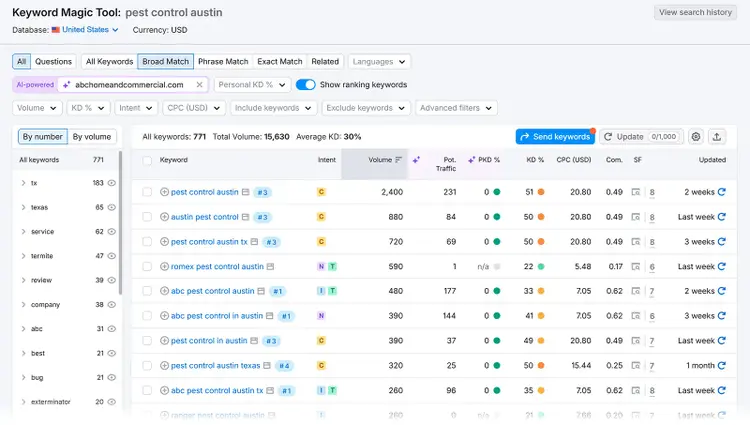
The tool will generate a list of related local keywords. Along with key metrics like:
- Search volume: Average monthly searches
- Keyword difficulty (KD%): How hard it is to rank in the top 10 for that keyword, based on the current level of competition
- Search intent: What the searcher is looking to do (classified as Informational, Commercial, Transactional, and/or Navigational)
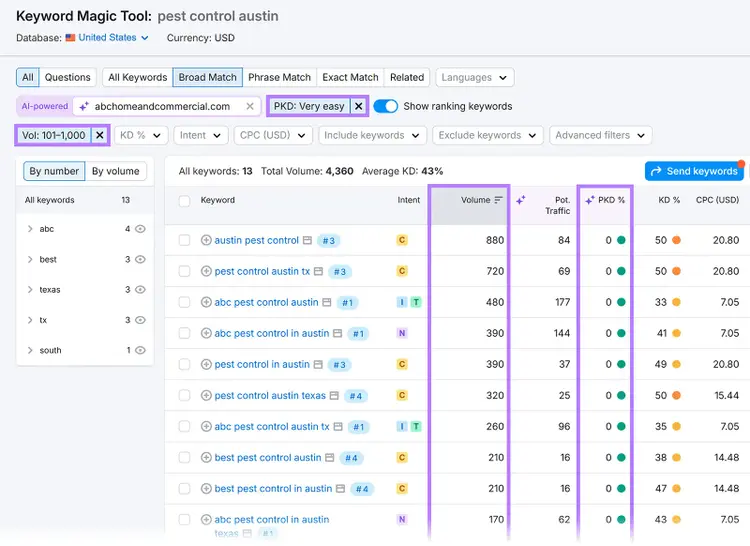
- Personal Keyword Difficulty (PKD%): An AI-powered estimate of how difficult it would be for your site to rank for that keyword
- Potential traffic: An AI-powered estimate of how much traffic your site could receive if you were to rank for that keyword
Narrow down your search using filters.
For example, use the PKD% filter to identify keywords your site has a better chance of ranking for. Set it to “Easy” or “Very Easy” as a starting point.
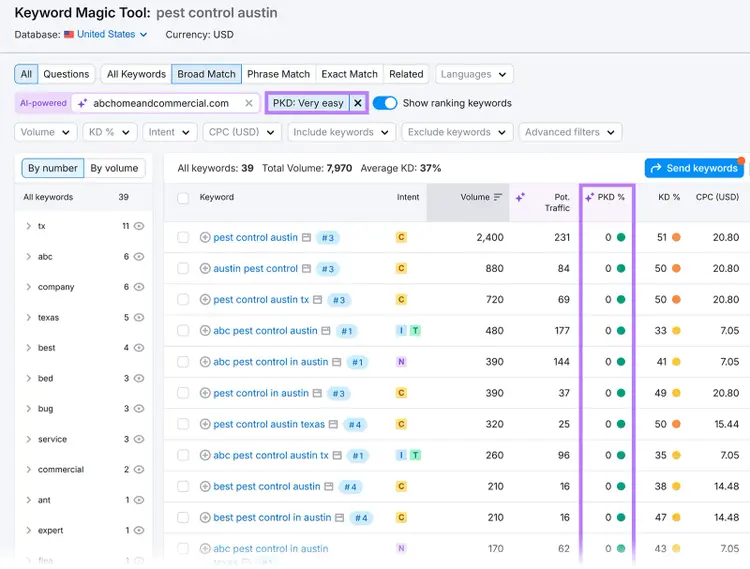
Use the “Volume” filter along with “Personal Keyword Difficulty (PKD)” to find keywords that have enough monthly searches to drive traffic but are realistic for your site to rank for.
For example, “Very easy” keywords with a monthly search volume of between 100 and 1,000.
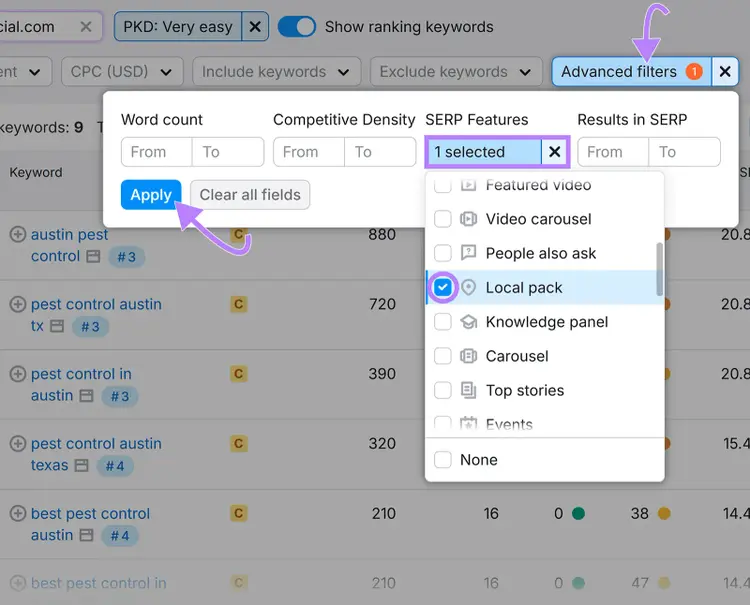
Since you’re looking to rank in the 3 pack specifically, go a step further and click “Advanced filters” > “SERP Features” > “Local pack” > “Apply” to show keywords that already show the 3 pack.
These aren’t the only keywords you should target. But they might be a good place to start since they’re already showing a 3 pack on the SERP.
Once you’ve identified the most promising and relevant keywords for your business, create high-quality content around them. This can include:
- Location-specific service pages: Create dedicated pages for each service area you serve, targeting keywords like “plumbing services in Brooklyn” or “personal trainer in Santa Monica”
- Blog posts: Write high-quality blog content targeting local keywords like “best time to plant trees in Austin” or “how to find a reliable roofer in Queens”
- Frequently asked questions (FAQs): Create frequently asked questions that answer local questions about the areas you serve and the services you offer
4. Get Listed on Local Directories
Local directories are online platforms or websites that list businesses, services, and locations by category or geographic area.
They help people discover and learn more about local businesses. But they also help search engines like Google verify your business’s legitimacy, location, and relevance—which can help you get into the 3 pack.
Getting listed on these platforms creates what’s known as NAP citations across the web. These Name, Address, and Phone number citations play a major role in local SEO.
Here’s an example of a NAP citation on Yelp:
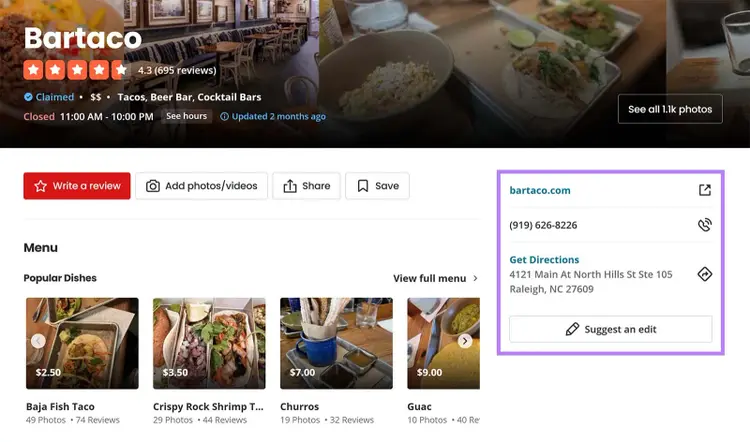
The more consistent and widespread they are, the more confidence Google can have in your business.
Start with trusted directories like:
- Yelp
- Bing Places
- Apple Maps
- YellowPages
- Better Business Bureau (BBB)
- Industry-specific sites like Zocdoc (healthcare), Avvo (legal), or Houzz (home services)
Make sure your NAP details are exactly the same across all your listings. Even small differences (like using “St.” in one place and “Street” in another) can create confusion for users and search engines, which may hurt your local rankings.
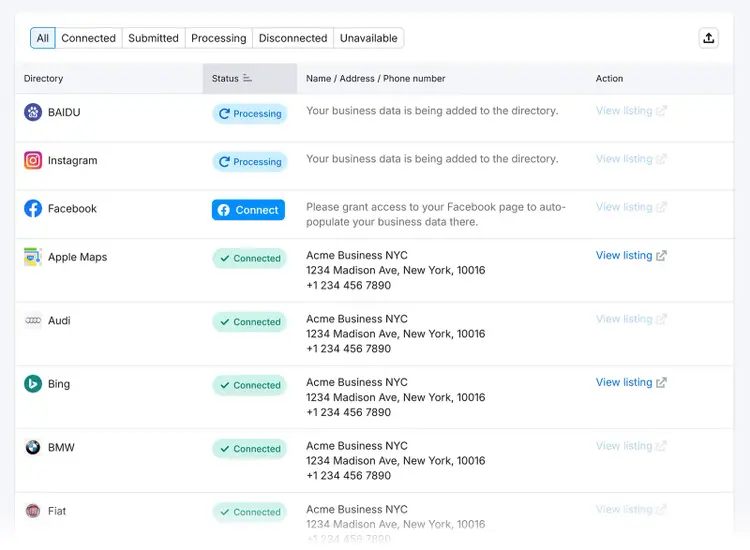
To make this easier, use Semrush’s Listing Management tool. It automatically distributes your business info across all major directories and keeps everything consistent and up to date.
This way, you don’t have to do it manually, and you can spend your time improving and growing your business instead.
Manage Your Business’s Citations
with the Listing Management Tool
5. Build High-Quality Local Backlinks to Your Site
Local backlinks are links from sites in your geographic area that point to your site. These links signal to Google that your business is trusted, relevant, and part of the local community.
And since backlinks are a direct ranking factor, high-quality local links can improve your site’s local search visibility. In turn, this can increase your business’s chances of appearing in the Google 3 pack.
Dmytro Sokhach, CEO at Editorial.Link, states the importance of earning real local mentions:
When I helped a local plumber in Brooklyn, I got them mentioned on a neighborhood blog, listed in a local business directory, and linked from a home improvement forum. This helped increase their local relevance and got them into the 3 pack for searches like ‘emergency plumber near me.’
But not all backlinks carry the same weight.
Google pays more attention to links from authoritative publications. A single backlink from a respected local organization or a well-known media outlet can have a greater impact than dozens of low-quality directory links.
Here’s how to earn high-quality local backlinks:
- Partner with local organizations or events. Sponsor a charity run, school fundraiser, or community event. Many of these groups will link back to your site from their sponsor page (and you can always ask them to if they don’t already).
- Publish locally relevant content. Create location-focused guides, how-tos, or roundups that other local sites may want to reference.
- Collaborate with nearby businesses. Cross-promote with complementary businesses in your area (like a florist linking to a nearby wedding planner).
- Get featured in local media. Reach out to local blogs, news outlets, or lifestyle sites. Share a story, pitch a unique angle, or offer expert commentary to earn coverage and (hopefully) a backlink.
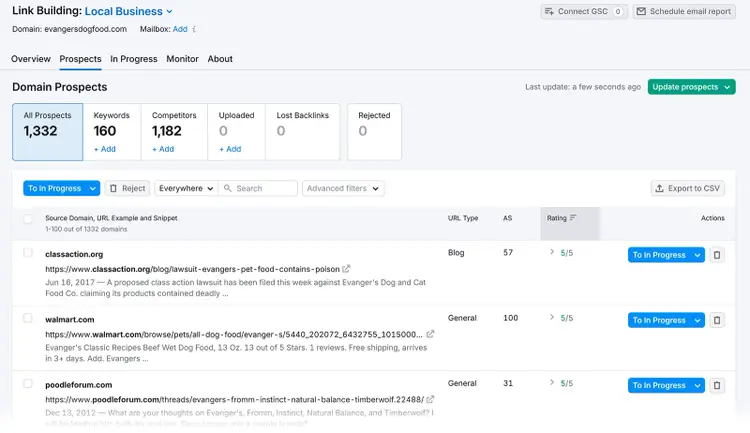
Use Semrush’s Link Building Tool to build high-quality local backlinks to your site at scale. It helps you find relevant link prospects, reach out to them, and manage your entire link building campaign from one place.
6. Encourage Customers to Leave Reviews
The more positive reviews your Google Business Profile has, the higher your chances of appearing in the Google 3 pack. That’s because Google uses reviews as a key signal of prominence, which is one of the main factors it considers when deciding which businesses to feature in the local pack.
Here’s how to ask for reviews the right way:
- Ask at the right moment, like right after a successful purchase, service, or interaction when the customer is most satisfied
- Share a direct link to your review form (You can generate one right within your Google Business Profile dashboard.)
- Make it part of your follow-up by adding a short, friendly review request to post-purchase emails or thank-you messages
- If you run a service business, train your team so everyone knows how and when to ask in person
- Google’s guidelines prohibit review incentives, so make the ask feel natural and optional
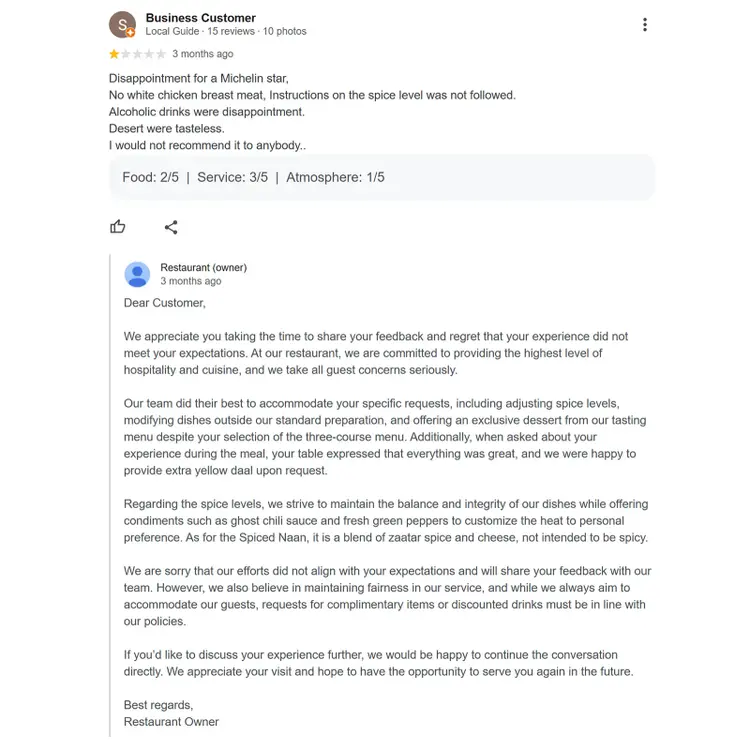
Also, you should always respond to negative reviews.
Even if you get a harsh or seemingly unfair review, respond politely and professionally. It shows potential customers that you take feedback seriously, and that you’re willing to make things right.
Here’s a great example of a fair, detailed response to a negative review (with an open option to continue the discussion):
To make this easier, use Semrush’s Review Management tool.
It lets you:
- Use AI to draft thoughtful replies you can quickly personalize
- Automate responses to both positive and negative reviews
- Monitor reviews across platforms from a single dashboard
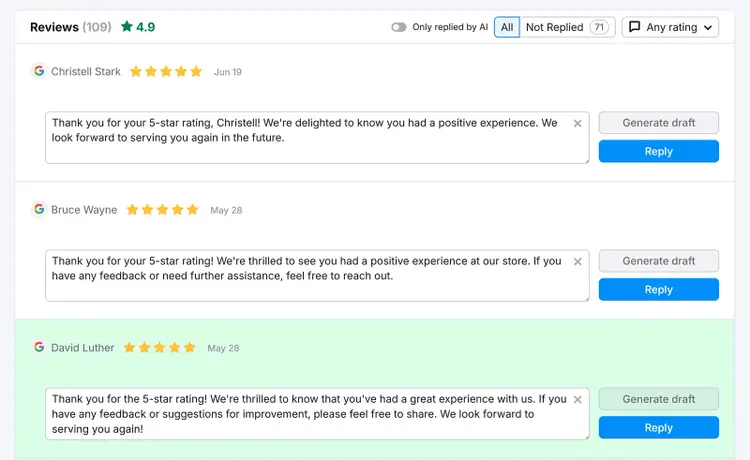
This keeps your profile active, shows you're engaged, and helps you stay on top of your online reputation with minimal time and effort.
7. Run Paid Ads
Running paid ads can place your local business above the organic Google 3 pack results, but with a “Sponsored” label.
These can still appear within the 3 pack itself. Like this:
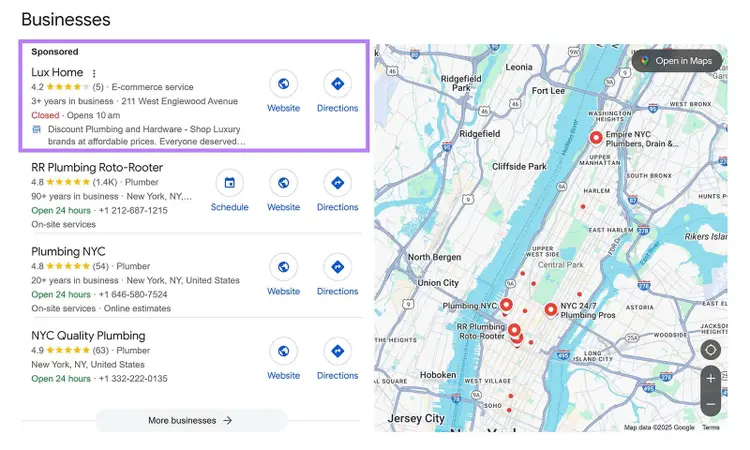
These ads look very similar to the organic 3 pack results, featuring your business name, star ratings, service area, hours, and a map preview.
While this obviously requires investment and an understanding of Google Ads, it’s a way to boost your business’s local visibility and appear in (or near) the 3 pack.
Further reading: A Guide to Paid Search Ads: Definition + How to Set up Campaigns
Start Ranking in the Google 3 Pack
Appearing in the Google 3 pack can put your business in front of more local customers.
From setting up your Google Business Profile to building local backlinks and collecting positive reviews, each step signals to Google that your business is trustworthy and relevant to local searchers.
Need help making it happen?
Start your free trial of the Semrush Local Toolkit. It helps you optimize your GBP, manage listings across different directories, and respond to customer reviews all in one place.
Improve Your Local Visibility
with the Semrush Local Toolkit

Alex is a managing editor with 10+ years of experience leading content and SEO teams across SaaS, tech, ecommerce, and digital publishing. He specializes in building editorial systems that balance human judgment with AI-assisted workflows, helping teams produce original, high-impact content as search and discovery evolve. His work spans SEO strategy, content quality frameworks, and adapting content operations for AI-driven search.
Alex Lindley
Alex is a managing editor with 10+ years of experience leading content and SEO teams. He focuses on building AI-aware editorial systems that help teams produce original, high-impact content as search evolves.

Tells Google to show you more from Semrush in AI, Search, and Discover.