
What Is Google Discover?
Google Discover is a personalized content feed that displays news stories, blog posts, and videos tailored to each user’s interests and browsing habits.
The Discover feed is available in the Google app and on the mobile version of Google Chrome.
And looks like this:
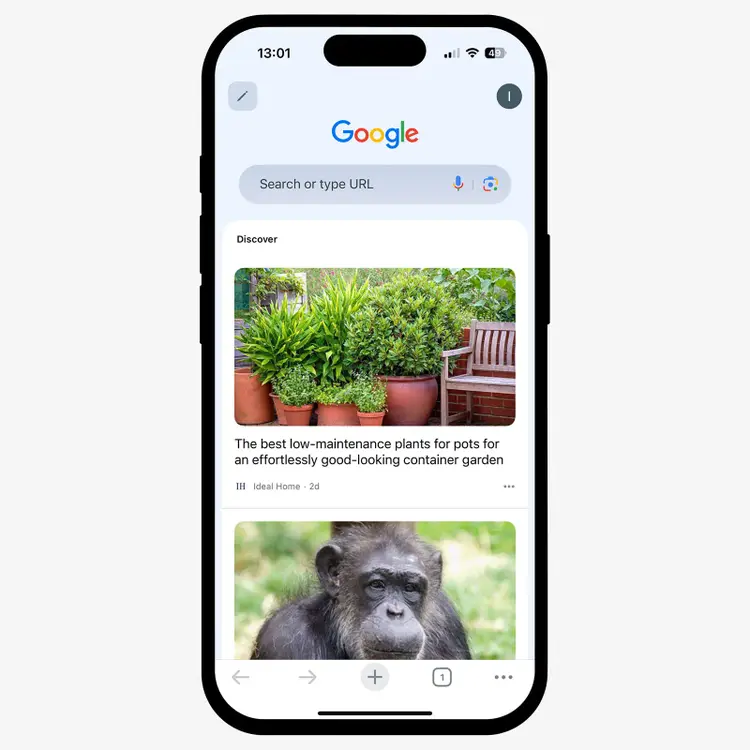
For content creators and SEO professionals, Discover provides a massive opportunity to reach new audiences.
Unlike traditional search, which requires the user to look for information, Discover proactively suggests content to potential readers—even if they've never seen your website before.
In this guide, you'll learn how Google Discover works and how to optimize content to appear in the Discover feed.
How Does Google Discover Work?
Google Discover relies on user behavior.
Each interaction with Google products (Search, YouTube, Chrome) helps Discover understand personal preferences and interests.
If you frequently read about photography or watch cooking videos, you'll see more content about these topics.
Location and device settings also affect the feed. Discover uses this information to display:
- Local news
- Weather updates
- Nearby events
- Content in your preferred language settings
- Trending topics in your region
If this sounds like social media, that’s because it is. Your feed reflects your hobbies, interests, and priorities. It’s incredibly personalized. This high level of personalization is extremely valuable for brands. When your content aligns with users' interests, it can appear organically in their feeds, much like social media posts.
Discover isn’t available on desktop computers. Google designed it for mobile users who want quick access to engaging content on the go.
How to Appear in Google Discover
Google Discover follows the same optimization principle as regular search results. Most best practices for SEO apply here, too.
Below are some key things to focus on.
1. Create People-First Content
Focus on providing genuine value to readers. Publish high-quality articles that solve real problems. Avoid adding keywords only for search engines.
For example, if you’re writing a guide on “how to train a new puppy,” go beyond the typical tips you see everywhere:
- Write from experience. Share real experiences and challenges you faced while training your own puppy. Include specific examples of what worked and what didn't.
- Add expert commentary. Provide advice from professional dog trainers. These tips help differentiate your content from generic articles.
- Incorporate multimedia. Incorporate high-quality images or video for readers to learn interactively and stay engaged.
Combining these elements creates content that meets readers' needs and increases your chances of appearing in Google Discover.
2. Write Accurate and Appealing Page Titles
Your page’s title tag helps Google understand your content, which helps the search engine better understand and showcase your page.
Plus, if your title is compelling, more users will click through and read your content.
Discover shows your title in a large, more prominent format. Like so:
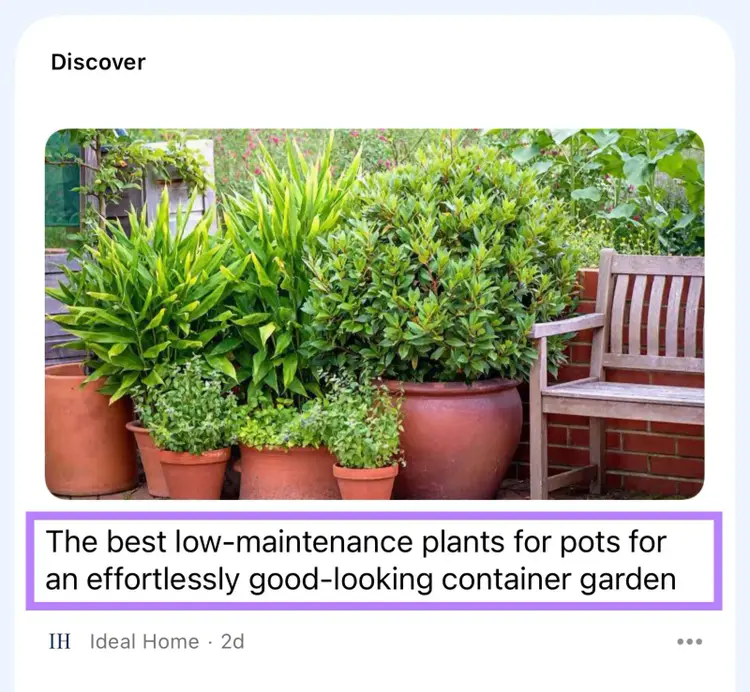
Here's how to write effective titles for Google Discover:
- Be accurate. Explain the main topic without misleading users. Don’t use sensational or clickbait titles. Google might remove your content from Discover if you do.
- Be descriptive but concise. Make your titles clear and specific, but keep them under 60 characters to avoid truncation.
- Showcase value. Indicate what readers will gain, such as "expert tips" or “step-by-step instructions.”
Here’s an example of a good title versus a bad, clickbait-style title:
✓ Good: "10 Proven Puppy Training Tips (From a Professional Trainer)"
✗ Bad: "You Won't Believe These SHOCKING Puppy Training Secrets!"
3. Publish Timely Content
Google Discover promotes timely content about current events. If you cover news and industry updates, include these topics in your content strategy.
Even if your niche relies on evergreen content, you can still appear in Google Discover. And look for opportunities to cover timely content.
Here’s how:
- Cover industry trends. Write about new developments and trends in your field.
- Plan seasonal content. Identify upcoming holidays or events related to your audience.
- Refresh older posts. Update evergreen articles with new data or examples to keep them relevant.
4. Add High-Quality Images
Images play a major role in Google Discover. A compelling image can be the difference between users scrolling past your content or clicking through to read more.
Discover displays your main image in a large format alongside your title.
Like this:
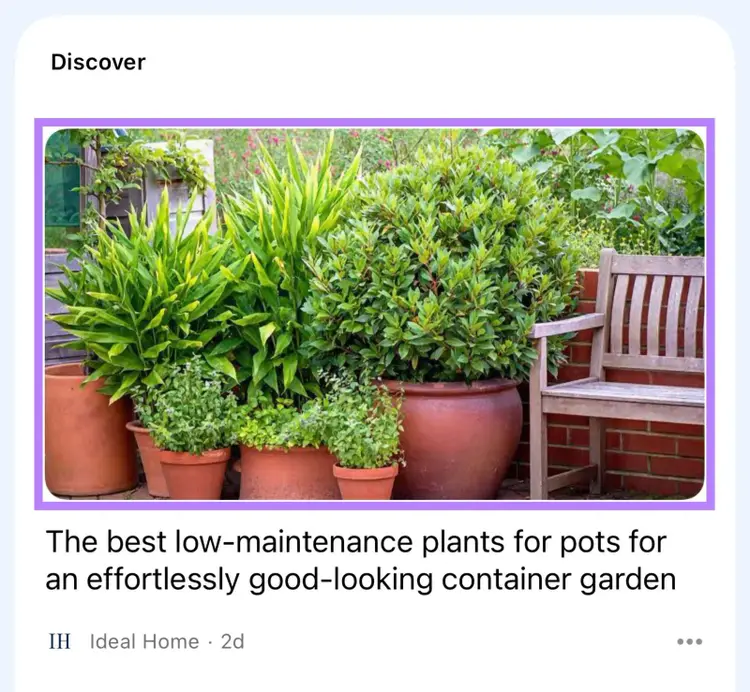
Here are Google's requirements for how you should use images for optimal appearance in Google Discover:
- Use large images. At least 1200 pixels wide.
- Keep images relevant. Match images to the article’s main topic.
- Enable large previews. Use max-image-preview:large or Accelerated Mobile Pages (AMPs) to allow high-quality previews.
- Avoid logos as main images. A clear and engaging photo is more effective.
5. Showcase E-E-A-T
E-E-A-T stands for Experience, Expertise, Authoritativeness, and Trustworthiness.
While E-E-A-T itself isn’t a ranking factor, it represents a framework of quality signals that Google uses to evaluate content.
If Google sees that your content is created by credible experts, reflects first-hand experience, and comes from a trustworthy source, you have a better chance of being featured in Discover feeds.
Here are some practical tips to showcase E-E-A-T in your content:
- Provide author information. Include author bios that highlight qualifications and experience.
- Cite reputable sources. Link to and reference trusted publications to back up claims.
- Demonstrate real experience. Include details that only someone with direct experience would know.
- Build quality backlinks. Earn links and mentions from reliable websites in your field.
- Maintain brand reputation. Establish your brand as a leader in your niche by consistently producing high-quality, valuable content.
- Review content quality.Have editors review your content to ensure it is accurate, well-written, and original.
Semrush’s SEO Writing Assistant streamlines this process. Use the tool to evaluate your draft for readability, originality, SEO, and tone of voice. And identify issues that need your attention:
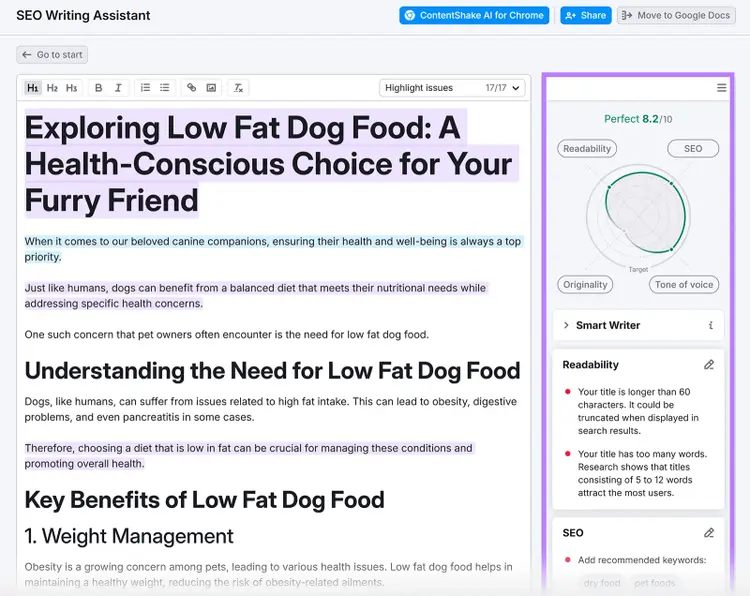
Craft High-Quality Content
with the SEO Writing Assistant
6. Prioritize Mobile User Experience
Google Discover only appears on mobile devices, which means a mobile-friendly site is crucial.
Start with the below tips:
- Use responsive design. Make sure your site automatically adapts to smaller screens.
- Choose readable fonts. Use clear, legible fonts that are easy to read on small screens.
- Structure content effectively. Break up text with subheadings and short paragraphs.
- Avoid intrusive elements. Minimize pop-ups or ads because they disrupt the reading experience.
- Simplify navigation. Ensure buttons and links are large enough to tap easily and keep ample white space between elements.
- Ensure fast loading. Aim for under three seconds on mobile devices.
Our free SEO check flags mobile issues fast. To check performance across every page on your site, use Semrush Site Audit.
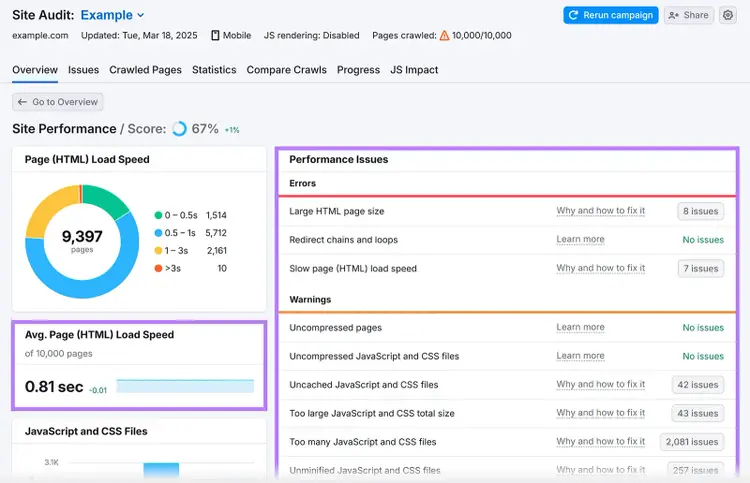
You can even set up automated audits to stay on top of any new issues that arise. Just edit the campaign settings (click the gray button with a cog) and select the scheduling option from the menu.
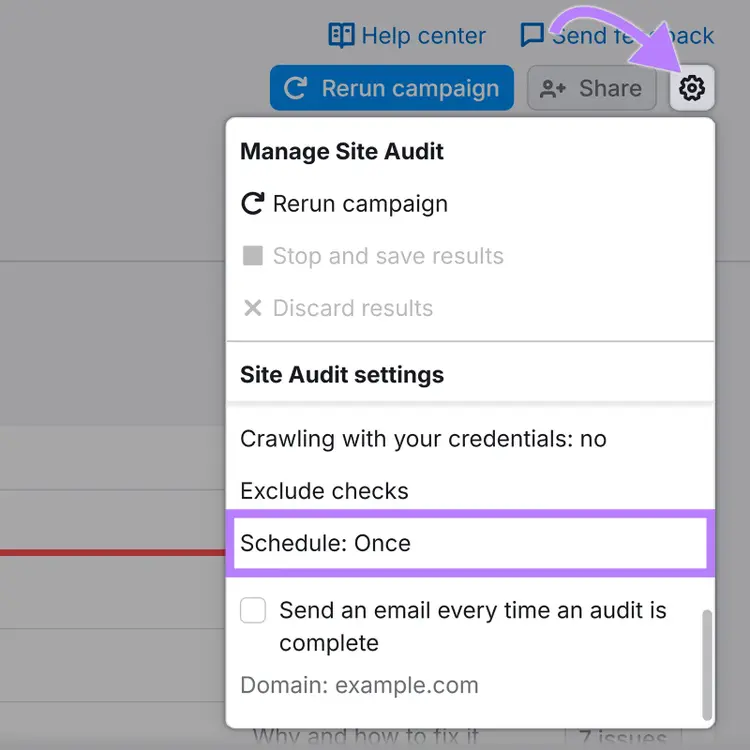
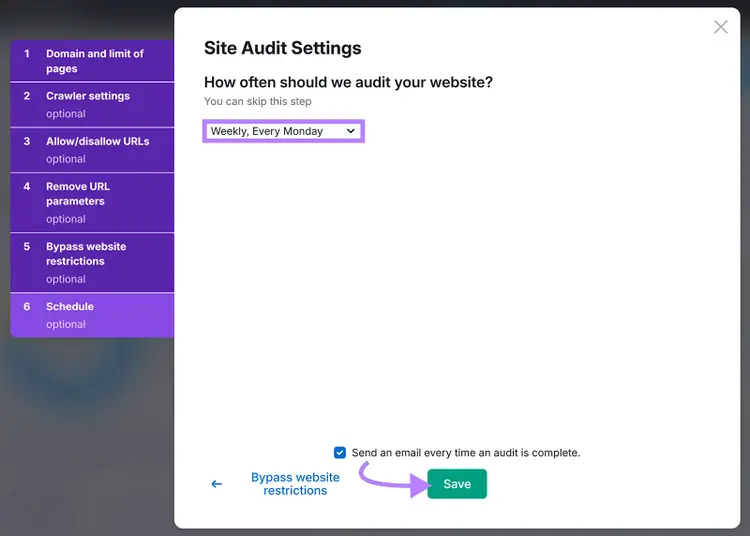
You can schedule audits to run on a daily or weekly basis. Once you set the frequency, click “Save.”
How to Track Your Discover Performance
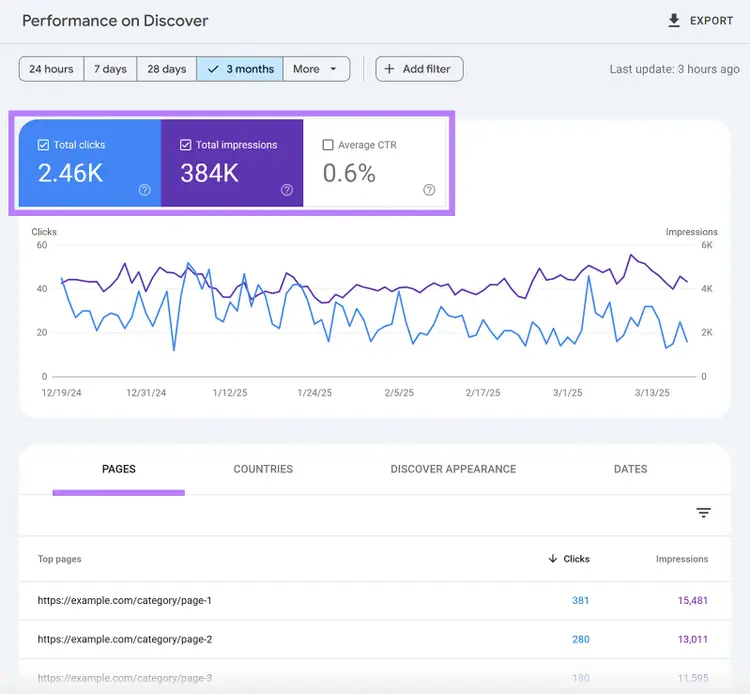
Monitor your Google Discover traffic using the Discover performance report in Google Search Console.
To access it, log into Google Search Console and click "Discover" in the left sidebar.
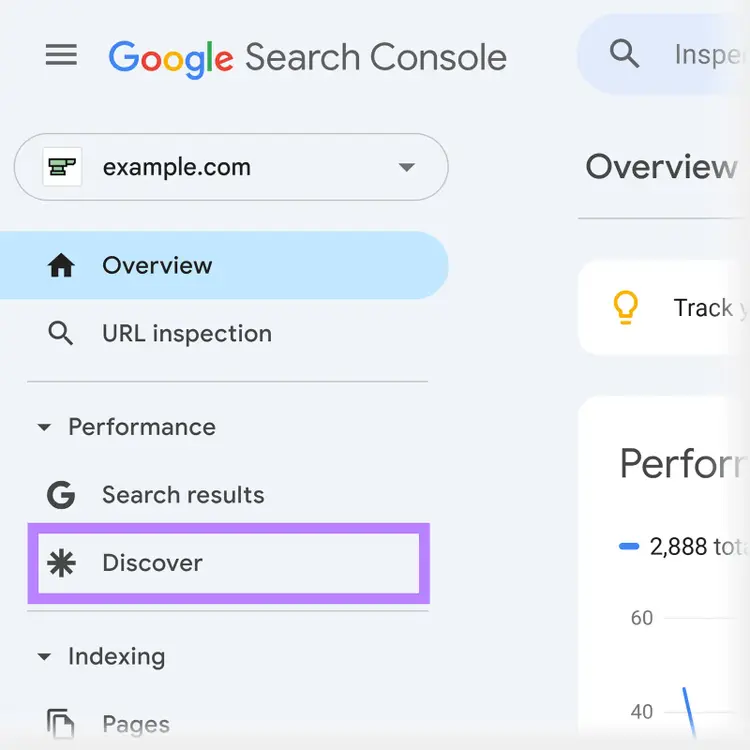
The report provides:
- Total impressions: Number of times your pages appeared in Discover feeds
- Total clicks: Number of times users clicked through to your content
- Average click-through rate (CTR): Percentage of impressions that resulted in clicks
- Performance over time: Changes in visibility across specific periods
- Pages list: Which pages appeared in Discover and their performance
- Countries data: Geographic breakdown of your Discover traffic
Start Optimizing for the Google Discover Feed
Google Discover can send additional traffic to your website.
You’ve learned how to optimize your content to improve your chances of appearing in Discover. Start applying these tactics to reach a wider audience.
Semrush offers tools to help optimize your content for maximum visibility. Sign up today to get started.
Optimize for the Google Discover Feed
with a Semrush Subscription

Tushar has been involved in SEO for the past six years, specializing in content strategy and technical SEO. He gained his experience in agencies, where he worked on various ecommerce and B2B clients. On the Semrush blog, he writes about SEO and marketing based on experience drawn from his client work, focusing on sharing practical and effective strategies. His goal is to turn Semrush blog into the ultimate destination for learning SEO and web marketing.
Tushar Pol
Tushar is an SEO expert with over six years of experience in content strategy and technical SEO. Having worked with various ecommerce and B2B clients at agencies, he now writes for the Semrush blog, sharing practical and effective SEO strategies.

Tells Google to show you more from Semrush in AI, Search, and Discover.