
Keyword research tools help you find, analyze, and prioritize the search terms people actually use. So you can build content and campaigns that drive visibility, traffic, and conversions.
This article compares eight free and paid keyword research tools to help you find the best option for your needs.
Before we cover the keyword research tools themselves, we’re starting with the criteria that matter most when choosing a tool.
8 Keyword Research Tools to Try
What Makes a Good Keyword Research Tool?
Conducting keyword research typically requires a tool that includes:
- Regularly updated data that reflects the current state of search
- Filters and buttons for homing in on terms that actually matter for your business
- Search intent data that shows what users are trying to accomplish and want to see in search results
- Domain-specific information that helps you see how you and your competitors are currently performing for certain terms
- Integrations with other tools that streamline your processes
The list below covers a range of keyword research tools for SEO teams—from free options for getting started to more robust tools for experienced practitioners.
8 Free & Paid Keyword Research Tools
1. Keyword Magic Tool
Pricing: A free trial is available. Pricing starts at $139.95/month for the Semrush SEO Toolkit.
The Semrush Keyword Magic Tool generates extensive keyword lists from a single term (a seed term) related to your business, so you can find and prioritize topics to target in your SEO content to increase your search visibility.
Simply enter a seed keyword and your target location into the Keyword Magic Tool to get a list of related keywords.I also recommend adding your domain to get personalized insights.
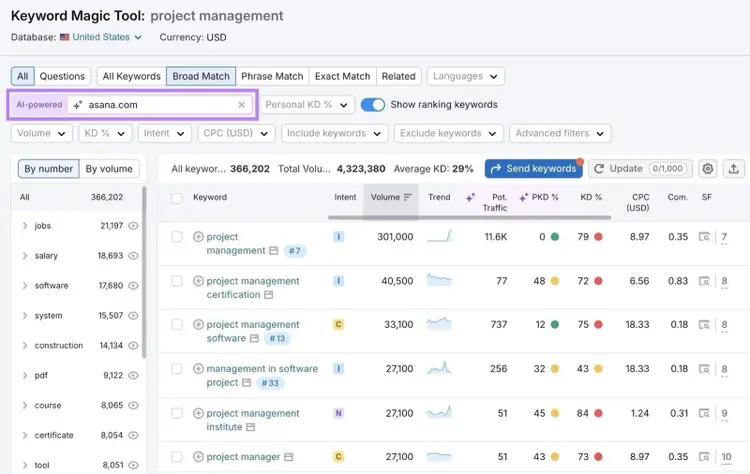
The Keyword Magic Tool report will show a variety of metrics for each keyword, including:
- Intent: What users are trying to achieve with their search (can be informational, transactional, commercial, navigational, or a combination)
- Volume: The average number of monthly searches for a term over the past 12 months
- Potential Traffic: The estimated monthly traffic you could get if you rank highly for that keyword
- Personal Keyword Difficulty (PKD %): How hard it would be for your specific domain to rank in the top 10 positions for that keyword on Google
- Cost per Click (CPC): Average price in U.S. dollars that advertisers pay for a click on an ad triggered by that keyword
- SERP Features (SF): Whether the keyword triggers special search results like AI Overviews,videos, or People Also Ask boxes
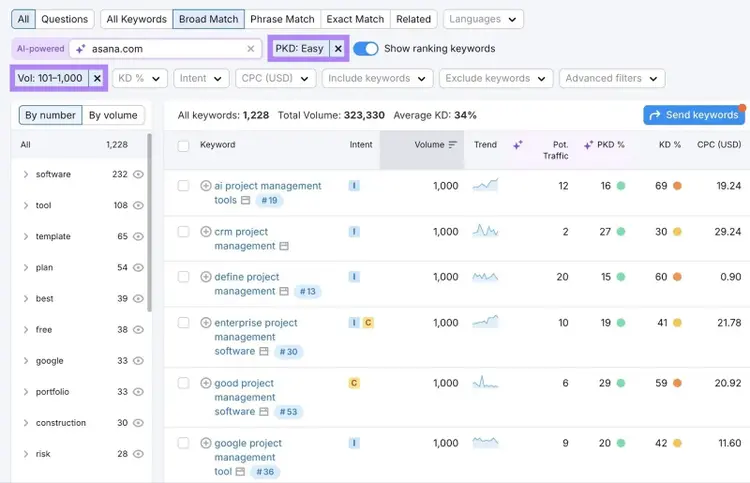
To filter your Keyword Magic Tool report to show only terms you can realistically rank for while still driving traffic, select the “Personal KD %” filter and set it to “Easy.” And set the “Volume” filter to “101-1,000.”
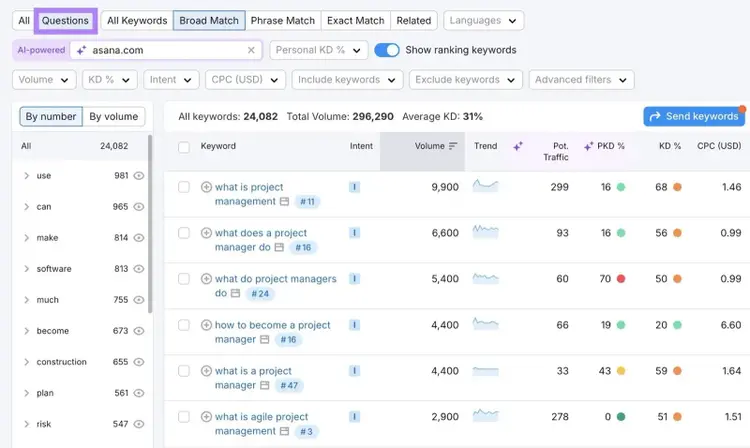
You can also use the “Questions” tab in the Keyword Magic Tool to find long-tail, question-based keywords (e.g., “what is project management”) that you can use to create content. Which is useful for increasing visibility in AI systems like Google’s AI Overviews and ChatGPT.
Key Features
- Access to a database of 27+ billion keywords across 140+ countries
- Keywords can be organized into topic-based groups and subgroups
- Advanced filters for intent, volume, difficulty, etc.
- Integration with Keyword Strategy Builder for content planning
What I Like
One of the helpful features in Keyword Magic Tool is the ability to remove competitor-focused terms that I don’t want to target.
For example, I’ll use the term “travel bags,” which could be a useful seed term for finding specific terms to use on product pages.
If Louis Vuitton is a competitor, I wouldn’t want to include terms including their brand name.
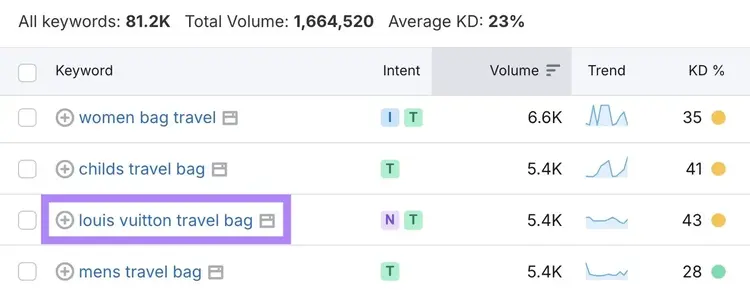
So, I use the “Exclude keywords” filter to remove competitor names from the list.
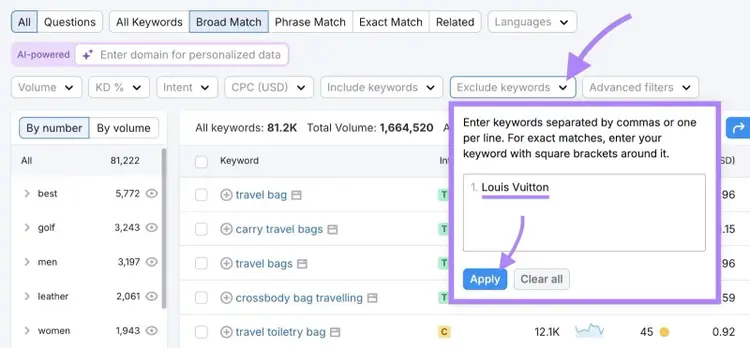
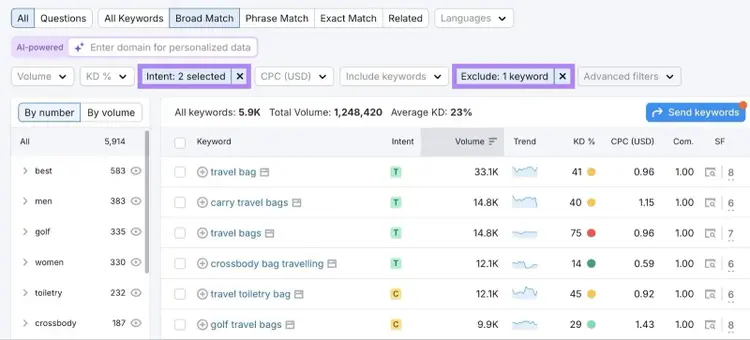
Then, I can use the “Intent” filter to show only terms with the “Commercial” and “Transactional” intent to focus on keywords users search when they’re actively comparing options and ready to buy.
This gives me a list of high-intent keywords I can confidently use on product pages.
2. Prompt Research
Pricing: A free trial of Semrush One (which combines SEO Toolkit and AI Visibility Toolkit) is available. Pricing for just the AI Visibility Toolkit starts at $99/month.
Semrush’s Prompt Research tool helps you discover and analyze the prompts people use in AI search systems, so you can understand how brands and content appear in AI-generated answers.
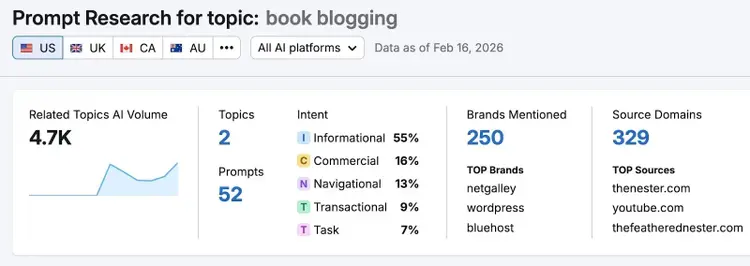
Enter a seed term, and Prompt Research shows estimated AI volume, lists of related topics and prompts, intent classifications, brands that are mentioned, and the domains that are cited.
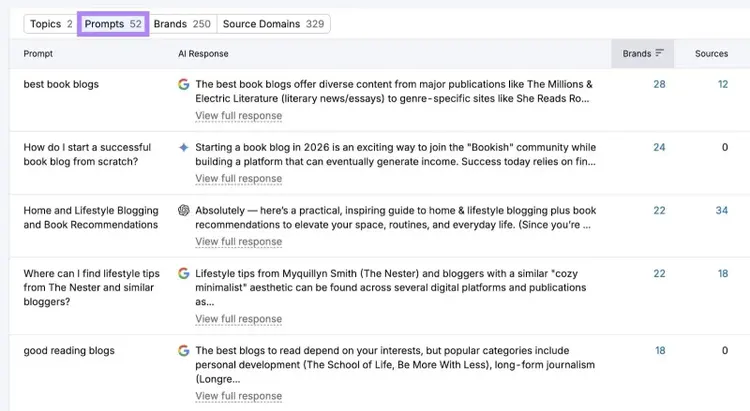
Click “Prompts” in Prompt Research to see which terms are used in AI searches and how AI tools respond.
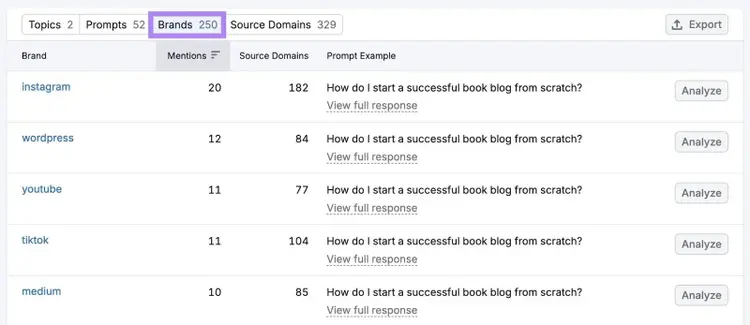
Click “Brands” to see which brands are mentioned most often in AI responses for your entered topic.
Key Features
- Topic breakdown that groups related prompts
- Intent classification for the entered topic
- Brand- and domain-level analysis within AI-generated responses
- Integration with Semrush’s Prompt Tracking tool for AI visibility monitoring
What I Like
One of the most useful parts of Prompt Research is that it seamlessly connects to the Visibility Overview tool, so you can easily analyze the most frequently mentioned brands.
After entering the seed topic “book blogging,” I can see which brands are mentioned most often in AI-generated responses.
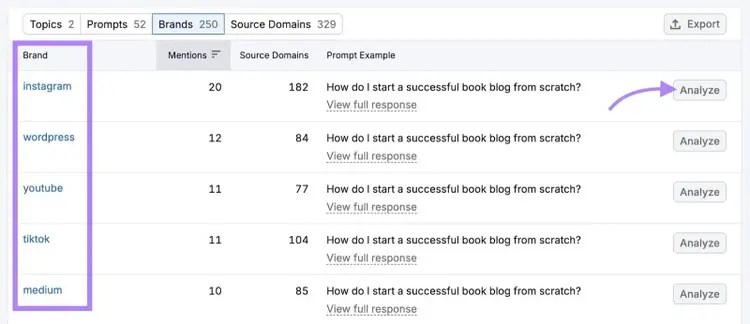
When I click “Analyze” for one of the top brands shown in Prompt Research, I’m taken directly to a more detailed report on how that brand appears across AI tools.
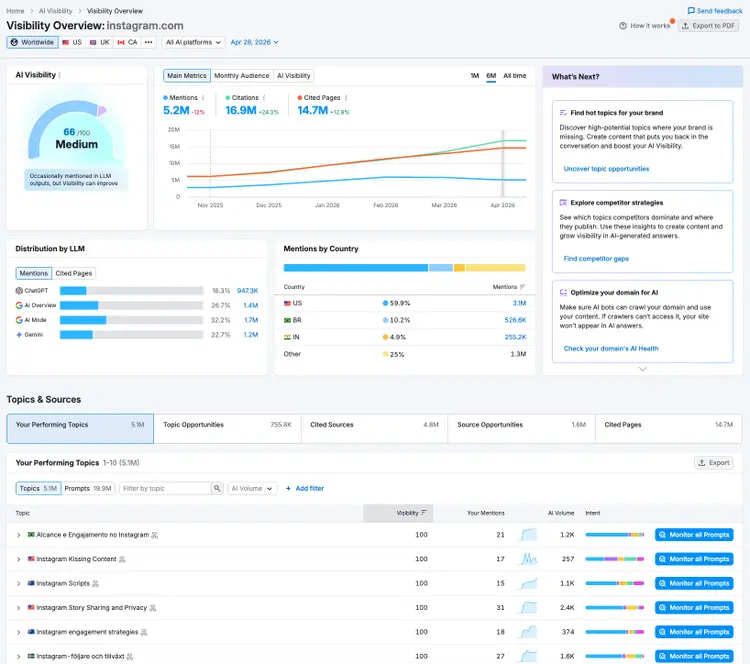
More thoroughly studying the brands you uncover in Prompt Research can give you even more ideas that you might not think to research.
3. ChatGPT
Pricing: A free version is available. Paid plans start at $8/month.
ChatGPT is OpenAI’s AI chatbot that you can use to brainstorm keyword ideas and explore new topic angles early in the research process, but it isn’t a dedicated keyword research tool.
Think of ChatGPT as a keyword discovery tool to use before you validate ideas with real search data, especially when you want to model how users phrase full questions in AI systems.
Here’s an example prompt asking for keyword ideas:
“I’m creating a landing page for a project management SaaS tool built for remote marketing teams. What are some keywords a marketing manager at a mid-sized company might search when they’re trying to improve collaboration, meet deadlines, and streamline approvals across a remote team? Please include both short-tail and long-tail variations.”
Here’s the output ChatGPT provided:
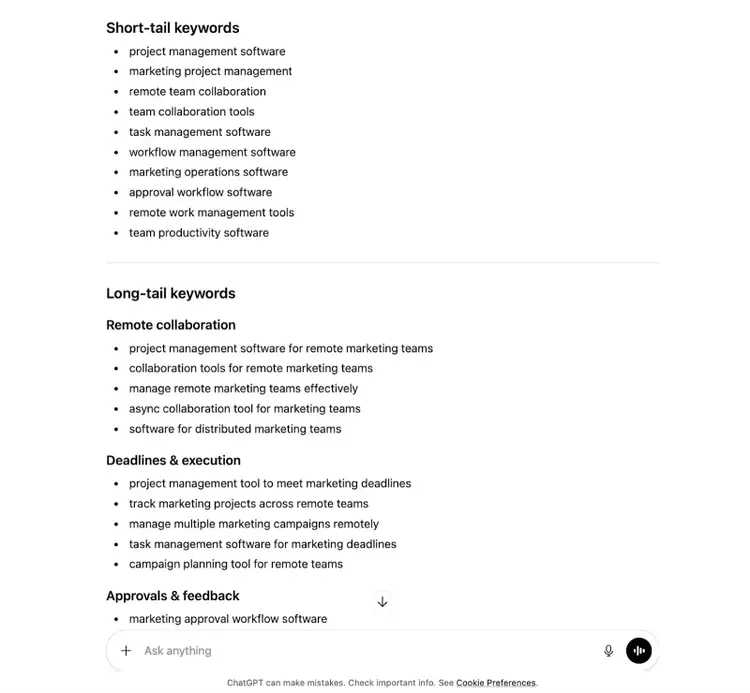
You can then plug the keyword ideas you get from ChatGPT into our website keyword checker to understand whether they're worth targeting.
You can also ask ChatGPT to:
- Group keywords into topic clusters (collections of related pages on a main topic, with each page targeting multiple related terms)
- Suggest long-tail variations (more specific versions of a broad keyword)
- Turn keyword lists into blog titles or content ideas
Just remember that ChatGPT isn’t a dedicated keyword research tool backed by SEO data. It won’t show you accurate search volumes, difficulty scores, or SERP insights.
Key Features
- Generates keyword ideas, topic angles, and keyword variations
- Refines responses based on your follow-up prompts
- Surfaces conversational phrasing
- Can group ideas into topic clusters or content themes
What I Like
I use ChatGPT to surface specific questions my audience might be typing into search systems.
To model how getting specific ideas can work for a company that creates project management software for finance teams, I prompted ChatGPT with this:
“Give me 30 bottom-of-the-funnel questions that a financial operations manager at a mid-sized company might search when looking for project management software. Focus on pain points like tracking budget approvals, managing timelines, and collaborating across departments.”
ChatGPT returned questions like:
- Which tools support multi-level budget approval workflows?
- How can I manage project budgets and approvals in one system?
- Which PM tools integrate budgeting and approvals?
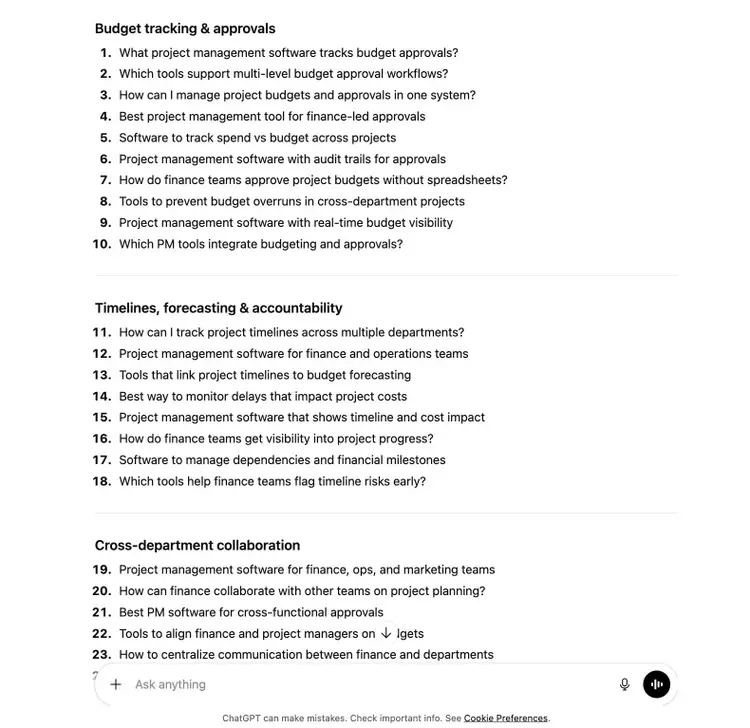
Prompts that focus on your business and specific requirements are great for brainstorming content ideas, especially for sales collateral or support content.
4. Google Keyword Planner
Pricing: Free with a Google Ads account.
Google's Keyword Planner is a free keyword research tool that's primarily built for advertisers running Google Ads, but it also works well for conducting keyword research at a basic level.
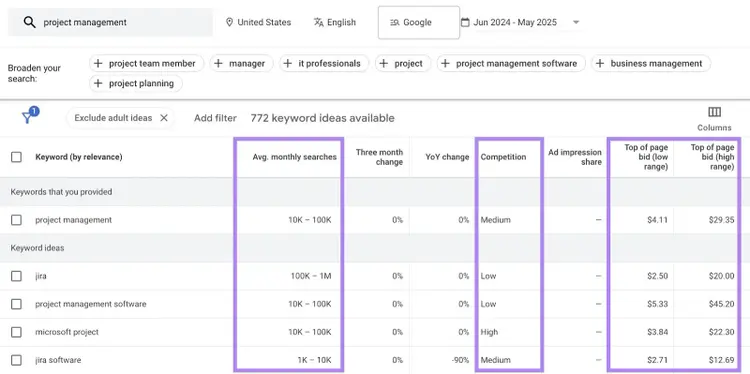
You can enter a keyword or URL, and Google Keyword Planner returns related keyword suggestions along with:
- Monthly search volume ranges (like 1K-10K)
- Competition (how difficult it might be to bid on, which may also indicate how difficult it is to rank for)
- Estimated cost per click (CPC) for ads
You can also filter Keyword Planner’s results by location, language, etc.
Key Features
- Generates keyword ideas from seed terms or URLs
- Includes filters for location, language, brand terms, product type, etc.
- Search volume ranges and competition data from Google Ads
- Ability to forecast clicks, impressions, and cost estimates for campaigns
What I Like
Google Keyword Planner is great if you’re looking for a free tool that lets you discover high-value, low-competition keywords in a specific location.
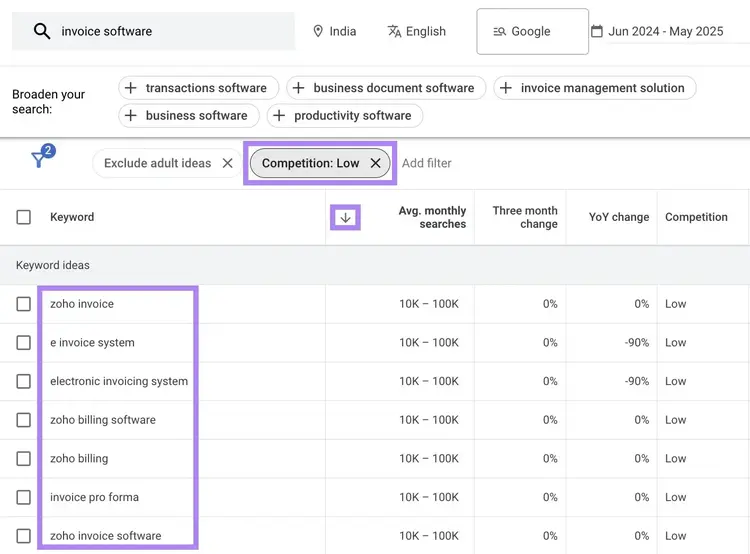
Let’s say I’m targeting small business owners in India with content about financial tools. I’d start by entering a seed term like “invoice software” and set the location as “India.”
Then, I’d sort Keyword Planner’s results by “Monthly searches,” and select “Add filter” > “Competition” > “Low.” This uncovers high-value keywords I could realistically rank for.
5. Google Search Console
Pricing: Free.
Google Search Console (GSC) is a free tool that shows how you’re performing in Google’s traditional and AI search results, and you can use it to identify keywords your site already appears for.
In GSC’s “Queries” tab, you’ll see up to 1,000 keywords your pages rank for in search results. For each keyword, you’ll find the following metrics:
- Clicks: How many times your results for the query were clicked
- Impressions: How many times your pages were displayed to users in Google search results for a specific query
- Click-through rate (CTR): The number of clicks relative to the number of impressions
- Position: The average ranking for a given query
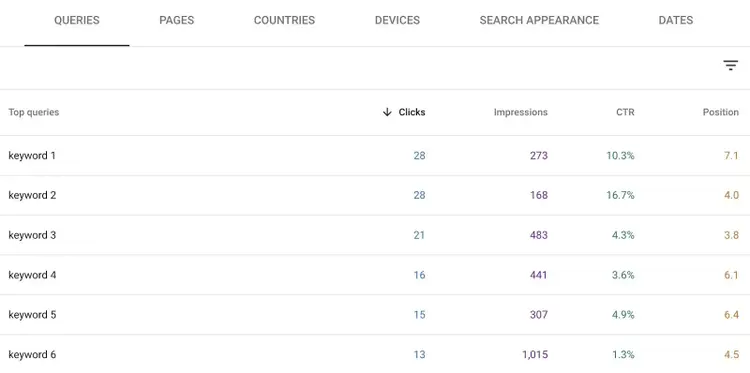
GSC insights are based on actual Google data—they’re not estimates.
And keep in mind that the “Query” tab in Google Search Console is query-based—not page-specific. So, the metrics here can reflect the combined performance of multiple pages ranking for the same keyword.
If you want to evaluate specific pages in Google Search Console, use the “Pages” tab.
Key Features
- Shows queries your site appears for in Google Search results and the corresponding metrics
- Page-level and query-level performance views
- Daily, weekly, and monthly views to allow for easier trend spotting
- Sortable table that allows you to find terms or pages with specific criteria
What I Like
Google Search Console makes it easy to find a group of terms that your site is showing up for but not getting much traffic from.
Just head to “Search results,” click “+ Add filter,” and select “Query.” Choose “Queries containing” from the drop-down and enter a term that represents the group you’re interested in.
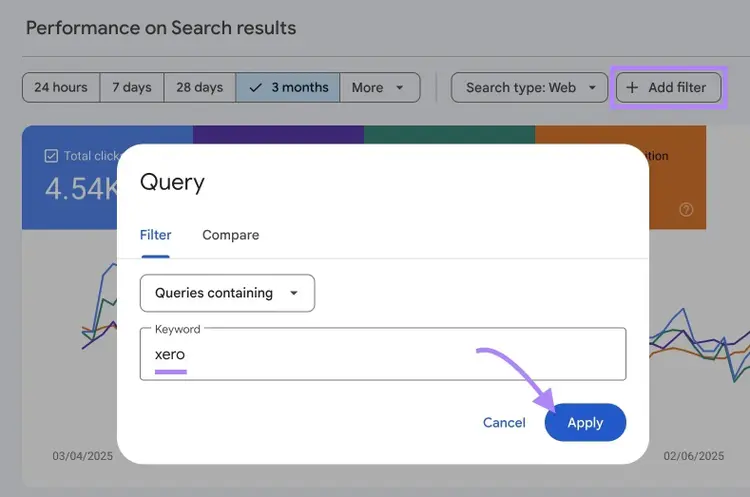
After you’ve applied a filter to find keywords containing a particular term in GSC, sort by impressions (high to low) and scan for keywords with few clicks.It’s a simple way to spot underperforming queries where you already have some visibility.
6. Surfer’s Keyword Research Tool
Pricing: Starts at $99/month. The Chrome extension is available for free.
Surfer's keyword research tool groups related keywords into clusters that can be targeted together on a single page.
After you enter a seed term into Surfer, you’ll see results displayed in keyword clusters (groups of closely related terms that can be targeted together in a single page).For each cluster, you’ll see:
- The main keyword and its variations
- Intent
- Monthly search volume (MSV)
- Keyword difficulty (KD)
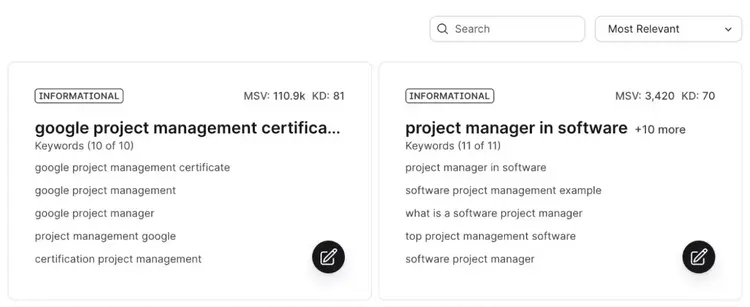
When you click on a cluster, Surfer gives you the option to launch the Content Editor tool. So you can move straight from research to writing.
Surfer also offers a free Chrome extension called Keyword Surfer that shows data like monthly search volume and CPC directly within Google Search. This is especially useful if you want to quickly validate ideas.

Key Features
- Organizes related keywords into suggested clusters
- Built-in Content Editor integration for moving from research to writing
- Free Chrome extension (Keyword Surfer) shows search volume and CPC data directly in Google results
What I Like
Surfer’s free Chrome extension is great for validating keyword ideas while browsing Google.
I can use Surfer’s Chrome extension to compare search volumes for multiple terms simply by conducting a search for each keyword instead of having to switch to a separate keyword research tool.
7. AnswerThePublic
Pricing: Free for limited daily searches. Paid plans start at $20/month.
AnswerThePublic is a keyword discovery tool that pulls autocomplete data from Google, Bing, YouTube, TikTok, Amazon, and Instagram, then organizes the results into clear categories.
You start by entering a keyword (like “influencer marketing”) and choosing a country and language. AnswerThePublic then returns keyword suggestions grouped into:
- Questions: Question-based terms
- Prepositions: Terms that include prepositions
- Comparisons: Terms that compare two items
- Alphabeticals: Terms that start with a specific letter
- Numbers: Terms including a number (like a year)
- Related Terms: Terms related to the keyword you entered into the tool
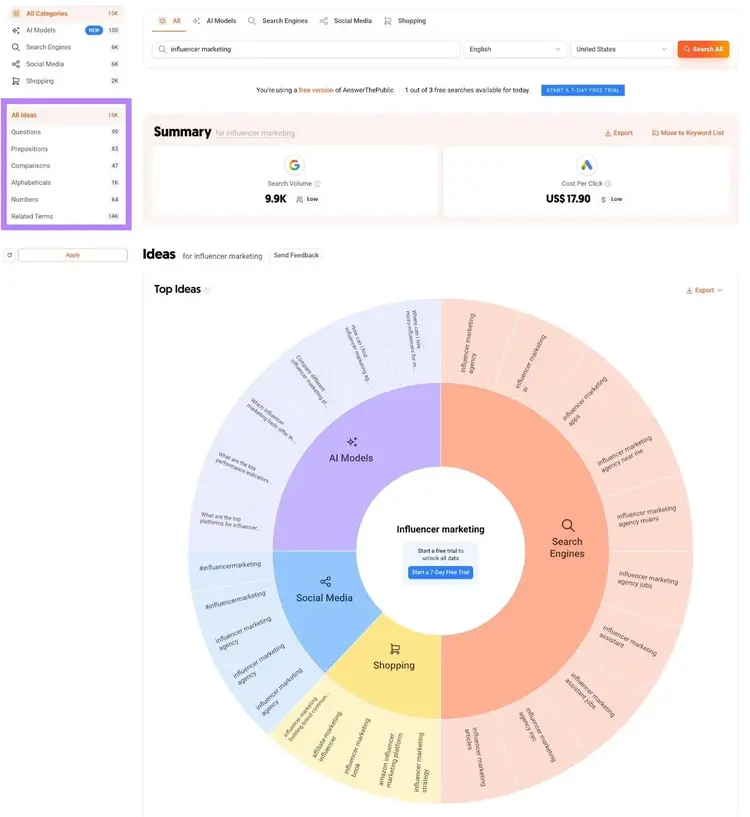
Search volume and CPC data is shown for the seed term you entered into AnswerThePublic. You’ll need a paid plan to see data for all the keyword suggestions.
While AnswerThePublic doesn’t offer advanced filters or more detailed SERP data, it’s a fast and visual way to surface long-tail keywords you might not think of on your own. Especially in the early stages of content planning.
Key Features
- Pulls autocomplete data from platforms like Google, Bing, YouTube, Amazon, Instagram, and TikTok
- Organizes keyword suggestions into categories
- Visual interface for exploring related long-tail queries
What I Like
AnswerThePublic makes it easy to quickly find question-based keywords that are pulled from autocomplete data across relevant platforms, which makes it good for finding terms to target for different content types and distribution channels.
It’s a good free tool for uncovering long-tail content ideas based on what people are actually asking.
8. Reddit Keyword Research Tool
Pricing: Free.
HigherVisibility’s Reddit Keyword Research Tool is one of the best free keyword research tools focused on finding ideas based on Reddit discussions, and all you need to do is enter a subreddit.

The Reddit Keyword Research Tool shows popular terms from the subreddit and displays them in a table along with:
- The estimated monthly U.S. search volume
- A “Context” link, which opens a Google search based on your selected subreddit and keyword
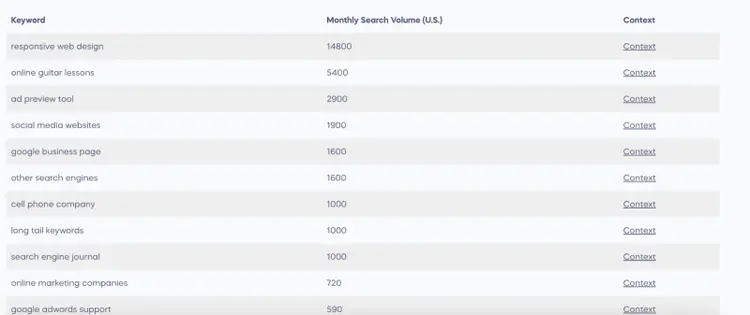
The Reddit Keyword Research Tool is helpful for identifying topics that real people are actually discussing.
And if you’re building content for a niche audience, the Reddit Keyword Research Tool can surface queries that other tools might miss.If you want additional metrics for these terms, export the report as a CSV that you can analyze using another tool.
Key Features
- Surfaces keyword ideas from subreddit discussions
- Displays estimated monthly U.S. search volume for surfaced terms
- Provides a “Context” link to view related Google search results
- Allows exporting for deeper analysis
What I Like
The Reddit Keyword Research Tool is great for building a keyword list based on various subreddits without having to manually sift through discussions yourself.
For example, just take a look at all the subreddit options you can comb related to “career”:
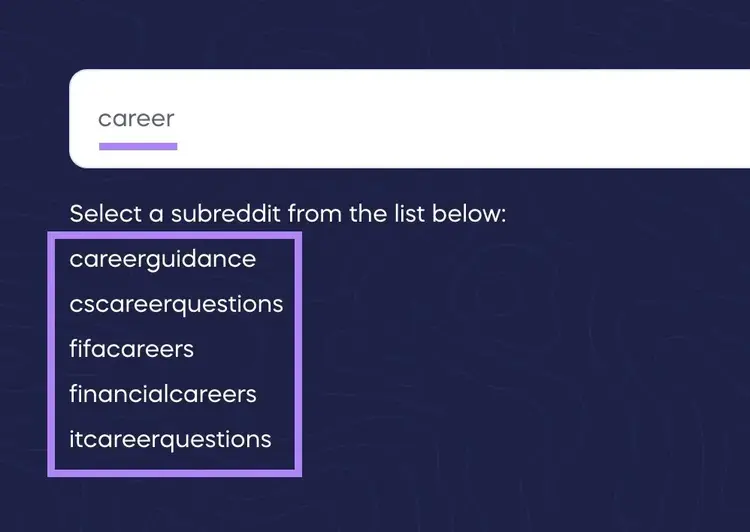
Going through each relevant subreddit list is likely to yield many valuable terms.
FAQs
What Tools Are Best for Conducting Keyword Research for AEO?
Semrush Keyword Magic Tool and Prompt Research tool are best keyword research tools when it comes to AEO.
- The Keyword Magic Tool's Questions tab surfaces long-tail, question-based keywords that trigger AI Overviews
- Prompt Research shows how real users might phrase questions in AI systems like ChatGPT and Gemini, helping you identify related topics and prompt variations
How Do You Leverage Generative AI Tools for SaaS Keyword Research?
Generative AI tools like ChatGPT work best as a brainstorming partner before you validate ideas with the actual keyword research tools.
AI tools like ChatGPT have no keyword database of its own, so any search volume and keyword difficulty (KD) it generates are fabricated.
To brainstorm keyword ideas with AI tools, describe your SaaS product and its exact use case, who it's for, what problem it solves, and what outcome the user wants, and ask for both short-tail and long-tail keyword variations.
For example, prompting ChatGPT with details about a project management tool built for remote marketing teams will surface ideas that can be good starting points for keyword research.
You can then validate those ideas in Semrush's Keyword Magic Tool, checking volume, intent, and Personal Keyword Difficulty (PKD) to see which terms are realistically worth targeting.
How Do You Use the Bing Keyword Research Tool?
Keyword research tools reveal what keywords to optimize your post around in order to rank in traditional search and increase visibility in AI search. They show you the terms your audience actually searches, the intent behind each one, and how realistic it is for your site to rank, so you're optimizing for topics that can drive visibility rather than guessing.
That's the foundation, but the strongest tools take you further into optimization. Semrush's Keyword Magic Tool surfaces intent, volume, and Personal Keyword Difficulty (PKD) so you can prioritize winnable terms, then group them in the Keyword Strategy Builder to create full content plans.
Is Data From Keyword Research Tools Accurate?
We can’t speak for every other tool but Semrush’s keyword data is directionally accurate and highly reliable for prioritizing SEO opportunities.
We have one of the largest, most trusted keyword datasets on the market (28.7B keywords) spanning 142 geo databases.
How to Use Bing Keyword Research Tool
Bing’s keyword research tool lives inside Bing Webmaster Tools, Microsoft's equivalent to Google Search Console.
To use it:
- Go to the Bing Webmaster Tools website and click "Get started"
- Create a Bing Webmaster Tools account by signing in with a Microsoft, Google, or Facebook account
- Add your site (import it directly from Google Search Console, or enter your URL manually) and verify ownership.
- Once verified, click the Keyword Research tab to open the tool
- Enter a keyword and click "Get details"
- Review the breakdown of monthly impressions for your keyword and the countries those impressions originate from
- Explore the related keywords and impression trends it returns
- Check the related question keywords and newly discovered keywords tabs to expand your research
It's valuable data for a free tool, and you can use it to shape your content strategy. Since Bing's tool doesn't include keyword difficulty, CPC, or search intent data, validate promising ideas in a tool like Semrush's Keyword Magic Tool, which adds those additional metrics which help in filtering.
Which Keyword Tool Should You Use?
The right keyword tool for you depends on your needs.
Most teams benefit from using multiple tools together. Start with free options to explore ideas, then move to paid options when you need more insights.
Here's how to match your specific needs to the right tool:
- For AI search and SEO strategy: The Keyword Magic Tool helps uncover high-potential search terms based on traditional search data, while Prompt Research reveals relevant topics in AI search and how brands appear in AI responses
- For early-stage ideation and brainstorming: Use ChatGPT to explore topic angles and model how users phrase full questions. It’s helpful for brainstorming before validating ideas with SEO data.
- For PPC campaigns: Stick with Google Keyword Planner. It's built specifically for advertisers and gives you CPC estimates alongside search volume.
- For forum research: The Reddit Keyword Research Tool surfaces queries that traditional tools can miss. Use it when you're targeting highly specific audiences or need to understand how real people talk about your topic.
If you want a single solution that enables you to do research for both traditional and AI search, try Semrush One. It provides access to the Keyword Magic Tool, Prompt Research, and much more.
Uncover Valuable AI Search Queries
with Semrush One

Sergei Bezdorozhev is an SEO Lead with over 10 years of experience, specializing in technical, international, and programmatic SEO. He has led large-scale SEO initiatives, cutting localization costs by double digits and driving significant traffic growth across multilingual markets. With a master’s degree in Linguistics, he ensures content ranks effectively in English, Spanish, German, and Japanese. Passionate about SEO growth hacking, he focuses on scaling content and automating processes.
Sergei Bezdorozhev
Sergei Bezdorozhev is an International Blogs Lead at Semrush with 10+ years in SEO. He specializes in International SEO, programmatic SEO, and website growth hacking, driving multilingual content performance and organic growth at scale.

Tells Google to show you more from Semrush in AI, Search, and Discover.