
9 Local On-Page SEO Tips to Improve Rankings [+ Checklist]
What Is Local On-Page SEO?
Local on-page SEO means optimizing your webpages to improve your organic (unpaid) local search rankings and get more website traffic—and foot traffic if you have one or more physical locations.
It’s part of a broader process known as local SEO. Which involves tactics to boost your entire site’s local traffic and visibility.
In this article, we’ll talk about the importance of on-page SEO for local businesses. Then walk you through some local on-page SEO tips to improve your chances of ranking for relevant search terms.
Why On-Page SEO Matters for Local Businesses
On-page SEO is particularly helpful for local businesses because local search is focused on finding nearby products or services. Meaning searchers are motivated to take action.
This has to do with user intent. Which is the reason behind a searcher’s query.
For example, consider this list of local keywords in our keyword generator. And notice that the "Intent" column has a "C" for most of the terms at the top.
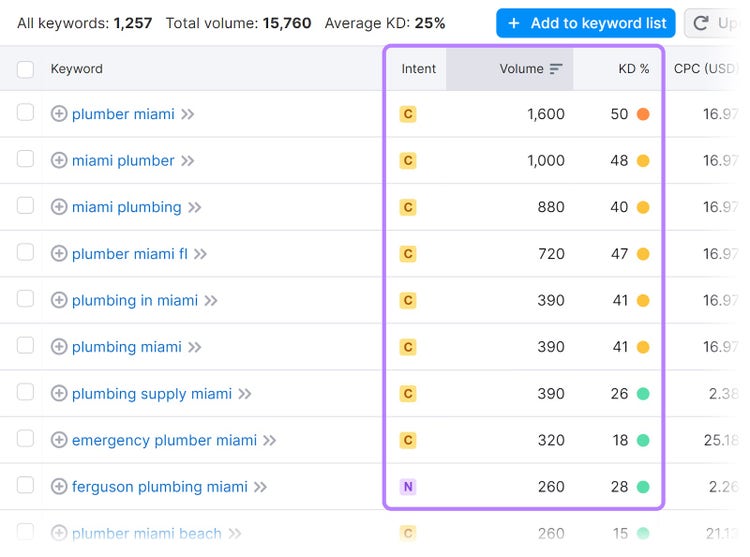
This means those keywords have commercial intent. And that indicates searchers are further into their buying journeys and comparing options before making a purchase decision.
In short, appearing in these types of local search results can drive traffic from visitors who are likely to become customers. Which translates to revenue potential.
9 Tips for Improving Local On-Page SEO
Follow our on-page local SEO checklist below to potentially gain visibility in local searches.
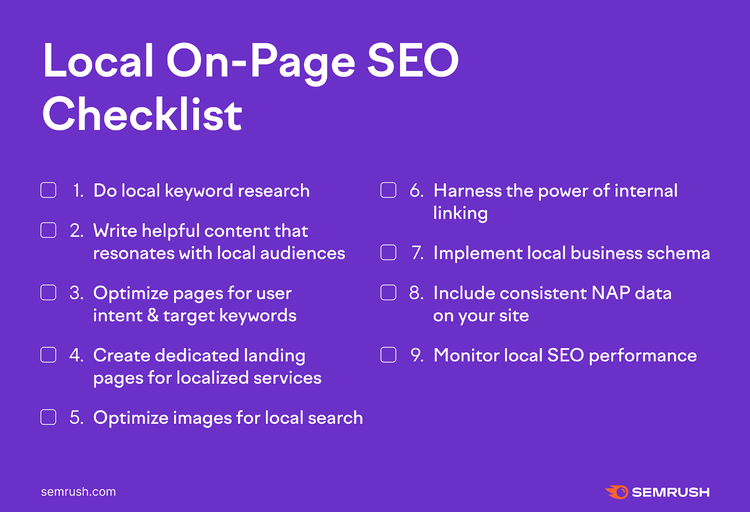
Now, let’s delve into each tip:
1. Do Local Keyword Research
Local keyword research involves discovering search terms nearby audiences are searching. So you can target relevant terms in your content.
Use our keyword tool to do your local keyword research.
Enter a term that’s relevant to your business and location. And click “Search.”
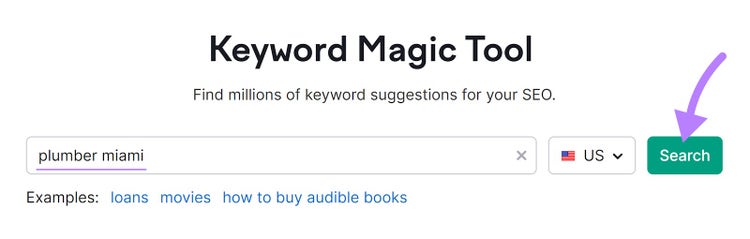
In this case, you’ll get a broad list of keywords people use when looking up plumbers in Miami.
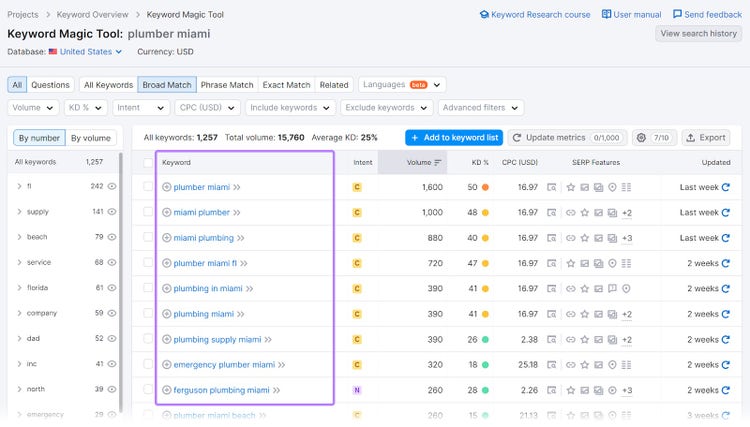
The tool shows you key metrics that provide insights into how each keyword performs in search.
- Intent: There are four categories of search intent—informational (I), navigational (N), commercial (C), and transactional (T)
- Volume: How many searches (on average) a specific keyword gets each month
- Keyword difficulty (KD %): How hard it is to rank highly on search engine results pages (SERPs) for a given keyword
How can you use these metrics to choose the right terms?
First, consider that the higher a keyword’s search volume, the more traffic it could drive to your site.
But you may not be able to feasibly rank for that term if it also has a high difficulty score. Especially if you have a new website.
So, you might consider starting with low-volume, easy-to-rank-for keywords to start generating site traffic. And move on to more competitive, high-volume ones after you’ve begun to establish a presence.
Just make sure to only target keywords relevant to your business and location(s). You’re more likely to rank for them. And they’re more likely to bring in the right potential customers.
For instance, avoid creating a page that targets “emergency plumbing service new york city” if you don’t offer emergency plumbing help or serve that area.
You’re unlikely to appear in search results. And if you do, users will leave your site disappointed.
Tip
Learn more about finding and choosing the right keywords for SEO in our comprehensive guide.
Perform Keyword Research
with the Keyword Tool
2. Write Helpful Content That Resonates with Local Audiences
Publishing site content tailored to your local audience signals that you’re a trustworthy source they can turn to. Making them more likely to choose you over your competitors.
Here are some helpful ideas for publishing great localized content:
- Emphasize local relevance: Write about topics relevant to your location and highlight where you offer services if applicable
- Write for your audience first: Answer questions local users care about, address their pain points, and provide solutions to their specific problems
- Highlight your expertise: Make your knowledge of the topic and local issues apparent
- Create readable content: Use images, lists, and short sentences and paragraphs to make your content easy to read
- Publish original content: Provide unique information your local competitors haven’t covered in their content
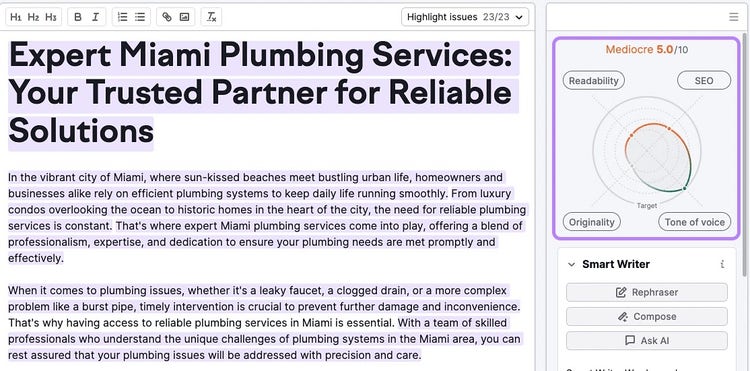
SEO Writing Assistant can help you polish your content to meet some of these criteria. Like checking if your copy is original and easy to read.
3. Optimize Pages for User Intent and Target Keywords
Content that considers each keyword’s intent and focuses on providing truly useful information is more likely to rank. And contribute to your larger business goals.
So, focus on what searchers care about. And incorporate keywords naturally—don’t force them. Because using keywords too many times risks triggering Google’s spam filters.
Here are some general best practices for where to include local keywords:
- URL: Create a short URL slug (the end part of the URL) that contains your primary keyword
- Headline: Include your primary keyword and format it as an H1
- Title tag (the HTML that specifies a page’s title): Feature your primary keyword, keep it between 50 and 60 characters, and mention your location where relevant
- Meta description (the HTML that provides a brief page summary): Include local keywords, keep it to 105 characters or fewer, and add a call to action (CTA)
- The first paragraph of your content: Include your target keyword in the first paragraph. Because it’s a great place to indicate which location the content is relevant to.
- Subheadings: Mention your local keywords in subheadings where it makes sense to include them
- Image alt text: Write descriptive text illustrating the image, including local keywords if they fit in naturally
- Throughout the content: Add keywords in a way that sounds natural to readers and genuinely helps them understand the topic
Use Semrush’s On Page SEO Checker to assess page-level optimization in your published content.
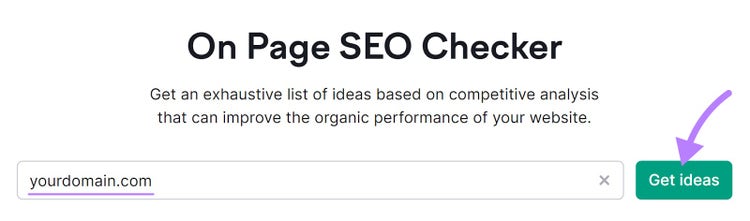
Enter your domain and click “Get ideas.”
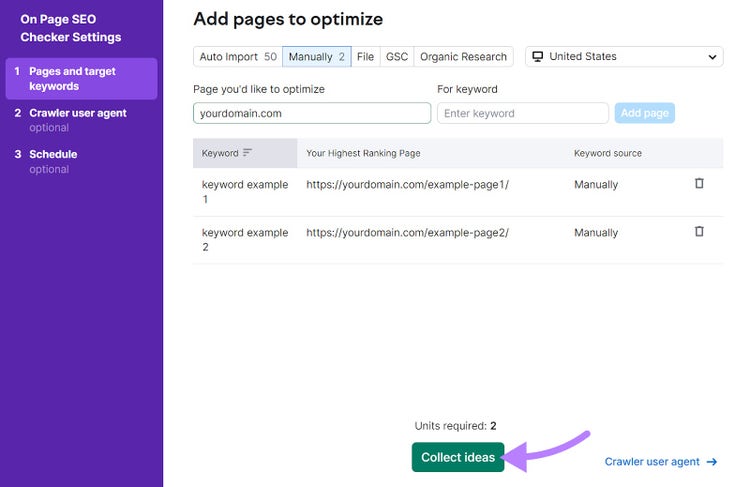
Select the location (down to the city) you’re focused on, add your local keywords, and click “Collect ideas.”
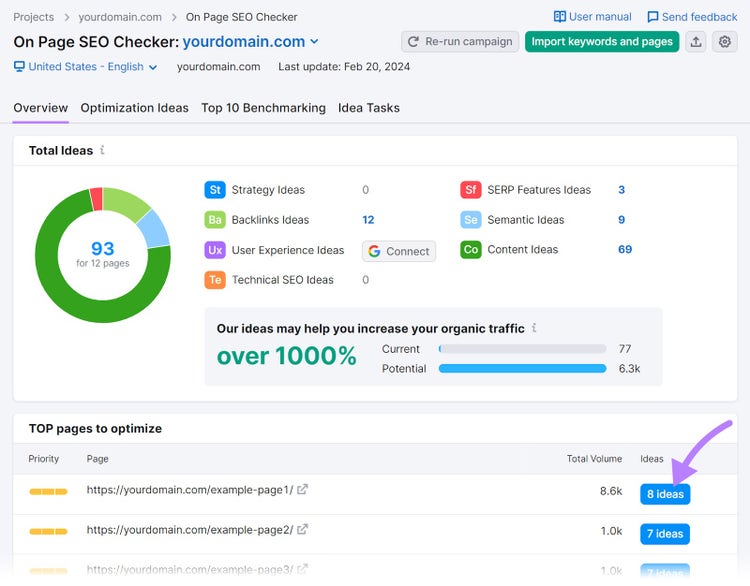
The tool will generate ideas on how you can enhance each page. Click the “# ideas” button next to one of the pages under “Top pages to optimize.”
In the “Content” section, you’ll see a list of recommendations. And an overview of things you’re doing well.
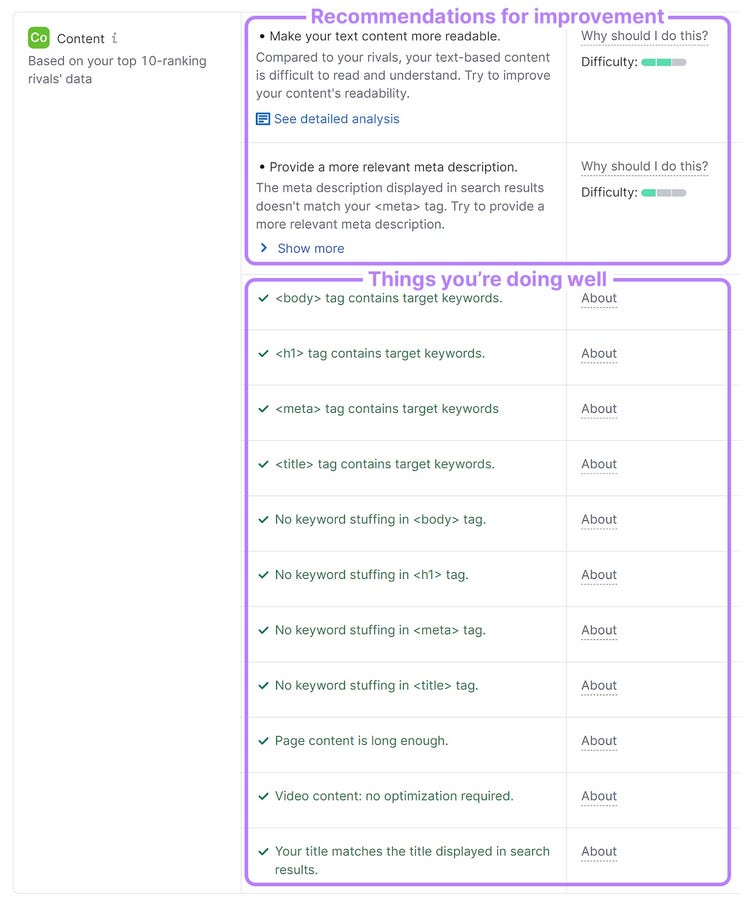
Implement the recommendations, and you’ll be one step closer to ranking higher for your local keywords.
Get Optimization Ideas
with the On Page SEO Checker
4. Create Dedicated Landing Pages for Localized Services
Landing pages that include local search terms and are specific to the areas you serve can improve your visibility among local audiences. And help persuade them to do business with you.
Going back to the Miami plumbing business example, those landing pages could cover local search terms across different keyword clusters (groups of related search terms) like:
- New construction plumbing: “plumbing contractors new construction miami,” “new home plumbing near me,” and “miami new construction plumbing”
- Commercial plumbing: “commercial plumbing company miami” and “emergency commercial plumbing miami”
- Gas system plumbing: “emergency gas leak repair miami”
For example, here’s a landing page from a business focused on new construction plumbing services in Miami:

If you serve multiple locations, creating landing pages for each location may help you rank for even more search terms.
Pro tip
Use Landing Page Builder to easily create and publish landing pages at scale. No coding experience required.
5. Optimize Images for Local Search
Using image SEO helps your visuals drive more organic traffic. And it works at the local level.
Which you can see in these image results on Google:
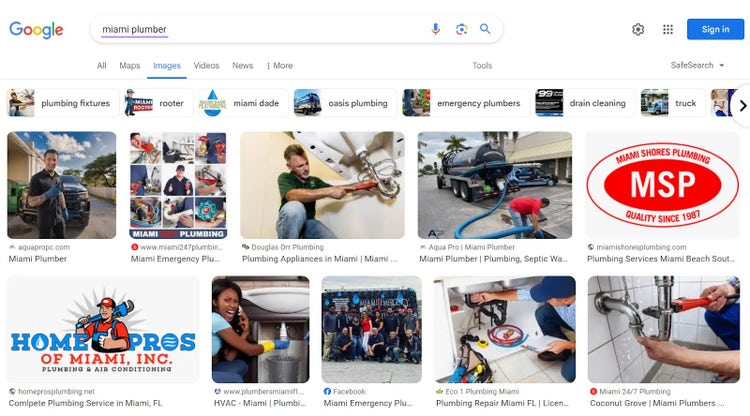
How do you optimize images for local search?
Here’s what you need to do:
- Write descriptive alt text: Include locally relevant keywords (or even just the location) in alt text when they fit in naturally (e.g., “a plumber fixing a leaky kitchen sink in a Miami home” or “plumbers working on a new construction site in Miami”)
- Properly name your image files: Give your images descriptive names (e.g., “miami-plumber-unclogging-drain.jpg”) instead of generic file names (e.g., “img44366.jpg”). But don’t try to force keywords.
Doing this helps search engines understand what your images are about. And that makes them more likely to appear in traditional and image search results.
Tip
Compress large files to prevent your site from loading slowly and negatively impacting rankings. Google recommends keeping the image size below 5 MB.
6. Harness the Power of Internal Linking
Internal links are hyperlinks that connect different pages of your website. Which helps users to navigate your site and search engines to understand your site’s structure.
There are two main types of internal links:
- Navigational: Links in your website’s menu bar, footer, and sidebar
- Contextual: Links within the content on your site
Including navigational links that make it easy to find area-specific content promotes a good user experience. Because it helps users find what they’re looking for.
Here’s an example:
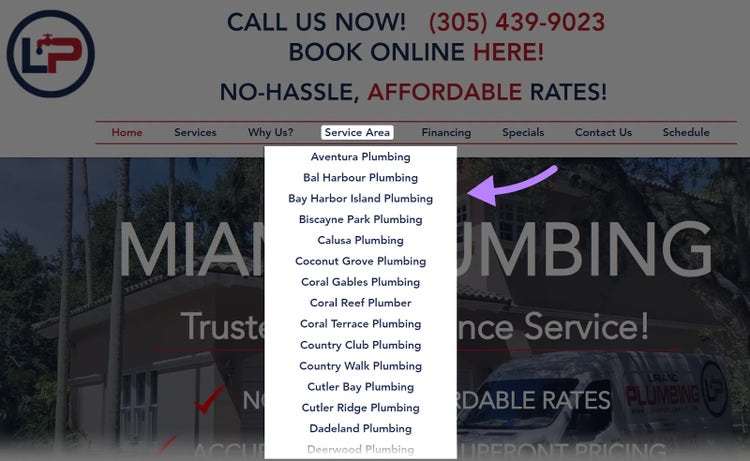
Once you have navigational links in place, think about how to implement contextual internal links.
For example, you’ll likely want to interlink between all the pages on your site that are related to Aventura, Florida.
And do so using logical anchor text that indicates what the linked page is about.
For instance, you might use the anchor text “plumbers in Aventura” when linking to that location-specific landing page.
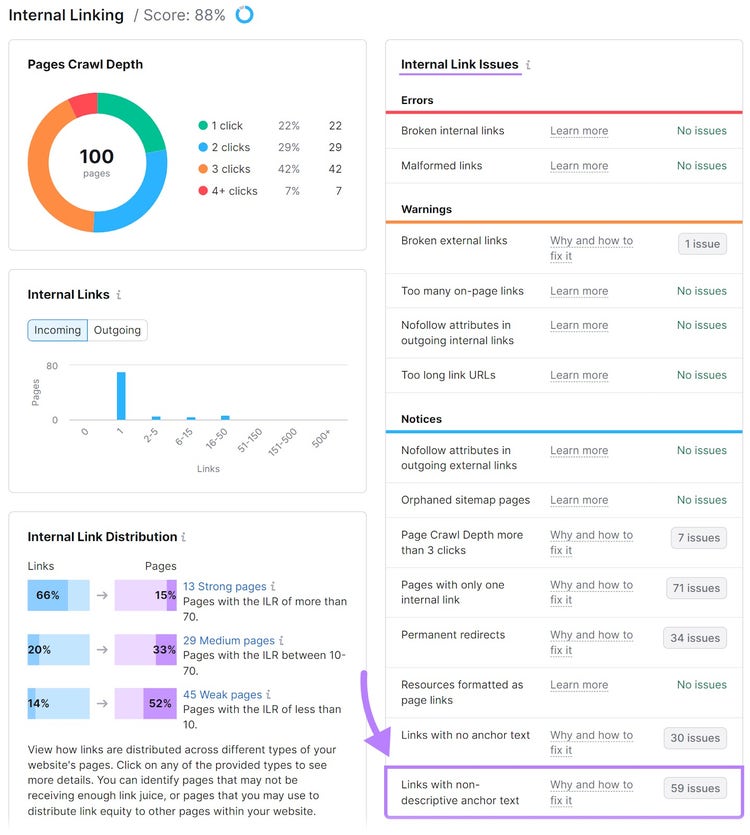
Then, use Site Audit to identify any internal linking mistakes.
First, set up the tool with these configuration instructions.
Once your audit is complete, click “View details” in the “Internal Linking” section.
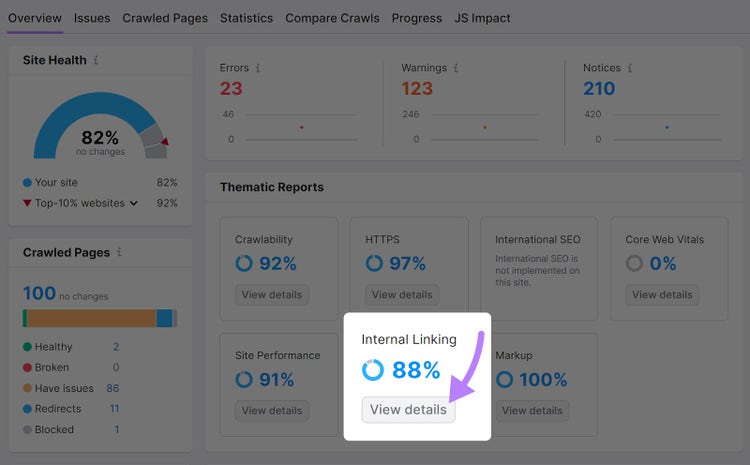
On the right, you’ll see a list of potential issues with detailed explanations on how to fix them.
For example, “Links with non-descriptive anchor text” will show which anchor text needs optimizing.
7. Implement Local Business Schema
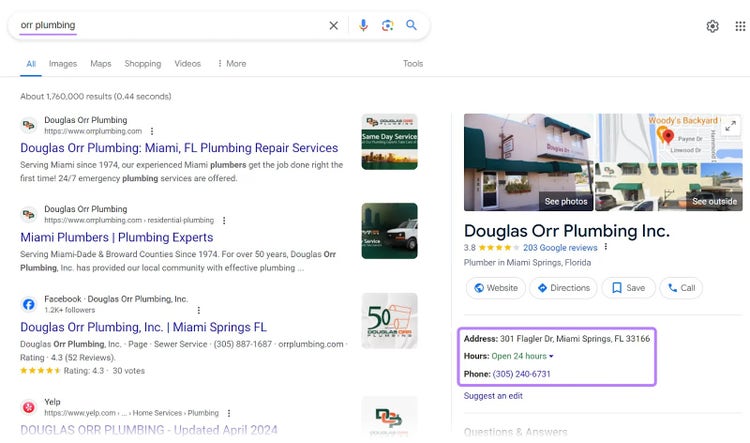
Local schema markup is code you add to your site to help search engines better understand your location-specific content. And it can display that information in search results.
For example, you can see the address, operating hours, and phone number in the result below.
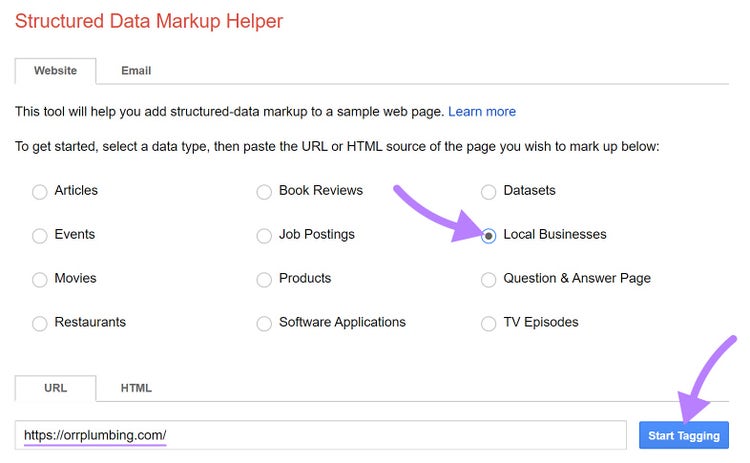
With Google’s Structured Data Markup Helper, you can easily create the code to add to your site.
Go to the tool and select “Local Businesses.”
Then, enter your site’s URL and click “Start Tagging.”
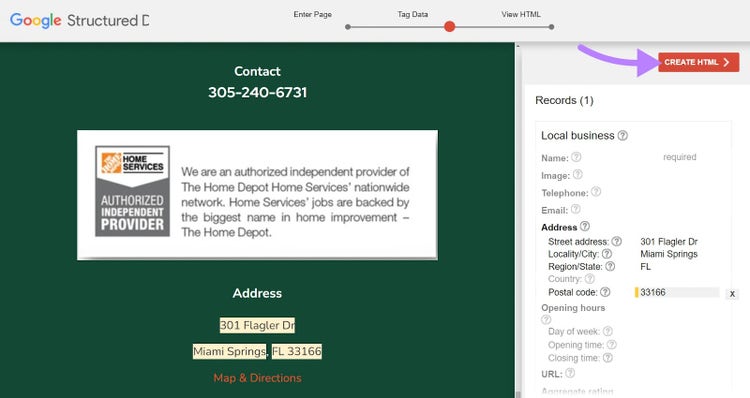
On the right-hand side, you’ll see a list of elements you can specify.
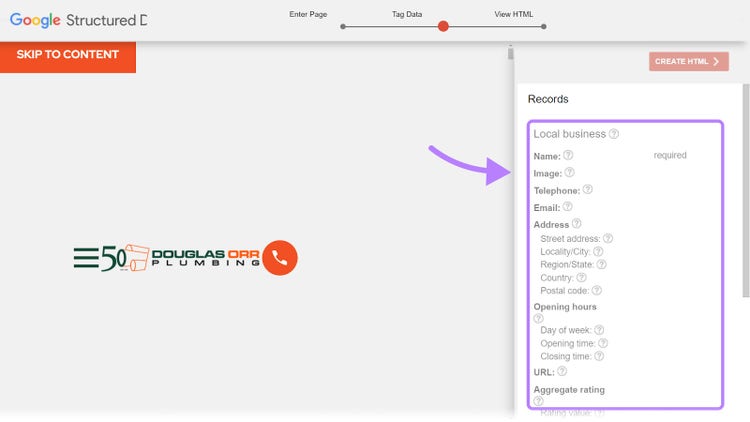
Go through the list by selecting different page elements and clarifying which category it addresses.
When you’re done, click “Create HTML.”
Click “Download.”
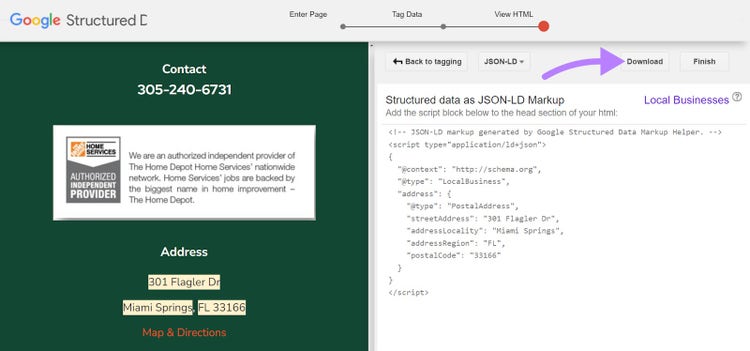
Add the code in the <head> section of the appropriate page.
Then, verify that the code was implemented correctly by running Site Audit. And look for errors in the “Markup” thematic report.
8. Including NAP Data and Ensuring Consistency
Name, address, and phone number (NAP) citations—sometimes called NAP+W to also include your website—mention key information about your business. And Google is more likely to deem your business trustworthy if they’re consistent.
Having the right NAP data on your site is especially important because directories like Yelp can take this information from your site to automatically create a listing for you—like this one:
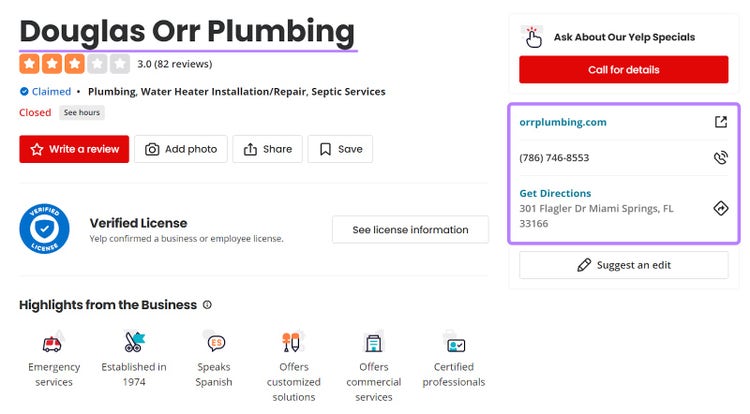
That means having one wrong digit in your phone number could lead to discrepancies in your listings. Which makes you appear less reputable and can lead to losing out on potential customers.
Try to include the NAP data in your header, footer, and contact page as text—not an image. So search engines can easily understand it.
Pro tip
Use Semrush’s Listing Management to manage your local business presence across online directories. The tool will find all your listings and distribute the right NAP information automatically.
9. Monitor Local SEO Performance
Monitoring your local search rankings will help you understand what kinds of pages perform best. So you know which pages to replicate and which ones might need extra attention.
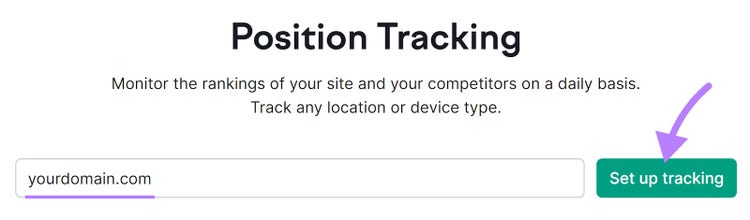
Semrush’s Position Tracking tool lets you do that easily and automatically.
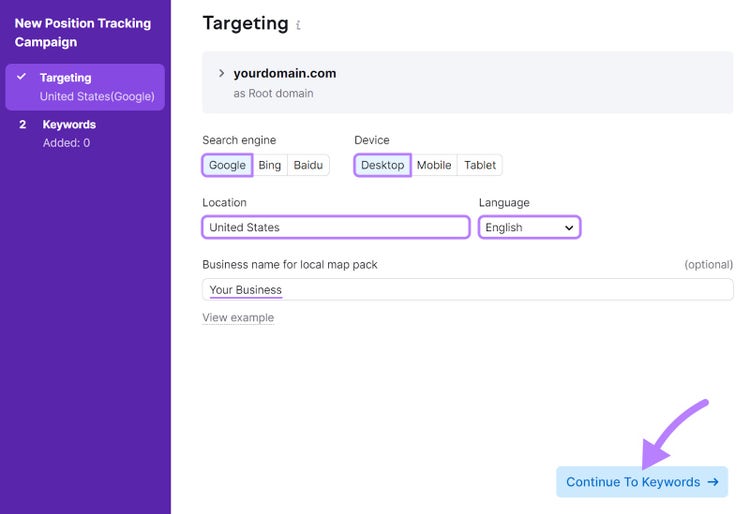
Enter your domain and click “Set up tracking.”
Choose a search engine, device, location, and language. And enter your business name for tracking local map pack (the SERP section featuring a map and a few local business listings) performance.
Click “Continue To Keywords.”
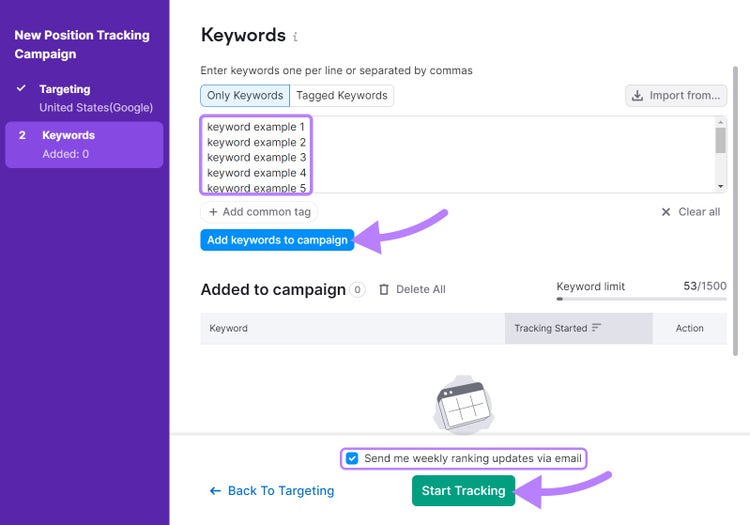
Next, enter your local keywords and click “Add keywords to campaign.”
Tick the box to receive weekly ranking updates via email if you wish, and then click “Start Tracking.”
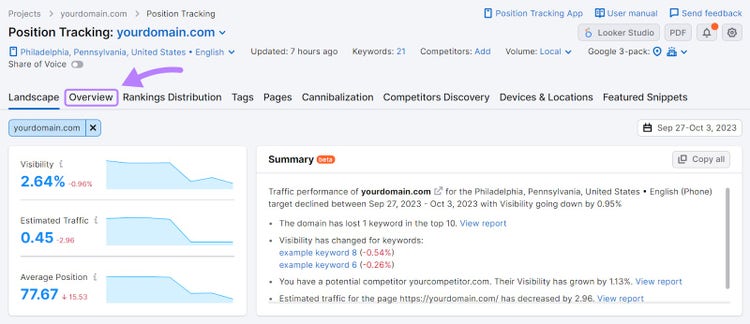
When the tool is ready, click the “Overview” tab in the navigation bar.
Scroll down to “Rankings Overview” to see a list of where you appear for your chosen local keywords.
You can easily see your current rankings compared to your rankings from the previous period. And which page ranks for each keyword.
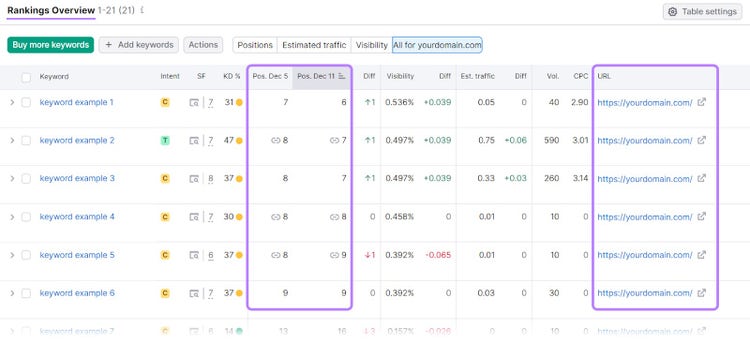
You’ll be able to adjust your local on-page SEO efforts based on the changes you see—both good and bad.
Track Your Rankings
with the Position Tracking Tool
Drive Search Results with Local On-Page SEO
Implementing the above local on-page SEO tips can help local businesses increase their ranking potential.
And it will be much easier to keep an eye on all the moving parts with the right tools.
Sign up for a free Semrush account to start improving your local SEO results.
Access 55+ Tools
with a Free Semrush Account

Aleksandra is an SEO consultant with more than 5 years of in-house experience in SEO and partner marketing. Her main specialties are content writing and link building.

Tells Google to show you more from Semrush in AI, Search, and Discover.
Table of contents
- What Is Local On-Page SEO?
- Why On-Page SEO Matters for Local Businesses
- 9 Tips for Improving Local On-Page SEO
- 1. Do Local Keyword Research
- 2. Write Helpful Content That Resonates with Local Audiences
- 3. Optimize Pages for User Intent and Target Keywords
- 4. Create Dedicated Landing Pages for Localized Services
- 5. Optimize Images for Local Search
- 6. Harness the Power of Internal Linking
- 7. Implement Local Business Schema
- 8. Including NAP Data and Ensuring Consistency
- 9. Monitor Local SEO Performance
- Drive Search Results with Local On-Page SEO