
Rankings alone don’t tell you how much visibility your brand is actually capturing in search.
You could rank for thousands of keywords and still miss a large portion of your market’s search demand.
That’s why many marketers track SEO share of voice alongside rankings and traffic.
In this guide, we’ll show you how to measure SEO share of voice in Semrush across traditional SEO, local SEO, and AI search.
What is SEO share of voice?
SEO share of voice (SoV) measures how much organic search visibility your brand captures compared to competitors.
It shows the percentage of estimated organic traffic (across a defined set of keywords) that your site earns versus other ranking sites.
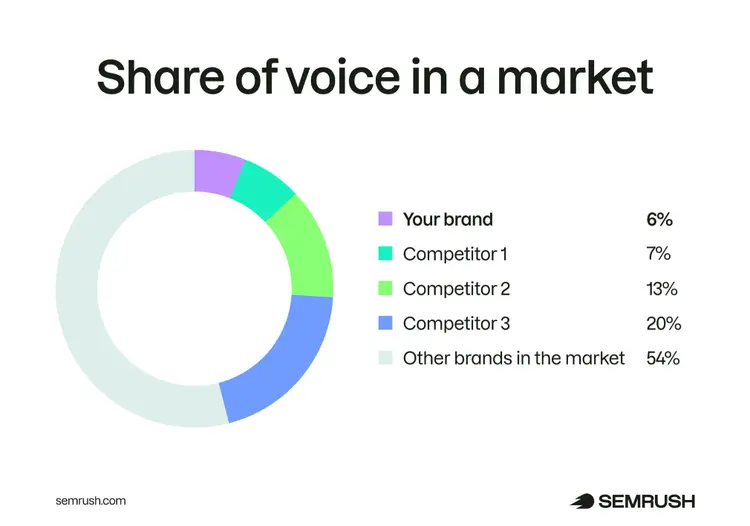
For example, if your tracked keywords generate an estimated 100,000 clicks per month and your site captures 6,000, your share of voice would be 6%.
Semrush offers multiple share of voice tools to measure your visibility across traditional SEO, local SEO, and AI search.
We’ll cover these later in the article.
Why does SEO share of voice matter?
SEO share of voice helps you understand how visible your brand is in search compared to competitors based on actual traffic potential.
That’s important because simpler metrics (like total keyword rankings or keywords in top positions) can be misleading.
Those counts treat a keyword with 10 monthly searches the same as one with 100,000.
So, you could rank for thousands of keywords and still capture only a small portion of your market’s total search demand.
Share of voice accounts for search volume, which makes it a stronger indicator of your visibility across the real demand in your market.
It helps you:
- Understand how much of your market’s search demand you own compared to competitors
- Identify gaps where competitors are capturing more high-value traffic
- Measure the impact of your SEO efforts over time
How to measure SEO share of voice with Semrush
Semrush offers multiple tools to measure your visibility across traditional SEO, local SEO, and AI search.
These include:
- Position Tracking: for measuring SEO share of voice based on search visibility and keyword rankings
- Map Rank Tracker: for measuring local SEO share of voice in map results
- AI Visibility Toolkit: for measuring AI share of voice across AI search platforms
Let’s go over each one.
1. Measuring SEO share of voice in Position Tracking
Set up Semrush’s Position Tracking tool to measure SEO share of voice.
Note: To measure your SEO share of voice with Position Tracking requires an Advanced subscription to Semrush One or a Business subscription to the SEO Toolkit.
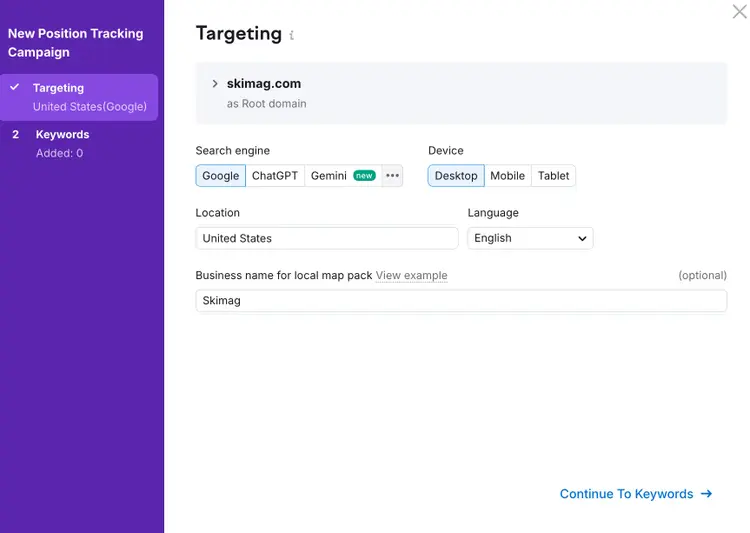
First, create a project for your site by clicking “+ Create project” and add:
- The domain, subdomain, folder, or URL you want to track
- Your target search engine
- Your chosen device type (desktop or mobile)
- Your location (country, city, street, or ZIP code)
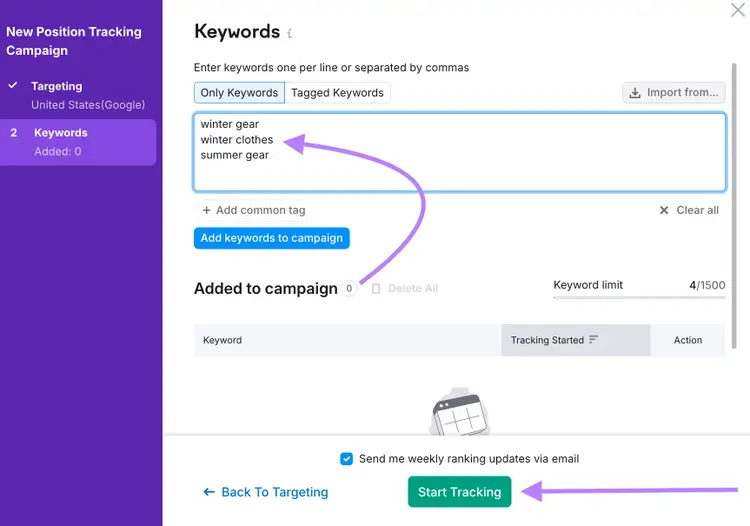
Then, add your keywords manually, by uploading a file, by importing from Google Analytics or Google Search Console, or using Semrush’s suggestions.
Click “Start Tracking.”
In the “Overview” tab, select “Share of Voice” above the chart to monitor your domain’s daily SoV percentage over time.
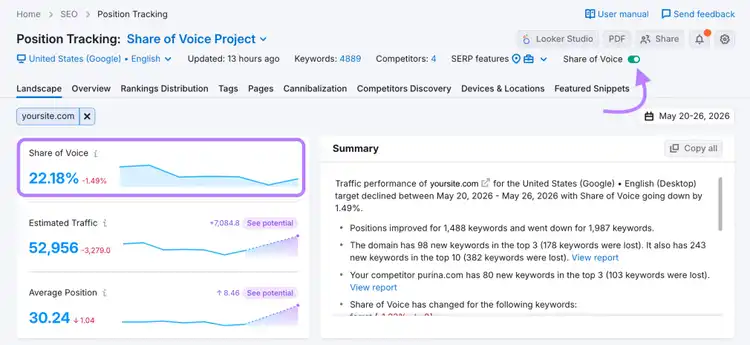
Once tracking is active, add competitors to the “Overview” tab to compare your share of voice against theirs.
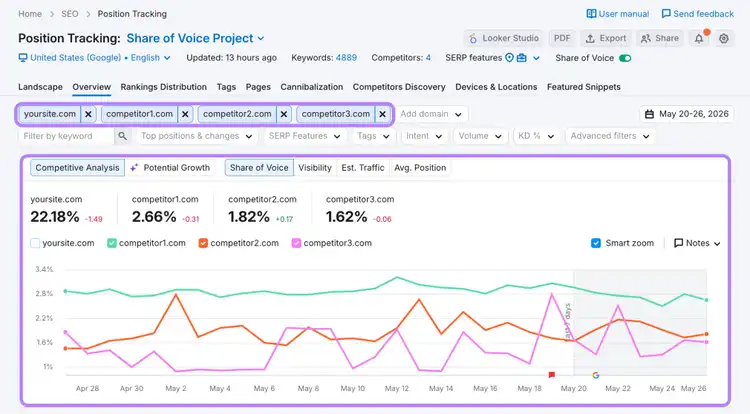
For raw data or deeper analysis, use the “Export” button to download keywords, rankings, and Share of Voice values in CSV, XLSX, or Google Sheets formats.
Tips for getting more from Position Tracking
Once you’re monitoring your share of voice in Semrush, here’s how to get better insights and reports:
Use keyword tags
Use tags to compare your share of voice across different search themes.
In this example, the brand Amerisleep tracks two keyword groups: “bed sizes” and “mattress differences ” over the course of a month:
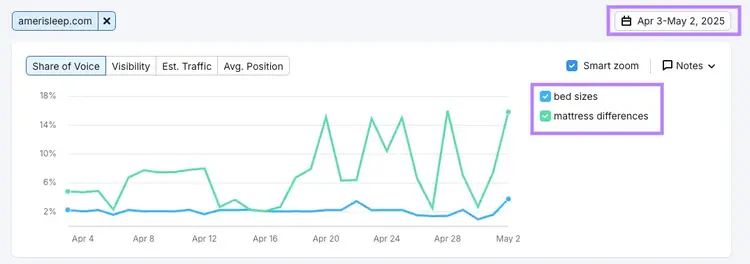
The chart shows that Amerisleep captures much more visibility for “mattress differences” than for “bed sizes.”
Hover over the chart to see the exact share of voice values for each tag.
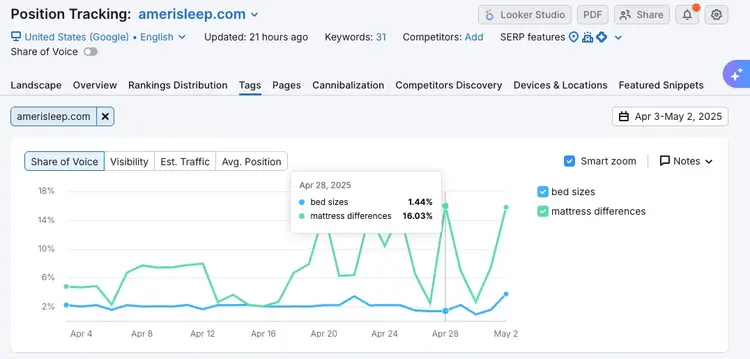
If both topics are important to your business, this gap highlights an opportunity to improve your visibility with new content or refreshed pages.
Use multi-targeting across locations
If you operate in multiple areas, track SoV across each one within your Position Tracking campaign.
Your overall share of voice might look solid, but there could be weak spots in a specific region.
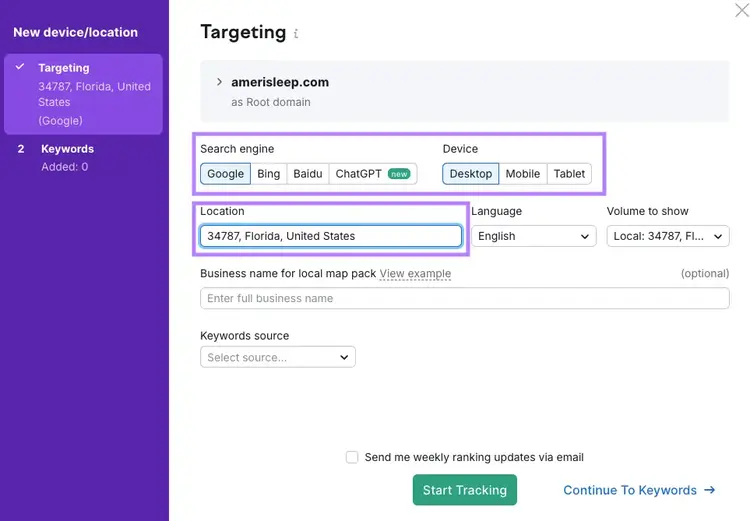
Open the target selector at the top of the report and click “+ Add new target.”
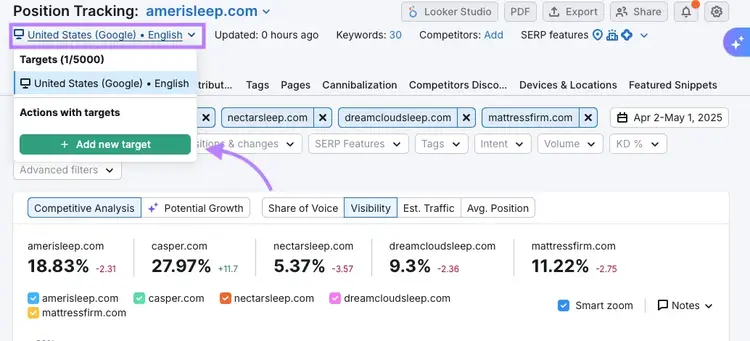
This takes you back to the setup wizard, where you can choose a different location and device type.
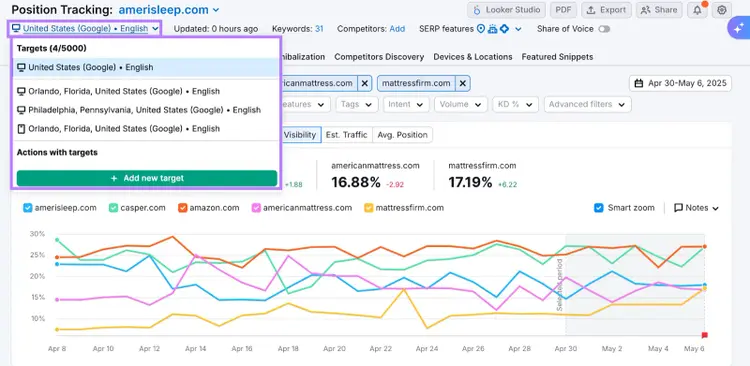
Once your targets are set up, you can switch between them from the “Overview” tab.
You can also compare targets in the “Devices & Locations” tab.
Note: Share of voice isn’t available for campaigns tracking visibility in ChatGPT search.
Keep your keyword set updated
Your tracked keywords should evolve alongside your business.
As you launch new campaigns or expand your product line, update your keyword set to reflect those changes.
Review your keywords every few months to keep your share of voice data accurate and actionable.
Automate SEO share of voice reporting
Simplify reporting by scheduling recurring reports on SEO share of voice straight from Position Tracking.
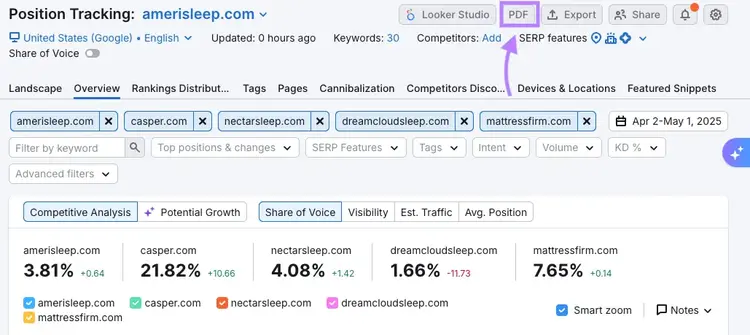
Click the “PDF” button at the top to generate a report.
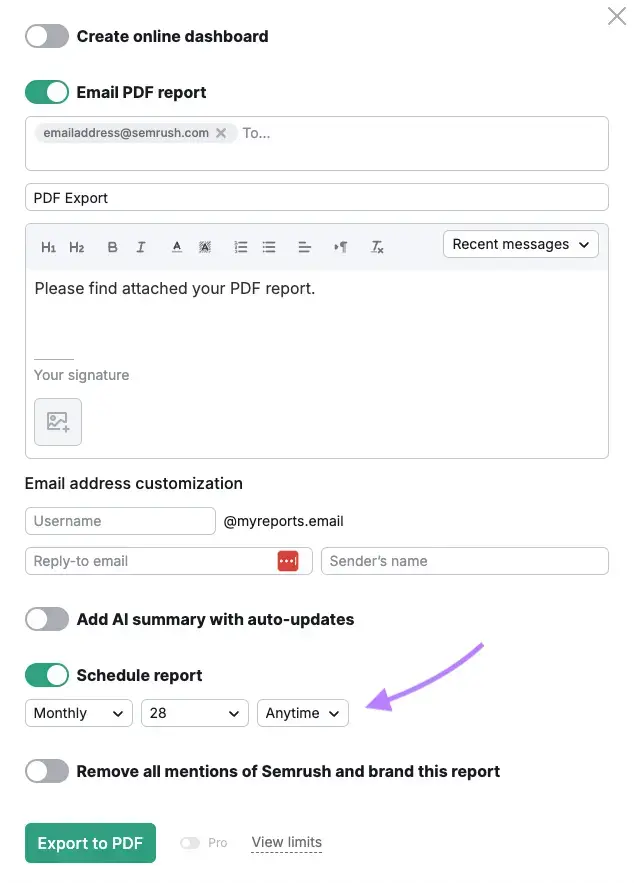
From there, set the email recipients, frequency (daily, weekly, monthly), and delivery day.
Or, use the My Reports tool to build your own report with drag-and-drop widgets.
To include share of voice data:
- Click the widget icon (pie chart symbol)
- Choose “Position Tracking” drop-down
- Drag the “Trend” widget into your report
- Switch the “Chart Type” to “Share of Voice”
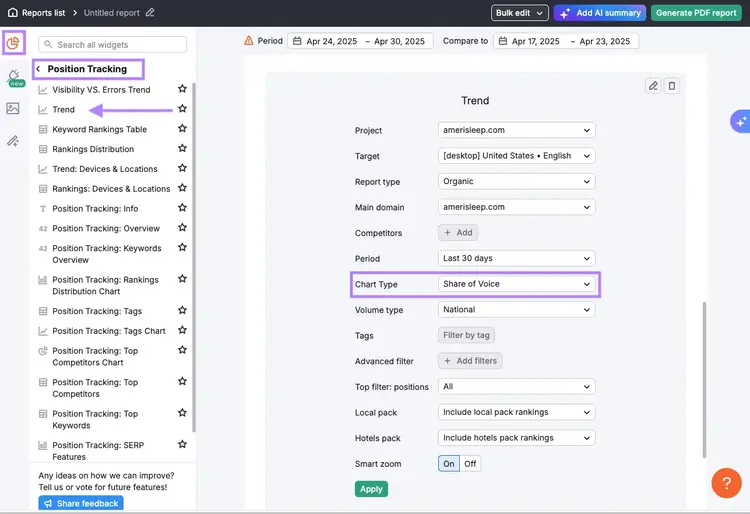
Once your report is ready, click “Generate PDF” to schedule automatic delivery to clients or teammates.
2. Measuring local SEO share of voice in Map Rank Tracker
Use the Map Rank Tracker within Semrush’s Local Toolkit to measure how visible your business is in local map results compared to nearby competitors.
It defines share of voice as the share of the local search market you get compared to your competitors.
The tool tracks your presence in local map results and compares your visibility to that of nearby competitors, which is especially useful for businesses targeting highly specific areas.
Start by creating a campaign and adding:
- Your business name and location
- Your target keywords
- Your target map area and grid size
- Your preferred scan schedule
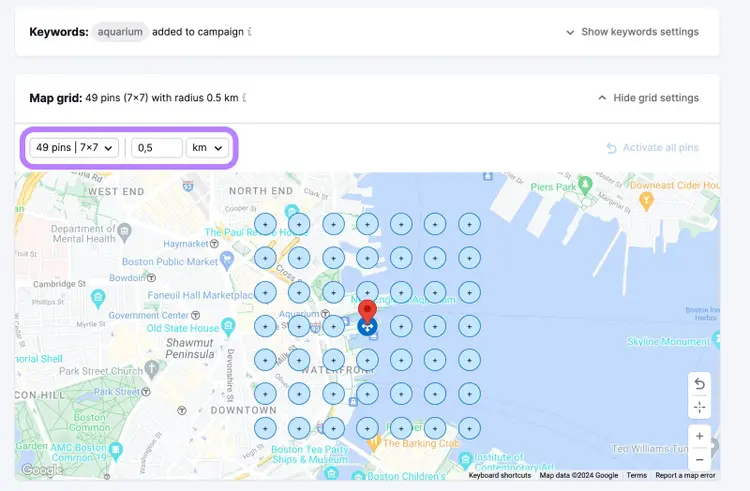
Once your campaign is running, the tool will generate a heatmap report showing your rankings across different map pins in your target area.
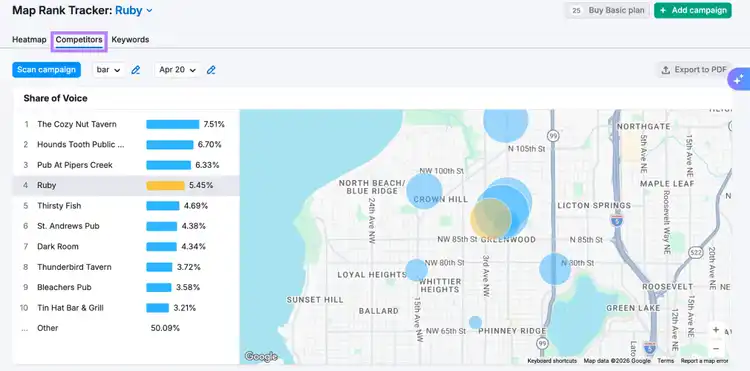
You can view your share of voice and competitor comparisons in the “Competitors” tab on a keyword-by-keyword basis.
The “Keywords” tab shows an overview of your share of voice, average rankings, and ranking trends across all your tracked keywords.
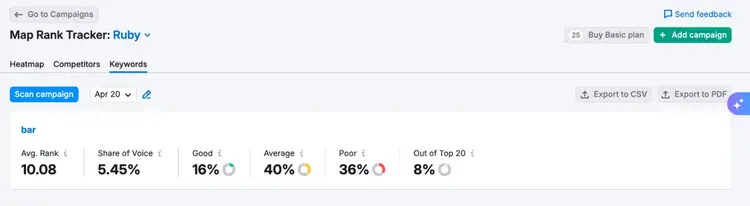
Map Rank Tracker defines share of voice as a weighted visibility metric based on how often your business appears in higher-ranking map positions compared to competitors.
For reporting or further analysis, you can export Map Rank Tracker reports as a PDF or CSV.
3. Measuring AI search share of voice in AI Visibility Toolkit
Use the AI Visibility Toolkit to measure how often your brand appears in AI-generated answers compared to competitors.
Start by launching the AI Brand Performance report.
Enter your domain and click “Analyze.”

Once your report is ready, you’ll see:
- Sentiment analysis of your AI mentions (favorable vs general)
- A pie chart showing your share of voice compared to competitors
- A Share of Voice vs. Sentiment graph comparing how your brand’s positive visibility to the competition
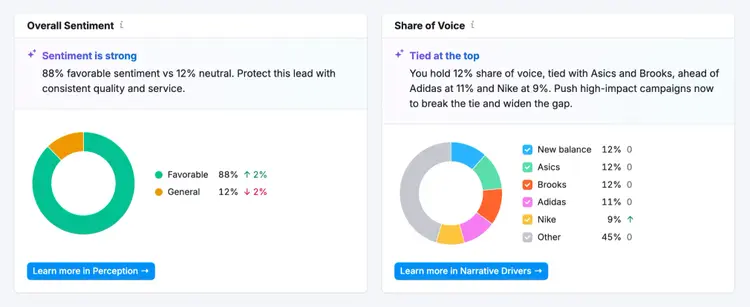
You’ll also see “Key Business Drivers” comparisons with your competitors, highlighting who has the most share of mentions for relevant features and qualities.
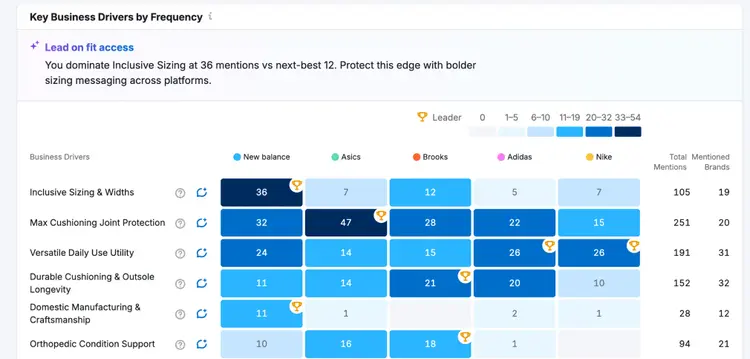
Use these reports to monitor your visibility across AI platforms and identify areas where competitors are appearing more often than you.
Further Reading:How to Measure AI Share of Voice Using Semrush
Use Semrush share of voice metrics to track real impact
Share of voice shows you how much real search demand your brand is capturing, which is better than tracking just rankings or keywords.
Whether you’re managing national SEO, local map results, or AI search visibility, these reports will show you where competitors are outperforming you and where you can grow your presence.
Ready to see how much of the search market you own?
CTA: Track your share of voice with a free trial of Semrush One
Frequently asked questions about SEO share of voice
1. How does Semrush calculate SEO share of voice?
SEO share of voice is based on the estimated organic traffic your site receives from your tracked keywords compared to the total available organic traffic from those keywords.
This estimate takes into account keyword rankings, keyword search volume, SERP features, and expected click-through rates for each position.
2. What’s a good SEO share of voice percentage?
There’s no universal benchmark for a “good” share of voice percentage because it’s a comparative score that depends on your industry, competition, and keyword set.
In general, a higher share of voice means your brand captures more visibility and potential traffic within your market.
Instead of focusing on a specific number, monitor whether your share of voice is growing over time compared to your market competitors.
3. How is SEO share of voice different from share of search?
SEO share of voice measures your visibility across a defined keyword set based on rankings, search volume, and estimated traffic.
Share of search usually measures how often people search for your brand name compared to competitors.
In other words, share of voice focuses on search visibility, while share of search focuses on brand demand.
4. Can you track competitors’ share of voice in Semrush?
Yes. Semrush lets you compare your share of voice against competitors in tools like Position Tracking, Map Rank Tracker, and the AI Visibility Toolkit.
This helps you identify which competitors capture the most visibility for your target topics and locations.
5. How does Semrush calculate AI share of voice?
AI share of voice is based on how often your brand appears in AI-generated answers and how prominently it appears compared to competitors.
This includes factors like brand mentions, placement within responses, and topic visibility across AI platforms.
Brands that appear more frequently and more prominently in AI-generated answers tend to have a higher AI share of voice.

Luke has over ten years of experience in digital marketing, writing about SEO, AI search, and how to get the most out of Semrush. He spent years building Semrush‘s Knowledge Base, working directly with product teams to explain every tool and feature on the platform so marketers can find the right tools and do better work.
Luke Harsel
Luke leads content for Semrush‘s product-led growth team, creating guides and research that show marketers what‘s possible with Semrush‘s tools.

Tells Google to show you more from Semrush in AI, Search, and Discover.