
How To Create a Media Plan in 10 Steps
Ready to build your own media plan for a successful campaign?
Here is a ten-step process.
Media Planning Basics
Media planning means deciding how, when, and where to show your ads to a specific audience. Understanding the reason behind your plan helps you get better results. A media plan guides your entire advertising campaign.
Your media plan should include:
- Objectives
- Target audience
- Selection of media channels
- Resource allocation
- Scheduling strategy for each chosen media vehicle
We will discuss each of these in the instructions below.
Why Do You Need a Media Plan?
Media planning helps customers see your ads at the right time and place. It can also boost your campaign’s impact in a powerful way.
A traditional media plan helps you:
- Reach your target audience
- Determine when to publish ads
- Decide which media channels to use
- Pick the best frequency for ads
- Stay on budget
A strong media plan also helps you:
- Grow overall brand awareness
- Distribute resources in a cost-effective way
- Increase engagement with your audience
- Keep your marketing messages consistent
- Develop deeper insights into your audience
- Measure your media planning’s success
- Gain a competitive advantage

How to Create a Media Plan in 10 Steps
Below are 10 steps to create an effective media plan, whether you are a newcomer or a seasoned pro.
1. Define Campaign Goals and KPIs
To get results, start by clarifying what you want to achieve. Set your campaign goals and key performance metrics (KPIs) before selecting media or creating ads.
Align your campaign goals with your business objectives. Examples might include:
- Increase brand awareness from 25% to 40% among your target audience within six months
- Achieve a 30% rise in online sales of your main product in Q1 compared to the previous year
- Generate 400+ qualified leads for a product launch within six months of launch
Next, pick KPIs based on your objective.
- Example: If your focus is brand awareness, you might track impressions and ad impression share.
- If your focus is online sales, you might track product reviews (earned media) and click-through rates leading to the product page.
- If your focus is generating leads, you might track cost-per-acquisition and click-through rates for demo ads.
Use these KPIs to see whether you are hitting your goals. Leave room in your media plan to shift tactics if your KPIs start to slip.
2. Identify Your Target Audience
Know who you want to reach before creating ads. Choose a specific target audience to reach people who are most likely to care about your product, service, or content.
Define this audience using details such as:
- Demographics (gender, age)
- Socioeconomics (education level, job status)
- Media affinity (preferred blogs, apps)
- Interests
- Other traits
Your media campaign could follow your company’s overall target audience, focus on a niche, or expand into a new market.
Use available tools to understand your audience better. Google Analytics 4 (GA4) has a free version that shows user traits like age, gender, and location.
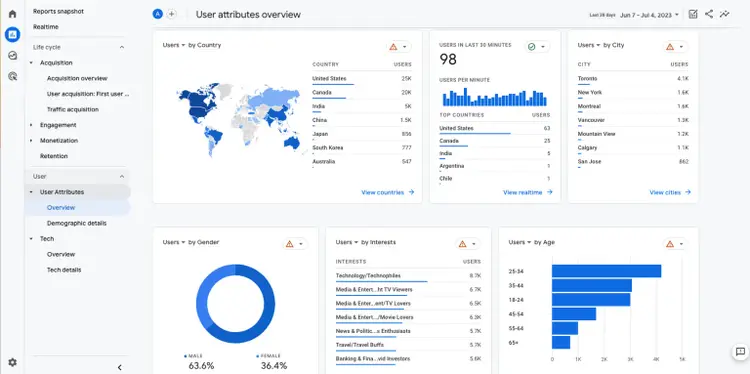
Credit: Destination British Columbia
Tools like Semrush’s Audience Intelligence can provide deeper insights into social consumer segments.
This tool offers nine sections of in-depth data for each audience, including demographics, socioeconomics, interests, and online habits.
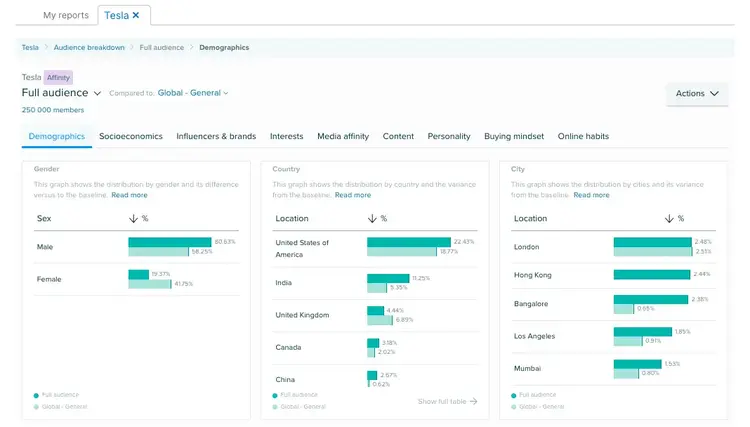
The app also compares these data points to national or global averages to spot trends.
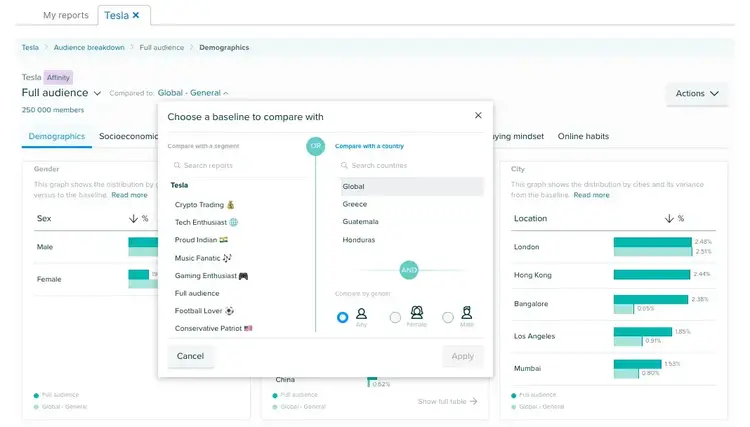
Try it in the Semrush App Center for clearer audience targets.
3. Perform Competitive Research
Studying your competition provides insights for outpacing them. Base your research on your objectives and KPIs. You might explore:
- Ad placements
- Average spend
- Audience segments
- Estimated impressions
- Media channels
- Media types
- Share of voice
If you plan to run a social media campaign, check the format your competitors use. Note the social platforms, posting days and times, hashtags, caption lengths, and presence of any influencers.
The AdClaritytool within Semrush’s Advertising Toolkitcan help you analyze your competitors’ campaigns and spot top-performing publishers, advertisers, ad networks, and agencies.
For example, search for a keyword linked to your product or service to see top ads and learn which audiences interacted most.
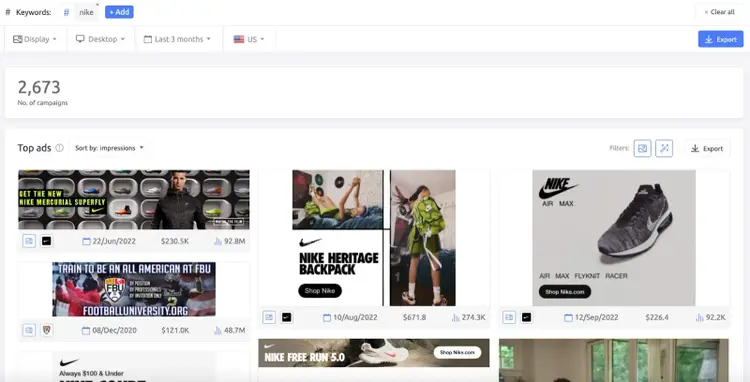
Assess social ad types and video placements to decide on ad creative and placement.
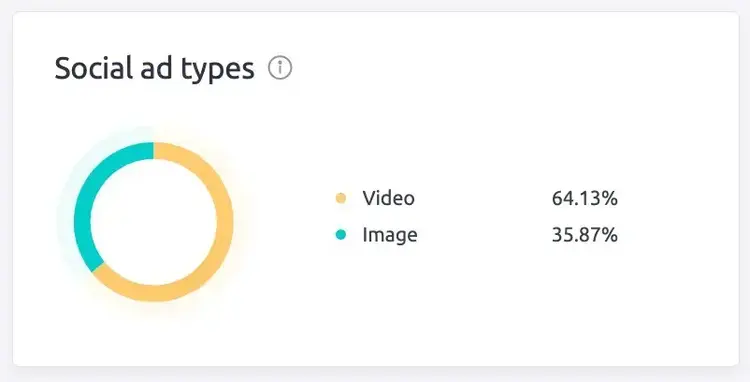
This data helps you outshine the competition.
4. Set a Budget
A precise budget helps you get strong results and make your ad spend work wisely. Budgeting can feel like guesswork, but solid data removes confusion.
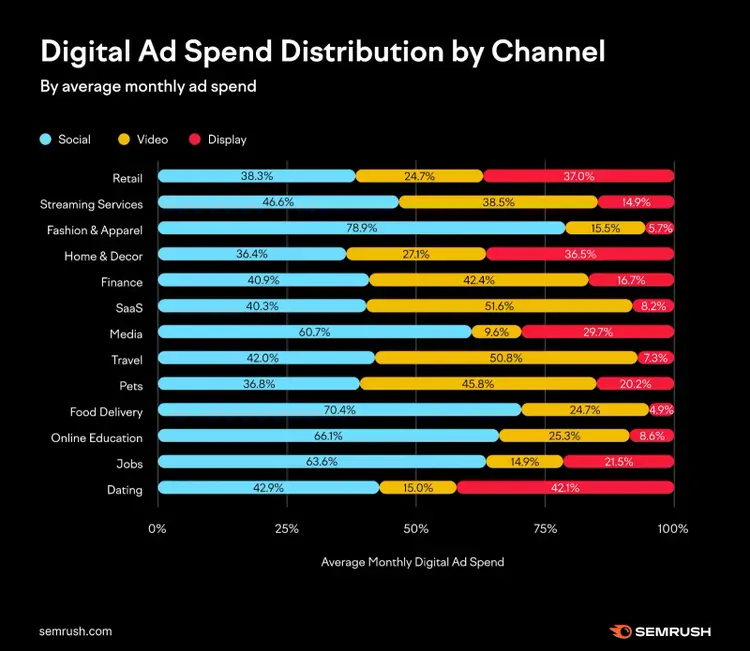
Check market trends to guide your choices. Semrush’s benchmark study can also provide clues on how others allocate budgets.
If you wonder which platforms deserve your spend, review the average monthly ad spend distribution.
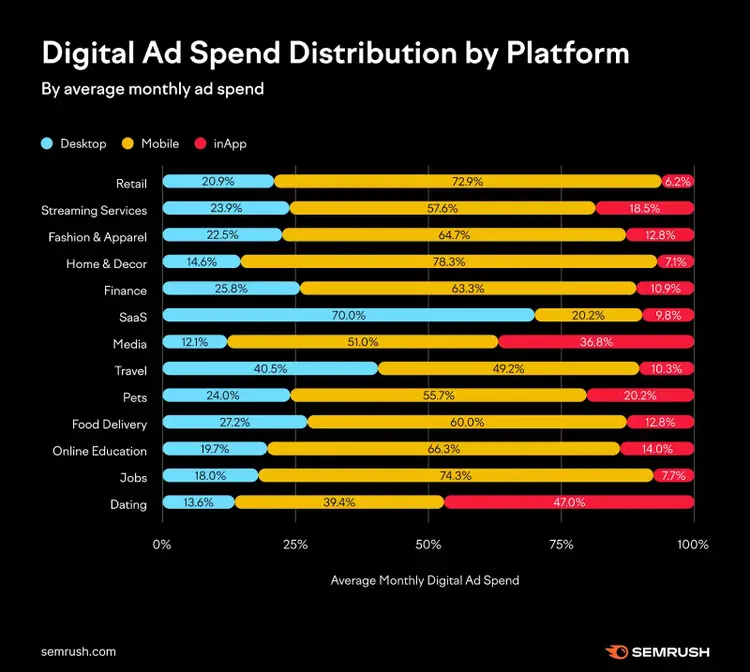
If you’re deciding how to split funds across channels, review distribution stats as well.
5. Determine Your Media Mix
Select the mix of media channels for your campaign and decide how much budget each will receive. Your earlier steps make this part simpler:
- Competitive research shows which media your rivals use.
- Benchmark data shows which platforms are cost-effective.
- Audience insights reveal which channels your audience prefers.
Combine these to find the best channels for your campaign. If you run a B2B webinar, your mix might be:
- Social media ads (60% of budget) on LinkedIn
- Online video ads (20% of budget) on YouTube
- Display ads (20% of budget) on B2B trade sites
Choose the channels that support your objectives, and allocate your ad budget based on the data.
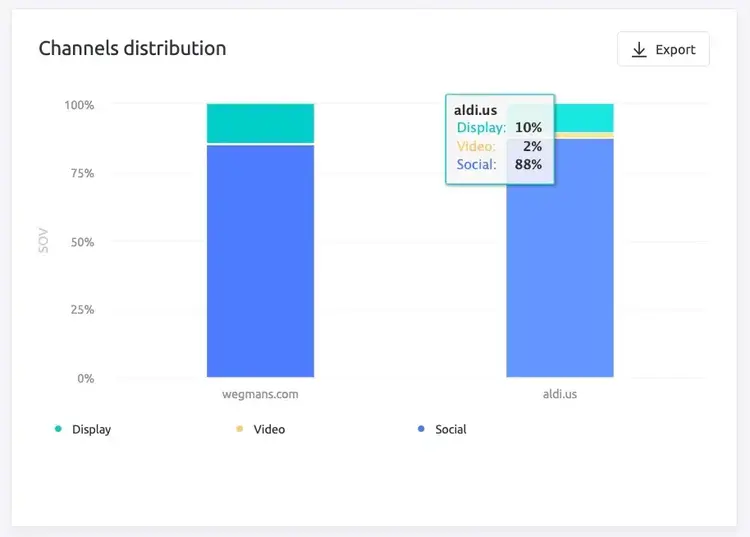
AdClarity’s Channels Distribution feature can show how display, video, and social ads are spread across your competitors’ domains.
6. Develop a Media Strategy
Shape your media strategy based on your industry and campaign goals. These steps can guide you:
- Pick your media assets. Platforms offer different ad formats, from banners to static graphics to videos. Choose ad formats that speak to your audience.
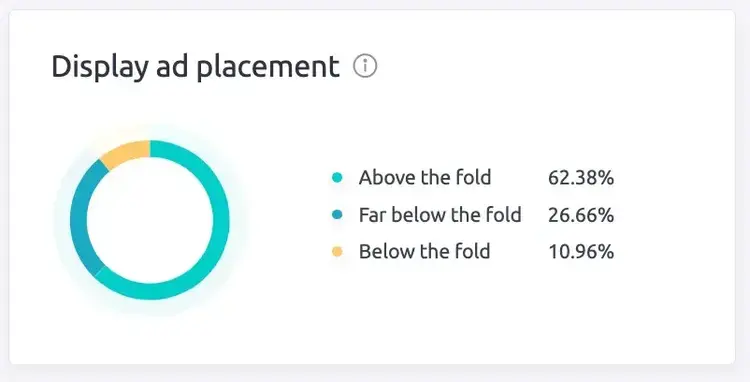
- Choose ad placement. Be selective about where you place ads. Lean on your earlier research for clues.
Pro Tip: Use AdClarity to study the placement and performance of ads on certain domains or apps, then compare results.
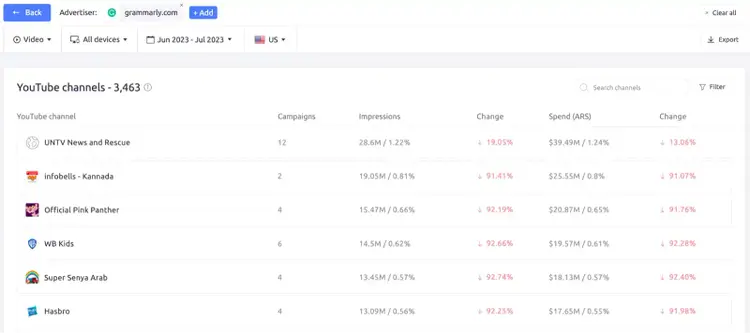
If you plan to run a YouTube ad, check top YouTube channels with AdClarity.
And if your ad is going on social media, the “Social networks” widget within AdClarity shows you the analysis of a single advertiser domain on the social channel.
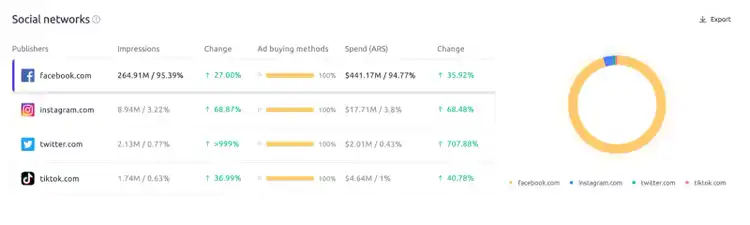
If you plan to run a social ad, look at the “Social networks” widget in AdClarity for an advertiser’s performance data.
- Decide on ad creative. Work with your copywriters and designers to produce content that resonates with your audience. Keep messaging consistent across channels. (Check out our copywriting tips for more information about messaging).
- Weigh the three media types (paid, owned, and earned). If you aim to increase customer reviews (earned media), create materials and messaging that prompt reviews.
7. Create a Media Schedule
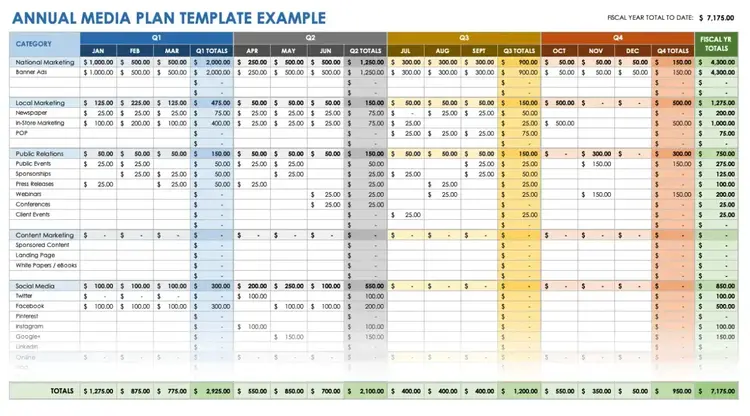
Set a timeline for your media plan. Know when your ad or campaign goes live and how long it will run. This period is often called the media flight. Assign a budget to that flight.
Use competitive data to spot the best times to run your campaign.
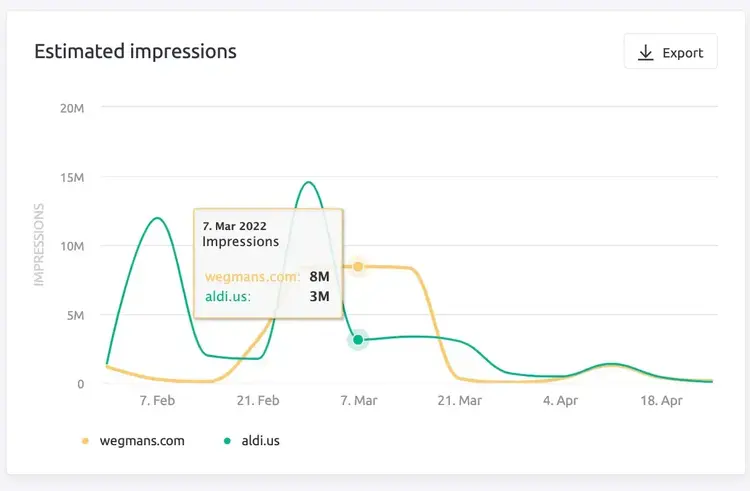
Your objectives will guide this decision. If your goal is 300 leads in three months, your flight should match that timeline, not stretch beyond it.
Decide how often your target audience should see your ad. Plan for the possibility of making changes.
Media Plan Example + Template Smartsheet offers free media plan templates, such as an annual media plan example.
8. Execute the Media Plan
Launch your campaigns on each platform. Schedule ads for the approved dates and times. Reaching this step likely took a lot of work. Take a moment to appreciate it.
9. Monitor and Optimize
When your campaign goes live, track its performance. Adjust as necessary—this might include frequency or messaging changes. Adaptability helps you succeed in a changing market.
A LinkedIn ad might perform well with a “Download here” call-to-action but not as well with “Get the guide.” If the data shows “Download here” performs better, pause the other version and shift the budget to the winning one.
If your data shows peak engagement on Wednesdays, shift more budget to that day. Adjusting your plan is not a failure—it means you are learning and getting closer to your objectives.
10. Measure Results and Adjust
Compare final results to the objectives and KPIs you set at the start. Review the data to see what resonated with your audience.
- Example Goal 1: Increase brand awareness from 25% to 40% over six months.
- Example Result 1: Achieved 39%, just shy of the 40% goal.
- Example Goal 2: Reach 30% growth in online sales within Q1.
- Example Result 2: Reached 45% growth, exceeding the goal by 15%.
Review top-performing elements and replicate them in future campaigns. Not all campaigns hit targets. If you missed your goals, look at the data, spot weaknesses, and adjust tactics next time. Every campaign yields insights about your audience.
Overcome Common Media Planning Challenges
Stay Current in a Changing Media Market
Media trends shift often. Social media is a good example. In 2005, Facebook sold its first ad. Less than two decades later, global social media ad spending reached about $230 billion, with future growth expected.
New ad formats arrive all the time, like YouTube Shorts or Instagram Stories. Stay alert to these changes by following media-related awards and reading industry newsletters (such as Marketing Brew).
Prevent Media Planning Burnout with Automation
Marketing can be draining. One Chartered Institute of Marketing survey found that 52% of marketers fear burnout. Combat this by defining clear responsibilities and using automation where you can.
Audience Intelligence tools help you gather deep audience research data in one place. Within minutes, you can find new audiences to target, and you can also research how they interact with competitors. Automation can simplify your workload.
Integrate Media Planning into Your Larger Marketing Plan
Don’t isolate your media planning team from other marketing efforts. Align your media plan with your overall marketing plan so they work together to reach business goals. Consistency across your marketing efforts helps you connect with your audience more effectively.
Create a Powerful Media Plan
You now have the tools to create a strong media plan that expands your audience reach, gives you an edge, and uses your budget wisely. The best next step is to start.
Each campaign teaches you more about what your audience values. Apply what you learn to each new effort for steady growth.
When you need more support, head to the Semrush App Center for resources.

Sonya Matejko is a writer, content marketer, and the founder of Nurtured Narratives, a feel-good storytelling company.

Tells Google to show you more from Semrush in AI, Search, and Discover.