
How to decide which AI search prompts to track
AI search platforms like ChatGPT, Perplexity, and Google AI Mode handle millions of queries a day, and which ones trigger a mention of your brand is far from obvious. The same question can be phrased dozens of ways, and each phrasing can produce a different answer.
That makes prompt selection one of the first practical challenges of any AI visibility program. Track too many prompts and the data gets too noisy to act on. Track too few and you miss the gaps that matter.
This guide shows you how to decide which prompts are worth tracking, and how to manage your set as your business changes.
Why is deciding which AI search prompts to track so hard?
Deciding which AI search prompts to track is so hard because the prompt space is infinite, and asking an AI the exact same prompts can result in different answers every time.
Compare that to organic search, where "best CRM software" returns a stable set of listings you can check on a schedule. AI answers are generated fresh each time, so they shift with phrasing, context, and how the model weighs sources in that moment.
With millions of ways to ask the same question, you can't monitor them all. That forces judgment calls: which phrasings matter most, and which topics are worth watching?
How is AI prompt tracking different from traditional keyword tracking?
AI prompt tracking is different from traditional keyword tracking because there's no fixed list of queries to monitor, no consistency in results, and no clear binary of whether you rank or not.
In keyword tracking, you monitor a set amount of queries against a position metric. AI prompt tracking usually focuses on whether your brand appears in an AI answer or it doesn't, and the answer itself varies across platforms.
And unlike keyword tracking, there's no finite list of prompts to monitor — people ask AI questions in countless different ways, and a small change in phrasing can return different results.
So instead of trying to track every possible prompt, curate a representative sample of prompts that tell you whether your brand shows up when it matters (we’ll show you how to do exactly that later on).
Which AI search prompts are worth tracking?
The AI search prompts worth tracking are the ones tied to your brand, your category, and your competitors.
Open Semrush's AI Visibility Toolkit and go to the AI Visibility Overview tool. Enter your domain, and review the topics and prompts you currently appear in. Clicking a topic expands to show the specific prompts you appear in. Pay attention to the “Visibility” column.
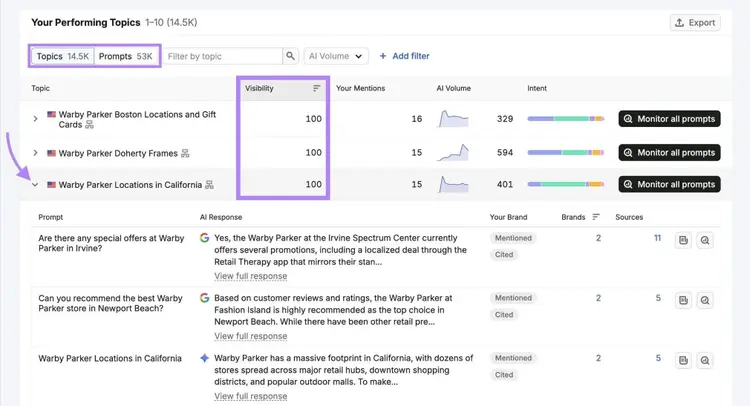
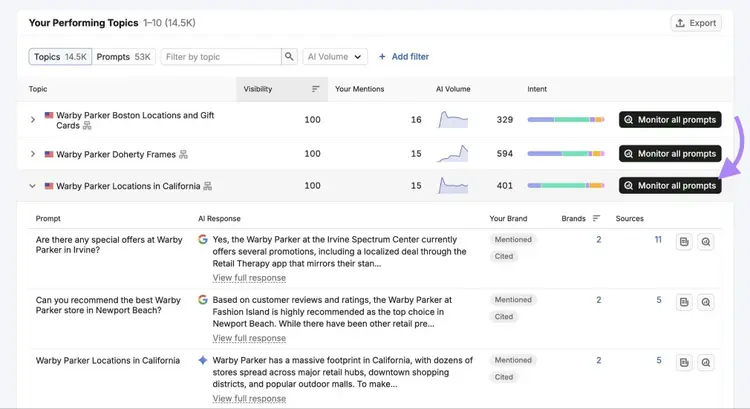
For relevant topics where your visibility is already high, click "Monitor all prompts" to add every prompt in that topic to your tracking set.
Then, use the search bar to find specific competitors. Track the prompts where rivals appear — those are the conversations you want to break into.
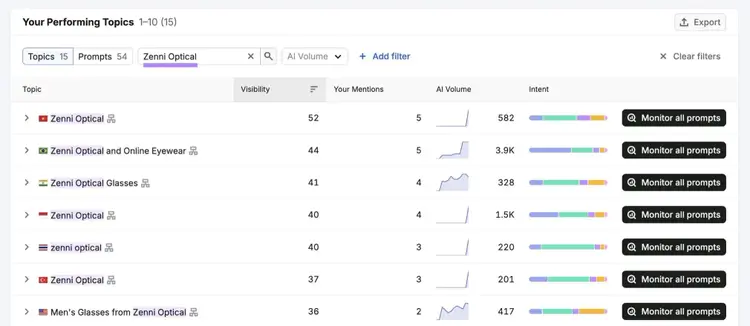
Again, click “Monitor all prompts” on relevant topics to add these to your prompt tracking database.
What is the difference between branded, category, and competitor AI prompts?
Branded, category, and competitor AI prompts differ in intent. Each type attracts a different buyer, at a different stage, with different stakes for your brand.
- Branded prompts name your brand explicitly: "What does [Brand] do?", "How much does [Brand] cost?", "Is [Brand] reliable?" These come from buyers who already know you. Appearing accurately in branded answers protects your brand narrative — this isn't where you typically win new customers, but it's where brand misinformation can hurt conversions.
- Category prompts describe a problem or situation without naming any brand: "What's the best tool for tracking AI search visibility?", "How do I improve my brand's presence in ChatGPT?" These reach buyers in the discovery phase, before they've settled on a vendor. They're the highest-stakes prompt type for most businesses because they map directly to the moment someone becomes interested in your business.
- Competitor prompts mention a rival: "How does [Competitor] compare?", "What are alternatives to [Competitor]?" These reach buyers actively evaluating options. If your brand appears as the answer here, you're capturing high-intent traffic from a buyer your competitor has already attracted to the category.
Track all three types as they tell a complete story about your AI visibility health: where you're protected, where you're discoverable, and where you're losing to rivals.
Should I track awareness-stage or decision-stage prompts — or both?
You should track both awareness-stage and decision-stage prompts, because each tells you something different about your position in the customer journey.
Awareness-stage prompts ("What is AI search optimization?", "How does AI search work?") come from buyers at the start of their research. They carry higher volume and measure broad reach, but a mention here rarely converts directly — these buyers aren't ready to purchase yet.
Decision-stage prompts ("Which AI search tracking tool should I use?", "What's the best platform for measuring AI visibility?") come from buyers evaluating options. They're lower volume and higher intent. A gap here — a competitor appears and you don't — is a missed opportunity you can put a number on.
Cover both ends, and the middle (consideration) takes care of itself as your set grows. The reason to track both: miss the awareness stage and you're absent while buyers are still forming their view of the problem. By the time they reach decision-stage prompts, a competitor may already look like the obvious answer.
How do I build a prompt set without drowning in noise?
Build a prompt set without drowning in noise by starting small, tightly defined, and grouped into clusters you can monitor as a unit.
Aim for the most relevant prompts, not the most prompts. A focused set gives you more actionable data than a sprawling one — you can spot trends and test whether content changes actually move your visibility scores.
How many prompts should I track when starting out?
You should track around 25 prompts when you're starting out. That's enough to cover your core branded, category, and competitor intent without generating data too noisy to read — and it matches the prompt allowance on the entry-level AI Visibility Toolkit, so you can start without upgrading.
The mistake most people make is pulling hundreds of prompts to track every phrasing of the same question. More prompts doesn't mean better data — it means more noise.
For example, "what are the best running shoes for marathons?" could also be asked as:
- "top marathon running shoes"
- "best shoes for long distance running"
- "what shoes should I wear for a marathon?"
- "what are the best running shoes for running 26 miles?"
- "what shoes do marathon runners wear on their feet?"
- "what are some shoes for marathon training?"
- "give me the best marathon shoe recommendations"
All of these express the same underlying need. Pick one or two that most closely match how your buyers talk and track those. The others don't need their own spot in your tracking set.
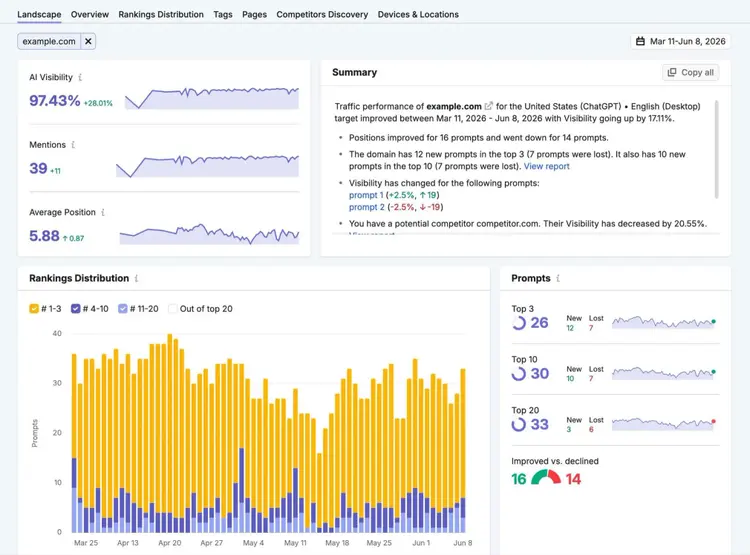
Once your initial set is loaded in Semrush's Prompt Tracking tool, check your dashboard weekly for movement. Look for citation rate changes, new competitor appearances, and prompt clusters where your visibility is shifting.
What is query fan-out and how do I use it to choose representative prompts instead of tracking every variation?
Query fan-out is what happens when an AI expands your question behind the scenes into several related questions behind the scenes before pulling together a response.
For example, when someone asks "what’s the best laptop for a college student who needs long battery life and does some video editing?," the AI might internally also consider “best laptops for college students,” “laptops with long battery life,” “video editing laptop requirements,” and “college laptop reviews”— all before generating its answer.
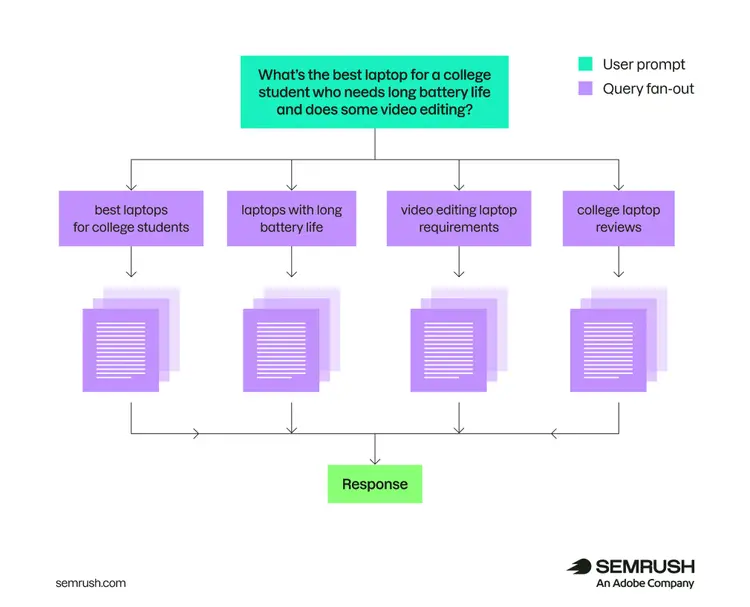
That's why tracking one well-chosen prompt often captures more than you'd expect. The AI is already considering the variations for you — you don't need to track them all yourself.
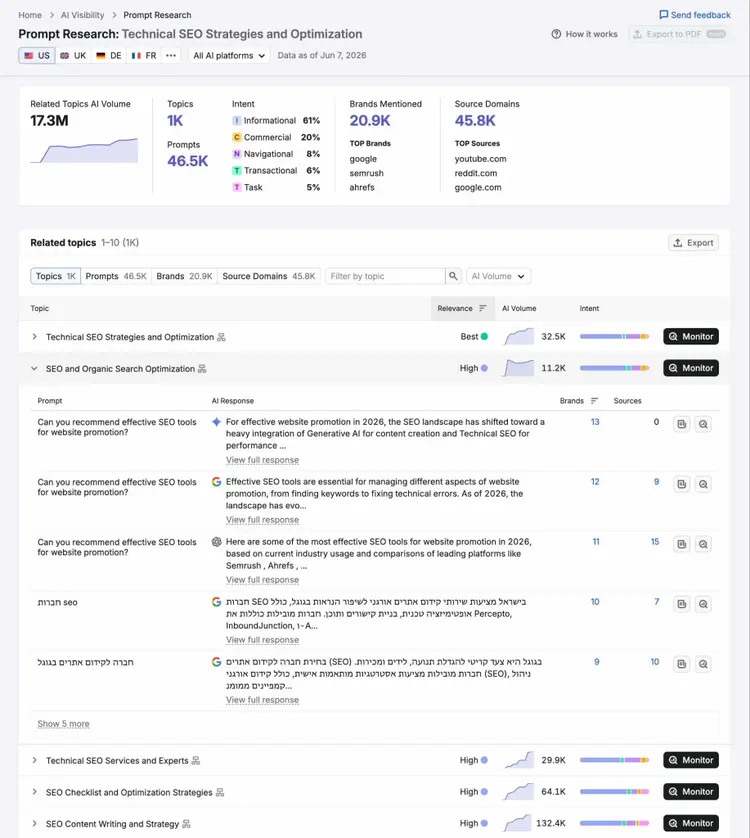
Semrush's Prompt Research tool surfaces related prompts and intent variants for any seed topic, making it easier to identify which phrasings have the most relevance before you commit them to your tracking set — rather than guessing at the full variation space manually.
How do I group similar prompt variations into clusters?
Group similar prompt variations into clusters by asking one question: "Are these all trying to solve the same problem?" If yes, they belong together, and you only need to track one or two from the group.
Clustering also simplifies reporting. Instead of reporting on 80 individual prompts, you report on 12 intent categories. Movement within a cluster signals a real shift in how AI platforms see your brand in that topic, and a cluster trending up is something you can hand to stakeholders without translation.
How do I validate my prompt set with AI visibility data?
Validate your prompt set with AI visibility data by checking whether tracked prompts generate enough citations or mentions to justify its place in the set.
For instance, a prompt with zero brand mentions, zero citations, and zero competitor appearances over 30+ days is a prompt you should likely remove from your tracking set.
The exception is high-intent prompts. If a prompt signals purchase intent, zero mentions isn't a reason to drop it. Your brand needs to be visible when buyers are closest to a decision.
How do I use brand mention and citation frequency to validate prompt selection?
Use brand mention and citation frequency to validate prompt selection by checking whether each prompt generates consistent signals like your brand appearing, a competitor appearing, or a high-priority buyer situation where neither appears yet.
A prompt worth keeping in your tracking set meets at least one of these criteria:
- Your brand is cited or mentioned in AI answers for this prompt — a win to maintain and monitor
- A competitor appears in AI answers for this prompt but you don't — a gap to close
- The prompt describes a high-priority buyer situation with no brand presence from anyone — a whitespace opportunity worth creating content for
Use Semrush's Brand Performance tool to review how your brand's citations and mentions are distributed across prompt categories.
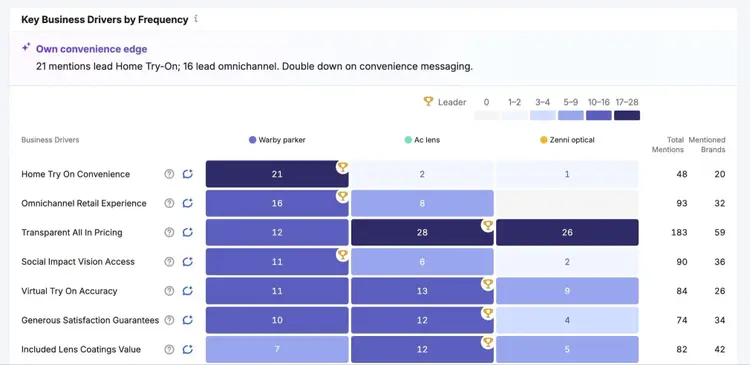
Prompts where you appear consistently are business drivers — protect them and track them to confirm they're holding.
Prompts where competitors appear and you don't are your highest-priority targets. View specific prompts by clicking the speech bubble icon. Then, click “View question list.”
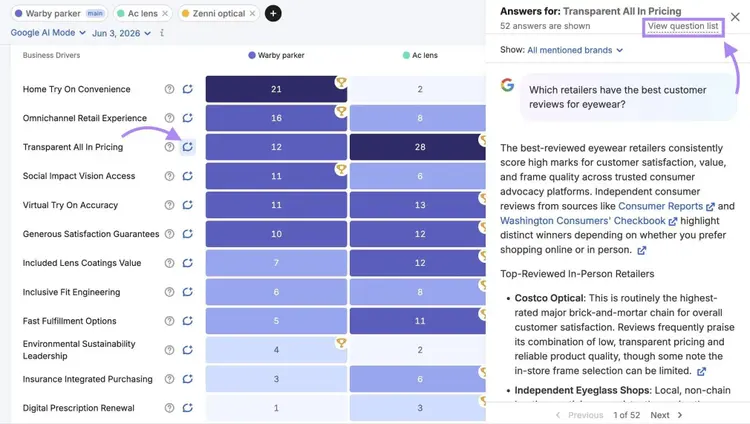
This displays specific prompts.
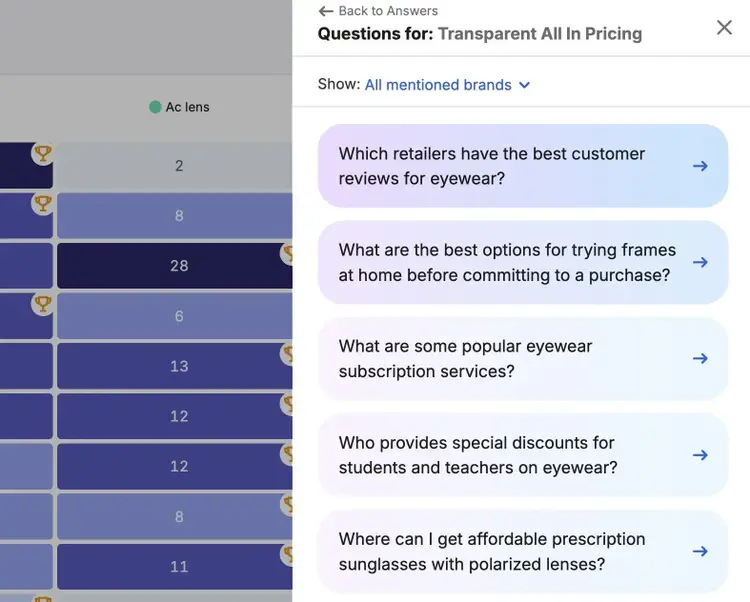
Choose a few within different categories to track if you aren’t already tracking them yet.
Which prompts should I prioritize if competitors appear in AI answers but I don't?
Prioritize prompts where a buyer is close to a decision, a competitor appears, and your content covers the topic but isn't getting cited.
Not every competitor gap is worth pursuing. Avoid focusing on categories you don’t serve, even if your competitors appear. Instead, focus on closing gaps where rivals appear in answers about a topic you cover.
Open the Competitor Research tool in Semrush's AI Visibility Toolkit, enter your domain along with up to four competitors, and navigate to the “Missing” tab for “Topics” or “Prompts.” Filter to prompts that match your product or service scope using the filter bar.
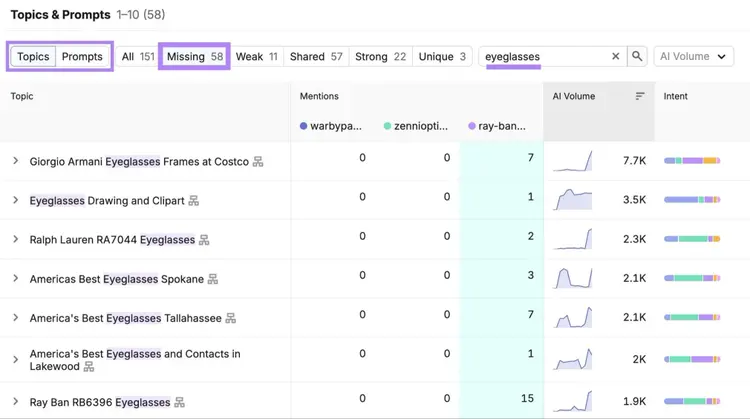
Filter to prompts that match your product or service scope using the filter bar. What remains is a prioritized list of gaps where content optimizations (like making your content easier to understand) are most likely to generate citations.
How do I weigh business impact when scoring prompts for my tracking set?
Weigh business impact when scoring prompts by rating each candidate prompt across three dimensions — buyer stage, topic relevance, and competitor presence — and prioritizing the ones that score highest across all three.
A consistent scoring table keeps this process repeatable across your team:
- Decision-stage = 3
- Consideration = 2
- Awareness = 1
- Core product topic = 3
- Adjacent = 2
- Tangential = 1
- Competitor cited, you absent = 2
- Both cited = 1
- Neither = 0
Multiply each raw score by its weight, then sum the three. A decision-stage prompt (3 × 3 = 9) on a core product topic (3 × 3 = 9) where a competitor appears but you don't (2 × 2 = 4) scores 22 — the maximum.
Scores land between 6 and 22, since buyer stage and topic relevance always contribute at least 3 each. Use these bands:
- 18–22 — core tracking targets. Decision-stage, on-topic, with an active competitor gap. Track these first.
- 12–17 — track if you have room in your set. Solid signal, not urgent.
- Below 12 — skip for now. Revisit when you expand your set; rescore to see if anything has moved up.
How should I manage and report on my prompt set over time?
Manage and report on your prompt set over time by reviewing it quarterly, adding prompts as your business expands, retiring prompts that generate no signal, and reporting at the category level rather than prompt by prompt.
When should I add or remove prompts from my tracking set?
Add prompts when you launch a new product, enter a new category, identify a new competitor gap, or consistently hear new language from customers about the problem you solve.
Remove prompts when they've generated no citation or mention signal for 60+ days, when the product or feature they reference has been discontinued, or when another prompt in your set captures the same intent and performs better.
A quarterly review cycle works for most teams. To get started, pull your prompt tracking data and sort by AI visibility.
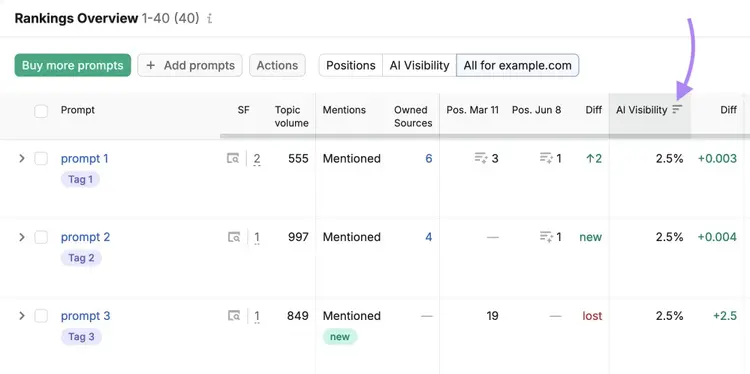
Adjust the date range to the last 90 days and expand each prompt to get a closer look at how visibility has changed.
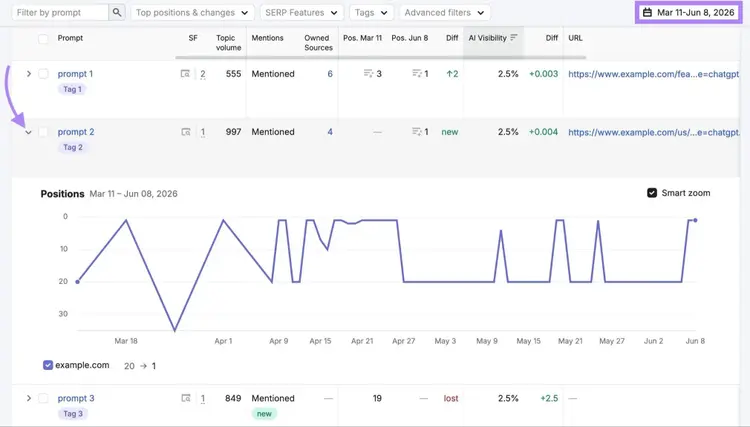
Flag any prompt that's been consistently flat for three months. For each flagged prompt, make one of three decisions: retire it, replace it with a better-performing alternative, or investigate why it's flat before deciding.
How do I keep my prompt set aligned with new product launches or messaging changes?
Keep your prompt set aligned with new product launches or messaging changes by running a simple prompt audit before each launch or messaging update.
- When a product launches → Think about the different reasons someone might need your new product, then draft three prompts per reason and add them to tracking
- When messaging changes → Audit your existing prompt set for language built around old framing. You may not want to remove these prompts right away, as messaging changes may take several months to sink in with your audience. Instead, tag these prompts so you can easily identify them in the future and remove them when you’re ready.
Use the Media Monitoring feature in Semrush's AI PR Toolkit to catch when your new category terms start showing up consistently across online coverage. As that language appears in publications and discussions, add prompts built around it — and retire prompts built on outdated framing.
How do I report whether my tracked prompts are improving?
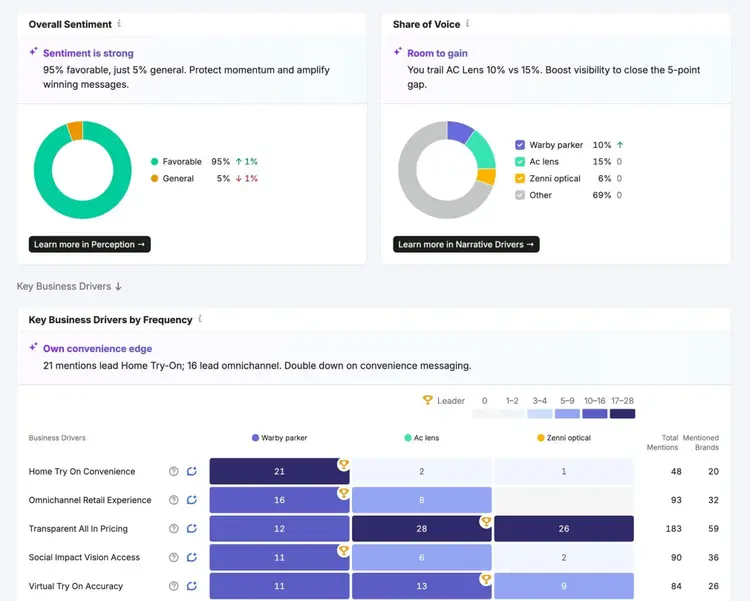
Report whether your tracked prompts are improving by measuring three metrics at the category level over time: citation rate (how often AI cites your brand for prompts in this cluster), share of voice (your citations relative to competitors in the same topic area), and sentiment (whether AI describes your brand positively when it appears).
For example, you might tell stakeholders: "Our citation rate in the 'AI prompt tracking tools' category increased from 12% to 27% this quarter." This is a business story they can act on.
Find these metrics in Semrush’s Brand Performance tool. The tool surfaces these metrics in a single view to help with your AI reporting.
Start tracking the right prompts
Not all AI search prompts are worth tracking. The right set — built around buyer intent, validated against real visibility data, and maintained as your business changes — gives you a reliable read on where you stand in AI search and where to focus next.
Open the AI Visibility Toolkit and start building your prompt set today.
Beat your competition in LLMs
with the Semrush AI Visibility Toolkit

Carlos Silva leads the editorial pipeline for the English blog—coordinating writers, editors, strategy, and building AI workflows that boost content quality and AI visibility. With 10+ years of experience writing and editing across in-house and agency roles, Carlos blends content strategy, SEO, and AI to help marketers stay ahead of an evolving search landscape.
Carlos Silva
Carlos Silva leads the editorial pipeline for the English blog and builds AI workflows that boost content quality and AI visibility. 10+ years writing and editing across in-house and agency roles.

Tells Google to show you more from Semrush in AI, Search, and Discover.