
301 vs. 302 Redirect: Which to Choose for SEO and UX
What’s the Difference Between 301 and 302 Redirects?
301 and 302 redirects are HTTP status codes that send users from one URL to another—the difference is, a 301 signals to search engines and browsers that the move is permanent, while a 302 signals the move is temporary.
Here’s a quick comparison of the 301 vs. 302 redirect:
Using the right type of redirect ensures a smooth user experience on your website. And helps you maintain or improve your search engine rankings.
Let’s explore 301 vs. 302 redirects in more depth.
How 301 and 302 Redirects Affect SEO
301 and 302 redirects matter in search engine optimization (SEO) because they can affect how search engines index and rank your affected pages.
301 permanent redirects encourage search engines to transfer rankings and ranking signals from the source page to the destination page.
For example, Google can pass PageRank (ranking power gained through links) via 301 redirects.
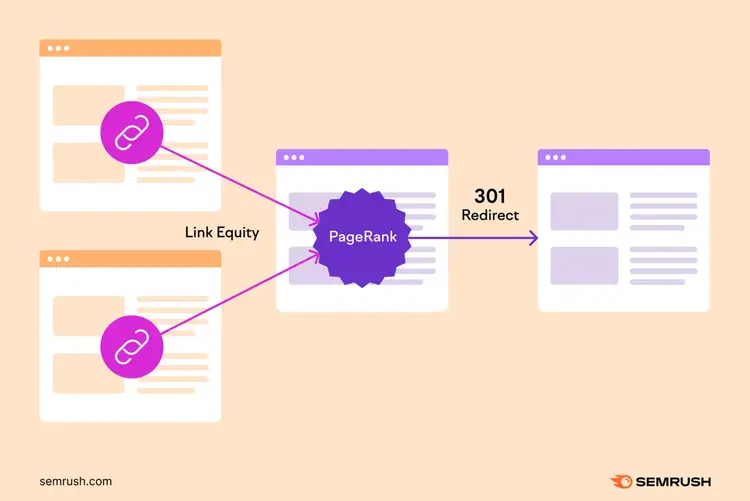
This means that the destination URL can inherit ranking power from the source page. And eventually replace the source page in search results.
302 temporary redirects deter search engines from transferring rankings and ranking signals from the source page to the destination page.
This means that you can protect your source page’s ranking ability—ready for when you restore it later.
Note
If you leave a 302 redirect in place for a long time, search engines may eventually treat it as a 301 redirect. And transfer your tracking and ranking signals accordingly. We recommend keeping a 302 redirect for no longer than six months.
How 301 and 302 Redirects Affect Browser Caching
301 and 302 redirects affect browser caching differently, which can impact users who revisit your source pages.
If you use a 301 permanent redirect, browsers will probably store the redirect in the user’s cache.
So, if the user revisits the old URL, their browser will send them to the destination URL without rechecking the server.
This makes the redirect faster but harder to revert.
If you use a 302 temporary redirect, browsers probably won’t store the redirect in the user’s cache.
So, the browser will likely recheck the server on any revisits. And will only redirect the user if the redirect is still in place.
This makes the redirect slower but easier to revert.
When to Choose a 301 Permanent Redirect
Choose a 301 redirect when you want to permanently redirect users, search engines, and browsers from an unwanted page to a replacement page.
Here are some specific uses cases for 301 permanent redirects:
- Deleting a page that has a direct replacement: For example, you might want to remove a discontinued product page and redirect visitors to the latest version of the product
- Migrating your site to a new domain: If you’re migrating your website, make sure the old URLs 301 redirect to the corresponding URLs on the new domain
- Changing URL slugs: If you’re changing the URL slug on an established page (e.g., to fix a typo), add a 301 redirect from the old URL to the new URL
- Moving a page to a different URL path: For example, if you move a product to a different category, you may need to set up a 301 redirect from the old URL to the new URL
- Consolidating similar pages: If you have multiple pages that serve a similar purpose, you can use 301 redirects to consolidate them. This is a form of content pruning.
- Consolidating duplicate pages: If you have multiple URLs that host duplicate content (e.g., an HTTPS and HTTP version of the same URL), consider using 301 redirects to consolidate them
You can implement 301 redirects by using the redirect settings in your website editor, using a suitable website plugin, or getting help from a web developer.
After implementing a 301 redirect, update any references to the source URL to reference the destination URL instead.
For example, you may need to update internal links and your XML sitemap.
When to Choose a 302 Temporary Redirect
Choose a 302 redirect when you need to temporarily redirect users, search engines, and browsers from a page you want to keep.
Here are some specific uses cases for 302 temporary redirects:
- Website maintenance or redesign: Temporarily redirect users to a different page on your site while a page is under construction
- Split testing: If you’re conducting a split test, use server-side 302 redirects to send a portion of your users to the test page. This lets you protect the SEO performance of the main page.
- Temporary promotional pages: For example, you can create a Black Friday version of your product category page and redirect users to this version while the promotion runs
- Live testing: Use 302 redirects to test the performance of a new flow, feature, or design with all your users. If the new version performs better, you can make it permanent.
You can implement 302 redirects by using the redirect settings in your website editor, using a suitable website plugin, or getting help from a web developer.
When you implement a temporary redirect instead of a permanent redirect, you don’t need to update references to the source page. You can leave your internal links, sitemap, etc. as they are.
Note
If a 301 or 302 redirect doesn’t seem to be the right solution, another HTTP status code may be more suitable. For example, you should generally use a 404 Not Found to permanently delete a page that doesn’t have a good replacement.
Test and Monitor Your Redirects
Making mistakes with 301 and 302 redirects is easy, so you need to test them and monitor their impact on your website’s performance.
In Google Search Console, you can see whether you have redirect errors, including:
- Redirect chains that are too long (e.g., Page A > Page B > Page C [...])
- Redirect loops (e.g., Page A > Page B > Page A)
- Redirect URLs that exceed the maximum URL length
- Bad or empty URLs in the redirect chain
The “Pages with redirect” report shows which redirecting pages are not indexed by Google. If you find any pages that should be indexed (i.e., eligible to appear in search results), you may need to remove the redirect.
In Semrush Site Audit tool, you can see all the URLs with 301 or 302 redirects on your website.
This tool can also identify common redirect errors, provide advice on how and why to fix them, and help you create tasks for your team.
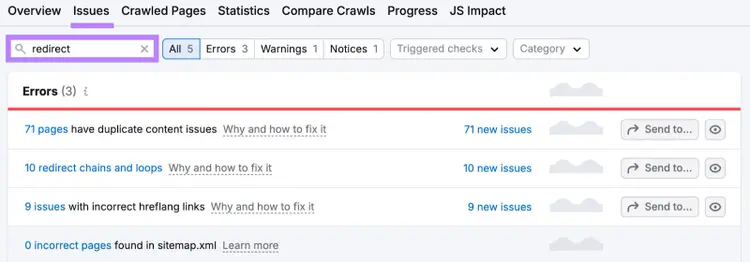
Site Audit also helps you find and fix dozens of other SEO issues. And you can use it to crawl 100 pages per month for free.
Find and Fix Redirect Issues
with the Site Audit Tool

Rachel is a Senior Content Writer with 12+ years‘ experience in content marketing and SEO. In a previous role as Head of Content at a digital marketing agency, Rachel developed and executed search-driven content strategies for a diverse range of clients, including global ecommerce brands and local B2B companies. She later transitioned to an in-house role at an SaaS startup, where she focused on scaling content operations and driving organic growth.
Rachel Handley
Rachel is a Senior Content Writer with 12+ years‘ experience in content marketing and SEO. She has worked agency-side, developing and executing content strategies for a wide range of brands, and in-house, driving organic growth for a SaaS startup.

Tells Google to show you more from Semrush in AI, Search, and Discover.