
A broken link is a hyperlink on your website that leads to a non-existent or inaccessible webpage, often returning a 404 error when clicked.
Broken links frustrate visitors who can't access the content they need and harm your SEO by preventing search engines from effectively crawling pages and passing link equity.
Below, we'll go over a more detailed explanation of what broken links are, how to find them on your site, and how to fix them to improve user experience and search performance.
What Are Broken Links?
A broken link is a hyperlink that no longer leads to its intended destination because the target page has been deleted, been moved, or become inaccessible.
When someone clicks a broken link, they often see a 404 (not found) error. In some cases, they may see other errors that indicate a broken link, including:
- 410 (gone) error: Indicates the page was permanently deleted
- 400 (bad request) error: Indicates an issue with the requested URL
- 502 (bad gateway) error: Indicates one server got an invalid response from another server

Broken links on your site happen most commonly when:
- Your pages are deleted and your links that point to them aren’t updated
- Your URLs that you link to change without being properly redirected
- External websites remove or relocate content you’ve linked to
For example, if you delete a product page but your navigation menu still links to it, visitors clicking that menu item will land on a 404 error page.
Both internal links (links pointing to pages on your own site) and external links (links pointing to other websites) can break, but they require different approaches for fixing.
How to Find Broken Links
To find broken links on your website, use Semrush Site Audit tool, Google Search Console, a browser extension, or manual checks.
1. Use Site Audit
Semrush’s Site Audit tool is a fast way to find broken links because it crawls your website and reports every internal and external link it finds that returns an error.
To find broken links with Site Audit:
- Set up a project using either the default configurations or your own custom configurations and run a crawl
- After the crawl finishes, go to the “Issues” tab
- Enter “broken” in the search bar
- Click the link in "# internal links are broken" to see links pointing to broken pages on your site
- Click the link in “# external links are broken” to find links pointing to broken links on other websites
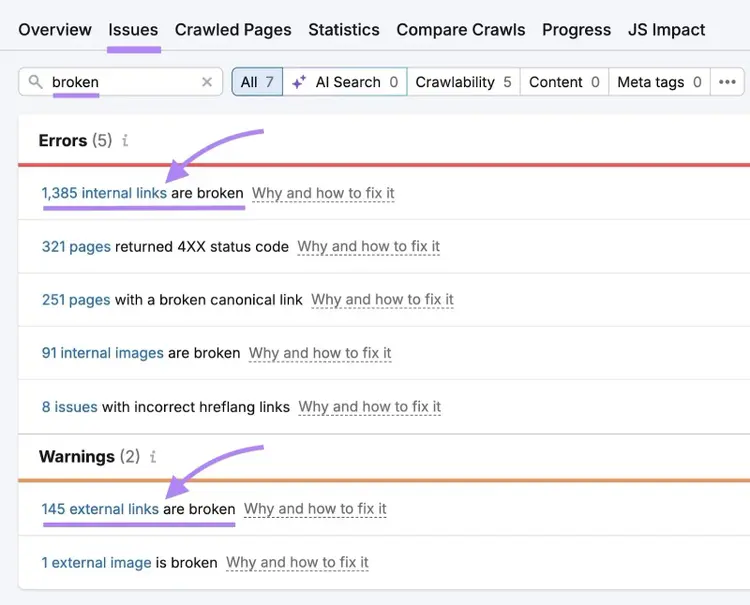
Clicking through to either issue will take you to a screen that shows the pages containing the broken links, the broken URLs, and the returned HTTP status codes. This makes it easy to sort and prioritize which issues to fix first.
2. Check Google Search Console
Google Search Console (GSC) can also be used as a broken link checker that finds pages returning 404 errors when Googlebot tries to crawl them, which can reveal broken internal links.
To find broken links in GSC:
- Open Google Search Console
- Go to “Indexing” > “Pages”
- Under "Why pages aren't indexed," click "Not found (404)" (or another error that indicates a broken link)
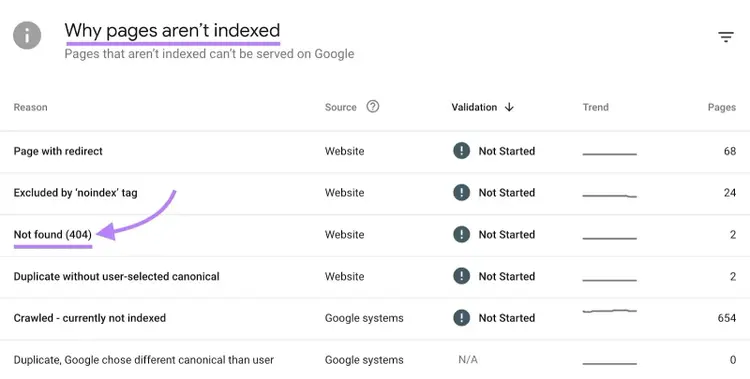
GSC will then show you a list of how many pages it detects with that issue and a list of URLs that triggered the error.
Note
Google Search Console only reports errors Googlebot has already encountered, and the results aren’t comprehensive. It won’t detect all broken links on your site.
3. Use Browser Extensions
Browser extensions like Broken Link Checker let you scan a single page for broken or redirected links as you browse.
Broken Link Checker lists every link on the page, shows its HTTP status (including 404s and redirects), and highlights broken links. This helps you quickly locate and fix broken links.
Using a browser extension to find broken links is ideal for reviewing individual pages—not for site-wide audits.
4. Manually Check for Broken Links
Another way to find broken links is to manually click each link on a page to confirm whether it loads correctly, though this method is impractical for large sites.
Manual checks are most useful for confirming that fixes—like updated links or redirects—are working as intended.
How to Fix Broken Links
There are multiple ways to fix broken links that depend on whether you know the cause and whether the link is internal or external.
- Internal links give you full control over the destination URL
- External links require a different approach because you can’t manage another site’s URLs
How to Fix Broken Internal Links
In most cases, fixing broken internal links comes down to redirecting traffic to the correct page, updating links to point to the best destination, or removing links to content that no longer exists.
Set Up 301 Redirects
Use a 301 redirect when a page has been moved to a new URL or when you have another page that serves the same purpose.
A 301 redirect permanently forwards users and search engines from the old URL to the new one and preserves most of the original page’s link equity.
Using 301 redirects is especially important when other internal pages (or external websites) still link to the old URL.
You can set up redirects at the server level.
For Apache servers, add a redirect rule in your .htaccess file. Before adding redirect rules, make sure the rewrite engine is enabled.
Here’s what it looks like to redirect a single page in an .htaccess file:
RewriteEngine OnRewriteRule ^old-page-url/?$ https://yourdomain.com/new-page-url [R=301,L]
For Nginx servers, add the redirect inside the appropriate server block:
location = /old-page-url { return 301 https://yourdomain.com/new-page-url;}
Most CMS platforms also provide redirect tools that handle this configuration for you without requiring you to edit server files.
Update URLs for Suitable Substitute Pages
Update internal links when you know the most appropriate destination page, even if a redirect exists.
Linking directly to the final URL reduces unnecessary redirects that take up more resources.
Update broken links to suitable substitute URLs when:
- A page was moved and you know the new URL
- Content was consolidated into a new page
- A redirect is already in place but internal links haven’t been updated yet
Use Site Audit to identify all pages still linking to outdated URLs and update those links in bulk where possible. This approach is more reliable and scalable than manually finding and replacing links.
Remove Broken Internal Links
Remove an internal link when the referenced content no longer exists and no relevant replacement page is available.
If the surrounding text is still useful, remove only the hyperlink and keep the text. If the reference itself is no longer relevant, remove the entire section to keep the content accurate and up to date.
How to Fix Broken External Links
Fixing broken external links typically means either updating the link to a suitable alternative or removing it entirely.
Update URLs (if Possible)
Update an external link when you can confidently identify a suitable replacement, such as a new URL on the same site or a similar resource on a different website.
Updating URLs for broken external links works best when:
- You know that a site moved content and where the content moved
- The topic and intent of the original resource are still relevant
- You can replace the link with a more current or more authoritative source
If you’re unable to find a replacement that truly matches the original intent, it’s better to remove the link.
Remove Broken External Links
In practice, removing broken external links is the most common fix.
If the external content isn’t accessible and can’t be reliably replaced, keeping the link adds little value and leads to a poor user experience.
When removing an external link, keep the surrounding text if it still makes sense on its own. If the reference depends on the external source to be useful or credible, remove the entire section instead.
How to Prevent Broken Links
Preventing broken links comes down to avoiding internal linking mistakes and making sure you double-check external links.
More specifically, you can do the following to prevent broken links:
- Add redirects before deleting pages: Set up a 301 redirect to the most relevant replacement page before removing or moving content. This ensures users and search engines are automatically sent to a valid page instead of encountering an error.
- Test links before publishing new content: Click through each link or scan the page with a browser extension to confirm it loads correctly. Catching broken or incorrect links before publishing is one of the easiest ways to prevent errors.
- Use stable, descriptive URLs: Create URLs that reflect the content and structure of the page to reduce the odds of needing to change them and implement redirects later on
Final Steps to Protect Maintain Your Site’s Links
Avoiding and fixing broken links helps preserve link equity and improves navigation for your visitors.
A full site audit is the best way to identify broken links that need to be addressed. Get started with Site Audit.
FAQs About Broken Links
What Causes Broken Links?
Broken links are most often caused when pages are deleted without updating links, URLs change without proper redirects, or a URL contains a typo.
How Do Broken Links Affect SEO?
Broken internal links make it harder for search engines to crawl your site and can interrupt the flow of link equity between pages, weakening your site’s technical SEO health and negatively affecting search visibility.
External broken links don’t directly harm rankings, but they create a poor user experience and can reduce trust in your content.
What Is the Best Way to Find Broken Links?
The best way to find broken links is to run a crawl using a tool like Semrush’s Site Audit. An audit identifies all broken internal and external links, shows the pages containing them, and lists the HTTP status codes returned.
How Do I Fix Broken Links on My Website?
To fix broken links, first determine whether the link is internal or external.
For broken internal links, update the URL, add a 301 redirect, or remove the link if no replacement exists.
For broken external links, update the link when a reliable alternative is available or remove it.
What Is the Difference Between 404 and 410 Status Codes?
A 404 status code means a page is missing but may return in the future. A 410 status code means the page was intentionally removed and won’t return. Search engines drop 410 pages from their index more quickly.
Is Broken Link Building the Same As Fixing Broken Links?
No, broken link building isn’t the same as fixing broken links. Broken link building is a link building technique that involves finding broken external links on other websites and suggesting your content as a replacement.
Fixing broken links on your own site focuses on improving user experience, maintaining site health, and preserving link equity—not acquiring backlinks.
Find and Fix Website Issues
with the Site Audit Tool

Alex is a managing editor with 10+ years of experience leading content and SEO teams across SaaS, tech, ecommerce, and digital publishing. He specializes in building editorial systems that balance human judgment with AI-assisted workflows, helping teams produce original, high-impact content as search and discovery evolve. His work spans SEO strategy, content quality frameworks, and adapting content operations for AI-driven search.
Alex Lindley
Alex is a managing editor with 10+ years of experience leading content and SEO teams. He focuses on building AI-aware editorial systems that help teams produce original, high-impact content as search evolves.

Tells Google to show you more from Semrush in AI, Search, and Discover.