
Learn about the role hreflang attributes play in helping multilingual and multiregional websites show the correct language versions to users.
What Is Hreflang?
Hreflang is an HTML attribute that communicates a webpage’s language—and possibly its target country—to search engines when the page has language or country variants.
For example, the hreflang attribute hreflang="en-us" signals that the specified page is written in English and targeted to U.S. audiences.
If you have multiple versions of your pages to serve different languages or countries, you should use hreflang in your search engine optimization (SEO) strategy.
Why Are Hreflang Attributes Important for SEO?
Hreflang attributes are important for SEO because they help ensure search engines display the correct versions of your pages based on users’ languages and locations.
Like this:
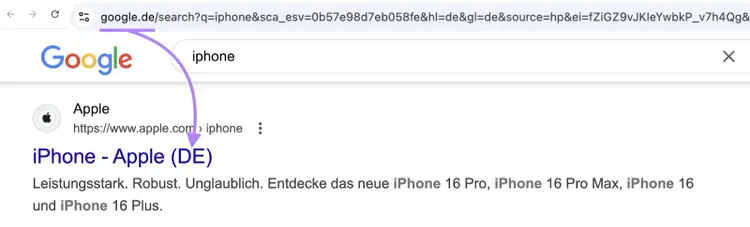
When Google displays the most relevant page version, users are more likely to click your result, have a good experience on your website, and contribute to your business goals.
Hreflang attributes also help search engines find and understand relationships between localized pages.
Without hreflang, search engines may view translated or regionalized pages as duplicate pages. And this can harm your search visibility.
Tip
If you haven’t created pages for different languages or regions yet, read our website localization guide to learn about the benefits.
How to Implement Hreflang
To implement hreflang, identify a set of pages on your site that share the same content but for different languages or countries. Then assign each page a different identifier, depending on its targeting.
The anatomy of hreflang code is hreflang="value", where value is filled in based on one of the following:
- Language code: The two-letter ISO 639-1 language code for the page’s language. For example, en for English. You should use this option if the page serves as a default for all speakers of the language.
- Language and country code: The ISO 639-1 language code and ISO 3166-1 alpha-2 country code for the target language/country, separated by a hyphen (-). For example, en-us for English-United States. The country code is only required if your page is region-specific and doesn’t serve as a default for all speakers of the language.
- X-default: Use the x-default value for the main version of your page. Search engines will display the default if no variant matches the user’s language or language-region.
Finally, follow one or more of the hreflang implementation methods below.
Tip
Check your website platform for features or plugins that make hreflang implementation and management easier. If you’re unsure about anything, get help from a web developer.
Hreflang Tags in HTML Headers
You can use hreflang tags in pages’ HTML header elements (<head> sections) to inform search engines about the language/region targeting of a page and its variants.
An hreflang tag specifies a URL and its hreflang attribute, like this:
<link rel="alternate" href="url" hreflang="value" />
Every affected page should have an hreflang tag that references the source page and its variants.
For example, the tag highlighted below shows that the source page is written in German for audiences in Germany (de-de).
The other hreflang tags show that the page is also available in English for audiences in Ireland (en-ie), French for audiences in Guinea (fr-gn), etc.
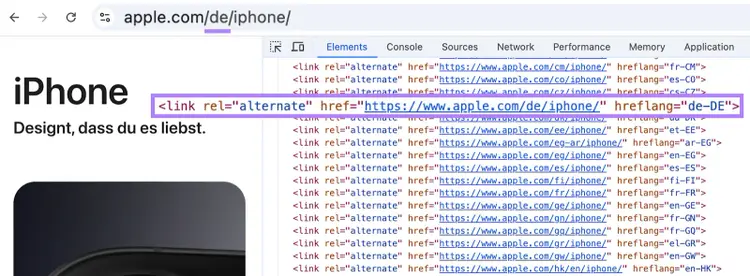
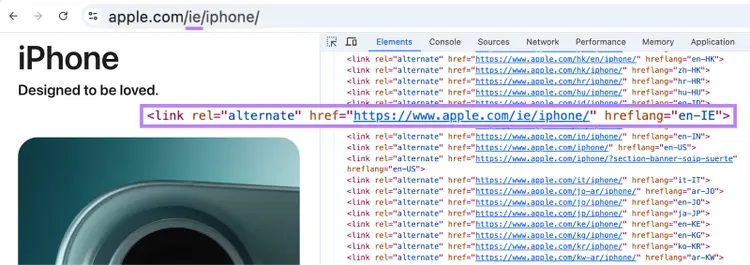
These same hreflang tags are used on all other versions of the page as well.
For example, here’s a snippet of HTML from the English version for audiences in Ireland:
Hreflang in the XML Sitemap
You can use hreflang in your website’s XML sitemap to inform search engines about language and region targeting across your website.
The XML sitemap is a file that should list all the URLs you want search engines to index (add to the database of possible search results).
Here’s what you need to do for pages with language/region variants:
- Include a <url><loc> entry for every URL variant
- Within each <url> element, use the <xhtml:link> element to provide the hreflang information for the specified URL and its variants
For example, if you have two versions of a page, the corresponding XML code should look something like this:
<url><loc>https://www.example.com/</loc><xhtml:link rel="alternate" href="https://www.example.com/" hreflang="x-default" /><xhtml:link rel="alternate" href="https://www.example.com/gb/" hreflang="en-gb" /></url><url><loc>https://www.example.com/gb/</loc><xhtml:link rel="alternate" href="https://www.example.com/" hreflang="x-default" /><xhtml:link rel="alternate" href="https://www.example.com/gb/" hreflang="en-gb" /></url>
Note that both URLs reference themselves and each other.
Hreflang in HTTP Response Headers
If you have a non-HTML page (like a PDF), you need to implement hreflang via the HTTP header.
Use this template to tell search engines about the language (and region if you wish) associated with the source page and its variants:
<url1>; rel="alternate"; hreflang="value1", <url2>; rel="alternate"; hreflang="value2" …
For example, you might add this to the HTTP header of all three listed pages:
<https://www.example.com/>; rel="alternate"; hreflang="x-default", <https://www.example.com/us/>; rel="alternate"; hreflang="en-us", <https://www.example.com/gb/>; rel="alternate"; hreflang="en-gb"
Again, note that the variant pages should reference themselves and each other.
Best Practices for Hreflang
Follow these best practices when using hreflang on your website:
Use Canonical URLs in Hreflang Code
You should only use canonical URLs in hreflang code to avoid confusing search engines and harming your SEO performance.
A canonical URL is the main address for a webpage and the URL that search engines use in search results. Search engines ignore any alternate URLs to save resources and prevent duplication.
Let’s say you can access the same page via three addresses:
- Canonical URL: https://www.example.com/en/
- Alternate URL: https://www.en.example.com/
- Alternate URL: example.com/en
You should only reference the canonical URL in hreflang code and avoid any alternate URLs.
In practice, this means you should not reference:
- URLs that have a 301 redirect pointing to another URL
- URLs that have a canonical tag pointing to another URL
- Broken URLs (e.g., URLs that serve a 404 error)
Keep Your Hreflang Code Updated
Update your hreflang code if you add, remove, or change URLs that have localized variants to avoid outdated code that can confuse search engines and harm your SEO.
Let’s say you implement hreflang via your XML sitemap for your English and Spanish website.
If you later translate your site into German, you need to:
- Add the new URLs (and their hreflang code) to your XML sitemap
- Update XML entries for existing page variants to ensure they reference the German variants
Audit Your Website for Hreflang Issues
Regularly audit your website for hreflang issues to check for any mistakes that could confuse or mislead search engines—and so harm your SEO.
Semrush Site Audit tool can help you find and fix the most common hreflang SEO issues, including:
- Invalid hreflang values
- Pages without self-referencing hreflang attributes
- Pages with missing hreflang attributes
- References to broken or non-canonical URLs
- Mismatches between the language code and the page’s language
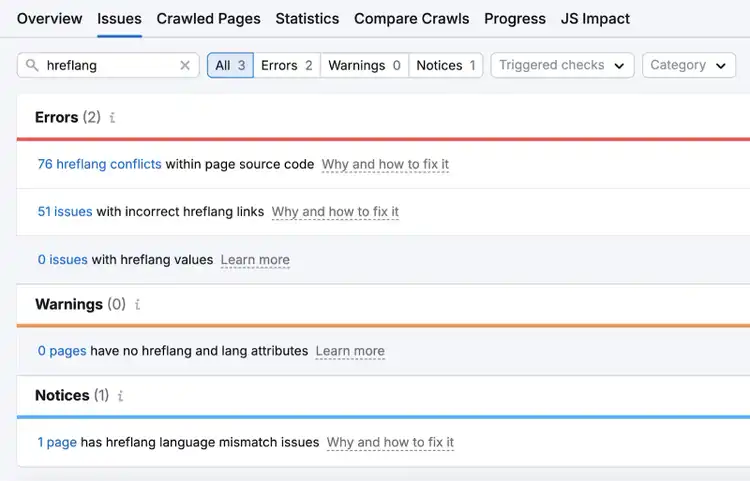
The SEO Audit tool also helps you find and fix many other kinds of SEO issues. And free users can crawl up to 100 pages per month.
Find and Fix Hreflang Issues
with the SEO Audit Tool

Rachel is a Senior Content Writer with 12+ years‘ experience in content marketing and SEO. In a previous role as Head of Content at a digital marketing agency, Rachel developed and executed search-driven content strategies for a diverse range of clients, including global ecommerce brands and local B2B companies. She later transitioned to an in-house role at an SaaS startup, where she focused on scaling content operations and driving organic growth.
Rachel Handley
Rachel is a Senior Content Writer with 12+ years‘ experience in content marketing and SEO. She has worked agency-side, developing and executing content strategies for a wide range of brands, and in-house, driving organic growth for a SaaS startup.

Tells Google to show you more from Semrush in AI, Search, and Discover.