
Keyword Analysis: What It Is & How to Do It
Expert reviewed
Our subject matter experts have reviewed this article to ensure it meets the highest standard for accurate information and guidance. Learn more about our editorial standards and process.
What Is Keyword Analysis?
Keyword analysis is the process of evaluating queries people enter into search engines to find and prioritize terms you want to rank for. And discover how to use them effectively.
Doing keyword analysis involves evaluating keyword popularity, the level of competition in unpaid listings on search engine results pages (SERPs), and the term’s search intent (the reason behind the search).
How to Do Keyword Analysis for SEO
Let’s explore how to do keyword analysis one step at a time.
You'll want to do some very basic keyword research to come up with a list of terms to evaluate first.
For example, use our free keyword tool to enter a seed keyword (a broad term related to your niche) to quickly generate a list of ideas. And then focus on any that are particularly relevant to your business.
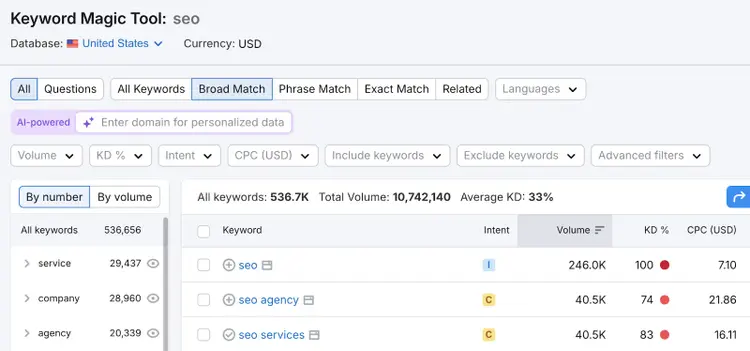
Then, study all the terms that seem like a good fit with the following methods:
Analyze Search Intent
Analyzing search intent ensures you understand what type of content you need to create to match users’ expectations and how close to purchasing those users likely are.
There are four main types of search intent:
- Informational: The user wants to learn about something
- Navigational: The user is looking for a specific page or website
- Commercial: The user is researching options before making a purchase
- Transactional: The user wants to complete an action like a purchase
You can check a keyword’s search intent type(s) in Keyword Overview.
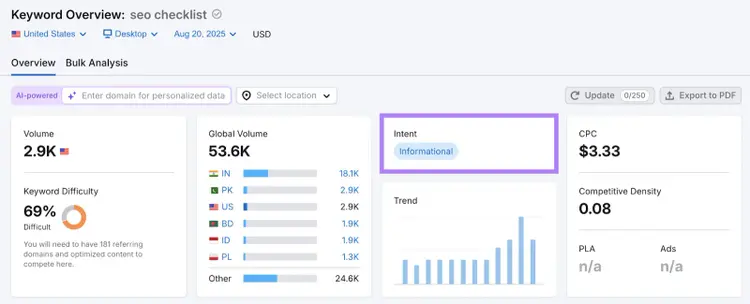
The search intent type is the first insight into what users want to see. But to get the full picture, scroll down to the “SERP Analysis” section.
This section shows you which pages are already ranking for this keyword. And by clicking the icon to open them and analyze them, you can determine what information users are looking for and what content format they want to see.
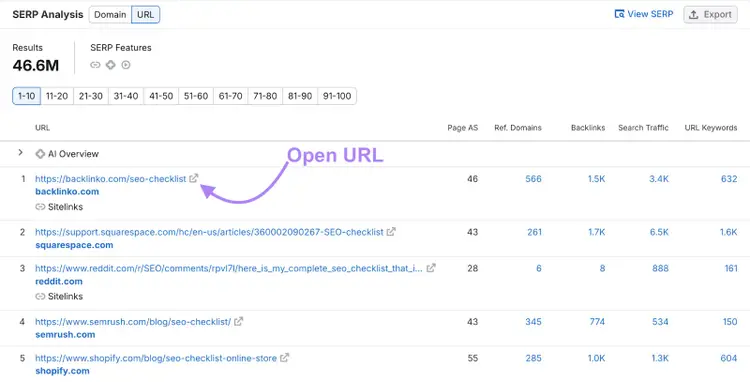
In the example above, you’ll see that the majority of top-ranking pages are long-form blog articles with actionable, step-by-step instructions on how to implement each tip.
Evaluate Search Volume and Potential Traffic
Analyzing a keyword’s search volume (average number of monthly searches) and potential traffic (the traffic your site is likely to get from it) helps you understand which terms are likely to drive a lot of visits to your site.
Enter the terms you’re considering into Keyword Overview, add your domain to get personalized recommendations, and click “Search.”
In this case, we’re looking at “technical seo checklist" and “seo checklist for beginners.”
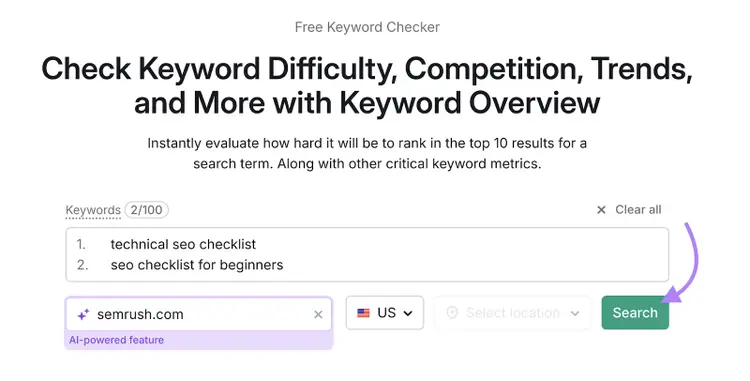
Now, look at the differences in search volumes and potential traffic. In this case, you’ll notice the term “technical seo checklist” has significantly more monthly searches and substantially higher potential traffic.
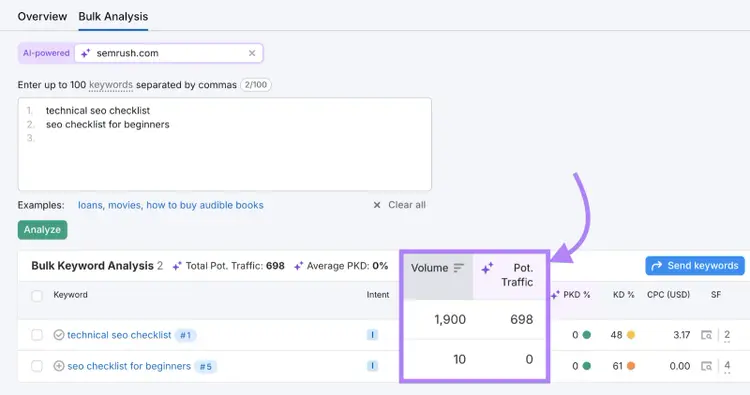
It may make more sense to prioritize "technical seo checklist” over “seo checklist for beginners.”
But it’s important to remember that search volume isn’t everything.
High-volume keywords won’t necessarily drive conversions. And they tend to be harder to rank for because they usually attract more competition, which we’ll discuss in the next section.
Consider Keyword Difficulty
Keyword difficulty reveals how challenging it is to rank for a keyword, so studying it helps you choose keywords you can effectively compete for.
First, let’s differentiate between the two Semrush metrics related to difficulty:
- Keyword difficulty (KD %): Shows how hard it is to rank in the top 10 results for a keyword based on factors like how many domains link to the top-ranking pages, how authoritative the top-ranking domains are, and how many monthly searches the term gets
- Personal Keyword Difficulty (PKD %): Shows how hard it is for your website to rank in the top 10 results for this keyword based on your site’s topical relevance, your site’s authority, and the overall competition for the term
Both are expressed as percentages on a scale from 0 to 100. The higher the score, the harder it will likely be to rank.
By analyzing Personal Keyword Difficulty, you can find keywords that are achievable for your domain—even if they don’t seem to be at first.
To see a term’s keyword difficulty, enter just the term (not your domain) in Keyword Overview.
This term has a keyword difficulty of 69%, meaning that the search results for it are very competitive. So, ranking highly may be challenging.
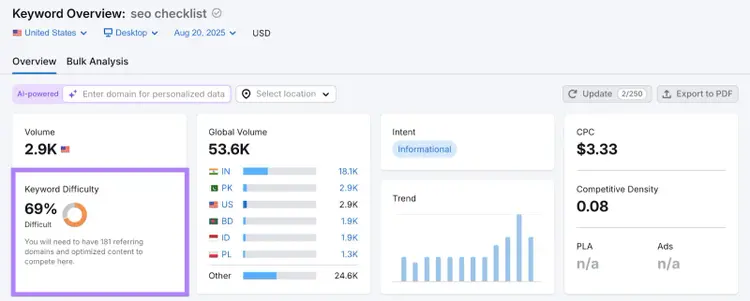
Now, add your domain to see your Personal Keyword Difficulty score.
Even though the entered keyword is highly competitive, it’s very achievable for the specified domain.
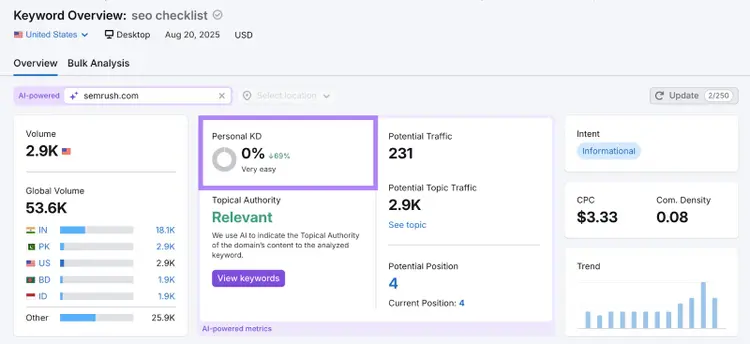
Analyzing the differences between these two metrics can reveal ranking opportunities you might not otherwise have known about.
Explore Any SERP Features That Appear
Studying the results page for a term helps you discover if there are any SERP features (special results that stand out from regular results) that present an opportunity to gain visibility beyond a standard blue link.
Plus, finding out whether there are any SERP features enables you to format your content in a way that’s more likely to show up in those features.
There are many types of SERP features, and Google is constantly updating, improving, and adding new ways to display search results.
Let’s go over some common SERP features:
Find out what types of SERP features show up for your target keyword in Keyword Overview.
Simply scroll down to the “SERP Analysis” section and look at the “SERP Features” area near the top.
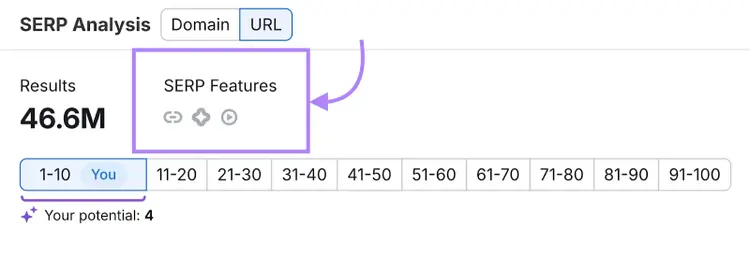
By hovering over each icon, you’ll find out what type of feature it is.
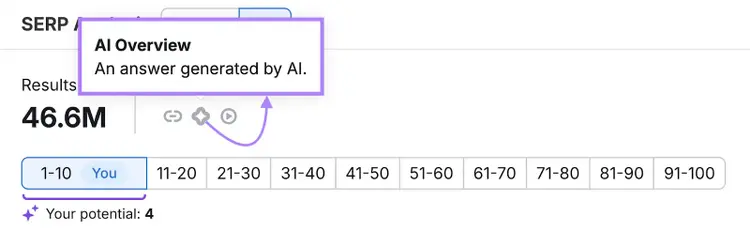
Analyzing SERP features can sometimes also help with figuring out which keywords to avoid.
For example, if you run a smaller site and are trying to get some initial search engine traffic, you may want to skip keywords with certain SERP features.
Why?
When a user is shown an AI Overview or featured snippet, they may find the information they’re looking for right in the search results and never visit any of the links. (These are called zero-click searches.)
You may get more branded searches and traffic resulting from that visibility, but it will likely come much later on.
Consider All Factors to Prioritize Keywords
To choose the right keywords for your brand, you need to weigh all of the above factors together.
We’ll show you how to do this for three businesses of different sizes and in different niches:
- Best Bagel & Coffee (a bakery in New York) trying to decide whether to pursue the keyword “best bagels in new york”
- Glow Recipe (a mid-size skincare business) trying to decide whether to pursue the keyword “steps for a skincare routine”
- Salesforce (an enterprise CRM company) trying to decide whether to pursue the keyword “crm software”
For Best Bagel & Coffee, targeting the keyword “best bagels in new york” could be very beneficial. The term appears fairly easy to rank for and is likely to drive a fair amount of qualified traffic given its commercial intent.
Glow Recipe probably shouldn’t target the keyword “steps for a skincare routine”—at least not right now. Because, despite the high search volume and relevance, the SERP landscape is highly competitive.
That’s not to say Glow Recipe should avoid “steps for a skincare routine” forever. But they might want to work on building authority and ranking for similar but less competitive terms first.
Our final example shows Salesforce has a strong online presence and topical authority that make it highly likely they can rank well for the keyword “crm software.” And it can bring over 20,000 potential visitors who are interested in learning about CRM software solutions.
Choose the Right Keywords for Your Business
Keyword analysis helps you choose the keywords that are aligned with your business goals.
Once you create content around those terms, you’ll be one step closer to achieving your objectives.
As you keep publishing content around your chosen keywords, use Position Tracking to monitor how you perform in search results. So you can make adjustments based on what you see.
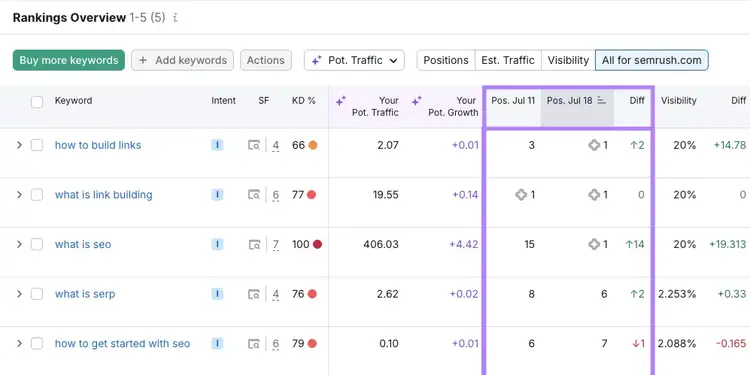
Sign up today to start monitoring your rankings.
Track Your Rankings
with the Position Tracking Tool

Carlos Silva leads the editorial pipeline for the English blog—coordinating writers, editors, strategy, and building AI workflows that boost content quality and AI visibility. With 10+ years of experience writing and editing across in-house and agency roles, Carlos blends content strategy, SEO, and AI to help marketers stay ahead of an evolving search landscape.
Carlos Silva
Carlos Silva leads the editorial pipeline for the English blog and builds AI workflows that boost content quality and AI visibility. 10+ years writing and editing across in-house and agency roles.

Tells Google to show you more from Semrush in AI, Search, and Discover.