
What Is Keyword Bidding?
Keyword bidding is the process of setting how much you're willing to pay to achieve a particular goal with your search ads.
That goal could be related to driving visibility, conversions, or clicks.
Let’s say you’re promoting your yoga mats and want to drive traffic to a landing page on your website. Your bid would be the amount you’re willing to pay for every click on your ad if it shows up in results like these:
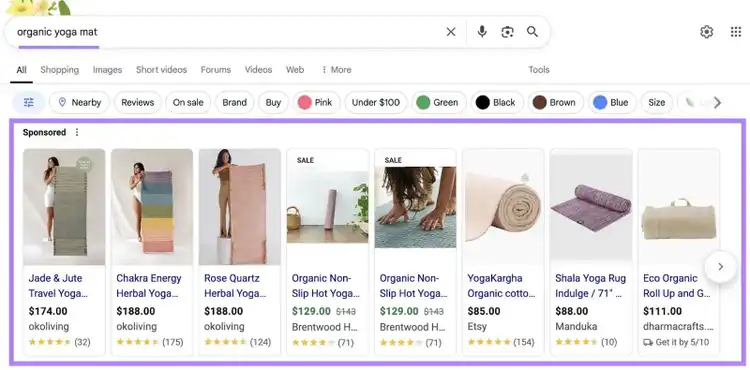
Optimizing your bids can improve your chances of showing up and also keeps costs under control.
Note
Several ad platforms use bidding. In this article, we'll focus on Google Ads.
How Does the Keyword Bidding Process Work?
The keyword bidding process involves advertisers setting bids through an auction, which helps determine which ads appear when someone searches a relevant term.
Here are the main steps:
- You select keywords relevant to your ads and landing pages
- You set your bid—either at the keyword level, ad group level, or using automated strategies
- When a user performs a search, an auction occurs
- Google shows ads based on bids and a number of other auction factors
- You may pay per click, impression, or conversion—depending on your bidding strategy
Note that your ad's position depends on more than just your bid amount.
Google considers multiple factors during the auction, including:
- The context of the search (such as device, location, and time of day)
- The quality and relevance of your ad and landing page
- The Ad Rank threshold—the minimum score needed for your ad to be eligible to show
This system rewards advertisers who create helpful, relevant ads. Not just those willing to spend the most.
What Are the Main Keyword Bidding Strategies?
Google offers two main types of keyword bidding strategies: manual and automated.
Manual bidding lets you choose how much you're willing to pay.
Automated bidding uses Google AI to handle bidding for you based on your goals.
Here’s a quick manual vs. automated bidding comparison:
Based on your campaign goal, you can choose from these automated strategies:
- Maximize clicks: Get the most clicks possible within your budget
- Maximize conversions: Get as many conversions as possible within your budget. Optionally, you can set a target CPA to guide performance.
- Maximize conversion value: Get the most total conversion value from your budget
- Target cost per action (CPA): Get as many conversions as possible at the average CPA you set
- Target return on ad spend (ROAS): Get as much conversion value as possible at the return you want from each dollar spent
- Target impression share: Automatically set bids to show your ad at the top of the page or in a specific position in search results, based on your visibility goal
You may also come across the term “Smart Bidding”—a subset of automated bidding that focuses on optimizing for conversions or conversion value.
How to Start Keyword Bidding
To start bidding on keywords, you’ll need a Google Ads account.
You can quickly create one from the Google Ads homepage. Check out Google’s setup guide for more details.
Once your account is ready, follow these foundational steps:
1. Choose the Right Keywords
Choosing keywords that are both popular among your target audience and relevant to what you're promoting gives your campaign the best chance of success.
You can use Google Keyword Planner within Google Ads to discover new keywords.
Go to Keyword Planner and enter terms related to your campaign to see keyword ideas and metrics like:
- Avg. monthly searches: Shows how often the keyword is searched on Google each month
- Competition: Tells you how competitive the keyword is in Google Ads based on how many advertisers are bidding on it
- Top of page bid (low and high range): Estimates of how much you’ll have to pay for each click to appear at the top of search results for that keyword
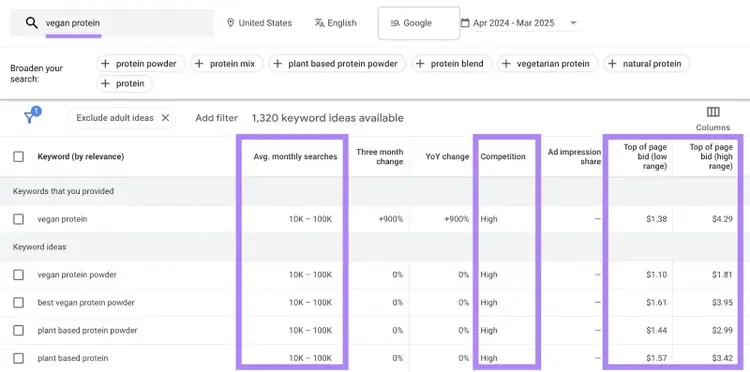
For more precise search volume data and other useful insights, use Semrush Keyword Magic Tool.
Open the tool, enter a broad term related to your campaign, choose a location, and click “Search.”
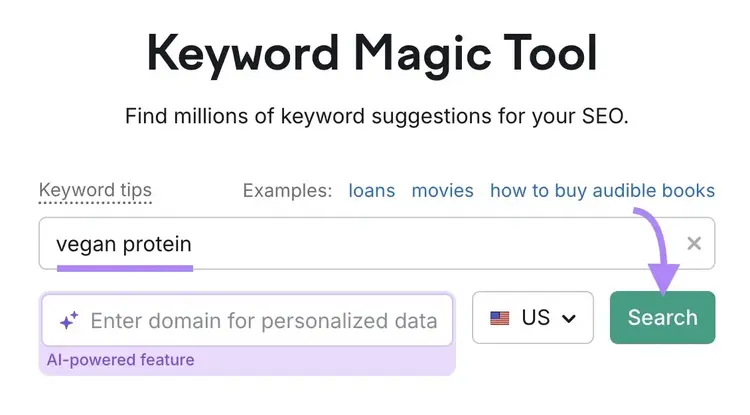
You’ll see a list of keyword ideas, and metrics like:
- Search volume: The average number of searches the keyword gets per month
- Cost per click (CPC): The average amount advertisers pay for a click on an ad triggered by that keyword
- Competitive density (Com.): A score from 0 to 1.00 that shows how competitive a keyword is in paid search
- Intent: Reveals what the searcher is trying to achieve, like to learn something, compare products, make a purchase, or visit a specific site
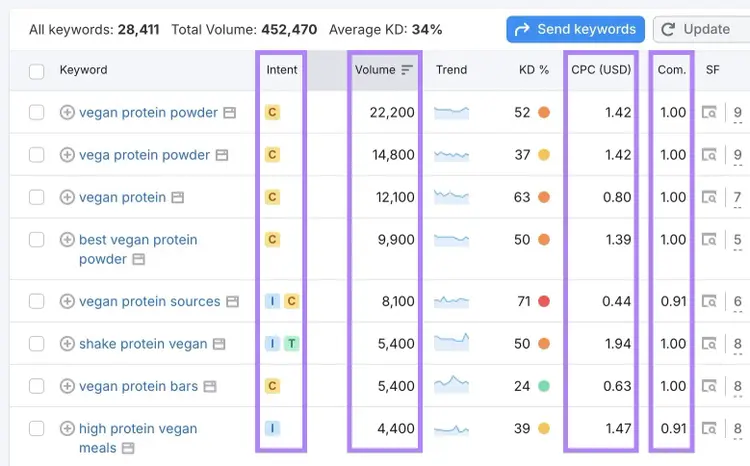
Consider the following when deciding which terms to select:
- Match your campaign: Pick keywords that closely relate to what you're promoting and the ads you’ll run
- Look for commercial and transactional intent: Choose terms that show someone is actively researching options or ready to take action (e.g., “best vegan protein powders” and “buy vegan protein powder”)
- Balance volume vs. competition: High-volume keywords may reach more people but are often more competitive and costly
- Use CPC as a guide, not a rule: A high CPC means others are bidding aggressively—an indication that a term is valuable. But you can always start lower and adjust later.
To learn more, check out our step-by-step guide on how to do PPC keyword research for your ad campaigns.
Find Keywords For Your Ad Campaigns
with the Keyword Magic Tool
2. Set Up Your Campaign in Google Ads
When you’re ready to create a campaign, start by choosing an objective and campaign type (“Search,” in this case). And that determines which bidding strategies you’ll see during setup.
Follow the prompts to complete these initial setup steps.
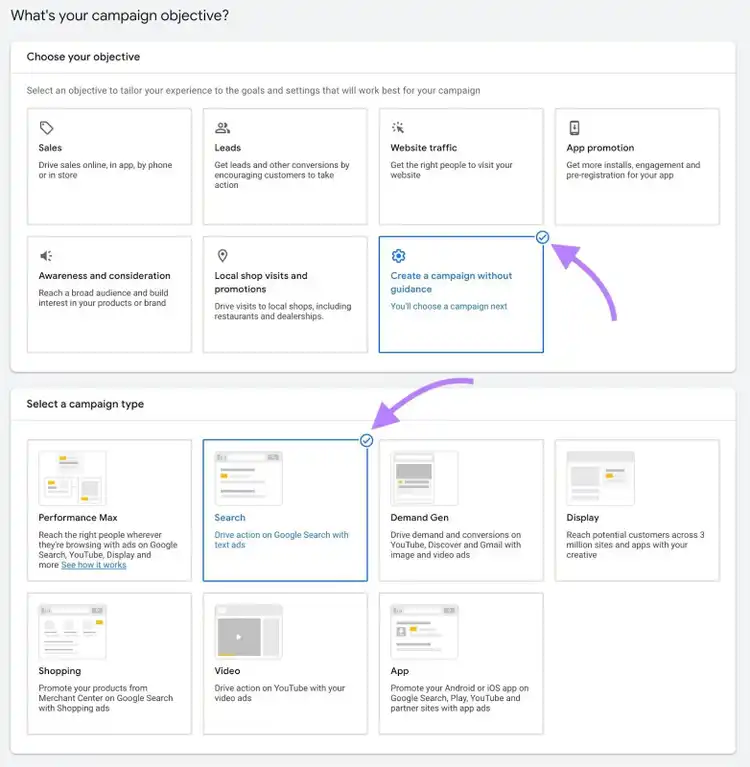
You’ll then reach the bidding section, where you choose what you want to focus on. Such as conversions, clicks, or impression share.
Here’s what Google recommends:
- If you want website traffic, use Maximize Clicks
- If you want more conversions (sales or leads), use Maximize Conversions or Target CPA
- If you want higher-value sales, use Maximize Conversion Value or Target ROAS
- If your goal is visibility in search results, use Target Impression Share
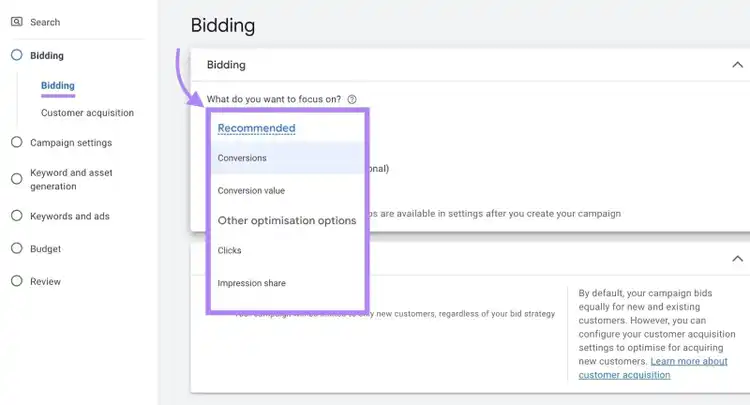
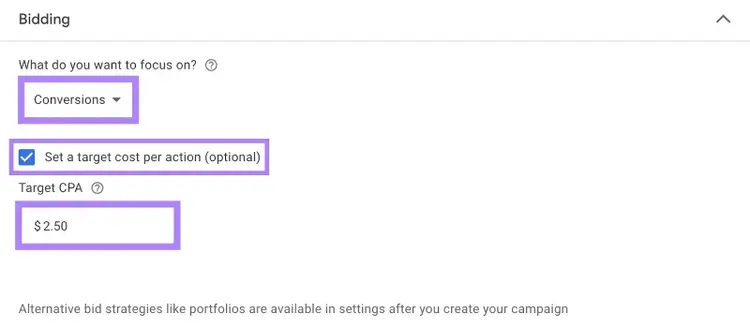
Let’s say you choose "Conversions."
You can let Google automatically maximize conversions. Or you can manually set a target CPA.
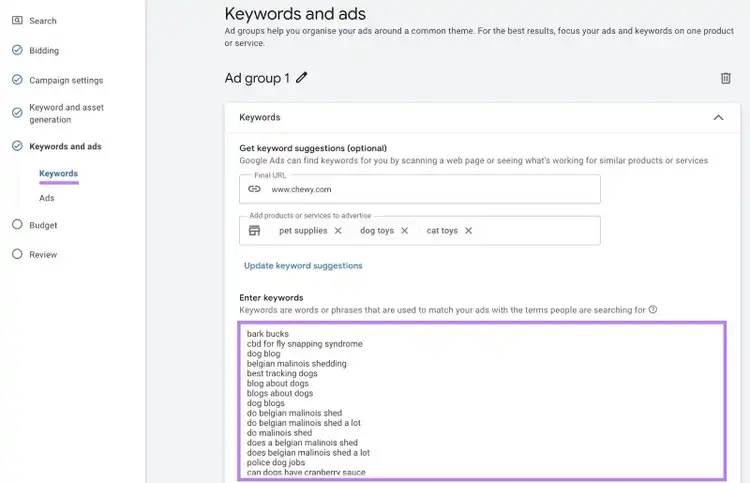
Next, you’ll add keywords and create your ads.
Once that’s done, you’ll move on to setting your average daily budget, which controls how much you're willing to spend each day.
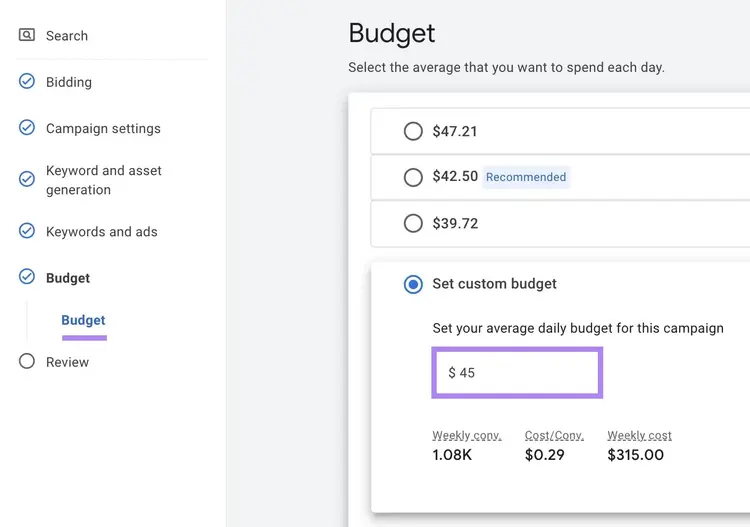
After you’ve filled in all the key campaign details, you’ll be ready to review and launch.
3. Launch and Monitor Your Campaign
Once your campaign is live, monitor your ads’ performance.
What metrics you track to measure performance will depend on your campaign type and goal. Here are a few common scenarios to watch for:
- If you're running lead generation ads and getting lots of clicks but few conversions: Pause underperforming keywords and consider testing stronger landing pages or more relevant ad copy
- If your goal is site traffic, but your ads aren’t getting impressions: Consider raising your bids or choosing more relevant keywords to increase visibility
- If your campaign is driving conversions, but your budget is quickly running out: Focus on improving your ad quality and landing page experience to increase efficiency. So you can keep targeting high-performing keywords without overpaying
- If a specific keyword is converting well but not getting many impressions: It might be worth increasing your bid slightly to boost visibility
There’s no one-size-fits-all approach. But monitoring performance regularly helps you optimize your bids and improve results over time.
Improve Performance by Studying Your Competitors
Once you’ve run a few campaigns and feel comfortable with keyword bidding, see what you can do to drive better results.
Start by analyzing your competitors using Semrush's Advertising Research tool to see:
- How much your competitors are spending on ads
- Which keywords they're bidding on
- What each keyword costs
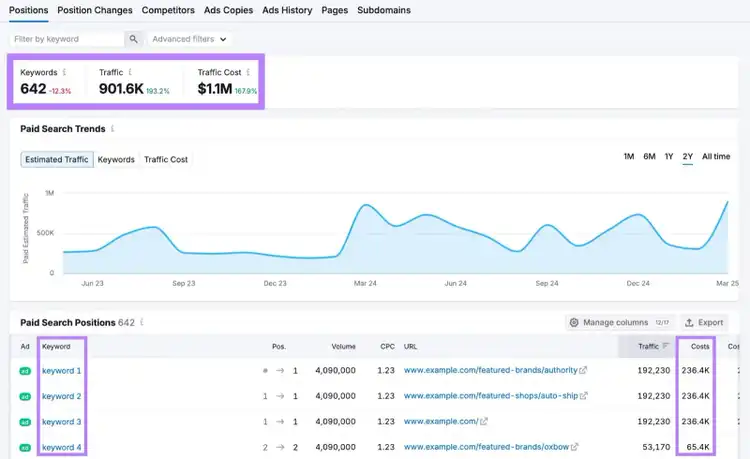
Use these insights to set more effective initial bids and prioritize keywords that deliver the best return.
Try Advertising Research today.
Analyze Competitors’ Ads
with the Advertising Research Tool

Connor Lahey is a content strategist with over 10 years of experience in content and SEO. His past roles and responsibilities include directing SEO and content strategy for dozens of local businesses, managing organic growth and strategy partnerships with fortune 500 companies, and working at Semrush on SEO and content strategy for its blog and other entities within the site. Connor‘s main interests revolve around advanced SEO, content strategy and development, SERP analysis and, AI.
Connor Lahey
Connor Lahey is a content strategist with over a decade of experience in content and SEO roles for both local businesses and large companies. He specializes in content strategy, search intent analysis, on-page SEO, local SEO, and SaaS SEO.

Tells Google to show you more from Semrush in AI, Search, and Discover.