Local SEO tools help you manage and optimize how your local business shows up across Google Maps, regular Google search results, and AI-driven search experiences like AI Overviews and AI Mode.
Because more and more are using AI to seek answers, get recommendations, and compare options. If your business isn't showing up consistently or in the right contexts, you're missing out on customers.
Here are my picks for the 11 best local SEO tools in 2026:
No.
Tool
Useful for
Pricing
1
Google Business Profile
Creating and managing your Google listing
Free
2
GBP Optimization (Semrush)
Managing multiple GBP listings
From $30/location/mo
3
Listing Management (Semrush)
Keeping NAP data consistent across directories
From $50/location/mo
4
Review Management (Semrush)
Monitoring and responding to reviews
From $30/location/mo
5
Map Rank Tracker (Semrush)
Tracking your Google Maps rankings
Free trial, then from $30/location/mo
6
Keyword Magic Tool (Semrush)
Local keyword research
Free limited access, paid plans available
7
Position Tracking (Semrush)
Tracking website rankings in specific locations
Free limited access, paid plans available
8
Google Reviews Widget (Elfsight)
Displaying Google reviews on your site
Free, or from $5/mo
9
Free Google Review Template & QR Code Generator (Semrush)
Collecting more Google reviews
Free
10
Google Analytics 4
Measuring website engagement
Free
11
Google Search Console
Monitoring website performance in Google Search
Free
Now, before we get into the details about each of these tools, here's why they matter.
Why Local SEO Tools Matter for Brand Visibility
Local SEO has always been about getting your business in front of the right people at the right time.
Today, people are searching in different places — Google Maps, Google AI Mode, ChatGPT, Gemini, and Perplexity. Local SEO tools help you stay visible across all of them.
Here's what they help you do:
Show up in AI-generated answers: Build the kind of authoritative, consistent online presence that AI platforms draw from when recommending local businesses
Keep your business information consistent: Accurate, consistent NAP data (name, address, and phone number) across the web gives AI platforms the confidence to recommend your business
Get found in local search: Track your rankings across Google Search and Maps so you can spot drops and act fast
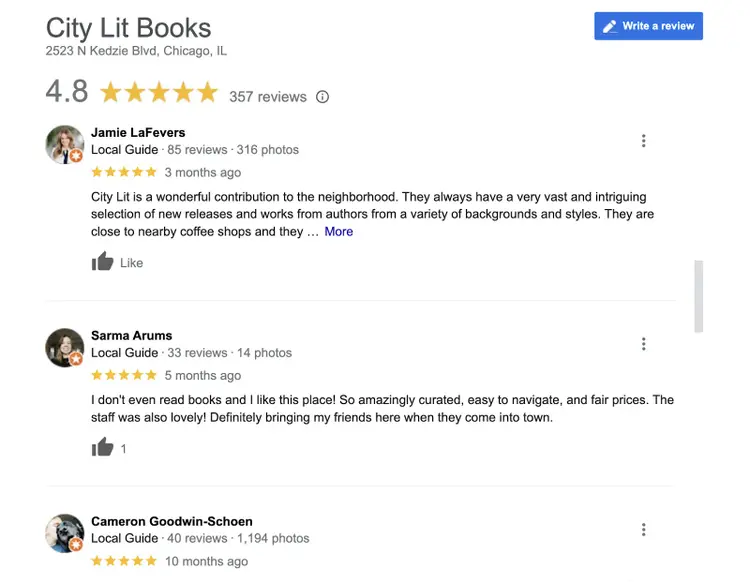
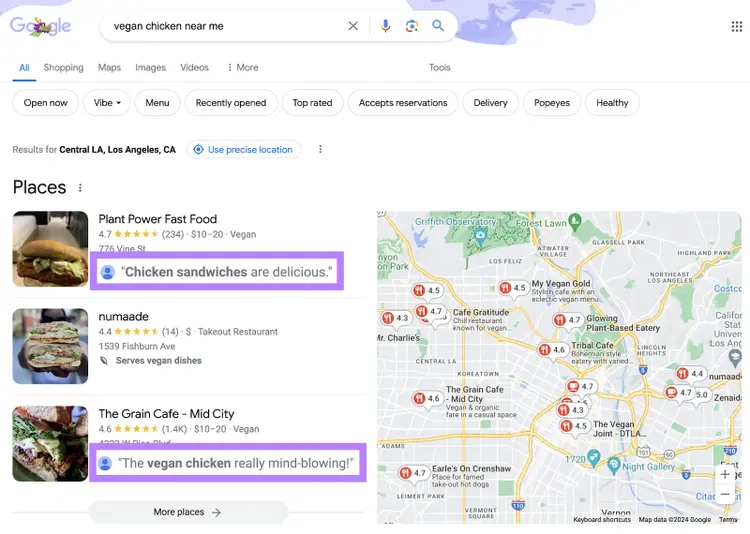
Build trust through reviews: Collect, monitor, and respond to customer reviews. Positive reviews build credibility in the eyes of Google and AI assistants — making them more likely to surface your business in search results
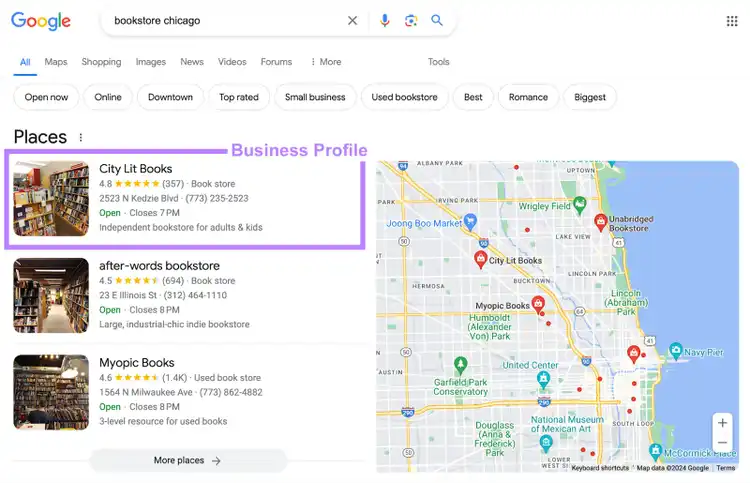
Your profile can rank in Google Search, like this:
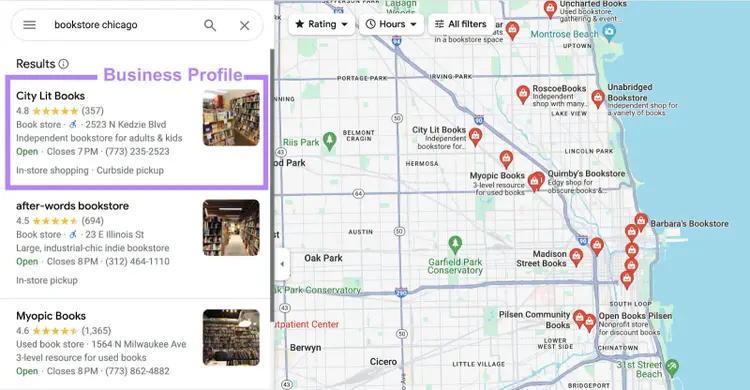
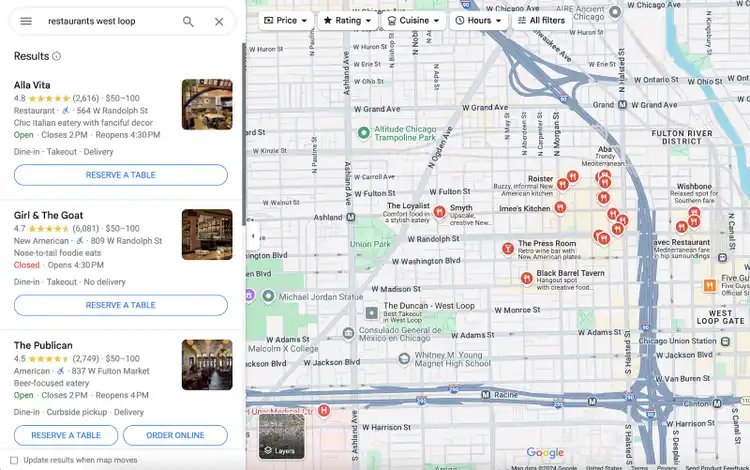
And in Google Maps:
If you optimize your profile, users are more likely to discover your business through these platforms. And ultimately choose your products or services.
Once that’s done, fill out your business information in as much detail as possible.
Here are some of the things you can add:
Business description
Attributes (e.g., Wi-Fi and outdoor seating)
Hours
Photos and videos
Product/service information
Completing your profile helps ensure prospective customers get the information they need. And helps Google match your profile with relevant search queries.
Accurate citations also make it easier for potential customers to find the information they need.
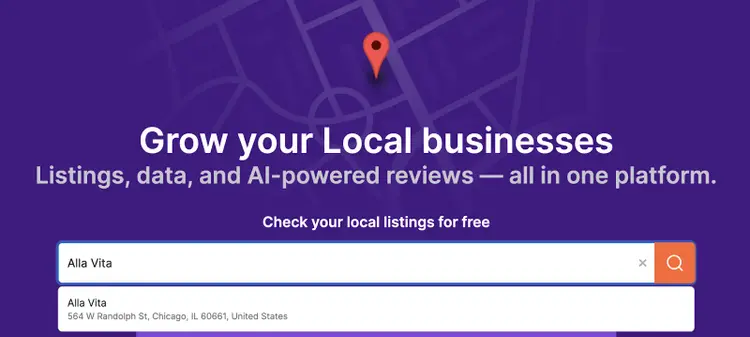
You can get started with Listing Management for free.
Just use the search bar to find your business.
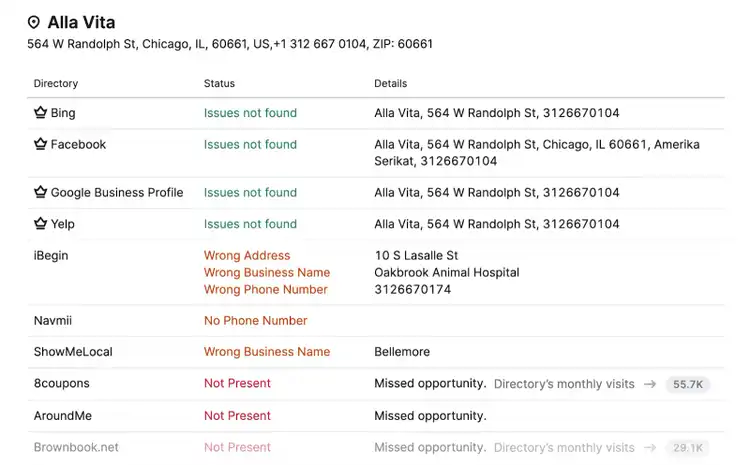
Then, scroll down to see which top directories you’re missing out on. And which contain incorrect or inconsistent information.
Want to fix all these listings at once?
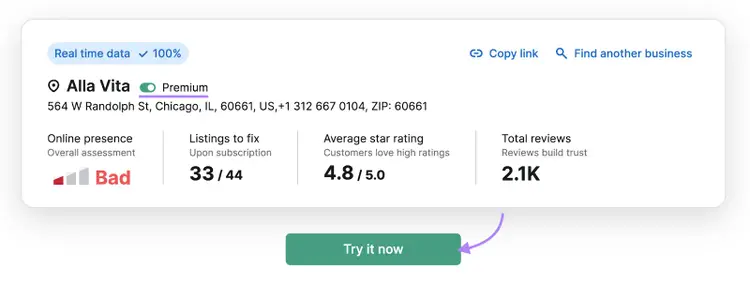
Scroll to the top and use the toggle to choose your plan. (You’ll find information about each plan below.)
Then, click “Try it now.”
Set up your plan and location step by step.
When you’re done, the tool will automatically distribute your information to high-quality, relevant directories. (Find a full list of directories for your location here.)
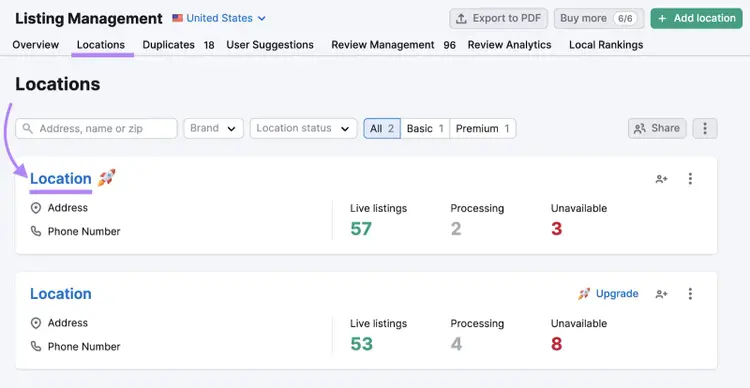
To keep track of your listings, choose your location from the “Locations” tab.
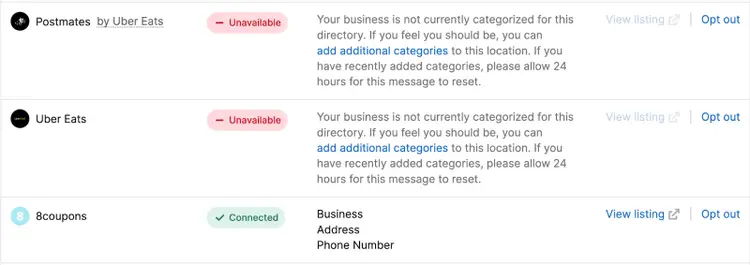
And scroll down to see the status for each directory.
You’ll also find useful links and information.
Pricing
To use Listing Management, you need a Semrush Local plan.
Local Essentials ($50 per location per month) gives you access to every feature except API support. This plan also includes access to GBP Optimization, Review Management, and Map Rank Tracker tools.
Local Pro ($60 per location per month) gives you access to API support and advanced features/limits in the other tools.
4. Review Management
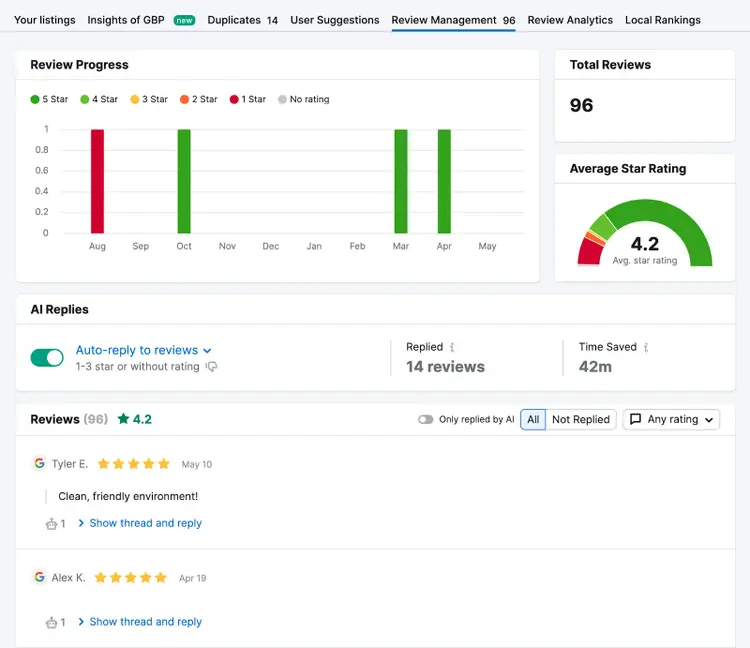
Semrush’s Review Management tool collects your reviews data from multiple online directories.
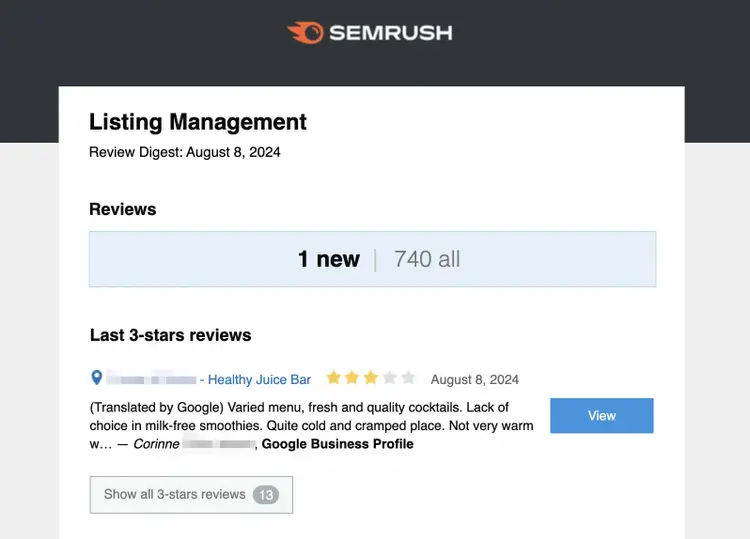
And every week, you’ll receive an email alert about any negative reviews. So you can quickly take corrective action.
Responding consistently and quickly shows that you care about customer feedback. And gives you the opportunity to counter any negative comments.
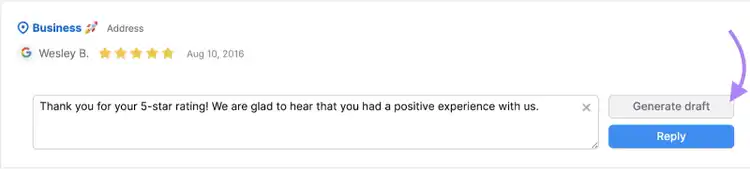
If you’re not sure what to say or want to save some time, use the “Generate draft” button.
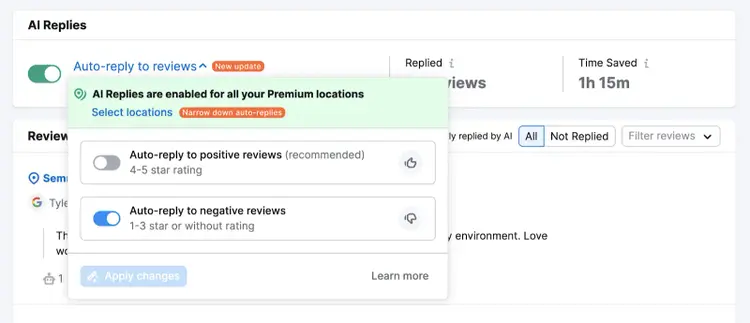
Or enable the AI auto-reply feature.
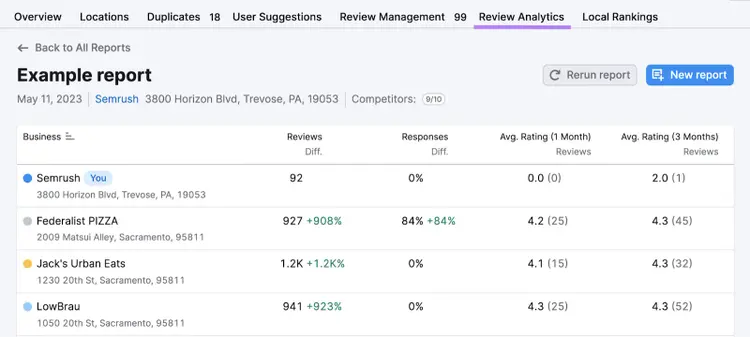
In the “Review Analytics” tab, you can compare your Google reviews against competitors’.
So, you can benchmark your performance. And learn from your rivals’ strengths and weaknesses.
Pricing
To use the Review Management tool, you need a Semrush Local plan.
Local Base ($30 per location per month) lets you manage your GBP reviews and generate up to one report with five competitors per month. This plan also includes access to GBP Optimization and Map Rank Tracker.
Local Essentials ($50 per location per month) lets you monitor reviews across multiple platforms. This plan also includes enhanced access to GBP Optimization, Review Management, and Map Rank Tracker tools.
Local Pro ($60 per location per month) includes everything above, plus additional advanced features.
5. Map Rank Tracker
Semrush’s Map Rank Tracker is a local SEO tool that allows you to monitor your Business Profile’s rankings in Google Maps.
In other words, where your profile appears when someone searches like this:
Enter your business name into the tool to get started.
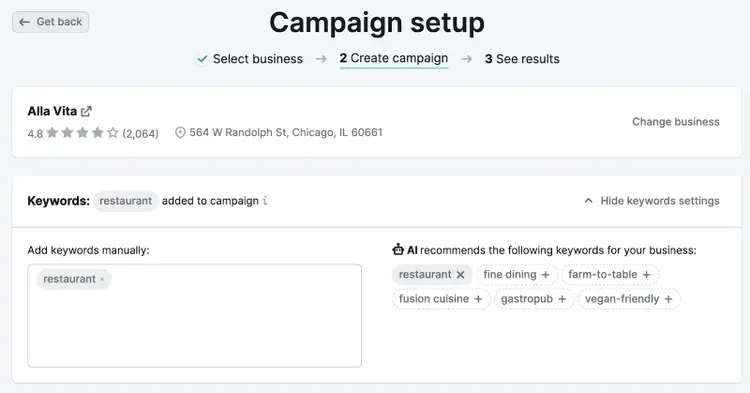
Then, choose up to 100 local keywords you want to track—i.e., search terms people use to find local businesses like yours.
If you need help, use the AI-generated recommendations. Or check out our local keyword research guide.
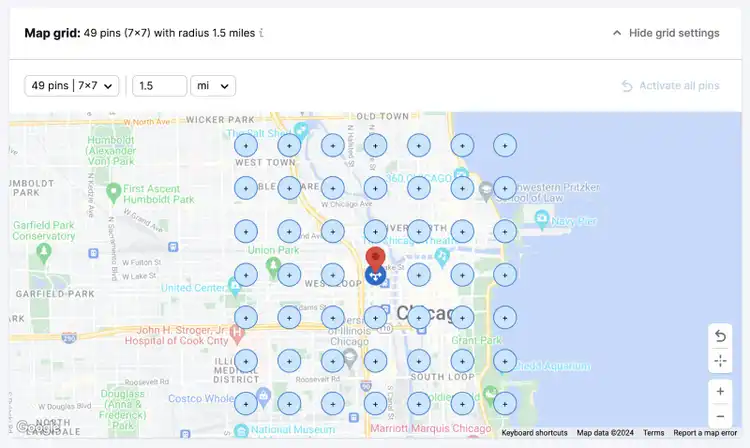
Next, you’ll need to set your map grid.
Every pin represents a different search location. The tool will monitor your ranking in each one.
Finally, decide whether to scan manually or set up a scanning schedule.
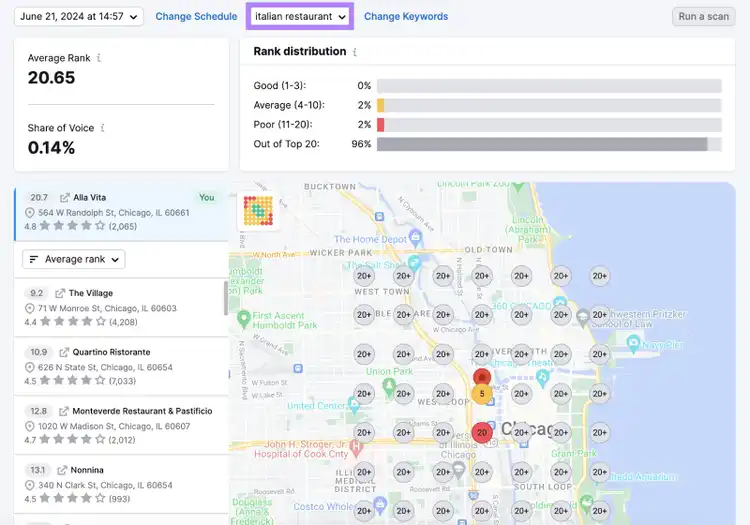
When setup is complete, you’ll see the result of your first scan.
Each number represents your ranking position for the given keyword and search location. (You can change your keyword selection using the drop-down menu at the top.)
Ideally, you want to be in position 1. Because that means searchers are more likely to see your result—and engage with it.
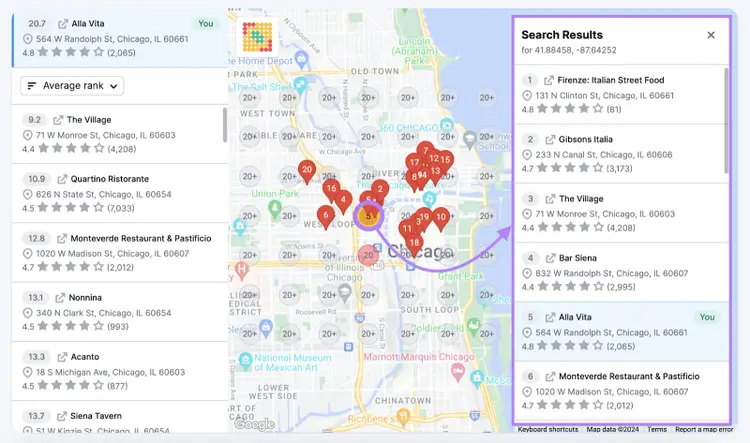
You can analyze your main competitors in any search location by clicking the numbered circle.
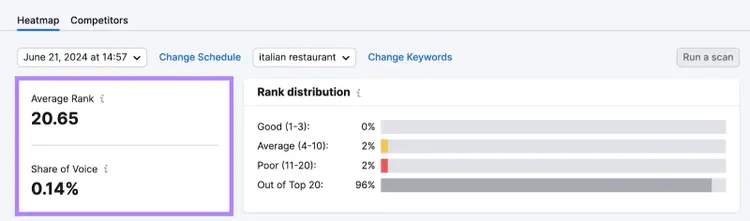
Make sure to monitor your average rank and share of voice over time. So you can check they’re moving in the right direction.
You can try the Map Rank Tracker for free. Just set up your free Semrush account to get 50 credits to use on one campaign (i.e., one business location).
Credit usage is based on the number of pins and keywords scanned. For example, if you scan a 7x7 map for 10 keywords four times per month, it’ll cost (7 x 7 x 10 x 4 =) 1,960 credits per month.
To access more credits, you’ll need one of the following Semrush Local plans:
Local Base ($30 per location per month) gives you 375 credits per month. You also get limited access to the GBP Optimization and Review Management.
Local Essentials ($50 per location per month) gives you 625 credits per month. You also get access to GBP Optimization, Listing Management, and Review Management.
Local Pro ($60 per location per month) gives you 1,225 credits per month. You also get additional features/limits in other local SEO tools.
After subscribing, you can purchase an additional campaign for $10 per month. And 1,000 extra credits for $5 per month.
Use it to discover search terms people use to find businesses like yours. So you can optimize your business listings and website more effectively.
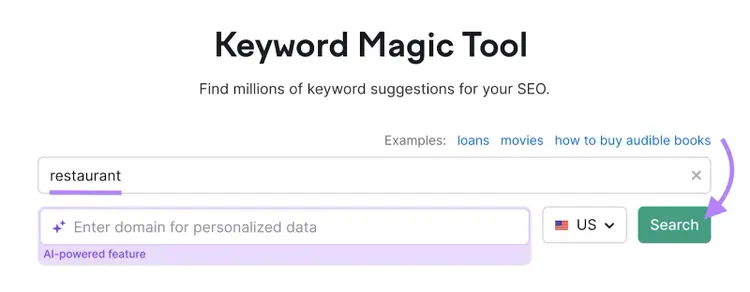
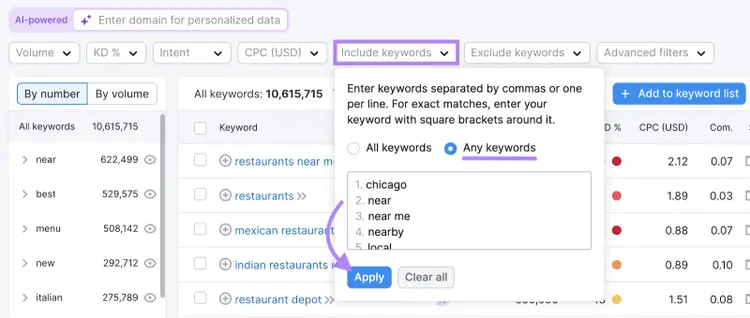
To get started, enter a seed keyword to base your research around. (This should be a simple term related to your business—e.g., “restaurant.”)
Then, choose your country and click “Search.”
Next, go to the “Include keywords” menu. And add location-specific terms your prospective customers might use (e.g., the name of your city and district).
Include general terms “near,” “nearby,” and “local,” too.
When you’re done, select “Any keywords” and click “Apply.”
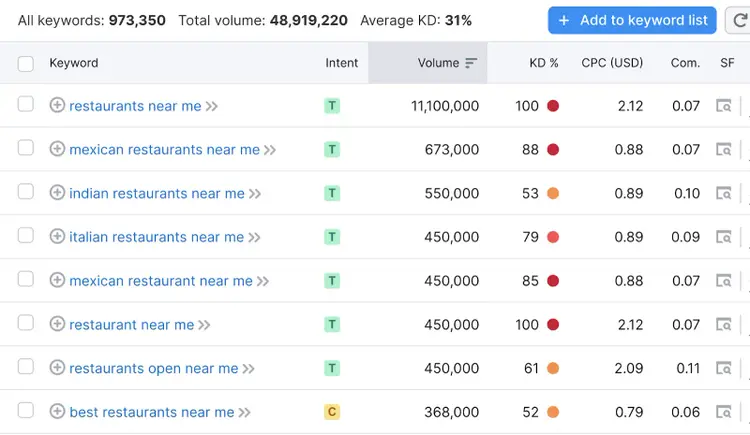
You’ll now see a list of keywords that contain your seed keyword (or a close variation) and one or more of your location-specific terms.
For example, “italian restaurants near me”:
(If you want, you can exclude irrelevant keywords. Like the names of cuisines you don’t offer.)
The tool also provides lots of useful data, including:
KD %: The keyword difficulty score, which measures how hard it'll be to rank highly in the organic (unpaid) results
SF: The number of SERP features (non-standard elements on the search engine results page, or SERP)—click the number to see which ones they are
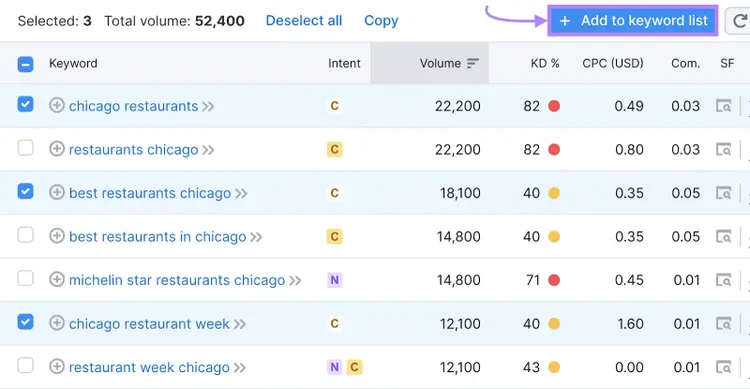
When you find keywords that are relevant to your business, use the check boxes and “+ Add to keyword list” button to save them to the Keyword Strategy Builder.
Then, repeat the process with other seed keywords. So you can discover all the different ways that prospective customers search.
Naturally incorporating keywords into your business listings and website can help you rank higher in search results. For detailed advice, read our keyword optimization guide.
Pricing
You can get limited access to the Keyword Magic Tool (and dozens of other tools) with a free Semrush account.
To unlock higher limits and advanced features, start your free Semrush trial.
Check out our pricing page to learn more about our plans.
7. Position Tracking
Semrush’s Position Tracking tool lets you monitor your website’s Google rankings in specific search locations.
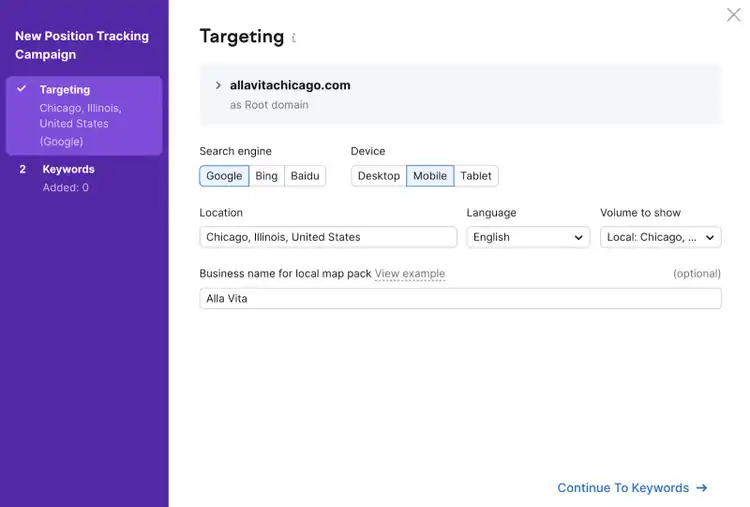
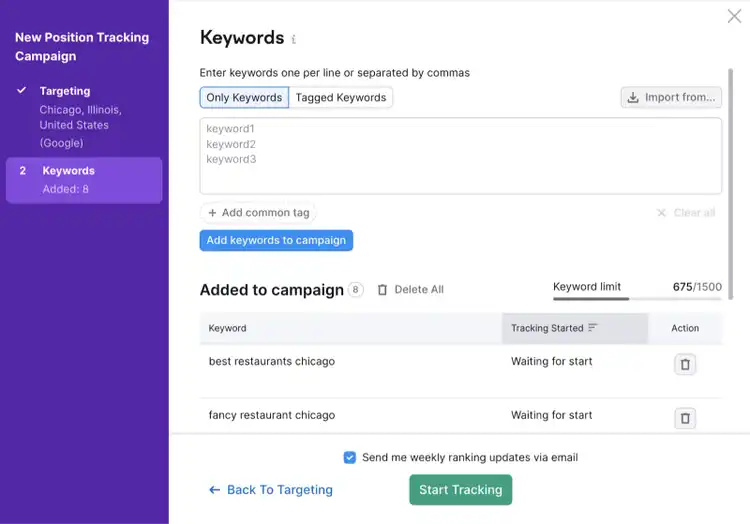
During the setup process, choose your target country, state/region, city, or zip code. (Many local businesses compete at the city level. So, this is a good place to start.)
And add the name attached to your Google Business Profile. So the tool can check for its appearance in search results.
Once setup is complete, go to the “Overview” report.
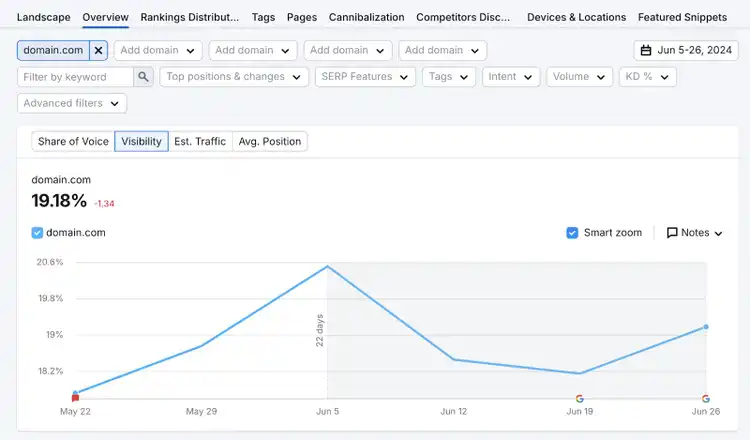
The “Visibility” graph gives an overview of your organic performance:
A score of 100% means your website ranks in the top unpaid position for all tracked keywords. While a score of 0% means you don’t appear in the top 100 for any of your keywords.
Scroll down to see a full keyword breakdown.
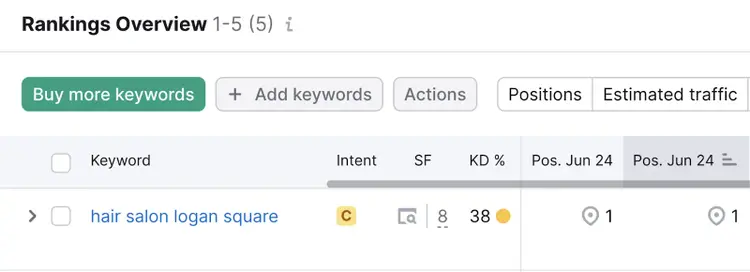
The “Pos.” columns show your website’s ranking position(s) on the specified dates.
If you see an icon, that means you rank(ed) for a SERP feature. The one that looks like a map pin means your Business Profile appears in the local pack (the section with a map).
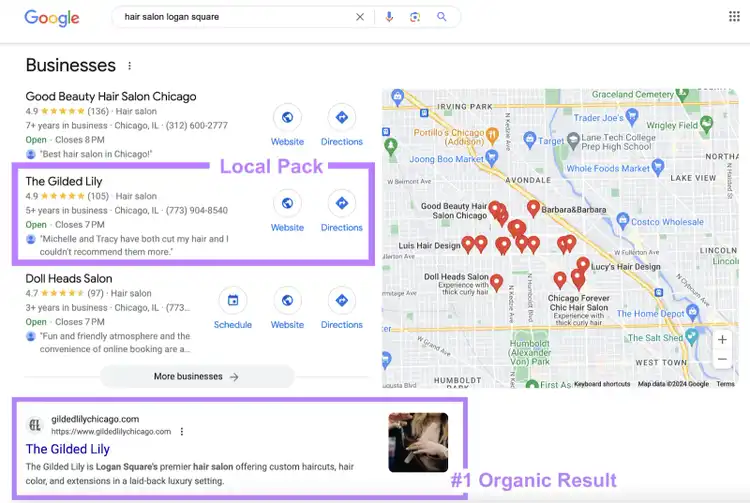
For example, this site ranks in the top organic position and the local pack:
Here’s what that looks like on the results page:
Make sure to identify any underperforming keywords. And adjust your local SEO strategy to suit.
Also sign up for ranking alerts. So you can act quickly should your rankings drop in the future.
Tip
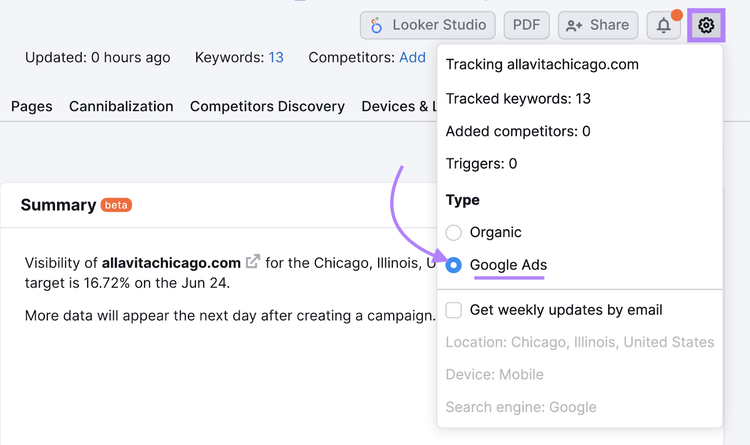
If you advertise on Google, you can also use Position Tracking to monitor your paid search ad rankings. Just click the cog icon then select “Google Ads.”
Pricing
You can get limited access to the Position Tracking tool with a free Semrush account.
To unlock higher limits and advanced features, start your free Semrush trial.
Check out our pricing page to learn more about our plans.
8. Google Reviews Widget
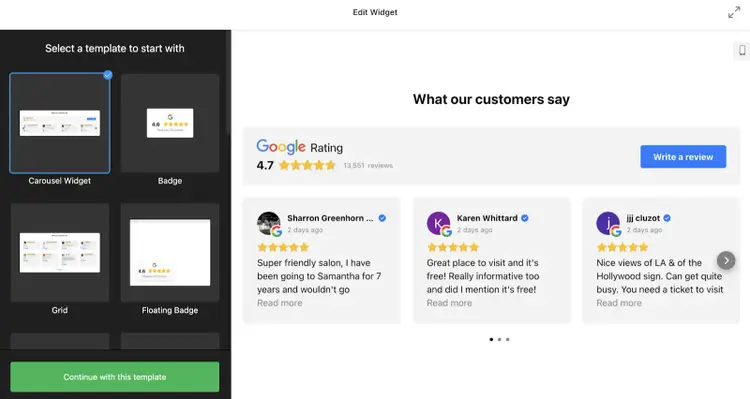
Elfsight’s Google Reviews widget allows you to display Google reviews on your website. Which can help you build trust with users.
The widget can also prompt visitors to write their own review.
Like this:
This is beneficial for local SEO because the quality and quality of reviews on your profile affect its rankings.
There are lots of customizable templates to choose from. So, it should be easy to display reviews in a way that works well for your website.
Plus, the widget is easy to install. You don’t need any coding expertise.
Pricing
There’s a free version of the Google Reviews widget, but it includes Elfsight branding and has a number of limitations.
To remove the Elfight branding, you’ll need a paid plan. These cost $5 to $80 per month billed annually, depending on the kinds of limits and features you need.
Alex is a managing editor with 10+ years of experience leading content and SEO teams across SaaS, tech, ecommerce, and digital publishing. He specializes in building editorial systems that balance human judgment with AI-assisted workflows, helping teams produce original, high-impact content as search and discovery evolve. His work spans SEO strategy, content quality frameworks, and adapting content operations for AI-driven search.
Subscribe to learn more about Local SEO
Subscribe
By clicking “Subscribe” you agree to Semrush Privacy Policy and consent to Semrush using your contact data for newsletter purposes
Alex Lindley
Alex is a managing editor with 10+ years of experience leading content and SEO teams. He focuses on building AI-aware editorial systems that help teams produce original, high-impact content as search evolves.
Share
Tells Google to show you more from Semrush in AI, Search, and Discover.