
You can’t set and forget pay-per-click (PPC) campaigns. Ongoing PPC management is crucial for making sure campaigns stay profitable.
In this guide, we’ll go over what PPC management entails, why it’s important, some best practices, and more.
Let’s start.
What Is PPC Management?
PPC management involves overseeing everything related to a business's PPC campaigns and strategy. And can involve handling search ads, display ads, social media ads, and other types.
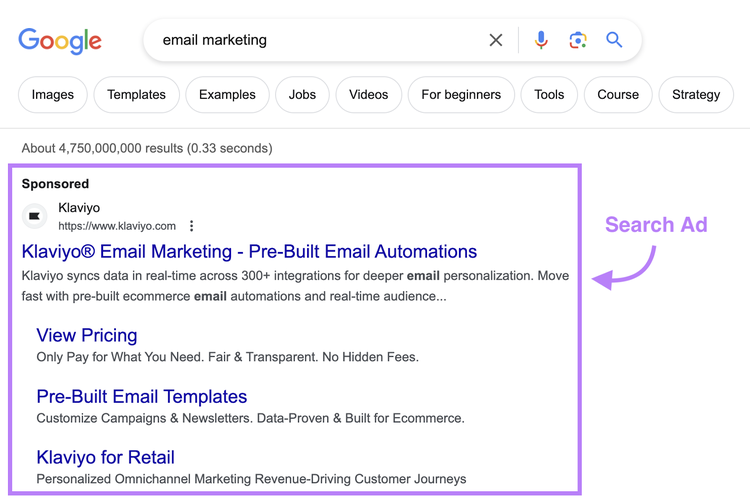
For example, here’s a PPC search ad:
PPC management can include (but isn’t limited to):
- Ad copywriting: Crafting messages that engage your target audience and persuade them to take action
- Landing page creation: Designing high-converting landing pages that turn visitors into customers
- Campaign optimization: Improving ad campaigns to achieve a higher return on ad spend
- A/B testing: Testing multiple versions of an ad or landing page to uncover the highest-performing variant
Why Is PPC Management Important?
Ongoing pay-per-click campaign management is crucial for achieving your desired results.
More specifically, it helps you:
- Improve your campaigns: Running and monitoring PPC campaigns reveals what works and what doesn’t. So you can optimize future campaigns to get a better return and reduce budget waste.
- Detect fraudulent clicks: Keeping an eye on your PPC campaigns enables you to spot click fraud (when malicious parties click your ads to drive up your costs). So you can protect your ad budget.
- Spot seasonal trends: Managing PPC campaigns allows you to spot seasonal trends and market fluctuations. And use this information to adjust your overall marketing strategy.
Outsourced vs. In-House PPC Management
Both outsourced and in-house PPC ad management have their pros and cons.
A PPC management agency or consultant already has expertise in this area. So, they may have a better chance at generating greater returns on your ad spend.
But there are a few cons to outsourcing this work to an agency or freelancer. Like the cost—you have to pay for the services on top of what you spend on the ads themselves—and the fact that you’ll be dependent on a third party.
There’s also the greater chance of miscommunication about goals or budget. Which could result in overspending.
This is something that can be avoided when you look into the following while choosing a PPC management agency or consultant:
- Services offered: Be clear on what exactly you need help with and find a partner that can do it. That might be just managing the campaigns. But it could also involve creating and optimizing landing pages.
- Communication style: Look for a freelancer or agency that’s quick to respond to your questions. And meshes well with your company.
- Reporting capabilities: Find a partner that offers frequent and detailed reporting on campaign performance to gain a clear understanding of what drives results
- Outcomes shared in case studies: Look for a partner with proven results, ideally in the form of case studies. And try to find hard numbers that demonstrate exactly what they achieved.
Managing PPC campaigns in-house might initially cost more as you learn the basics. And it’ll take time to develop expertise.
But it can also be more cost-effective. Because you don’t need to pay any management fees.
It’s also more feasible than you might think—as you’re about to see.
6 Tips for PPC Management Success
Let’s look at what you can do to ensure your pay-per-click campaigns are as profitable as possible.
Note
While there are multiple kinds of PPC ads, we’ll be focusing on Google Search ads for these tips.
1. Get Familiar with the Ad Platform
Before setting up your first PPC campaign, you’ll want to get familiar with Google Ads. So you can take advantage of all the features for maximizing performance.
A few things you’ll want to learn about include:
- Campaign types: Google Ads offers a variety of different campaign types, including search campaigns, display campaigns, video campaigns, and more. Even if you’re focusing solely on search ads, it’s a good idea to get familiar with the other options to better understand how they can meet different goals.
- Targeting options: You can target users based on the search terms they use, their interests, their previous ad interactions, and other criteria. Look through the different targeting options and decide which ones make the most sense for your campaign.
- Bidding strategies: Google Ads supports both manual and automated bidding strategies. Make sure to learn how each of these works before launching your campaign to prevent unwanted budget spend (we’ll also cover bidding more later in this article).
- Scheduling options: You can schedule ads to only be displayed at certain hours of the day or days of the week. If you think your campaign could benefit from ad scheduling, consider this feature.
2. Perform Keyword Research
You need to perform keyword research to find the right search terms to focus on in your PPC campaigns. And Semrush Keyword Magic Tool can help.
All you need to do is enter a single seed keyword, and the tool will generate potentially thousands of keyword ideas for you to review.
Here’s how to use it:
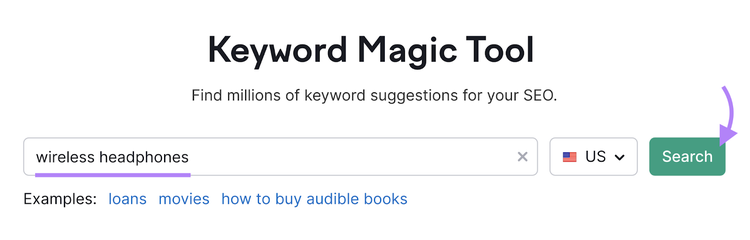
Start by entering your seed keyword. Then, hit the “Search” button.
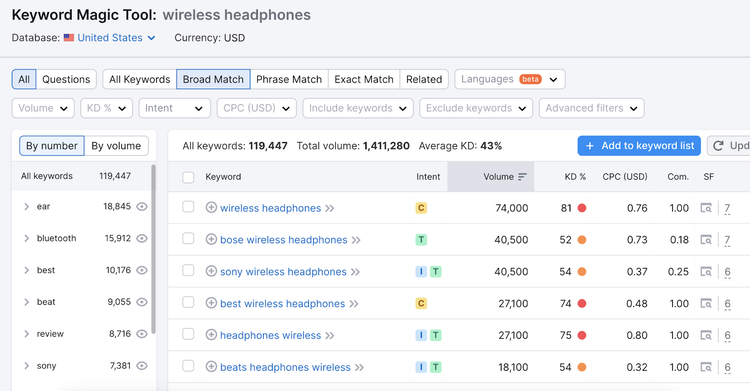
The tool will then generate a report containing relevant keyword ideas.
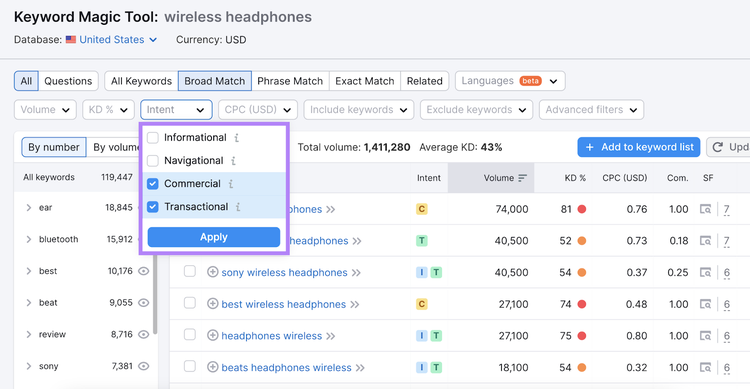
Use the “Intent” drop-down to filter by search intent (the reason driving a searcher’s query).
Check the boxes next to “Commercial” (which indicates searchers are interested in doing research on brands, products, or services) and “Transactional” (which indicates searchers are interested in taking action like making a purchase).
And click “Apply.”
To keep track of your keywords, select the ones you want to include in your ads by clicking the checkbox next to each. Then, click the export icon.
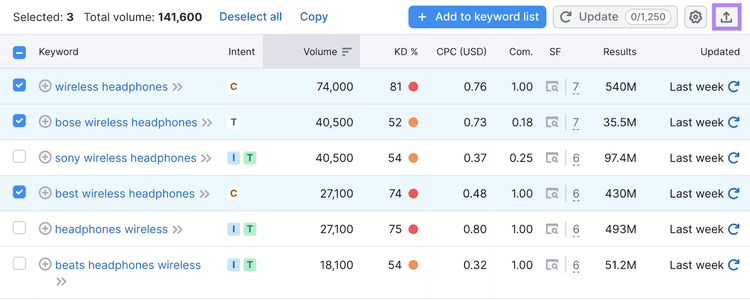
This will allow you to export all your keywords to a single file. Making it easier to add the keywords to Google Ads later on.
Perform Keyword Research
with the Keyword Magic Tool
3. Use Negative Keywords
Negative keywords are terms you don’t want your ads to appear for. And you can designate a list of negative keywords in your campaigns’ settings.
Why would you want to use negative keywords?
It’s simple: Over time, you’ll learn that certain keywords don’t generate ad clicks. Or they deliver ad clicks that don’t convert.
You should add these keywords to a negative keyword list to prevent them from wasting your ad budget.
Here’s how to create a negative keyword list in Google Ads:
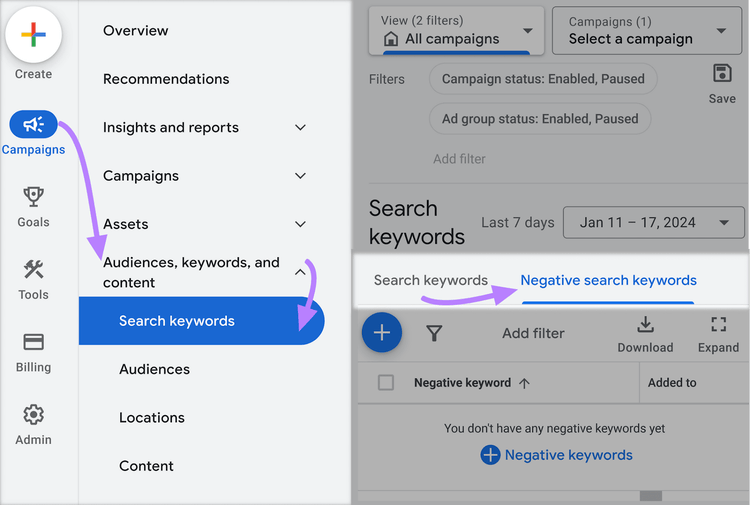
From the Google Ads dashboard, go to “Campaigns” > “Audiences, keywords, and content” > “Search keywords.”
Next, click on “Negative search keywords.”
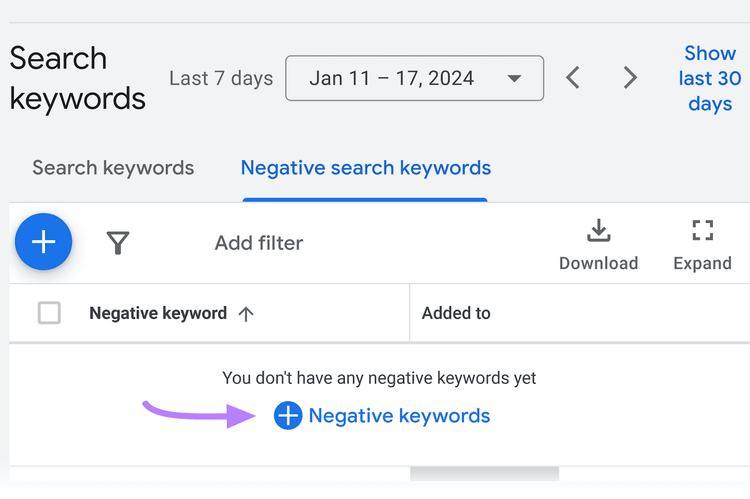
Click on the “+ Negative keywords” button.
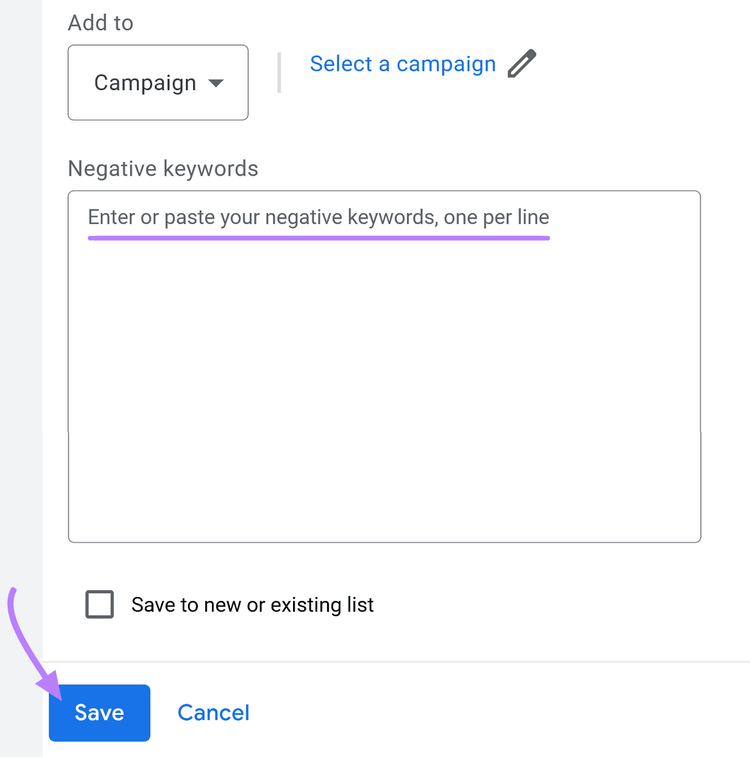
Here, you can decide to have the negative keywords apply to either the entire ad campaign or just a single ad group.
Choose one of the two options and then enter your negative keywords.
You can add three types of keywords:
- Negative exact match: Your ads won’t show if the search query contains the exact term you enter, with all words in the same order. The ad can still be displayed if the search query contains the exact term you enter and additional words.
- Negative phrase match: Your ads won’t show if the search query contains all the words in the phrase you enter, with all words in the same order. And your ads also won’t show if the search query contains additional words—as long as the specified terms appear in the order you enter.
- Negative broad match: Your ads won’t show if the search query contains all words that your negative keyword contains, regardless of word order. Ads can still be displayed if a search contains only some words from your negative keyword.
Note
Negative broad match keywords should be entered as is. But negative exact match keywords need to be enclosed in square brackets ([example]). And negative phrase match keywords have to be enclosed in quotation marks (“example”).
Finish the process by clicking the “Save” button.
4. Analyze Your Competitor’s Ads
Analyzing your competitors’ ads will give you a starting point for your campaigns. And help you more quickly figure out what works.
Use Semrush’s Advertising Research to do this.
Enter a competitor’s domain and click “Search.”
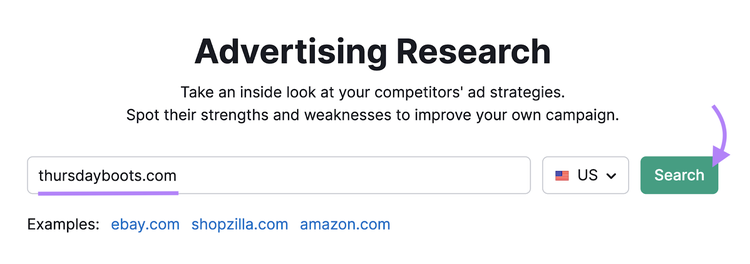
The tool will then generate a detailed report on your competitor’s advertising activities.
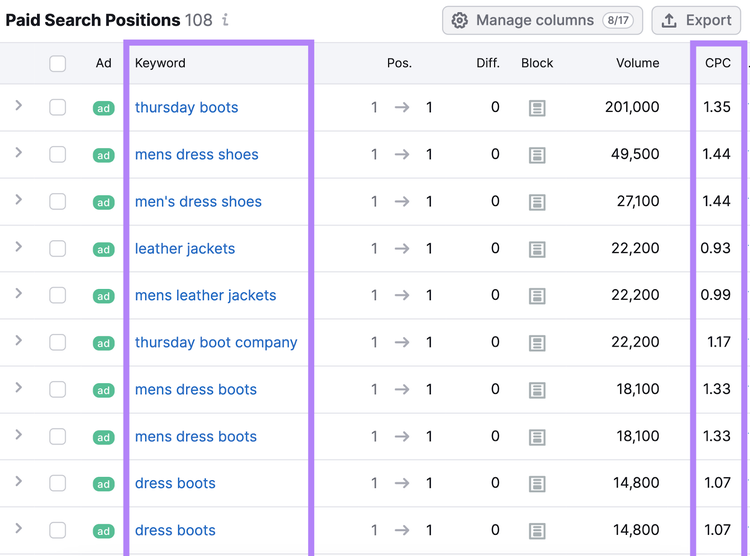
From the “Positions” tab, scroll down to the “Paid Search Positions” section to see all the keywords your competitor is bidding on. Along with the average cost per click (CPC)—the average amount advertisers are willing to pay for a click on their ad—for each keyword.
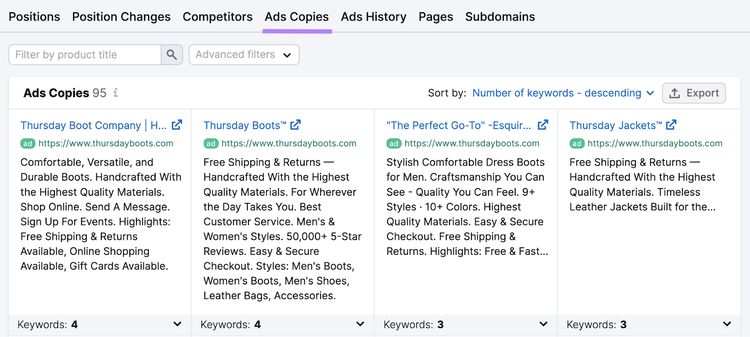
Visit the “Ads Copies” tab to see the exact ad copy your competitor is using and the number of keywords that trigger those ads. Which can help inspire your own messaging.
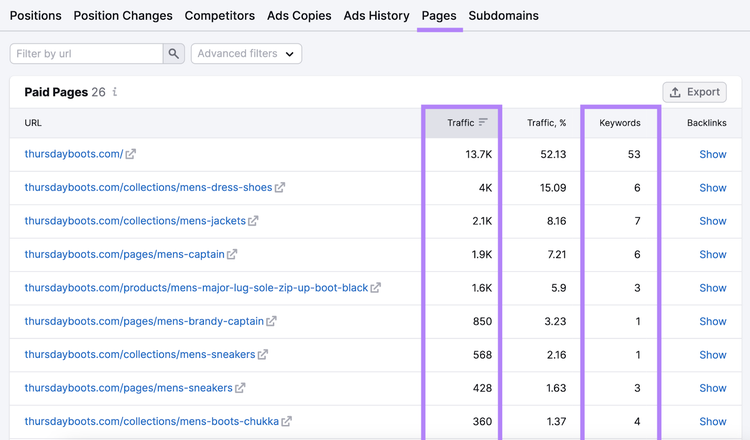
Then, go to the “Pages” tab to see the landing pages each ad leads to.
Click the links to your competitors’ landing pages to see what messaging, imagery, and calls to action (CTAs) they use.
And look at the estimated traffic numbers and related keywords for each to get a sense of the impact your own ads might have.
Analyze Competitors’ Ads
with the Advertising Research Tool
5. Choose the Right Bidding Strategy
PPC advertising is based on an auction model.
Advertisers place bids to have their ads displayed on a search results page for a specific search term. And the winner (determined by bid amount, ad quality, and other factors) gets its ad displayed.
There are different bidding strategies you can try out to achieve better results. And choosing the right bidding strategy can make or break your PPC campaign.
Let’s look at some of the most popular bidding strategies available in Google Ads and when to use each one.
Target CPA
Target cost per action (CPA) is an automated bidding strategy that lets you determine how much you want to spend for each action.
To do this, it uses historical campaign data and any available contextual signals. Like who’s performing the search that’s triggering your ad.
Keep in mind that not all conversions will have the CPA you set. Some might be higher, and some might be lower. But the CPA will average out to your target CPA over time.
For example, let’s say you sell leather bags and set your target CPA at $15. Your cost per action on some conversions might be higher or lower than $15, but it will ultimately average out to meet your target CPA of $15.
Target CPA is a good strategy to use if your campaigns have already generated a decent number of conversions (at least 30) since it uses historical data to optimize bids.
Target ROAS
For this bidding strategy, you set a target return on ad spend (ROAS) that you’d like your ad campaign to generate.
Google Ads then uses AI and other signals to adjust your bids to maximize conversion value while meeting your target ROAS.
Target ROAS is a good option if you’ve been running Google Ads for a while and want to try to get a better return by using the platform’s AI-powered algorithm.
Maximize Conversions
This bidding strategy is designed to help you get the most conversions out of your ad budget. And you can use it with or without setting a target CPA.
It uses historical data on your campaigns, contextual signals, and AI to optimize bids.
Keep in mind that maximizing for conversions is set up to use your daily budget every time. So, if your campaign isn’t currently using up your entire budget every day, be prepared for an increase in ad spend.
Maximize Conversion Value
With this strategy, Google Ads optimizes your bids for the highest conversion value (i.e., order value) possible.
This means it will possibly bid higher for ad auctions that might result in a higher conversion value compared to auctions that might generate a lower conversion value.
For example, if your historical conversion data shows that shoppers from a specific location tend to spend more per order, it might (hypothetically) bid higher for clicks from users in that location.
ECPC
Enhanced cost per click (ECPC) aims to help you get more conversions from manual bidding. And adjusts bids based on the likelihood of a conversion.
It works by using contextual signals to predict how likely it is for specific ad clicks to lead to conversions.
ECPC is a good option if you’d like to take advantage of Google Ads’ machine learning features but still retain some control over your bids.
6. Create Enticing Ads and Landing Pages
Once you’ve adjusted your campaign settings, it’s time to create ads and landing pages that will entice people to click and convert.
Here are a few tips to help you create high-converting PPC ads and landing pages:
- Use your keywords: Include the exact keywords searchers are using within the ad copy to improve the click-through rate on your ads. It helps grab searchers’ attention and increase the chances of them clicking on your ad.
- Match the landing page to the ad: Use similar messaging, tone, and voice on both your ads and landing pages. To avoid confusing visitors.
- Take advantage of trust signals: Use trust signals (such as customer reviews, money-back guarantees, or security certificates) to make searchers who arrive on your landing page feel more confident about buying from your website. This can be especially helpful for those who aren’t very familiar with your brand.
- Include a call to action: Let people know what action you want them to take (e.g., “Click here” or “Buy now”). It’s an effective way to get more clicks on your ads and elements on your landing pages.
FAQs About PPC Management
Here are answers to some of the most frequently asked questions about PPC management:
When Should You Use PPC?
While most businesses can benefit from PPC advertising, it’s especially suitable for those that need to:
- Generate results fast: Unlike search engine optimization (SEO), PPC can generate attention and sales on the very first day. Which you might want to do in the case of a new product launch, for example.
- Target a highly specific audience: PPC platforms like Google Ads let you target users based on a variety of criteria. Including location and income level.
- Promote a limited-time offer: Due to its instantaneous nature, PPC is also suitable for limited-time offers. And you can switch off your campaigns right when you need to.
Is It Easy to Learn PPC?
PPC is easy to learn but hard to master. Luckily, there are plenty of online resources you can use to become better at PPC advertising.
Here are a few guides that can help:
- How to Create an Effective PPC Strategy in 7 Steps
- 12 Best PPC Tools for Research, Automation, and More
- How to Do a PPC Audit in 10 Steps
Is PPC Better Than SEO?
When it comes to deciding between PPC and SEO, it’s important to know that both have their advantages and disadvantages.
For example, PPC can generate conversions more quickly, but it can also be quite expensive.
SEO can take a while to start generating results. But once it does, it can keep driving conversions without much additional investment.
A well-rounded strategy should include both PPC and SEO.
Get a Good Return on Your PPC Campaigns
Proper PPC management doesn’t just lead to high-performing campaigns—it leads to tangible business results.
And the right tools make all the difference.
So, take advantage of PPC management software like the keyword tool and Advertising Research to find out what keywords and messaging can generate a positive return.
Elevate Your Digital Strategy
with a Semrush Subscription

Boris Mustapic is a content marketing consultant with over a decade of experience in the digital marketing industry. He specializes in helping B2B SaaS companies drive growth through strategic, product-led content marketing.

Tells Google to show you more from Semrush in AI, Search, and Discover.