
How to Do a PPC Audit in 10 Steps
A poorly performing ad campaign is like pouring money down the drain.
To analyze and optimize your pay-per-click (PPC) strategy, follow our 10-step PPC audit checklist.
But let’s go over some background first.
What Is a PPC Audit?
A PPC audit is an in-depth analysis of your PPC campaigns.
It shows you where you’re performing well—and where you may be lacking.
In short, PPC audits aim to:
- Optimize campaigns
- Save money
- Uncover new opportunities
- Maximize return on investment (ROI)
- Correct mistakes
- Increase conversions
- Produce valuable insights
Note: There are multiple types of PPC ads. But we’ll be focusing on Google Search ads.
How Do I Run a PPC Audit?
You run a PPC audit by compiling and assessing your paid ad campaign data.
This can be done manually, with the help of PPC tools (like Advertising Research, shown below), or a combination of the two.
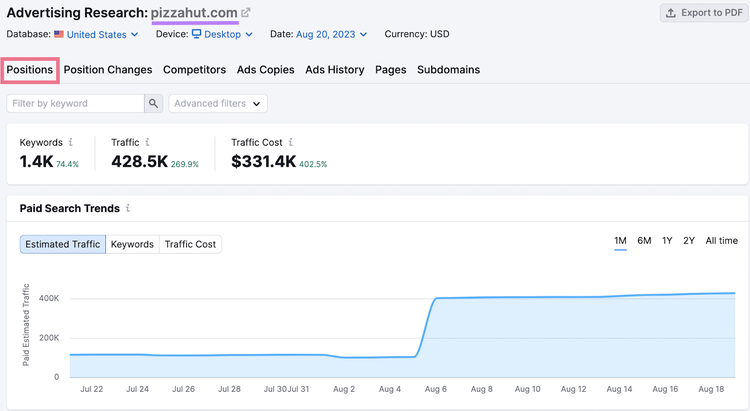
Tip: You shouldn’t fully automate this process through PPC audit software. Tools can help, but manual assessment will give you a more valuable audit.
A good PPC audit analyzes campaign settings, costs, ad groups, and ad performance to identify areas of success. And areas that need improvement.
But a great PPC audit takes it a step further by looking at what competitors are doing. And making adjustments based on your target market.
The 10-Step PPC Audit Checklist
Auditing your PPC campaigns may feel overwhelming. But the value is worth the effort.
To make the process more manageable, follow this 10-step PPC audit guide.
Tip: Review your conversion goals before doing a PPC audit. Having a clear sense of what you’re trying to accomplish (signups, sales, leads, etc.) will sharpen your analysis.
1. Organize the Data
Start your audit by downloading and organizing your paid campaign data into spreadsheets.
You can use these spreadsheets to easily assess your campaigns. And create a PPC audit report to share with the entire marketing team.
Here’s how:
- Download your Google Ads data as an Excel or Google Sheets spreadsheet
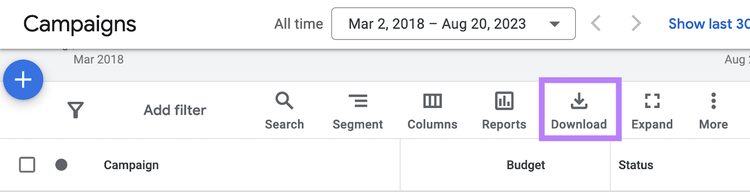
- Name the spreadsheet for the current season and year (e.g., PPC Audit Summer 2024)
- Analyze each campaign one at a time. Highlight problem areas (like low impressions). And success areas (like high conversions).
- Look for trends among campaigns that are doing well. And among those that aren’t.
Having these sheets will help you visualize your campaigns at a high level, evaluate your progress, and inform any actions you take to improve your PPC efforts.
2. Check Your Settings
Log into your Google Ads account and Google Analytics account and check the settings. To make sure you’re avoiding needless errors.
While reviewing your settings, ask the following questions:
- Are your conversions being properly tracked? You can check your tracking statuses in your Google Ads account.
- Are your naming conventions consistent, specific, and descriptive?
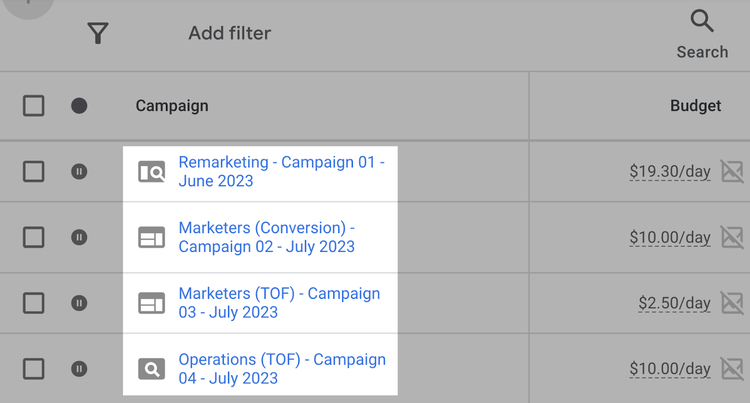
- Are ad groups appropriately organized into categories and subcategories?
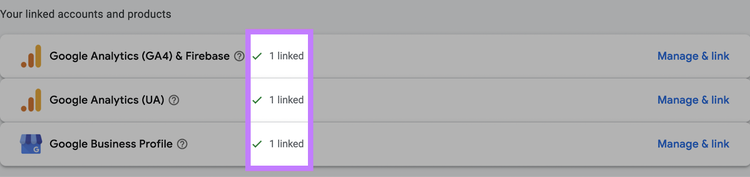
- Is your Google Analytics account linked to your Google Ads account? Check this in your Google Ads account under “Tools and settings” > “Setup” > “Linked accounts” > “Google Analytics (GA4) and Firebase” > “Manage & link.” Find your Analytics property and make sure the status is listed as “Linked.”
3. Review Ad Content
Now, it’s time to take a look at your ads’ content. Because an ad will succeed (or fail) based on how the unique selling proposition (USP) is conveyed.
You probably determined your USP in the initial stages of planning your PPC campaign.
But you’ve changed since then. As have your competitors. And your audience.
So it’s time to re-examine your USP and optimize how you promote it through ad copy.
See How Your USP Stands Up to Your Competitors’ USPs
Take a look at what competitors are including in their ads so you can ensure your USP is truly unique.
Here’s how:
Find Your PPC Competitors
You first need to identify who you’re competing against with your PPC ads.
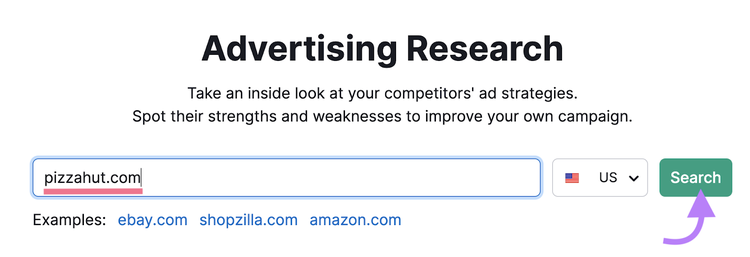
Go to the Advertising Research tool. Enter your domain and click “Search.”
Navigate to the “Competitors” tab.
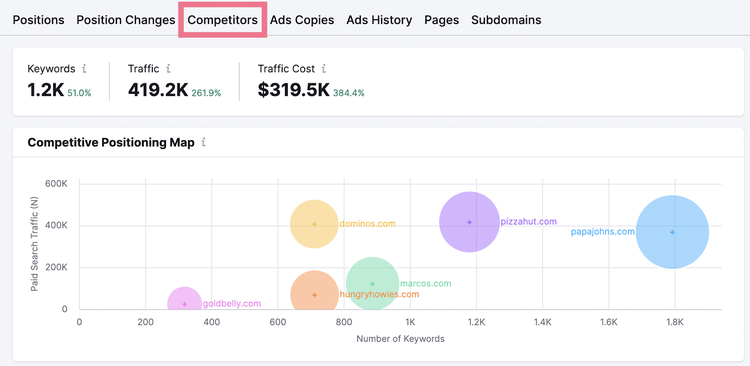
You’ll see a list of paid competitors sorted by the ones that present the most competition.
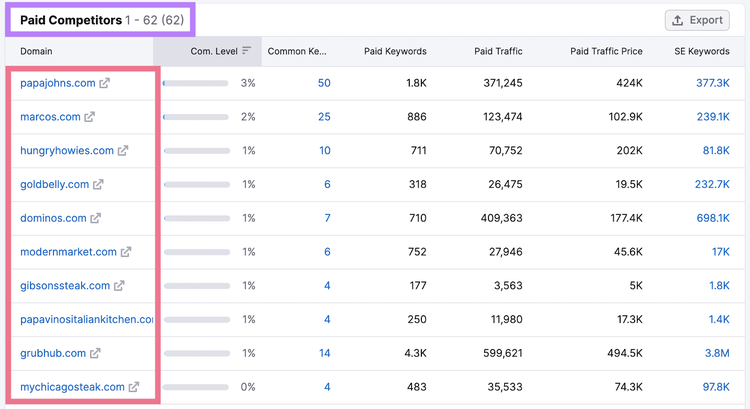
Here, you can see who’s bidding on the same keywords as you, how many paid keywords they have, how much paid traffic they bring in, and what their estimated Google Ads budget is.
Identify your top competitors and open their websites in a separate tab by clicking on the arrow icon. To get a sense of their messaging.
Analyze Your Competitors’ Ad Copy
The next step is reviewing the copy your competitors are using in their ads. To see what works for them and gain inspiration for your own campaigns.
Move over to the “Ads Copies” tab in the Advertising Research tool. Enter a competitor’s domain in the search bar at the top and click “Search.”
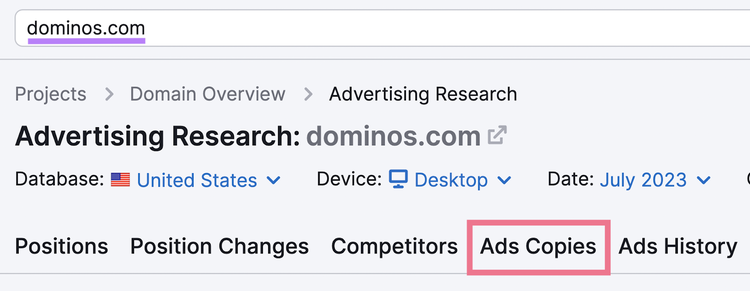
In this report, you can view the headlines, URLs, and descriptions your competitor has used in their ads.
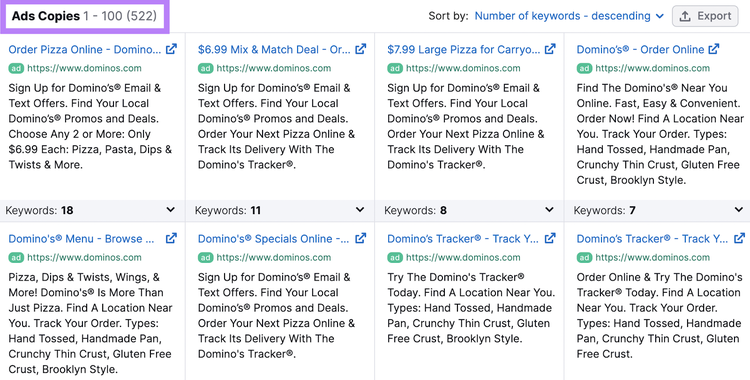
Analyze what your competitors are doing.
What are their USPs? Calls to action? Promos and deals?
Pay close attention to which keywords trigger which ad copy. To do this, click where it says “Keywords” under a specific ad.
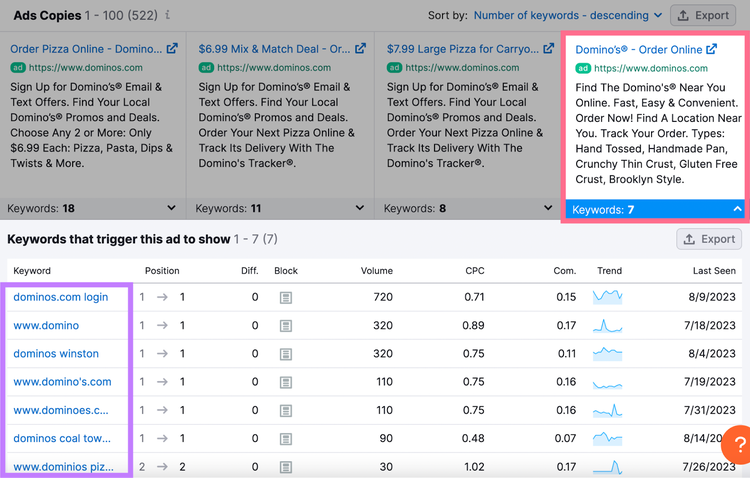
Use this information to gauge how your competitors are promoting solutions to users’ problems through their ad copy. Then, find ways to improve on what they’re doing.
Uncover Your Competitors’ Search Ads
with the Advertising Research Tool
Review Your Ad Copy for Accuracy
Reviewing your own ad copy for accuracy might seem obvious, but it’s a step that can easily be overlooked.
As part of your PPC audit, look for ad content errors like:
- Spelling and grammar mistakes
- Misspelled display URLs or URLs that don’t match the landing page
- Outdated promotions
- Expired pricing
Find Optimization Opportunities
Improving ad content will take time, but you can uncover ideas for strengthening your headlines, URLs, and descriptions in your audit.
Optimized ad content will include:
- A USP that stands out from the competition
- A call to action
- Relevant keywords
- Content that matches keyword intent (the reason behind a searcher’s query)
- A display URL that indicates the contents of the landing page
- An accurate and attention-grabbing headline
Tip: You can identify broad areas that need improvement through a PPC audit. But copy optimization should be an ongoing process.
Ensure You’re Using Ad Assets
Ad assets (formerly known as ad extensions) are additional links that show even more information. And they provide easy ways to increase engagement on your ads.
Here’s an example of what they look like:

Google will automatically determine which assets to display to improve an ad’s performance. But not all assets are automatically generated.
Make sure you’ve set up every relevant ad asset. So Google can choose the best options for each ad.
Finally, double-check all your assets for accuracy.
4. Check Your Quality Score
A higher Google Ads Quality Score (how Google rates your ad’s quality compared to other advertisers’ ads) means lower ad cost and better ad placement.
Quality Scores range from 1 to 10. And according to Google:
A higher Quality Score means that your ad and landing page are more relevant and useful to someone searching for your keyword, compared to other advertisers.
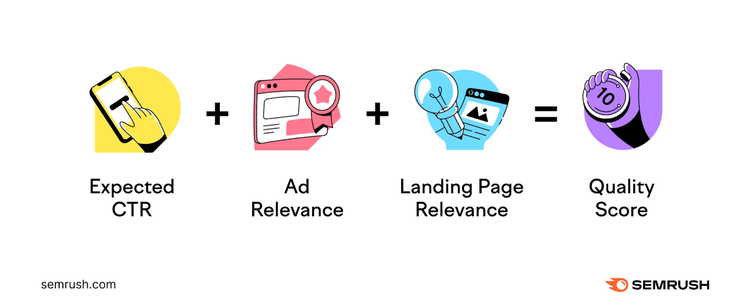
Each keyword’s Quality Score is based on the following factors:
- Expected click-through rate (CTR)
- Ad relevance
- Landing page relevance
Check your Quality Score by going to your Google Ads account and clicking on the “Campaigns” icon.
Then click on the “Search keywords” section.
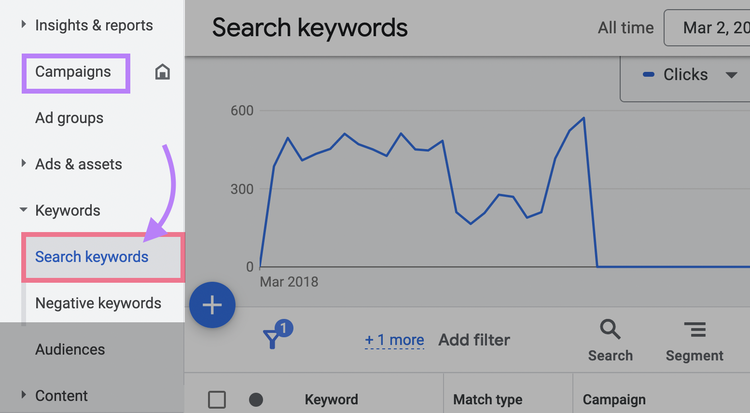
Click “Search keywords.”
Then, click on the columns icon (three bars). In the upper right corner of the table.

Under “Modify columns for keywords,” click “Quality Score.”
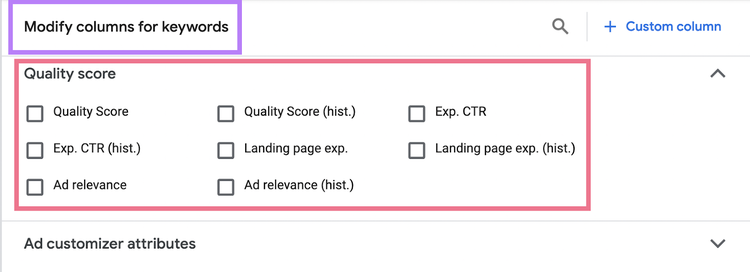
Here you’ll see your Quality Score. Adjust your table settings to view different components of your Quality Score.
If your Quality Score is a 7 or lower, there’s room to improve. To increase your Quality Score:
- Optimize ad relevance by matching your ad’s message to the intent behind its keywords
- Optimize landing page relevance by making sure it delivers everything the ad promises
- Organize your keywords into tighter ad groups
5. Analyze Your Keyword Targeting
Analyzing your keyword targeting ensures you aren’t wasting budget.
Here’s how to do it:
Optimize Your Ad Groups
Review your ad groups to determine whether you need to add, delete, or reorganize keywords.
Start by looking at the PPC audit spreadsheet you created to identify weak spots (like low impressions or conversions). This may reveal which ad groups need improvement.
Improve your ad groups with the following steps:
- Make sure your groups are tightly themed. Each ad group should be made up of keywords with the same target. For example, a keyword aimed at selling (“order pizza online”) should not be in the same ad group as a keyword aimed at informing (“best cheese for pizza”).
- Ensure ad groups don’t have more than 20 keywords (aim for five to 10 keywords per group)
- Delete keywords with low search volumes (~100 monthly search volume or lower), so your ad groups aren’t diluted with keywords that enough people aren’t searching for
- Remove keywords with low impressions or move them to a different group, as this indicates your ad doesn’t match that keyword’s intent
- Pause seasonal keywords, like back-to-school or holiday keywords, if they aren’t relevant to the current season
- Check that your keyword match types align with your PPC goals and budget
Further reading: Learn how to use Semrush’s keyword research tools to optimize your keyword targeting.
Uncover New Ad Group Ideas
Finding new ad group ideas can help you reach even more audiences.
To find new ideas for organizing keywords into ad groups, go to Keyword Strategy Builder and enter one to five seed keywords (broad search terms related to your business) that you want to develop or reconfigure your ad groups around.
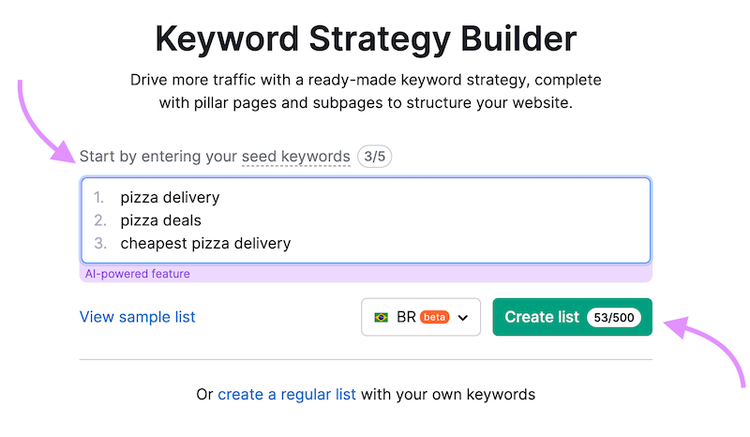
Then, click “Create list.”
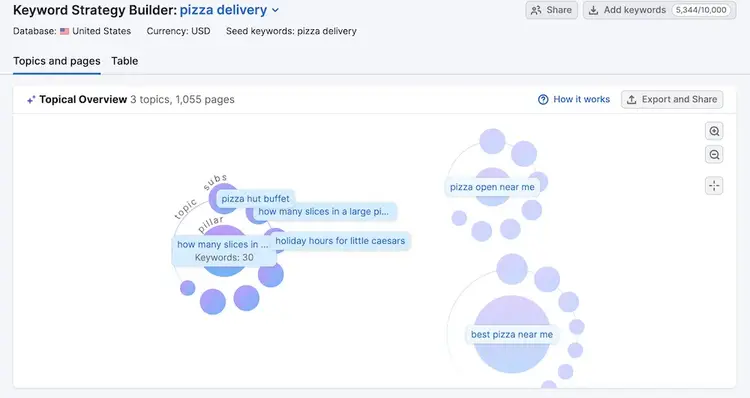
Next, you can see a visual preview under the Topics and Pages tab. You can see this example has 763 keywords.
If you scroll down, you can see your pillar pages and subpages listed. Click the carrot to see each keyword cluster’s breakdown by intent, Keyword Difficulty (a measure of how hard it is to rank in the top 10 organic results for that term), and monthly search volume.
The tool even shows which clusters have the highest ranking potential.
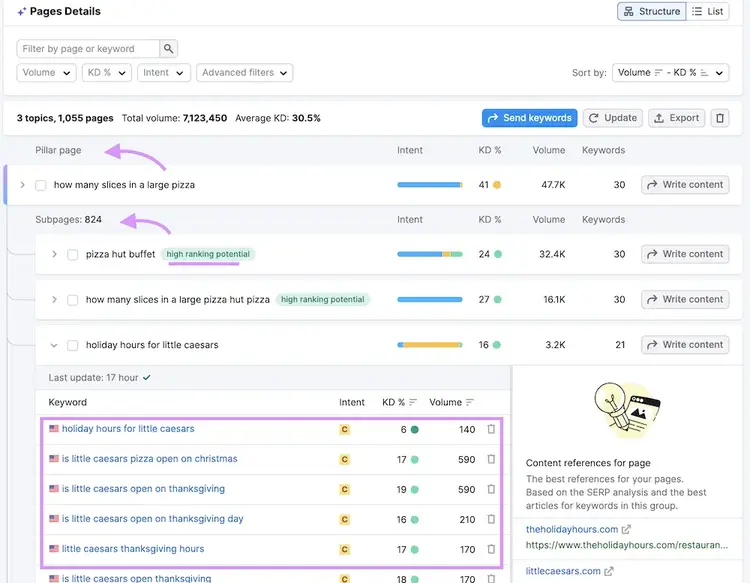
Use this report to identify new ad group opportunities. Or ways to optimize your current groups.
Uncover New Ad Group Ideas
with the Keyword Strategy Builder Tool
Refine Your Negative Keywords
Negative keywords are terms you can add to your campaigns to keep ads from appearing when users search for them.
It’s a good idea to leverage negative keywords to prevent wasted budget and irrelevant traffic.
In your Google Ads search terms report, you’ll see metrics on which search terms are triggering your ads. And how your ads are performing for those searches.
To see this report, go to “Campaigns” > “Insights and reports” > “Search terms.”
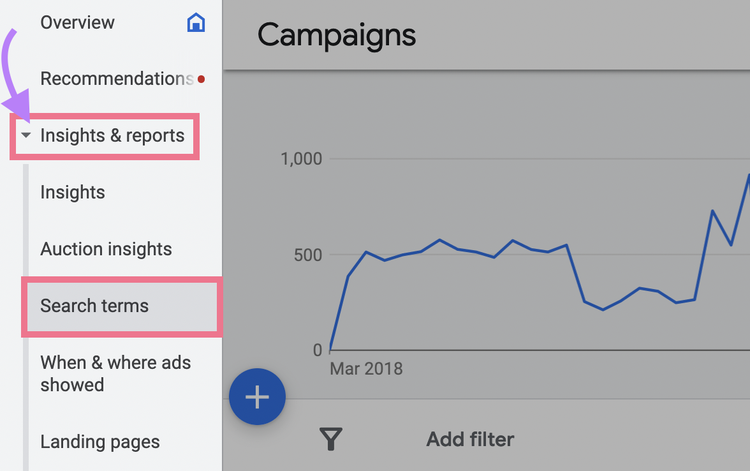
If you notice a search term triggering an ad with poor engagement rates, your ad isn’t delivering what the user is looking for when using that term.
Use these search terms as jumping-off points for expanding your negative keywords lists.
6. Analyze Competitors’ Keyword Targeting
Evaluating your competitors’ keyword strategies can help you gain a competitive edge.
Here’s how you can incorporate competitive keyword research into your PPC audit:
Check Your Competitors’ Past and Current Ad Positions
Evaluating the ads your competitors have run in the past will reveal which keywords they’re targeting. Which can help you identify gaps or gain inspiration for your own ad groups.
Start by choosing one competitor to assess.
Go to Advertising Research, enter their domain, click “Search,” and navigate to the “Ads History” tab.
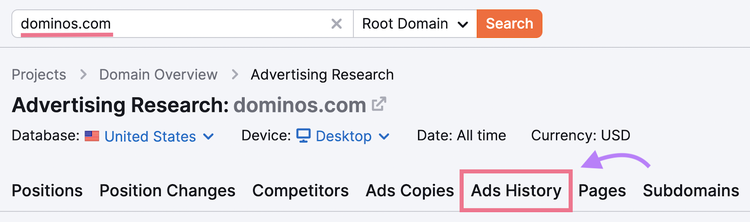
You can use the “Advanced filters” menu to exclude keywords that include that competitor’s brand name.
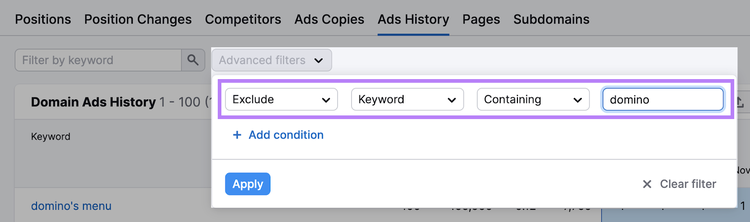
This will generate a report of the keywords your competitor is bidding on and what ads they’ve run over the past year.
You can also export the report as a spreadsheet.
Next, navigate to the “Position Changes” tab.
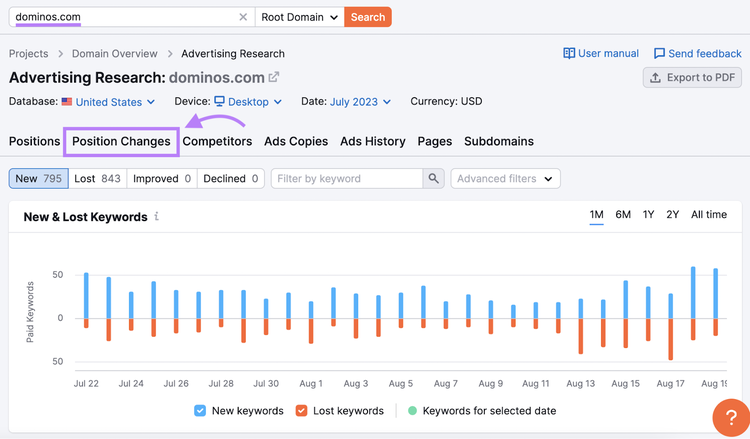
This report shows you new, lost, improved, and declined positions for keywords your competitor is bidding on.
Find Keyword Gaps
Identifying keyword opportunities you’re overlooking can give you ideas for reaching more audiences.
And you can find opportunities with the Keyword Gap tool.
Enter up to four of your competitors’ root domains along with your own. Then, click “Compare.”
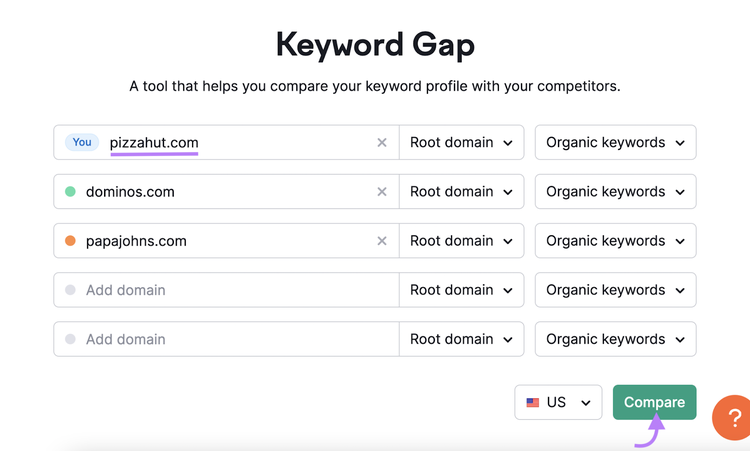
Switch the keyword type from “Organic keywords” to “Paid keywords.”
Then, scroll down to the table. Switch to the “Missing” tab to view keywords you don’t rank for but all of your competitors do.
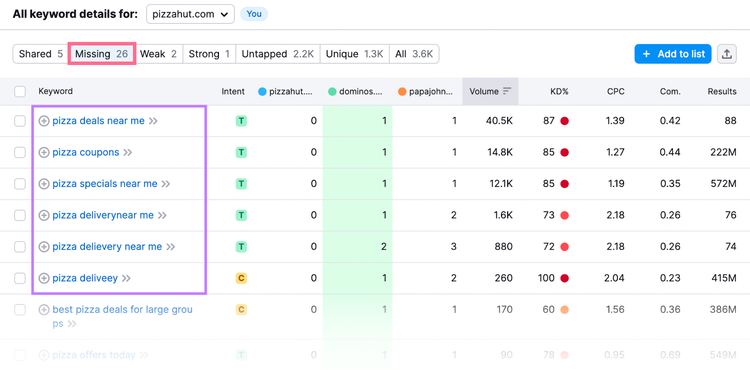
This can reveal relevant keywords you may want to start bidding on for your own campaigns.
7. Assess Your CTR & Conversion Rates
Assessing your click-through rate (CTR) and conversion rate reveals ways to improve ad performance.
Too low of a CTR can lead to a poor Quality Score. But too high of a CTR combined with a low conversion rate can mean money wasted on low-quality traffic.
You can check your CTR in your Google Ads account dashboard.
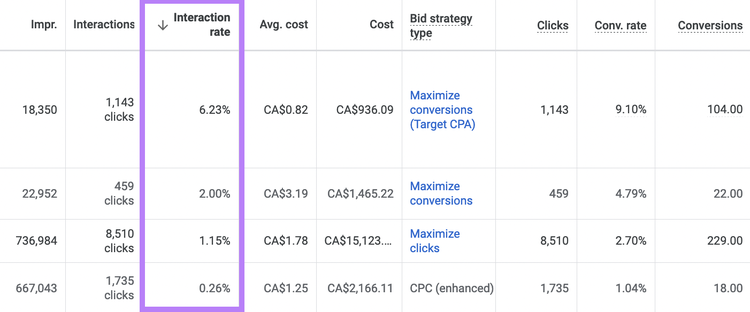
If your CTR is low, here are some ways to improve it:
- Make sure ads are showing during prime conversion times
- Change your CPC bid strategy
- Test different ad copy
- Refine your audience targeting
- Tighten your ad groups. Make sure they each have a unified theme. And that the ads match every keyword’s intent.
- Optimize your ad assets by providing relevant, up-to-date information about your business. And make sure you’ve set up all applicable manual ad assets.
Tip: There’s no consensus on what a good CTR is, and the benchmarks vary by industry. Research your industry and analyze your most successful ads’ CTRs to define a goal rate.
Next, you can check your conversion rates.
If your CTR and conversion rates are both low, focus first on improving your CTR.
If your CTR is good but your conversion rate isn’t, it’s probably due to one of two problems:
- Your landing page isn’t optimized to convert
- Your landing page isn’t delivering what your ad promised users
Take a look at your landing page to determine what you can do to improve performance.
8. Review Location Targeting
Reviewing and optimizing your location targeting can eliminate wasted spend.
You may be wasting money delivering ads to locations that you can’t serve. Or wasting potential profit not delivering ads to valuable locations.
Focus your efforts on three areas:
- Determine where your ads perform the best. In Google Ads, you can check your location performance by going to “Campaigns” > “Insights & reports” > “When & where ads showed.”
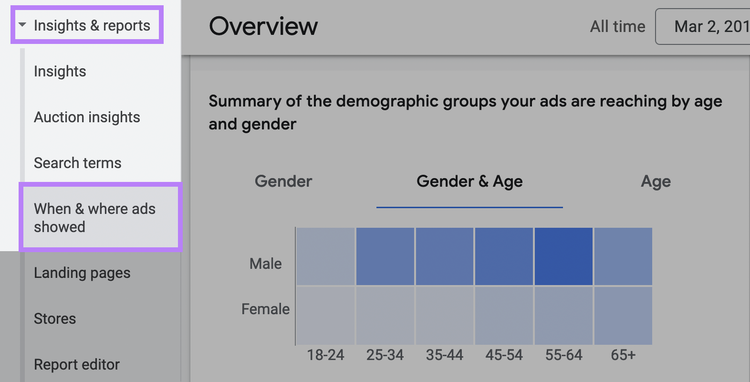
- Make sure you’re targeting locations where you have a store/branch and locations where you can deliver (if relevant)
- Exclude locations where you can’t sell or where the demographic doesn’t match your target audience
9. Review and Adjust Your Bids
Reviewing your bidding strategy and current performance can help you understand how to adjust your bids to maximize ROI.
Automated bidding is often a good idea for those just starting out. But you may be able to see better performance later on if you switch to manual bidding.
If you want to manually adjust your bids, evaluate at least three months’ worth of your PPC campaign data.
Assess different bid factors (e.g., how well mobile ads are performing for a specific campaign or ad group) to identify where you need to increase or decrease your bids.
In Google Ads, you can adjust your bids based on:
- Device
- Location
- Schedule
- Call interactions
- Demographics (age, gender, and household income)
If you have a Google Ads advanced account, you can also make bid adjustments for:
- Targeting methods (i.e., Search Network vs. Display Network)
- Remarketing lists
10. Find Wasted Spend
The ultimate goal of a PPC audit is to save money—both by maximizing returns and eliminating wasted spend.
Big fixes that come from your audit will obviously save money. But you can also identify small changes to make right away for quick savings.
So, make sure you’ve accounted for the following best practices:
- Ads are scheduled to display during prime conversion times
- Mobile ads are optimized to display on mobile
- Language targeting matches your customer base
- Your home and office IPs are excluded
- Delivery method is set to standard (not accelerated)
Other actions you can take to save extra money on your PPC campaigns include:
- Targeting a smaller geographic area to reach your most relevant customers
- Lowering your bids on ads that get lots of clicks
- Changing your keyword match type to broad match
- Optimizing negative keywords so you aren’t blocking relevant traffic or bringing in irrelevant traffic
- Changing your ad rotation setting to “Optimize” so ads that are expected to perform well are prioritized
Run Frequent PPC Audits & Optimize Your Ads
It’s a good idea to run paid search audits at least every six months. Or every time you start managing a new account.
And know that ads can always be further optimized. Especially if you’re leveraging tools like Advertising Research.
Optimize Your Ads
with the Advertising Research Tool

Kari Dearie is a writer and editor with 5+ years of experience creating and optimizing SEO content, product funnels, and website copy. She’s managed content campaigns in the legal, tech, finance, and career industries.

Tells Google to show you more from Semrush in AI, Search, and Discover.