
Keyword research tells you what your audience is searching for. You can use that information to create content that appears in search results and AI citations on platforms like ChatGPT, Gemini, and Google AI Overviews.
This guide walks through the process of performing keyword research with Semrush. You'll learn how to:
- Identify the keywords you already know to uncover quick wins
- Discover new search terms related to your main topic
- Analyze competitors’ search performance to find gaps across both traditional and AI search results
- Organize keywords into clusters, so you can target multiple terms on the same page
Here’s a quick overview of the tools we’ll cover:
1. Review your existing search engine rankings.
Reviewing the terms you already rank for, and how well you rank for them, helps you spot easy opportunities to improve with minimal effort.
Open Organic Rankings and enter your domain. Check the “Overview” report for a snapshot of your total ranking keywords, estimated traffic, and how both are trending.
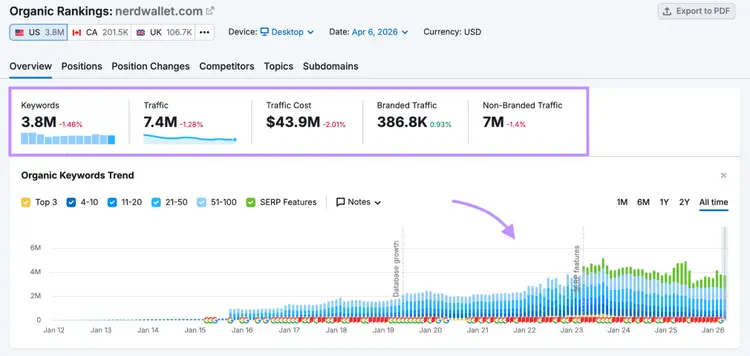
Then click the "Positions" tab and scroll to the “Organic Search Positions” table to see keywords your site already ranks for — the topics where you have existing authority and the fastest opportunities to improve visibility.
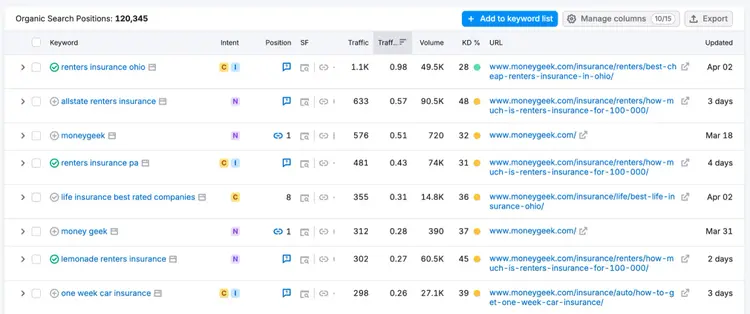
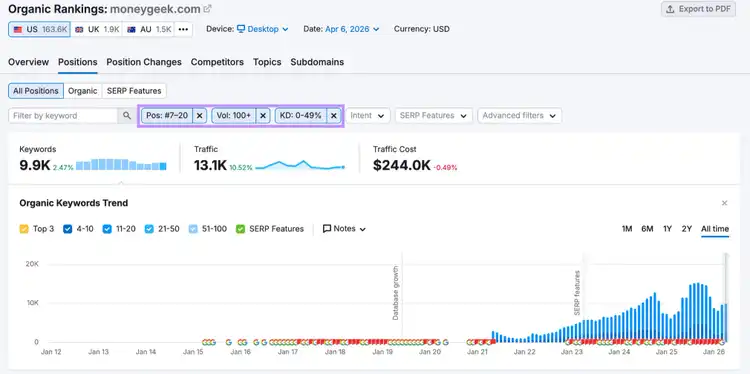
From here, narrow down to the keywords worth prioritizing with the following filters:
- Position: 7-20 (ranking just below where pages are likely to earn clicks)
- Volume: 100+ (shows there’s meaningful demand)
- Keyword Difficulty: Under 50% (to avoid the most competitive keywords)
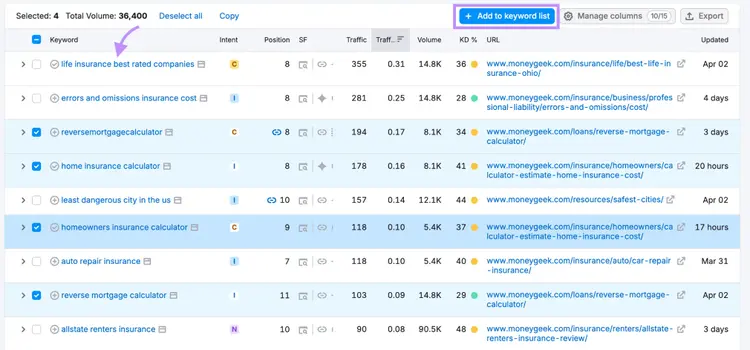
Select the keywords you want to focus on and save them to a list using the checkbox feature and the “+ Add to keyword list” button. You'll build on this list as you move through the rest of the research.
Tip: Evaluate an individual keyword in-depth by clicking on it and opening the Keyword Overview report, which will show you the keyword’s metrics and SERP analysis.
Start your keyword research
with a free trial of Semrush
2. Find new keyword ideas
With Semrush you can generate new keyword ideas and then narrow them down to a focused set of opportunities you can actually compete for.
Start with the Keyword Magic Tool. Enter a term related to your business and add your domain in the AI-powered field.
The tool will return a list of keywords along with metrics that help you evaluate each opportunity.
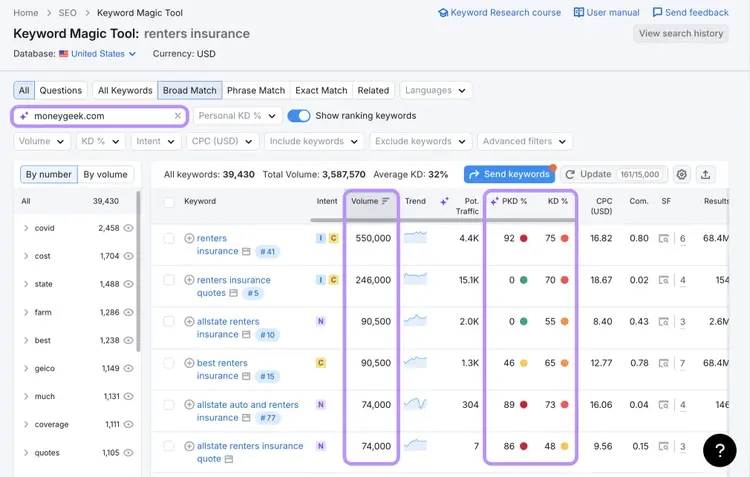
Focus on these signals:
- Search Volume: the estimated number of monthly searches for the keyword
- Keyword Difficulty (KD %): how difficult it is to rank in the top 10 overall
- Personal Keyword Difficulty (PKD %): how difficult it is for your specific domain to rank
If your PKD % is close to or lower than the KD %, you’re in a good position to compete.
If it’s much higher, your site doesn’t have the authority needed to rank for that keyword yet. Focus instead on building authority in that topic by creating content around related, less competitive terms. As your site becomes more established, you can return to these more competitive keywords.
Note: If you don’t find keywords with a realistic PKD %, it’s a sign you don’t yet have enough authority in that topic. In that case, concentrate on topics with lower competition where you can gain visibility.
Find common question keywords
The “Questions” filter is another way to find long-tail terms containing your seed term.
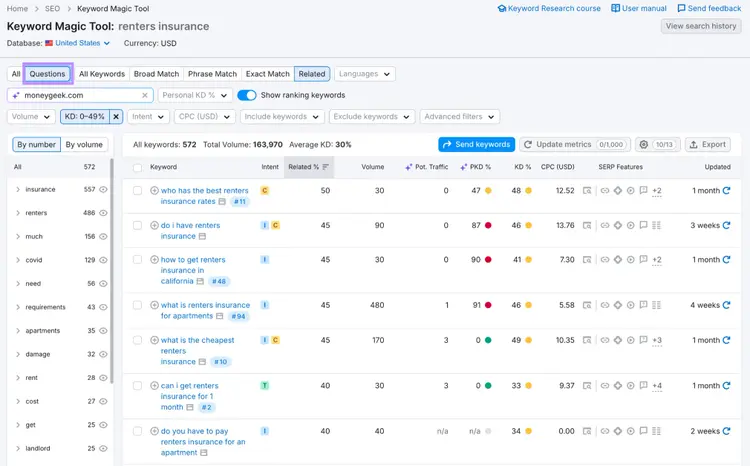
These reflect how people naturally ask questions in a search engine — and increasingly, how they prompt AI tools. Answer-style content built around these questions can help a website get visible on both traditional rankings and AI citations.
Identify topics people ask AI about
Search data shows what people type into Google, but not how they interact with AI tools or what drives AI-generated answers. To uncover prompts and topics people ask AI about, use Prompt Research in the AI Visibility Toolkit.
Enter a topic to see how it’s broken down into subtopics and prompts.
The “Topics” tab gives you a high-level view of related topics along with their AI search demand, helping you quickly identify areas worth exploring.
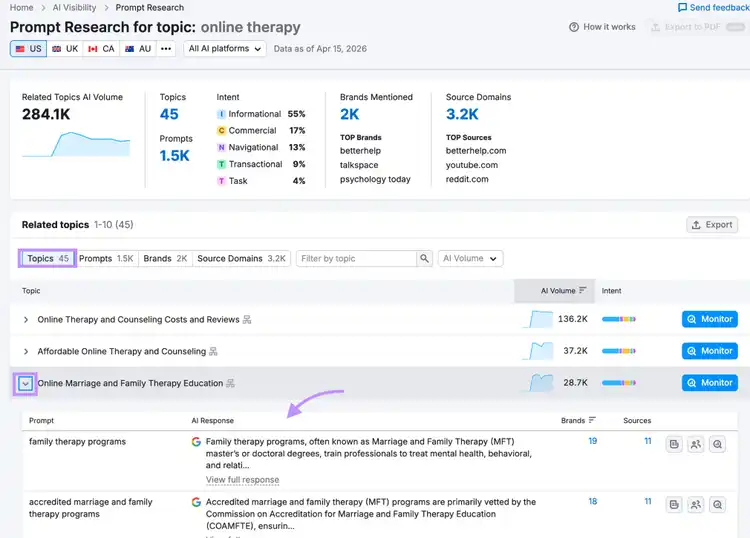
Click into a topic to expand it and review the Prompts.
Here you’ll see the actual questions users ask, along with example AI responses and a list of brands mentioned and cited sources. Use these results to understand how people phrase questions, and what brands get mentioned by AI for relevant topics.
These are topics you can use to guide your content to gain visibility on AI platforms.
3. Analyze competitor keywords to find gaps
Your competitors are already capturing visibility for topics you may be missing. Use their performance to identify where you should expand or improve your content.
Identify gaps in SERP results
Leverage the Keyword Gap tool to compare your site against competitors.
Enter your domain along with a few competitors, select “Organic keywords,” and click the “Missing” tab.
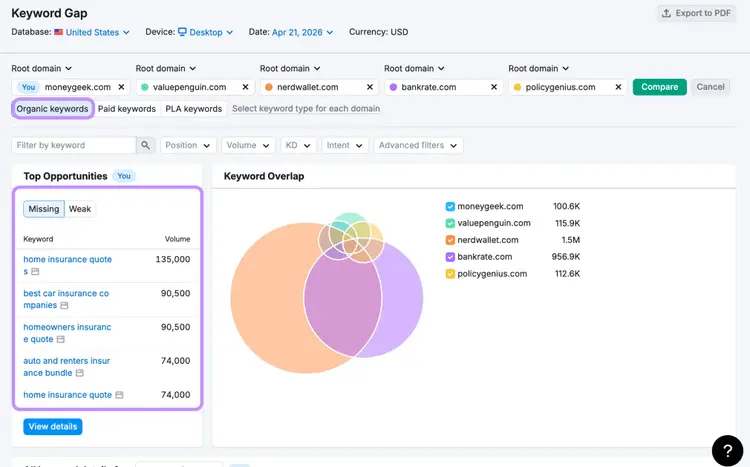
This shows keywords your competitors rank for that you don’t, and those are opportunities you can create content around to potentially outperform the competition.
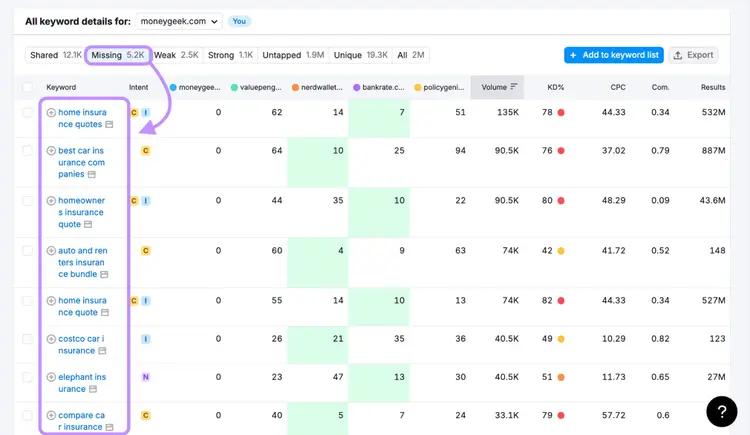
As you review them, look for relevant, non-branded keywords tied to your core topics. These represent clear opportunities to cover new topics and compete for organic traffic.
Identify gaps in AI visibility
To find gaps in AI-driven results, use the Competitor Research report in the AI Visibility Toolkit.
Enter your domain and your top competitors into Competitor Research and scroll down to the “Topics & Prompts” section.
Click the "Prompts" and “Missing” toggles to see topics where your competitors are mentioned but you aren’t.
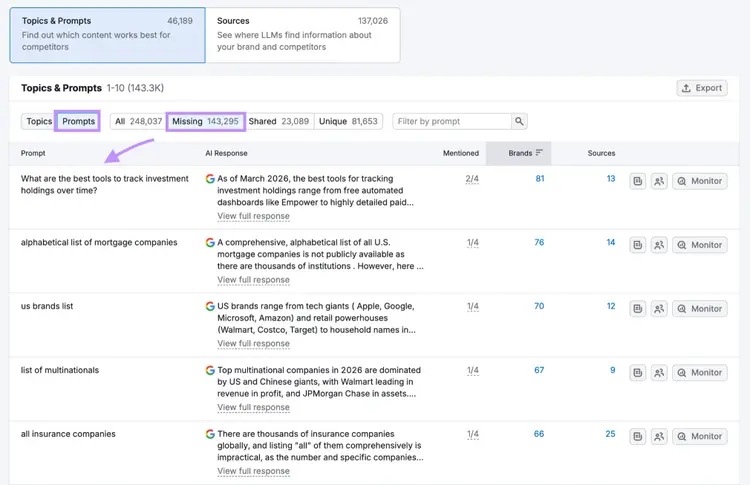
Similar to the Keyword Gap, this tool shows you topics where your competitors are getting AI mentions, but you’re not.
As you review both Keyword Gap and Competitor Research reports, note the keywords and prompts that are relevant to your business and aligned with your existing or planned content.
Focus on the gaps that represent meaningful topics, not just individual terms. These are the areas where expanding or improving your content can help you compete for visibility across both search and AI.
4. Organize keywords into topic clusters
Once you have a complete keyword list, use the Keyword Strategy Builder to group like terms into what are called keyword clusters.
With keyword clusters, you can target an entire cluster with a single page. This allows the page to show for more queries.
Open your keyword list in the Keyword Strategy Builder and click “Cluster this list” to automatically group related terms.
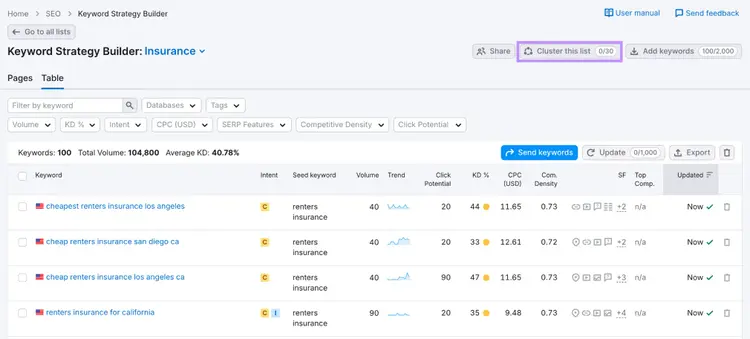
The resulting view will tell you how many pages you should create, and the search volume of each cluster that a page will be targeting.
This gives you a sense of the demand behind each topic.
Expand a cluster to review the keywords, metrics, and ranking pages.
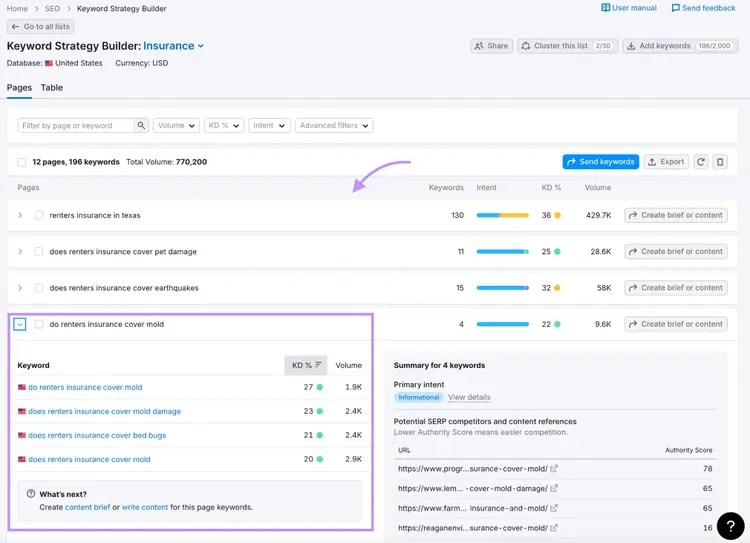
Inside each cluster, you’ll see the keywords grouped together, their search volume and difficulty, and examples of pages currently ranking.
Review these together to understand what the topic actually covers. The grouped keywords show how people search for the topic, while the ranking pages show what type of content is currently performing.
This is the point where your keyword lists become your publishing plan to create content that’s highly visible and is able to attract visitors.
Monitor results and refine your approach
Once you’ve found your keywords, you’ll want to see whether you’re achieving positive results as you create or optimize your content to target them.
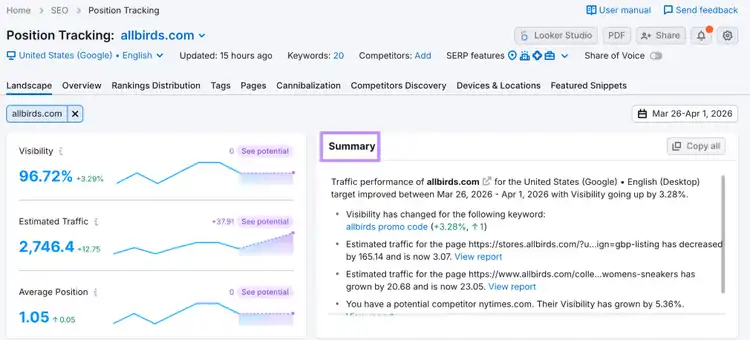
Use Semrush’s Position Tracking tool to monitor performance for your target keywords. Follow the prompts to set up your project by adding your keyword list and choosing your platform to track visibility (Google, ChatGPT, Gemini, etc).
You’ll be able to see:
- Daily visibility changes for your target keywords
- How your rankings compare to your competitors
- Which pages are ranking for each keyword
- Which SERP features (like AI Overviews) appear in results
The “Summary” widget provides a quick overview of recent changes with links to detailed reports.
Start your keyword research
Keyword research is how you find the topics worth building content around — for Google and for AI.
Use Semrush One to find quick wins in your existing keyword rankings, expose content gaps, and build a content plan. Try it for free today.
Start your keyword research
with a free trial of Semrush

Brenna is a Content Writer for Semrush focusing on educational marketing content that empowers readers to unlock and maximize their SEO potential.

Tells Google to show you more from Semrush in AI, Search, and Discover.