
What Is Quality Score?
Quality Score is a metric expressed on a scale from 1 to 10 that helps you measure the quality and relevance of your Google ads and landing pages.
A higher Quality Score can mean your ads and landing pages are more relevant to users compared to competing ads. And you may get better placements and lower cost per click (CPC) values as a result.
Why Is Quality Score Important?
Quality Score is important because it allows you to assess the quality of your search ads in a way that’s similar to how Google does when running the auction that determines whether and where your ads will show.
A good Quality Score suggests you might get to experience:
- Lower costs: All else being equal, Google charges a lower cost per click (CPC) for ads that are higher in quality
- Better ad placements: High-quality ads that Google thinks will be relevant to users have a better chance of appearing prominently. Which can translate to more visibility, more clicks, and even a better return on ad spend (ROAS).
- Competitive advantage: If you consistently create ads that are higher in quality than your competitors’ ads, you could possibly get more leads and customers at lower costs compared to your rivals
What Metrics Determine Quality Score?
Google determines Quality Score using three components: expected CTR, ad relevance, and landing page experience.
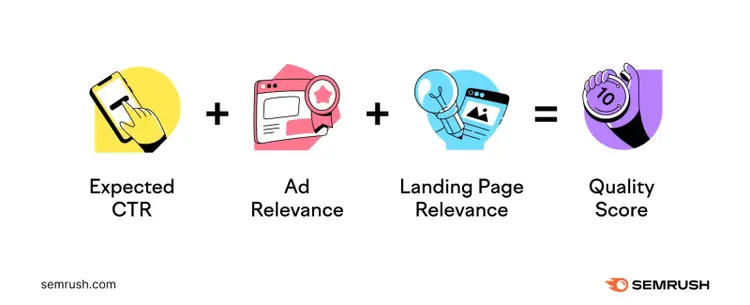
Here’s what each component means:
- Expected CTR: Google's prediction of the percentage of users who will click on your ad compared to the number of users who see it. Google uses historical data to make this prediction.
- Ad relevance: How relevant your ad is to the user’s search intent (i.e., the main reason behind the query). If your ads are closely aligned to intent, your ads are more likely to appear.
- Landing page experience: The quality and relevance of your landing page. Google considers factors like content value, ad alignment, and usability to evaluate the landing page experience.
This is what Quality Score and the other three components look like in your Google Ads account dashboard:
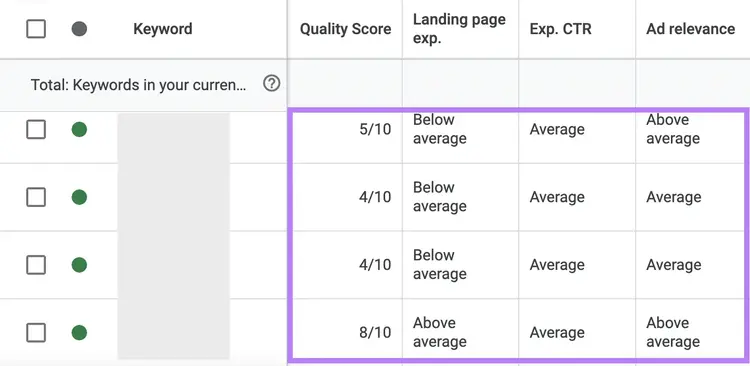
Google rates each component by comparing your ad with competitors’ ads that were shown over the past 90 days.
If your expected CTR, ad relevance, and landing page experience are worse than your competitors', you'll get a below average rating for each component.
If they are equal to your competitors', you'll receive an average rating for each.
And if they are better than your competitors', you'll get an above average rating.
Then, based on your rating for each component, Google gives your ad a Quality Score out of 10.
Just know that Quality Score doesn’t capture everything related to ad quality, including:
- Devices: Quality can vary based on the device used (desktop, mobile, tablet)
- Geographic location: Quality can vary depending on where users are located, but Quality Score doesn’t capture that
- Ad extensions: Using ad extensions (like sitelinks and user ratings) can lead to better performance in the auction, but they’re not considered as part of your Quality Score
Further reading: 9 PPC Metrics to Track & How to Optimize Them
How to Find Quality Score in Google Ads
Find your current and past Quality Scores directly in your Google Ads account.
Here’s how:
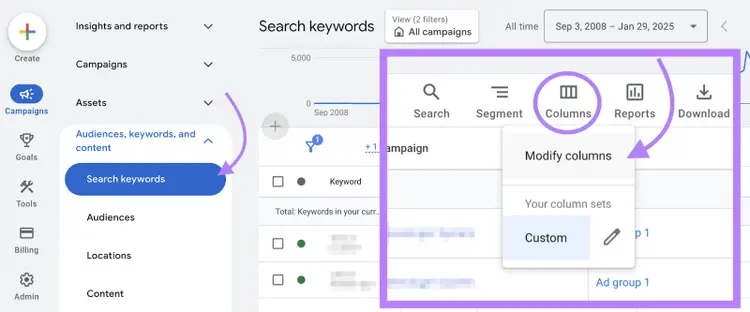
Sign in to your Google Ads account. And click on “Campaigns” > “Audiences, keywords, and content” > “Search keywords.”
Then, in the upper right corner, click "Columns” > “Modify columns”
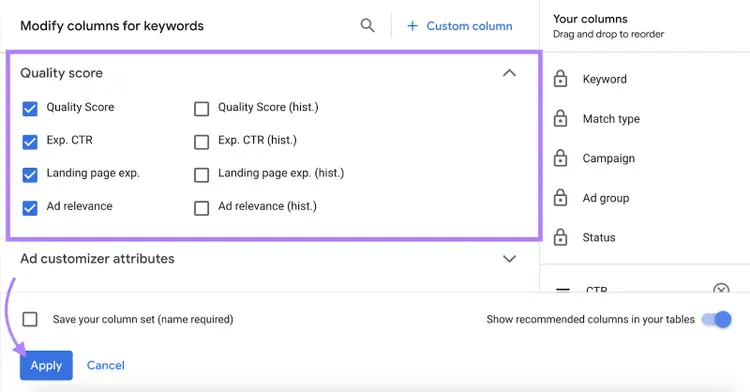
Click on the “Quality Score” drop-down under “Modify columns for keywords.”
Select the checkboxes next to “Quality Score,” “Exp. CTR,” “Ad relevance,” and “Landing page exp.”
If you want to see past Google Ads Quality Score stats for your selected period, check the boxes that have “(hist.)” next to them.
Click “Apply.”
You’ll see your keyword dashboard along with Quality Scores and the other selected values.
It’ll look something like this:
Note
If the Quality Score column shows “—,” it means your keywords don’t have enough exact-match searches to calculate a Quality Score.
How to Improve Your Quality Score
You can improve your Quality Score in Google Ads by increasing your expected CTR, ad relevance, or landing page experience.
But keep in mind that Google recommends using Quality Score as a diagnostic tool for identifying whether you need to improve. Meaning it’s not worth chasing a perfect score.
Quality Score is not a key performance indicator and should not be optimized or aggregated with the rest of your data.
So, start by identifying ads with below average and average ratings (as shown in the previous section).
And follow these tips to improve your ad campaigns’ quality:
- Find relevant keywords. Choose relevant keywords to reach users who are genuinely interested in your offering. For example, a specific keyword like “grain free organic dog food” will target your audience more effectively than a broad term like “pet food.”
- Write ad copy that meets users’ intent. Understand what users are searching for and highlight benefits that address their needs. For instance, “Vet-Approved Grain-Free Dog Food” could be an effective headline for the target keyword “grain free dog food.”
- Organize your ad groups. Create ad groups based on product categories or themes. For example, you can form ad groups for shoe categories like “running shoes,” “hiking shoes,” “winter boots,” and so on if you sell footwear.
- Maintain consistency in messaging. Make sure your landing page aligns with what you offer or promise in your ad. Meaning if your ad promotes “Up to 50% off on recliners,” the landing page should display a collection of discounted recliners.
- Optimize your landing pages. Make sure your pages load fast, are easy to navigate, and work well on mobile devices
- Add negative keywords. Use negative keywords to keep your ads from showering for irrelevant queries. If you’re selling luxury perfumes, you can add terms like “cheap” or “affordable” as negative keywords to avoid clicks from users looking for budget perfumes.
It’s also worth looking into what your rivals are doing. To gain inspiration and find ways to outperform them.
Use the Advertising Research toolwithin Semrush’s Advertising Toolkit to discover your competitors’ paid keywords, ad copies, and landing pages.
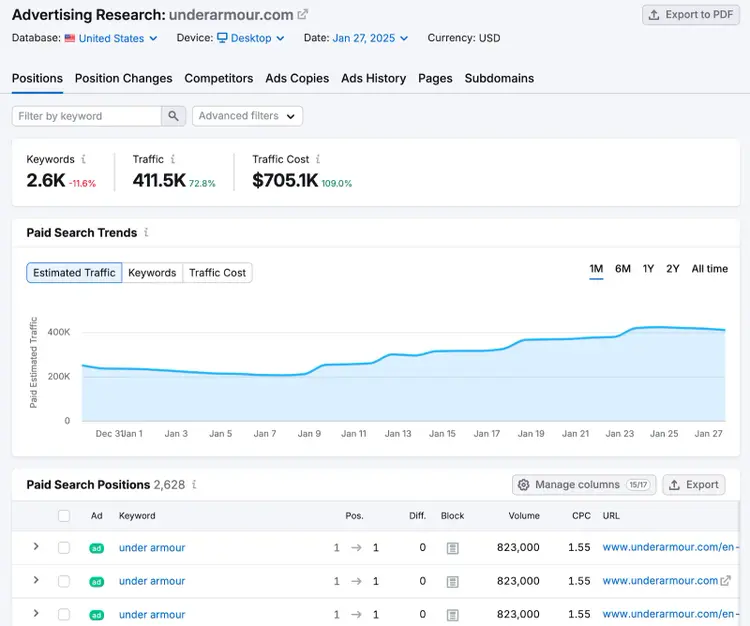
Use what you learn to inform your own campaigns.
For instance, you might uncover a specific keyword group that you hadn’t considered before.
Further reading: 8 Google Ads Best Practices to Maximize Return on Ad Spend
Start Creating Relevant, High-Quality Google Ads
Studying your Quality Score can help you find areas for improvement that lead to more clicks and conversions.
But you need to start creating campaigns before you can view this score.
Creating a list of relevant keywords to target is a great first step.
Semrush’s Keyword Magic Tool can help you discover potential queries to target.
Enter a broad term related to your business and click “Search.”
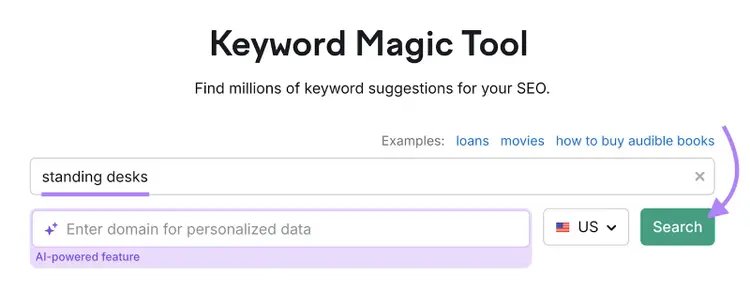
The tool will generate a list of related keywords along with various metrics.
Review the list to find the most relevant keywords for your campaigns.
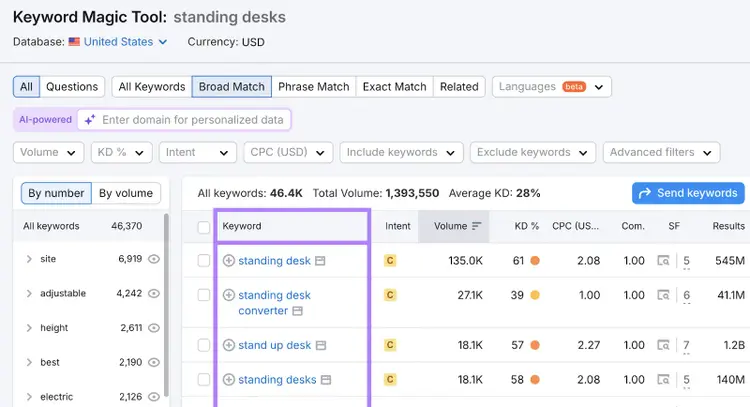
On the left, you’ll see suggested groups organized by specific modifiers.
Use these groups to identify niche or specific keyword ideas for your ad campaigns.
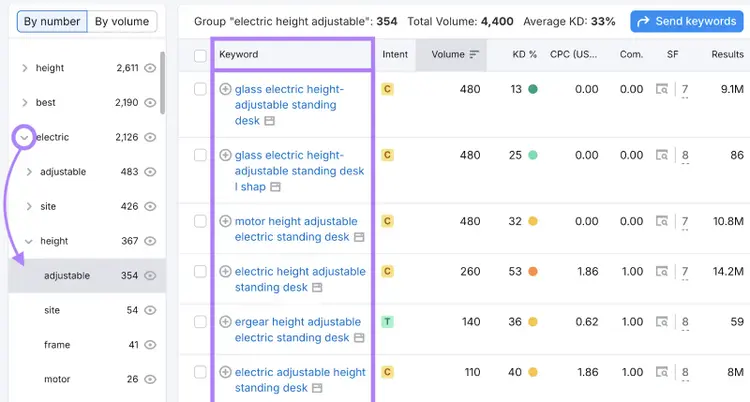
Pick keywords that best represent your offering. And start building your campaigns and landing pages around these keywords.
Explore the Keyword Magic Tool’s powerful features today.
Find Relevant Keywords
with the Keyword Magic Tool

Ravi is a data-driven content marketer, writer, and strategist with over 10 years of marketing experience. He helps B2B SaaS companies drive organic growth with product-led content and SEO.

Tells Google to show you more from Semrush in AI, Search, and Discover.