
How to do YouTube keyword research: A complete 2026 guide
Most creators learn how to do YouTube keyword research by picking a high-volume phrase and reverse-engineering a video idea to fit it. The result is content nobody asked for.
This guide flips that order. You start with a topic you can cover well and use research to validate whether there’s demand, what angle the audience expects, and how to increase the video’s odds of showing on YouTube and Google.
Why YouTube keyword research is topic validation rather than idea generation
The YouTube algorithm rewards topical relevance, engagement, and quality over exact phrase matches.
That means your mindset shifts from "what should I make?" to "of the topics I can credibly own, which ones have validated demand worth pursuing?"
The algorithm matches for topics
If you search a specific term on YouTube, you’ll notice that sometimes none of the top results contain that exact phrase in their titles. For example, in the results for “best microphone for youtube”:
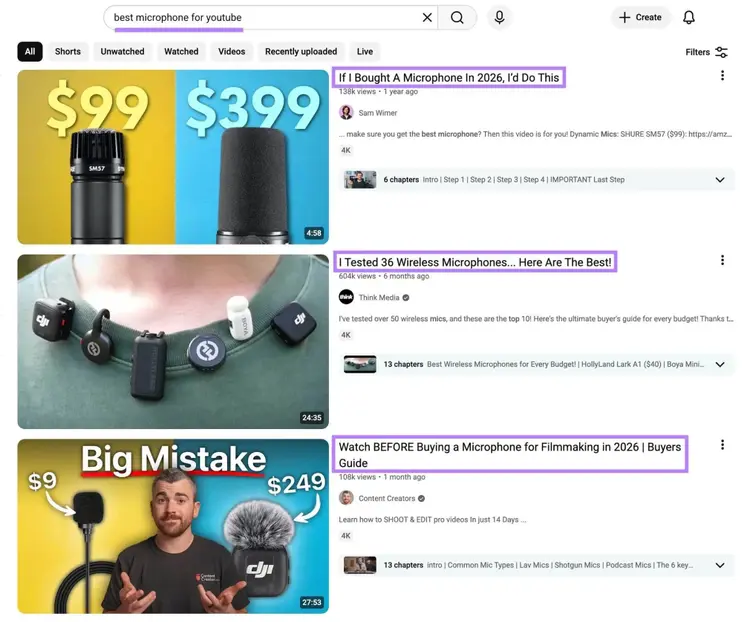
These videos rank because the algorithm thinks they’re the best answers to the underlying question.
Topic validation checks three things beyond demand
Validation tests topic demand, channel fit, format fit, and business value.
Here’s how to think about those four elements:
- Demand: Does the topic have enough YouTube search volume and trend stability to justify a video?
- Channel fit: Can your channel credibly own the topic without confusing existing viewers?
- Format fit: Can you produce the format the topic demands? For example, a "best wireless microphones" video requires gear access.
- Business value: Does the video map to a product, service, audience goal, or other commercial outcome?
Keyword data feeds the demand check directly. The other three depend on knowing your channel and your business. A tool cannot concretely know what you can credibly own.
Validation matters more for video than for blog content
Video is too expensive and time-intensive to produce on speculation, and once published, it can't be iterated on the way a blog post can.
Once a YouTube video is live, you can update the title, description, and thumbnail. But you can't redo the video itself.
Bad ideas either stay public, drag down your channel's average watch time, or get unpublished and re-shot from scratch. Validation is the key step that keeps you out of that situation.
What is YouTube keyword research?
YouTube keyword research is the process of finding video topics with real audience demand that your channel can credibly cover and compete for.
Unlike keyword research for SEO, YouTube rankings depend on engagement signals like watch time and click-through rate (CTR) more than exact phrase fit.
Effective YouTube keyword research enables you to:
- Choose the right topics with real business value. Validate ideas against real demand and clear fit with your channel and brand.
- Choose how to package each video. Surface the language, angles, and format viewers expect for the topics you choose.
YouTube keyword research shapes your entire YouTube strategy.
How to do keyword research for YouTube videos
Here’s how to do keyword research for YouTube videos:
- Start with topic ideas
- Use YouTube features to find ideas
- Evaluate seasonal and regional trends
- Analyze your competitors' videos
- Use YouTube keyword research tools
- Score and prioritize video opportunities
- Use AI to expand video angles for each topic
Start with topic ideas
Define the core topics your channel should cover, which are the broad subject areas your audience cares about.
For example, if you run a YouTube channel about content creation, your core topics might include phrases like “home studio setup,” “video editing,” and “on-camera confidence.” Each of those topics can generate dozens of specific video ideas once you start researching.
Write your topic list somewhere you can reference throughout this process. Like a spreadsheet.
We created a YouTube keyword scoring spreadsheet you can create a copy of to use for your research process. We’ll provide more information on how to use it later. For now, just add your keywords in the “Topic / keyword” column.
Use YouTube features to find ideas
Use the initial ideas you came up with alongside YouTube’s built-in features to find ideas grounded in real viewer behavior that you might otherwise miss.
Start with the search bar. Type one of your core topics and look at the autocomplete suggestions. These are real queries people search for, ranked by factors like popularity and similarity.
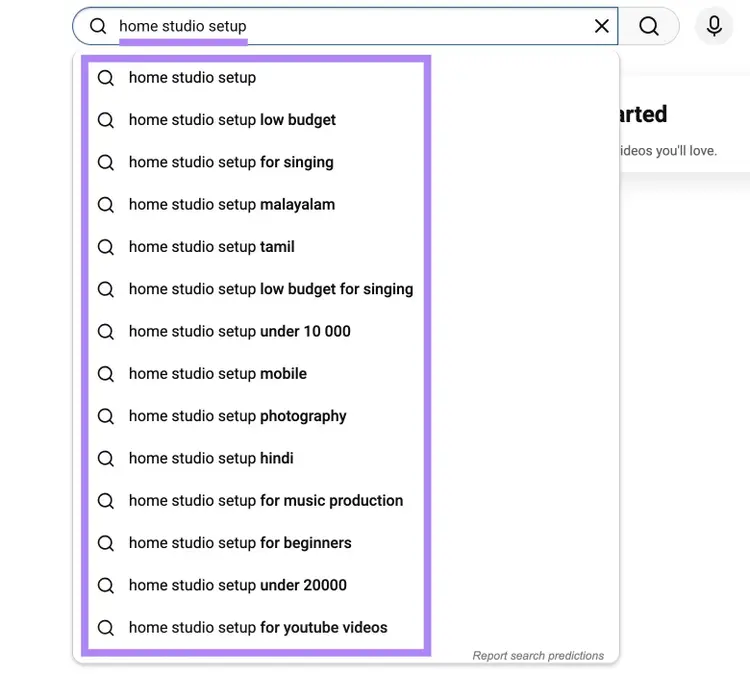
To expand your results, try the alphabet trick. This is when you type your topic followed by a space, then a single letter. For example, "Home studio setup a," "home studio setup b," etc. Each letter surfaces a different set of suggestions.
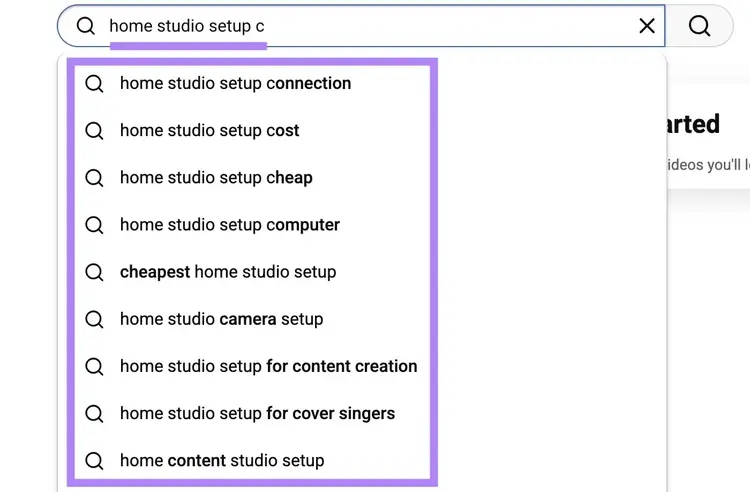
Pro tip
You can also place modifiers before your topic — like "best home studio setup" or "cheap home studio setup" — to reveal other angles searchers care about.
Next, go to “Analytics” > “Trends” in YouTube Studio to spot rising YouTube search trends before they peak.
Evaluate seasonal and regional trends
Using Google Trends with the YouTube filter applied shows you whether a video topic is growing, fading, or seasonal — and when to publish for maximum impact.
Go to Google Trends, enter one of your topic ideas, change the search type drop-down from "Web Search" to "YouTube Search,” and change the time to drop-down to “Past 5 years.” You'll see a trend line showing interest over time.
In this example, “home studio setup” seems to peak in December.
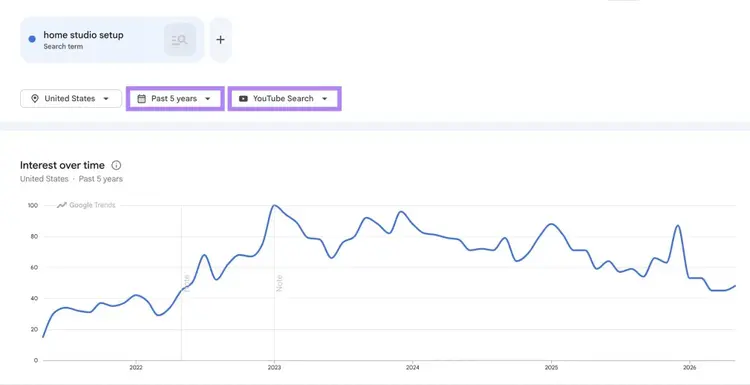
Compare multiple topics side by side to see which ones have stronger or more consistent demand.
For example, "home studio setup" spikes around the holidays when people are buying new gear, while “ai video editing” is more steady year-round and has much higher overall demand.
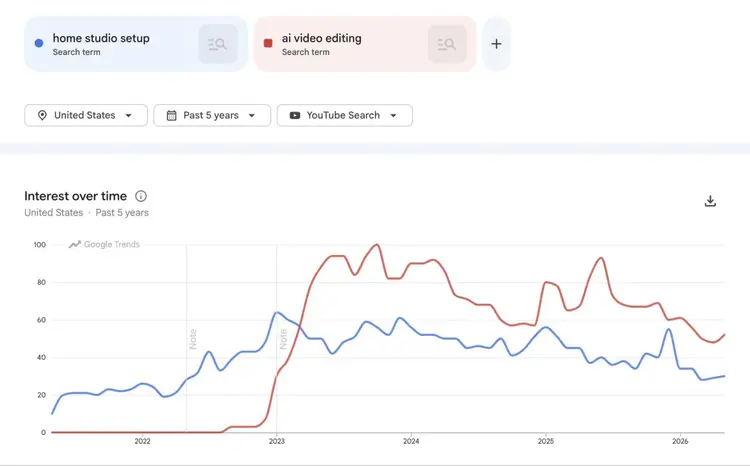
Under the graph, check the "Top queries" and "Rising queries" sections for terms labeled "Breakout," which signal rising demand for topics your competitors may not have covered yet.
If your audience is concentrated in a specific country, change the location drop-down from "Worldwide" to that country to see whether the trend holds locally.
Analyze your competitors' YouTube channels
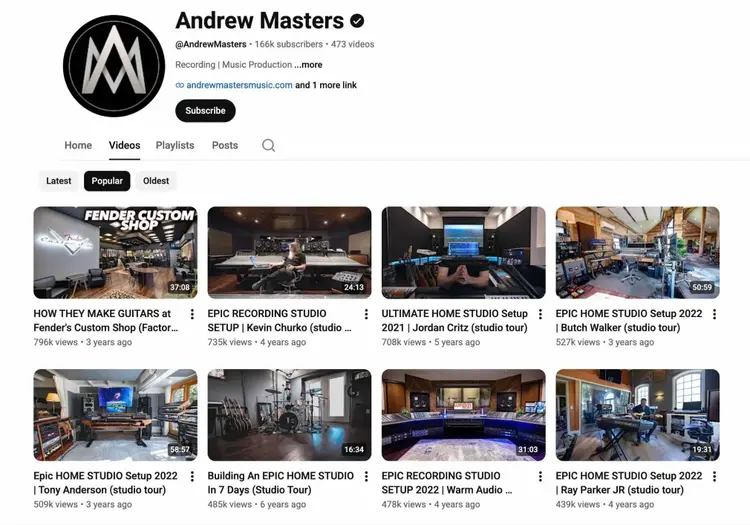
Visit your competitors' YouTube channels directly to study what topics they cover, how they package each video, and which videos perform.
Pick three to five channels similar in size to yours that cover topics in your space. If you’re covering topics related to the topic “home studio setup,” you're looking for content-creation gear channels at your subscriber level.
For each channel, look at:
- What topics they cover. Scan their video grid sorted by most popular. The titles and view counts tell you which of your candidate topics they've already addressed and which they haven't.
- How they package each video. Look at titles, thumbnails, video formats (talking head, screen capture, walkthrough, etc.), and angles (beginner intro, mistake-fixer, comparison, etc). Note the patterns you see at the top of their popular list.
- Which videos significantly overperform. A video with five to 10 times the average view count of the channel's other videos is signaling something. Usually it means the topic, the angle, or the packaging tapped into something worth paying attention to.
You can also check competitors' tags to see which keywords they're targeting.Tags have minimal impact on search results, but they reveal how other creators think about a topic.
Install a browser extension like YouTube Tags to easily view any video’s tags.
Finally, note what's missing across the channels you've reviewed:
- Are the top videos outdated?
- Do they all take the same angle on a topic?
- Is there a question viewers keep asking in comments that nobody has made a dedicated video about?
These gaps are your highest-value opportunities.
Use YouTube keyword research tools
Use YouTube keyword research tools to validate the specific topics you’ve gathered so far.
The Keyword Analytics for YouTube app pulls real YouTube search data and tells you which of your keyword ideas have meaningful demand.
To use it, click "Get started" under "Keywords Research,” enter one of your topic ideas (e.g., "budget home studio setup"), and choose your country.
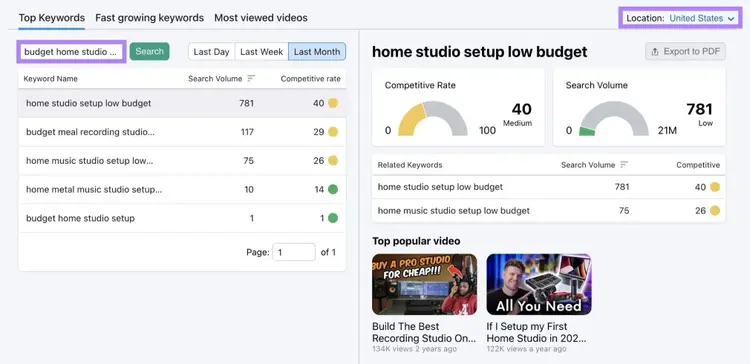
Review the results and look at "Search Volume" and "Competitive rate." Choose to display the data for the last day, week, or month data depending on how time-sensitive your topic is.
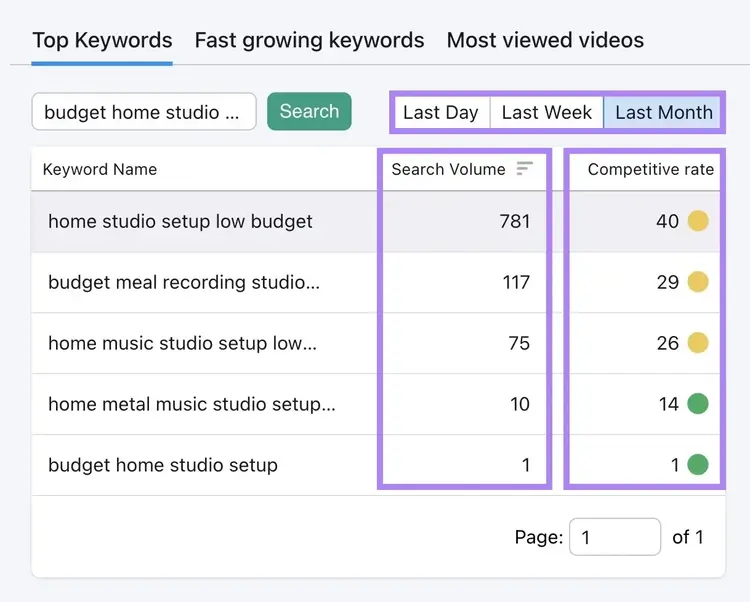
For each keyword, record four things in your scoring spreadsheet:
- The main topic / keyword (Column A)
- Search volume for the candidate as you entered it (column B)
- Competitive rate (column C)
- Any phrasing variations the tool surfaces that look stronger than your original (column O)
Next, use the Keyword Magic Tool to confirm which of your candidates also trigger video SERP features (video carousels, featured videos, and video results) in Google. Because a topic that ranks on YouTube and in Google's video features compounds your reach.
To check whether a candidate topic triggers video features, enter a topic into the Keyword Magic Tool, click "Advanced filters" then "Any” under “SERP Features." Select the boxes next to "Video," "Featured video," and "Video carousel," then click "Apply."
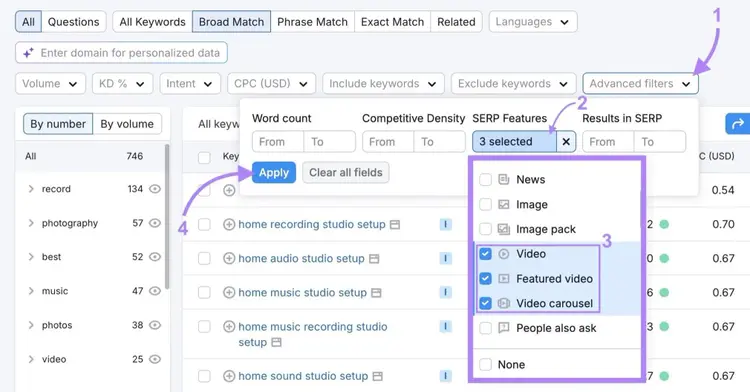
If the topic appears in this filtered list, Google currently shows video results for it.
When a candidate shows strong demand in the Top Keywords tab in Keyword Analytics for YouTube and also triggers video SERP features in Google, that's strong support for putting it into production. Add “yes” or “no” in column D (Google video SERP) in your scoring sheet.
Score and prioritize video opportunities
Once you have a list of validated topics, prioritize them with our YouTube keyword scorer that considers each topic’s demand, competition, channel fit, format fit, business value, and urgency.
Here’s how to use the YouTube video keyword scoring spreadsheet:
Step 1: Complete the ‘Scorer’ tab
Complete the “Scorer” tab by entering the terms you want to focus on from your list of candidates and scoring them. For reference, here’s how to score each factor (factor weights are specified in parentheses):
- Demand (25%): How much YouTube search volume the topic has. A score of 5 = strong, sustained demand.
- Competition (20%): How beatable the top results are for your channel size. A score of 5 = manageable competition with a clear angle.
- Channel fit (10%): How squarely on-brand the topic is. A score of 5 = reinforces what existing viewers expect.
- Format fit (10%): How easily you can produce the format the topic demands. A score of 5 = a format you produce regularly.
- Business value (25%): Whether the video maps to a commercial outcome. A score of 5 = direct product, service, or strategic audience goal.
- Urgency (10%): Whether the topic has a publish-by window. A score of 5 = clear seasonal or competitive deadline.
“Demand” and “Business value” are weighted the heaviest because volume and payoff are the two things you cannot manufacture later.
“Channel fit,” “Format fit,” and “Urgency” are weighted less because they’re negotiable. You can stretch your channel a little, learn a new format, or wait out a seasonal cycle.
Step 2. Review the ‘Score’ and ‘Recommendation’ columns
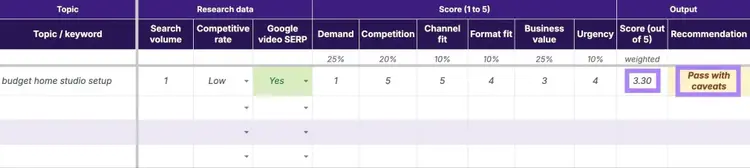
The YouTube keyword scorer spreadsheet automatically calculates a score and recommendation for each topic:
- 4.0 or higher: Strong go. Move the topic into production.
- 3.0 to 3.99: Pass with caveats. Identify the weakest factor and decide if you can fix it before producing (e.g., a tighter business hook to lift “Business value”).
- Below 3.0: Drop or rework. The video isn't worth your time as currently scoped.
The “Recommendation” cell is color-coded, so you can easily scan the list.
Use AI to expand video angles for each topic
Once you have a list of validated topics, use a large language model tool (LLM) to generate two or three specific video angles and format suggestions for each one.
Open Claude, ChatGPT, or another LLM. For each validated topic, paste this prompt:
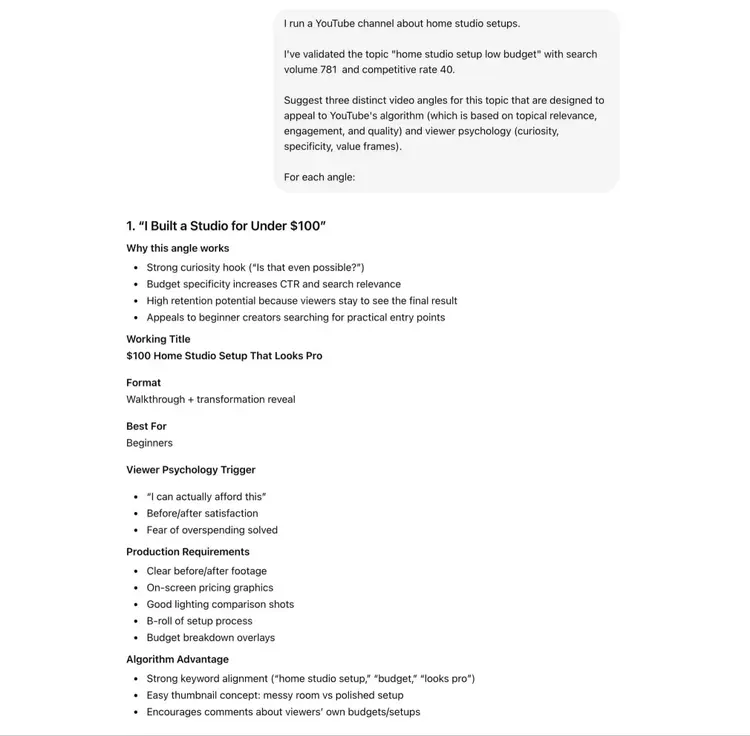
I run a YouTube channel about [your channel’s topic]. I've validated the topic "[your topic]" with search volume [specific search volume] and competitive rate [specific competitive rate].
Suggest three distinct video angles for this topic that are designed to appeal to YouTube's algorithm (which is based on topical relevance, engagement, and quality) and viewer psychology (curiosity, specificity, value frames).
For each angle:
- Propose a working title (under 60 characters, with a hook)
- Propose a video format (talking head, walkthrough, listicle, comparison, mistake-fixer, etc.)
- Note who the angle is best for (beginner, intermediate, or established creator)
- Flag any production requirements I should anticipate
Run the prompt for each validated topic to get a few packaging-ready video ideas you can compare side by side.
A few practical notes:
- Iterate on the prompt if the angles feel generic. Add constraints. Tell the LLM your subscriber count, your typical video length, your budget, the audience problems you've heard repeatedly. The more specific your context, the sharper the angles.
- Ignore any performance predictions the model invents. If it claims "this angle will get the most views," that's guessing. Trust the data you already collected, and rely on the model for variation suggestions.
Treat the AI output as a brainstorming partner. It expands your shortlist of validated topics into a fuller set of producible video ideas. You still need to ultimately pick which ones make it on the calendar.
How to use your YouTube keyword research
To use your YouTube keyword research, apply the insights as relevance signals across each element of the video to strengthen your ability to perform well both in YouTube SEO and in Google's video features.
Use keywords in video elements
Use keywords in specific elements to signal what your video covers and who it serves.
Titles
Your video title tells YouTube what the video is about and tells viewers whether to click.
Whether to use your primary keyword in the title depends on the topic. Search YouTube for the topic and study the top results.
If the top-ranking videos for a given keyword all include the exact phrase, do the same. If the leaders use hooks (tested counts, years, warnings, or contrasts) instead, match that pattern.
Here are a few suggestions:
- Build the title around a hook like a tested count ("I Tested 36 ..."), a year ("... in 2026"), a constraint ("under $500"), a contrast ("$99 vs. $399"), a warning ("Watch BEFORE Buying"), or a hypothetical ("If I Were Starting Over ...").
- Keep the title around 60 characters to reduce the odds of truncation
- For long-tail topics with little competition, an exact-match title still works and saves you the hook work
- Avoid clickbait. If the title overpromises and causes viewers to leave, that leads to poor engagement that can decrease visibility
Descriptions
Your video description does two jobs: It gives YouTube text to classify the video for related searches and previews the content for viewers deciding whether to click.
When writing your description:
- Place your primary keyword in the first one or two sentences. About the first 100-150 characters appear under the video in both YouTube and Google search results.
- Use keyword phrasing variations (column O in your spreadsheet) a few times naturally. Repeating your primary keyword many times reads as stuffing rather than relevance.
- Write at least 200 words, so YouTube has enough context
- Add timestamped chapters (covered below) to help your viewers skip to the most important parts and to appear in Google search results
Hashtags
Use two or three relevant hashtags to help your video appear in YouTube's topic-based searches and feeds.
- Use two or three hashtags per video — no more
- Make one a hashtag version of your primary keyword. Make one broader. Make one even more specific to the video.
- Place them at the end of the description
- Match what your audience already searches. Hashtags work when they map to existing communities on YouTube.
Hashtags will show up like this when your video is published:
Tags
Tags have minimal impact on rankings, but they help YouTube categorize misspellings and edge variations of your keyword.
Here are some tips for YouTube tags:
- Include your primary keyword and any obvious misspellings
- Add five to 10 close variations and synonyms
- Add format tags ("how to," "tutorial," "review," "comparison") to help YouTube understand the video
- Skip unrelated trending terms that could cause confusion about the topic
Chapters
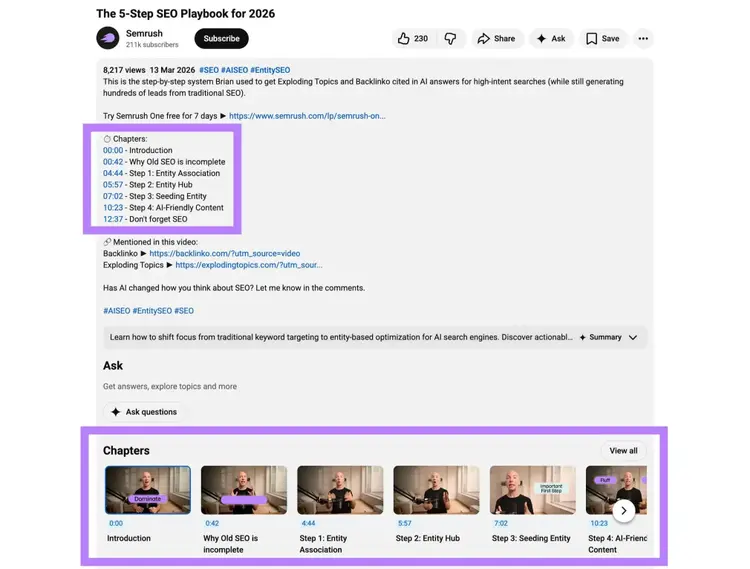
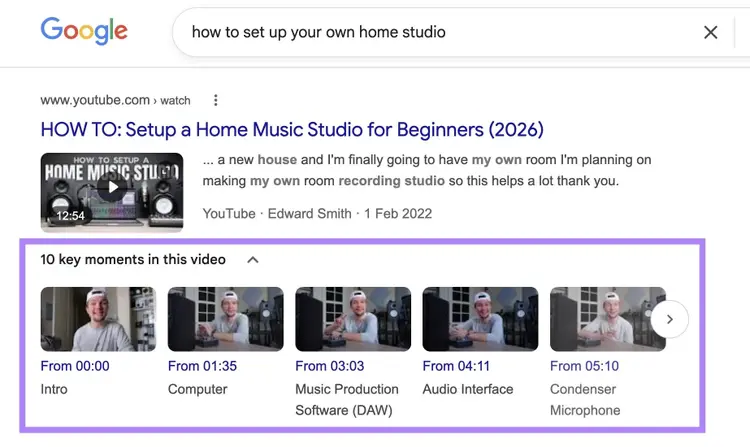
Chapters break the video into navigable sections that can be separately surfaced as results inside YouTube and Google.
Plus, adding chapters to your videos helps users find the information that’s most relevant to them. Here are some best practices:
- Add at least three chapters, with the first starting at 0:00 and named after the topic
- Write keyword-rich, scannable titles for each chapter (e.g., "How to soundproof a small room" beats "Soundproofing")
- Aim for a chapter every one to two minutes. Too few and the navigation is useless. Too many and the chapter list becomes noise.
- Include timestamps in your description in ascending order
Optimize your videos for Google and AI Overviews
You don’t have to do anything special to make your YouTube videos eligible for Google's video features and AI Overviews, but you can increase your chances of showing up if you focus on basic video SEO practices like including a clear title, a thorough description, chapters with timestamps, and a clean transcript.
Here’s what matters:
- A transcript may help with AIO citations. It’s possible that Google uses YouTube transcripts to extract text excerpts the same way it extracts excerpts from webpages, so make sure yours (auto-generated or uploaded) is accurate.
- Chapters with timestamps can surface as "key moments" in Google search results
- Topically relevant titles and descriptions matter more than exact-keyword matching since Google evaluates topic match semantically
Add keywords to your playlist titles and descriptions
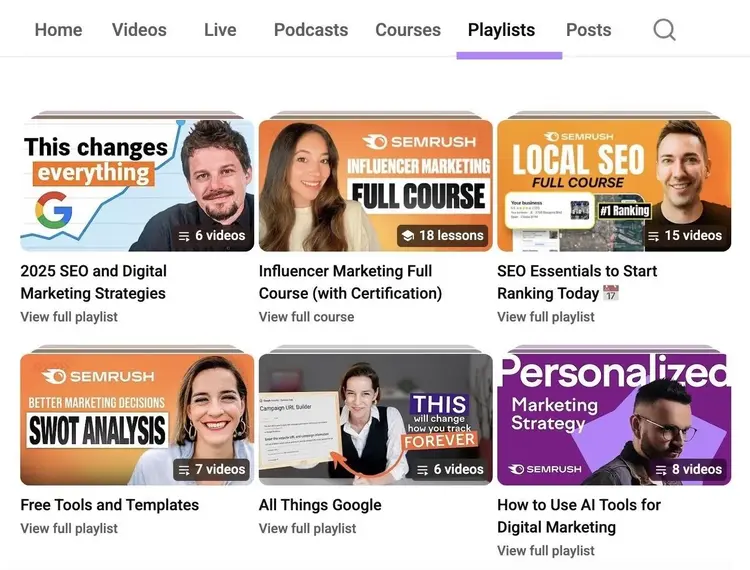
Adding keywords to playlist titles and descriptions helps your playlists show in search results and as recommendations.
Here are some tips:
- Use the keyword in the title if possible (e.g., "Home studio setup tutorials for beginners" beats "How to construct a home studio if you aren’t experienced")
- In the description, write two or three sentences explaining what the playlist covers and who it serves, with the primary keyword once and supporting keywords naturally
- Put your highest-retention video first,so the playlist's autoplay momentum carries new viewers through the rest of the queue
- Keep playlists focused on a single topic. A playlist with eight videos around one problem signals more than a 30-video playlist that spans three.
Optimize your channel with keywords
Optimizing your channel with keywords helps YouTube understand your channel as a whole, which influences your recommendations and search visibility.
Start with the channel description. Open YouTube Studio and go to “Customization” and select “Profile.”
Write a description that names your channel’s main topic and what viewers will get from subscribing. Include your primary topic keywords in the first one to two sentences. Those first few lines appear under your channel name in search results.
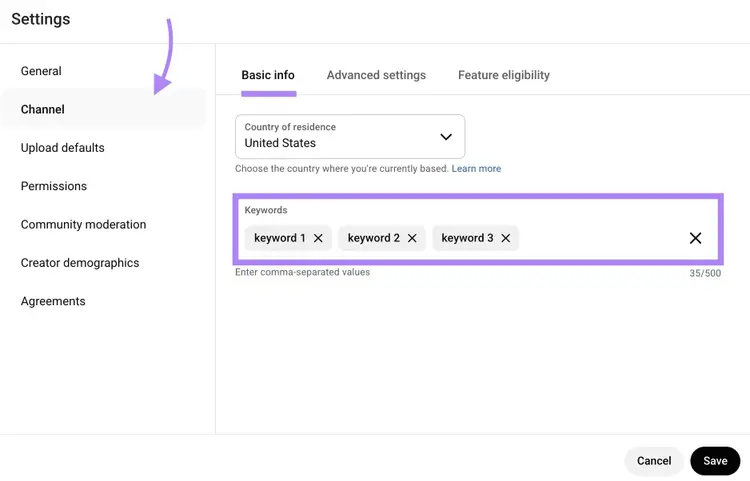
Then add five to 10 keywords in the channel keywords field by going to “Settings” > “Channel” > “Basic info.” Choose terms that best represent your main topics..
YouTube keyword research FAQs
Here are quick answers to the questions readers ask most about YouTube keyword research.
What are the best keywords for YouTube?
The best keywords for YouTube have meaningful search volume, manageable competition for your channel size, and point to a video you can produce well. High volume alone doesn't make a keyword good if your channel can't credibly own the topic.
How many keywords should you use for YouTube videos?
Use one primary keyword per video, plus some supporting keywords for YouTube videos spread across the title, description, hashtags, tags, and chapters.
The primary keyword represents the core topic. Supporting keywords cover phrase variations and adjacent topics, so YouTube can match the video to a wider set of queries.
How do I identify low-competition keywords on YouTube?
To identify low-competition keywords on YouTube, use the Keyword Analytics for YouTube app to look for terms with low “Competitive rate” scores that still have meaningful search volume.
Cross-check any candidate against the actual YouTube search results. If the top results are all from massive channels with millions of subscribers, the keyword is harder than the score suggests.
Monitor Your YouTube Rankings
with Rank Tracker for YouTube

Carlos Silva leads the editorial pipeline for the English blog—coordinating writers, editors, strategy, and building AI workflows that boost content quality and AI visibility. With 10+ years of experience writing and editing across in-house and agency roles, Carlos blends content strategy, SEO, and AI to help marketers stay ahead of an evolving search landscape.
Carlos Silva
Carlos Silva leads the editorial pipeline for the English blog and builds AI workflows that boost content quality and AI visibility. 10+ years writing and editing across in-house and agency roles.

Tells Google to show you more from Semrush in AI, Search, and Discover.