
YouTube keyword tools can help you grow your YouTube channel and earn more subscribers by revealing popular topics and optimization opportunities.
But which tool is right for you? It depends on the challenges you face in keyword research and what you want to achieve on YouTube.
This article covers six of the best keyword tools for YouTube. Each section outlines pros, cons, and usage instructions.
The Best YouTube Keyword Tools
1. YouTube Search Bar
Best free option for YouTube Keyword research
- Website:YouTube
- Price: Free
At least at first, you don’t necessarily have to use a YouTube keyword tool or software. A simple, no-cost method to find trending searches in the YouTube search bar.
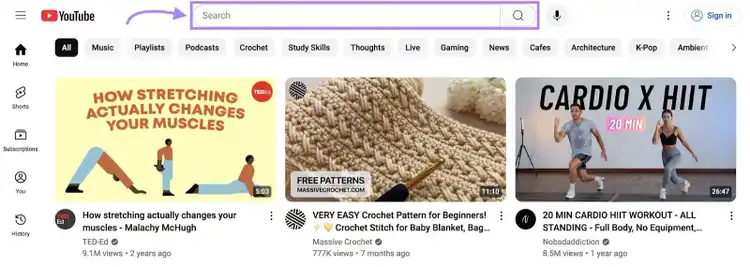
It’s the quickest way to get keyword ideas for your YouTube marketing strategy because you don’t have to leave YouTube.
Pros:
- Generates keyword ideas directly from YouTube (in seconds)
- You don’t need to subscribe to software or access a third-party tool
Cons:
- You’ll get a limited number of ideas, unlike with other tools (which are far more comprehensive)
- Lacks keyword metrics to help you determine the best topics for your channel
How to Use This Tool
Type a word or phrase into the YouTube search bar and wait for the autocomplete suggestions to populate in the box beneath it.
Like this:
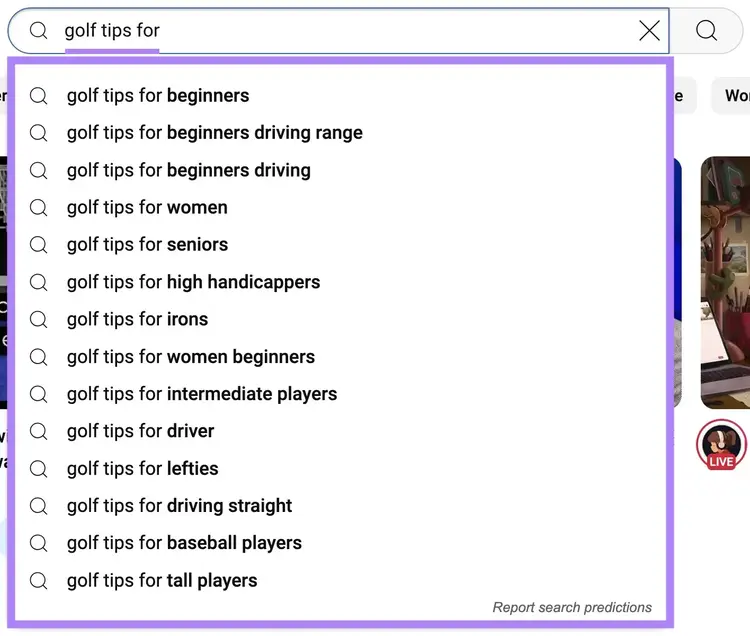
YouTube will suggest topics based on what users have already searched, which suggests interest in the keyword.
When you find an idea that works for your channel, save it to a keyword list for future reference.
My Favorite Part
I like how the search bar provides a big picture of major subtopics I can cover on my channel.
For instance, typing “writing essays for” led to eight new video ideas.
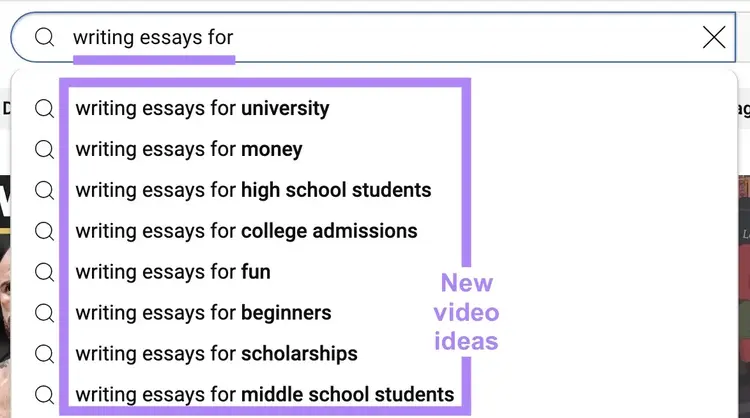
I usually jot down these autocompletes. Then use a keyword tool to see if the topics are truly worth covering.
2. Keyword Analytics for YouTube
Best YouTube keyword tool for beginners
- Website: Keyword Analytics for YouTube
- Price: $10/month
This Semrush tool helps you find YouTube keyword ideas and see how often people search for them (search volume).
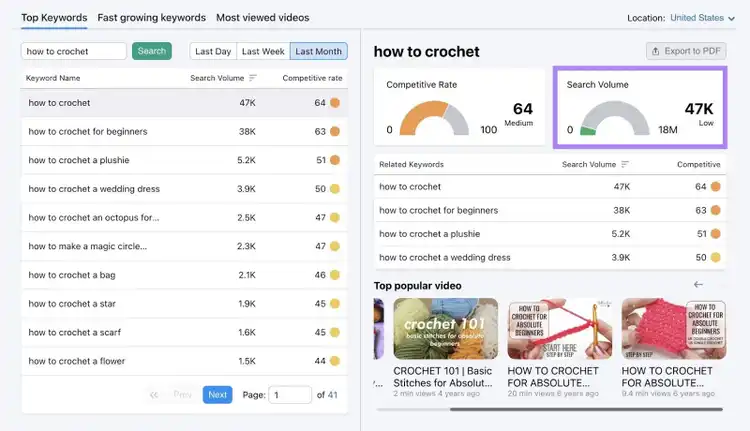
The tool assigns each keyword a “Competitive Rate,” indicating how difficult it may be to rank for that keyword in YouTube search.
Pros:
- Easy-to-use interface—you’re unlikely to feel overwhelmed by data
- Links to popular videos related to your topic, inspiring new video marketing ideas
- Shows related keywords, so if a term is too competitive or not the right fit, you’ll have other options
Cons:
- Strictly a YouTube keyword analysis tool. Meaning you won’t have access to additional creator tools with a subscription.
- The “Most Viewed Videos” feature may not show videos that are relevant to your business or niche
How to Use This Tool
To use the tool, select the “Top Keywords” tab, set your location, then enter a topic you want to cover on your channel.
Then, click “Search.”
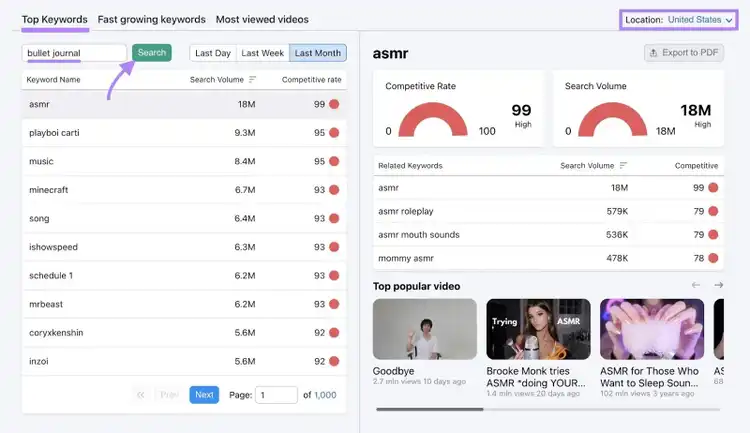
Check out the keywords in the table. Along with their search volumes and competitive rates.
When choosing topics to cover (or what keywords to optimize your YouTube videos for), higher search volume is generally better. Because more people search for the topic.
But if your channel has fewer subscribers, focus on low-competition keywords as well (i.e., lower Competitive Rate). So your videos have a better chance of showing up in searches.
My Favorite Part
I like the “Fast growing keywords” feature for spotting trending topics.
For example, the “Change” column highlights which keywords gained the most popularity in the past day or week.
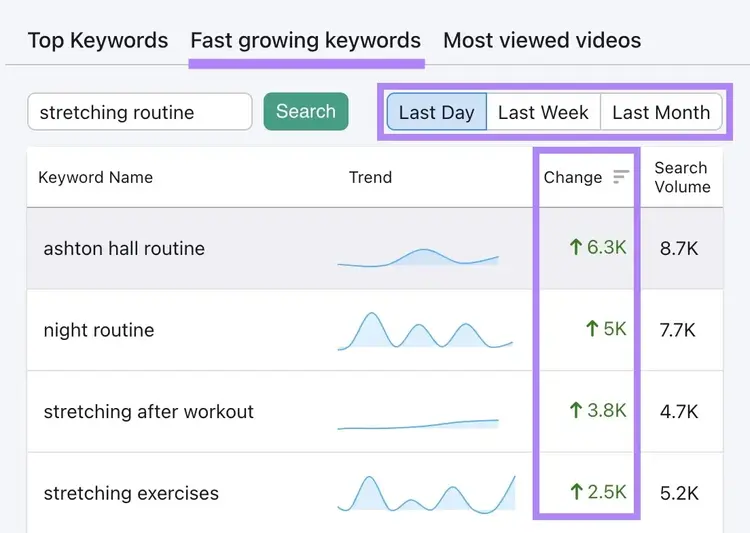
And then I create videos or YouTube shorts related to them. To capitalize on the growing interest.
3. vidIQ
Best YouTube keyword tool for full-time creators
- Website: vidIQ
- Price: $19/month
vidIQ is a YouTube growth platform that helps creators find relevant keywords to increase their videos' reach.
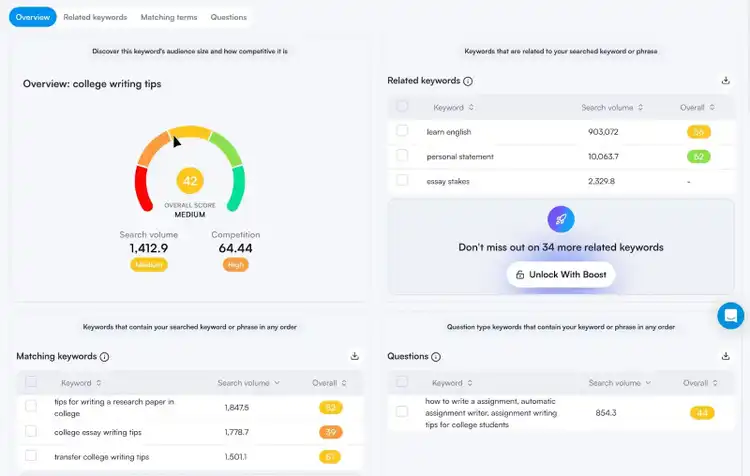
You can discover related keywords, matching terms, and commonly searched questions on YouTube. Then, use the data to select the best opportunities for your channel.
If you’re a full-time creator who needs in-depth keyword insights and video optimization in one place, vidIQ may suit you.
Pros:
- Provides top keyword recommendations tailored to your channel and topic areas
- Includes unlimited lookups, so you can do as much research as you need
- Lets you export keyword lists as spreadsheets (so you can more easily share them, if needed)
Cons:
- No option to filter research by location or country
- The competition score can be confusing. For example, high-competition keywords will be assigned a lower “Overall” score.
How to Use This Tool
Click on the “Keywords” tab in the left-hand menu of vidIQ to access the YouTube keyword search tool.
Input a topic or phrase and hit enter on your keyboard.
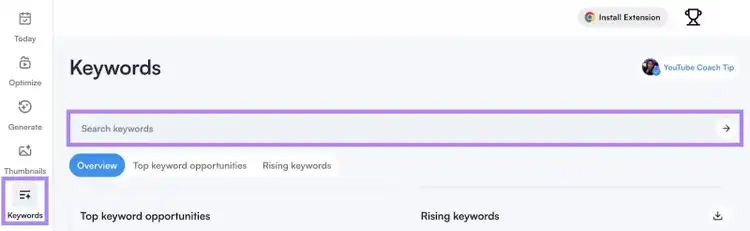
Browse the keywords in the tables. To copy a keyword for a list, select the checkbox to the left of the term and click “Copy.”
My Favorite Part
I use the “Optimize” feature to do YouTube SEO after choosing a keyword, including for the videos already published on my channel.
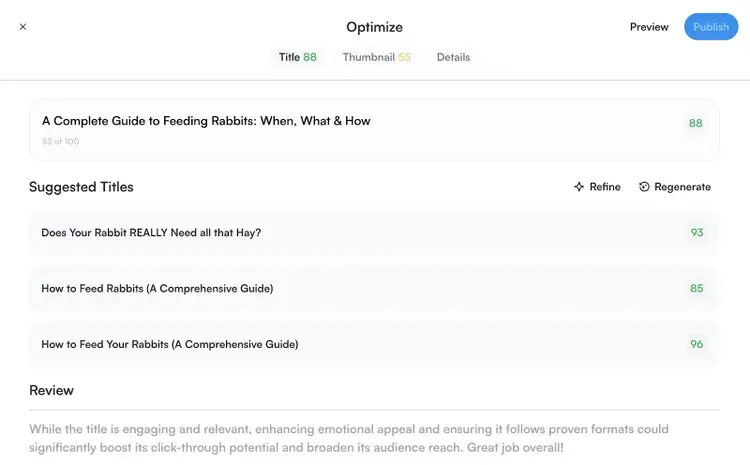
The feature suggests more engaging video titles that include your keyword. Which may lead to better rankings and more views.
4. 1of10Best YouTube keyword tool for competitor research
- Website: 1of10
- Price: $39/month
1of10 is a YouTube competitor research tool that helps you find video topics that are more likely to get views.
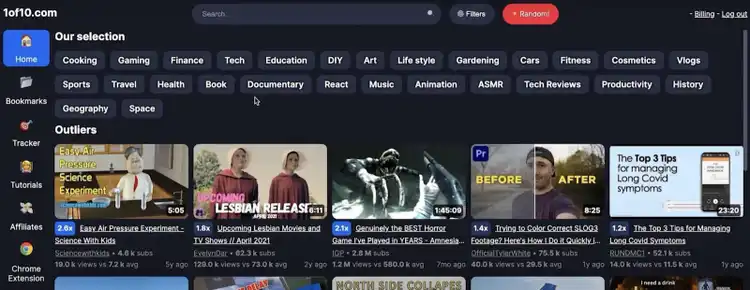
The tool only shows “outlier videos” in its results. Meaning videos that have performed significantly above average (when compared to similar ones).
You can search videos by keywords or niche. And use the results as inspiration for your own content.
Pros:
- Multiplier scores estimate how well certain video topics might perform
- Advanced filters let you sort outlier videos by length, views, channel subscribers, and more
- Tracking features let you monitor high-performing videos from specific competitors
Cons:
- No search volume data, so you can’t gauge overall interest
- The tool prioritizes virality (as opposed to target audience), which isn’t as useful if you use YouTube for lead generation
How to Use This Tool
Click the “Home” tab in the left-hand menu. Then search for a keyword or topic in the search bar at the top of the dashboard.
Instead of keyword metrics, you’ll see a list of related outlier videos. Look for those that have high multiplier scores.
Bookmark those videos to use as inspiration for your channel. Creating a video on a similar topic may lead to more visibility in YouTube search.
My Favorite Part
I like that 1of10 makes it easy to bookmark videos into folders, which helps me keep my research organized by project or niche.

If you have multiple channels, this feature can streamline your research workflow. By keeping similar videos together to reference side by side.
5. TubeBuddyBest YouTube keyword tool for personalized recommendations
- Website: TubeBuddy
- Price: There is a free version. But to fully access the keyword research features, you’ll need the Pro subscription, which is $26.39/month.
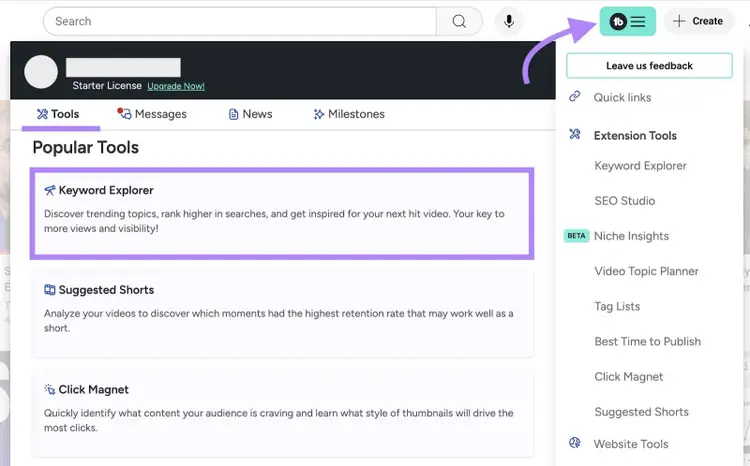
TubeBuddy is a browser extension that includes a full suite of YouTube tools, including its Keyword Explorer.
Once downloaded, access the keyword tool by clicking the TubeBuddy extension button when you visit YouTube.
Pros:
- “Weighted” competition scores factor in your channel’s niche, subscriber count, and competitor set
- “Optimization” scores help identify strong ranking opportunities
- YouTube and Google search trends for keywords (up to the past 12 months)
Cons:
- You’ll need to be in YouTube to access the tool, which can be distracting
- There is no way to make keyword lists for sharing, which reduces usability for agencies or teams
How to Use This Tool
When you’re in YouTube, click on the teal TubeBuddy extension button and locate the Keyword Explorer under the “Tools” tab.
Type in a term or phrase and click “Explore.” Then, slide the toggle to “Weighted” to see competition scores for your specific channel.
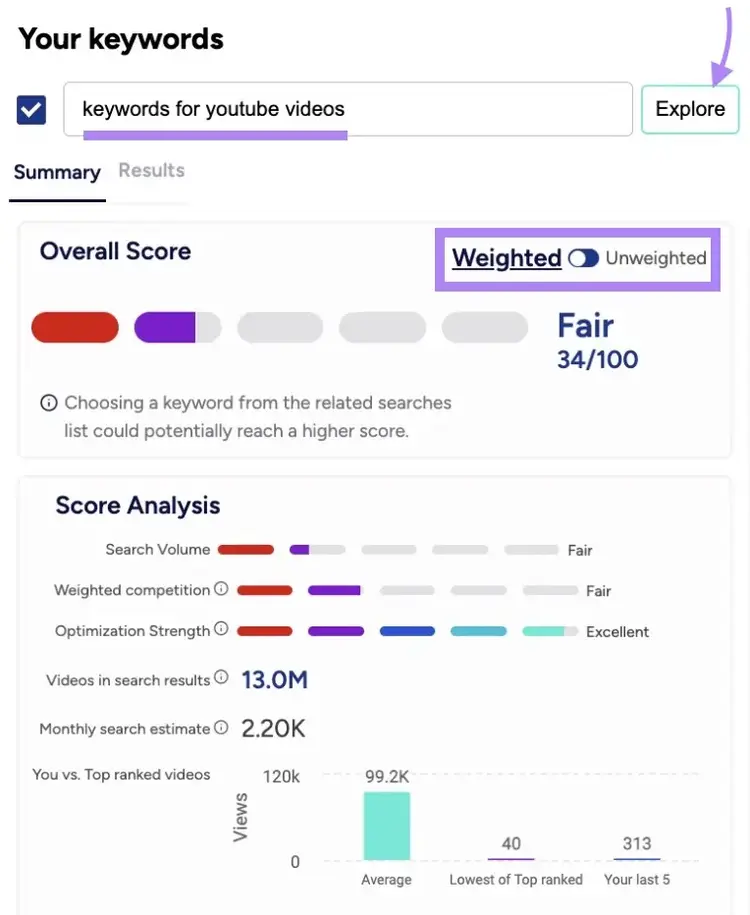
Prioritize the keywords that have “Good” search volume, “Low” competition, and “Excellent” optimization strength.
My Favorite Part
When I don’t have time for keyword research, I like that TubeBuddy makes it easy to add keyword tags to videos before posting them.
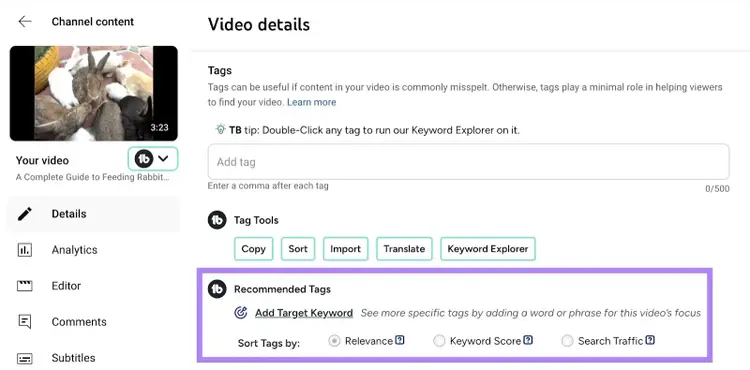
Browse tags by relevance, Keyword Score, or search traffic. And choose the combination that aligns with your goals.
6. Keywords Everywhere
Best YouTube keyword tool for marketers
- Website: Keywords Everywhere
- Price: $6/month
Keywords Everywhere is a browser extension that shows keyword data in a sidebar and beneath videos as you search on YouTube.
It displays search volume, search trends, most used tags, and related keywords.
Pros:
- Offers a broad range of keyword metrics for your keyword strategy
- Includes advanced reports that compare optimization details for the top 20 videos
- Displays SEO scores with each video result, so you can see how optimized the top-ranking results are
Cons:
- Displays a lot of data, which may be overwhelming if you’re new to SEO
- Each search costs one credit, so when you’re browsing YouTube casually, you’ll need to turn off the extension to not waste your quota
How to Use This Tool
Search for a topic or phrase on YouTube and wait for the keyword data to populate results.
Keyword data will appear underneath the search bar, below each video result, and in a sidebar. Like this:
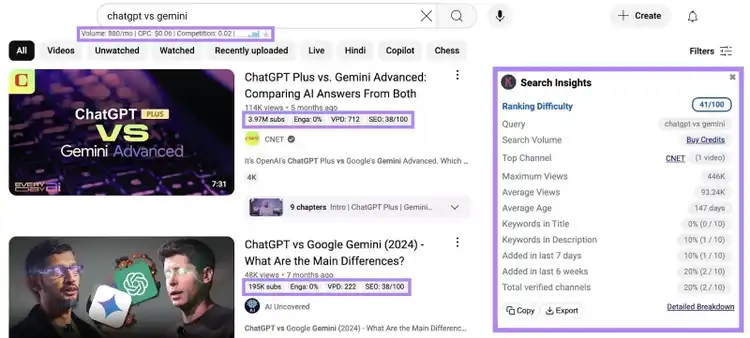
Click on the blue hyperlinks in the different categories to see more detailed reports. And copy or export the keyword data at any time.
Whenever you do another YouTube search, fresh data will populate.
My Favorite Part
I find that the additional data available in this tool can help you optimize your keyword strategy for more views and engagements.
For example, metrics like “Average Views,” “Average Age,” and “Total verified channels,” aren’t available in most tools.
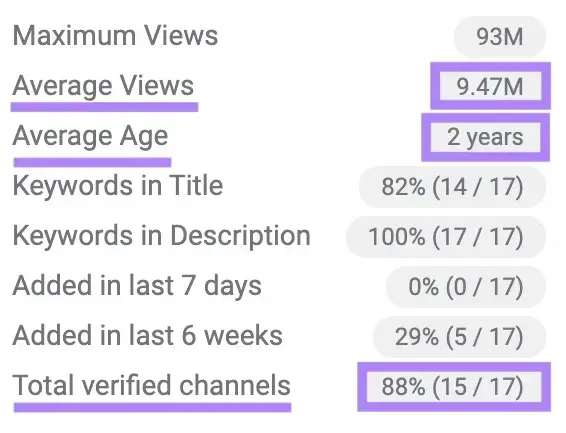
But they can help you understand if a topic is still relevant to users. And if there are recently published videos covering it.
YouTube Keyword Research Tips
Follow these tips whenever you research keywords for YouTube, regardless of the tool you choose:
- Use Google Trends to find or cross-reference data about trending searches
- Look at video tags to see what topics and subtopics creators in your niche are covering
- Analyze competitor videos to see what keywords they target in their titles and descriptions
- Balance high and low-volume keywords to maximize the total keywords your videos rank for
- Use an SEO keyword tool like Keyword Magic Tool to understand keyword search intent and tailor your videos to what the user is actually looking for
Watch Your YouTube Rankings Improve
Using tools for YouTube keyword research may lead to better rankings for your videos. And thus more visibility for your channel.
Track your video performance using Rank Tracker for YouTube.
To get started, add the link to your YouTube channel in the text bar. Then, click “Add Channel.”
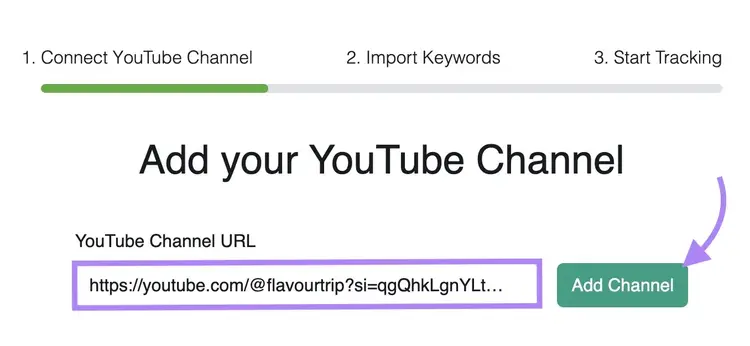
Then, add the keywords you want to track. Including the ones your videos are optimized for.
Add the keywords line by line into the text box. Or export your top keywords from YouTube Studio and copy and paste the top 200 in. Then, click “Import Keywords.”
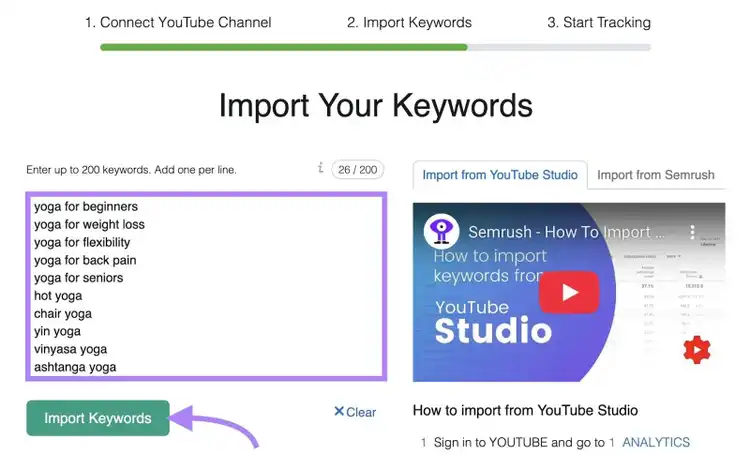
You’ll start getting weekly updates for the keywords you added. And can more easily monitor whether your videos move up or down in search.
YouTube keyword research is just one part of a comprehensive SEO strategy. Semrush has more than 55 tools to help improve your search rankings across platforms. Try for free today.
Elevate Your Digital Strategy
with a Semrush Subscription

Alex is a managing editor with 10+ years of experience leading content and SEO teams across SaaS, tech, ecommerce, and digital publishing. He specializes in building editorial systems that balance human judgment with AI-assisted workflows, helping teams produce original, high-impact content as search and discovery evolve. His work spans SEO strategy, content quality frameworks, and adapting content operations for AI-driven search.
Alex Lindley
Alex is a managing editor with 10+ years of experience leading content and SEO teams. He focuses on building AI-aware editorial systems that help teams produce original, high-impact content as search evolves.

Tells Google to show you more from Semrush in AI, Search, and Discover.