
What Is a 307 Redirect? An Overview & How to Use It
What Is a 307 Redirect?
A 307 redirect (often referred to as an HTTP 307 status code) temporarily and automatically diverts website visitors from one URL to another while maintaining the HTTP request method—which is important for certain types of pages.
For example, say you’re redesigning your site’s login page. And you want to temporarily redirect users from “yoursite.com/login/” to “yoursite.com/login-temp/” during the redesign.
A 307 redirect can help. And users who try to access ”yoursite.com/login/” will be redirected to your temporary login page.
How Do 3xx Status Codes Work?
A 3xx status code (a 307 redirect is just one type) tells web browsers to divert traffic from the initial URL to a different URL.
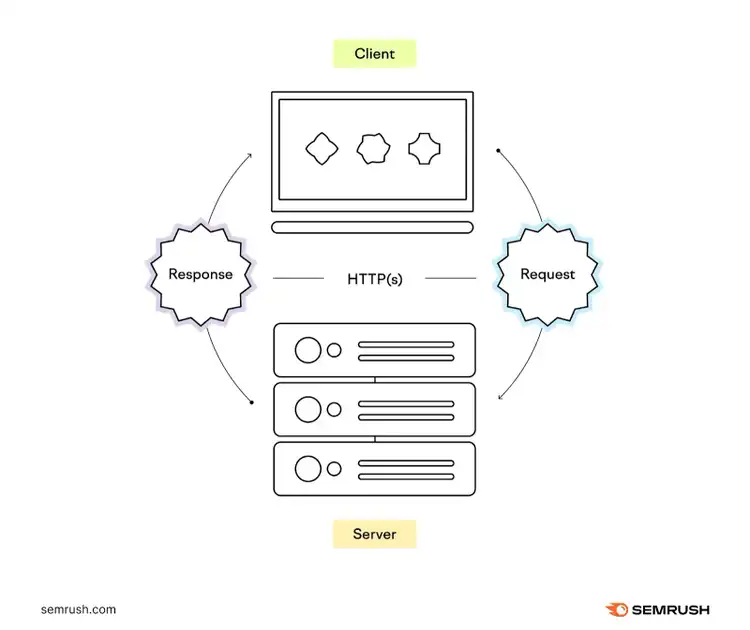
When someone tries to access your temporarily redirected webpage, their browser sends a request to your site’s server (the system that hosts and delivers web content).
The server responds with a 3xx HTTP status code that indicates the status of the page or action requested. And that status code tells browsers where to go next and how to handle the redirection.
307 vs. 302 vs. 303 Redirects
307, 302, and 303 redirects are all temporary redirects, but they differ in how and whether they maintain the HTTP request type.
This mostly applies to two types of requests sent by a browser to a server:
- GET: When data is being retrieved from the server
- POST: When data is being sent to the server (like through a form submission)
Knowing the difference between GET and POST requests helps you understand the difference between these redirects:
302 Redirect
A 302 redirect is a temporary redirect that can potentially change a POST request into a GET request.
You can use it when you need to temporarily direct traffic to a new location and it doesn’t matter if the request method changes. Like if you’re running a temporary sale and want to redirect users to that limited-time page from your main product page while the sale is running.
303 Redirect
A 303 redirect is a temporary redirect that changes all requests to a GET request, and it’s typically used when you want to send users to a new page after they perform an action like submitting a form.
For example, if a user completes a form to download a resource on your site, you can use a 303 redirect to send them to a thank you page after the submission gets processed. Which can avoid duplicate submissions.
307 Redirect
A 307 HTTP code is a temporary redirect that maintains the original request method—a POST request remains a POST request.
Maintaining the request method helps protect data, avoid data loss, etc.
For instance, you can use a 307 redirect to send users to an order confirmation page that contains some of the same information the user submitted.
307 Temporary Redirect vs. 307 Internal Redirect
While a 307 temporary redirect is a way to temporarily send users to a different page than the one requested, a 307 internal redirect (this is an informal term and isn’t a true redirect) is a way to automatically send users to the secure version of a website.
When someone visits your website, the data transfer between their browser and your server can be via:
- HTTP: A plain-text communication protocol
- HTTP Secure (HTTPS): An encrypted communication protocol that’s more secure
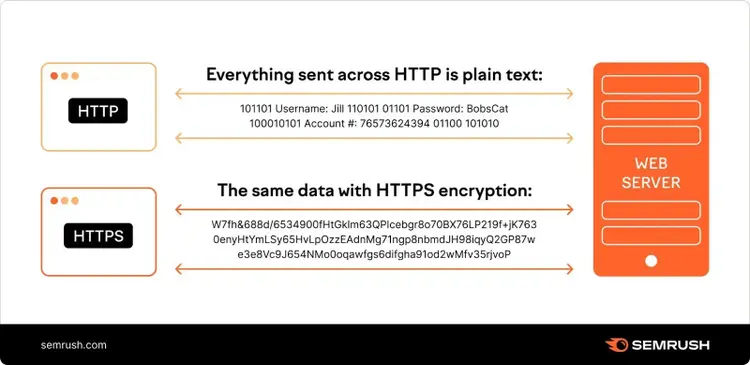
If your website uses HTTP Strict Transport Security (HSTS)—a security feature that instructs browsers to always use HTTPS instead of HTTP—users will always end up on the secure version of your site.
Chrome’s developer tools show this as a “307 internal redirect.”
How Do 307 Redirects Affect SEO?
A proper 307 redirect usually has minimal effects on your site’s SEO because it:
- Doesn’t pass link equity: Because 307 redirects are temporary, search engines expect the original URL to be accessible again in the future. As a result, link equity isn’t generally transferred.
- Doesn’t update the search results: Search engines will typically continue to index the original URL when they see a temporary redirect. And that means if the original page is ranking, it will continue to show in place of the temporary page.
That said, 307 redirects can cause confusion to search engines if used long term. Which could negatively impact your rankings.
When to Use a 307 Redirect and When to Avoid a 307 Redirect
Use a 307 redirect for:
- Temporary redirects that require maintaining the HTTP request method: Using a 307 redirect is essential when you need to make sure a POST request isn’t changed to a GET request
- Other temporary needs: If you’re updating pages on your site or running A/B tests (testing two variations to see which performs better), you can use 307 redirects. Though 302 redirects are more common for these scenarios.
Avoid 307 redirects for:
- Bulk redirects: If you’re implementing a lot of temporary redirects, using individual 307 redirects for each page can be inefficient and may slow down your site’s loading time. Instead, use wildcard or pattern-based redirects to redirect multiple URLs based on rules.
- Permanent URL changes: If you’ve permanently moved a page to a new URL, a 307 temporary redirect isn’t right. Instead, you should use a 301 permanent redirect to signal the change to search engines.
How to Set Up a 307 Redirect
The way you set up a 307 redirect depends on your website platform (e.g., WordPress, Joomla, or custom-built), your technical expertise, and your specific goals for the temporary redirect.
Here are four of the most common methods:
1. Edit the .htaccess File
The .htaccess file is a configuration file that instructs your server (assuming you use Apache) how to respond to various scenarios, including redirects.
You can implement a 307 redirect by modifying this file.
Log in to your website’s hosting account, go to your file manager, and then navigate to the root directory (your website’s main folder).
If Bluehost is your web hosting provider, your root directory may look something like this:
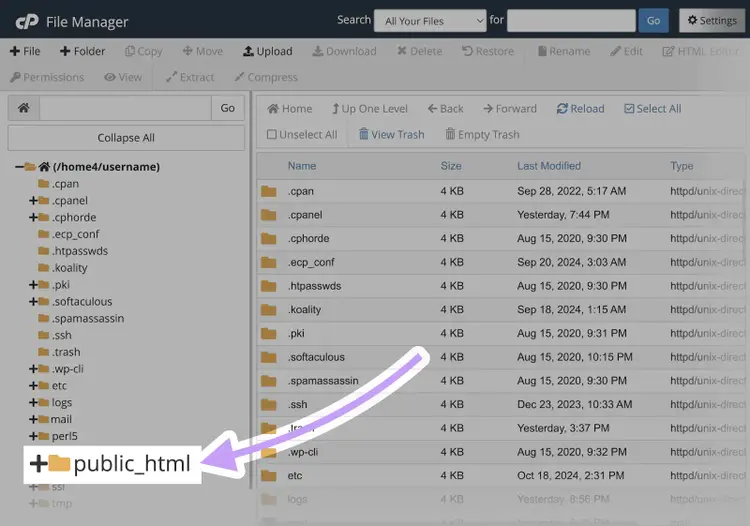
Locate the .htaccess file inside the root directory and select it to edit.
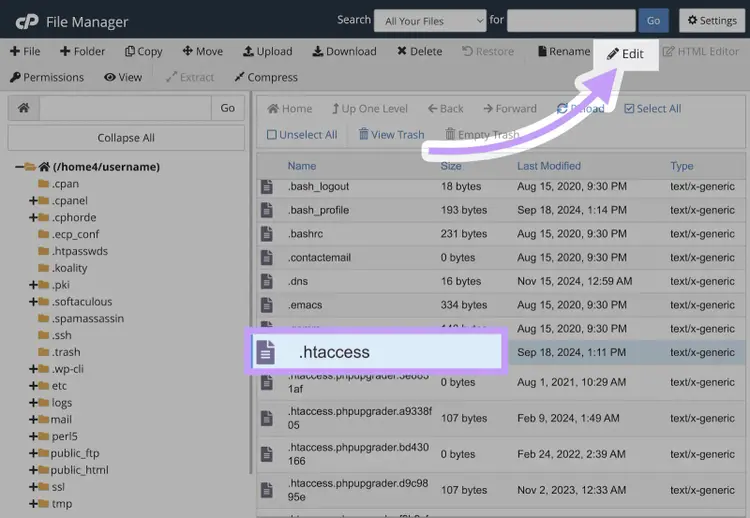
Now do the following:
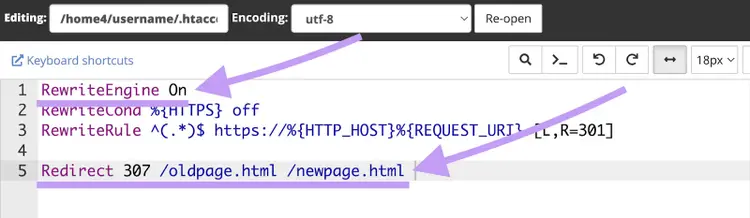
- Check for a line that says “RewriteEngine On” (see the screenshot below). If it’s not there, consider adding it (you don’t strictly need it for this example, but it’s necessary for adding rewrite rules)
- Add the following code at the end of the .htaccess file:
Redirect 307 /oldpage.html /newpage.html
Make sure to replace “/oldpage.html”with the relative URL of the page you’re redirecting from and“/newpage.html”with the destination page’s relative URL.
Save the file. And test to see if the redirect works.
2. Try PHP Redirection
Using PHP headers is another way to do a server-side redirect.
To set up a 307 redirect using PHP, use the “header()” function to send a location header to the browser and instruct it to redirect to a new URL.
Open the PHP file that corresponds to the page you want to redirect.
At the top, insert this before any other content:
<?phpheader("Location: /new-url/", true, 307);exit;?>
Replace “/new-url/” with your desired destination (it can be a relative URL as we’ve shown) and save the file. Test the redirect by accessing the original page.
3. Use Plugins
Using a plugin is an effective way to implement 307 redirects if you can’t—or don’t want to—access your server files.
Here’s how to do redirects on WordPress:
Download the Redirection plugin, upload it to your WordPress site, and activate it.
Then head to “Tools” > “Redirection” to open the plugin.
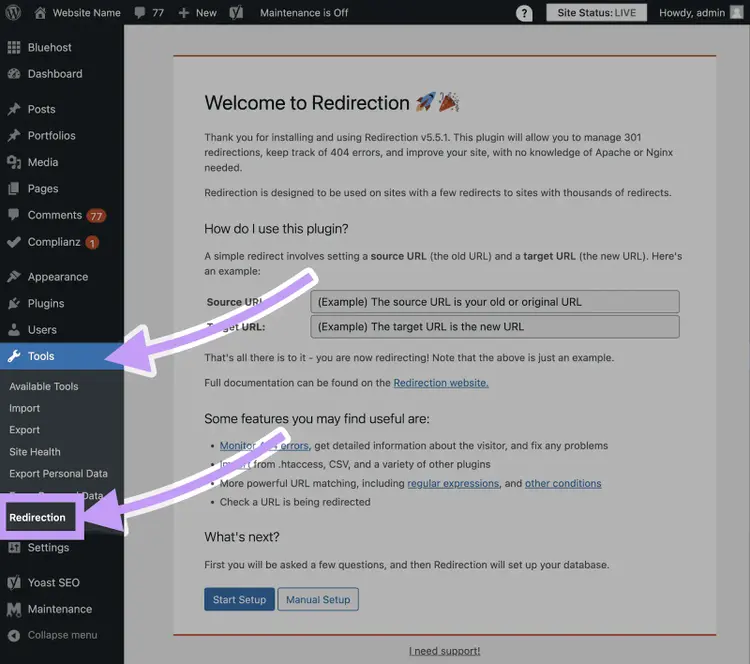
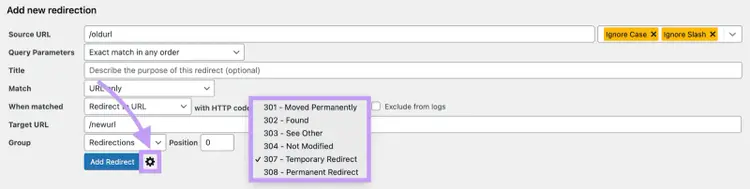
Now, enter your 307 redirect rules by clicking the gear icon to expand all input areas.
4. Use a JavaScript Redirect
Another option if you can’t modify your server files is to use JavaScript to add a client-side redirect.
But setting up redirects in JavaScript isn’t as SEO-friendly as server-side methods.
Why?
Because the redirects occur after the page starts loading, which can cause a delay. And not all search engines execute JavaScript or do so consistently.
Find the HTML file of the page you wish to redirect.
In the <head> section of your HTML file, insert the following script:
<script type="text/javascript">window.location.replace("/newpath/");</script>
Replace “/newpath/” with your desired destination’s relative URL.
Save your changes to the HTML file. Then test the redirect by accessing the original page.
Best Practices for 307 Redirects
There’s a lot to consider when handling 307 redirects. Follow these best practices to ensure optimal results:
- Test redirects regularly: Visit the old URL to confirm it redirects correctly to the updated page
- Monitor user behavior: Use analytics tools to track user interactions on redirected pages. Issues like increased bounce rates might indicate user dissatisfaction, prompting a need for better alternatives.
- Use redirects sparingly: Avoid too many 307 redirects—they can slow down your site
- Track redirects: Maintain a record of active redirects for easier troubleshooting and future reference
- Avoid redirect chains and loops: Redirect chains are when browsers initiate multiple redirects before getting to their final destination. And loops occur when two URLs redirect to each other. Both of these can slow the page’s loading time and create a poor user experience.
So, make sure you track any 307 redirects you implement. And remove them when you don’t need them any more.
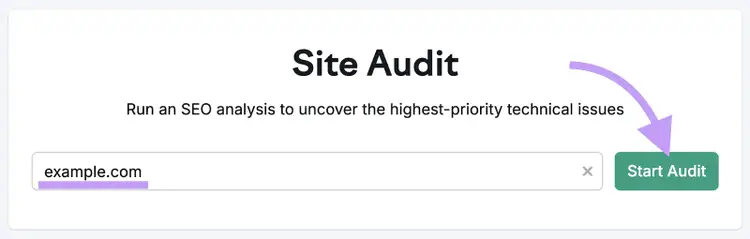
You can use Semrush’s Site Audit tool to monitor pages on your website with 307 redirects.
Open the tool, enter your domain, and click “Start Audit.”
Once the audit is complete, find the “Crawled Pages” module and click the number next to “Redirects.”
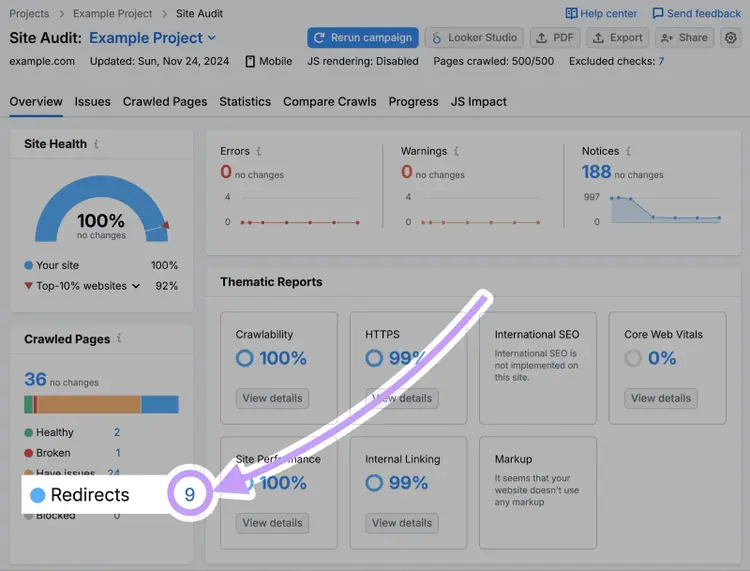
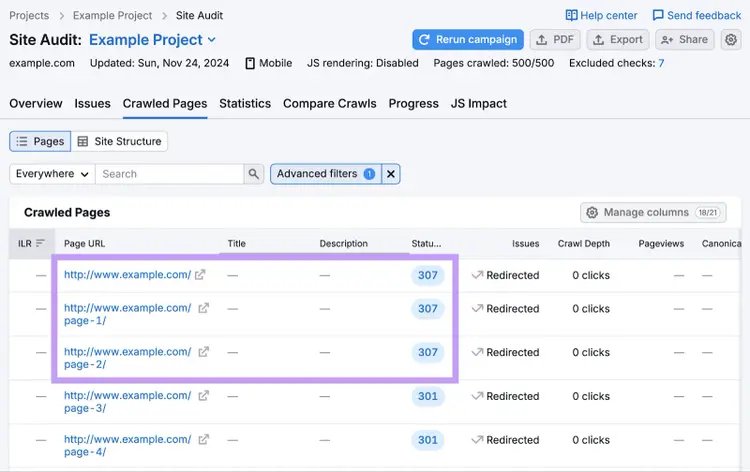
Review all the URLs with 307 status codes to see whether any are unintentional and need to be removed.
To specifically look for any redirect chains and loops, go to the “Issues” report, enter “redirect” in the search bar, and look for the “# redirect chains and loops issue.”
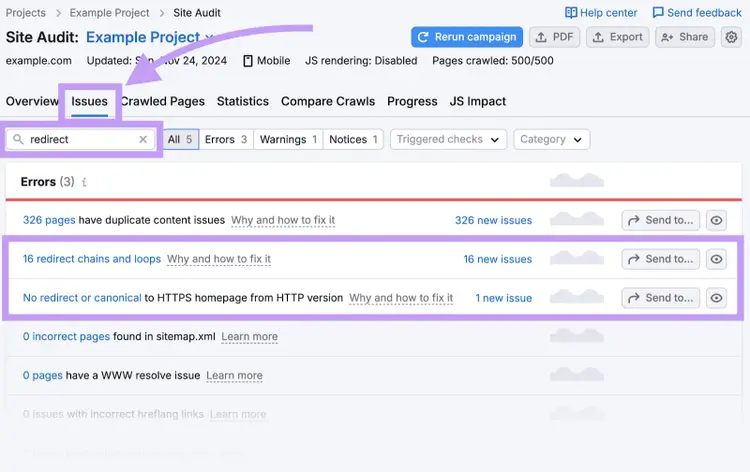
If you see this error, click it to review the affected pages. And then take steps to address the issues.
Find and Fix Website Issues
with the Site Audit Tool
How to Fix 307 Temporary Redirect Issues
You may face issues or misconfigurations after implementing 307 redirects. Here are some common solutions:
- If you discover problems by monitoring your server logs or through Site Audit, review the modifications you made for the affected pages and address any errors you see
- If your website has caching mechanisms in place, ensure that they’re not caching outdated redirects
- Check the documentation for your CMS or website platform regarding redirects if you use them to manage redirects. And look into whether there are known issues with certain plugins.
- If you’re facing complex redirect loops, chains, or other scenarios that you can’t resolve, seek help from a developer
Use 307 Redirects the Right Way
Now that you understand what a 307 redirect is, how to implement one, and how to fix related issues, it’s time to get to work.
Audit your website using Site Audit to get a full report on all your redirects to review.
Based on your assessment, make changes accordingly.
Find and Fix Website Issues
with the Site Audit Tool

Asif is a content marketing specialist with over eight years of experience. While working at agencies and startups, he has helped brands drive millions in sales through full-funnel inbound marketing campaigns.

Tells Google to show you more from Semrush in AI, Search, and Discover.