
AI is revolutionizing the way businesses optimize their operations — from speeding up software development to outsourcing repeatable tasks to AI agents.
You can also use AI to improve your content’s performance.
In this post, we’ll walk through six AI content optimization techniques. And we’ll share tips for optimizing your content specifically for AI search.
What is AI content optimization?
AI content optimization is the practice of using AI tools to improve content and enhance its performance.
For example, you might use AI tools like:
- ChatGPT to rewrite your content for readability
- Semrush’s AI Visibility Toolkit to research prompts your content should address
The performance gains you see from incorporating AI into your content processes could include getting more AI search citations, achieving higher traditional search rankings, and improving your user experience metrics.
What are the benefits of AI content optimization?
The benefits of AI content optimization include:
- Improved content performance: By processing massive amounts of data at scale, AI tools may spot content optimization opportunities that you might’ve missed but can now act on
- Manual work reduction: AI tools streamline the optimization process by automating time-consuming tasks like keyword research and content analysis
- Faster idea generation and content editing: AI content solutions can identify relevant topics, grammatical errors, and stylistic inconsistencies much quicker than humans
- Scalability: AI content optimization tools help you expand content operations without incurring significantly more costs
6 ways to use AI for content optimization (+ AI optimization tools)
Let’s explore six ways to use AI for content optimization, plus relevant AI optimization tools.
1. Find on-page SEO opportunities
Finding on-page SEO opportunities to improve your pages’ structure and content makes your pages more likely to appear in traditional and AI search results.
You can use AI tools to identify on-page SEO opportunities like:
- Addressing content gaps
- Creating cleaner URL structures
- Optimizing for search engine results page (SERP) features — special results like featured snippets that may appear in SERPs
ChatGPT is especially useful for discovering and plugging content gaps when you use a prompt like this:
“Here’s the URL to my blog post on [topic]: [your URL]. My competitors have published blog posts on the same topic: [competing URL 1], [competing URL 2], [competing URL 3]. Perform a content gap analysis between my site URL and my competitors’.”
Here’s an example of what ChatGPT’s response might look like:
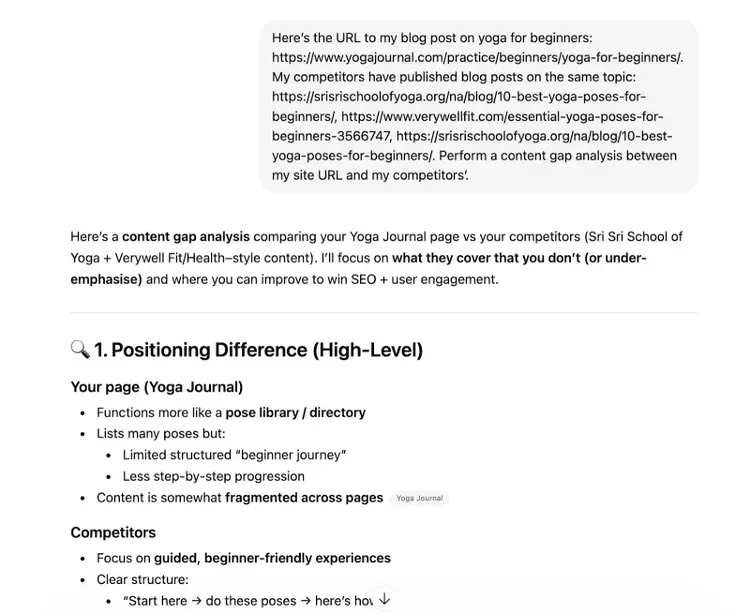
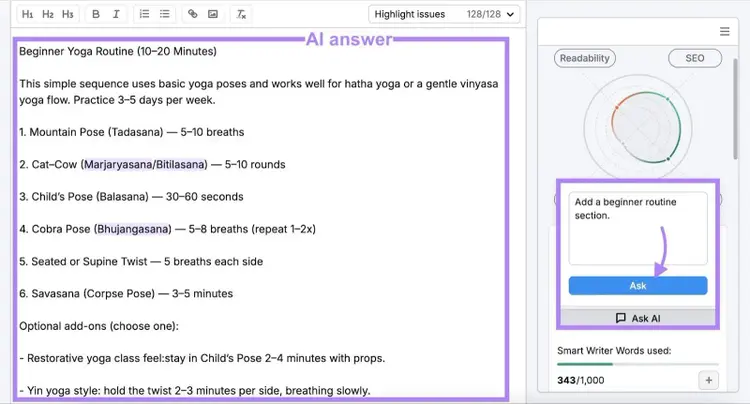
You can then use ChatGPT or Semrush’s SEO Writing Assistant to generate new sections that fill the gaps.
Just tell the tool the type of content you’d like to add. Here’s how this looks in SEO Writing Assistant:
2. Optimize title tags and meta descriptions
Optimizing your title tags and meta descriptions is a good way to improve click-through rates in AI and traditional search results.
Title tags and meta descriptions are HTML elements that define page titles and summaries, respectively. AI tools and traditional search engines can use or reference both HTML elements to generate search results snippets:
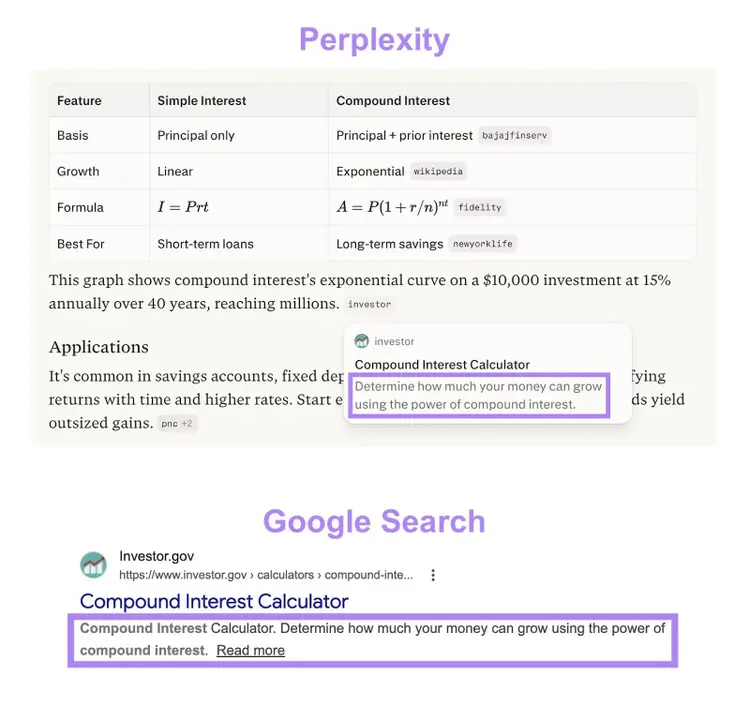
Which means your title tags and meta descriptions need to:
- Entice readers to click
- Incorporate your target query
- Be short to avoid truncation (i.e., fewer than 60 characters for title tags and 105 characters for meta descriptions)
Here’s a prompt you can enter into ChatGPT to generate optimized title tags and meta descriptions:
"Generate title tags and meta descriptions for this article. The title tags and meta descriptions should entice readers to click and must include the ‘[keyword]’ keyword. The title tags should not exceed 60 characters, and the meta descriptions should not exceed 105 characters. Article: [text]"
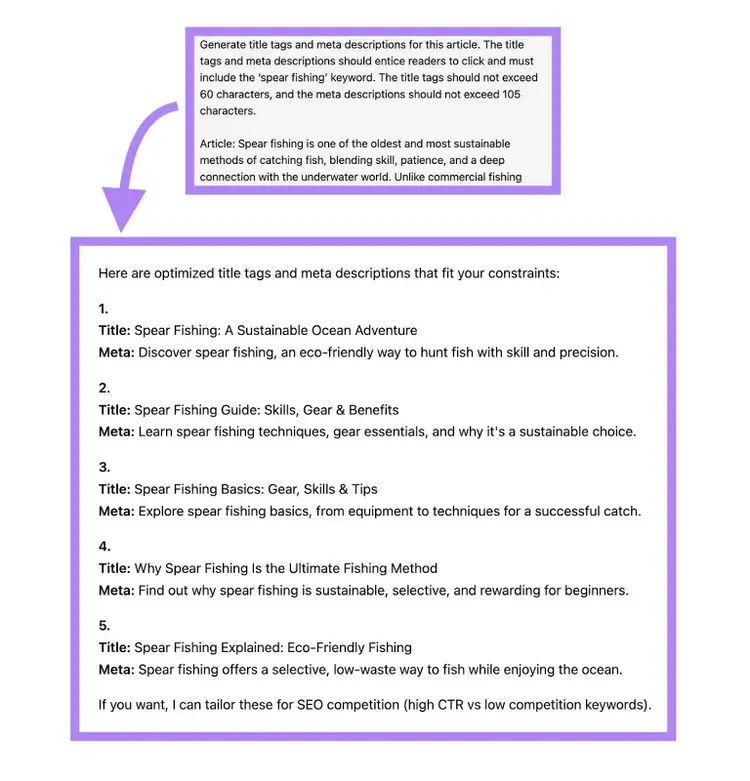
Alternatively, use the Content Toolkit’s AI Article Generator to create title tags and meta descriptions for articles you generate with it. Enter your article idea into the tool, adjust the settings, and click “Generate article.”
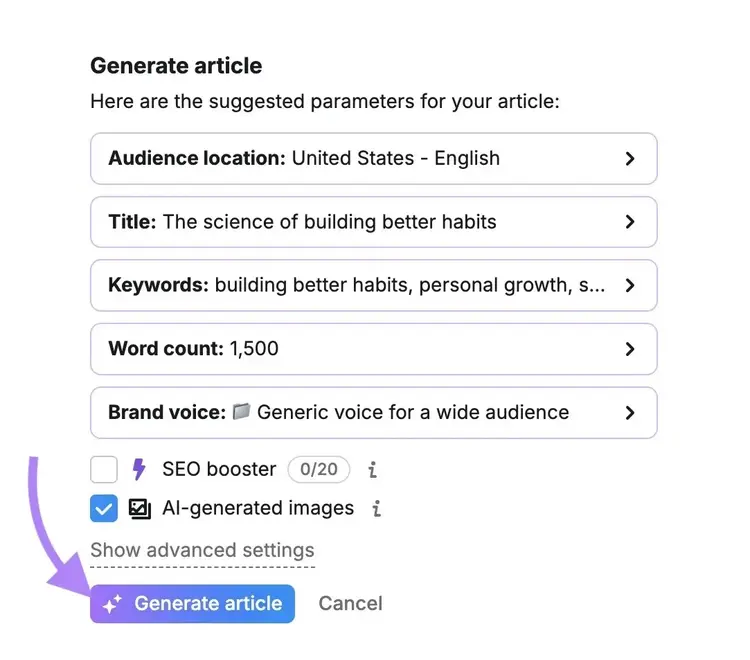
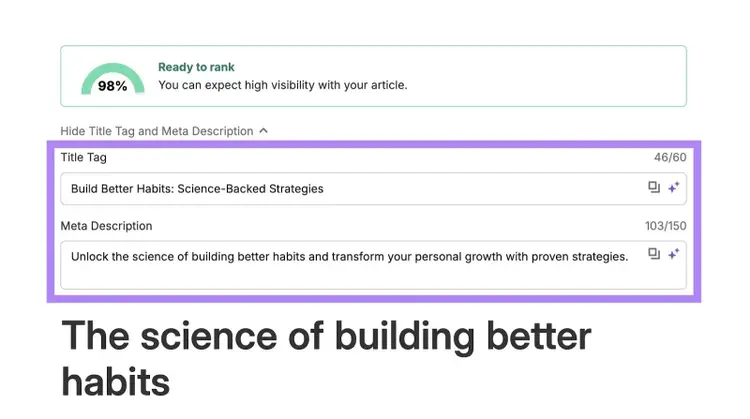
AI Article Generator will produce a search-friendly article that includes the title tag and meta description at the top. If you’re dissatisfied with either of these, you can regenerate them with AI or tweak them manually.
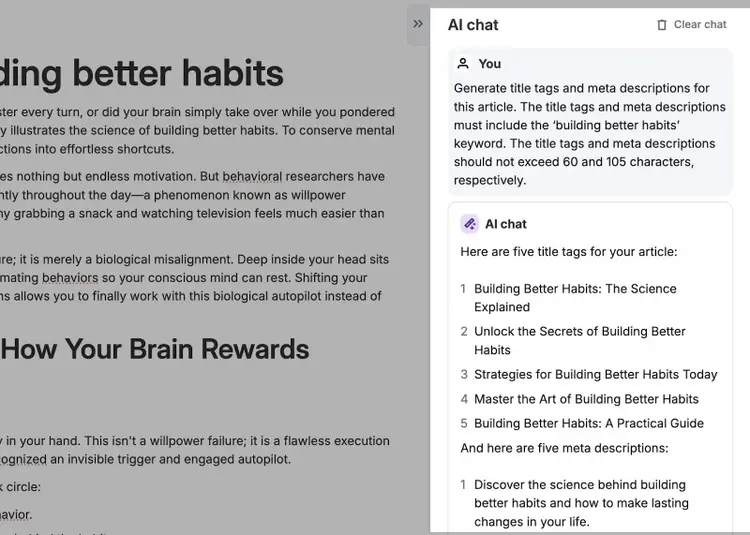
If you need optimized title tags and meta descriptions for existing drafts, use the Content Toolkit’s AI Search Optimizer.
Enter a prompt like this into AI Search Optimizer:
"Generate title tags and meta descriptions for this article. The title tags and meta descriptions must include the ‘[keyword]’ keyword. The title tags and meta descriptions should not exceed 60 and 105 characters, respectively."
3. Identify related queries and keyword clusters
Identify related queries that you can group into keyword clusters and then target within the same page to improve visibility for a wider range of searches.
Keyword clusters are groups of keywords comprising a primary keyword and related queries that complement the primary keyword.
AI makes finding related queries and creating keyword clusters easy. Here’s how:
Find related queries
Find related queries with ChatGPT by entering a prompt like this:
“Generate 30 related search queries for ‘[primary topic]’.”
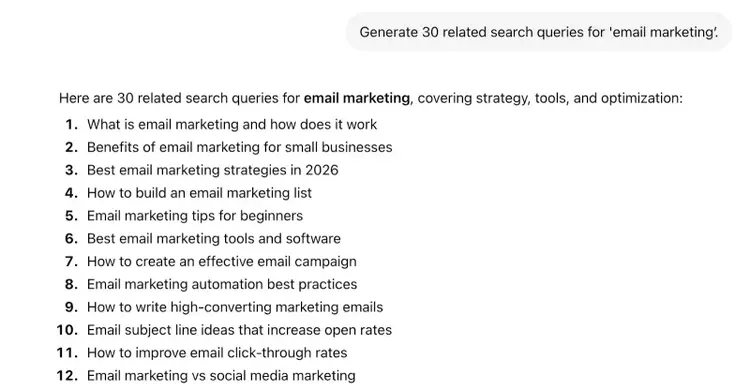
ChatGPT works well for brainstorming potential queries. To uncover people’s actual AI tool prompts, use the Prompt Research tool in Semrush’s AI Visibility Toolkit.
Prompt Research analyzes your primary topic to list user prompts about related topics. And you can customize the AI tools you want data for.
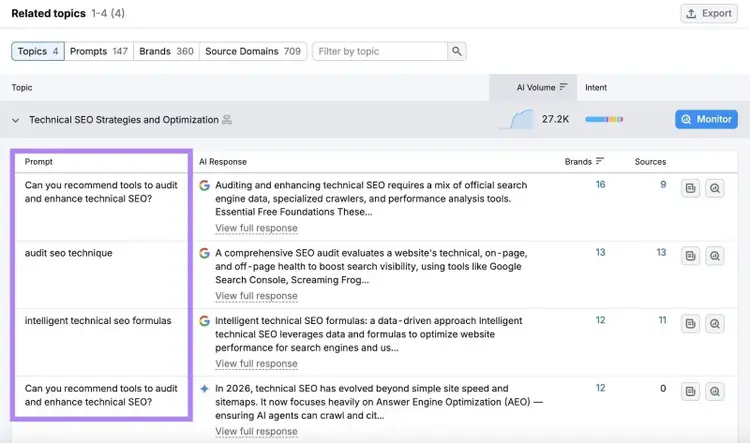
You can also supplement the related queries you find in Prompt Research with recommended keywords from our keyword generator.
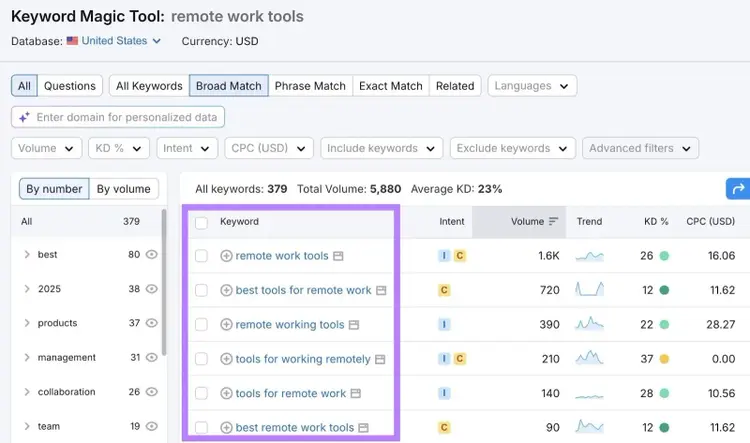
Create keyword clusters
Create keyword clusters by providing ChatGPT with your primary topic and related queries using a prompt like this:
“My primary topic is ‘[primary topic]’ and my related queries are ‘[related queries]’. Group the related queries into logical keyword clusters based on topic similarity and search intent.”
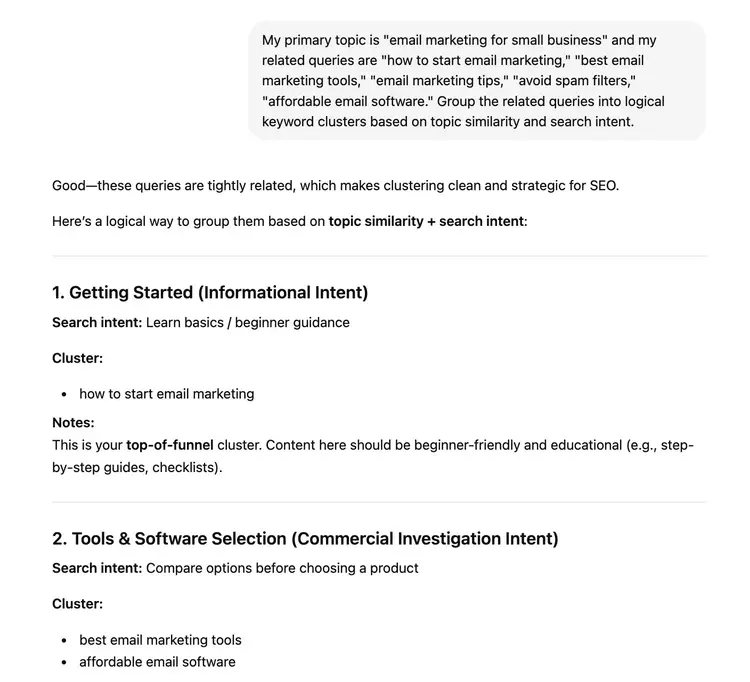
You can also use a dedicated keyword clustering tool like Semrush’s Keyword Strategy Builder. Add your related queries to a list in the tool and click “Cluster this list.”
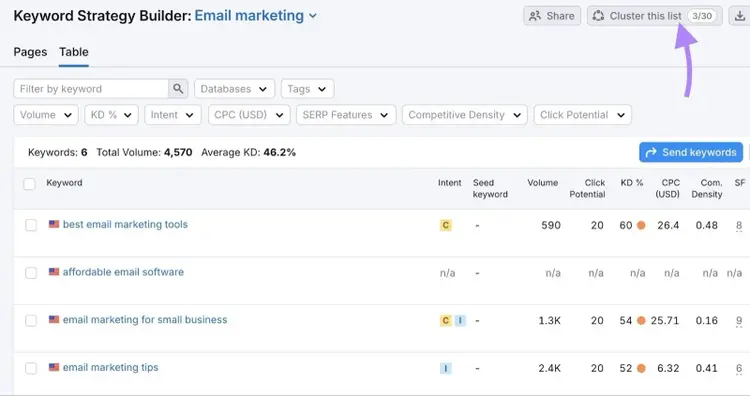
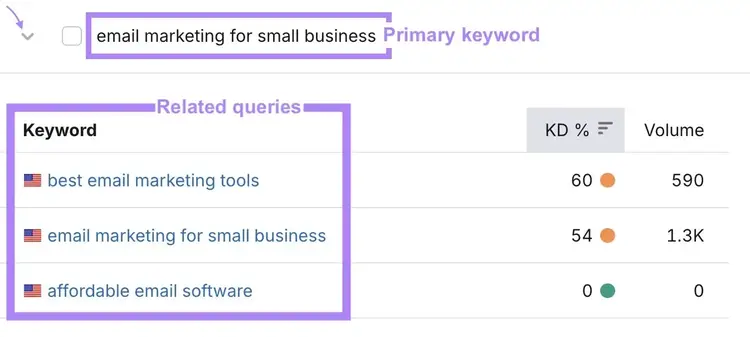
The Keyword Strategy Builder will cluster closely related queries that you can use on the same page. In this example, it generated three clusters.
Click any cluster in the Keyword Strategy Builder to view its related queries.
4. Find internal linking opportunities
AI tools are useful for finding opportunities to add internal links between your site’s pages, which distributes page authority and helps people and search systems discover your content.
You can use ChatGPT to find internal linking opportunities by providing a list of your site’s key pages and asking for link suggestions. The more pages you list, the more links ChatGPT can suggest.
Here’s an example prompt:
"Here are three key articles on my fitness website: ‘[article title 1],’ ‘[article title 2],’ and ‘[article title 3].’ Please suggest how I might link these articles internally."
And here’s the type of response you can expect:
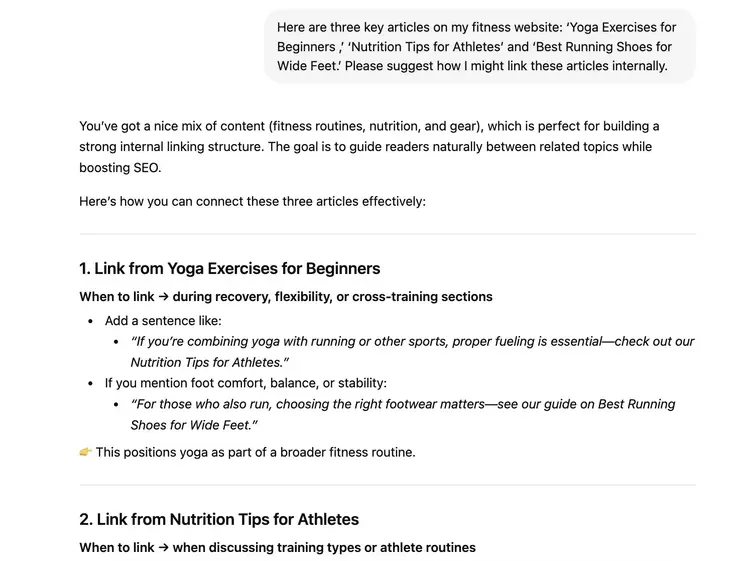
Review the tool’s internal link suggestions, and then work on those you agree with.
5. Analyze search intent
Analyze your target keyword’s or prompt’s search intent — what people are trying to achieve with their search — so you can create content that addresses it.
You can analyze search intent with ChatGPT. Open the tool, enable its web search feature, and then give it a prompt like this:
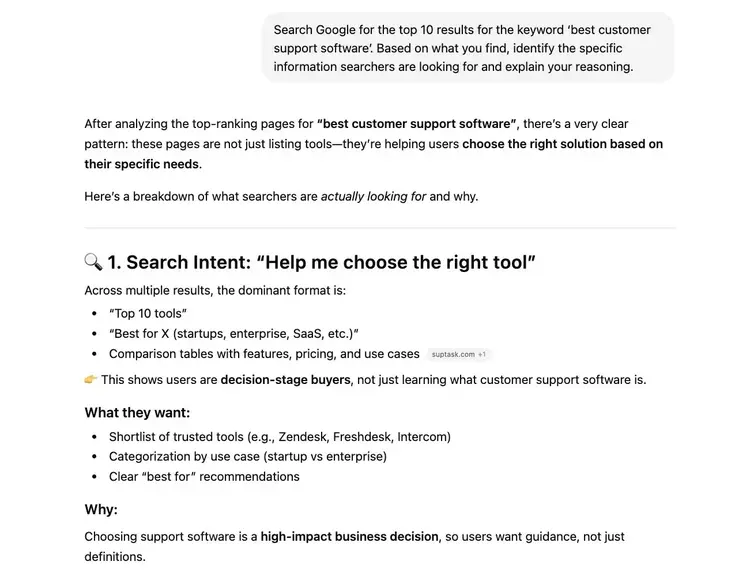
“Search Google for the top 10 results for the keyword ‘[keyword].’ Based on what you find, identify the specific information searchers are looking for and explain your reasoning.”
ChatGPT may then provide a response like this:
6. Enhance your writing’s readability
Having an AI tool suggest ways of improving your writing’s readability can make your content easier for people and search systems to understand.
ChatGPT can help review your writing with a prompt like this:
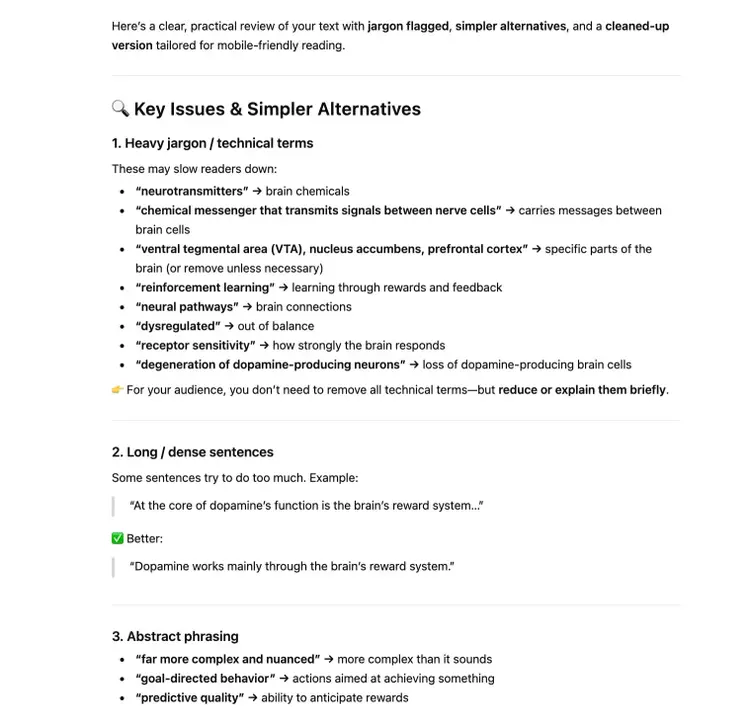
“Please review this text for any jargon or complex sentences that my target audience might struggle to understand. Suggest simpler alternatives to improve clarity and readability. My target audience is [describe your target audience here]. Text: [full text].”
Common AI content optimization mistakes to avoid
Common AI content optimization mistakes to avoid include:
- Failing to fact-check AI outputs: AI tools are prone to hallucinations, which means they may provide misleading or nonsensical responses. Double-check the accuracy of AI-generated content before using it.
- Using generic AI content as is: Generic content won’t stand out from the competition. Enhance AI content with unique insights and data you’ve gained from real-world experience.
- Not tailoring AI content to your audience: AI-generated content may not resonate with your audience if it isn’t created with their characteristics in mind. Provide AI tools with details on your target audience so they can adapt their output to match.
- Not providing AI tools with tone of voice and style guides: Without guidance, AI tools may generate content in a tone and style incompatible with your brand’s. Give these tools tone and style requirements to follow when generating content.
- Keeping verbose AI content: AI-generated content may contain bloated explanations. Shorten these to make your writing more relevant and engaging.
- Acting on every AI recommendation: Doing this may lead to over-optimized content. For example, adding all AI-recommended internal links without context can make your content look spammy. Follow AI recommendations only if they make sense.
How to optimize content for AI search
To optimize content for AI search, take steps like:
- Making your content easy to parse by using short paragraphs and incorporating heading and list formatting where appropriate
- Answering questions in headings directly to help AI tools match your answers to these questions
- Restating the subjects of sentences, which improves clarity compared to using pronouns like “it” and “they”
- Adding authoritative references and data to strengthen arguments
- Updating your content regularly because research shows that AI tools favor recent content
- Adding structured summaries at the top of the page, like comparison tables or TL;DR sections, so AI tools can easily extract and cite the key information
FAQs
How can AI help identify content gaps for optimization?
AI tools can compare your content against competing pages and surface subtopics, questions, or angles you haven't covered.
The fastest way to do this is with ChatGPT. Share your URL alongside two or three competing URLs and ask it to perform a content gap analysis. You'll get a list of missing subtopics, unanswered questions, and sections worth adding.
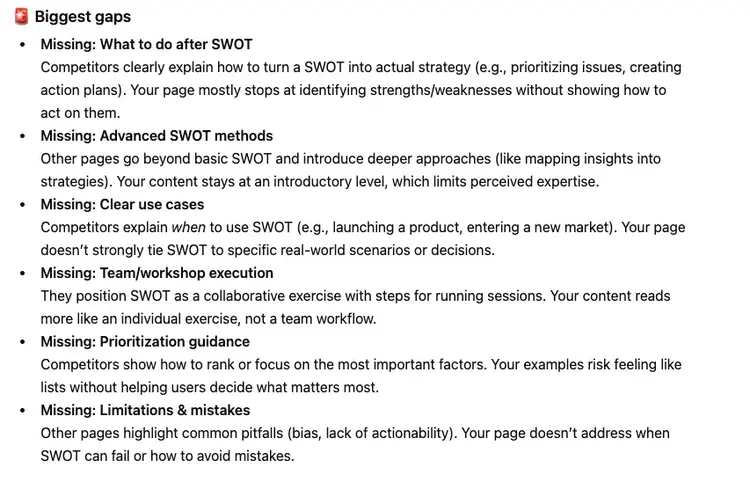
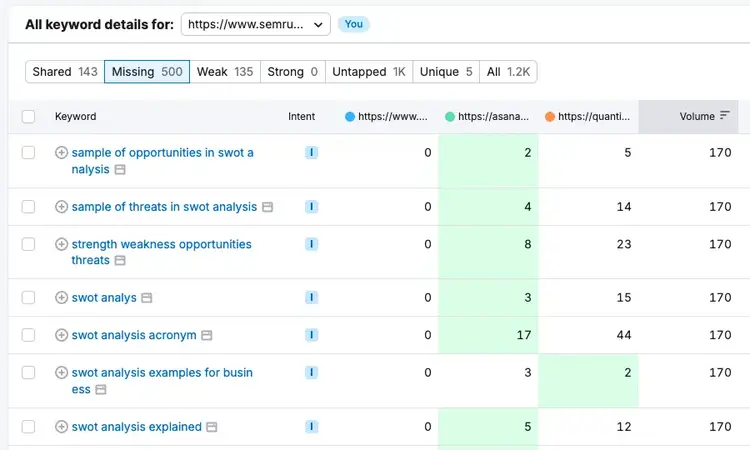
Additionally, you can use Semrush's Keyword Gap tool to find keywords your competitors rank for that you don't. This is the sort of data that AI tools don’t have access to. Once you find the missing keywords, use them in your content to start showing up for the query your competitors do.
Which AI content optimization tools are most effective for improving SEO performance?
Keyword Magic Tool, Keyword Strategy Builder, ChatGPT, AI Article Generator, and SEO Writing Assistant are some content tools that are most effective for improving SEO performance.
SEO performance improves when you use the right tool for each part of the content workflow:
- For keyword research and clustering: Keyword Magic Tool and Keyword Strategy Builder help you find and group related queries to target on the same page
- For drafting and editing: ChatGPT and Semrush's AI Article Generator help you produce search-friendly drafts quickly
- For on-page optimization: SEO Writing Assistant scores your content against your target keyword and flags readability, tone, and SEO issues in real time
How do Google's helpful content guidelines apply to AI-generated content?
Google's guidelines focus on whether content is helpful to people, not on how it was produced. AI-generated content can rank well as long as it meets the same standards as high quality, human-written content. It has to be accurate, original, and useful.
Where AI content tends to run into trouble is when it's published as is. Generic AI output often lacks quality.
How do I optimize content for Google AI Overviews and AI summaries?
Google AI Overviews pull from pages that already perform well in traditional search, so strong SEO fundamentals are still a requirement. Your content has to be accessible, easy to parse, and genuinely useful.
To that end, here are some things you can do:
- Check your robots.txt file is configured properly. Check your robots.txt file to make sure Google-Extended and GoogleBot (Google’s web crawlers) aren't blocked. If they are, your content has no chance of being referenced in AI summaries
- Structure your content for AI extraction. Use clear H2s and H3s that break up your content into focused sections. In each section, lead with the answer, takeaway, or main point before getting into the supporting details. And keep paragraphs short and to the point.
- Cover the full topic, not just the keyword. AI Overviews stitch together answers from multiple pages, so the more completely you address related sub-questions on one page, the more likely you are to be the source it pulls from
- Build topical authority. Google tends to pull content from sites that have demonstrated depth on a subject across multiple pieces of content
- Keep information fresh. AI Overviews lean toward recently updated pages, especially for anything time-sensitive
Start your AI content optimization journey
Start your AI content optimization journey with AI tools that can help you improve your content with less effort.
A Semrush One subscription offers access to many of these tools, including the AI Visibility Toolkit, SEO Writing Assistant, and Keyword Magic Tool.
Try Semrush One for free today.
Enhance Your Content with AI
with Semrush One

Carlos Silva leads the editorial pipeline for the English blog—coordinating writers, editors, strategy, and building AI workflows that boost content quality and AI visibility. With 10+ years of experience writing and editing across in-house and agency roles, Carlos blends content strategy, SEO, and AI to help marketers stay ahead of an evolving search landscape.
Carlos Silva
Carlos Silva leads the editorial pipeline for the English blog and builds AI workflows that boost content quality and AI visibility. 10+ years writing and editing across in-house and agency roles.

Tells Google to show you more from Semrush in AI, Search, and Discover.