
On-page SEO remains as relevant as ever for ensuring your target audience sees your content—regardless of whether users search with traditional search engines like Google or AI tools like ChatGPT.
This on-page SEO guide will detail exactly what on-page SEO is, why it matters, and the techniques you can use to optimize your content. Let’s begin.
What Is On-Page SEO?
On-page SEO is the process of improving the structure and content—like text, images, and videos—of webpages to increase their likelihood of showing in traditional and AI search results.
Examples of on-page SEO tasks include strategically placing target keywords in content and writing accurate title tags.
Why Is On-Page SEO Important?
On-page SEO is important because it helps traditional and AI search engines understand your pages and match them to relevant queries, which can improve visibility and drive relevant traffic.
Case in point: We optimized our article on backlinks by adding helpful content about backlinks’ relevance to AI search and saw performance improve as a result.
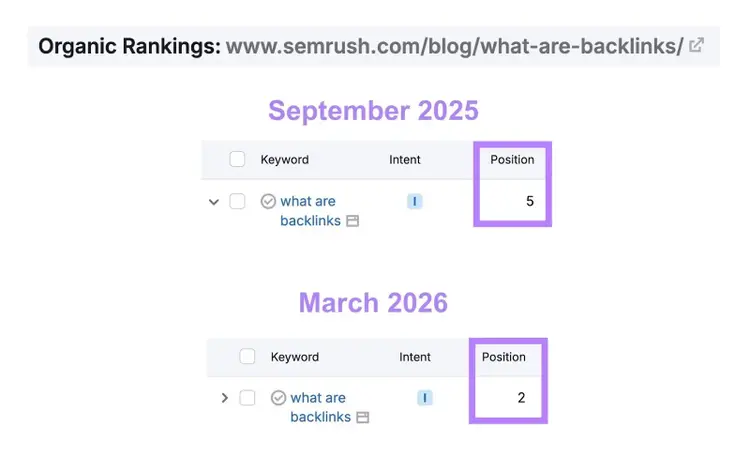
Before optimization in September 2025, our backlinks article ranked in position 5 on Google for the term “what are backlinks,” according to the Organic Rankings tool. We published our updated article in February 2026, and the article has since moved to position 2.
It’s also worth pointing out that our backlinks article appears in dozens of AI Overviews.
On-Page SEO vs. Off-Page SEO
On-page SEO involves performing tasks on webpages (i.e., internally) to improve a site’s search visibility, while off-page SEO involves performing tasks outside of a site (i.e., externally) to achieve the same objective.
For example, writing unique, helpful content is an on-page SEO technique. Getting backlinks to that content is an off-page SEO technique.
Here are examples of on-page SEO vs. off-page SEO techniques:
You have full control over the execution of on-page SEO tasks on your site. Which makes on-page SEO a good starting point for your SEO strategy.
How to Do On-Page SEO for Your Site: 11-Item Checklist
Do on-page SEO for your site with this 11-item on-page SEO checklist:
1. Place Target Keywords & Prompts Strategically
Place target keywords and prompts strategically in your content to signal relevance to traditional search engines, AI search engines, and users.
Content that conveys relevance through keywords and prompts is more likely to appear in search results and get clicks.
After doing keyword research (and prompt research) to identify your target terms, incorporate them in page locations like these:
- H1 heading
- First paragraph
- Subheadings
- URL slug
- Image alternative (alt) text
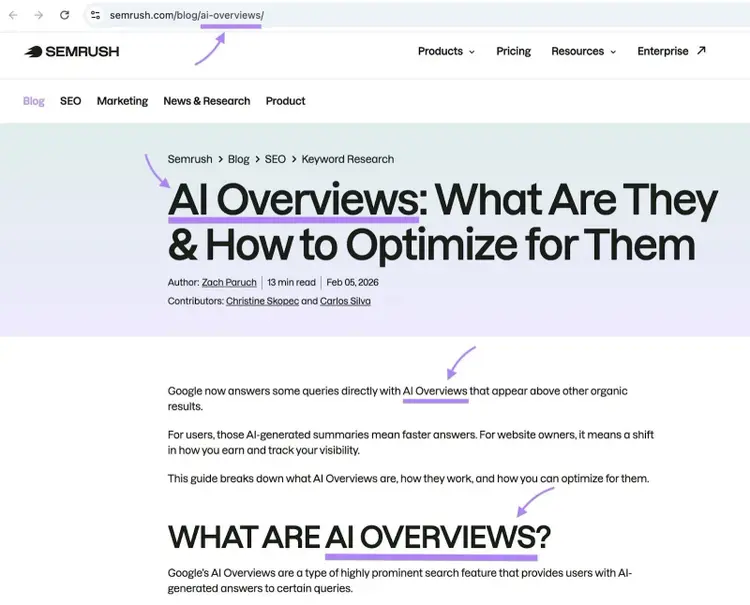
This Semrush blog post demonstrates strategic keyword placement, with the “ai overviews” target keyword being included in the post’s URL slug, H1 heading, first paragraph, and H2 subheading, among other places.
When incorporating keywords, ensure they read as a natural part of the discussion. Don’t stuff keywords into every sentence or even every paragraph.
Analyze your keyword and prompt use with the On Page SEO Checker. To check whether you’ve added your terms in the right areas.
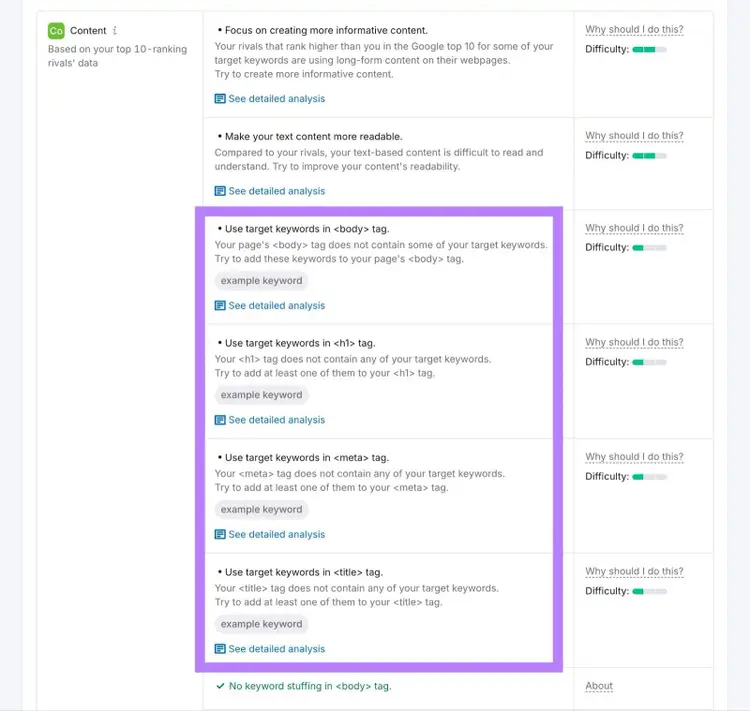
On Page SEO Checker also suggests semantically related keywords you can include in your content to strengthen topical relevance.
2. Write Accurate Title Tags
Write title tags that accurately describe your pages to help traditional and AI search engines match your content to relevant searches.
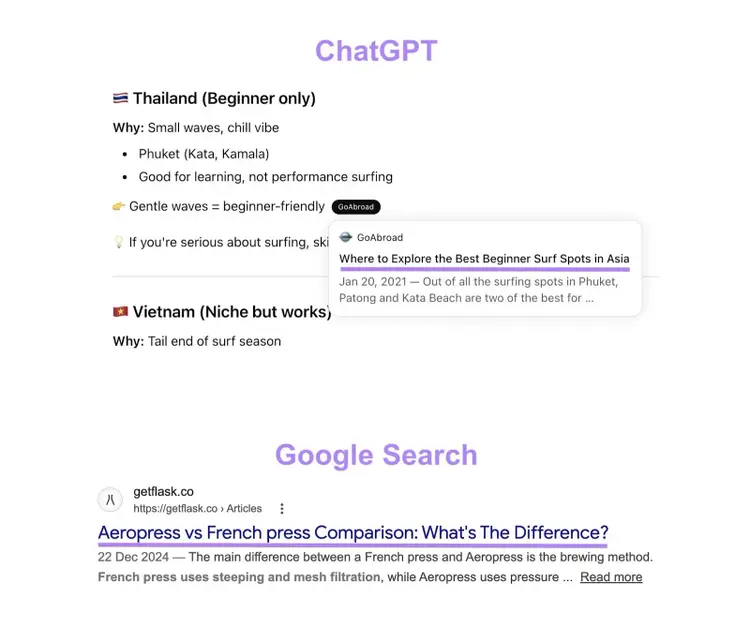
A title tag is the HTML title that shows in browser tabs and that can appear in AI and traditional search results.
Accurate title tags that show in search results help users decide if your pages meet their needs. If so, they’ll be more likely to click through to visit your pages.
Follow these best practices when writing title tags:
- Keep your titles between 50 and 60 characters to avoid truncation
- Include your target keyword to clearly indicate what the page is about
- Make your title tags the same as or similar to the H1 titles to provide a consistent experience
- Use unique titles for all pages to help search engines and users differentiate your pages’ topics
- Write compelling titles in ways like including “best” or other attention-grabbing words
3. Optimize Your URL Slugs
Optimize your URL slugs to be short, descriptive, and keyword-rich, so search systems and users can understand your pages’ relevance.
A URL slug is the last part of the page’s URL that identifies the page. For example, the URL slug of the “https://www.semrush.com/blog/on-page-seo” blog post is “on-page-seo.”
Optimize your URL slugs with these tips:
- Include your target keyword: This signals relevance to the main query
- Keep your URL slugs short: Aim for three to five words when possible
- Make your URL slugs readable: Use words that represent your page’s content. Avoid random numbers, publish dates, and unnecessary text.
- Use hyphens to separate words: Use “email-marketing-guide” and not “emailmarketingguide” or “email_marketing_guide”
- Avoid unnecessary parameters after the URL slug: Remove UTM parameters, session IDs, tracking codes, and date stamps unless they’re required for functionality
An optimized URL slug could look like this:
https://www.brandonsbaseballcards.com/blog/rarest-baseball-cards
4. Write Accurate Meta Descriptions
Writing accurate meta descriptions that users find interesting can help persuade users to click your page over others.
A meta description is an HTML element that provides a brief page summary. AI and traditional search engines may use or reference meta descriptions to generate snippets that show in search results:
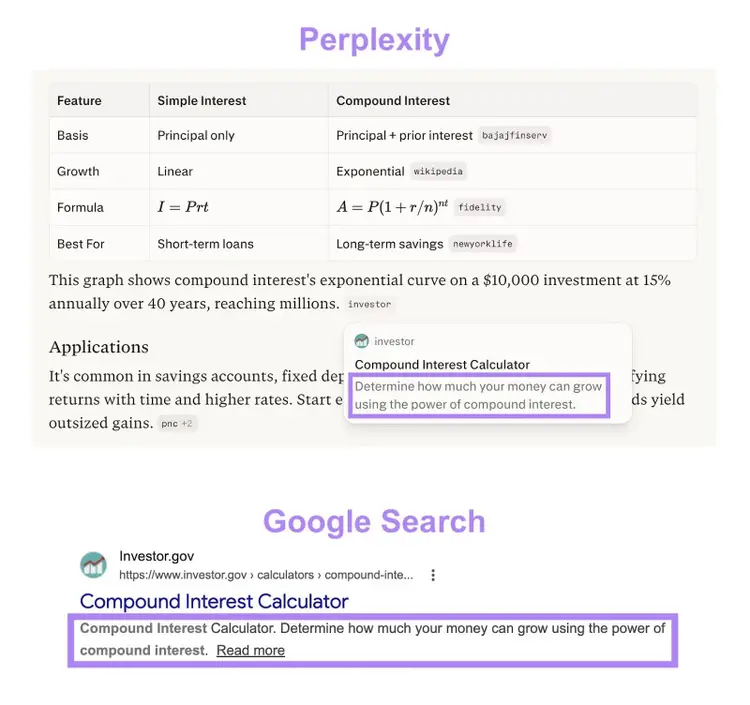
Improve your meta descriptions with these best practices:
- Keep your meta descriptions concise: Aim to keep your meta descriptions to around 105 characters to avoid truncation—especially if AI and traditional search engines use your meta descriptions as snippets in full
- Include your target keyword: Doing this can help AI and traditional search engines surface your pages for relevant queries. And help users see that your page matches their search intent—meaning, the purpose for their search.
- Make your meta descriptions enticing: Use active voice, which is more direct and saves space. And include phrases like “try for free” or “learn more,” which can increase clicks from users.
Here’s an example of a good meta description for a blog post targeting the “best running shoes for beginners” keyword:
"Our testers picked the 9 best running shoes for beginners. Compare specs to find your perfect shoe today."
5. Structure Your Content with Headings
Structure your pages with headings like H1, H2, H3, etc., to organize your page content into scannable sections that help users, traditional search engines, and AI search engines understand your page structure and content.
Having headings improves your pages’ chances of appearing in organic search results and getting cited in AI-generated responses. Headings also provide visual hierarchy that makes your pages easier for users to read—especially if your headings have different font sizes and colors.
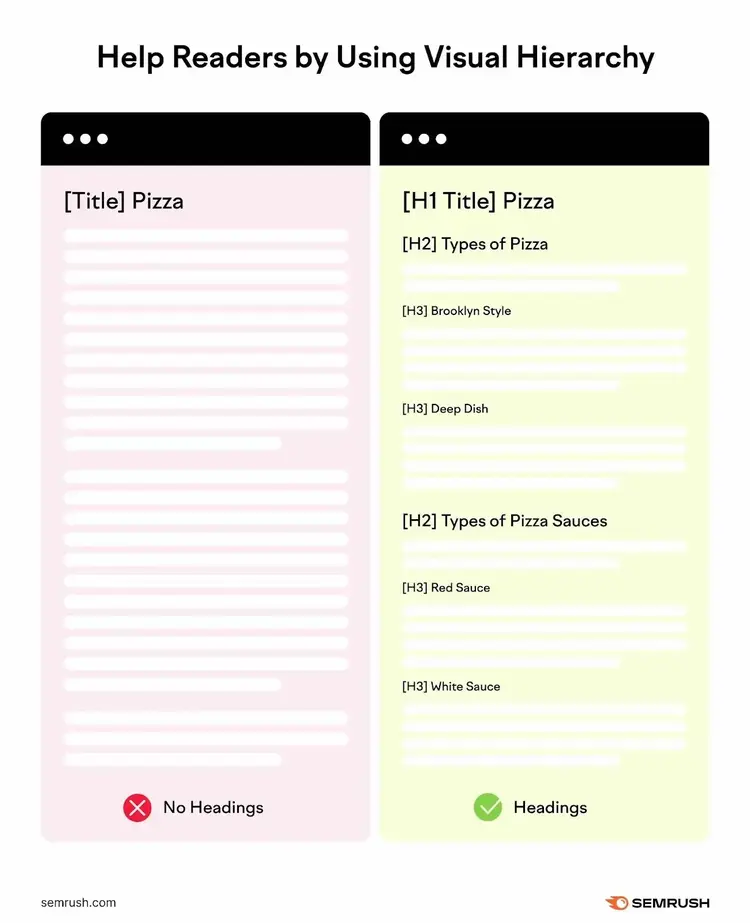
Here’s how to properly use headings:
- Use an H1 for the title visible on the page
- Use H2s for the main topics
- Use H3s nested under H2s to discuss subtopics within main topics
- Use deeper subheadings nested under H3s and beyond for even more specific subtopics
Write headings—and the content that follows them—in these ways to help AI and traditional search engines extract clear answers from your pages:
- Include target keywords in your headings naturally: These include secondary keywords where possible
- Make your headings descriptive: "Getting Started" is vague. In contrast, "How to Start Researching Keywords" provides more context.
- Answer the heading immediately in the first sentence: For example, the first sentence below the heading “What Does SEO Stand for?” could be “SEO stands for ‘search engine optimization.’”
- Make each section self-contained: AI extracts individual sections, so ensure each section and paragraph makes sense when read on its own
6. Create Unique, Helpful Content
Create unique, helpful content that matches search intent, covers topics comprehensively, and demonstrates expertise to increase the likelihood of AI and traditional search engines showing your content.
To produce high-quality content optimized for AI search engines, take steps like:
- Researching users’ needs to ensure your content addresses them completely
- Interviewing in-house and third-party experts to include unique insights, data, or examples competitors lack
- Writing content to answer users’ queries directly by stating the main points upfront before expanding to provide more context
- Creating accompanying images and videos that help clarify complex concepts
- Including answers for even more specific queries that match how users interact with AI search engines. Creating groups of related keywords is a great first step, but consider using a tool like Semrush’s Prompt Research to find more variations.
- Avoiding vague pronouns by restating subjects clearly. For example, saying "keyword difficulty" instead of "it" reduces ambiguity.
And review and update your content regularly after publishing. Research shows that AI search engines prefer to surface pages that contain the latest information.
7. Add Strategic Internal Links
Add internal links that connect to other pages on your site to help users and search systems discover your content.
On-page SEO best practices for adding internal links include:
- Linking to pages that are about related topics and likely to benefit readers
- Linking from new content to relevant existing content to help users and AI and traditional search engines discover the existing content if they haven’t already
- Linking from high-authority pages that already show in search and attract backlinks to boost the ranking potential of the pages being linked to
- Avoiding over-linking because too many internal links can seem spammy
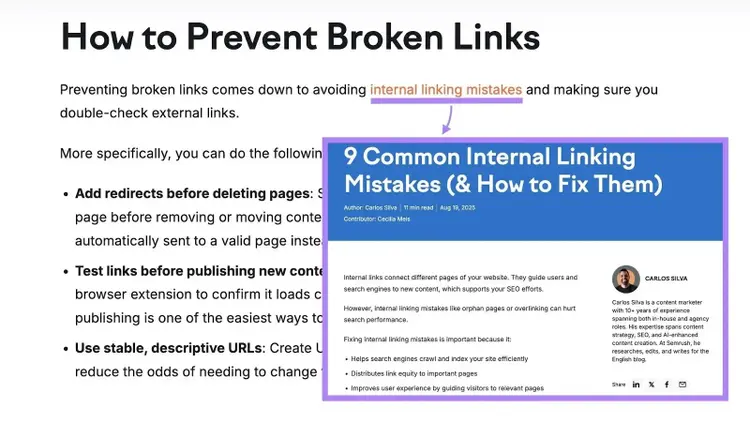
- Using descriptive anchor text (the text the link is placed on) to communicate what the linked page is about. For example, we’ve used the anchor text “internal linking mistakes” to link to a blog post that covers internal linking mistakes in detail.
8. Add External Links to Credible Sources
Adding external links to credible sources that support your claims directs readers to related resources they may find helpful and builds trust.
Linking to authoritative sources is also a proven tactic for boosting AI search visibility, as researchers have found.
Follow these external linking tips:
- Link only to relevant, high-quality sources
- Use descriptive anchor text that reads naturally, so users know what to expect when they click the link
- Balance link placement and quantity to avoid looking spammy
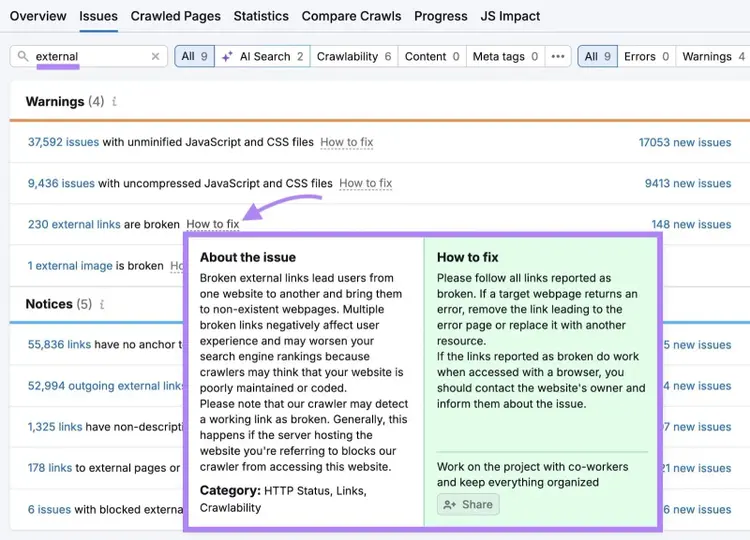
Use a tool like Semrush’s Site Audit to find opportunities for improving external linking.
After setting up your site as a project in Site Audit, you can filter for external link issues on the site. And click “How to fix” to get recommendations for fixing these issues.
9. Write Descriptive Image File Names and Alt Text
Write descriptive image file names and alt text to increase the likelihood of your pages appearing in image search results.
Alt text is an HTML element that describes a page’s image when the image can't be displayed or when users rely on assistive technologies to navigate the page.
An image’s file name should describe the image’s subject in general, while the alt text may provide more details.
The Pinch of Yum blog provides a good example. The file name of this image of meatball ingredients is “Ingredients-for-Swedish-Meatballs.jpg.” And the image’s alt text is “Ingredients for meatballs in a bowl before mixing.”
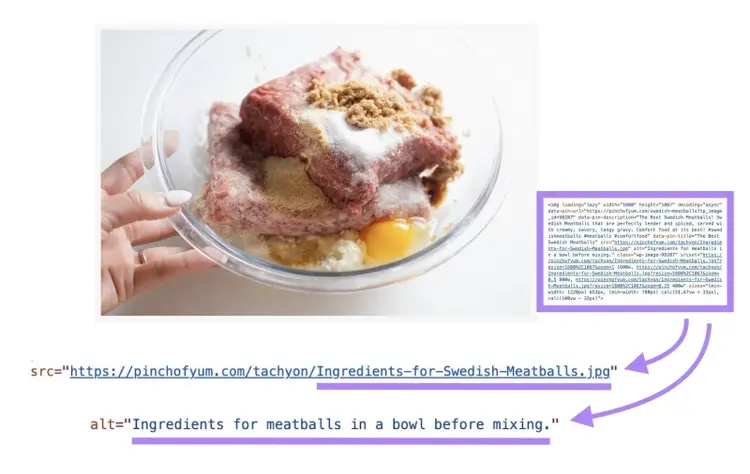
Where relevant, you may add target keywords to your image file names and alt text to improve your images’ discoverability for these keywords.
More alt text best practices include:
- Keeping your alt text to 125 characters or fewer
- Skipping alt text for purely decorative images
- Avoiding phrases like “image of” or “picture of”
10. Optimize for Page Speed
Optimizing for page speed (beyond optimizing images) improves SEO and AI search visibility, and it can also reduce bounce rates—the rate at which users leave a site without engaging.
If a page takes too long to load, traditional search engines may rank it lower. That can affect the page’s AI visibility, because AI search engines often rely on traditional search results to identify sources worth citing.
And users may bounce from slow pages because they can get the information they need elsewhere more quickly.
On-page methods of reducing page speeds include:
- Choosing the right image formats: Use WebP for photos, PNG for graphics with transparent backgrounds, and SVG for logos and icons. These image formats offer a good balance between image quality and file size for these respective image types.
- Compressing images: Use a tool like Squoosh to reduce your images’ file sizes before uploading them
- Reducing redirects: Wherever possible, add links that directly send users to the target pages instead of first sending users to links that then automatically lead to the target pages. To shorten the time it takes to reach the intended page.
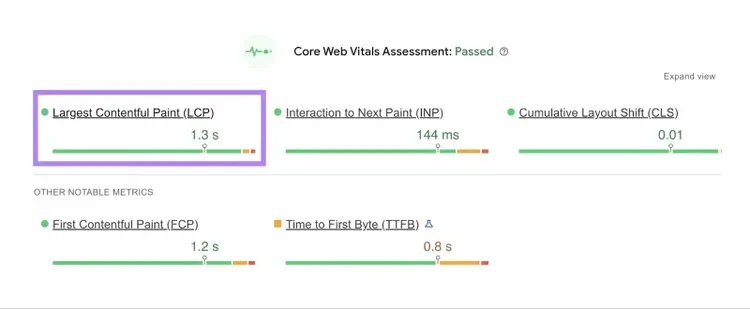
Measure your pages’ load speeds with Google’s PageSpeed Insights. This tool provides performance scores for Largest Contentful Paint (LCP)—the time your page’s main content takes to load—and a few related metrics. And also lists tactics for improving speed and the overall page experience.
11. Add Schema Markup
Add schema markup to your pages to help search engines better understand their content, which can lead to higher traditional and AI search visibility.
Schema is a type of structured data that provides more details about pages. Common schema types include:
- Article: Identifies content type, author, publish date, and sections
- Product: Displays prices, availability, and reviews for products
- Local Business: Shows address, hours, and contact information for physical businesses
- Review: Displays star ratings and review counts
Traditional search engines can use schema markup to generate rich snippets. Rich snippets display extra information on eligible traditional search result listings and make these listings more enticing for users to click.
Like this traditional search result listing, which has a review rich snippet:

Use a tool like Google’s Structured Data Markup Helper to add schema to your pages. Then, use Google’s Rich Results Test to check if you’ve implemented the schema correctly.
Measure Your On-Page SEO Success
Measure on-page SEO success by tracking key AI search and SEO metrics before and after implementing optimizations, so you know what’s driving results.
Use tools to track key metrics like:
- Keyword positions: Track your target keywords’ rankings with Semrush’s Position Tracking tool
- Organic traffic: Measure how many people come to your site from search with Google Analytics 4 (GA4)
- Click-through rate (CTR): Measure CTR from Google’s traditional and AI search results in Google Search Console
- Search engine results page (SERP) feature appearances: Monitor your visibility in AI Overviews, featured snippets, and People Also Ask sections with Semrush’s Organic Rankings tool
- AI mentions and citations: See whether AI search engines talk about you and your number of AI mentions with the AI Visibility Toolkit
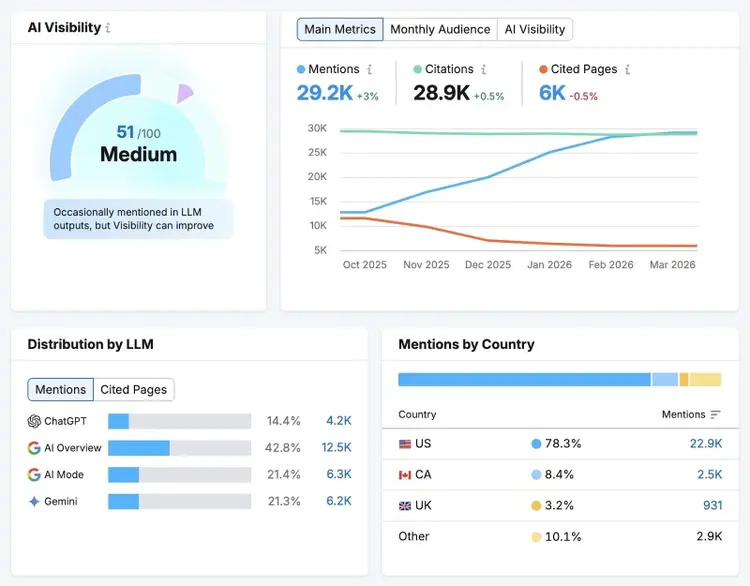
You can access several of these tools with a Semrush One subscription. Sign up today.
Improve AI & Traditional Search Performance
with Semrush One

Vlado is a content marketer with 10+ years of experience in SEO, content strategy, and building websites for both clients and personal projects. As Content Operations Lead at Semrush, he streamlines workflows and optimizes processes. He also played a key role in scaling content production and shaping the blog Style Guide. Previously, as Head of Content at Mangools, he led initiatives that made the blog a major driver of organic traffic. He enjoys making complex SEO topics accessible to others.
Vlado Pavlik
Vlado is a content marketer with 10+ years of experience in SEO, content strategy, and website building. As Content Operations Lead at Semrush, he focuses on improving content workflows, optimizing processes, and helping scale content production.

Tells Google to show you more from Semrush in AI, Search, and Discover.
Table of contents
-
How to Do On-Page SEO for Your Site: 11-Item Checklist
- 1. Place Target Keywords & Prompts Strategically
- 2. Write Accurate Title Tags
- 3. Optimize Your URL Slugs
- 4. Write Accurate Meta Descriptions
- 5. Structure Your Content with Headings
- 6. Create Unique, Helpful Content
- 7. Add Strategic Internal Links
- 8. Add External Links to Credible Sources
- 9. Write Descriptive Image File Names and Alt Text
- 10. Optimize for Page Speed
- 11. Add Schema Markup