SEO is one of the most reliable ways to drive traffic and increase brand visibility.
But maintaining competitive rankings takes more than a well-written article. Google's systems evaluate content quality, technical health, authority signals, and user experience simultaneously, and the bar keeps rising as more content competes for the same positions.
This guide covers nine strategies for improving your SEO rankings:
Update existing content: Pages with existing authority can respond quickly to targeted improvements, making this one of the fastest ways to lift rankings
Target low-competition keywords: Less-competitive terms give newer or lower-authority sites a realistic path to page one
Improve your site's user experience: Google tracks how users interact with your pages, and sites that keep visitors engaged tend to rank better over time
Enhance your on-page SEO: Optimizing title tags, headings, and body content helps search engines understand what each page is about and when to rank it
Maintain strong technical SEO: Crawl errors, indexing issues, and broken redirects can affect your rankings if left unaddressed
Build quality backlinks: Links from credible sites in your industry act as votes of confidence that signal authority to search engines and AI systems
Win more AI Overviews: Optimizing for AI-generated answers can significantly expand your brand's visibility
Consolidate pages that target similar keywords: Merging pages that target the same keywords prevents you from competing against yourself and concentrates your ranking power
Demonstrate E-E-A-T: Content that reflects genuine experience, expertise, authoritativeness, and trustworthiness consistently outperforms content that doesn't
Below, we’ll show you exactly what to do for each strategy.
1. Update existing content
Updating existing content often delivers faster ranking improvements than creating new content from scratch. Pages with existing authority and indexing history typically respond to targeted improvements quickly — sometimes within days of being recrawled.
Find pages with ranking potential
Find pages with ranking potential using tools that monitor your rankings, like Google Search Console (GSC).
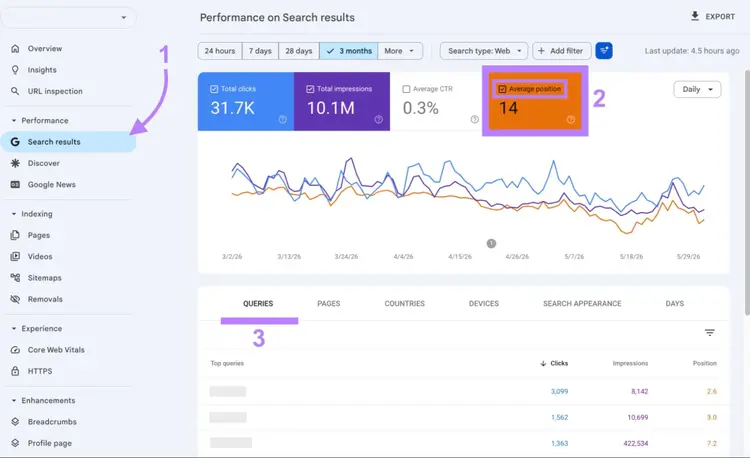
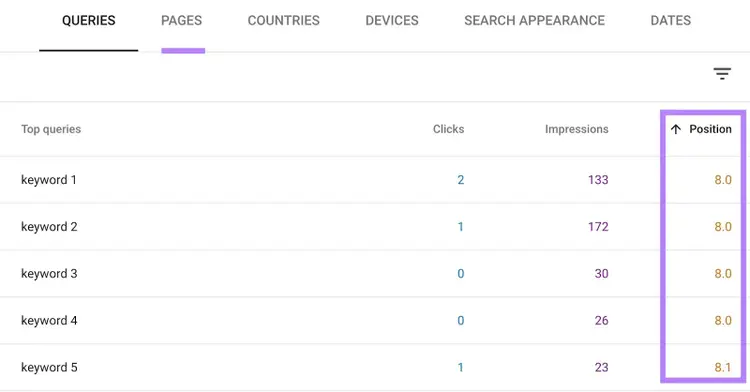
First, open your website within GSC and go to "Search results," click "Average position," and navigate to the "Queries" tab in the table. You'll see a list of all the search terms your site ranks for, along with their positions.
Review the queries where you're ranking below position three, and identify the corresponding pages that need improvement. (We're focusing on this threshold because click-through rate falls under 10% once you drop out of the top three positions, according to data from First Page Sage.)
Improve content
Improve content by adding relevant, up-to-date information readers will find useful.
Align with search intent: Ensure your content matches the intent (the reason someone searches). For example, users searching for "best crm software" likely want to compare different options before making a purchase decision. Structuring your content as a "best of" list, with the pros and cons of each tool, would align well with that intent.
Answer the question completely: The most consistently ranked content gives readers everything they need to accomplish their goal — not a partial answer that sends them back to search for more. Before publishing, ask: Does this page fully address what someone searching this query actually needs? If not, it's not ready.
Update outdated information: Replace old statistics, examples, and facts with the most current information on the topic. Remove anything that's no longer relevant or accurate.
Draw on firsthand knowledge: Original perspectives carry more weight than rehashed information. Write from real experience: include data from your own tests or campaigns, cite specific examples you can verify, and surface details that can only come from someone who has worked with the topic. Content like this is hard to replicate, which is exactly why it tends to rank.
Include missing subtopics: Check top-ranking competitor pages to see what subtopics they cover that you haven’t. Add these subtopics to your piece to make it more complete and help with query fan-out (a process where AI expands your query into related sub-queries).
Add target keywords: Use your target keywords throughout the content to reinforce to Google and LLMs what the page is about. Include variations and related keywords as well.
Build internal links: Link to the updated content from other relevant and authoritative pages on your site to help web crawlers (bots) discover your important content and understand how different pages are related
Note
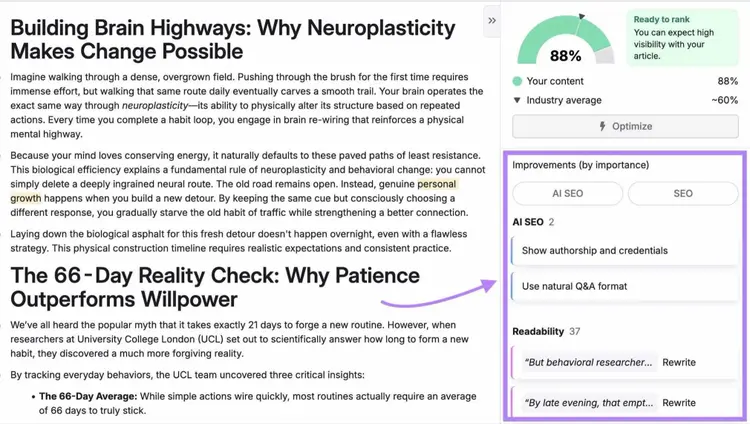
Semrush's AI Search Optimizer analyzes your content and surfaces specific recommendations to improve it for SEO and AEO (answer engine optimization), so you can increase visibility in search engines and LLMs.
2. Target low-competition keywords
Targeting low-competition keywords gives you a faster path to organic traffic — if you create genuinely better content than what's currently ranking.
Low-competition keywords are search queries that tend to have lower search volumes and fewer high-authority websites targeting them. This makes it easier for a new or lower-authority site to rank for these terms and drive search traffic.
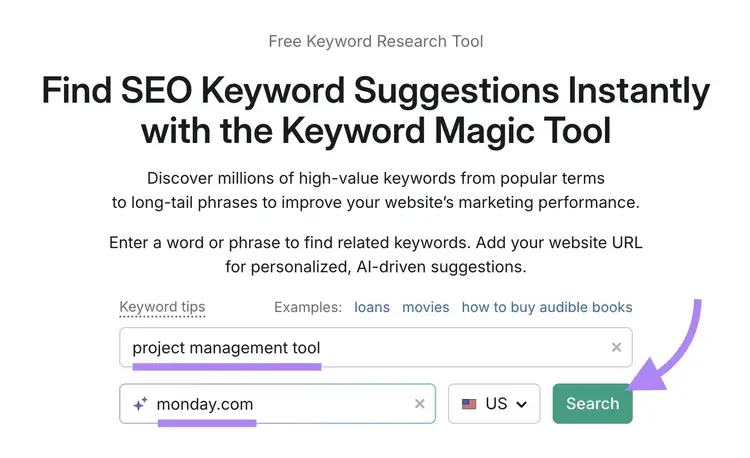
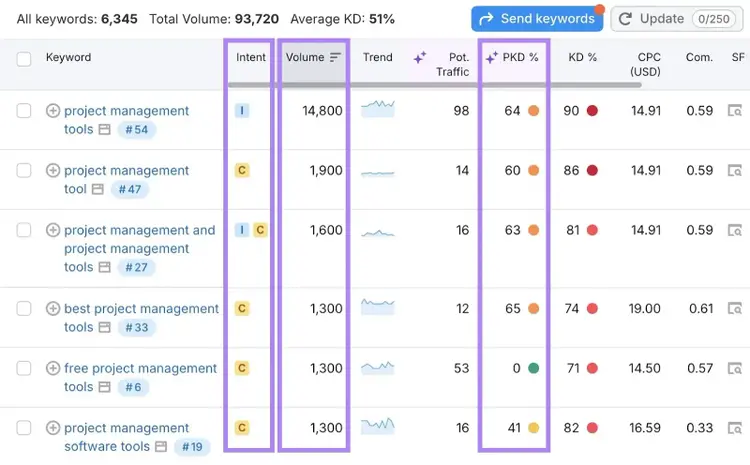
Open the tool, enter a broad keyword related to your niche, type your domain name (for personalized results), and click "Search."
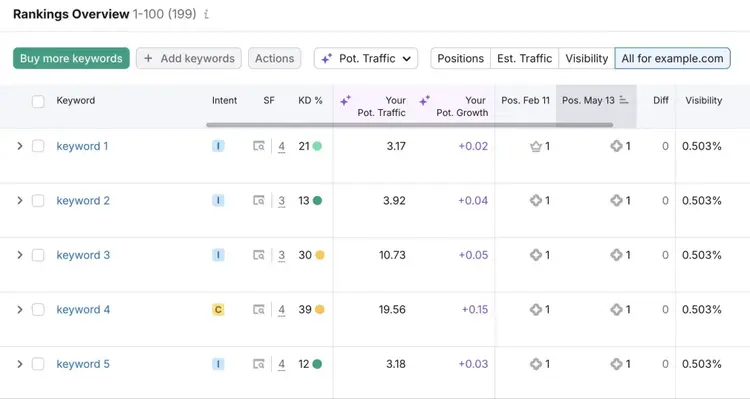
You'll see a list of related keywords along with metrics like monthly search volume, search intent, and Personal Keyword Difficulty (PKD %). PKD % represents how difficult it'll be for your specific website to rank in Google's top 10 positions for a given term.
Select keywords with a PKD % under 30% (indicating lower competition levels) and enough search volume based on your goals.
Before committing to a keyword, consider if you have real expertise, original data, or a meaningfully different angle on the topic. If you don't, a lower PKD% likely won't help as much because you'll struggle to create content better than what's already ranking.
Once you find promising keywords, create pages focused on them, making sure each beats the current top-ranking results.
3. Improve your site's user experience
Improving the user experience (UX) may influence rankings because Google uses engagement signals to evaluate which pages best serve users.
Google uses the Navboost algorithm to track and analyze how users interact with search results. If users spend more time on your site or click through to other pages, Google may be more inclined to rank your content higher.
Plus, the better your site's UX, the more likely visitors are to stay longer, explore more pages, and share your content.
UX-focused SEO improvements include:
Use a clean design: Keep it simple and visually appealing, with consistent fonts, colors, and spacing. Avoid clutter and distractions to keep the focus on your content.
Improve page speed: Optimize images, minify code, and enable browser caching to speed up load times. Use tools like Google's PageSpeed Insights to identify and fix loading issues, as fast-loading pages are essential for improving website SEO and user satisfaction.
Ensure mobile-friendliness: Make your site fully responsive, so it looks great and functions well on any screen size
Simplify navigation: Create a clear menu hierarchy with logical categories. Use breadcrumbs (navigational elements) to show users where they are and to help them navigate your site.
4. Enhance your on-page SEO
Enhancing your on-page SEO helps search engines understand what your pages are about, improving your chances of ranking for queries relevant to your business.
Some of the most important on-page SEO elements are:
Title tagsand meta descriptions: Title tags and meta descriptions are HTML elements that specify a webpage's title and summary and can appear in search results. Include your target keyword naturally in both elements, keep titles under 60 characters, and write compelling descriptions under 135 characters.
Heading tags (H1, H2, H3): HTML headings structure content on a page, with H1 being the main heading and H2s, H3s, and so on serving as subheadings. Use your primary keyword in the H1, include related keywords in subheadings, and maintain a logical hierarchy that makes your content easy to scan.
Body content: Body content is the main text on a page. Include your target keyword and its variations naturally throughout the content.
Image alt text: Alternative text (alt text for short) describes images for search engines, screen readers, and people who can’t see the image. Ensure each image has alt text that accurately reflects the image content.
Use Semrush's On Page SEO Checker to see how well you’ve optimized these elements on your pages.
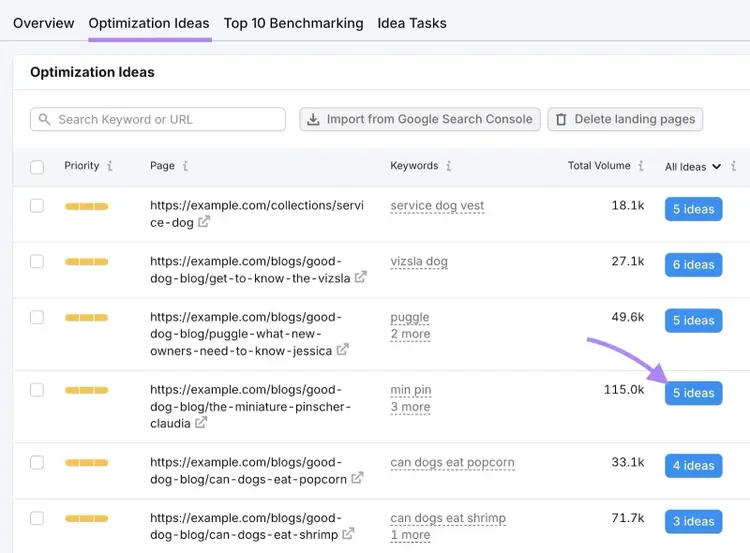
Set up a project in the tool and go to the "Optimization ideas" tab. You'll see a list of all the pages the tool evaluated.
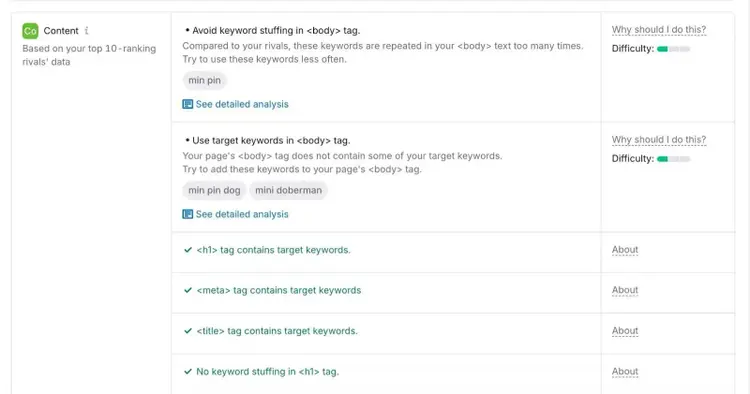
Click on the "# ideas" button for any page to see details about its on-page SEO.
Implement the suggestions you see.
Many of the recommendations relate to using keywords effectively and can be implemented in your content management system (CMS).
If you're on WordPress, plugins like Yoast SEO or Rank Math surface most of these on-page elements directly in the editor, making it easier to optimize without switching between tools.
Note
If your business serves a specific geographic area, optimize your Google Business Profile with accurate business information, consistent NAP (name, address, phone) details across directories, and regular posts and review responses. These signals influence your visibility in local search results and Google Maps.
5. Maintain strong technical SEO
Maintain a strong technical SEO foundation by ensuring Google can crawl and index your site and fixing any technical errors.
Here’s how.
Check your indexing status
Checking your indexing status tells you whether Google has crawled and indexed your pages. Pages that aren’t indexed won’t appear in search results.
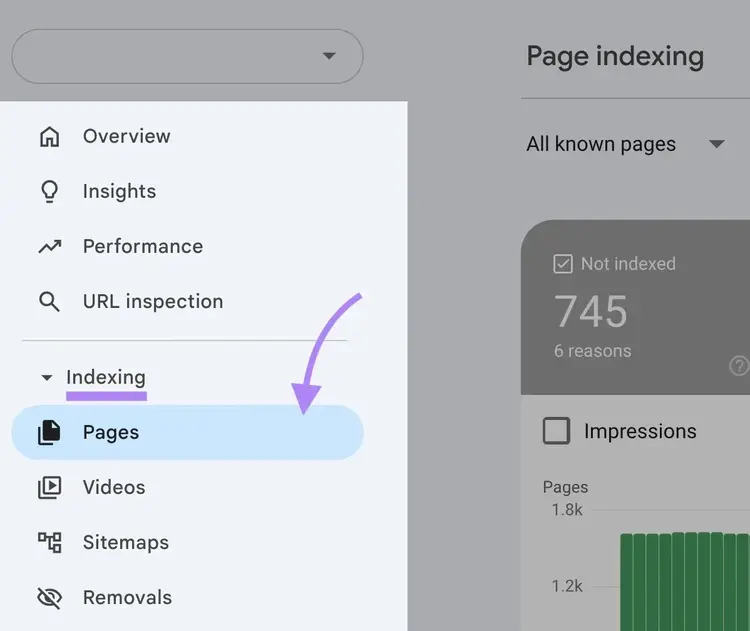
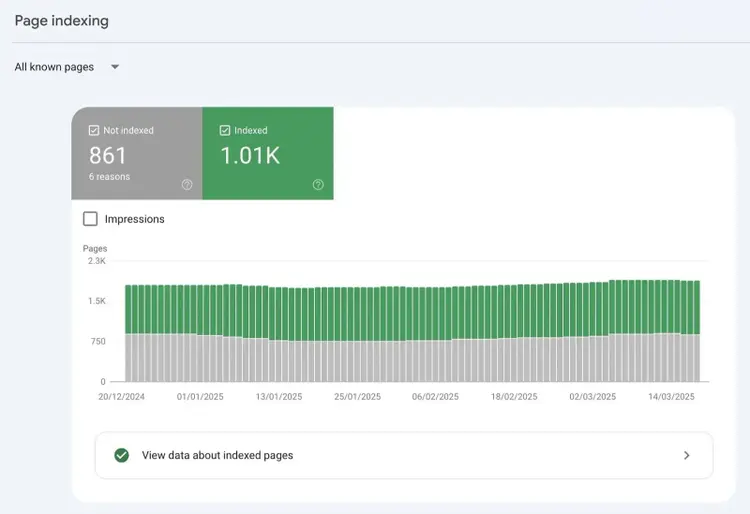
Use GSC to check your site’s indexing status. Open GSC and go to "Indexing" > "Pages" on the sidebar.
You'll see two tabs showing how many of your pages are indexed versus not indexed.
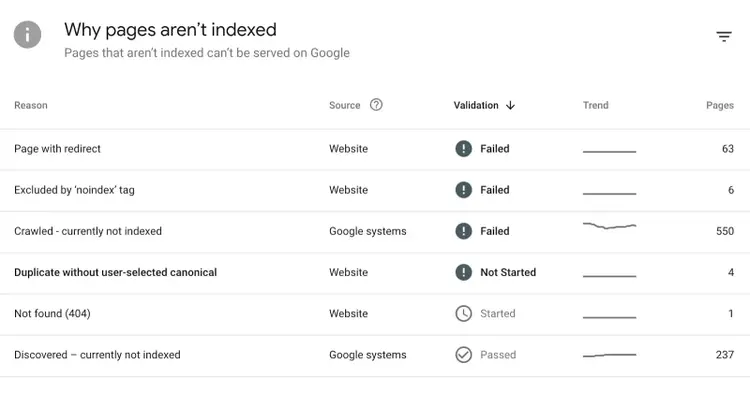
Scroll down to see why certain pages aren't indexed.
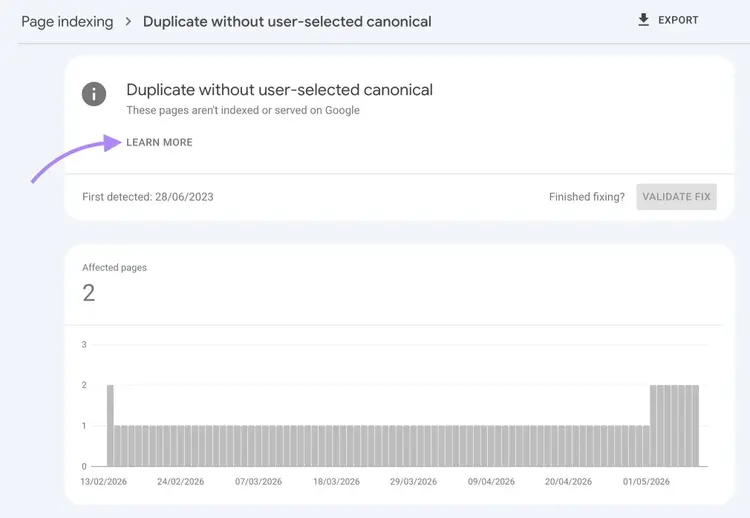
Click on any issue to see a list of affected URLs.
"Learn more" provides more details about the issue and how to resolve it.
Find and fix technical errors
Finding and fixing technical errors helps search engines and AI systems navigate your content so they can index and cite it.
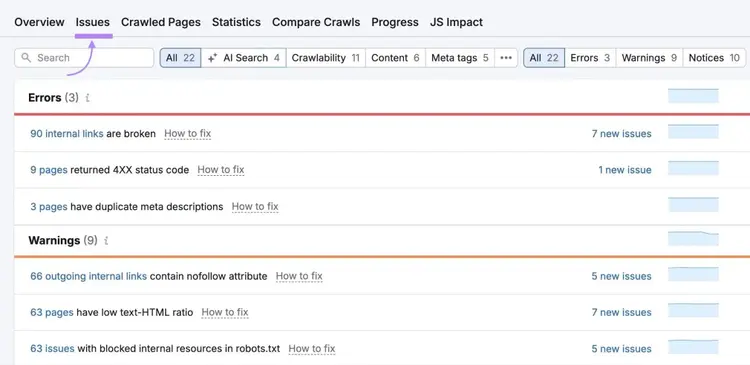
To get started, create a project in the tool, run a crawl of your site, then go to the "Issues" tab. The tool sorts problems by severity — errors, warnings, and notices — so you know where to focus first.
Site Audit scans your website for over 140 technical and on-page issues that hurt your SEO, including:
4xx errors: Invalid page requests, such as a request for a page that doesn't exist
Redirect chains: Multiple redirects firing in sequence — for example, URL A redirects to URL B, which then redirects to URL C
Mixed content issues: HTTP resources loaded on HTTPS pages, which trigger browser security warnings in users’ browsers
When addressing technical issues, start with "errors" since these typically have the biggest impact on your site's performance.
If you're not comfortable making technical changes to your website, work with a developer or your technical team to implement the fixes.
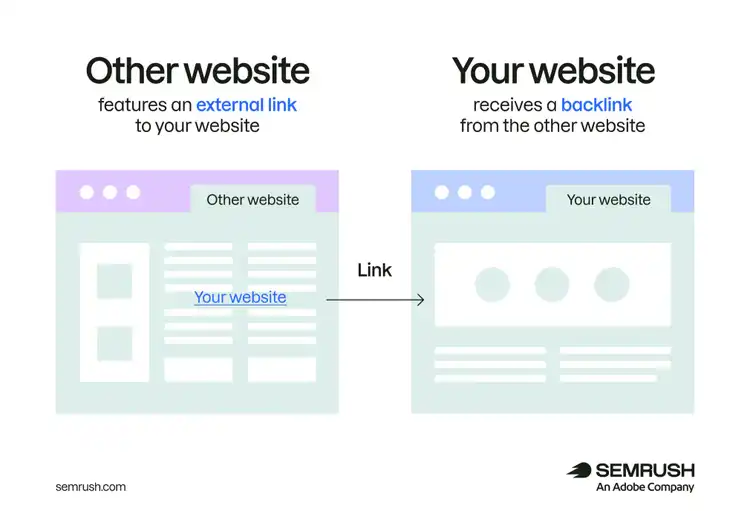
Each quality link from another website (especially if it's within your industry) acts like a vote of confidence in your favor. The more "votes" you have, the better.
Here are some effective ways to get quality backlinks:
Find unlinked mentions: Look for mentions of your brand that don't include a link and politely ask the creators to add one. Use the Brand Monitoring app to find such mentions, or Google your brand name and examine the results for unlinked mentions.
Become a source: Offer expert insights to media outlets and request a backlink in return for your contribution. Find journalists looking for expert insights on platforms like Qwoted and HARO.
Create link-worthy assets: Publish high-quality, shareable content (infographics, data studies, calculators, etc.) that creators will naturally want to link to. Once you create these assets, promote them through social media and manual outreach.
7. Win more AI Overviews
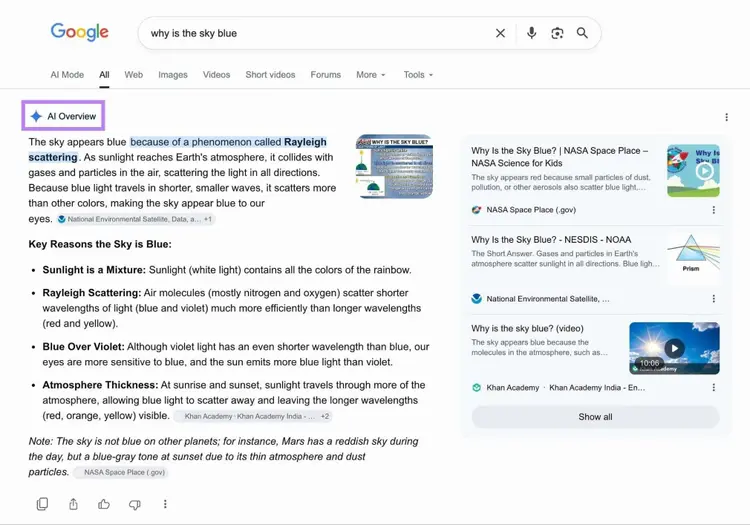
Winning more AI Overviews (AI-generated answers that usually appear at the top of the search results) helps you increase brand visibility.
The simplest way to find featured AI Overview opportunities is to open an incognito window and search for your target keywords to see if an AI Overview is present.
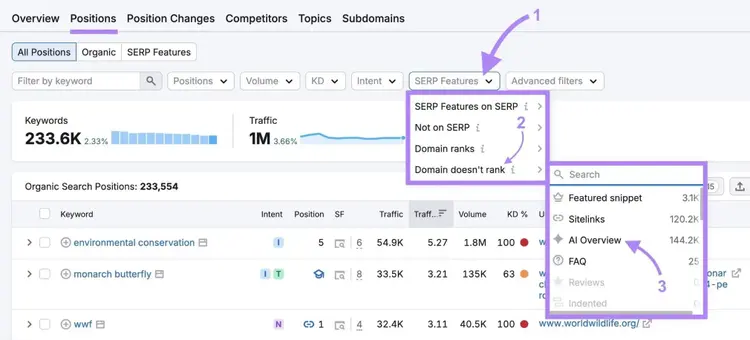
To streamline the process and quickly find opportunities across all your keywords, use Semrush's Organic Rankings tool:
Enter your domain and navigate to the "Positions" tab to see all the keywords you rank for.
Select the "SERP Features" filter, hover over "Domain doesn't rank," and select "AI Overviews."
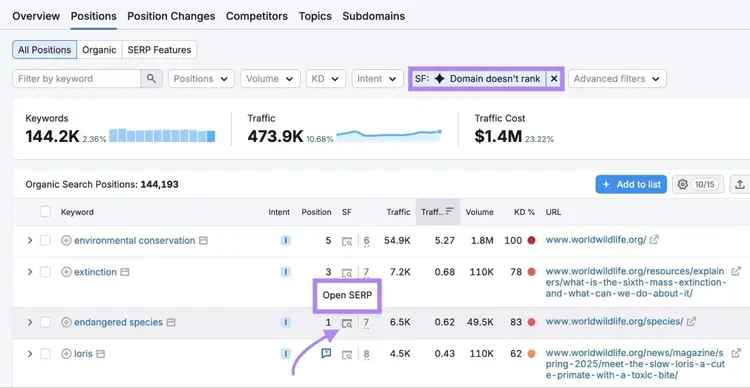
This will show you keywords you rank for but not in AI Overviews.
You can also analyze the SERP directly in the tool. Click the SERP icon to open the search result page directly within the tool.
This powerful feature lets you examine AI Overviews without leaving Semrush.
After finding AI Overview opportunities you want to secure, optimize the relevant pages on your site by clearly answering the query within your content so Google can easily extract and surface a direct response.
Other ways to improve your chances of appearing in AI Overviews include:
Building backlinks
Earning brand mentions
Improving on-page SEO
Optimizing technical SEO
Enhancing the user experience on your site
Basically, implementing all of the strategies we discuss in this article can increase your chances of appearing in AI Overviews.
8. Consolidate pages that target similar keywords
Consolidating pages that target the same or similar keywords helps you fix keyword cannibalization — and boosts your chances of ranking well.
Keyword cannibalization is when multiple pages on a site target the same keywords and search intent and hurt one another’s rankings in the process. Search engines may struggle to determine which page is the most relevant to rank when multiple pages target the same term(s).
By consolidating similar pages, you can increase the likelihood that your preferred page appears in search results.
Keyword cannibalization can also dilute your pages' authority, as link equity (ranking power) may be split among competing pages instead of flowing to a single authoritative page.
To find keyword cannibalization issues on your site, log in to GSC.
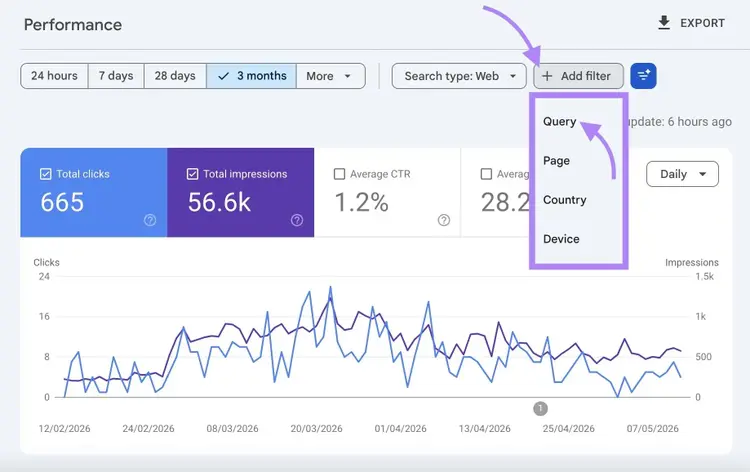
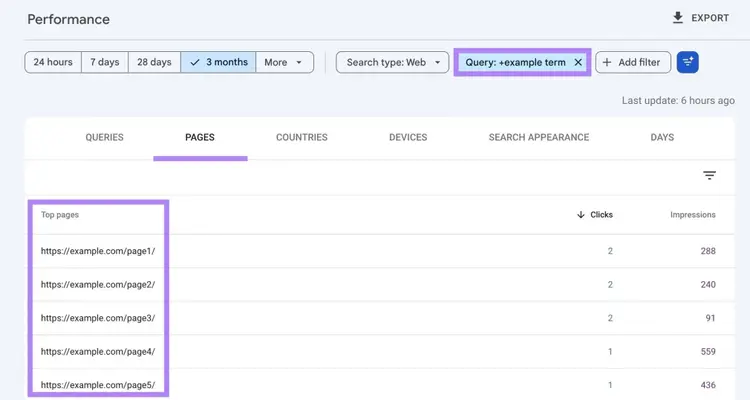
Go to "Search results," click the "+ Add filter" button, select "Query," and enter the keyword you want to check.
Then navigate to the "Pages" tab in the table, and you'll see all the pages on your site related to this keyword.
Analyze each page for content and search intent overlap.
If there's a significant overlap, you likely have a cannibalization issue.
Once you've confirmed a cannibalization problem, determine which page is the most authoritative and relevant to keep, typically the one with the most organic traffic and the most backlinks (you can quickly check a page's backlink count with the free backlink checker).
Then review the similar pages to identify any content worth incorporating into the main page before you take action.
How you consolidate depends on the relationship between the pages:
When to use a redirect (301)
Use a 301 redirect (a permanent redirect) when one page is clearly weaker: lower traffic, fewer backlinks, and no unique content that isn't already covered by the main page.
A redirect permanently sends visitors and link equity from the weaker page to the stronger one. It's the cleanest resolution when there's nothing worth preserving on the page being removed.
When to canonicalize instead
Use a canonical tag(rel="canonical") when both pages should remain accessible, but you want to tell Google which one to index and rank.
This is the right approach for syndicated content, URL parameter variations (e.g., filtered product pages), or near-duplicate pages that exist for technical reasons but cover the same topic.
When to merge content
Merge content when both pages have meaningful traffic, backlinks, or unique content that would be lost in a redirect.
Combine the strongest elements of both pages into a single definitive version, then use a 301 redirect to point the weaker URL to the updated page. This approach takes more effort but often produces a stronger result than either page alone.
9. Demonstrate E-E-A-T
Demonstrating E-E-A-T (Experience, Expertise, Authoritativeness, and Trustworthiness) is a framework used to assess the quality of search results.
This framework comes directly from Google's Search Quality Rater Guidelines, a manual that helps Google reviewers assess ranking content.
Though E-E-A-T isn't a direct ranking factor, content that demonstrates these qualities tends to perform better.
Here are specific ways to build each signal on your website:
Expertise: Reflect genuine subject-matter knowledge rather than rehashing what other articles say. Include technical details, edge cases, and nuance that a real practitioner would recognize. Keep detailed author bios that document the qualifications, credentials, and relevant experience of everyone who writes or edits your content.
Authoritativeness: Build your site and your contributors into recognized sources for specific topics by consistently publishing accurate, high-quality information that other credible sources want to reference. Being cited by reputable publications and authoritative domains in your field strengthens this signal over time.
Experience: Demonstrate that your content creators have direct, firsthand experience with what they're writing about. Original research, personal observations, and real examples from practice outweigh secondhand descriptions. If you're reviewing a product, use original photos and specific hands-on details; if you're giving SEO advice, back it with data from your own campaigns or tests.
Trustworthiness: Support claims with credible sources, keep statistics and product details current, and make it easy for readers to verify who wrote the content and why they're qualified. A clear privacy policy, accurate contact information, and consistent details across your site all reinforce trust.
Note
AI systems don't use the E-E-A-T framework directly, but the principles behind it carry over. LLMs like ChatGPT and Gemini tend to cite sources with verifiable author credentials, content that clearly demonstrates real expertise, and information that holds up consistently across third-party sources.
Track your SEO improvements
Track your SEO improvements by monitoring whether your changes have improved your rankings.
Semrush's Position Tracking tool lets you track your keywords and visibility and see if you're appearing in places like AI Overviews.
Remember: SEO is not a "set it and forget it" thing. Rankings shift as competitors update their content, as Google's systems evolve, and as search behavior changes. The sites that maintain strong positions treat SEO as an ongoing process, not a one-time project.
Ready to see how the above strategies improve your SEO? Try Position Tracking today.
Sergei Bezdorozhev is an SEO Lead with over 10 years of experience, specializing in technical, international, and programmatic SEO. He has led large-scale SEO initiatives, cutting localization costs by double digits and driving significant traffic growth across multilingual markets. With a master’s degree in Linguistics, he ensures content ranks effectively in English, Spanish, German, and Japanese. Passionate about SEO growth hacking, he focuses on scaling content and automating processes.
Subscribe to learn more about General SEO
Subscribe
By clicking “Subscribe” you agree to Semrush Privacy Policy and consent to Semrush using your contact data for newsletter purposes
Sergei Bezdorozhev
Sergei Bezdorozhev is an International Blogs Lead at Semrush with 10+ years in SEO. He specializes in International SEO, programmatic SEO, and website growth hacking, driving multilingual content performance and organic growth at scale.
Share
Tells Google to show you more from Semrush in AI, Search, and Discover.