
On-page SEO checklist: The complete task list for 2026
Expert reviewed
Our subject matter experts have reviewed this article to ensure it meets the highest standard for accurate information and guidance. Learn more about our editorial standards and process.
On-page SEO has always been about helping your content appear in search results.
Today, many of the same practices that have always helped you rank in traditional search engines also improve your visibility in agentic search — where AI tools search the web, reference sources, and generate curated answers on behalf of users.
This guide gives you a complete on-page SEO checklist to improve your content for traditional and agentic search.
How on-page SEO supports agentic search optimization
On-page SEO supports agentic search optimization by giving AI systems the structure, clarity, and topical signals they need to extract and cite your content.
That means the work you're already doing to drive SEO results — writing descriptive title tags, using clear headings, placing keywords naturally — directly improves your chances of being surfaced in AI-generated responses.
Your complete on-page SEO checklist
Here’s a snapshot of the complete on-page SEO checklist you’ll be following:
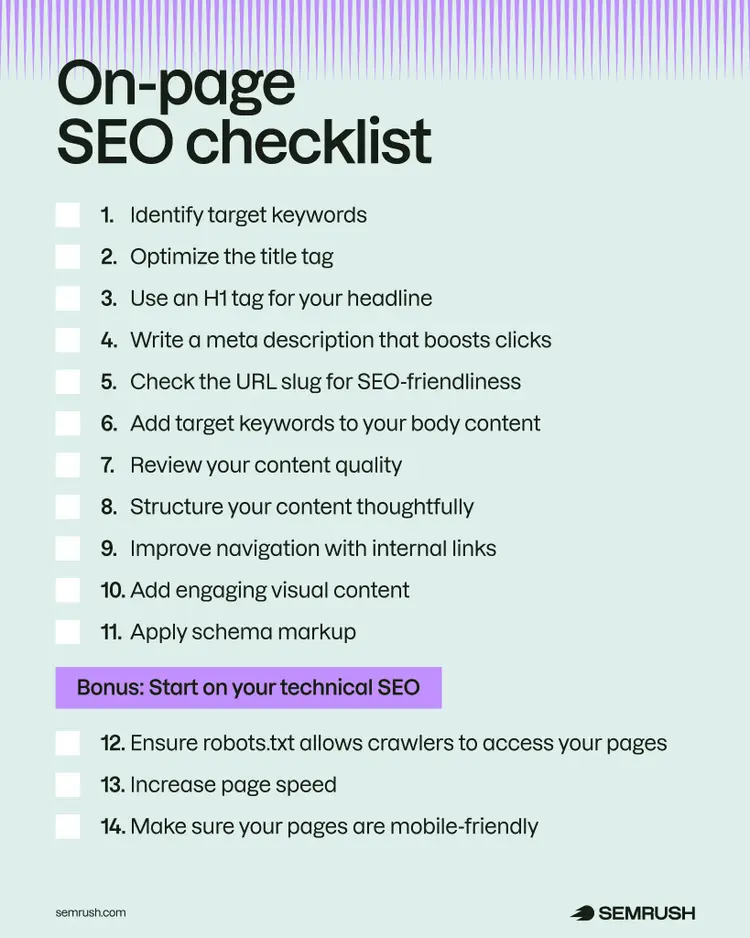
Download this on-page SEO checklist and check the boxes as you complete each task.

1. Identify target keywords
Find the right keywords to target in your content, so your pages appear in traditional search results and AI-generated answers.
Keywords are the words and phrases people type into search engines when looking for information, products, or services. They're the foundation of on-page SEO because they tell search engines and AI systems what your content covers.
When an AI system processes a query, it doesn't just match keywords — it breaks the question into subtopics and searches for content that covers each one. This is called query fan-out. If a page thoroughly covers a topic and related subtopics, it's more likely to be surfaced for those fan-out queries.
When choosing keywords, consider these three key factors:
- Search volume: The average number of monthly searches the term gets
- Personal Keyword Difficulty: How hard it will be for you to rank in Google's top 10 results for the keyword
- Search intent: What the searcher wants to find out or accomplish when searching the keyword
Search intent generally breaks down into four main categories:
- Informational: People looking to learn (e.g., "types of wedding flowers")
- Navigational: People searching for a specific website (e.g., "stemfloral.com")
- Commercial: People researching products (e.g., "best wedding flower delivery")
- Transactional: People ready to buy (e.g., "buy wedding flowers online")
Let's say you own a small flower shop with just one location. The keyword "wedding flowers" might seem like a perfect fit. It's directly relevant to what you sell. But is it realistic to target?
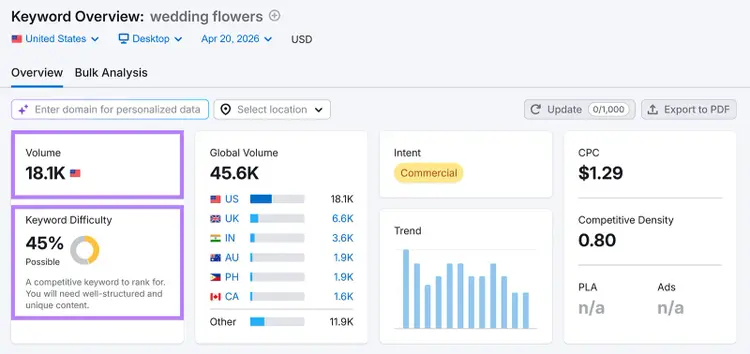
The term "wedding flowers" gets 18,100 searches per month and has a keyword difficulty of 45%. That puts it in competitive territory, which means you'll need well-structured, unique content and strong domain authority to achieve high visibility.
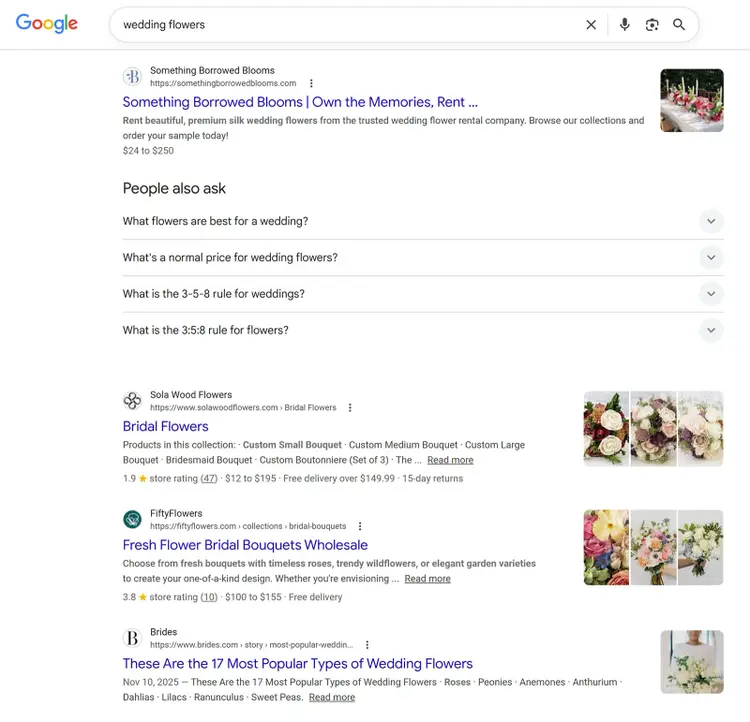
And even though the intent is commercial — meaning searchers are actively researching options — the SERP is dominated by major planning sites and national flower delivery brands. That’s stiff competition for a single-location shop.
A more specific keyword like "wedding florist in [your city]" would be easier to rank for and more likely to generate conversions. Because someone searching that term is looking for exactly what you offer, and in your area.
So if your goal is to drive local sales, "wedding flowers" might not be the keyword for you.
To find keywords worth targeting, use Semrush Keyword Magic Tool. Just enter a broad term related to your business and add your domain to get a list with lots of keyword ideas:
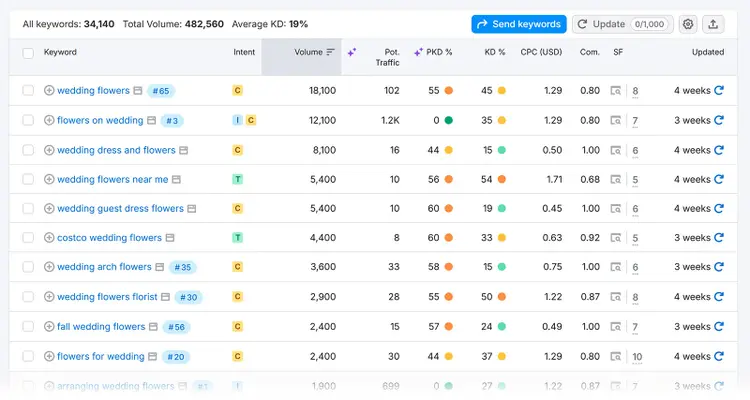
Narrow this keyword list down to only show keywords that suit your specific business goals. To do this, filter the list by:
- Volume: You want a high search volume to reach more people with your content
- Intent: Choose keywords matching your page's purpose (e.g., transactional for product pages)
- Personal KD%: Lower personal keyword difficulty indicates your domain is more likely to rank in the top 10 Google results
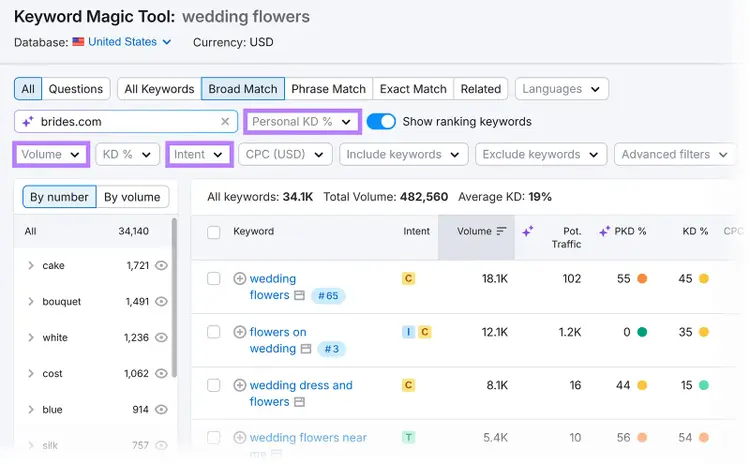
Take note of all the keywords that meet your ideal criteria. We’ll be using them in the next steps to complete the on-page SEO checklist.
2. Optimize the title tag
Optimize your title tag to clearly communicate to search systems what your page is about and entice clicks.
Title tags appear in browser tabs and can show as clickable headlines in search results (though search systems sometimes show a different title).
Here’s what a title tag can look like if it’s displayed on the SERP:
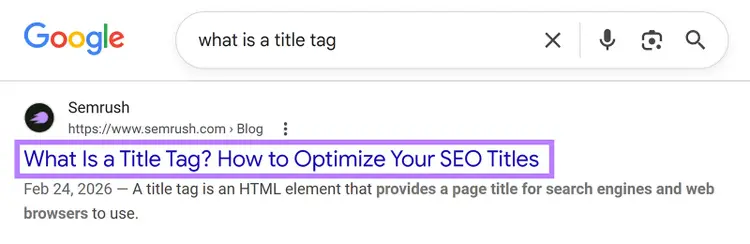
And this in the HTML code for the same title tag:
<title>What Is a Title Tag & How to Optimize Your Title Tags for SEO</title>
Your title tag should be clear, relevant, and compelling. Here's how to optimize it:
- Place your primary keyword near the start
- Write clear, descriptive titles that accurately reflect your content
- Add relevant secondary keywords naturally (without stuffing them in) if possible
- Keep it under 60 characters to reduce the chance of truncation in search results (see below)
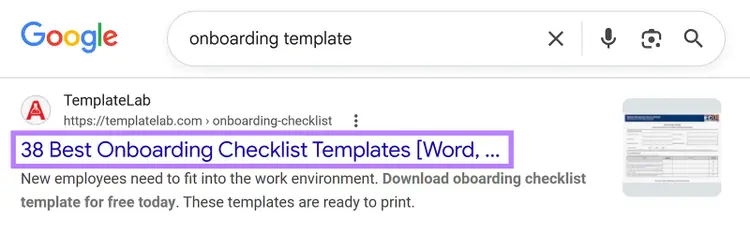
Use Semrush’s On Page SEO Checker to check if your title tags contain target keywords and if there’s any keyword stuffing (unnaturally forcing in keywords).
Open On Page SEO Checker and create your project. Go to the “Optimization Ideas” tab to see your webpages and a number of optimization ideas for them. And click on “# ideas” next to any page to see its specific recommendations.
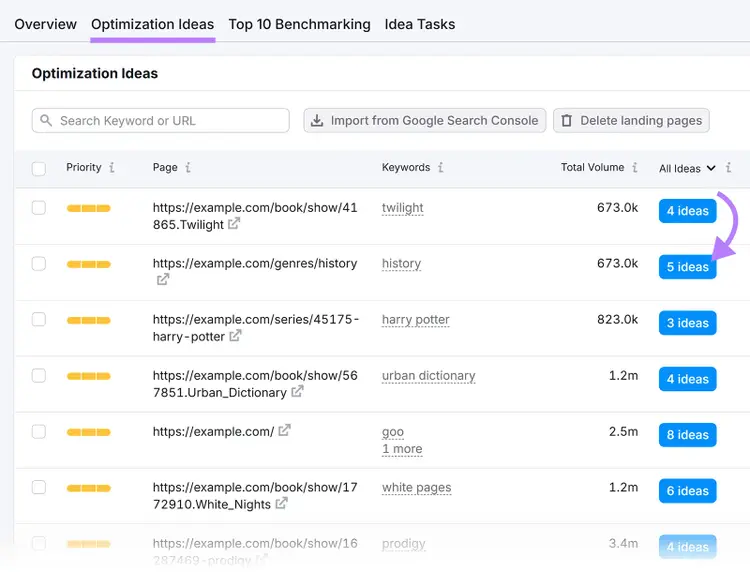
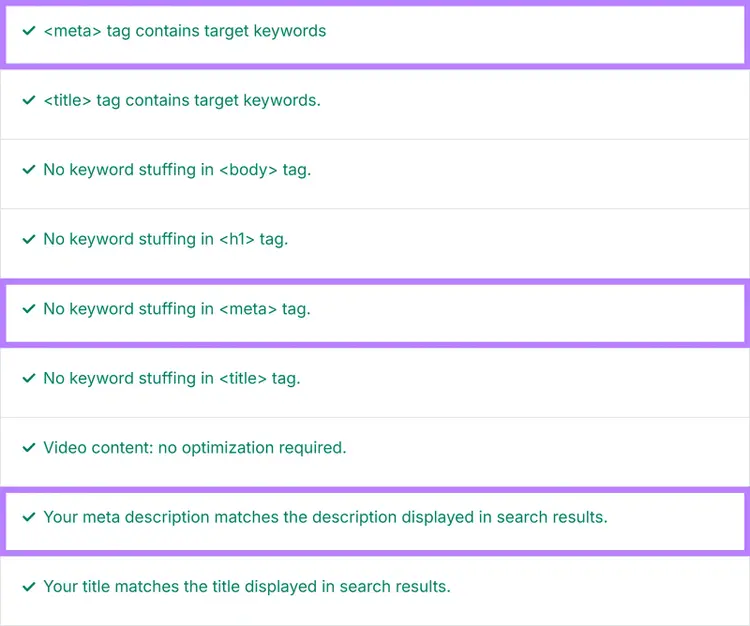
The “Content” section in On Page SEO Checker will tell you whether your title tag includes target keywords without keyword stuffing.
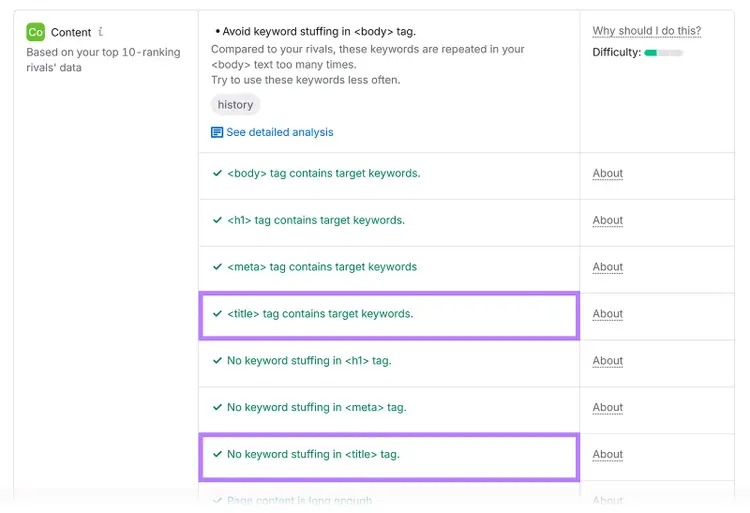
Go through all your pages to ensure you’ve optimized your title tags.
3. Use an H1 tag for your headline
Every page should have one H1 tag that clearly describes the content to visitors — it's one of the simplest yet most important on-page SEO tasks.
According to Microsoft's guidance on AI search optimization, your H1 tag is used by Bing’s AI-powered search experiences to interpret a page's purpose and scope. Plus, a descriptive H1 is also helpful for traditional search and users.
Your H1 tag is different from your title tag. It appears directly on your webpage. Here's an example of what it looks like in HTML and on the page:
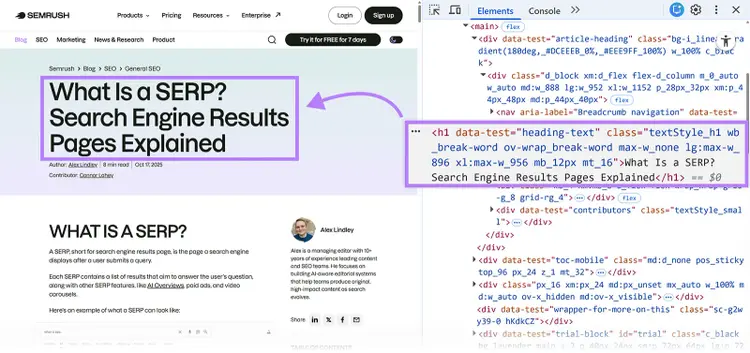
Your H1 tag should be similar to or the same as your title tag since they both tell search systems and users what the page is about. But while your title tag can be truncated in search results if it's too long, your H1 can be more descriptive.
So, when writing your H1:
- Include your primary keyword close to the start
- Explain your content in simple terms and tell readers exactly what to expect
- Hook your readers with compelling words (e.g., "Learn to create ..." is more engaging than "How to make ...")
- Align it with your page's content (in other words, keep it relevant)
- Fulfill your headline's promise and avoid making claims your content can't support
Head back into Semrush's On Page SEO Checker to check your H1 tag for target keywords and keyword stuffing.
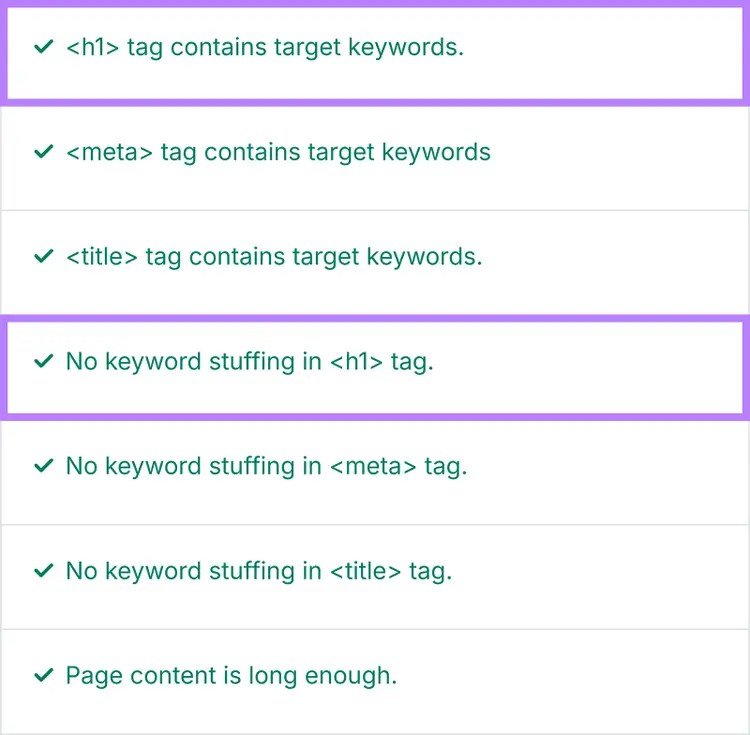
4. Write a meta description that boosts clicks
Your meta description is a brief page description that can appear under your title in search results, meaning it can influence whether users click through to your page.
A meta description can appear as the snippet beneath your title in traditional search results and as the summary text when AI tools cite your page.
Here's what it looks like across traditional and AI search results:
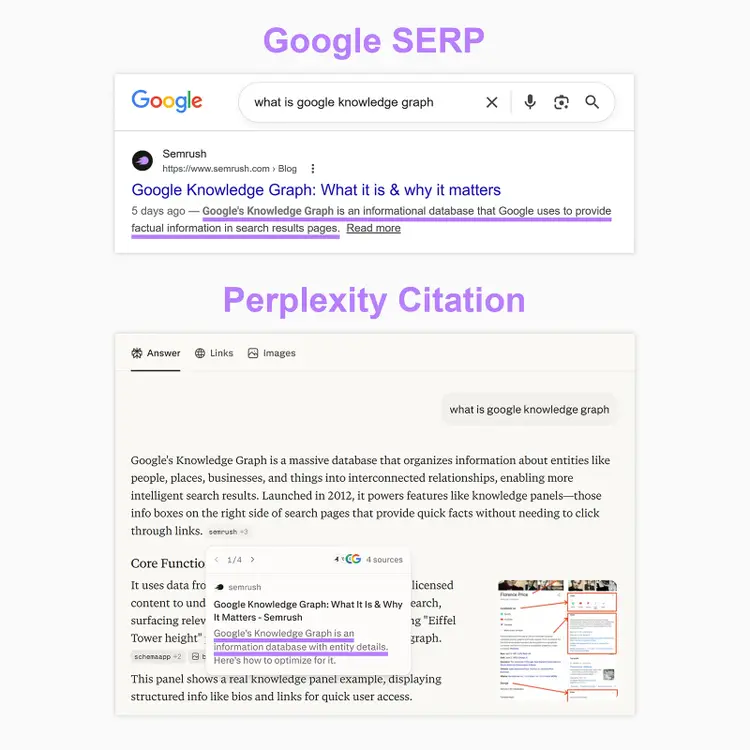
And this is what a meta description looks like in your HTML code:
<meta name="description" content="Meta description here.">
The meta description isn't a direct ranking factor for Google. However, a compelling meta description can significantly increase your click-through rate (CTR) in search experiences.
Meta descriptions may also be useful for AI visibility. Microsoft's AI search optimization guidance notes that meta descriptions provide important context for Bing’s AI experiences.
Follow these tips to optimize your meta descriptions:
- Include your target keyword naturally. Search engines often bold these terms when they match user searches.
- Clearly mention what users will get. Indicate what your page provides or what pain point the page solves.
- Share what makes you unique. Mention specific features, offers, or expertise that set you apart.
- Add a clear next step. Invite readers to "discover," "learn," or "explore" (but avoid pushy phrases like "click here").
- Keep it short and complete. Stay under ~105 characters to prevent your meta description from getting truncated in search results.
Writing clear, relevant descriptions that match search intent reduces the likelihood of search systems using alternative descriptions. And gives you more control over how your page appears in search results.
Use Semrush's On Page SEO Checker to check your meta description for target keywords and keyword stuffing. It will also flag if Google is rewriting your description in search results.
5. Check the URL slug for SEO-friendliness
SEO-friendly URL slugs help search engines and users understand your page content.
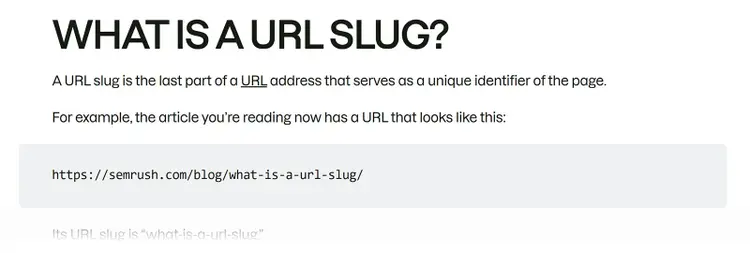
The URL slug is the unique part of your webpage address that describes a specific page. For example, https://www.yoursite.com/this-is-a-url-slug.
Google's URL structure best practices recommend using simple, descriptive words in your URLs — and the same clarity helps AI systems parse what a page covers.
Here's how to optimize URL slugs:
- Make them descriptive. Something like "wedding-flowers" is better than "wf-arrangements-2026-page1."
- Use your primary keyword. Use it naturally — don't stuff it in.
- Separate words with hyphens. Use "fresh-flower-delivery" not "freshflowerdelivery" or "fresh_flower_delivery."
- Keep it short and simple. Something like "summer-flowers" works better than "beautiful-fresh-summer-flowers-for-sale."
- Avoid special characters. Stick to letters, numbers, and hyphens.
- Skip unnecessary words. Remove words like "and," "the," and "a."
- Remove dates that might change or become irrelevant. For example, "flower-care-guide" is better than "flower-care-guide-2026."
Also, if you ever change a URL slug, set up a redirect from the old URL to the new one. This helps maintain your ranking power and prevents visitors from clicking broken links.
Check out our dedicated guide for more advice on creating SEO-friendly URLs.
6. Add target keywords to your body content
Incorporate target keywords naturally throughout your content, so search engines and AI tools can confidently match your pages to relevant queries.
Your content needs the right balance of primary keywords, related terms, and supporting topics. But placement matters as much as frequency. In practice, this means the body content directly beneath each subheading should answer the question that heading explicitly on implicitly asks — using the terms that define it.
For example, if your H2 is "How to check your Core Web Vitals," the first sentence under it should tell the reader how to check their Core Web Vitals — not provide background on what Core Web Vitals are.
When key terms appear naturally in a direct answer, AI systems can confidently match the passage to the query.
Here’s an example of a subheading followed by body copy that immediately answers the question:
In contrast, you want to avoid keyword stuffing. It sounds unnatural and can harm your search performance.
When incorporating keywords in your content for on-page optimization:
- Place your main keyword naturally in the first paragraph
- Include related terms that add context (like "gift cards" and "in-app purchases" when discussing app store credit)
- Use variations of your keyword in ways that fit naturally
To get some ideas on how to use keywords and related terms, look at the top-ranking pages (but don't copy them!).
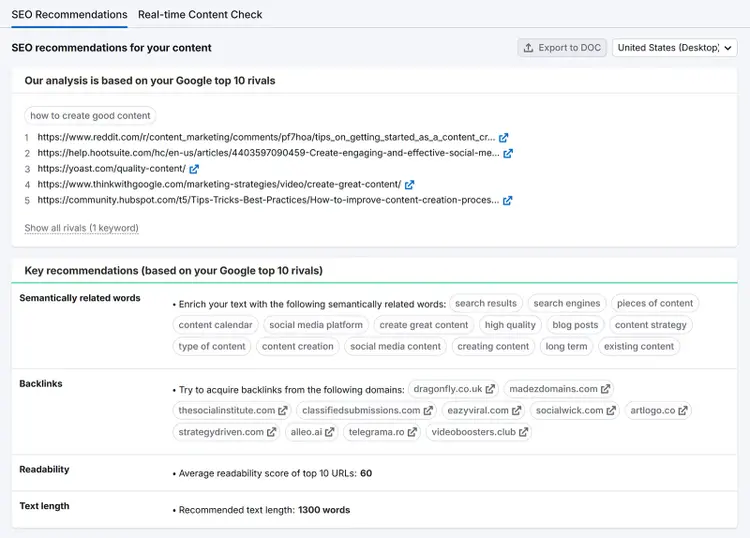
Alternatively, use Semrush's SEO Content Template to save time. It provides key recommendations based on the top 10 results for your target keyword(s).
The tool also lets you see how competitors use your target keywords across their content — showing exactly where and how often each term appears on their pages.
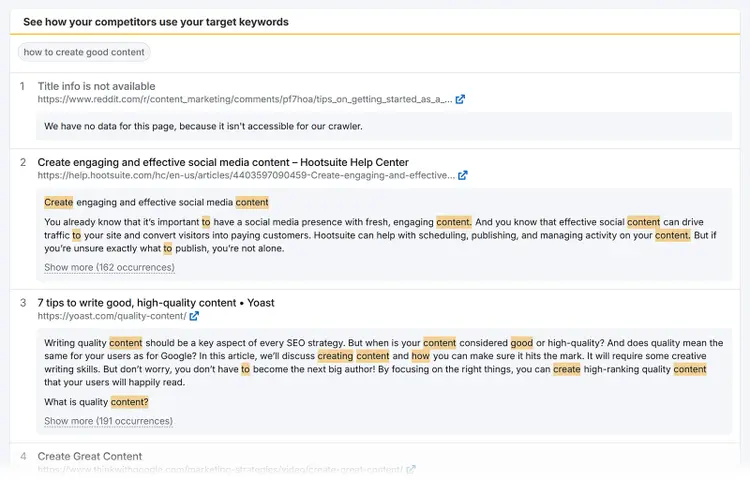
While you don't want to copy what your competitors are doing, studying their content does give you a good idea of the kinds of keywords they're using and where they're using them. To give you ideas for how to optimize your own content.
7. Review your content quality
Review your content to make sure it's accurate, satisfies search intent, and provides real value because high-quality content is more likely to perform well in both traditional and AI search results.
Google's guidance on creating helpful content emphasizes incorporating Experience, Expertise, Authoritativeness, and Trustworthiness (E-E-A-T).
In other words: Pages that demonstrate clear expertise and provide accurate, well-sourced information are more likely to be selected as sources for search results. And AI systems use Google search, so it also increases your chances of being shown in AI results.
Here are the main content quality indicators:
Search intent is one of the most important factors to consider when looking at your content's quality. Content that matches what users are looking for generally keeps them on the page longer and moves them closer to converting.
So, meeting search intent isn't just good for the user. It's good for your business.
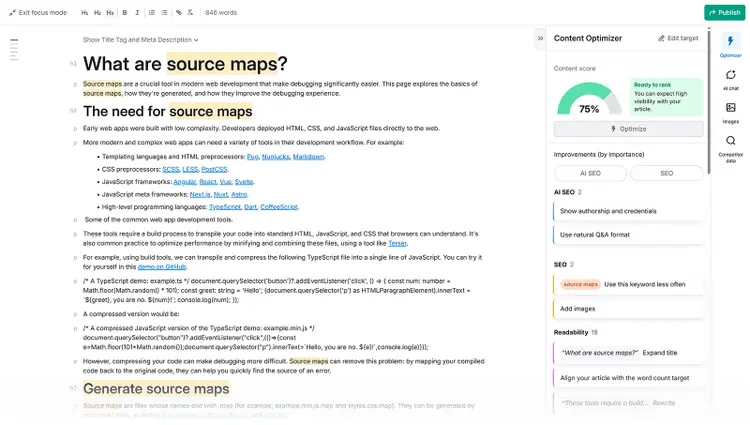
Regularly review your content against search intent and other quality indicators to identify gaps in information, opportunities for clearer explanations, and areas where you can add more value for your readers. For help with the review, use Semrush's AI Search Optimizer in the Content Toolkit.
The AI Search Optimizer analyzes your content against both traditional SEO signals and AI search factors, so you can identify gaps in quality, structure, and topical coverage from a single view.
8. Structure your content thoughtfully
Organize your content to ensure search systems can quickly find, understand, and extract the information they need.
Plus, effectively structured content is also better for readers.
Here’s how to ensure your content is easily understood by search systems:
- Use header tags to create a clear hierarchy. Header tags (H1 through H6) act as your content's outline. Your H1 is the page title, H2s mark major sections, and H3s and beyond create subsections within those sections.
- Focus each section on one subtopic/question. Keeping each section focused on a specific question or subtopic makes it easier for readers to navigate and gives AI systems a clear match to a specific query.
- Lead each section with a direct answer. The first sentence under any subheading should directly address what the heading promises. Background, context, and nuance should come after.
- Use formatting to support scannability. Bullet points, numbered lists, bold key terms, and short paragraphs all make content easier to scan.
- Keep sections and paragraphs self-contained. Each section and paragraph should make sense on its own, without requiring the reader to have read everything above it or below it. This increases the likelihood that your content will be incorporated into an AI-generated answer.
For a strong example of this well-structured content in action, look at Semrush'stechnical SEO checklist. Each section targets one technical SEO task, leads with the what and why, and works as a stand-alone answer.
9. Improve navigation with internal links
Using internal links to connect pages on your website helps users discover more relevant content, makes it easier for search engines to understand your site structure, and distributes ranking potential across your site.
Internal links also strengthen your topical authority.
When you publish in-depth content across related topics and connect those pages with internal links, you signal to search engines that your site has genuine expertise in that area. That topical depth also makes your content more likely to surface when AI tools are assembling answers on the subject.
For example, Soak&Sleep has internal links to similar category pages and individual product pages on its single bedding page. (There are also helpful links in the navigation menu, breadcrumb navigation, and other elements.)
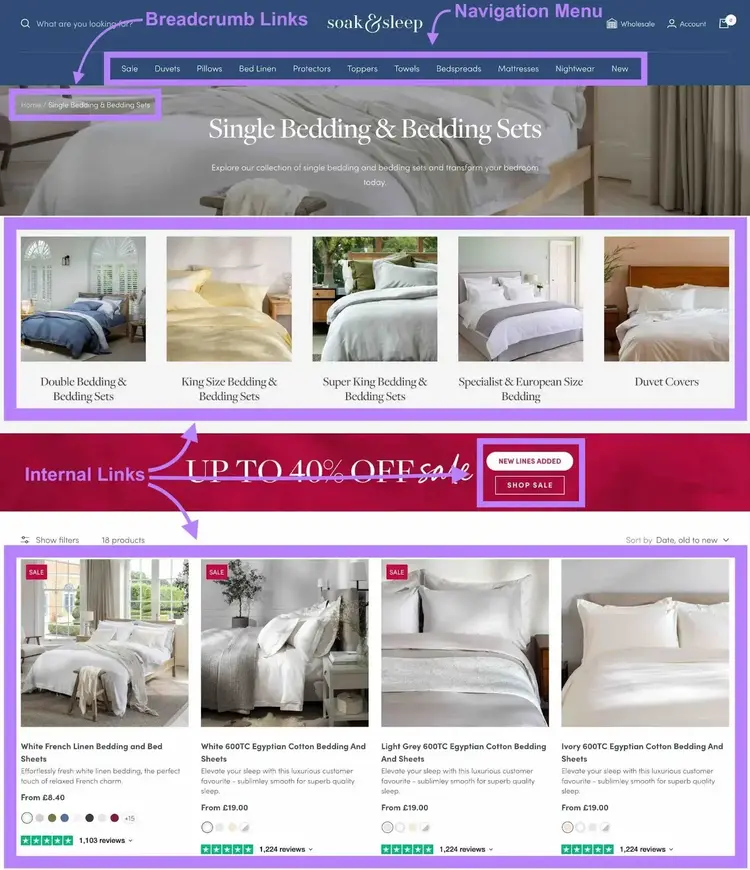
When creating internal links, youranchor text — the clickable words in your link — matters. So, use descriptive terms to help readers understand what they'll find on the linked page. (It also provides more helpful context about the page for search systems.)
When creating internal links, keep these best practices in mind:
- Place links where they naturally fit in your content
- Ensure linked pages are truly relevant and helpful
- Avoid linking to the same page many times on one page (in most cases)
- Link to your most important pages more often
- Keep the number of links reasonable — using too many can overwhelm readers
Blog posts offer excellent opportunities for internal linking. Because you can link to your previous articles when covering related topics. And you can link to relevant product pages when discussing what you offer in more informational content.
Tip
Add external links to your content as well. Linking out to high-quality informational resources can add credibility to your content and provide additional value for your readers.
10. Add engaging visual content
Visual content — images, videos, and infographics — makes your pages more engaging and easier to understand, which strengthens both the user experience and SEO performance.
Optimized visuals also give search systems valuable information about your page through properly implemented alt text and descriptive file names.
When adding images to your content:
- Choose visuals that reinforce your content's message. Screenshots, annotated examples, and original graphics add more value than stock photos.
- Add alt text to every meaningful image. Alt text is a written description in your page's code that helps search systems understand your image and assists visually impaired users (screen readers read this text aloud).
- Place images next to the text they support. This helps readers connect the visual to the explanation.
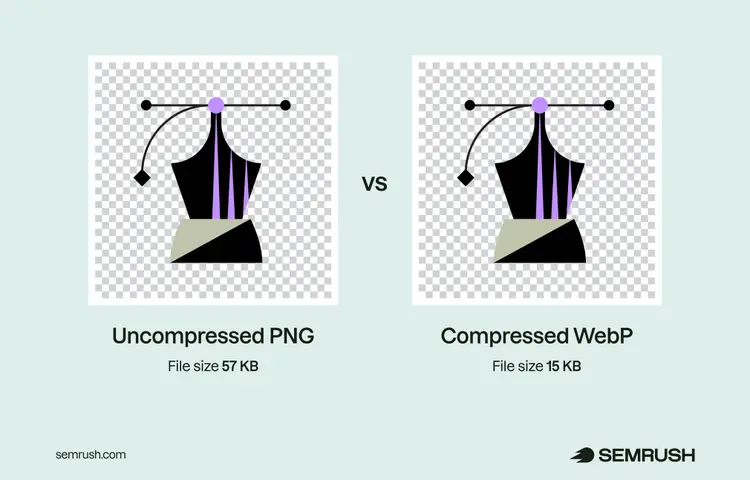
- Compress your images. Try tools like TinyPNG to keep your page loading quickly without sacrificing quality.
When adding videos to your content:
- Create video content that matches your page's purpose. Tutorials work well for how-to guides, while explainer videos suit concept-driven pages.
- Host your videos on YouTube and embed them from there. This keeps your page load times fast. And the video itself can rank separately on YouTube, giving you an additional visibility channel.
- Add captions to make your videos more accessible. Captions also provide additional context for search systems.
Pages with well-optimized visuals give AI models more information about your content, which improves your chances of being cited in AI-generated responses.
Learn more about image SEO and video SEO with our in-depth guides.
11. Apply schema markup
Add schema markup to help search engines better understand and display your content in results.
Schema markup (a type of structured data) is added to your page's HTML to give search engines more information about the different types of data on your page. And the better search engines can understand your page, the more likely they will be to show your content for relevant search terms.
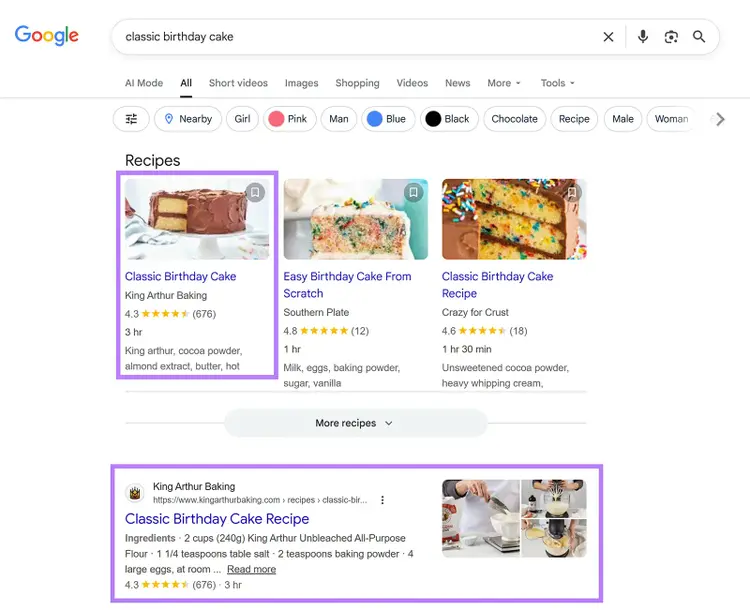
Google uses schema to create rich results, which are enhanced search listings that display extra details like ratings, prices, or event dates directly in search results. Like this:
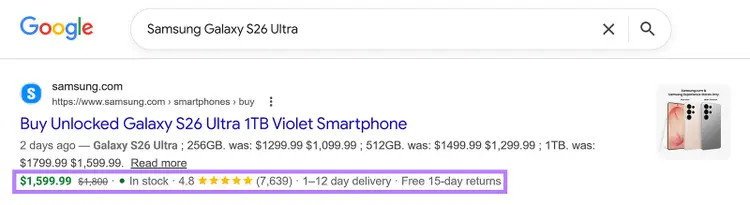
While schema isn't required to appear in AI Overviews, it does give clearer context about what your page is about, which can influence whether your content gets surfaced in AI-generated answers.
Google supports several types of schema markup, including:
- Article: For blog posts and news articles
- Product: For ecommerce pages with prices and availability
- Event: For dates, times, and locations
- Local Business: For address, hours, and contact details
- Recipe: For ingredients, cooking times, and ratings
For example, Recipe schema helps King Arthur Baking earn a valuable spot on the SERP. And gives users more information about the page's content, like ratings, time to make the recipe, and ingredients used.
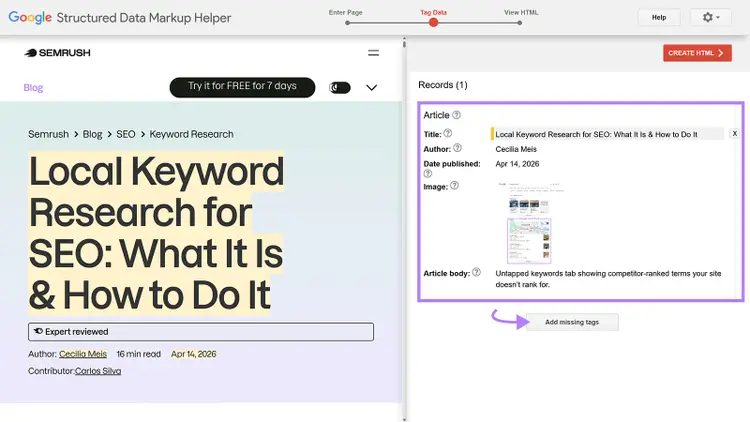
This is one of the more advanced tasks on this on-page SEO checklist. But Google does have a Structured Data Markup Helper that helps you add schema to your pages.
Learn more in our guide to structured data.
Ecommerce sites should also keep an eye on new protocols designed for AI-driven product discovery, like the Universal Commerce Protocol (UCP) and Agentic Commerce Protocol (ACP). The goal is to make product catalogs, pricing, and availability directly readable by AI agents that shop on behalf of users.
BONUS: Start on your technical SEO
While technical SEO is different from on-page SEO, you need both to perform well in search.
You can read our in-depth guide to technical SEO for more info. But here are three quick ways to get started:
12. Ensure robots.txt allows crawlers to access your pages
Make sure your robots.txt file isn't accidentally blocking crawlers from accessing your pages.
Your robots.txt file tells crawlers (computer programs created by search engines and AI platforms) which parts of your site they should or shouldn't access.
A properly configured robots.txt file ensures your key pages get crawled, indexed, and made available to both search results and AI-powered search experiences.
To check your robots.txt file, go to "yourdomain.com/robots.txt" in your browser.
Look for rules that might be blocking important crawlers. For example, pay attention to something like this:
User-agent: GooglebotDisallow: /
The above entry is telling Googlebot to avoid accessing your entire site. This means your pages won't appear in Google's search results at all — even if everything else on this checklist is perfect.
AI crawlers like OAI-SearchBot and PerplexityBot are equally important. Blocking them means your content won't appear in those platforms' answers when searchers are using the web search mode.
Review your robots.txt file carefully and remove any disallow rules that might be blocking crawlers you actually want visiting your site. This is one of the most common technical issues that undermines on-page SEO work.
13. Increase page speed
Page speed directly impacts both search rankings and the user experience.
Fast-loading pages can reduce bounce rates, keep prospective customers on your site, and improve your business's bottom line.
If a user clicks through from an AI-generated answer and your page takes too long to load, you could lose the visit that AI visibility earned you.
Things that could slow down your page speed include:
- Redirect chains
- Unoptimized images or media files
- Render-blocking JavaScript
In our study of 50,000 domains for our technical SEO checklist, we found that around 35% of those domains had speed issues. This was one of many technical SEO problems we found affecting a significant portion of websites.
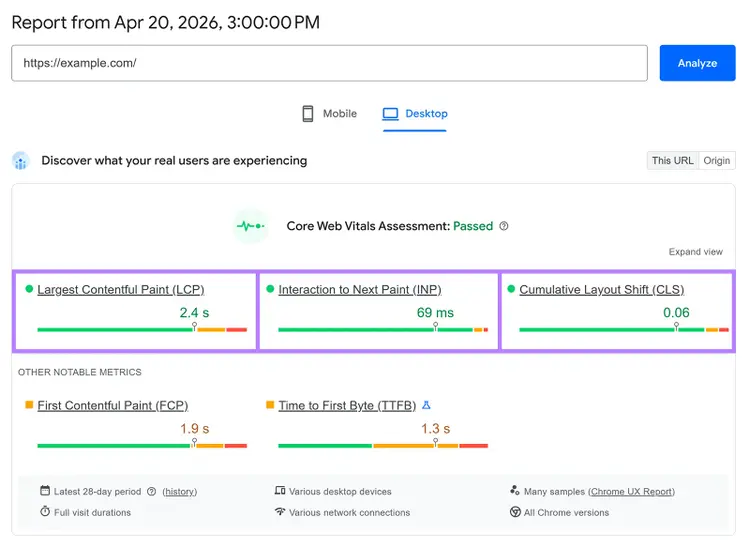
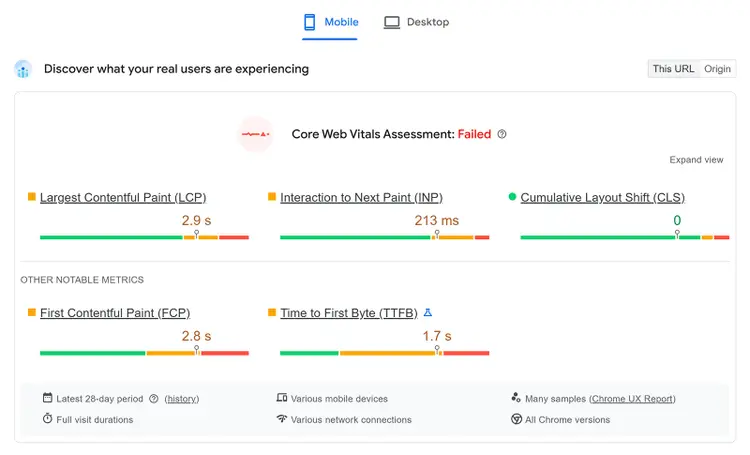
Check your page speed in Google's PageSpeed Insights tool. Just enter your page's URL and click "Analyze."
Then look at your "Core Web Vitals Assessment" (on both "Mobile" and "Desktop") to see whether you passed. Core Web Vitals are key user experience metrics.
The three Core Web Vitals are:
- Largest Contentful Paint (LCP): The time it takes for the main content of the page to load
- Interaction to Next Paint (INP): The time between a user's interaction and the page's next visual update
- Cumulative Layout Shift (CLS): A measure of unexpected layout movements that occur during loading
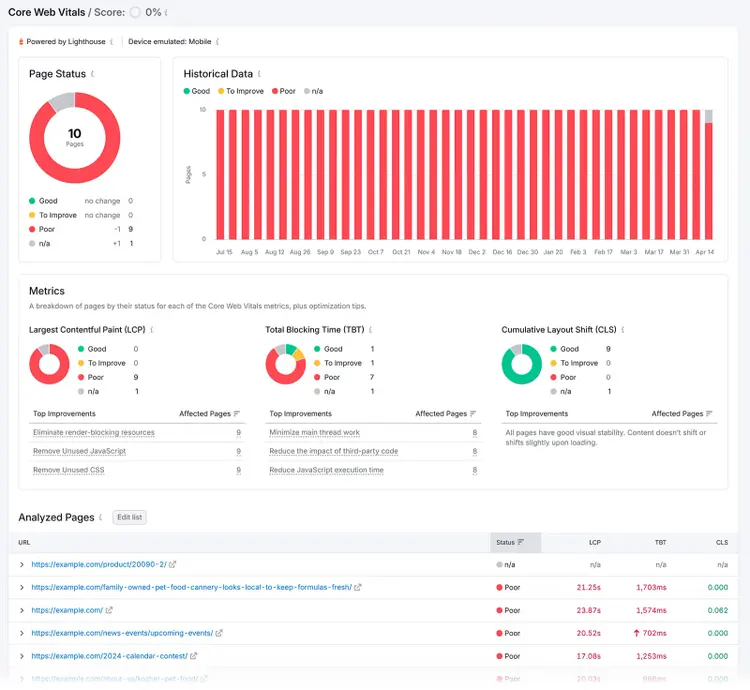
Semrush Site Audit has a Core Web Vitals report that analyzes up to 10 pages per crawl. (Note that, as INP requires user interaction data, Site Audit uses TBT instead.)
14. Make sure your pages are mobile-friendly
Google predominantly evaluates and ranks your content based on the mobile version of the page.
That means the mobile version is also what AI systems pulling from Google's index use. So, a strong mobile experience improves your chances of being cited in both traditional and agentic search.
Here are three quick tips for making your website mobile-friendly:
- Use a responsive design. This ensures your website works just as well on mobile as it does on desktop.
- Create mobile-friendly content. To cater to smaller screen sizes, use short sentences and paragraphs to make your content easier to read
- Make sure all your buttons and menus work properly. Make sure your buttons are easily tappable and that your menus are easy to navigate.
Improve your on-page SEO today
On-page SEO is key for staying visible in both traditional search and agentic search experiences.
Optimizing your pages is easy with Semrush’s On Page SEO Checker. It compares your pages against your competition and provides actionable recommendations, so you easily prioritize fixes.
Try the On Page SEO Checker today.
Get optimization ideas
with the On Page SEO Checker

Carlos Silva leads the editorial pipeline for the English blog—coordinating writers, editors, strategy, and building AI workflows that boost content quality and AI visibility. With 10+ years of experience writing and editing across in-house and agency roles, Carlos blends content strategy, SEO, and AI to help marketers stay ahead of an evolving search landscape.
Carlos Silva
Carlos Silva leads the editorial pipeline for the English blog and builds AI workflows that boost content quality and AI visibility. 10+ years writing and editing across in-house and agency roles.

Tells Google to show you more from Semrush in AI, Search, and Discover.
Table of contents
-
Your complete on-page SEO checklist
- 1. Identify target keywords
- 2. Optimize the title tag
- 3. Use an H1 tag for your headline
- 4. Write a meta description that boosts clicks
- 5. Check the URL slug for SEO-friendliness
- 6. Add target keywords to your body content
- 7. Review your content quality
- 8. Structure your content thoughtfully
- 9. Improve navigation with internal links
- 10. Add engaging visual content
- 11. Apply schema markup