Click-through rate (CTR) is the percentage of people who click on a link after seeing it. It measures how effectively your content captures attention and drives action across digital marketing channels.
CTR is a helpful metric across channels, whether you're running Google Ads, sending email campaigns, posting on social media, or optimizing webpages for search engines.
A higher CTR indicates many people find your content relevant and compelling enough to take the next step.
For example, if 1,000 people see your Facebook ad and 50 people click on it, your CTR is 5%.
This same calculation works for email links, Google search results, display banners, and any other clickable content.
Why Is Click-Through Rate Important?
Click-through rate is important because it directly impacts your marketing ROI and campaign performance across many channels.
A higher CTR means more people are engaging with your content, leading to increased traffic, conversions, and revenue.
However, achieving high CTRs has become increasingly challenging as internet users see thousands of ads every day and often ignore them.
Modern consumers have developed "banner blindness" and are more selective about which content they engage with, making it harder to capture attention across all digital channels.
Still, CTR is still an important metric to track.
Here’s why:
First, CTR affects your advertising costs.
Platforms like Google Ads and Facebook reward high-CTR ads with lower costs per click and better ad placements. This creates a positive feedback loop where engaging content becomes more affordable to promote, while poor-performing ads get penalized with higher costs.
Second, CTR may serve as a user engagement signal for some forms of organic search.
While Google hasn't confirmed CTR as a direct ranking factor, pages with higher-than-expected click rates often see improved search visibility over time. This suggests some search engines may use engagement metrics to evaluate content quality.
Low click rates signal a disconnect between your messaging and audience expectations, allowing you to fix headlines, images, or targeting before wasting budget on unengaging content.
Monitoring your performance against industry benchmarks helps you identify opportunities to outperform competitors and capture more market share from the same audience pool.
How to Calculate Click-Through Rate
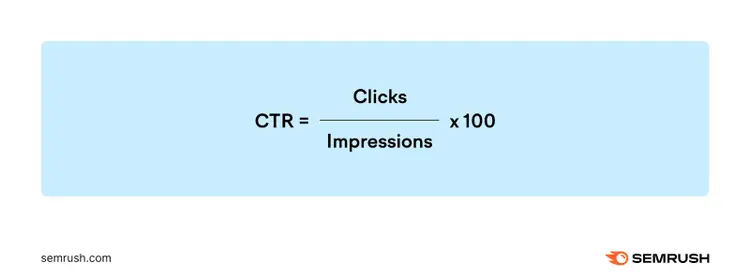
Click-through rate is calculated by dividing clicks by impressions and multiplying by 100 to get a percentage.
The CTR formula is:
CTR = (Clicks / Impressions) × 100
Here's how this works in practice:
Let's say your Google Ad received 2,500 impressions and generated 125 clicks. Your CTR calculation would be:
CTR = (125 ÷ 2,500) × 100 = 5%
This same formula applies across marketing channels.
For an email campaign with 10,000 recipients where 800 people clicked your link, your CTR is 8%.
For a social media post seen by 5,000 people with 150 clicks, your CTR is 3%.
Most advertising platforms and analytics tools calculate CTR automatically.
You'll find this metric in Google Ads, Facebook Ads Manager, Google Analytics, and email marketing platforms like Mailchimp. The calculation remains consistent regardless of the platform or channel.
When tracking CTR manually, make sure you're measuring the same time period for both clicks and impressions.
A click that happens days after an impression can skew your results if the timeframes don't align.
CTR vs. Conversion Rate: What's the Difference?
CTR measures how many people click your ad or website, while conversion rate measures how many of those clicks turn into sales or leads (or some other desired action).
A high CTR means your listing captures attention effectively. But conversion rate shows whether visitors actually take the action you want—like making a purchase, signing up for a newsletter, or downloading a resource.
For example, your ad might have a 10% CTR but only a 1% conversion rate.
This means 100 people clicked your ad out of 1,000 who saw it, but only one person actually bought something.
Both metrics matter for campaign success.
CTR gets people to your website, while conversion rate determines your actual business results.
You need strong performance in both areas to maximize your return on investment. This is why focusing only on CTR can be misleading.
High click-through rates don't guarantee sales if your landing page, offer, or targeting won’t match visitor expectations.
What Is a Good Click-Through Rate?
A good click-through rate generally falls between 2% and 5% based on my experience managing digital marketing campaigns, but this varies significantly by industry, platform, and campaign goals.
What counts as "good" for a B2B software company will differ dramatically from an e-commerce retailer or local restaurant.
Your channel also determines realistic CTR expectations.
For example, email campaigns typically see higher CTRs (around 2-5%) than display ads (often below 1%). That’s likely because email subscribers have already expressed interest in your brand.
And Google Ads may perform better than Facebook Ads because searchers may be actively looking to buy something when they search.
Instead of chasing arbitrary numbers, focus on these context-specific benchmarks:
Industry comparisons: Research average CTRs within your specific sector using resources like Google's official benchmarking tools or industry publications like Search Engine Land. Legal services ads might average 3-4%, while dating apps could see 8-10% on social platforms.
Historical performance: Your own past campaigns provide the most relevant baseline. A 3% CTR might be excellent if your previous average was 1.5%.
Channel-specific goals: Optimize for your platform's norms. A 3% CTR on email newsletters could indicate compelling content and calls-to-action, while the same rate on display ads would be exceptional.
Campaign objectives: Brand awareness campaigns typically see lower CTRs than retargeting campaigns because they target people who haven't heard of your brand yet, while retargeting shows ads to people who already visited your website.
The key is consistent improvement over time rather than hitting specific numbers. A steady upward trend in your CTR indicates better audience targeting, messaging, and creative optimization.
When High CTR Can Be Problematic
High click-through rates aren't always good for your business.
A CTR that's too high for your goals can waste budget, attract unqualified visitors, and hurt your overall campaign performance.
This happens when your messaging appeals to a broader audience than your actual target market.
For example, a luxury watch brand running ads with the headline "Best Watches Under $50" could get a high CTR from bargain hunters.
But these clicks won't convert because the actual products cost thousands of dollars.
The key is balancing CTR with other performance metrics like conversion rate, cost per acquisition, and return on ad spend to ensure your high click rates actually drive business results.
Click-Through Rate for Organic Search
Organic search CTR works differently from paid advertising because users aren't responding to targeted ads—they're choosing from a list of search results based on relevance and appeal.
Unlike paid campaigns where you control targeting and budget, organic CTR depends entirely on how compelling your page appears in search results compared to other listings on the same page.
Your search position is the biggest factor affecting organic CTR.
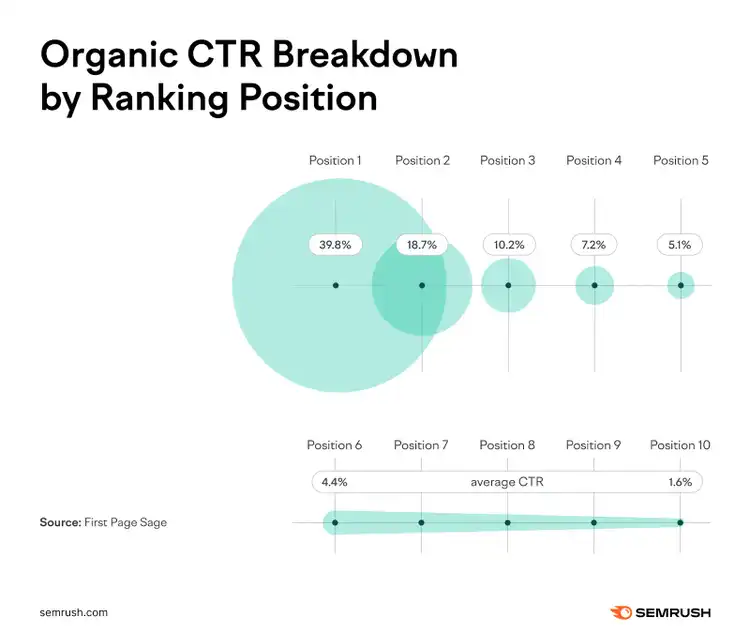
The top position averages a 39.6% CTR, while the second position drops to 18.4%, and the third position falls to 10.1%, according to a First Page Sage study of over 4 million search results.
Here's how organic CTR typically breaks down by position:
Position 1: 39.8% average CTR
Position 2: 18.7% average CTR
Position 3: 10.2% average CTR
Position 4: 7.2% average CTR
Position 5: 5.1% average CTR
Positions 6-10: 4.4% to 1.6% average CTR
These numbers change based on industry and search type.
For example, branded searches see much higher CTRs across all positions, while informational queries might have lower overall click rates because users find answers directly in search features.
Why Organic CTR Matters for SEO
While Google hasn't confirmed CTR as a direct ranking factor, pages that get higher-than-expected rates often see improved search visibility over time.
This correlation suggests user engagement signals, including CTR, may influence how search engines evaluate content quality.
More importantly, organic CTR directly impacts your website traffic and conversions.
A page ranking #3 with optimized title tags and meta descriptions might capture more clicks than a #2 result with poor SERP presentation.
Key Differences from Paid CTR
There are several key differences between organic CTR and paid CTR that affect how you approach optimization.
Understanding these differences can help you set realistic expectations and choose the right strategy.
No cost per click: Every organic click is free, making higher CTRs purely beneficial
Position dependency: Your ranking position heavily influences maximum possible CTR
Limited control: You can't directly target specific audiences—optimization focuses on search result appearance
Broader competition: You're competing against all other websites and content types in search results, not just other advertisers with similar budgets
With organic CTR optimization, your goal is maximizing clicks from your current position while working to improve rankings through SEO.
How to Find and Track CTR
Finding and tracking your CTR is important for understanding how your content is performing and identifying opportunities for optimization.
The tools and methods you use depend on whether you're measuring organic search results or paid campaigns.
Tracking Organic CTR
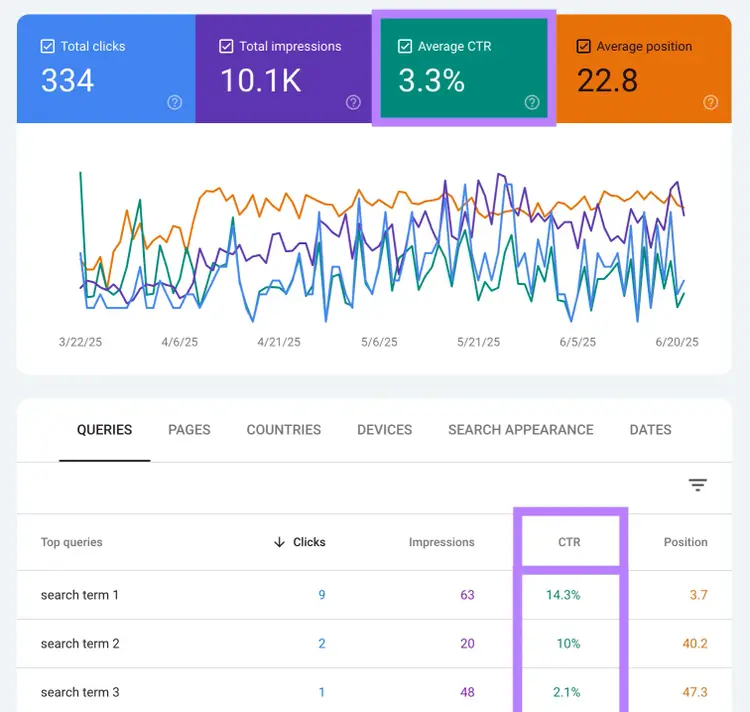
Google Search Console (GSC) is the primary tool for tracking organic CTR because it shows exactly how your pages perform in Google search results.
To access your organic CTR data:
Open GSC and select your website property
Go to “Search results” under "Performance" in the sidebar
Click “Average CTR” to see CTR data alongside impressions, clicks, and average position
The Performance report shows CTR for individual pages, queries, and time periods.
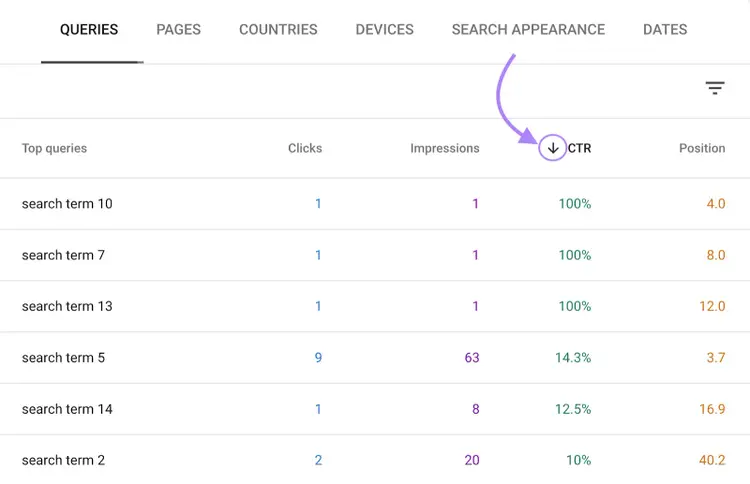
You can filter by specific pages to see which content gets the highest click rates. Or sort by queries to identify keywords where your CTR is below average for your ranking position.
Pay attention to pages with high impressions but low CTR—these often represent the biggest optimization opportunities.
A page with 10,000 impressions and 2% CTR could double its traffic by improving to 4% CTR through a better title tag and meta description—these elements often appear as your page's headline and snippet in search results, directly influencing whether people click.
Tracking Paid CTR
Most advertising platforms calculate and display CTR automatically within their native dashboards, making paid CTR tracking more straightforward than organic measurement.
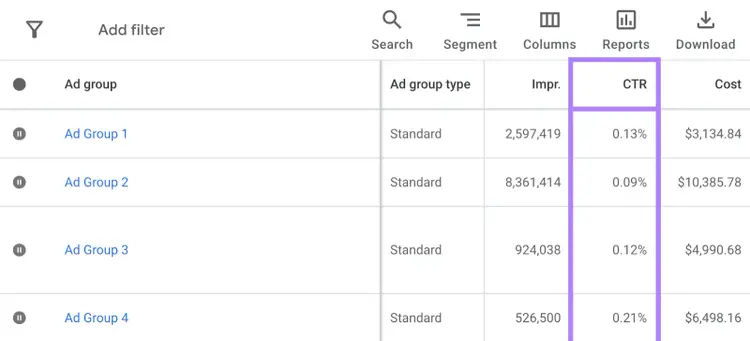
Google Ads:
Sign into your Google Ads account
Navigate to "Campaigns," "Ad groups," or "Ads & extensions"
View CTR in the performance table alongside impressions, clicks, and cost data
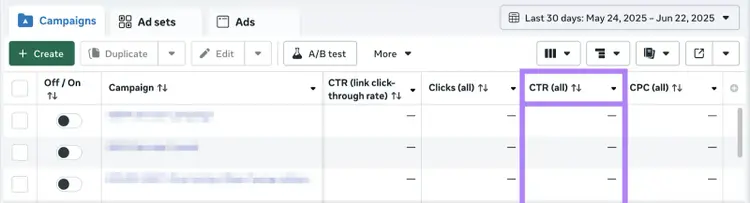
Facebook Ads Manager:
Access Ads Manager and select your campaign
Go to the "Columns" dropdown and ensure CTR (all) is selected
View CTR data at the campaign, ad set, or individual ad level
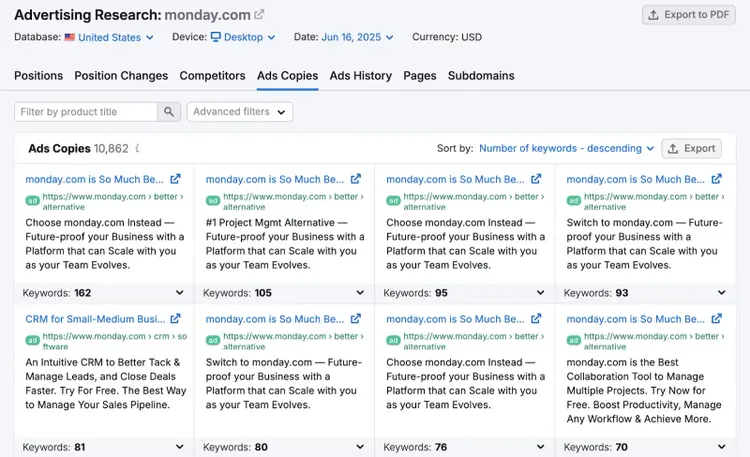
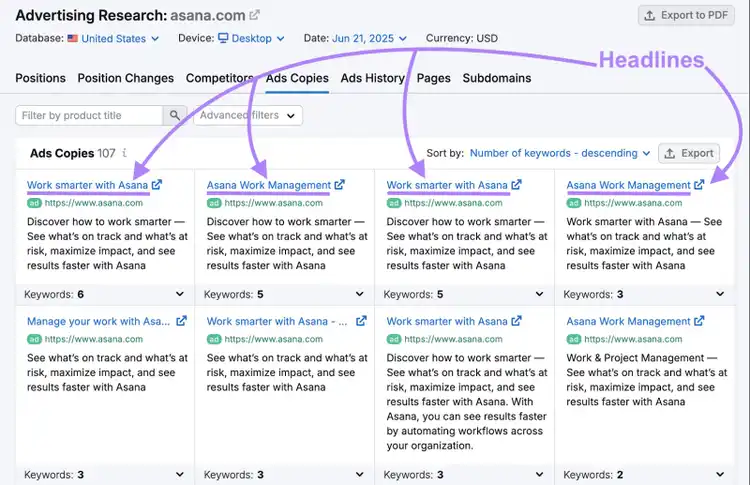
You can also use Advertising Research to analyze competitors' ad copy and see which headlines and messaging strategies they use most frequently in your industry.
Enter any competitor's domain and head to the "Ads Copies" tab to see their most frequently used headlines and descriptions.
This competitive intelligence helps you understand what messaging drives clicks in your market.
Key paid CTR metrics to track include:
CTR by campaign: Shows which campaign themes perform best
CTR by ad group: Identifies top-performing audience segments or keywords
CTR by individual ad: Reveals which specific copy and creative combinations work
CTR by device: Helps optimize mobile vs. desktop performance
CTR trends: Monitors performance changes and ad fatigue over time
Review paid CTR data daily or weekly depending on campaign spend and goals. High-budget campaigns require more frequent monitoring to catch performance drops quickly.
How SERP Features Impact CTR
SERP features like featured snippets, People Also Ask boxes, and local packs can reduce your organic click-through rates. They often give users answers directly on the search page, so people don't need to click your website.
When Google shows information right in the search results, fewer clicks go to traditional organic listings.
Common SERP Features That Reduce CTR
These SERP features can pull clicks away from your organic results:
Local packs: Map listings with business info for location searches
Knowledge panels: Info boxes about businesses, people, or topics
Image carousels: Visual results for image-based searches
Video thumbnails: Embedded video previews from YouTube and other platforms
These features can create "zero-click searches"—search engine users get their answer without visiting any website.
The impact depends on your query type.
Informational searches tend to see the biggest CTR drop because users typically just need quick facts. Commercial and navigational searches keep higher click rates since users typically want to visit specific websites.
How to Compete With SERP Features:
You can't remove SERP features, but you can still win clicks:
Optimize for featured snippets. Structure your content to answer common questions clearly and win the featured snippet for yourself—this can actually increase your visibility above the #1 organic result.
Target long-tail keywords. Less competitive searches may have fewer SERP features.
Focus on branded searches. When people search for your company name specifically (like "Nike" or "Starbucks"), Google typically shows fewer competing features because users clearly want to visit that particular website. This means higher click-through rates for your own brand-related pages.
Write compelling title tags. Make your listing the most clickable option, even if you're not #1.
You can still earn clicks by being the most relevant result below the SERP features.
AI Search Features and Their Impact on CTR
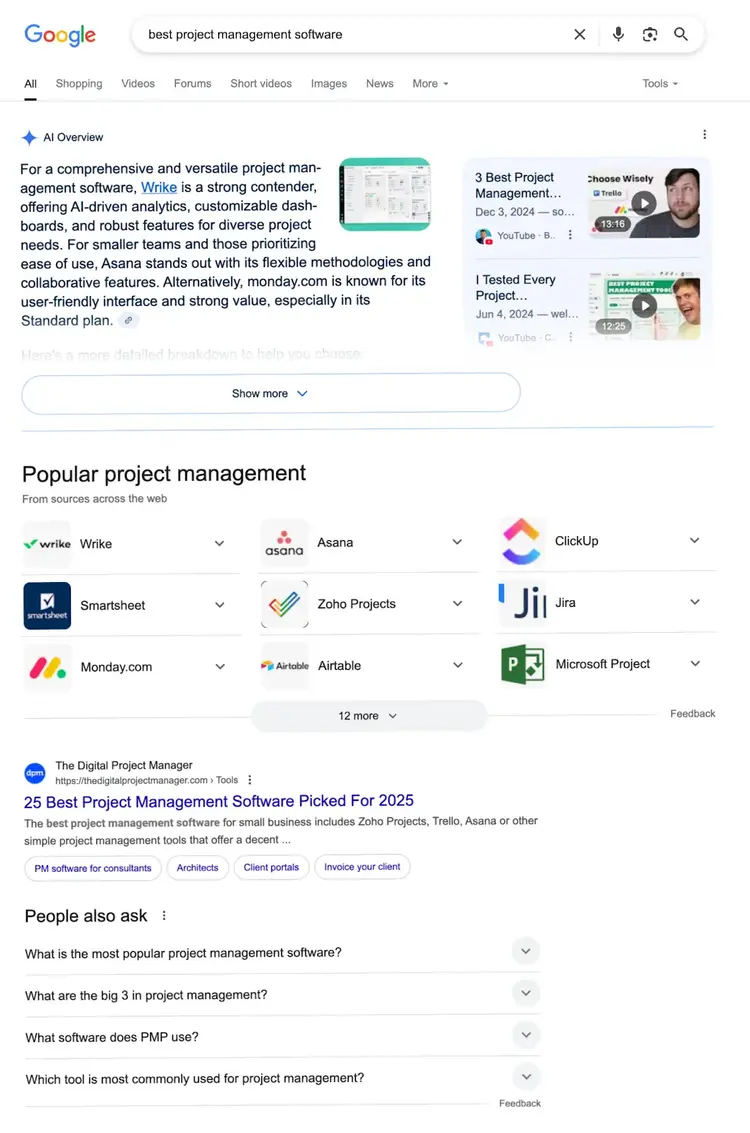
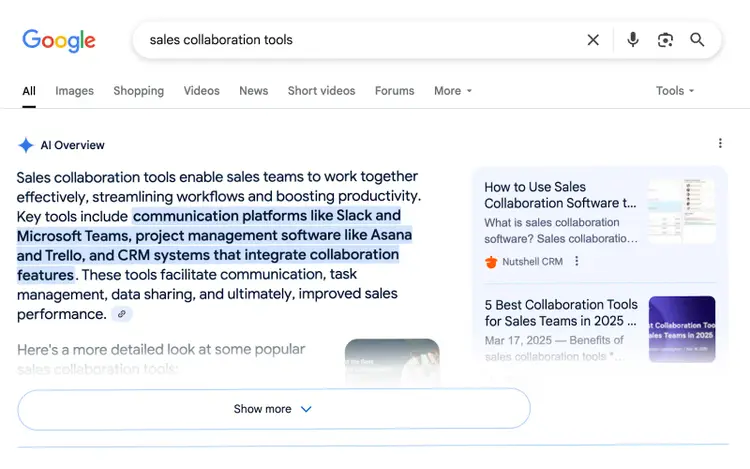
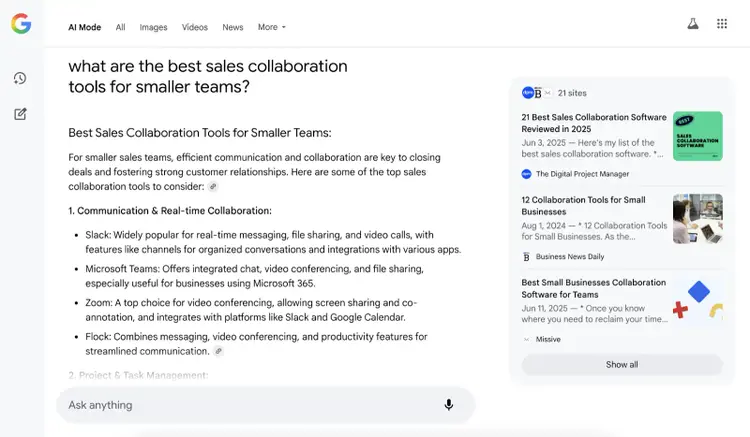
AI search features like Google's AI Overviews and AI Mode will likely reduce your organic click-through rates because they create answers to search queries directly in search results.
Unlike featured snippets that show one source, AI systems combine information from multiple websites to build new answers.
This means users often get what they need without clicking through to any single site.
How AI Search Features Affect Your CTR
AI Overviews appear across many query types and can significantly reduce your organic clicks when they show up.
AI Mode breaks complex searches into smaller queries and combines everything into one comprehensive answer.
This often reduces clicks even more because users get thorough responses without visiting multiple sites.
Informational searches usually see the biggest CTR drops. If someone searches "what is click through rate," they might get a complete answer from AI without clicking your article.
Commercial searches may keep higher CTRs because people still need to visit websites to compare products, read reviews, or make purchases.
How to Maintain CTR in the AI Era
Focus on content that drives clicks even when AI answers appear:
Target action-oriented keywords. "CTR calculator," "free CTR tracking template," and "Google Ads CTR setup guide" still generate clicks because users need to access actual tools, download resources, or follow platform-specific steps that AI can't provide directly.
Create unique tools and resources. Build CTR calculators, templates, or dashboards that AI can't replicate.
Write compelling meta descriptions. Even if AI answers appear above you, make your listing irresistible to click.
Optimize for branded searches: "Semrush CTR guide" will likely have higher click rates than generic terms.
The goal isn't fighting AI features—it's positioning your content to capture clicks when users need more than just information.
6 Tips to Improve Click-Through Rate
These six strategies will help you boost your CTR across all marketing channels, from paid ads to organic search results.
1. Write Compelling Headlines and Copy
Compelling headlines and copy are the highest-impact elements for improving CTR because they determine whether people click before reading anything else.
These elements vary by channel but serve the same purpose—capturing attention and communicating value:
Search results: Title tags and meta descriptions
Email campaigns: Headlines, body copy, and call-to-action button text within the email
Paid ads: Ad headlines, descriptions, and display URLs
Social media: Post headlines, captions, and link previews
Display advertising: Banner headlines, supporting copy, and CTAs
Your headlines and copy should clearly communicate value and address your audience's specific needs, regardless of which channel you're optimizing.
Here are three approaches that consistently drive higher clicks:
Focus on benefits over features. Replace "Premium software solutions" with "Cut project time in half with our task automation." Show readers what they'll gain.
Include specific numbers and social proof. "Why 10,000+ marketers choose our platform" combines credibility with specificity, while "Save 3 hours daily" quantifies the benefit.
Keep language clear and scannable. Avoid jargon or clever wordplay that might confuse readers scrolling quickly through search results, emails, or social feeds.
Remember you can use the “Ads Copies” tab in Advertising Research to understand which headline strategies work best in your industry.
You’ll see the exact headlines and CTAs they use most frequently.
Do this for several competitors.
Analyze their highest-performing ads to identify patterns—like whether they emphasize urgency, social proof, or specific benefits—and adapt these to your own campaigns.
2. Target and Personalize for Your Audience
Personalized content generates higher CTRs because it speaks directly to specific audience segments rather than trying to appeal to everyone.
When you match your messaging to your audience's characteristics and context, you create relevance that generic content can't achieve.
Follow these three personalization strategies to boost engagement:
Segment by audience characteristics. Create different messaging for different groups. A fitness app might use "Get Beach Ready" for younger users and "Stay Active After 50" for older audiences.
Use location and contextual targeting. Include specific elements like "Chicago Businesses Save 30%" in ads or "Local Weather Alert for [City]" in email subject lines.
Match timing to audience behavior. For example, schedule B2B content during business hours and entertainment content during evening hours when your audiences are most receptive.
Tip
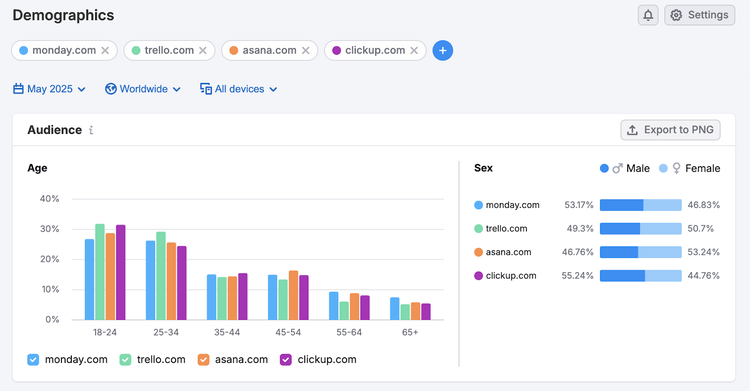
To learn more about your (or your competitors’) audience, use our Demographics tool to see insights like age, gender, geographic distribution, and more.
3. Use Strong Visual Elements
Strong visual elements grab attention and communicate your message instantly before users read your copy.
Choose images that directly relate to your content's benefit rather than generic stock photos, whether in ad creatives, email headers, or blog featured images.
Here are three visual strategies that capture attention:
Choose relevant, benefit-focused images. A project management tool should show organized dashboards or productive teams, not people shaking hands. Your visuals should reinforce the specific problem you solve.
Use contrasting colors and clear focal points. Bright colors against neutral backgrounds or compelling product shots help your content stand out as users scroll through feeds, scan emails, or browse search results.
Ensure mobile optimization. Because most users view content on mobile devices, your images must look crisp and clear on smaller screens across all channels.
4. Test and Optimize Continuously
Continuous testing reveals which elements drive higher CTRs by comparing different versions of your content with one key variable changed.
This data-driven approach eliminates guesswork and helps you optimize based on actual user behavior rather than assumptions.
Apply these three testing fundamentals to deliver reliable results:
Test one element at a time. Compare two headlines, two images, or two calls to action, but avoid changing multiple variables simultaneously. This isolation lets you identify exactly which change improved your CTR.
Focus on high-impact elements first. Headlines typically have the biggest influence on CTR, followed by images and call-to-action elements. Start with headline variations before testing smaller details
Run tests for statistical significance. Allow each variation to receive sufficient data before drawing conclusions. I recommend at least 100 clicks for ads or 1,000 opens for emails to get meaningful results. Apply winning insights across your campaigns to compound improvements over time.
5. Optimize for SERP Features (Organic-Specific)
SERP features can steal your clicks, but you can also use them to increase your visibility and capture more traffic from organic search results.
Instead of just competing against other websites, optimize your content to appear in the SERP features themselves.
Here are three ways to leverage SERP features for higher organic CTR:
Structure content for featured snippets. Use clear question-and-answer formats with concise 40- to 60-word answers. For example, follow "How to calculate click-through rate?" with "Calculate click-through rate by dividing clicks by impressions and multiplying by 100."
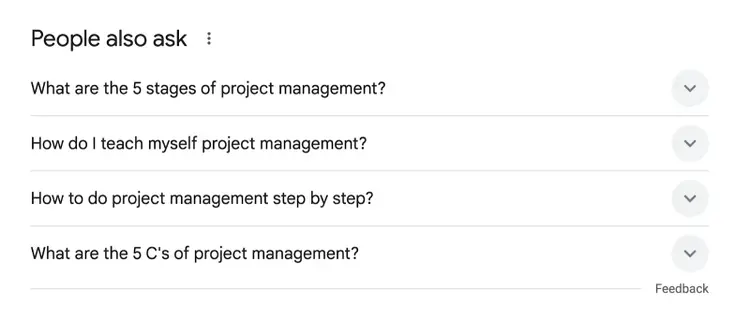
Target “People Also Ask” opportunities. Research related questions using the “questions” filter in Keyword Magic Tool. Or check Google's "People Also Ask" section directly. Create dedicated H3 sections that answer each question completely.
Optimize for AI citation and linking. Structure your content in clear, quotable chunks that AI systems can easily extract and cite. Use short paragraphs (2-3 sentences), include specific data points, and start sections with definitive statements. When AI features cite your content, they often include links back to your page, driving qualified clicks.
Pro tip
Use Position Tracking to monitor when your pages start appearing in SERP features. Track both traditional rankings and featured snippet appearances to measure the full impact on your organic visibility.
6. Monitor and Adapt to AI Search Changes
AI search features change regularly, and your CTR optimization strategy needs to evolve with them.
Regular monitoring helps you identify when AI features start affecting your click rates and adjust your content accordingly.
Use these three monitoring practices to stay ahead of AI search changes:
Monitor search result layouts. Monitor your GSC data weekly for sudden CTR decreases. If you see drops coinciding with new AI features, analyze which pages are most affected and look for patterns—like whether informational content drops more than transactional pages—then adjust your content strategy to focus on the less-affected content types.
Test different content angles. When AI answers cover basic information, pivot your content to focus on implementation, tools, or advanced strategies. For example, if AI easily explains "what is CTR," create content about a related but helpful angle, such as "CTR optimization mistakes to avoid."
Monitor search result layouts. Google your target keywords monthly to see how SERP layouts change. Screenshot key search results to track when new AI features appear and how they affect click distribution. Then, adjust your strategy—for example, if AI Overviews start dominating broad terms like "project management," pivot to more specific keywords like "project management for remote teams."
Maximize Your Click-Through Rates
Start improving your CTR today by focusing on one high-impact element: your headline elements—whether that's title tags for search results, ad headlines for paid campaigns, or call-to-action copy for emails.
Whether you're writing ad copy, email subject lines, or page titles, benefit-focused headlines typically deliver the biggest CTR improvements with the least effort.
Begin by auditing your current headlines across all channels.
Replace feature-focused language with specific benefits your audience will gain. Then test variations to see which approach resonates most with your target market.
Track your progress by monitoring CTR trends over time rather than chasing specific benchmarks.
A consistent upward trend indicates better audience targeting and messaging optimization, regardless of your starting point.
To understand what's working in your industry, analyze your top competitors' most successful campaigns.
Tools like Advertising Research can show you which headlines and messaging strategies drive the highest engagement in your market, giving you proven frameworks to adapt for your own content.
Carlos Silva leads the editorial pipeline for the English blog—coordinating writers, editors, strategy, and building AI workflows that boost content quality and AI visibility. With 10+ years of experience writing and editing across in-house and agency roles, Carlos blends content strategy, SEO, and AI to help marketers stay ahead of an evolving search landscape.
Subscribe to learn more about On-page SEO
Subscribe
By clicking “Subscribe” you agree to Semrush Privacy Policy and consent to Semrush using your contact data for newsletter purposes
Carlos Silva
Carlos Silva leads the editorial pipeline for the English blog and builds AI workflows that boost content quality and AI visibility. 10+ years writing and editing across in-house and agency roles.
Share
Tells Google to show you more from Semrush in AI, Search, and Discover.