
How to Do a Backlink Audit (5 Simple Steps)
What Is a Backlink Audit?
A backlink audit is the process of analyzing the quality, quantity, and relevance of links pointing to your website.
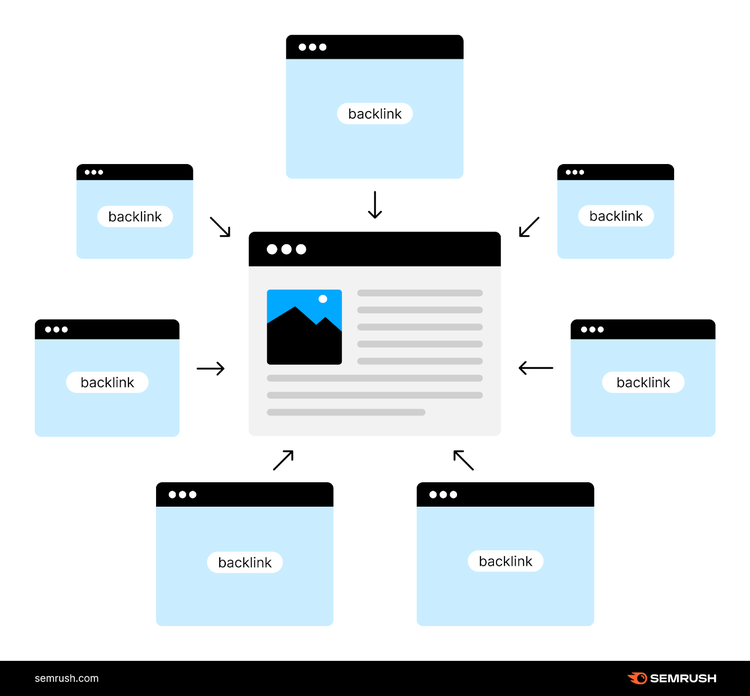
A comprehensive link audit can give you a gold mine of information that can greatly impact your SEO and backlink strategy.
So you can build better links and beat your competitors by outranking them in search results.
In this article, we’ll run through a simple backlink audit process you can replicate for your own site.
Note: We’ll be using Semrush’s Backlink Audit, Backlink Checker, and Link Building Tool for this entire process. Semrush tools have the biggest backlink database on the market.
Let’s get started.
Access Your Backlink Data & More
in One Platform with Semrush
1. Benchmark Your Backlink Profile Against Competitors
This step is a must. Comparing yourself to your competitors can give you a lot of valuable insights and answer important questions like:
- Do you have more backlinks and referring domains than your competitors?
- What does your link acquisition rate look like compared to your competitors?
- What’s your Authority Score? How does it compare to your competition?
All of this matters.
Because the stronger your backlink profile is, the better you’ll end up ranking in search results. Which can translate to more traffic to your site.
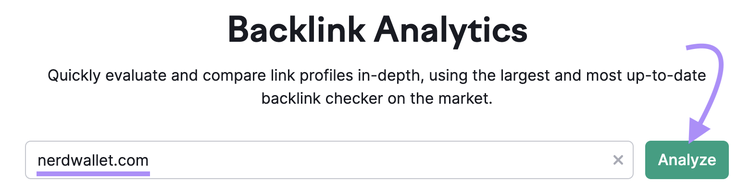
To start your analysis, go to the Backlinks tool. Enter your domain name and click “Analyze.”
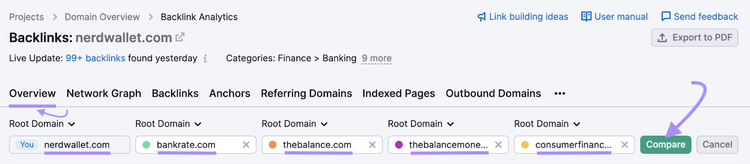
Then, in the “Overview” tab, enter some of your competitors’ domains and click “Compare.”
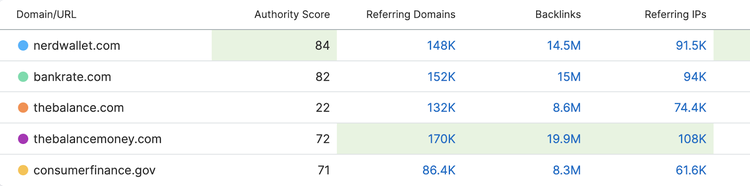
You’ll find lots of data points to see whether you’re trending in the right direction with your link building strategy.
What You Should Analyze
In the “Overview” tab, review the:
- Backlinks, Referring Domains, and Referring IPs: To estimate how big your backlink footprint is compared to the competition. Generally, the higher the numbers, the stronger your backlink profile is.
- Authority Score: To determine the quality of your website. This quality is measured on a scale from 1 to 100. The higher the number, the better quality the domain is.
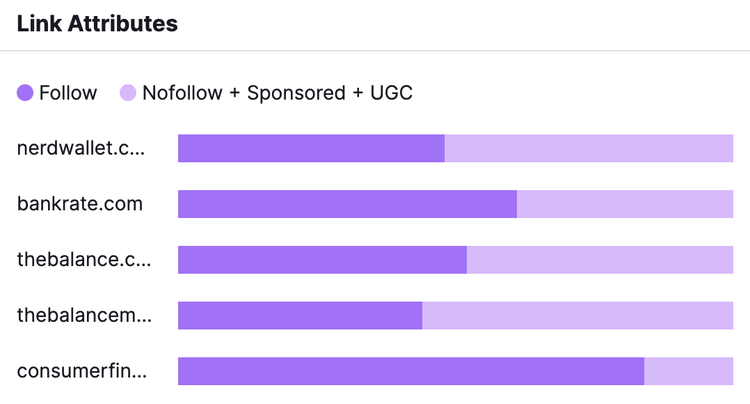
- Link Attributes: To identify linking patterns and see what proportion of your links are “follow” and nofollow. “Follow” links influence your rankings because they transfer link equity, but nofollow links don’t. So, you want to prioritize building “follow” links.
- Referring Domains: To find out whether your referring domains are growing consistently. Or whether your referring domains growth is stagnant. And see how your growth compares to your competition.
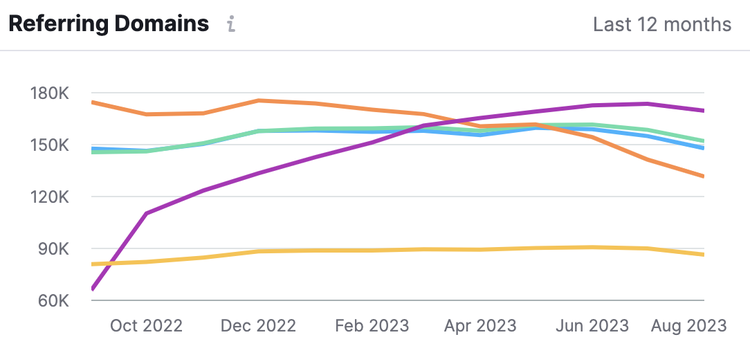
The analysis above should reveal strengths you can capitalize on and weaknesses you’ll want to overcome.
For example, if you notice your link growth is stagnant and your competitors have more backlinks than you, then start building links.
Read our full guide on link building strategies to learn how.
Get Insights on Backlink Profiles
with the Backlinks Tool
2. Find and Evaluate Each Backlink You Have
Now that you know how your backlink profile stacks up against your competition, it’s time to dig deeper and analyze each link individually.
Why?
Some backlinks are more beneficial than others. And if you have a lot of low-quality backlinks, they’re not going to move the needle for your site.
Or worse, they could trigger a manual action penalty from Google (meaning some or all of your pages won’t appear in search results). Especially if your site was involved in any link spam (links intended to manipulate organic rankings).
You can use Semrush Backlink Audit tool to analyze your backlinks.
First, start a project, configure the tool, and click “Start Backlink Audit.”
Once the audit is complete, you’ll see a detailed report. Like this:
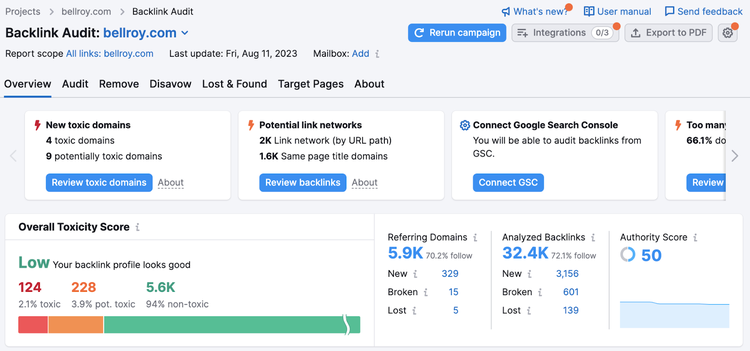
What You Should Analyze
In the “Overview” tab, look at the:
- Overall Toxicity Score: To see whether you have a high score, meaning there are too many low-quality links pointing to your website
- Analyzed Backlinks: To find out whether the number is higher than what you expected it to be, which could indicate a negative SEO attack. In most cases, you don't need to do anything. Google is pretty good at ignoring link-related negative SEO attacks.
- Referring Domains: To see how many domains link to your site. Multiple links coming from a single domain won’t have much impact from a ranking standpoint. The key is to build links from as many unique and relevant domains as possible.
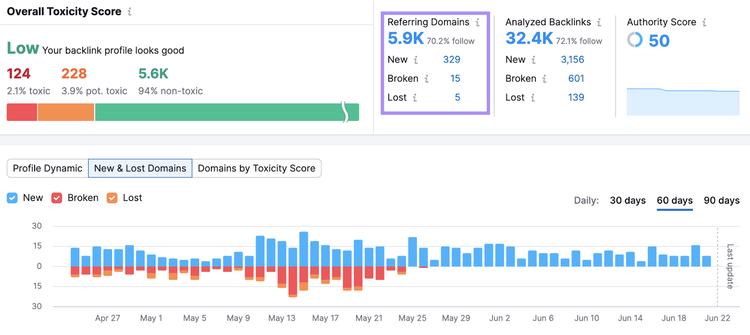
The “Overview” tab gives you a very high-level view. To delve deeper, you need to go to the “Audit” tab.
There, you’ll see all the backlinks pointing to your site.
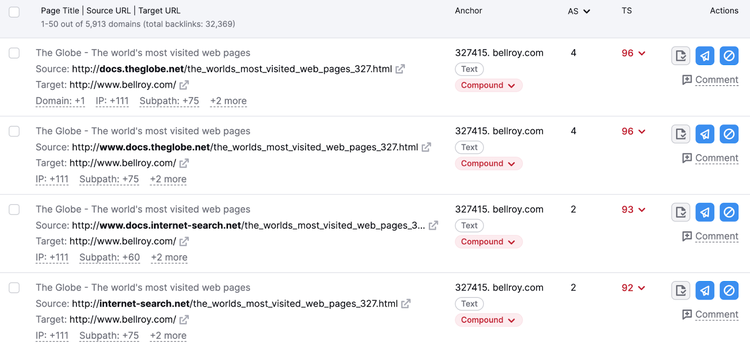
From here, look at:
- The URLs: To see whether they come from legitimate websites
- Anchor text: To see whether the anchor text is relevant to the linked page. High-quality backlinks tend to have anchor text that is relevant to the linked page’s content, while low-quality backlinks tend to have unnatural or spammy anchor text (i.e., something random).
- Authority Score (AS) of the linking domain: To gauge the reputability of the linking domain, which impacts your search rankings. A higher AS means a more positive influence on rankings. A lower AS means a less positive impact on rankings.
- Toxicity Score (TS) of the linking page: To measure how potentially harmful the linking page could be. The Toxicity Score ranges from 0 to 100. The lower the TS, the higher the link’s quality. The higher the TS, the lower the link’s quality. You can click on the TS score to see why Semrush considers a particular link as low-quality or bad.
Evaluate Your Backlinks
with the Backlink Audit Tool
3. Decide Whether to Disavow or Remove Bad Links
The next step is deciding whether to disavow or remove any bad backlinks.
Google says to do this:
- If you have a significant number of low-quality links built using tactics that are against Google’s guidelines
- If you’ve received a manual action penalty from Google
If you’ve deliberately violated Google’s guidelines and built an influx of links in ways that violate Google’s guidelines, you risk everything in terms of SEO.
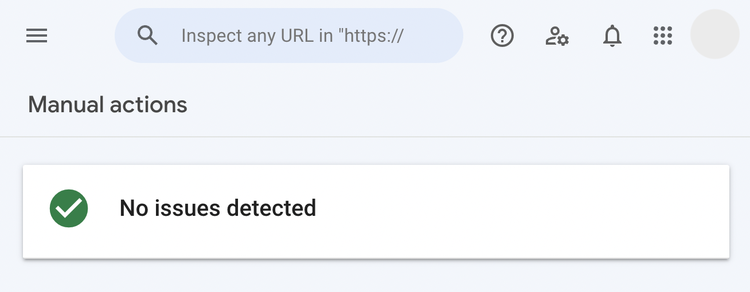
You’ll receive an alert in Google Search Console notifying you of a manual action penalty.
You can check for these penalties by going to "Security & Manual Actions," and then "Manual actions" in Google Search Console.
If your website hasn't been issued any penalties, you'll see a green check mark.
Like this:
You can deal with manual action penalties in one of two ways:
- Remove: Reaching out to linking websites and asking them to delete links
- Disavow: Disavowing links using Google’s Disavow tool
First, reach out to websites and see if you can get those links removed.
You can use Semrush Backlink Audit tool for this purpose.
Here’s how:
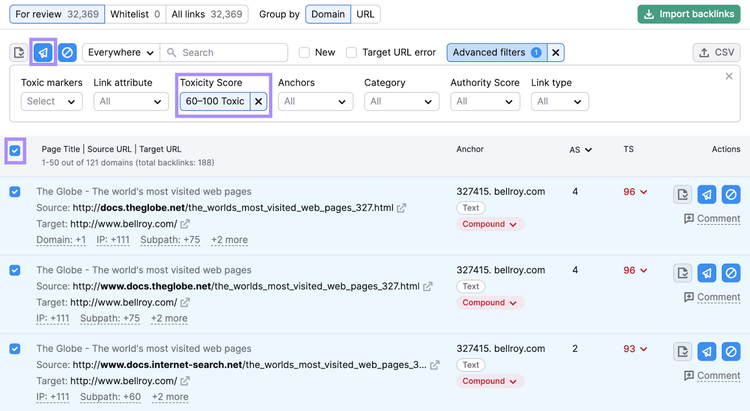
1. Go to the “Audit” tab of the tool and filter for links that have a Toxicity Score of 60 or more. These are likely going to be low-quality, bad links.
2. Check the boxes on the left-hand side. Then, click the “Remove” button, select “Domain” or “URL,” and send them to your “Remove” list.
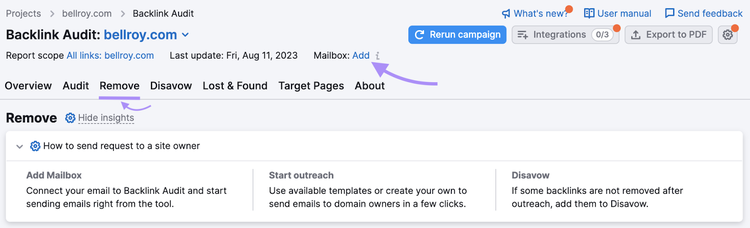
3. Navigate to the “Remove” tab and connect your email
4. Click the “Send” button next to one of the links

5. Write an email requesting link removal. The recipient’s email address will populate automatically. If it doesn’t, you can add it manually by finding it on their website.
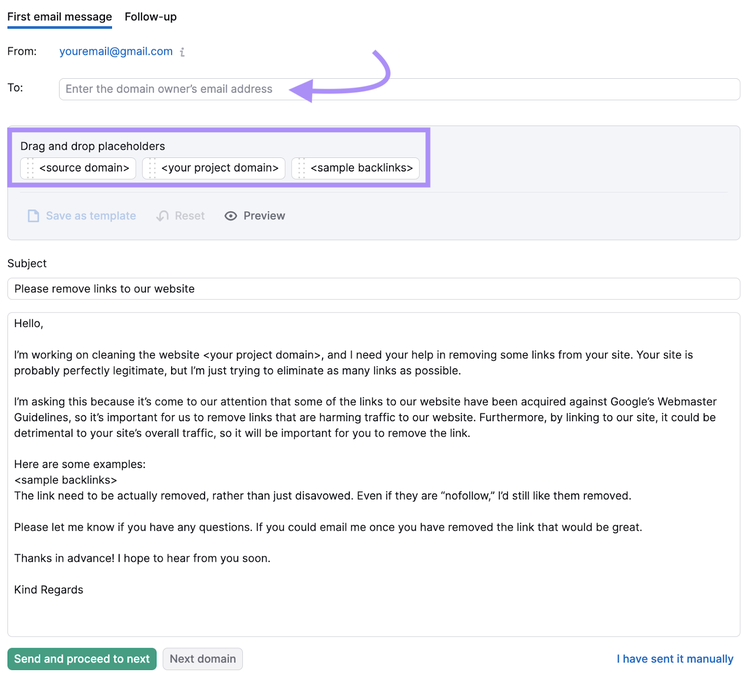
6. Click “Send and proceed to next.”
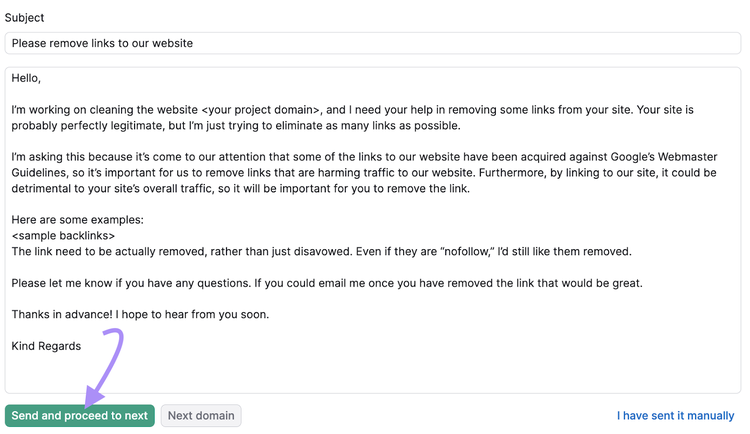
You’ll be able to keep track of your requests in Semrush and in your own mailbox.
If the website owners don’t remove the links to your site, disavowing is your remaining option.
To do this, click the “Disavow” button to send your bad links to the “Disavow” list.

Next, go to the “Disavow” tab, export its contents in a .txt file, and then upload it to the Google disavow tool.
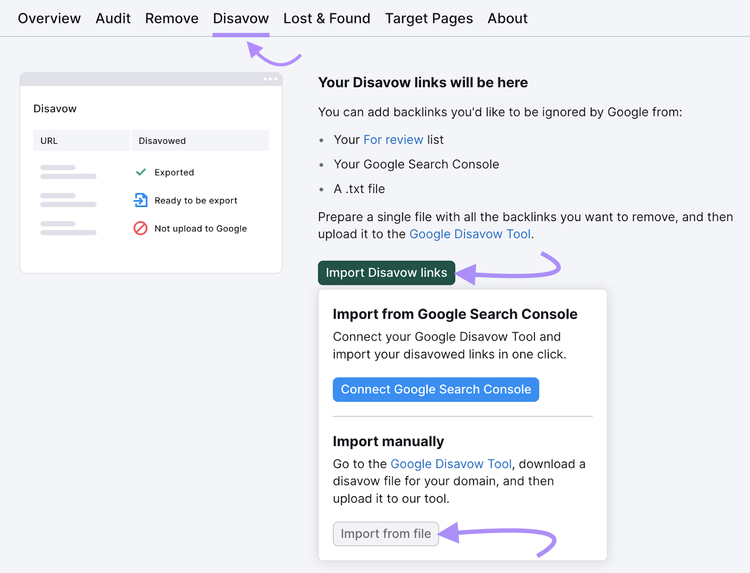
To learn more about the disavow procedure, check out our detailed guide on disavowing backlinks.
Note: Be extremely careful when disavowing links. Disavowing backlinks when it’s unnecessary can severely harm your rankings.
4. Reclaim Your Lost Backlinks
This step is about making sure you recover any links you used to have that you lost.
Building backlinks takes time and effort. So, it pays to reclaim them when you lose them over time.
This happens for many different reasons:
- The author removed your link from the content
- The linking page has been redirected to another page
- The author replaced your link with something else
- The linking page accidentally got deleted
Use Semrush’s Link Building tool to recover your hard-earned links.
First, configure the tool. After that, go to the “Prospects” tab and click on “Lost Backlinks.”
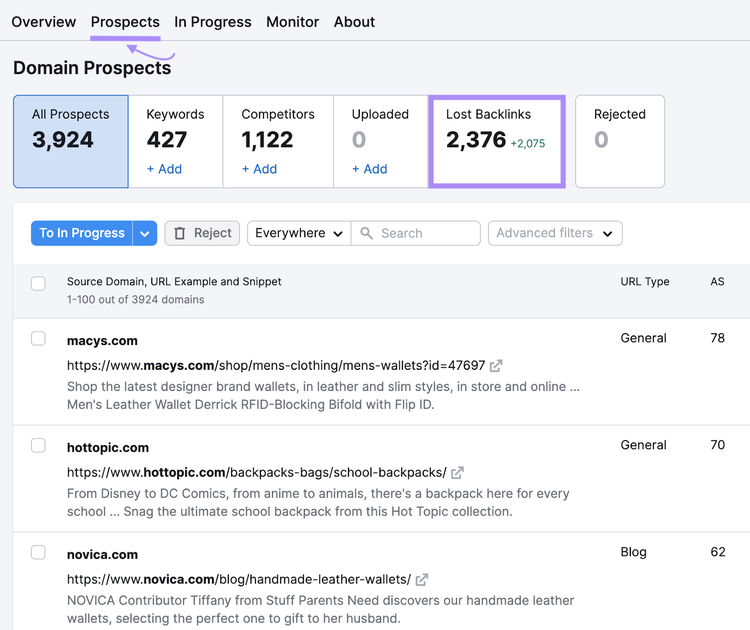
You’ll see links that you used to have.
From here, open each link individually. You’ll be able to see information about why your link disappeared.
For example, if it’s returning a 404 error, it could be because the page was deleted.
Then, you could reach out to the website owner and ask them to reinstate the page.
A simple email like this could do the trick:
Hey [Name],
Just came across your ____ page and found it’s broken.
Did you do this on purpose or was it deleted accidentally?
In any case, having a broken page on your website is not good for UX or SEO.
So, I would recommend reinstating the page.
No pressure if you don’t want to do so, though. 🙂 It’s all up to you. I just thought it would be helpful to reach out and let you know.
Thanks,
[Your Name]
Find & Reclaim Your Lost Backlinks
with the Link Building Tool
5. Find New Opportunities to Build Valuable Links
A backlink audit is more than just analyzing your backlink profile and reclaiming your lost links. It can also help you spot new opportunities to build high-quality links.
There are two main ways to do this:
- Studying what content types attract the most backlinks to your site. So you can double down on producing the same types of content to continue attracting links.
- Researching your competitors’ link building strategies and replicating the same strategy for your site.
Here’s how you can do both.
To look at what content types attract links to your site, go to the “Indexed Pages” tab in Backlinks tool for your website.
You’ll see your most linked-to content.
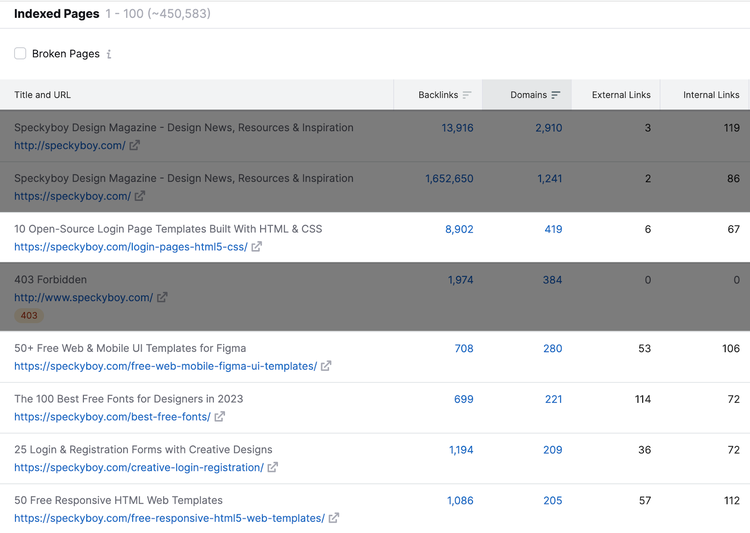
If you see that listicle-style posts are the top link earners, create more listicle posts.
If you see how-to guides attracting links, create more how-to posts.
Now, let’s go over how you can research your competitors’ backlinks to develop new link building strategies.
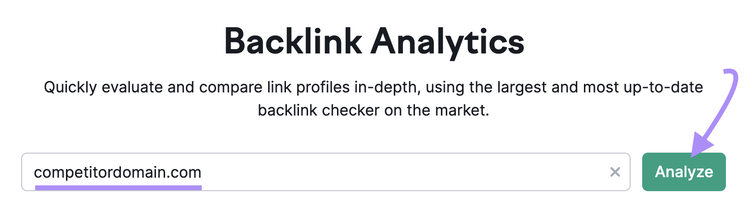
Open the backlink tool, enter a competitor's domain, and then click "Analyze." Like this:
You’ll see all the websites that are linking to that competitor. Like this:
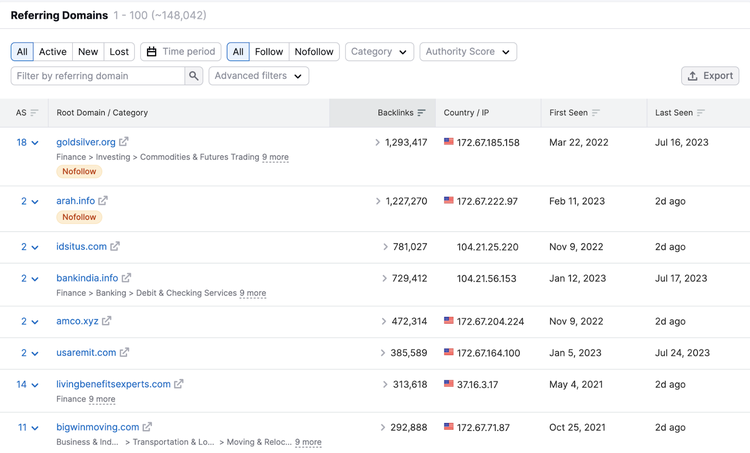
Look at the domains that frequently link to them. Or types of websites that link to them the most.
For example, if you see your competitor is getting links from popular media outlets like BBC, TechCrunch, etc., this probably means they’re putting efforts into digital PR.
You could do the same for your own site. And earn links that way.
Read our guide to digital PR to learn how.
Build High-Quality Backlinks at Scale
If your backlink audit reveals that you lack enough high-quality links to remain competitive in your market, building more of these links should be your priority.
You can use Semrush Link Building Tool for this.
The tool automatically scans the web for relevant websites you can build links from. Even better, you can contact the website owners from the tool itself.
To get started, set up a project in the tool.
After that, navigate to the “Prospects” tab. Here, you’ll see websites you can reach out to for backlinks.
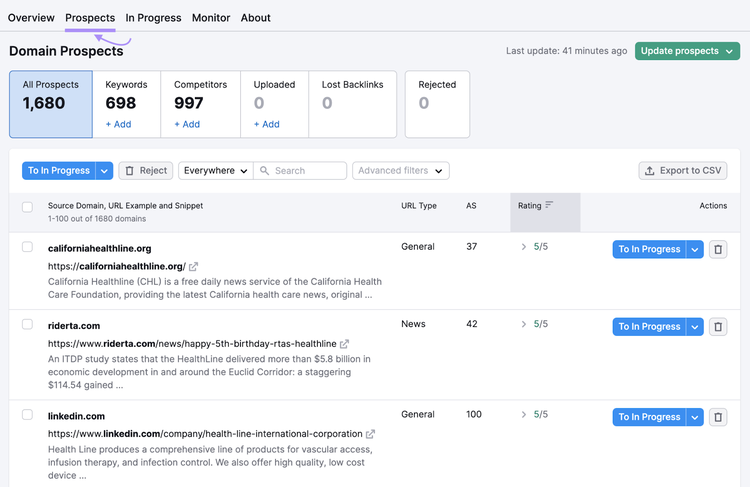
Manually review each prospect and click “To In Progress” to send the promising ones to the “In Progress” tab.

On the “In Progress” tab, click on the “Contact” button next to one of the websites you want to contact.

From here, you can craft and send your outreach email.
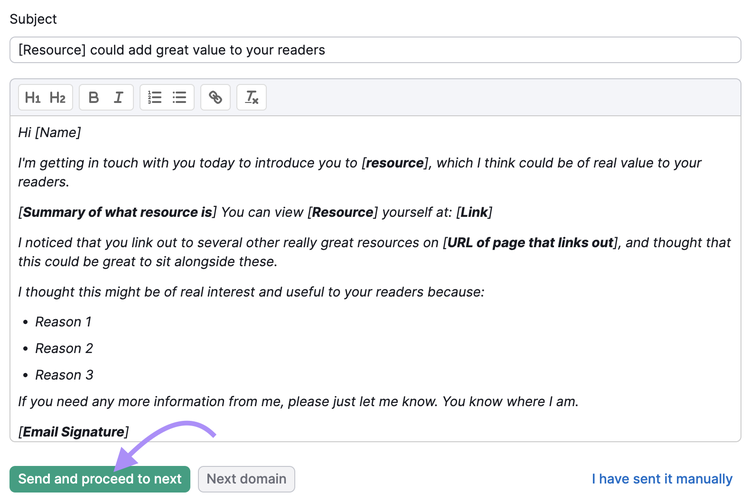
And make sure you follow link building outreach best practices and give website owners a strong reason to link to your site.
Build High-Quality Links
with the Link Building Tool

Tushar has been involved in SEO for the past six years, specializing in content strategy and technical SEO. He gained his experience in agencies, where he worked on various ecommerce and B2B clients. On the Semrush blog, he writes about SEO and marketing based on experience drawn from his client work, focusing on sharing practical and effective strategies. His goal is to turn Semrush blog into the ultimate destination for learning SEO and web marketing.
Tushar Pol
Tushar is an SEO expert with over six years of experience in content strategy and technical SEO. Having worked with various ecommerce and B2B clients at agencies, he now writes for the Semrush blog, sharing practical and effective SEO strategies.

Tells Google to show you more from Semrush in AI, Search, and Discover.