
Nofollow Links vs. Follow Links: All You Need to Know
Expert reviewed
Our subject matter experts have reviewed this article to ensure it meets the highest standard for accurate information and guidance. Learn more about our editorial standards and process.
What Are Nofollow Links?
Nofollow links are hyperlinks that include the `rel="nofollow"` attribute in their HTML code.
The `nofollow` attribute instructs Google not to crawl the linked page and not to pass link equity (ranking strength) to it.
An example of a nofollow link in HTML code is:
<a href="https://example.com/" rel="nofollow">Click here</a>
The presence of the `rel="nofollow"` attribute confirms that the link is a nofollow link.
What Are Dofollow Links?
Dofollow links, also known as "follow" links, are the standard type of hyperlinks on the web. These links do not have any special attributes like “nofollow,” “UGC,” or “sponsored” attached to them.
Because they lack these attributes, dofollow links pass link equity (ranking strength) to the linked page.
An example of a dofollow link in HTML code is:
<a href="https://example.com/">Click here</a>
The absence of a `rel` attribute confirms that the link is a dofollow link.
Note
Technically, “follow” and “dofollow” terms don’t exist. We just use them for convenience to differentiate them from nofollow links.
How Do Nofollow and Dofollow Links Differ?**
Nofollow and dofollow links differ in how they influence the search rankings of the linked page.
Dofollow links can boost the search ranking of the page they link to, but nofollow links likely cannot.
For example, linking to Apple's website like this:
<a href="https://apple.com/">Apple</a>
creates a dofollow link that can influence Apple's search engine rankings.
Alternatively, linking like this:
<a href="https://apple.com/" rel="nofollow">Apple</a>
includes the `rel="nofollow"` attribute, which generally will not pass ranking power to Apple's site.
Are nofollow links completely useless?
Not exactly.
Why Are Nofollow Links Important?
Nofollow links are important for several reasons:
Referral Traffic
Nofollow backlinks from popular websites can drive referral traffic to your site. Even though these links do not pass link equity, visitors can still click on them and reach your website.
For example, some sites like Forbes use the `nofollow` attribute for all external links. In an author's byline, the link might look like this:
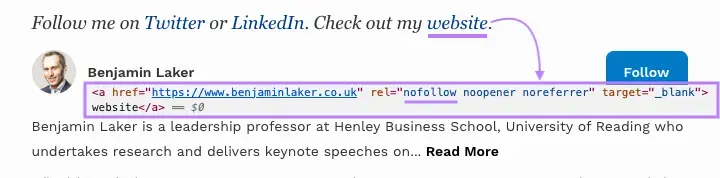
Receiving a backlink from such high-traffic sites is beneficial because their large audience can click the link and visit your site.
Exposure
Being mentioned on popular websites is great for brand awareness and can naturally lead to more dofollow backlinks from other sites.
For example, if a popular blogger links to your site but uses the nofollow attribute, it still raises awareness of your brand among their audience.
Multiple readers may then organically link to your site, and those links could be dofollow links that pass link equity.
Backlink Profile Diversity
Search engines value a natural and diverse backlink profile that includes a mix of both nofollow and follow links.
A website with only follow links may appear unnatural or manipulative to search engines, potentially triggering red flags.
By maintaining a healthy balance of nofollow links, your site demonstrates a more organic growth pattern.
That's why nofollow links are also important for SEO.
How to Check If a Link Is Nofollow
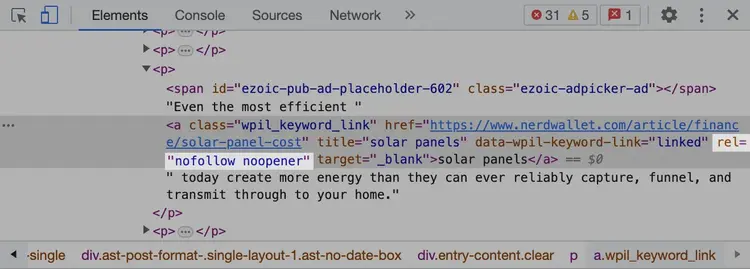
To determine whether a specific link has a nofollow attribute, check the page's source code.
Hover over the link, right-click it, and select "Inspect" (this option may have different names in different browsers).
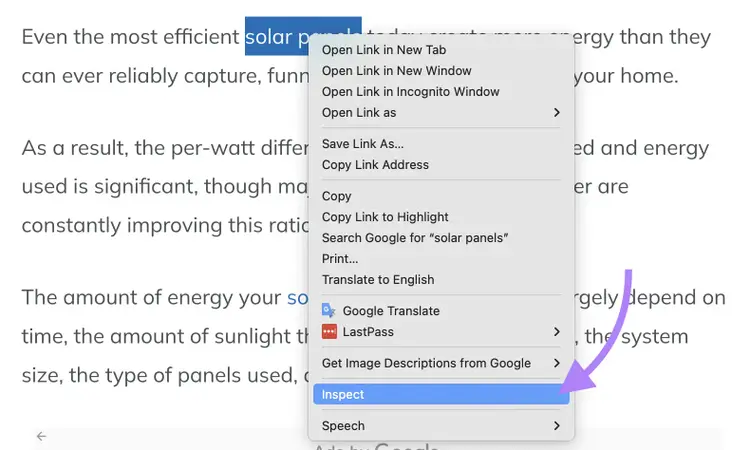
If you see the word "nofollow" within the rel attribute, the link is a nofollow link.
To analyze the distribution of follow and nofollow backlinks to your site or a competitor's site, use tools like Semrush Backlinks.
These tools provide a detailed breakdown of the attributes of the links pointing to a domain. You can also apply filters to view specific backlinks with certain attributes.
For example, to see only active "sponsored" backlinks for a domain, select “Active” and “Sponsored” from the filters at the top.
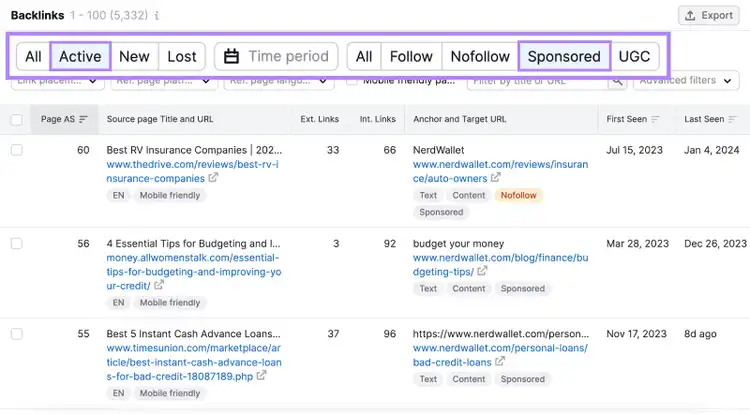
The rel="sponsored" attribute indicates links that have been purchased, such as by sponsoring an article on a blog that links back to you. Google treats these links the same as nofollow links, meaning they don’t transfer link equity.
Using these tools can be useful for inspecting the paid digital PR activities of your competitors.
Note
From here on, we’ll use the general term nofollow links to refer to links all that don’t pass link equity. This includes rel="nofollow," rel="sponsored," and rel="ugc."
Check Follow and Nofollow Links
with the Backlinks Tool
When to Use Nofollow Links
Here are the most common use cases for nofollow links:
- Linking to a Page You Don’t Want to Endorse: If you prefer not to be associated with the linked page—for example, if you need to link to a gambling website but don’t want to imply endorsement—use rel="nofollow"
- Including Sponsored or Paid Links: If the link is sponsored or purchased in any way, use rel="sponsored." This applies to both links pointing to other sites from your site and links pointing to your site. Make sure others linking to you with a paid link are using this attribute correctly.
- Using Affiliate Links: For affiliate links pointing to or from your website, also use rel="sponsored"
- Incorporating User-Generated Content: For links created by users on your website, such as in comments or forum discussions, use rel="ugc". This helps prevent people from spamming your site with links in an attempt to improve their search rankings.
When to Avoid Using Nofollow Links
In the past, the nofollow attribute was often misused to manipulate how link equity passes from your page. For example, some webmasters applied the nofollow attribute to all external links to pass more link equity to their own pages through internal links.
This technique, known as PageRank sculpting, no longer works because Google changed how it handles nofollow links for PageRank. However, some people still misuse the nofollow attribute, and bad practices persist.
Here are two common examples of how not to use nofollow:
- Nofollow for All External Links: You shouldn’t apply the nofollow attribute to all external links pointing from your site. Doing so doesn’t help your website and may even harm it.
- Nofollow for Internal Links: You shouldn’t use the nofollow attribute for internal links. If you don’t want a certain page to be crawled or indexed, use other methods like robots meta tags.
If you’re unsure whether you’re using nofollow correctly on your site, Semrush Site Audit can help.
To use the tool:
Create a free account (no credit card needed) and set up your first crawl. If you need guidance, follow this step-by-step setup guide.
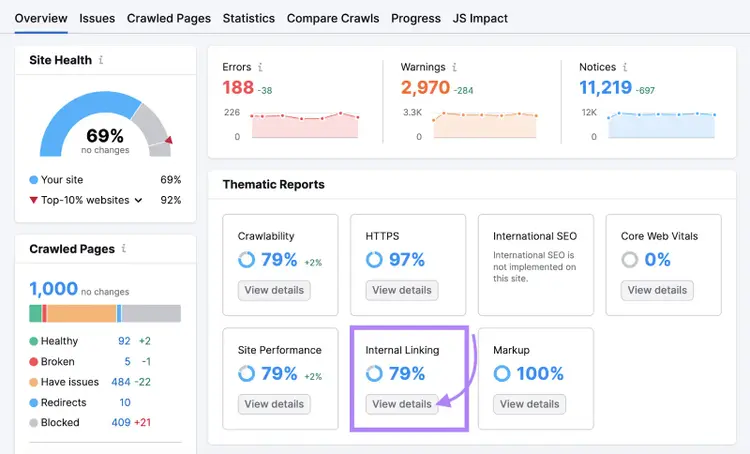
Once the audit is complete, navigate to the "Internal Linking" report by clicking "View details."
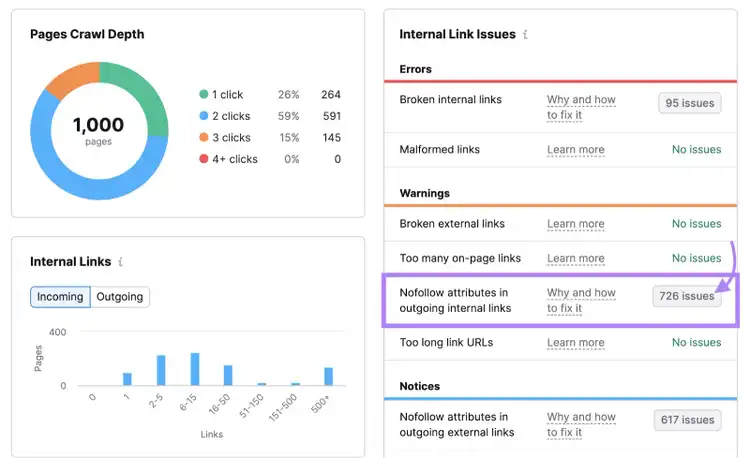
On the right side, you’ll see a list of possible issues related to internal linking.
In the "Warnings" section, look for "Nofollow attributes in outgoing internal links."
If the tool detects issues, click the link showing the number of issues. This will lead you to a list of pages where nofollow internal links were detected.
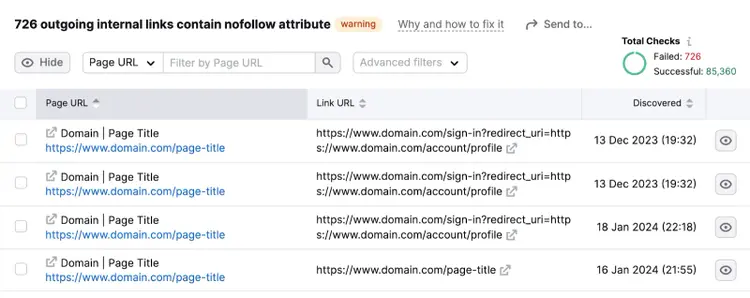
Review the list and remove the nofollow attributes from internal links.
Next, review all your external links with the nofollow attribute:
Look for the "Nofollow attributes in outgoing external links" issue in the "Notices" section.
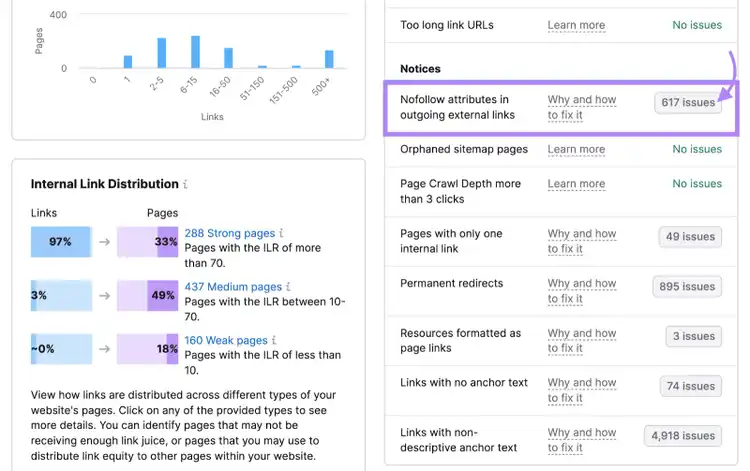
Go through the links and reconsider your use of nofollow attributes. Ensure they are truly necessary.
By properly managing your use of nofollow links, you can avoid potential SEO issues and improve your site's link equity distribution.
Review Whether You’re Using Nofollow Correctly
with the Site Audit Tool
Next Steps
To deepen your understanding of how links impact SEO and how to obtain the best backlinks for your website, explore these resources:
- What Are Backlinks?
- Link Building for SEO
- Backlink Management (free video course)
- Internal Linking
If you want to start building links immediately, try our Link Building Tool. With a free account, you can begin your first link-building campaign.
Find Backlink Opportunities
with the Link Building Tool

Vlado is a content marketer with 10+ years of experience in SEO, content strategy, and building websites for both clients and personal projects. As Content Operations Lead at Semrush, he streamlines workflows and optimizes processes. He also played a key role in scaling content production and shaping the blog Style Guide. Previously, as Head of Content at Mangools, he led initiatives that made the blog a major driver of organic traffic. He enjoys making complex SEO topics accessible to others.
Vlado Pavlik
Vlado is a content marketer with 10+ years of experience in SEO, content strategy, and website building. As Content Operations Lead at Semrush, he focuses on improving content workflows, optimizing processes, and helping scale content production.

Tells Google to show you more from Semrush in AI, Search, and Discover.