
5 Time-Tested Blog Post Templates for Compelling Content
A blog post template serves as a blueprint. It guides you through crafting an engaging blog post.
We’ll introduce you to five effective blog post templates. You’ll understand their structure, learn proper usage, and explore real-life examples.
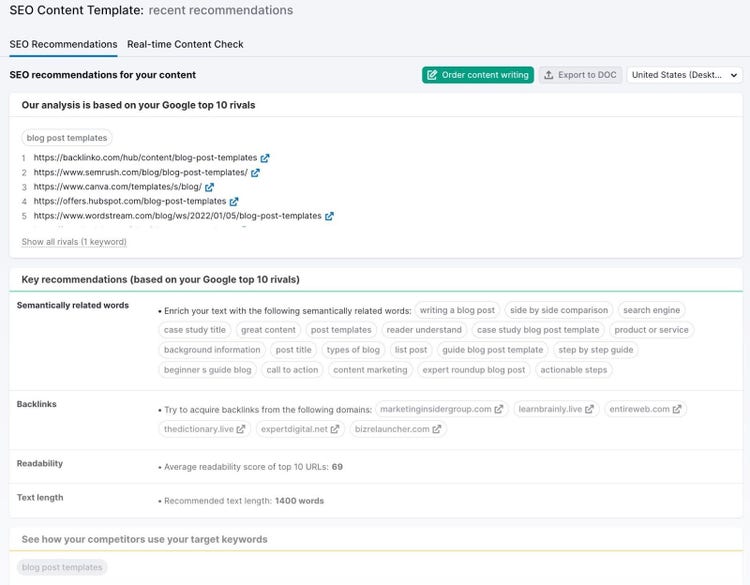
Pro tip: Sign up for the SEO Content Template tool before you follow along. That way, you get specific tips about what keywords to use, how to optimize your meta data, and how long your article should be. All before you even start writing.
Beginner’s Guide Blog Post Template
These blog posts are for beginners or those new to the topic. They provide a detailed roadmap to follow and implement knowledge.
In other words: they discuss a topic’s how, what, and why.
When Should You Use Guide Blog Posts?
- Supporting Customer Success: If your customers often have questions or challenges about your product or industry. It enhances customer satisfaction and lightens the workload of your support team.
- When Introducing a New Concept or Topic: Guide blog posts help beginners grasp subjects more comprehensively. They simplify complex ideas into easily understandable steps. Making it easier for readers to grasp the fundamentals.
- When Targeting Beginners or Individuals Unfamiliar With the Topic: Guide blog posts are designed to assist beginners or those without prior knowledge on a subject. They lay a strong foundation for readers to start their learning journey.
Anatomy of the Guide Blog Post
Below is a breakdown of the structure for a guide blog post with instructions on how to write a guide blog post yourself:
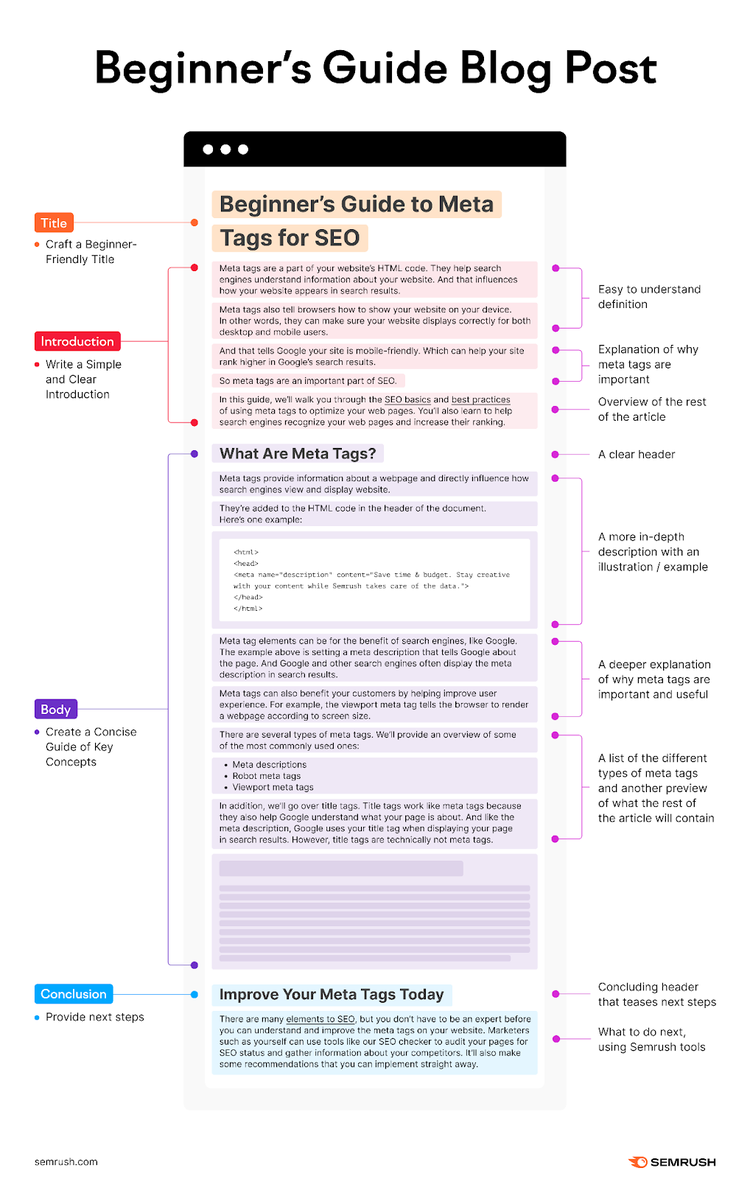
Craft a Beginner-Friendly Title
Align the title to cater to beginners’ interests and goals. Use clear and relatable language, avoiding jargon or complexity. Incorporate SEO keywords naturally, ensuring the title aligns with search intent.
Example: Beginner’s Guide to Meta Tags for SEO

The title above includes our target keyword, “meta tags.” And tells the readers that the article is a “beginner’s guide.”
Here are some other headline examples:
- Kickstart Your Journey: A Novice’s Guide to Understanding [Concept]
- Decoding [Concept]: A Beginner’s Ultimate Guide
- Embark on [Concept]: A Clear, Simple Guide for Beginners
- Demystifying [Concept]: A Comprehensive Guide for Beginners
- [Concept]: A Newcomer’s Roadmap to Success
- Breaking Down [Concept]: A Detailed Guide for the Uninitiated
- [Concept]: What Are They & How to Use Them
Write a Simple and Clear Introduction
Introduce the topic and why it matters. Also tell readers what they can expect to learn.
Here are some tips to make your introduction compelling:
- The “Journey” Teaser: Provide a roadmap of what readers will learn or achieve. Breaking down the key steps or sections you'll cover.
- Explain Why: Explain the practical importance of the topic.
- Relevance: Tease readers with how this topic relates to their goals.
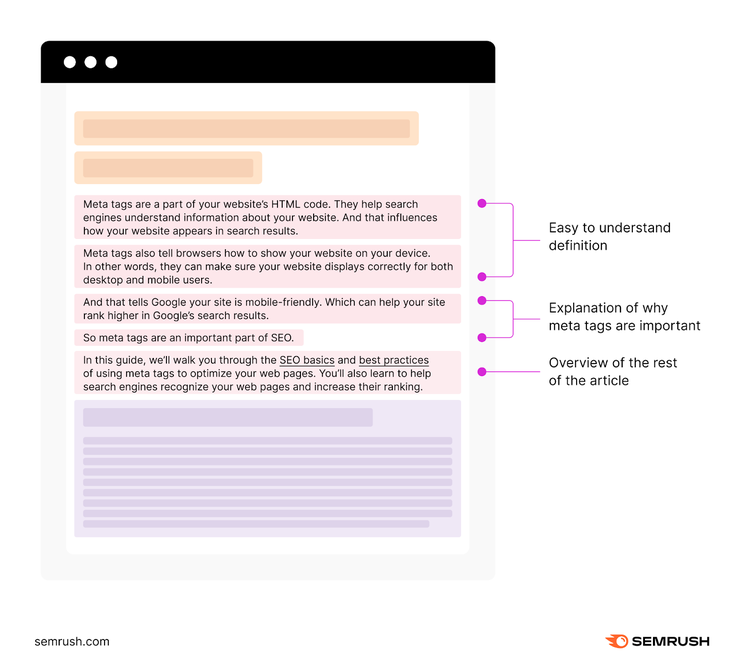
Let’s take a look at the introduction of our guide blog post about meta tags. It has three main sections:
- A quick, easy-to-understand definition of meta tags
- A short blurb to establish the importance of meta tags
- A summary to tell the readers what to expect
Create a Concise Guide of Key Concepts
The body of your guide blog post should have four important elements:
- Clear headers that introduce each section without overwhelming beginners
- An easy-to-digest explanation of all important concepts related to your main topic
- Actionable tips on how beginners can start applying those concept
- Other important tips or concepts you think a beginner should know
Let’s see that in action by looking again at our article on meta tags:
The article starts with a section that goes deeper into what meta tags actually are. Which is why that first section has the header, “What Are Meta Tags.”
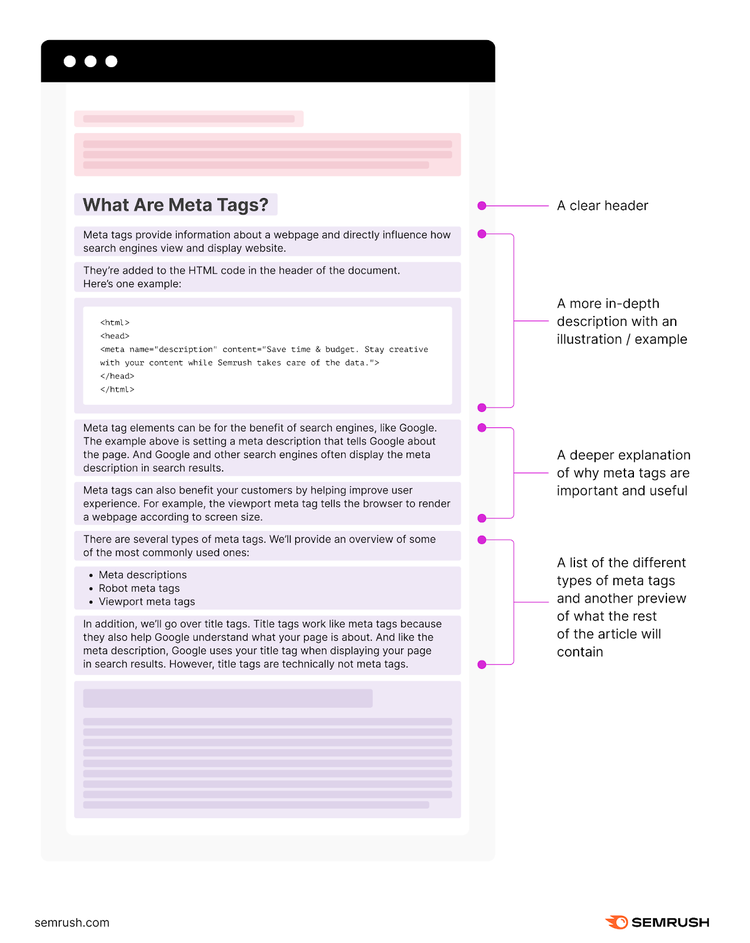
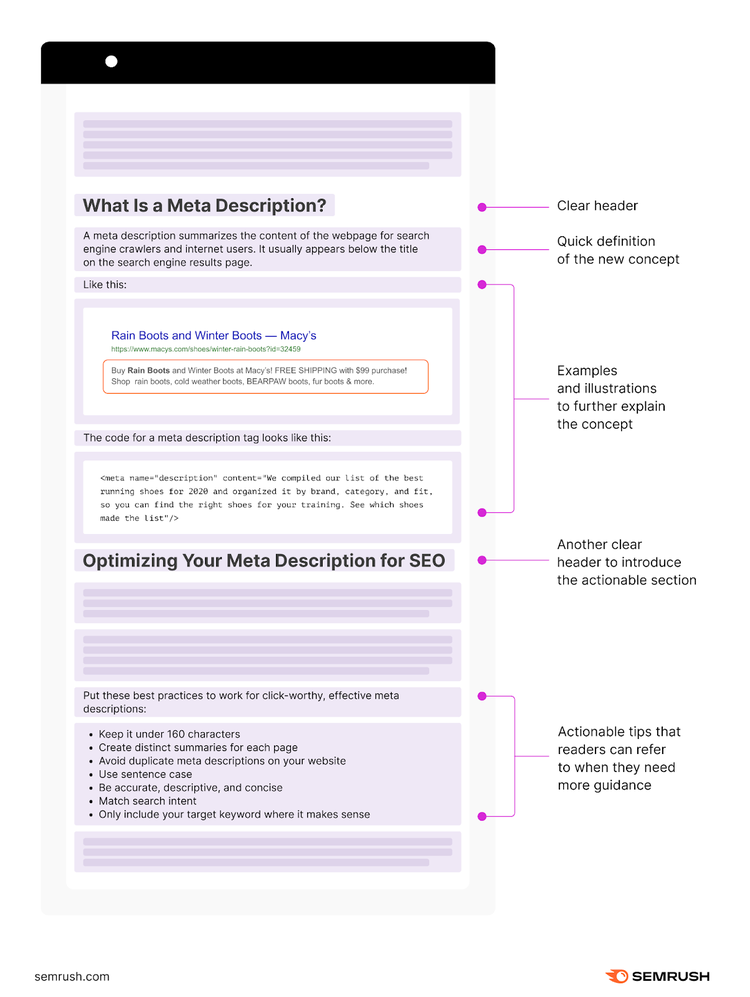
From there, the article defines the three types of meta tags: meta description, robots meta tags, and viewport meta tags. Each definition is followed by an actionable section on how to optimize each tag for SEO.
Here’s what that looks like for the section on meta descriptions:
Lastly, since title tags are related to meta tags, the article explains what those are, as well. And also has a section on how to optimize title tags for SEO.
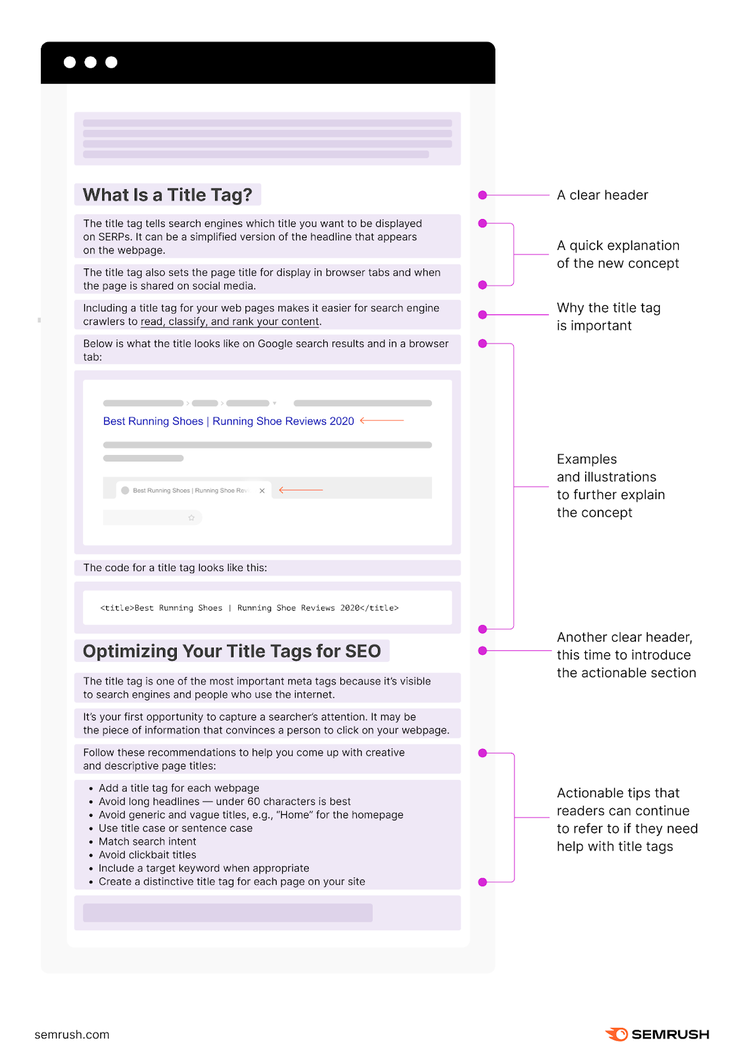
Generally, the body of a guide post should contain the “what,” “why,” and “how,” behind each concept.
That way, even after beginners read the post, they continue to refer to it when they’re stuck, forget what they need to do, or need a little more guidance.
Provide Next Steps
Offer valuable insights to reinforce the guide's value. And tell readers what to do next, whether that’s through:
- Presenting key takeaways
- Linking out to additional resources or more in-depth guides
- Using a call to action (CTA) that says, “Click here to…”
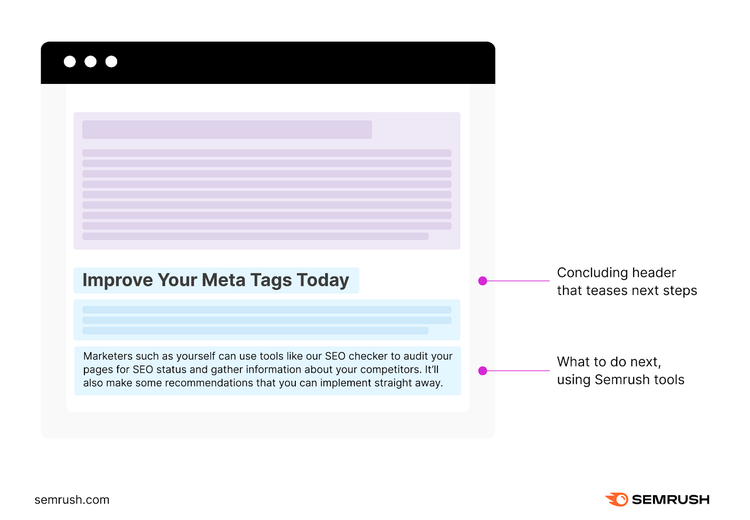
For example, our conclusion for the meta tags guide post includes a header to tease the next steps. And a small blurb on how readers can do that using Semrush tools.
3 Examples of the Guide Blog Post Template in Action
- What Is Digital Advertising? A Guide to Getting Started
- Keyword Search Volume: A Beginner's Guide
- The Ultimate Guide to Content Marketing Strategy
3 Tips to Consider
- Include a Table of Contents: Tables of content are clear, giving beginners something to grasp. They also help understand the guide’s structure quickly and provide reference points for jumping back when needed. Plus, search engines understand structure and hierarchy, which can boost search rankings and drive organic traffic.
- Create a Lead Magnet: Create a 1-page PDF download, like a step-by-step checklist or cheat sheet. Offer it for free in exchange for readers’ emails. You can also use this as a lead-generation strategy.
- Troubleshooting: Address common pitfalls, challenges, or roadblocks that readers might encounter. Include a troubleshooting section with proactive solutions to enhance the guide’s practicality. And help readers overcome obstacles effectively.
Pillar Blog Post Template
Pillar blog posts are often called pillar pages or cornerstone content. They’re enormous pieces covering a core topic in great detail.
But: pillar blog posts are foundations for clusters of related content. They’re like the trunk of a tree from which other related posts (the branches) sprout. These related posts link to the pillar post, creating a content ecosystem.
When Should You Use Pillar Blog Posts?
- Search Intent: Is there a high search volume for a specific topic relevant to your niche? This blog format template can help you rank for those keywords and meet user intent.
- Keyword Targeting: You want to target a primary keyword and many related keywords.
- Evergreen Content: If your topic has lasting relevance, a pillar post is a good choice as it can continue to draw traffic over time.
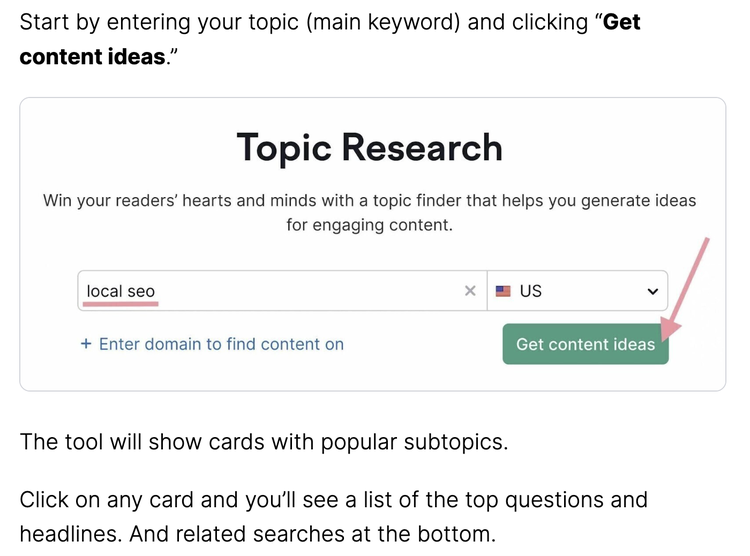
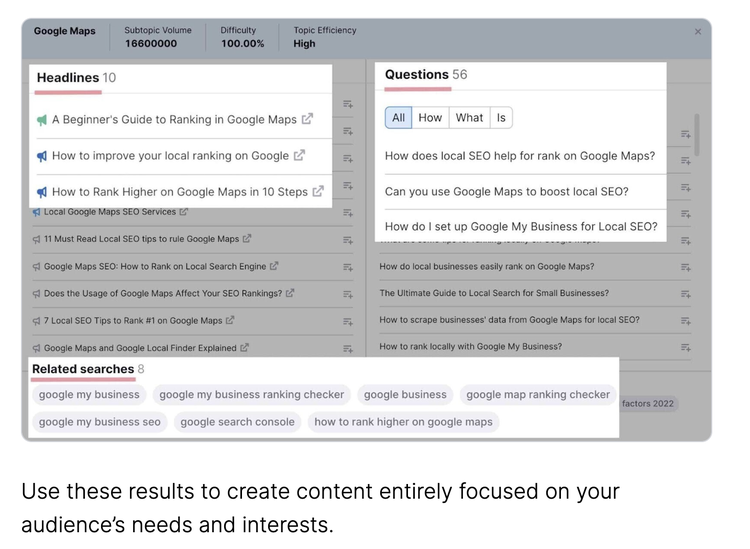
Pro tip: Not sure what topics to create pillar pages for? Check out the Topic Research tool. You’ll get a list of hundreds of subtopics. Along with suggested headlines and related questions for each topic that you can look at to find the best pillar post topics.
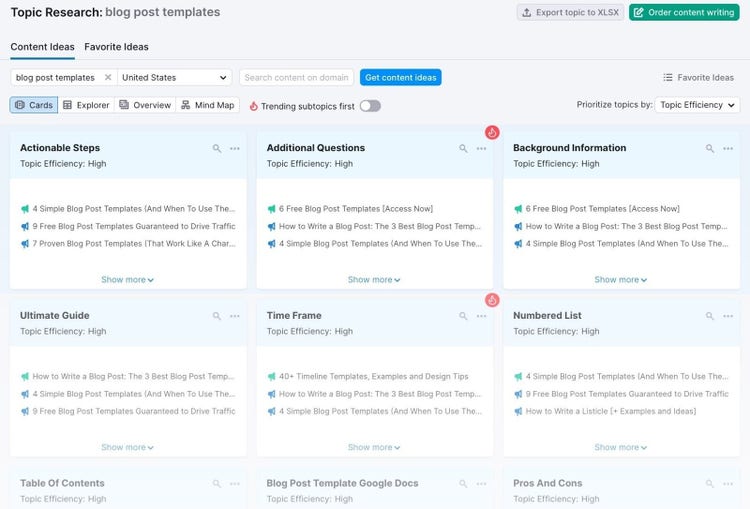
Anatomy of the Pillar Blog Post
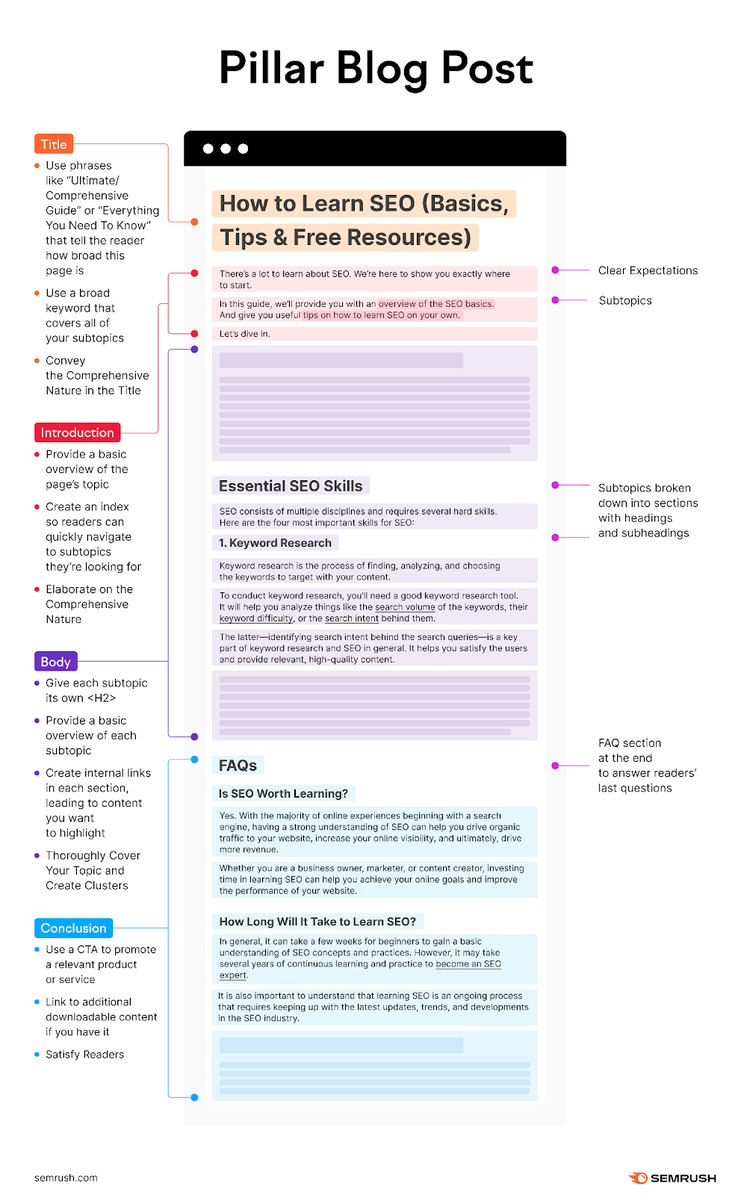
Here’s the fundamental pillar blog post structure:
Convey the Comprehensive Nature in the Title
A pillar blog post title should capture the comprehensive essence of the content, becoming the go-to resource on a specific topic. That’s why they often use headlines like “Ultimate Guide to X” or “Comprehensive Overview” to attract users.
Example: How to Learn SEO (Basics, Tips & Free Resources)

The title promises to cover multiple aspects of learning SEO.
“How to Learn SEO” implies a step-by-step guide, suggesting a comprehensive approach.
“Basics, Tips & Free Resources” underlines the depth and breadth of the content. Offering readers a foundational understanding, practical advice, and access to additional learning materials. All in one article.
This makes it clear that the post is a one-stop resource for anyone looking to learn SEO.
Here are some headlines you can also use:
- The Complete Guide to [Topic]
- Everything You Need to Know About [Topic]
- [Topic]: A Comprehensive Overview
- The Ultimate Resource for [Topic]
- Demystifying [Topic]: A Deep Dive into [Sub-Topic]
- Your Go-to Guide for [Topic]
- How to Excel at [Topic]: A Detailed Guide
- Exploring [Topic]: From Basics to Advanced Concepts
Elaborate on the Comprehensive Nature
Here are a few tips for an effective introduction:
- Pillar Content’s Framework: Outline the framework of the pillar blog post by highlighting its main sections or subtopics. By doing this, you establish clear expectations for readers and assist them in effectively navigating the comprehensive content.
- Evergreen Nature of the Content: Highlight the timeless nature. Assure readers that the information and strategies provided will remain valuable and relevant. Long after the post is published. This emphasizes the post’s comprehensive and timeless nature.
- Interlinking Structure: Highlight the interlinking structure. Show that the post acts as a hub, connecting and organizing related subtopics or supporting articles on your blog. This demonstrates the interconnectedness of your content and encourages readers to explore other relevant resources on your website.
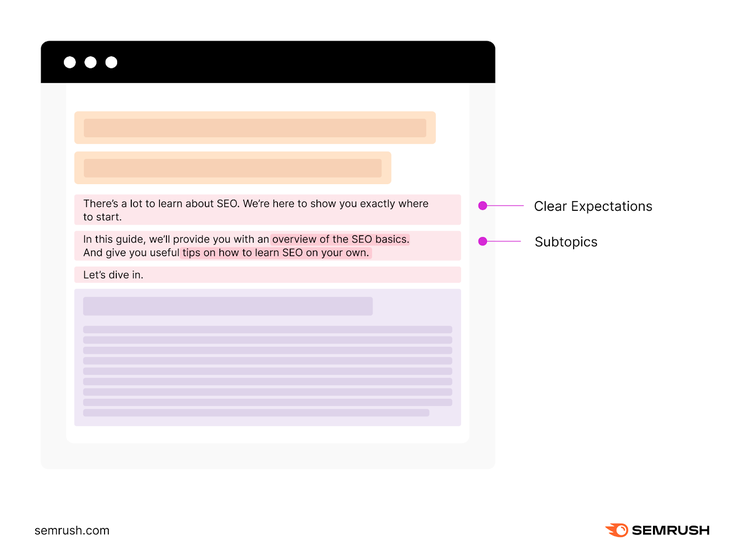
Let’s look at the introduction of our pillar blog post about how to learn SEO:
- It starts off with setting clear expectations
- And then, it shortly highlights subtopics
Thoroughly Cover Your Topic and Create Clusters
Your pillar blog post should include four key elements:
- Integration of a group of related articles that link back to the pillar page
- In-depth and comprehensive coverage of a specific topic
- Subtopics broken down into sections with headings and subheadings
- Strategically optimized keywords
Let’s see that in action by revisiting our article on learning SEO:
The article begins with SEO basics and the functioning of search engines.
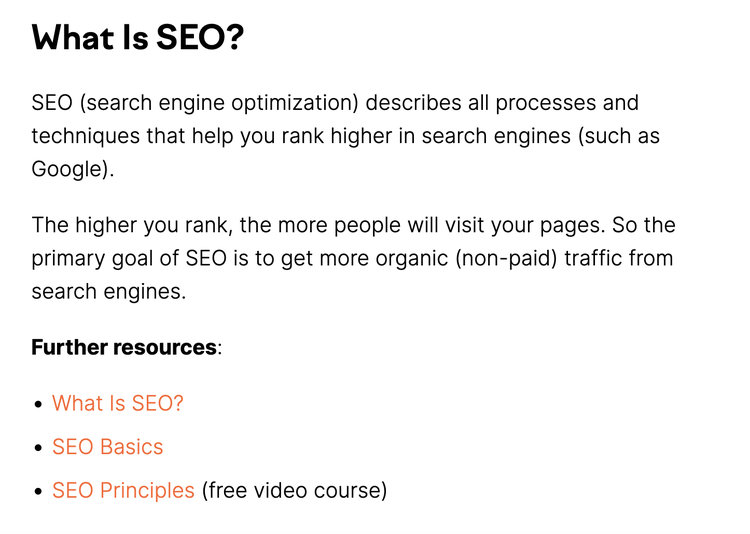
With clear subheadings like “What is SEO”, “How Search Engines Work”, “Types of SEO”, and “Essential SEO skills”, it gives comprehensive coverage of the topic.
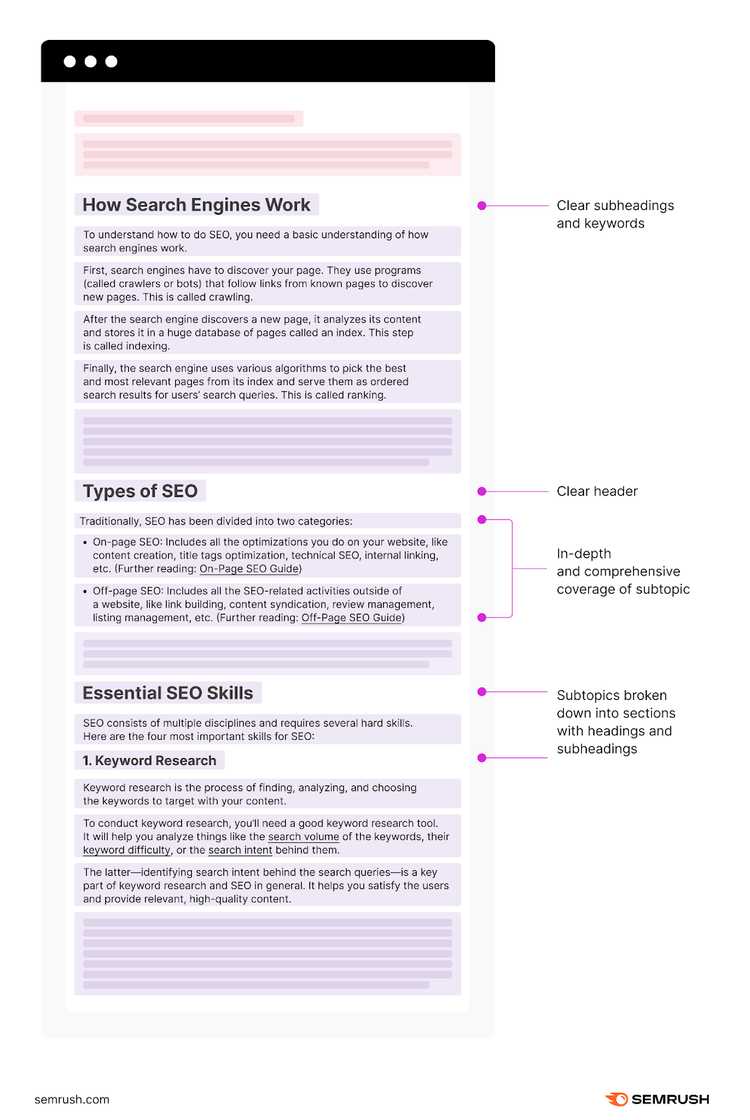
And the article always integrates optimized keywords and related articles.
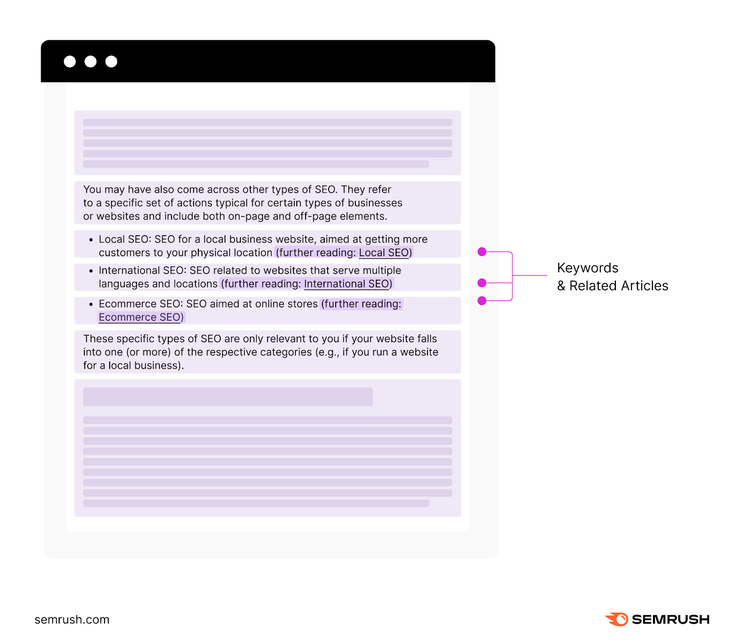
The body of the post should be comprehensive and authoritative. Make sure to cover all topics related to your primary term. Including any questions or problems, someone might have.
Satisfy Readers
Leave readers informed, inspired, and eager to engage with your content. The conclusion is your last chance to leave a lasting impression on your readers.
For example, our conclusion for the learning SEO pillar post includes a FAQ section at the end to answer readers’ last questions:

3 Examples of the Pillar Blog Post Template in Action
- SEO Basics: The Ultimate Guide to SEO for Beginners
- What Is SEO? (A Fluff-Free Definition + Basics Explained)
- The Definitive Guide to Ecommerce SEO
3 Tips to Consider
- Choose Your Topic Wisely: The topic should be broad enough for thorough coverage. But not so broad that it becomes unfocused.
- Update Often: Regular updates let you add new cluster content or internal links to support and expand on the main topic. You can also enhance the knowledge base to provide more valuable information to your audience. And you can leverage emerging keywords and trends since the original publication.
- Optimize Strategically: Don't miss the chance to target a wide range of related keywords. Look beyond the primary keyword and optimize for long-tail queries as well.
Definition Blog Post Template
A definition blog post explains a term, concept, or process. Guides and pillars provide a broad perspective. Definition posts break down specific topics for easy understanding. They’re like encyclopedia entries, offering clear, concise definitions for quick answers.
When Should You Use Definition Blog Posts?
- Informational Intent: Does your keyword research process reveal that users search for topic-related definitions or explanations? If so, a definition blog post would be effective.
- Educational Purpose: Definition blog posts educate readers about specific terms, concepts, or subjects. They offer clear definitions, helping readers understand the fundamentals of a topic.
- Establishing Authority: Defining a topic creates an authoritative stance. Helping you establish yourself as an authority in the field.
Anatomy of the Definition Blog Post
Here’s what you should include in a definition blog post:
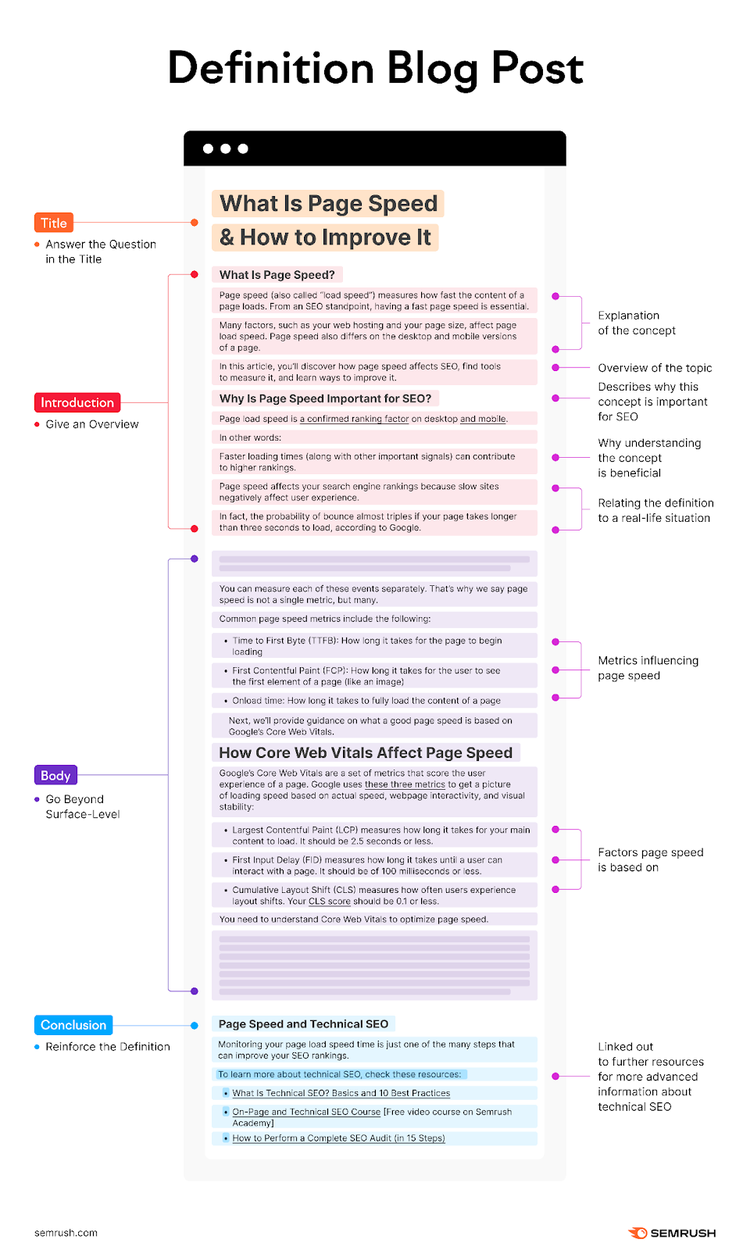
Answer the Question in the Title
The title should either include the questions or terms readers search for. Or show that you answer on their question.
Example: What Is Page Speed & How to Improve It

The title above includes the searched question and tells that it’s a definition. And “How to Improve It” shows that the article goes even beyond just explaining page speed.
Here are some headlines you can use for your definition blog post:
- What is [Topic]?
- What Does [Term] Mean?
- Decoding [Topic]: An Insider’s Perspective
- Unlocking [Topic]: The Key Concepts Explained
- Explaining [Concept]: A Comprehensive Definition
- Demystifying [Topic]: Everything You Need to Know
- A Deep Dive into [Topic]: What it is and Why it Matters
Give an Overview
Start with a brief overview of the topic. Explain the concept or introduce related terms/definitions you’ll discuss in detail later. Alternatively, explain why this definition matters for your industry. Or you can also skip the intro and jump straight into the body.
To make your introduction more impactful, you can try out these suggestions:
- Provide Practical Applications: Illustrate the practical applications. You pique readers’ curiosity by showing concrete results of understanding the term. And motivate them to explore the rest of the blog post for more insights.
- Relate the Definition to Everyday Life: Connect the defined term to real-life situations or experiences readers can easily relate to. You make it more relevant and relatable by showing how it applies to their everyday lives.
- Demonstrate the Value of Knowing: Explain why understanding the concept is beneficial. This shows readers how it can improve their life in some way.
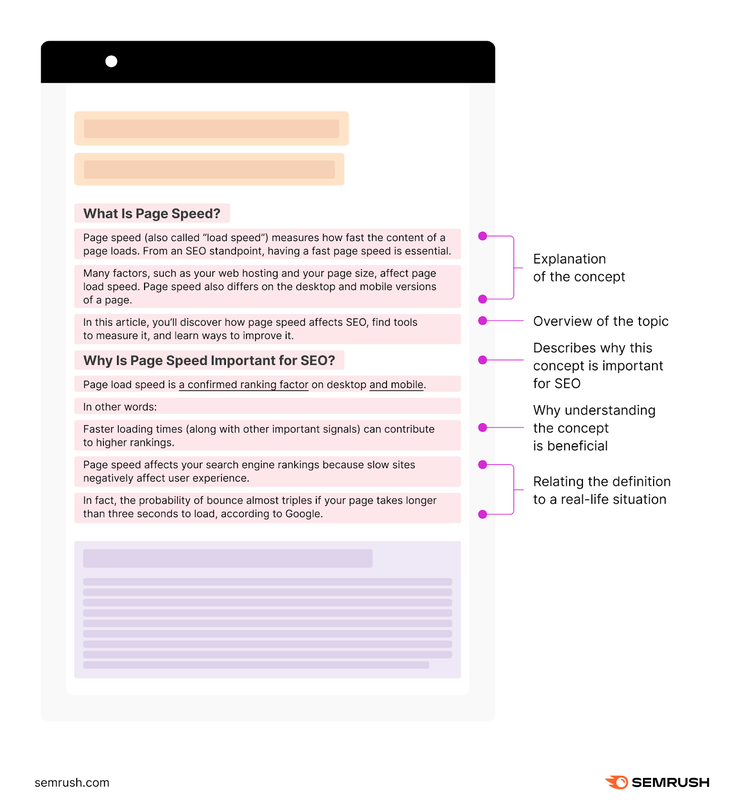
If you look at our definition blog post about page speed, you’ll see that it:
- Starts with explaining the concept right away
- Gives an overview of the topic
- Describes why this concept is important for SEO
Go Beyond Surface-Level
When writing a definition blog post, you should include these elements in the body:
- If you haven’t already in the intro, explain the term in a clear and easy language
- Go beyond surface-level into the definition and explore its components, intricacies, or variations
- Explain the concept with relevant examples (statistics, expert quotes/opinions, case studies, etc.)
- Highlight key differentiators or similarities that set the defined term apart from similar concepts
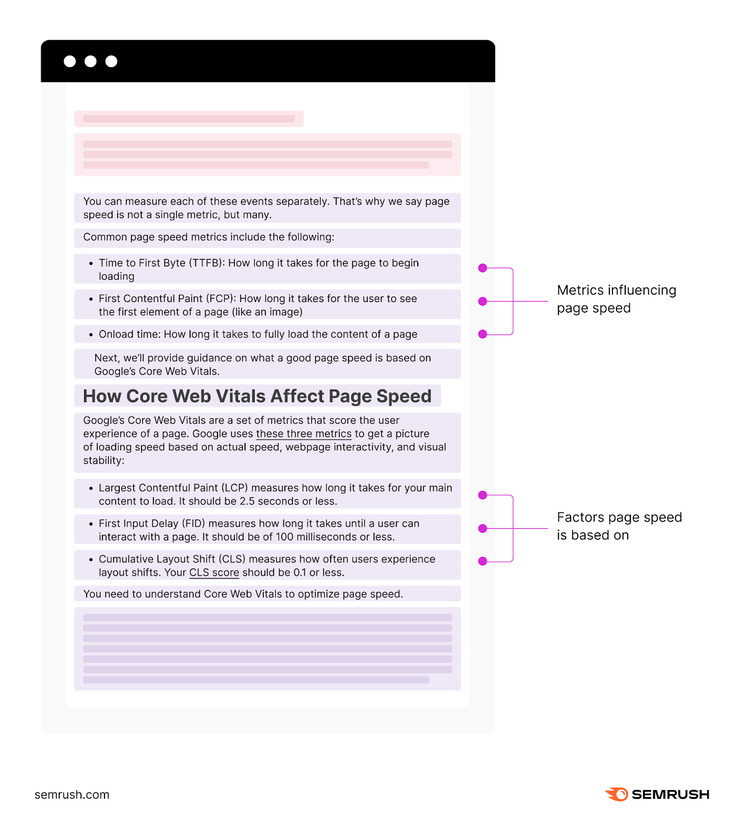
Let’s use our article on page speed as an example once more:
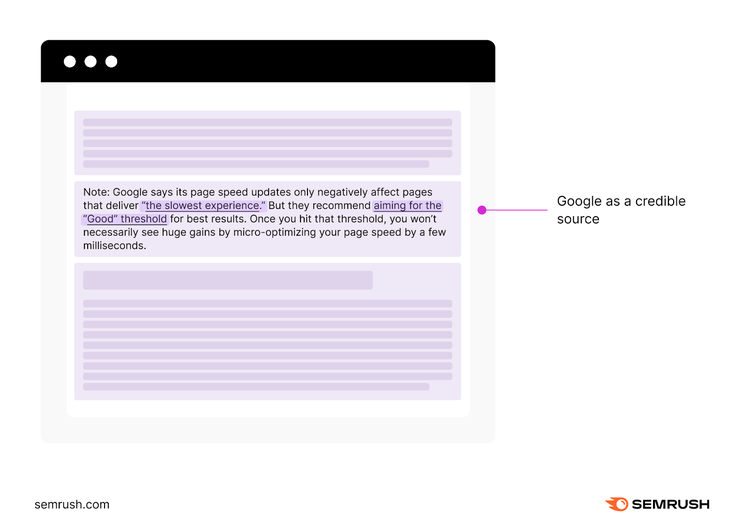
This article explores page speed deeper. Including metrics influencing page load time or underlying factors.
It always uses helpful examples or Google as a credible source:
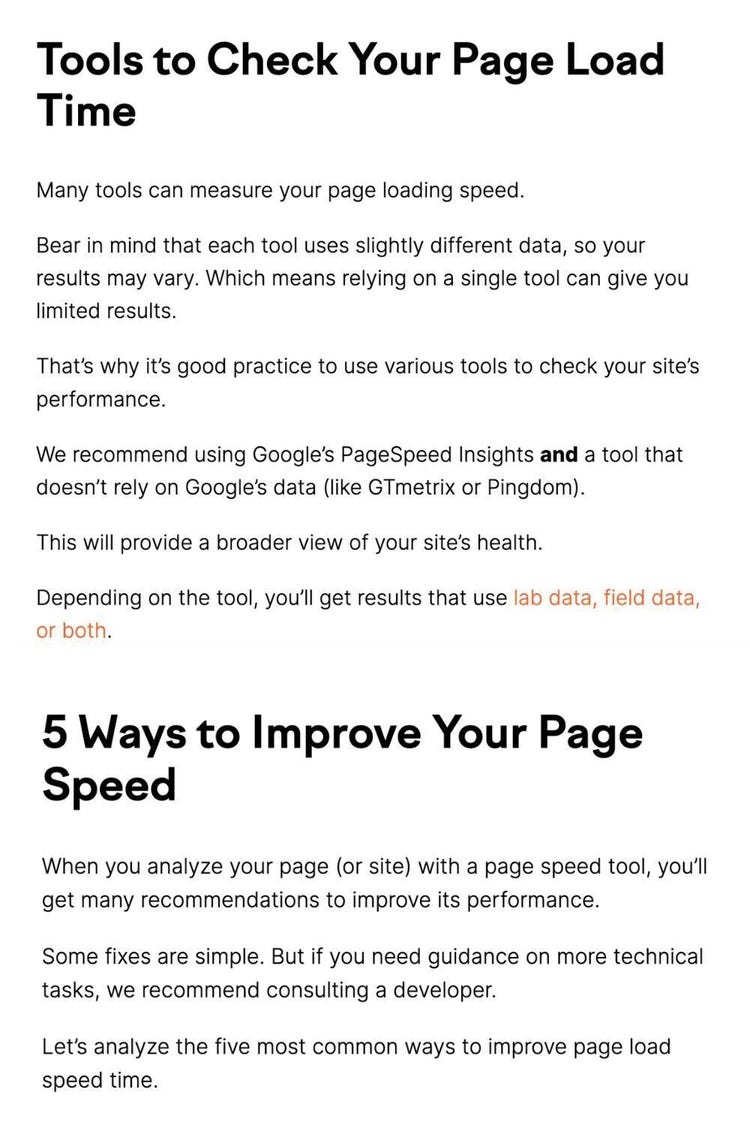
And it also gives tools to check page speed and provides guidance on improving it:
Reinforce the Definition
You have many ways to end your definition blog post.
You can:
- Summarize the core points
- Restate the definition in a different way
- Include practical tips for using the defined term
- Provide resources for additional reading or more information
- Explain the definition further by comparing it to similar terms or concepts
- Brainstorm possible business problems that arise from a lack of knowledge about this concept
For example, in our conclusion for the page speed definition post, we’ve linked out to further resources for more advanced information about technical SEO.

3 Examples of the Definition Blog Post Template in Action
- What Is Organic Traffic (And How to Increase It)
- What Is Bounce Rate and What Is a Good Rate?
- Multilingual SEO: What It Is & How to Do It
3 Tips to Consider
- Clear Definition: Avoid using confusing technical terms or complicated explanations. Instead, provide a detailed description that leaves no room for ambiguity.
- Address Different Interpretations: Consider that terms can have multiple interpretations or variations across different contexts or industries. So: acknowledge and address these different interpretations.
- Potential Misconceptions: Writing a definition blog post is a chance to clear up any misunderstandings or confusion about a term. Find out what aspects people often misunderstand or confuse. And then address them.
“How-To” Blog Post Template
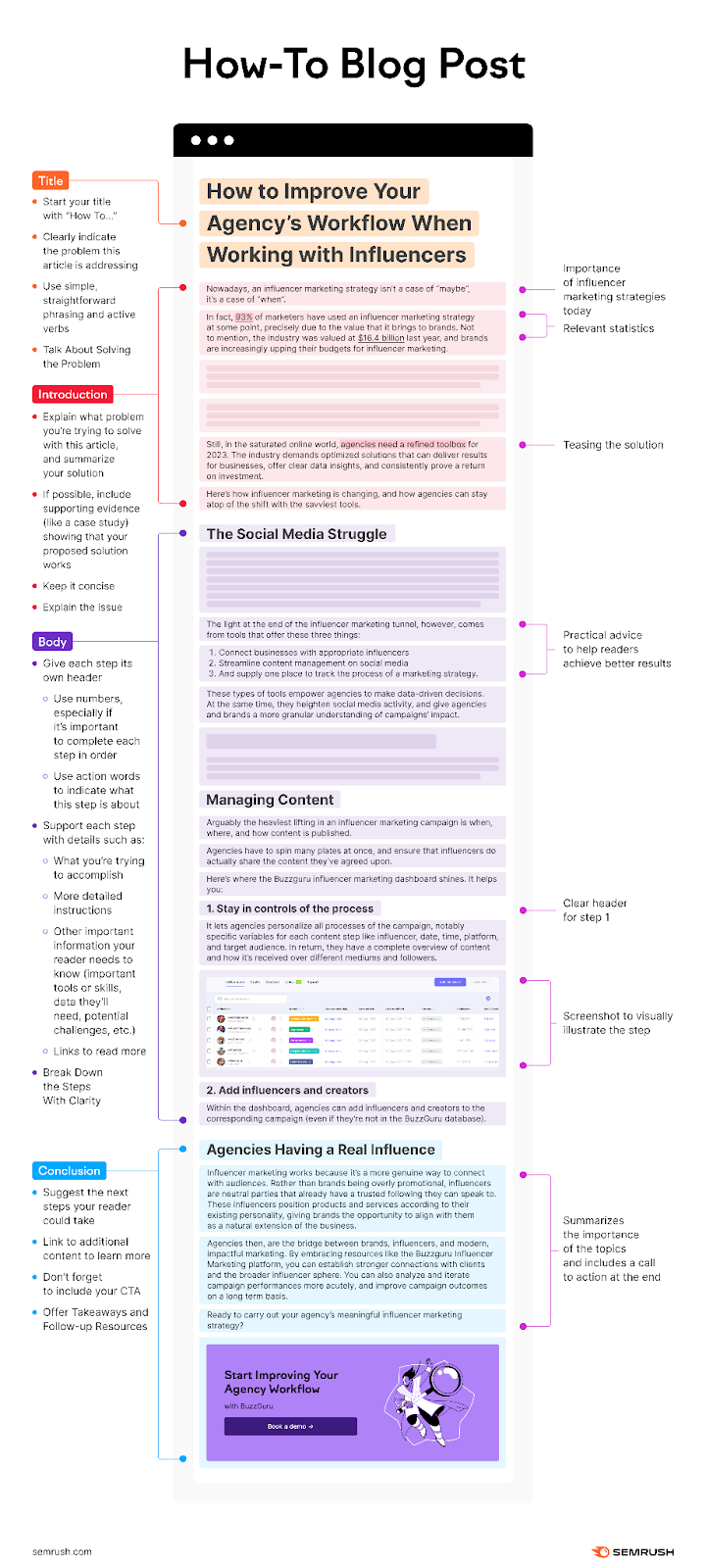
This post offers step-by-step instructions to complete a task or solve a problem. It’s actionable, allowing readers to carry out the process themselves.
When Should You Use the “How-To” Blog Post Template?
- Simplifying Complex Processes: How-to blog posts are great for breaking down complex tasks or processes into simple step-by-step instructions. Does your audience need help with technical procedures, DIY projects, or skill development? A how-to post can bring clarity and make learning easier.
- Teaching Skills: If your readers need to learn a particular skill or craft, you can create content that educates them on how to do it.
- Offering Solutions: How-to posts help readers solve problems. Whether it’s for their business or troubleshooting a tool, you can use this blog post template to guide them.
Anatomy of the “How-To” Blog Post Template
Here’s what you should include in a “How-To” blog post:
Talk About Solving the Problem
The title should show that the post is a how-to guide. And provide a hint about the problem or task the post will help solve or achieve. That’s why such blog posts often include “how to” in the title.
Example: How to Improve Your Agency’s Workflow When Working with Influencers

The title in our example clearly shows that it’s a how-to guide, explaining what you’ll learn. It also implies the issue by mentioning “improving your agency’s workflow”.
Here are other headlines you can use:
- How to [Task] in No Time
- How to [Task] like an Expert
- Need [Result]? Here’s How to Achieve It
- How to Reach [Result] Without [Obstacle]
- Ignite Your Impact: How to Leverage [Task] for Optimal Results
- Maximize Your Momentum: The Definitive How-To Guide for [Task]
- How to [Task] to [Achieve Desired Outcome] Like [Gripping Simile/Metaphor]
Explain the Issue
In the introduction, explain the issue or necessary task and why it’s important to solve. Discuss why this post matters to your readers.
Outline the article’s goal and provide an overview of each step. Explain what success looks like after completing all the steps.
Here are some tips to make your introduction strong:
- Use Experts & Statistics: When relevant, support the importance of achieving the goal with data or an expert’s opinion.
- Tease the Solution: Give readers a glimpse of the solution or the main steps they’ll learn in your how-to blog post.
- Show the Importance: Explain why completing the how-to guide matters and how it will help readers reach a desirable outcome.
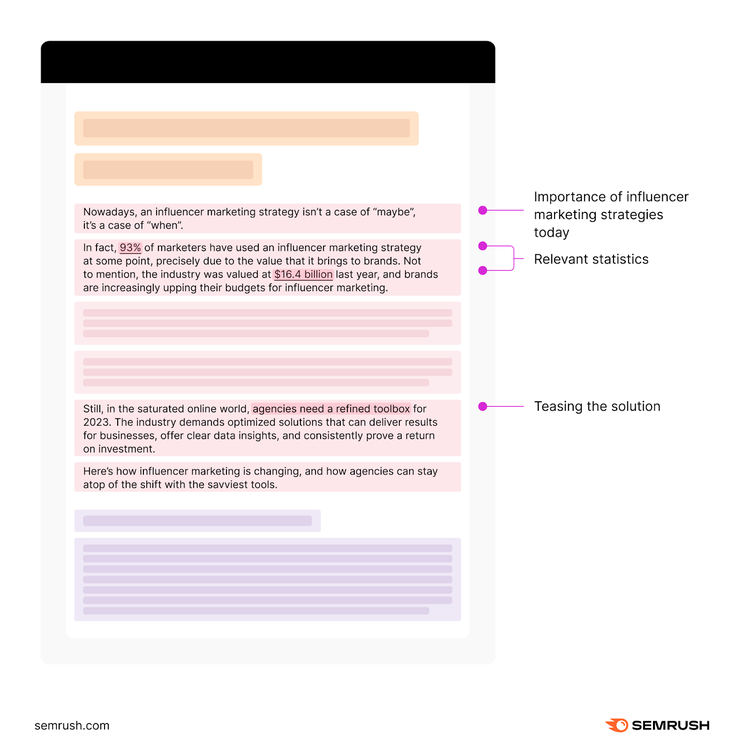
Let’s examine how we created the introduction for our how-to blog post on influencer marketing workflow:
- It starts out with the importance of influencer marketing strategies today
- It includes two relevant statistics about influencer marketing
- It hints at the solution by mentioning “agencies need a refined toolbox”
Break Down the Steps With Clarity
The body must provide clear instructions for each step of the process. It should have the following components:
- Clear step-by-step instructions that break down the process into easy-to-follow steps
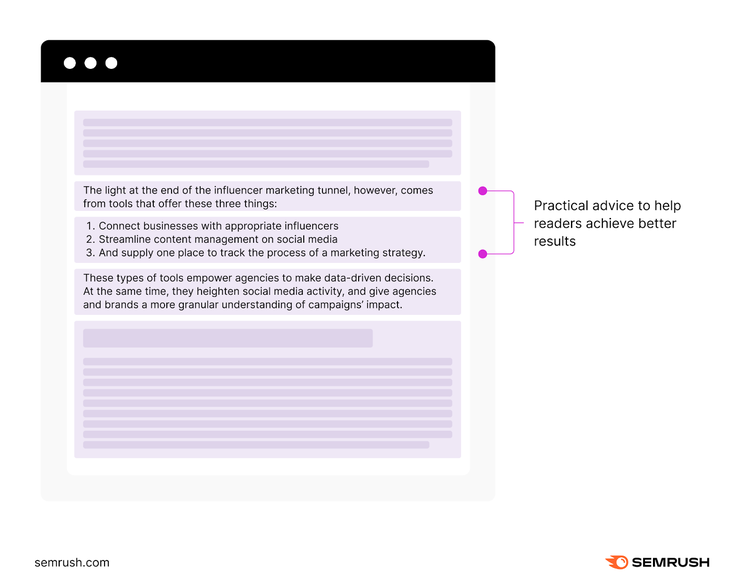
- Practical advice, tips, and shortcuts to help readers achieve better results and overcome common challenges
- Troubleshooting and FAQs to address concerns proactively
- Relevant images, diagrams, or videos to visually illustrate the steps or concepts
Let’s check how that looks in our article on influencer agencies:
First, the article explains how tools can empower agencies to make data-driven decisions.
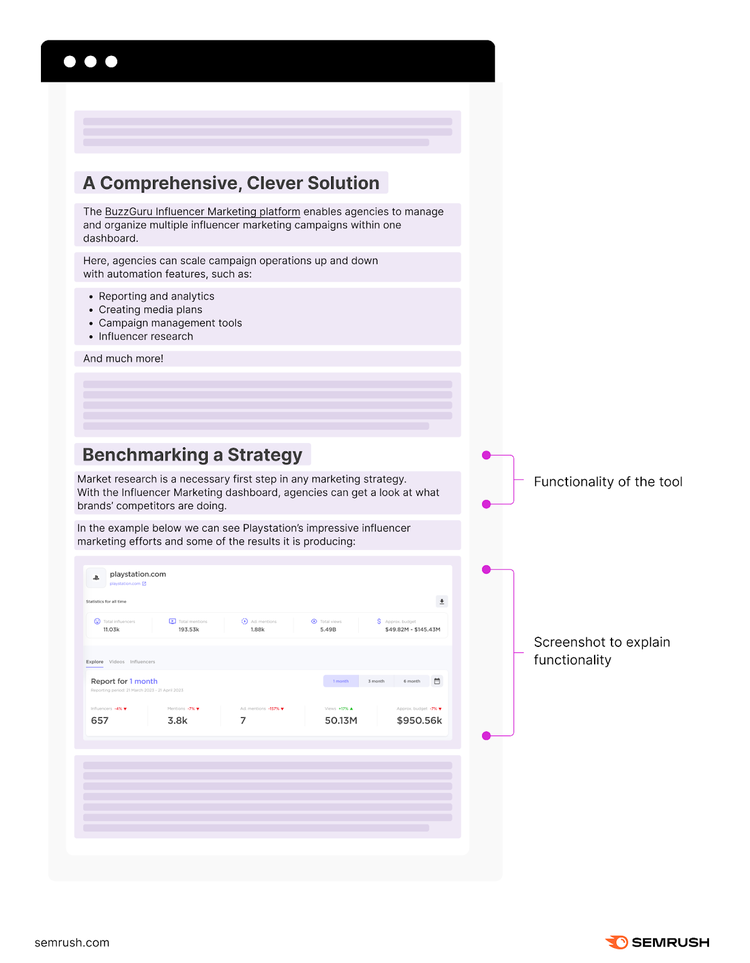
Then, it provides a tool as the solution. Demonstrating its functionality (+ explanatory screenshots):
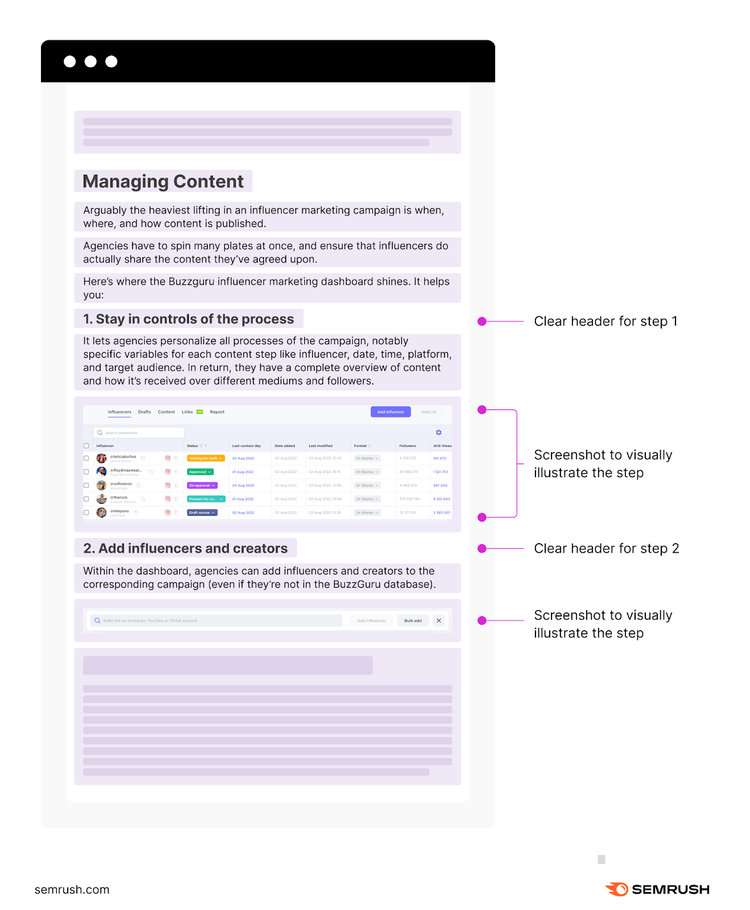
Afterward, the article provides step-by-step guidance on a crucial aspect of influencer marketing: content management.
And it always includes screenshots to explain the tool’s functionality and content management process.
Generally, the body should include information tailored to the readers’ level of knowledge. And it should be comprehensive, covering all aspects of the task or problem. But without overwhelming readers with excessive detail.
Offer Takeaways and Follow-up Resources
In a how-to blog post, the conclusion is where you wrap up with key takeaways, give a boost of encouragement, and inspire further action.
You can:
- Summarize the most important points or steps from your post
- Offer further resources/links to help readers get more information or complete difficult tasks
- Highlight areas where the readers can benefit from additional tools or services
- Ask questions to encourage readers to think through the implications of what they learned in your post
- Suggest other posts they can read to learn even more
Our conclusion for the influencer marketing workflow how-to post summarizes the importance of influencer marketing agencies.
And it includes a call to action and a banner at the end that guides readers to use our tool.

3 Examples of the “How-To” Blog Post Template in Action
- How to Guest Post for SEO in 2024
- Blog SEO: How to Optimize Your Blog for Search Engines
- How to Write a Blog Post (Even If It's the First Time)
3 Tips to Consider
- Offer Many Methods: If there are multiple ways to do something, share these methods. This caters to different readers and acknowledges that there’s no one-size-fits-all approach.
- Share Personal Experiences: Sharing your experiences, mistakes, and learnings makes your content more authentic and relatable. It shows you’ve been in your readers’ shoes.
- Cater to Different Levels: Reader levels vary. Some know the basics, while others are complete novices. Identify your target audience and adapt your content accordingly. Provide additional resources for those needing advanced explanations.
Numbered Listicle Blog Post Template
Listicle blog post templates present information in a numbered format. They simplify complex ideas. And this makes content more accessible and easier for your audience to understand.
When Should You Use the Numbered Listicle Blog Post Template?
- Ranking or Countdown Lists: Listicles are great for ranking or countdown lists. Whether it’s “Top 10 Tips” or “5 Best Practices,” this format creates excitement as readers go through. It makes them curious and keeps them hooked until they reach number one. Or the most important point.
- Curating Content: A listicle is an excellent way to curate content from different sources. For example, you can create a list of “15 Tips for Scaling Your SEO Content Strategy.”
- Summarizing Research Findings: They are also useful for summarizing research findings or survey results. A numbered listicle can present the data clearly and organized. With each point representing a key finding or statistic. This helps readers grasp and remember important insights from the study.
Anatomy of the Listicle Blog Post Template
Here’s how a listicle blog post should look:
Include a Number
Include a number in the title. It represents the points or items covered in the listicle. You can also add emotional or power words for a catchier effect. And don’t forget your target keyword.
Example: SEO Copywriting: 10 Tips to Boost Your Content Performance

The title above mentions “10 tips” and it also includes our target keyword, “SEO Copywriting”.
Here are some other headline you can also use:
- 10 Insider Secrets to Mastering [Topic] Like a Pro
- 3 Surprising [Topic] Hacks You Wish You Knew Sooner
- 8 Essential [Topic] Tips Every Beginner Needs to Know
- 7 Unbeatable Strategies to Skyrocket Your [Topic] Success
- 5 Game-Changing [Topic] Trends You Can’t Afford to Ignore
- The A-Z of [Topic]: 26 Key Concepts You Need to Understand
- The Top 6 [Topic] Mistakes You’re Making (And How to Fix Them)
Write a Short or No Intro at All
Since most people skim through list posts, it’s unnecessary to write a lengthy introduction.
Instead, focus on the following aspects:
- Table of Contents: Preview the list of tips covered in your post.
- Trust: Establish trust in as few words as possible.
Here’s an example from our SEO Copywriting blog post:
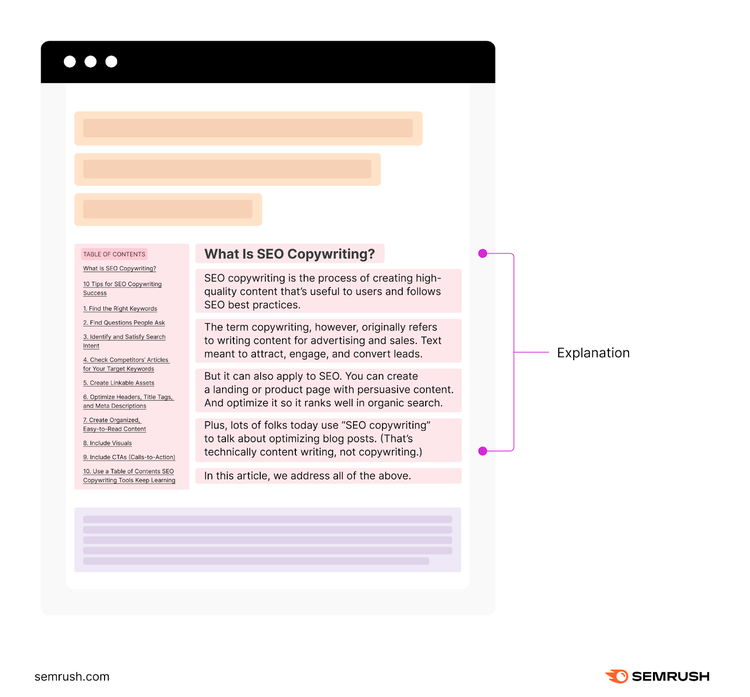
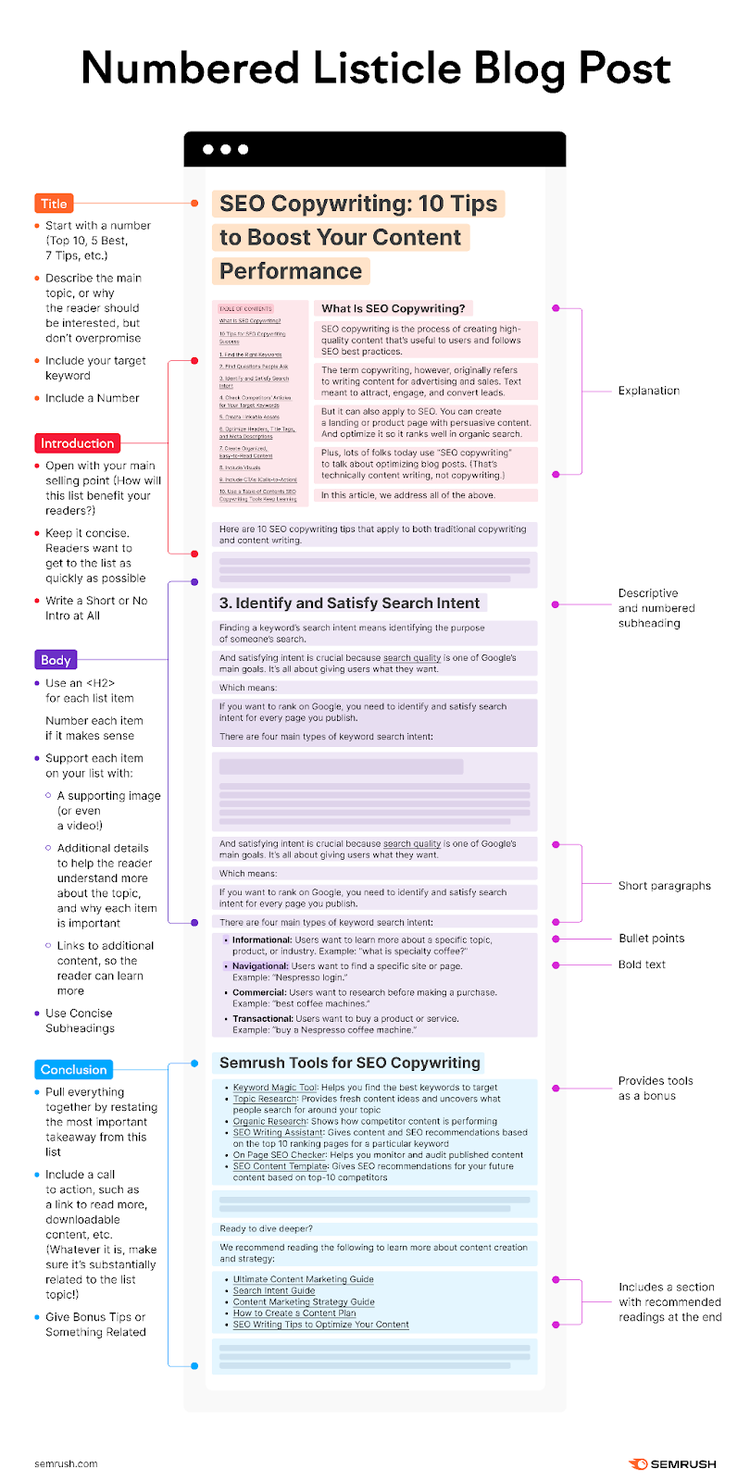
This article doesn’t have an introduction. It jumps straight into explaining SEO Copywriting. And there’s a table of contents on the left.
Use Concise Subheadings
In a listicle you should do the following:
- Subheadings should be concise, descriptive, and entice readers to continue reading
- Create snappy and scannable content (e.g., short paragraphs, bullet points, bold or italicized text)
- Keep readers engaged by varying the length, tone, and format of each list item
So, how does that look in our article about SEO Copywriting?
The article has descriptive, and numbered subheadings.
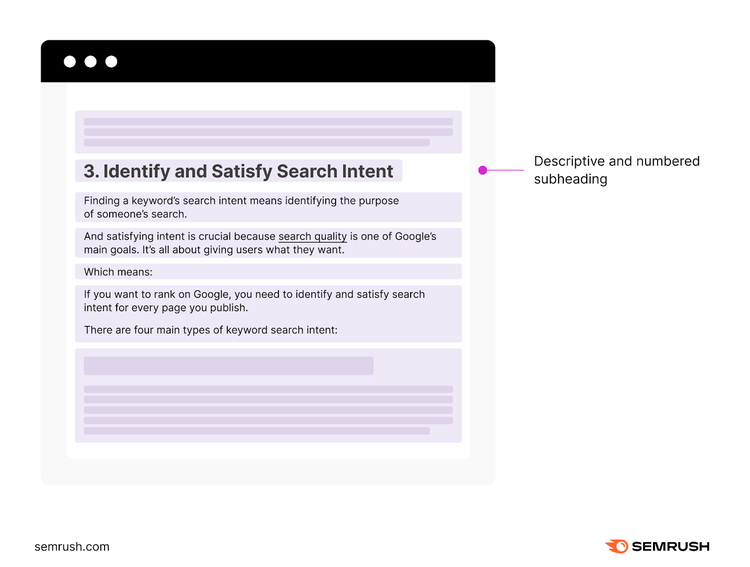
And short paragraphs, bullet points, and bold text.
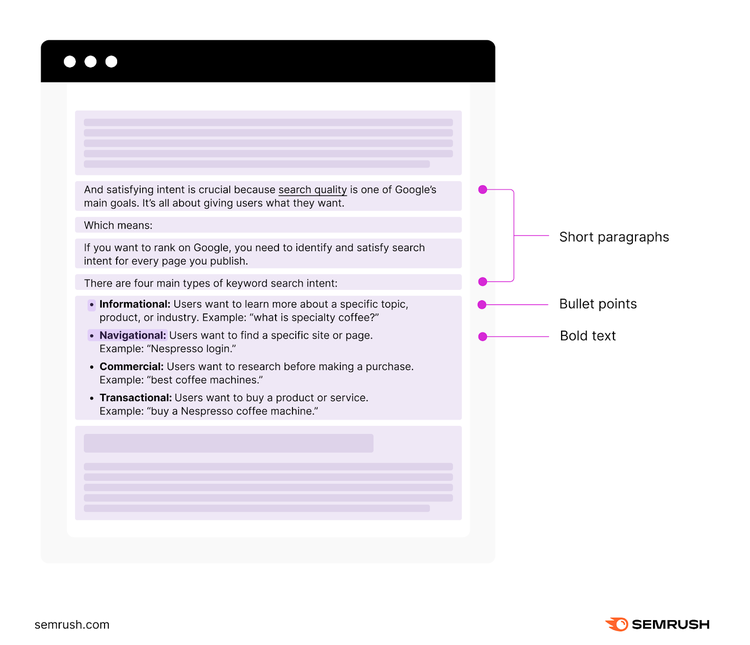
And the format differs for each subheading. Some have varying numbers of bullet points like above.
While others have more descriptions and images.
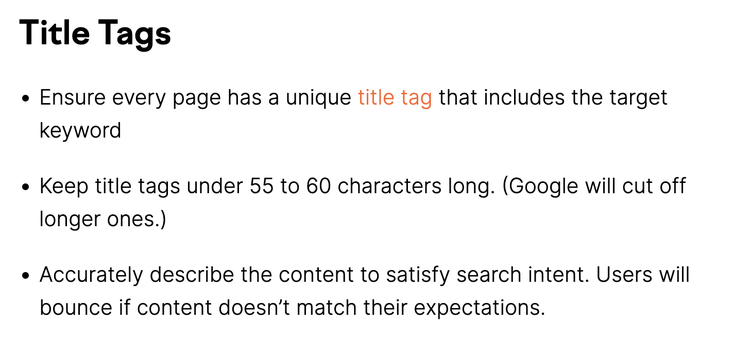
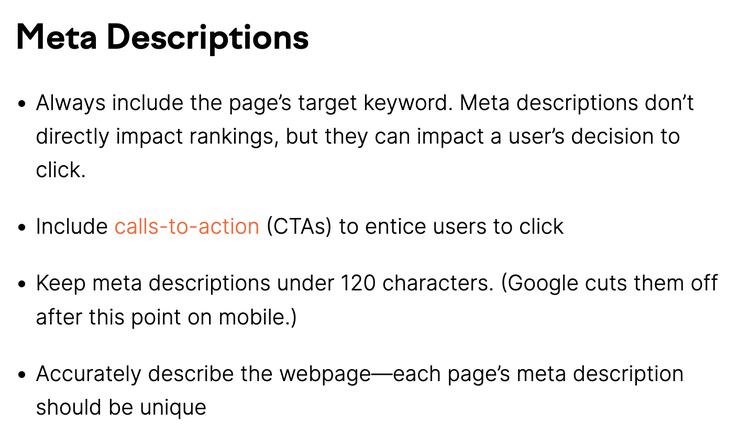
“6. Optimize Headers, Title Tags, and Meta Descriptions” even delves deeper into the topic with its own subheadings.
Give Bonus Tips or Something Related
Bonus tips or a related topic are a great way to keep readers engaged. They should be added after the main list is complete.
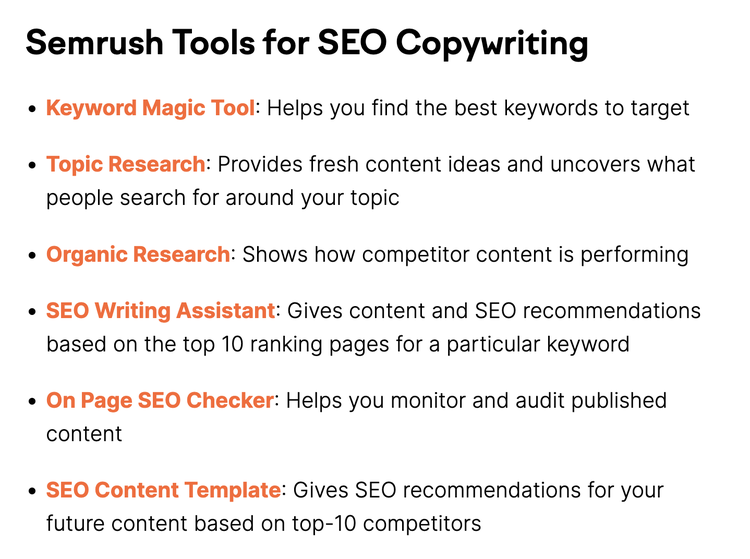
For example, since you can use tools for SEO copywriting, our SEO Copywriting post provides tools as a bonus:
And it also includes a section with recommended readings at the end:
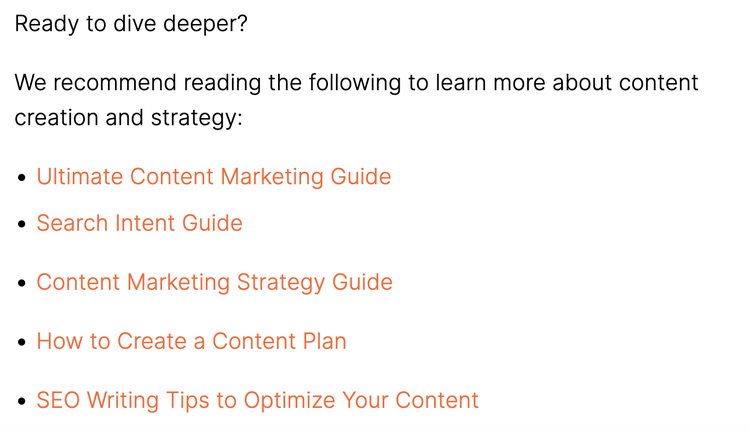
3 Examples of the Numbered Blog Post Template in Action
- 21 Practical and Effective Blogging Tips for Beginners
- 121 Blog Ideas and Topics to Write About
- 12 Types of Content Marketing to Leverage for Success in 2024
3 Tips to Consider
- Mix Information with Entertainment: Listicles give you a chance to mix info with entertainment. When sharing valuable information, add some humor, storytelling, or interesting anecdotes. That keeps readers hooked and entertained.
- Add a Twist to Common Points: To stand out in a saturated topic, add a unique twist or perspective to your points. This can include presenting contrarian views or citing lesser-known facts.
- Use Unconventional Listicle Structures: Regular listicles follow a numerical format like “10 Tips” or “5 Ways.” To make your listicle stand out, try unconventional structures. For example, replace numbers with letters or symbols. This adds a touch of creativity and visual appeal. Making your content more memorable for readers.
Shake Up How You Format New Content
When creating compelling blog posts with these templates, remember: enhancing your content goes beyond formatting.
The right tools for analyzing and optimizing your content can make a big difference.
For instance, the Topic Research tool uncovers trending topics and audience queries.
So, improve your blog post format and boost visibility.
Because great content deserves a great audience!
Find Out What Ranks
with the Topic Research Tool

Zhenya is a content strategist and writer with five years of experience. Throughout his career, he has guided numerous start-ups and mentored entrepreneurs and companies globally in the realm of content strategy. Additionally, he is working on his own content-based online business.

Tells Google to show you more from Semrush in AI, Search, and Discover.