
Bot Traffic: Definition, Types, and Best Practices for Prevention
What Is Bot Traffic?
Bot traffic is non-human traffic to websites and apps generated by automated software programs, or "bots," rather than by human users.
Bot traffic isn’t valuable traffic, but it’s common to see it. Search engine crawlers (also referred to as “spiders”) may visit your site on a regular basis, for example.
Bot traffic typically won’t result in conversions or revenue for your business—although, if you’re an ecommerce business, you might experience shopping bots that make purchases on behalf of human creators.
However, this mostly pertains to businesses that sell in-demand items like concert tickets or limited sneaker releases.
Some bots visit your site to crawl pages for search engine indexing or check site performance. Other bots may attempt to scrape (extract data) from your site or intentionally overwhelm your servers to attack your site’s accessibility.
Good Bots vs. Bad Bots: Identifying the Differences
There are both beneficial and harmful bots. Below, we explain how they differ.
Good Bots
Common good bots include but aren’t limited to:
- Crawlers from SEO tools: Tool bots, such as the SemrushBot, crawl your site to help you make informed decisions, like optimizing meta tags and assessing the indexability of pages. These bots are used for good to help you meet SEO best practices.
- Site monitoring bots: These bots can check for system outages and monitor the performance of your website. We use SemrushBot with tools like the SEO Checker and more to alert you of issues like downtime and slow response times. Continuous monitoring helps maintain optimal site performance and availability for your visitors.
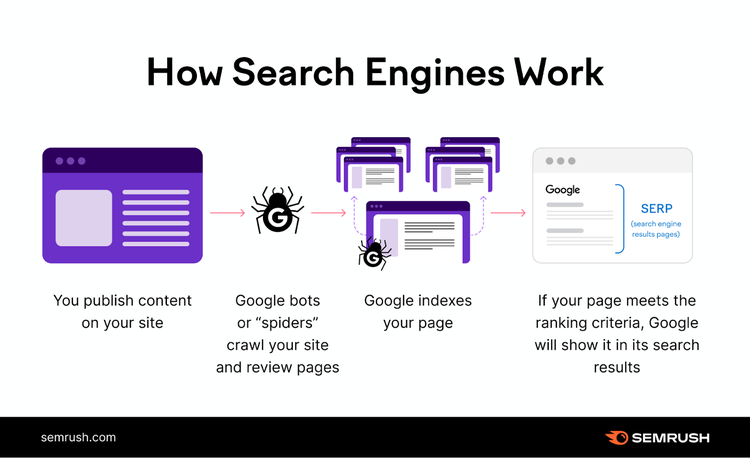
- Search engine crawlers: Search engines use bots, such as Googlebot, to index and rank the pages of your website. Without these bots crawling your site, your pages wouldn’t get indexed, and people wouldn’t find your business in search results.
Bad Bots
You may not see traffic from or evidence of malicious bots on a regular basis, but you should always keep in mind the potential of being targeted.
Bad bots include but aren’t limited to:
- Scrapers: Bots can scrape and copy content from your website without your permission. Publishing that information elsewhere is intellectual property theft and copyright infringement. If people see your content duplicated elsewhere on the web, the integrity of your brand may be compromised.
- Spam bots: Bots can also create and distribute spam content, such as phishing emails, fake social media accounts, and forum posts. Spam can deceive users and compromise online security by tricking them into revealing sensitive information.
- DDoS bots: DDoS (Distributed Denial-of-Service) bots aim to overwhelm your servers and prevent people from accessing your website by sending a flood of fake traffic. These bots can disrupt your site's availability, leading to downtime and financial losses if users aren’t able to access or buy what they need.
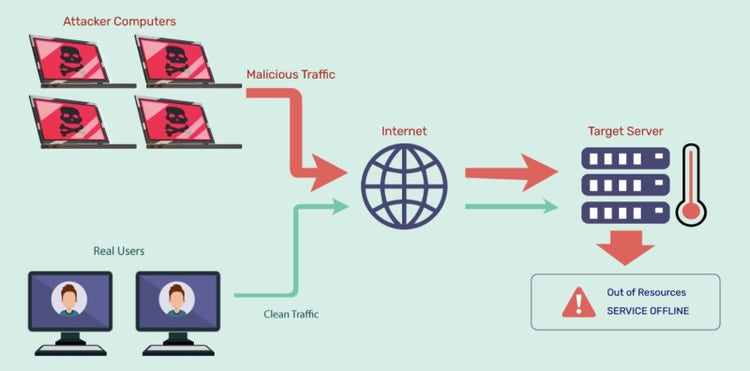
Image Source: Indusface
Further reading: 11 Crawlability Problems and How to Fix Them
How Bot Traffic Affects Websites and Analytics
Bot traffic can skew website analytics and lead to inaccurate data by affecting the following:
- Page views: Bot traffic can artificially inflate the number of page views, making it seem like users are engaging with your website more than they really are
- Session duration: Bots can affect the session duration metric, which measures how long users stay on your site. Bots that browse your website quickly or slowly can alter the average session duration, making it challenging to assess the true quality of the user experience.
- Location of users: Bot traffic creates a false impression of where your site’s visitors are coming from by masking their IP addresses or using proxies
- Conversions: Bots can interfere with your conversion goals, such as form submissions, purchases, or downloads, with fake information and email addresses
Bot traffic can also negatively impact your website’s performance and user experience by:
- Consuming server resources: Bots can consume bandwidth and server resources, especially if it’s malicious or high-volume. This can slow down page load times, increase hosting costs, and even cause your site to crash.
- Damaging your reputation and security: Bots can harm your site’s reputation and security by stealing or scraping content, prices, and data. An attack (such as DDoS) could cost you revenue and customer trust. With your site potentially inaccessible, your competitors may benefit if users turn to them instead.
Security Risks Associated with Malicious Bots
All websites are vulnerable to bot attacks, which can compromise security, performance, and reputation. Attacks can target all types of websites, regardless of size or popularity.
Bot traffic makes up nearly half of all internet traffic, and more than 30% of automated traffic is malicious.
Malicious bots can pose security threats to your website as they can steal data, spam, hijack accounts, and disrupt services.
Two common security threats are data breaches and DDoS attacks:
- Data breaches: Malicious bots can infiltrate your site to access sensitive information like personal data, financial records, and intellectual property. Data breaches from these bots can result in fraud, identity theft of people at your business or your site’s visitors, reputational damage to your brand, and more.
- DDoS attacks: Malicious bots can also launch DDoS attacks that make your site slow or unavailable for human users. These attacks can result in service disruption, revenue loss, and dissatisfied users.
How to Detect Bot Traffic
Detecting bot traffic is important for website security and accurate analytics.
Identify Bots with Tools and Techniques
There are various tools and techniques to help you detect bot traffic on your website.
Some of the most common ones are:
- IP analysis: Compare the IP addresses of your site’s visitors against known bot IP lists. Look for IP addresses with unusual characteristics, such as high request rates, low session durations, or geographic anomalies.
- Behavior analysis: Monitor the behavior of visitors and look for signs that indicate bot activity, such as repetitive patterns, unusual site navigation, and low session times
Log File Analysis
Analyze the log files of your web server. Log files record every request made to your site and provide valuable information about your website traffic, such as the user agent, referrer, response code, and request time.
A log file analysis can also help you spot issues crawlers might face with your site. Semrush’s Log File Analyzer allows you to better understand how Google crawls your website.
Here’s how to use it:
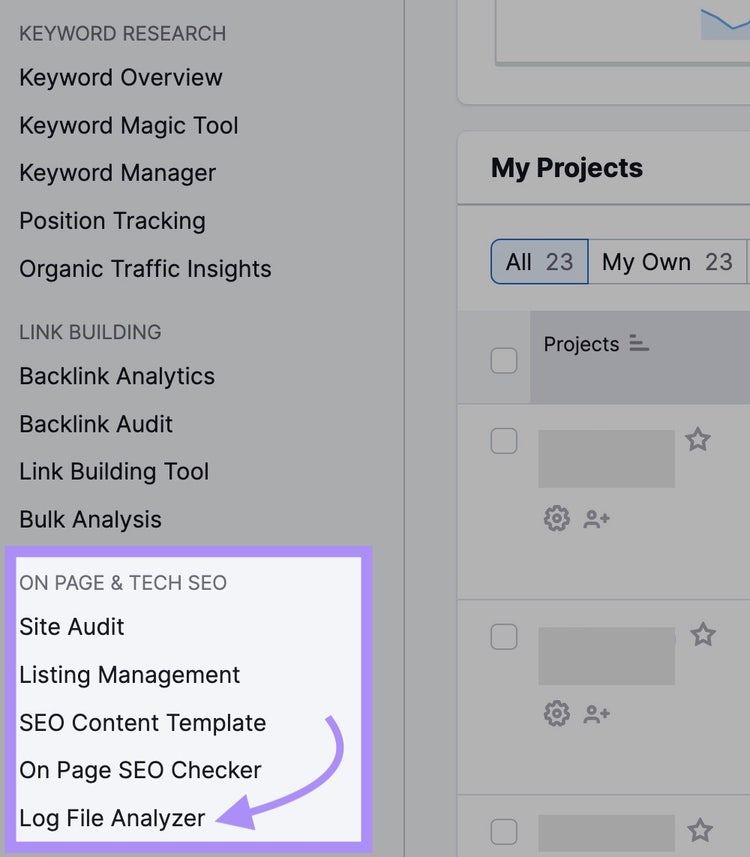
Go straight to the Log File Analyzer or log in to your Semrush account. Access the tool through the left navigation under “ON PAGE & TECH SEO.”
Before using the tool, get a copy of your site’s log file from your web server.
The most common way of accessing it is through a file transfer protocol (FTP) client like FileZilla. Or, ask your development or IT team for a copy of the file.
Note
Need more guidance on accessing your log file? This guide will help: Log File Analysis for SEO.
Once you have the log file, drop it into the analyzer.
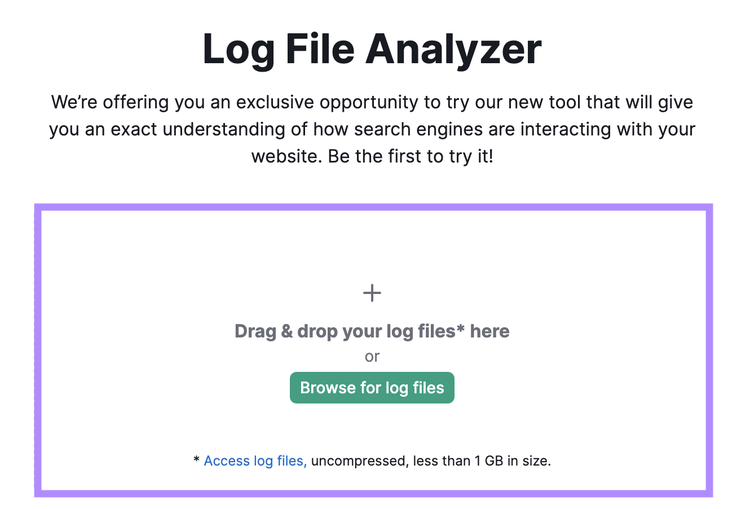
Then click “Start Log File Analyzer.”
A chart will display smartphone and desktop Googlebot activity, showing daily hits, status codes, and the requested file types.
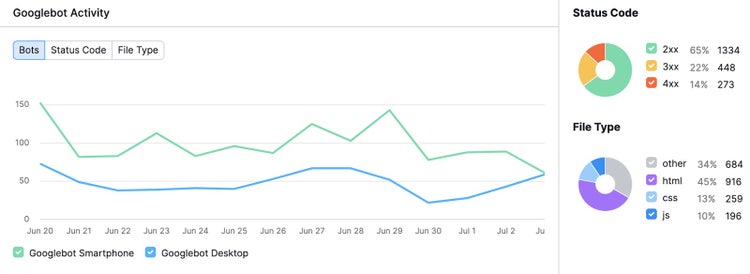
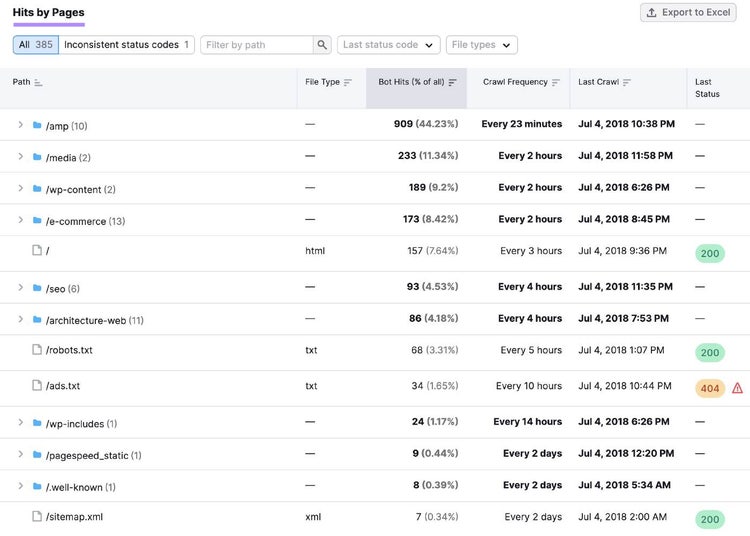
If you scroll down to “Hits by Pages,” there is a table where you can drill down to specific pages and folders. This can help determine if you’re wasting crawl budget, as Google only crawls so many of your pages at a time.
The table shows the number of bot hits, which pages and folders are crawled the most, the time of the last crawl, and the last reported server status. The analysis gives you insights to improve your site’s crawlability and indexability.
Analyze Your Log File
to Detect Bad Bot Traffic
Analyze Web Traffic Patterns
To learn how to identify bot traffic in Google Analytics and other platforms, analyze the traffic patterns of your website. Look for anomalies that might indicate bot activity.
Examples of suspicious patterns include:
Spikes or Drops in Traffic
Big changes in traffic could be a sign of bot activity. For example, a spike might indicate a DDoS attack. A drop might be the result of a bot scraping your content, which can reduce your rankings.
Duplication on the web can muddy your content's uniqueness and authority, potentially leading to lower rankings and fewer clicks.
Low Number of Views per User
A large percentage of visitors landing on your site but only viewing one page might be a sign of click fraud. Click fraud is the act of clicking on links with disingenuous or malicious intent.
An average engagement time of zero to one second would help confirm that users with a low number of views are bots.
Zero Engagement Time
Bots don’t interact with your website like humans do, often arriving and then leaving immediately. If you see traffic with an average engagement time of zero seconds, it may be from bots.
High Conversion Rate
An unusually large percentage of your visitors completing a desired action, such as buying an item or filling out a form, might indicate a credential stuffing attack. This type of attack is when your forms are filled out with stolen or fake user information in an attempt to breach your site.
Suspicious Sources and Referrals
Traffic coming from the “unassigned” medium, which means the traffic has no identifiable source, can be unusual for human visitors who usually come from search engines, social media, or other websites.
It may be bot traffic if you see irrelevant referrals to your website, such as spam domains or adult sites.
Suspicious Geographies
Traffic coming from cities, regions, or countries that aren’t consistent with your target audience or marketing efforts may be from bots that are spoofing their location.
Strategies to Combat Bot Traffic
To prevent bad bots from wreaking havoc on your website, here are several techniques to help you deter or slow them down.
Implement Effective Bot Management Solutions
One way to combat bot traffic is by using a bot management solution like Cloudflare or Akamai.
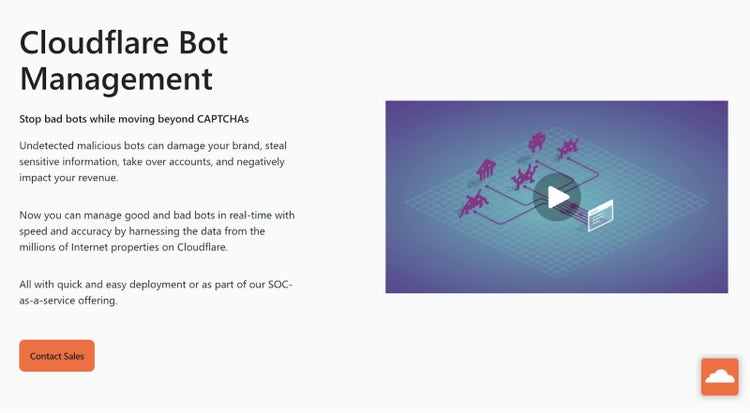
These solutions can help you identify, monitor, and block bot traffic on your website, using various techniques such as:
- Behavioral analysis: This studies how users interact with your website, such as how they scroll or click. By comparing the behavior of users and bots, the solution can block malicious bot traffic.
- Device fingerprinting: This collects unique information from a device, such as the browser and IP address. By creating a fingerprint for each device, the solution can block repeated bot requests.
- Machine learning: This uses algorithms to learn from data and make predictions. The solution can analyze the patterns and features of bot traffic.
Bot management algorithms can also differentiate between good and bad bots, with insights and analytics on the source, frequency, and impact.
If you use a bot management solution, you’ll be able to customize your response to different types of bots, such as:
- Challenging: Asking bots to prove their identity or legitimacy before accessing your site
- Redirecting: Sending bots to a different destination away from your website
- Throttling: Allowing bots to access your site, but at a limited frequency
Set Up Firewalls and Security Protocols
Another way to combat bot traffic is to set up firewalls and security protocols on your website, such as web application firewall (WAF) or HTTPS.
These solutions can help you prevent unauthorized access and data breaches on your website, as well as filter out malicious requests and common web attacks.
To use a WAF, you should do the following:
- Sign up for an account with a provider (such as Cloudflare or Akamai), add your domain name, and change your DNS settings to point to the service’s servers
- Specify which ports, protocols, and IP addresses are allowed or denied access to your site
- Use a firewall plugin for your site platform, such as WordPress, to help you manage your firewall settings from your website dashboard
To use HTTPS for your site, obtain and install an SSL/TLS certificate from a trusted certificate authority, which proves your site’s identity and enables encryption.
By using HTTPS, you can:
- Ensure visitors connect to your real website and that their data is secure
- Prevent bots from modifying your site’s content
Use Advanced Techniques: CAPTCHAs, Honeypots, and Rate Limiting
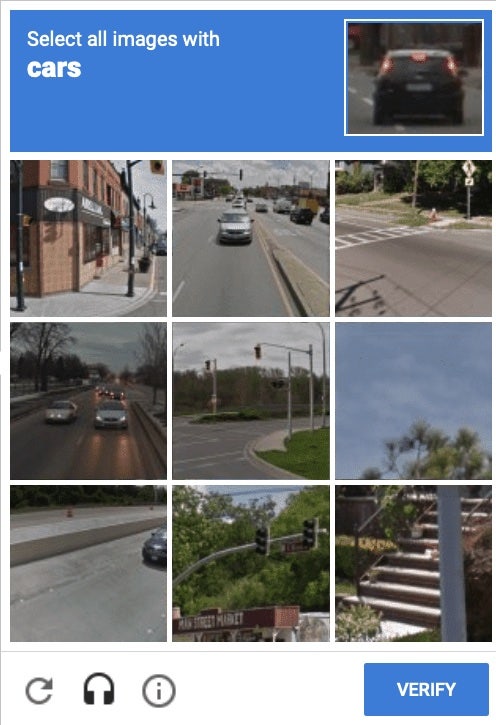
Image Source: Google
- CAPTCHAs are tests that require human input, such as checking a box or typing a word, to verify the user isn’t a bot. Use a third-party service like Google’s reCAPTCHA to generate challenges that require human intelligence and embed these in your web forms or pages.
- Honeypots are traps that lure bots into revealing themselves, such as hidden links or forms that only bots can see. Monitor any traffic that interacts with these elements.
- Rate limiting caps the number of requests or actions a user can perform on your site, such as logging in or commenting, within a certain time frame. Use a tool like Cloudflare to set limits on requests and reject or throttle any that exceed those limits.
Best Practices for Bot Traffic Prevention
Before you make any changes to prevent bots from reaching your website, consult with an expert to help ensure you don’t block good bots.
Here are several best practices for how to stop bot traffic and minimize your site’s exposure to risk.
Monitor and Update Security Measures
Monitoring web traffic can help you detect and analyze bot activity, such as the bots' source, frequency, and impact.
Update your security measures to:
- Prevent or mitigate bot attacks
- Patch vulnerabilities
- Block malicious IP addresses
- Implement encryption and authentication
These tools, for example, can help you identify, monitor, and block bot traffic:
- Google Analytics for monitoring
- Cloudflare for security
- Akamai for security
Educate Your Team on Bot Traffic Awareness
Awareness and training can help your team recognize and handle bot traffic, as well as prevent human errors that may expose your website to bot attacks.
Foster a culture of security and responsibility among your team members to improve communication and collaboration. Consider conducting regular training sessions, sharing best practices, or creating a bot traffic policy.
Keep Up with Bot Traffic Trends
Bots are constantly evolving and adapting as developers use new techniques to bypass security measures. Keeping up with bot traffic trends can help you prepare for emerging bot threats.
By doing this, you can also learn from the experiences of other websites that have dealt with bot traffic issues.
Following industry news and blogs (such as the Cloudflare blog or the Barracuda blog), attending webinars and events, or joining online communities and forums can help you stay updated with the latest trends in bot management.
These are also opportunities to exchange ideas and feedback with other website administrators.
How to Filter Bot Traffic in Google Analytics
In Google Analytics 4, the latest version of the platform, traffic from known bots and spiders is automatically excluded.
You can still create IP address filters to catch other potential bot traffic if you know or can identify the IP addresses the bots originate from. Google’s filtering feature is meant to filter internal traffic (the feature is called “Define internal traffic”), but you can still enter any IP address you like.
Here’s how to do it:
In Google Analytics, note the landing page, date, or time frame the traffic came in, and any other information (like city or device type) that may be helpful to reference later.
Check your website’s server logs for suspicious activity from certain IP addresses, like high request frequency or unusual request patterns during the same time frame.
Once you’ve determined which IP address you want to block, copy it. As an example, it might look like 123.456.78.90.
Enter the IP address into an IP lookup tool, such as NordVPN’s IP Address Lookup. Look at the information that corresponds with the address, such as internet service provider (ISP), hostname, city, and country.
If the IP lookup tool confirms your suspicions about the IP address likely being that of a bot, continue to Google Analytics to begin the filtering process.
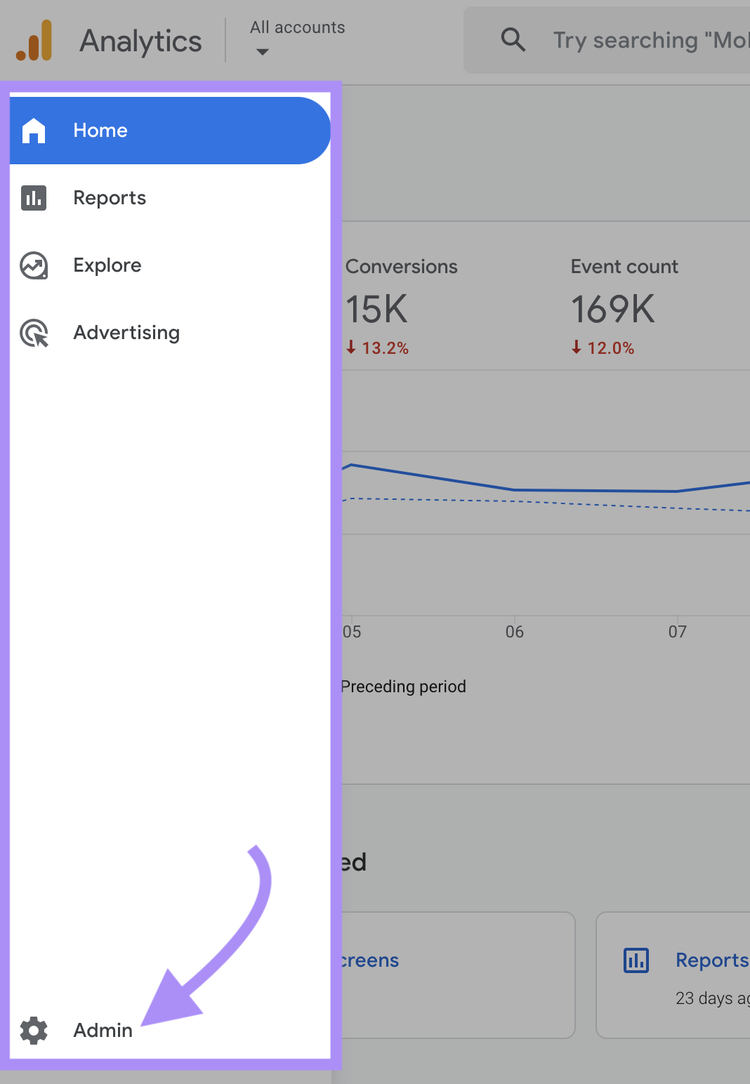
Navigate to “Admin” at the bottom left of the platform.
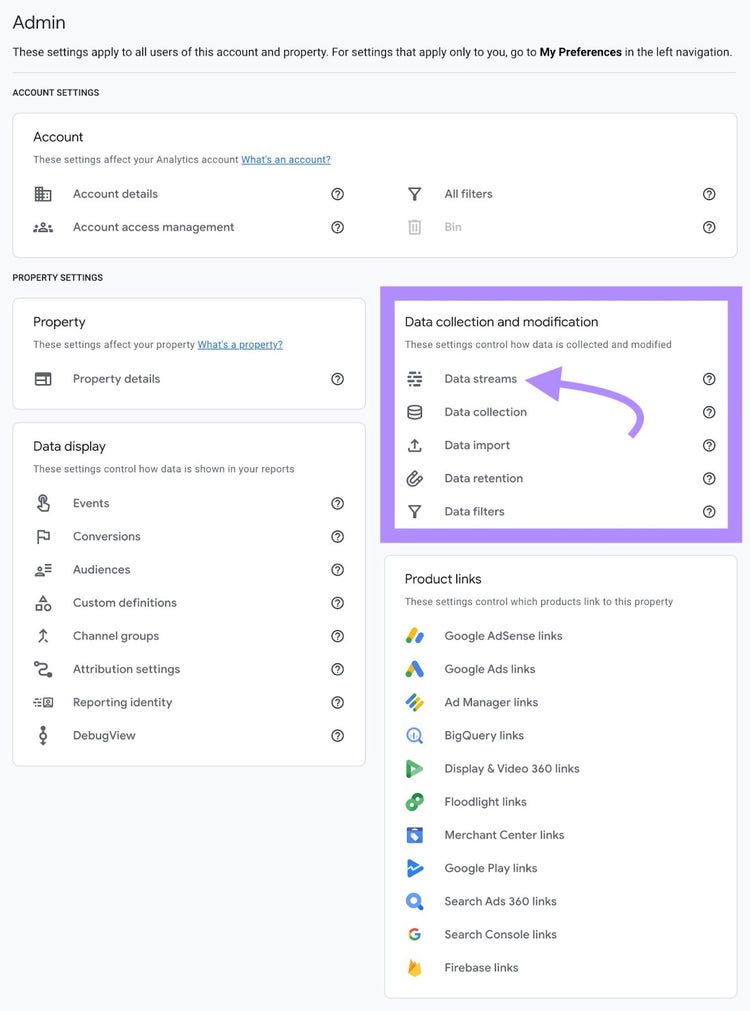
Under “Data collection and modification,” click “Data streams.”
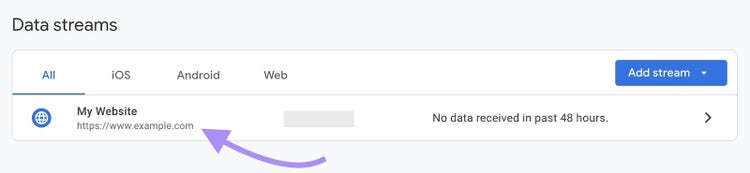
Choose the data stream you want to apply a filter to.
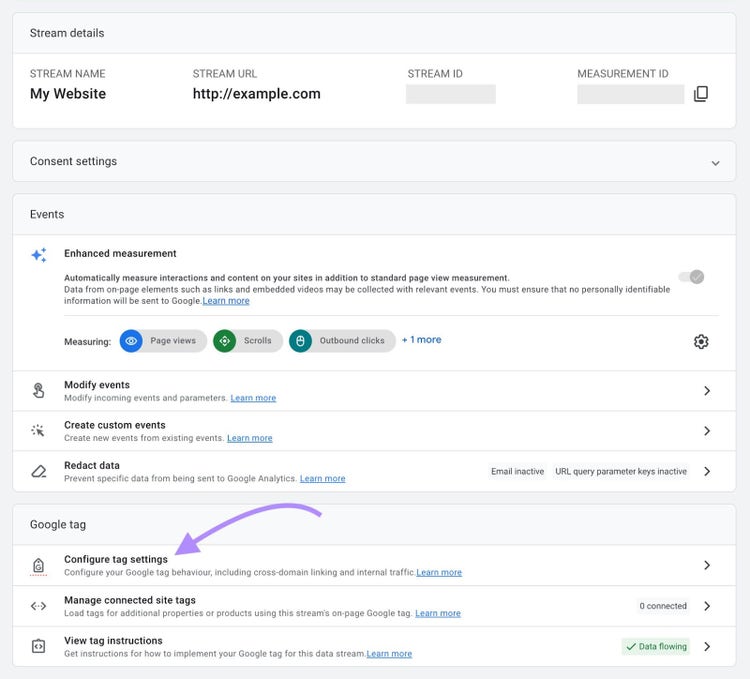
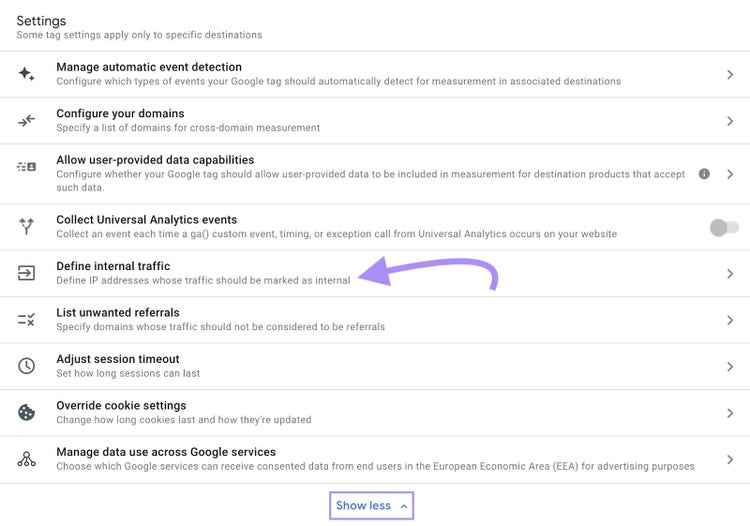
Navigate to “Configure tag settings.”
Click “Show more” and then navigate to “Define internal traffic.”
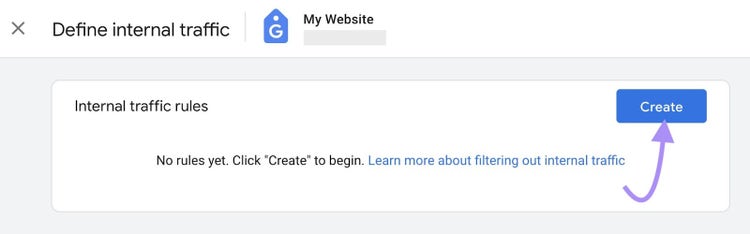
Click the “Create” button.
Enter a rule name, traffic type value (such as “bot”), and the IP address you want to filter. Choose from a variety of match types (equals, range, etc.) and add multiple addresses as conditions if you’d prefer not to create a separate filter for every address.
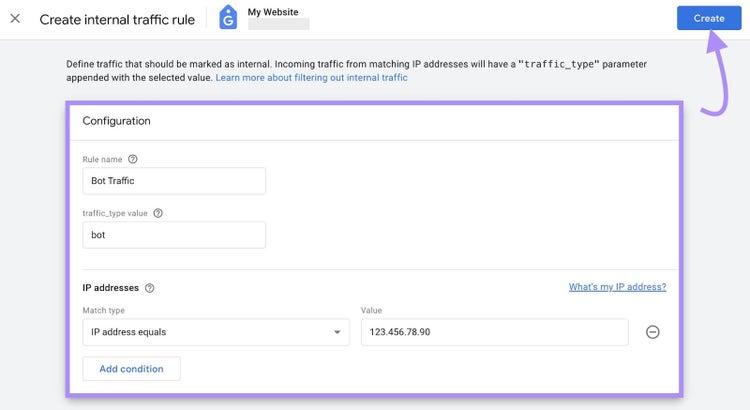
Click the “Create” button again, and you’re done. Allow for a processing delay of 24 to 48 hours.
Further reading: Crawl Errors: What They Are and How to Fix Them
How to Ensure Good Bots Can Crawl Your Site
Once you’ve blocked bad bots and filtered bot traffic in your analytics, ensure good bots can still easily crawl your site.
The free SEO Checker reviews key crawlability signals like your robots.txt, sitemap, and canonical tags on your homepage.
To find issues across your entire site, the Semrush Site Audit tool identifies over 140 potential issues, including crawlability.
Here’s how:
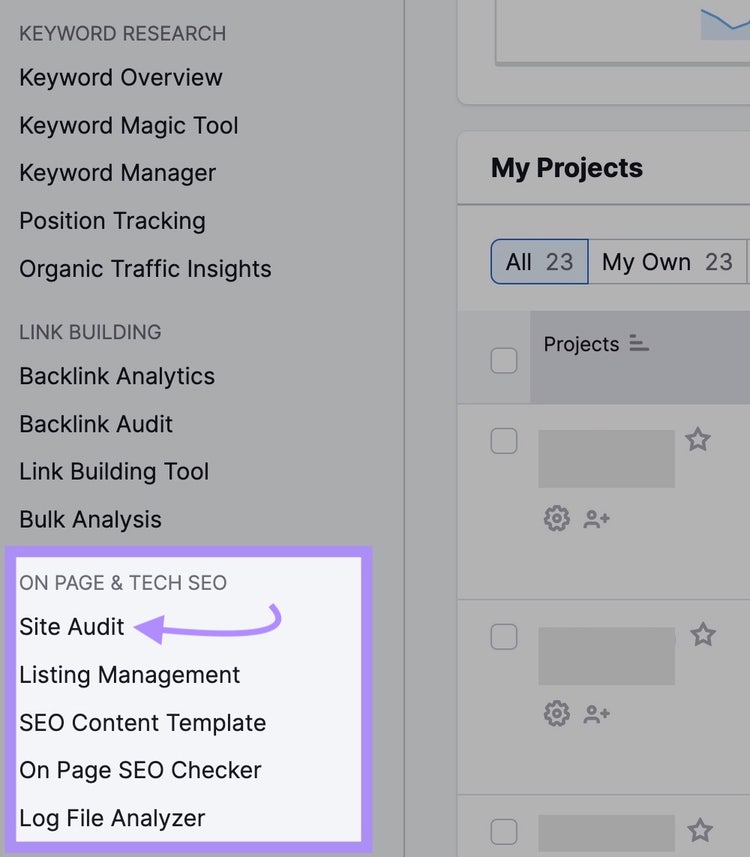
Navigate to Semrush and click on the Site Audit tool in the left-hand navigation under “ON PAGE & TECH SEO.”
Enter your domain and click the "Start Audit" button.
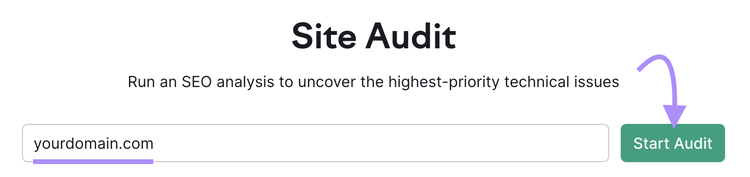
Next, you’ll be presented with the "Site Audit Settings" menu.
Click the pencil icon next to the "Crawl scope” line where your domain is.
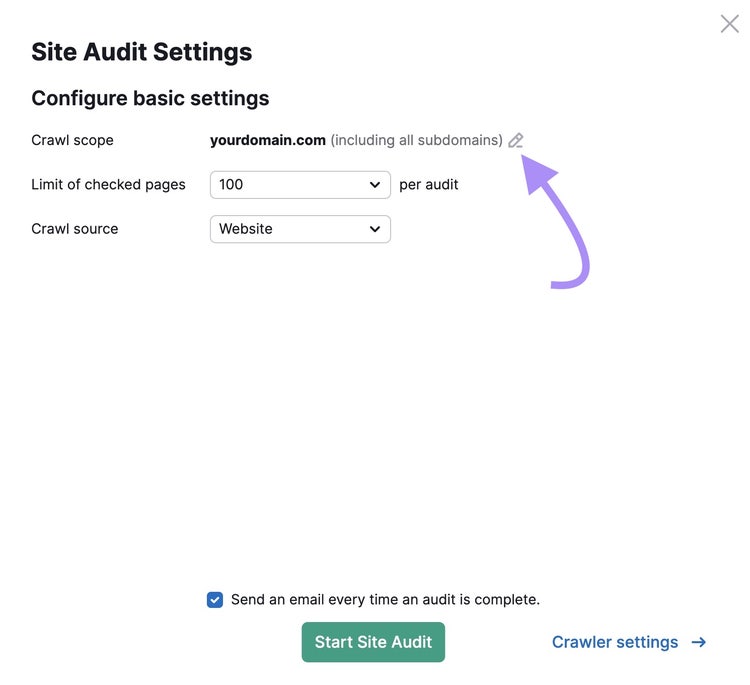
Choose if you want to crawl your entire domain, a subdomain, or a folder.
If you want Site Audit to crawl the entire domain, which we recommend, leave everything as-is.
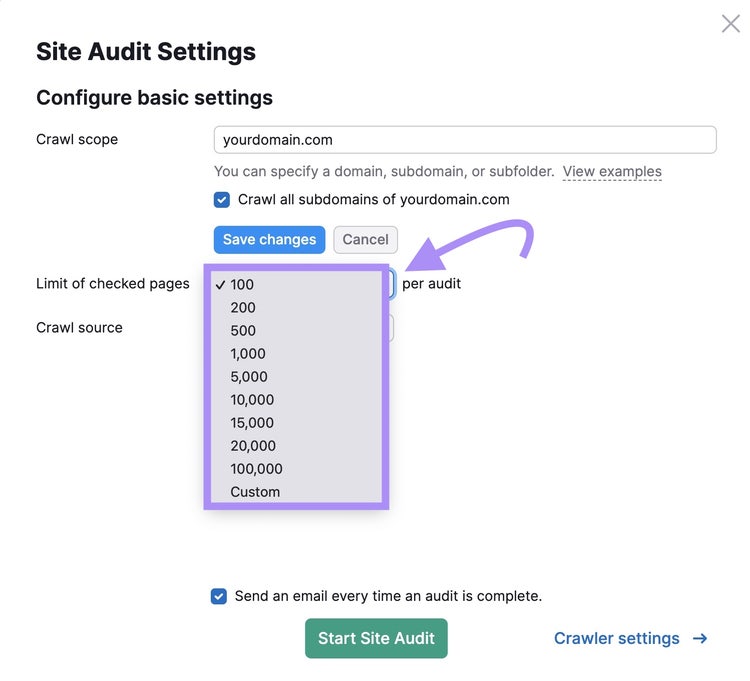
Next, choose the number of pages you want crawled from the limit drop-down.
Your choices depend on your Semrush subscription level:
- Free: 100 pages per audit and per month
- Pro: 20,000 pages
- Guru: 20,000 pages
- Business: 100,000 pages
Lastly, select the crawl source.
Since we’re interested in analyzing pages accessible to bots, choose "Sitemaps on site."
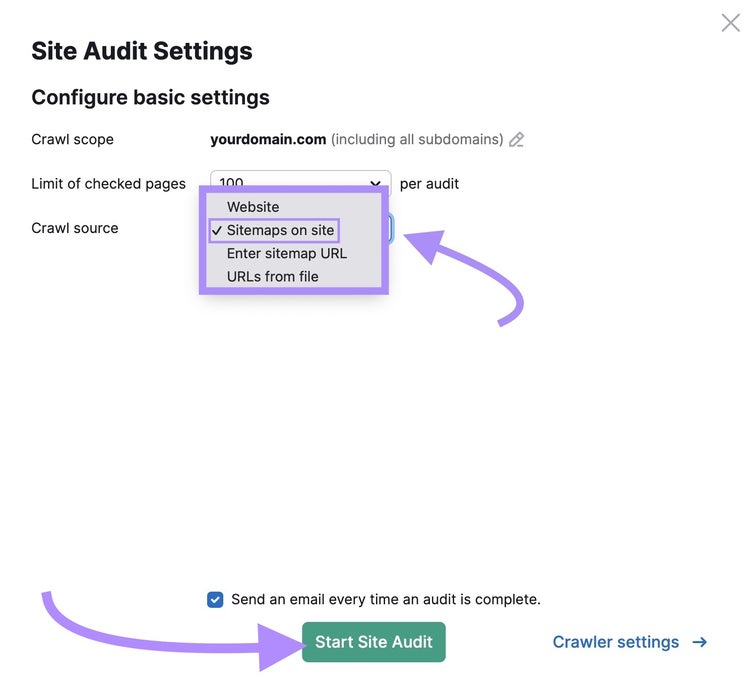
The remainder of the settings, like “Crawler settings” and “Allow/disallow URLs,” are broken into six tabs on the left-hand side. These are optional.
Pro tip
Get the most out of Site Audit by learning about all the settings in How to Do a Website Audit.
When you’re ready, click the “Start Site Audit” button.
Now, you’ll see an overview that looks like this:
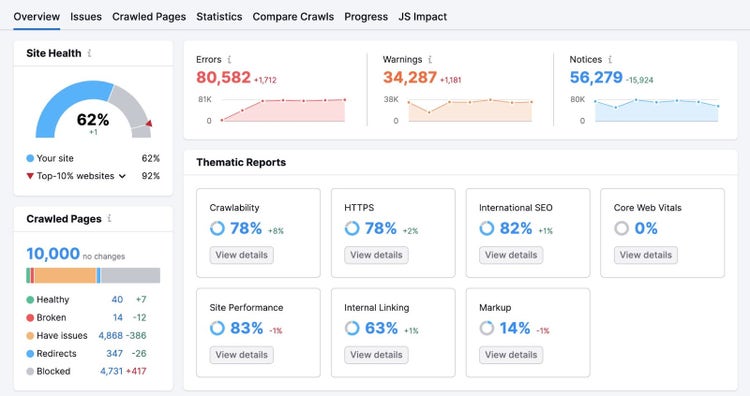
To identify issues affecting your site’s crawlability, go to the “Issues” tab.
In the “Category” drop-down, select “Crawlability.”
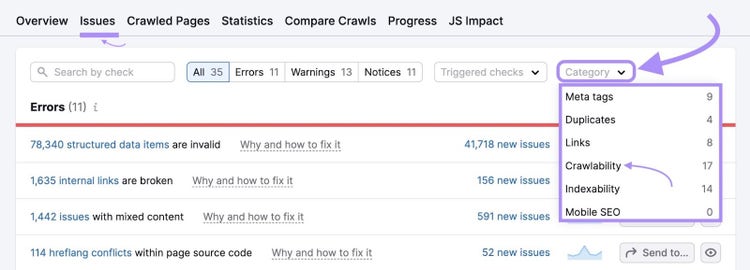
For details about any issue, click on “Why and how to fix it” for an explanation and recommendations.
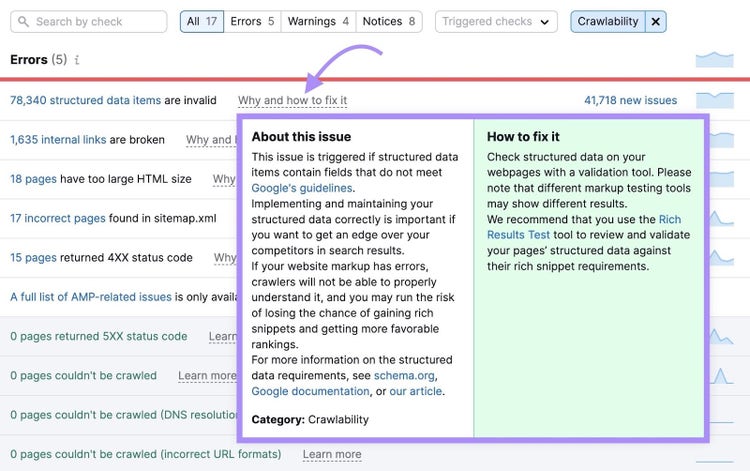
To ensure good bots can crawl your site without any issues, pay special attention to any of the following errors.
Why?
Because these issues could hinder a bot’s ability to crawl:
- Broken internal links
- Format errors in robots.txt file
- Format errors in sitemap.xml files
- Incorrect pages found in sitemap.xml
- Malformed links
- No redirect or canonical to HTTPS homepage from HTTP version
- Pages couldn't be crawled
- Pages couldn't be crawled (DNS resolution issues)
- Pages couldn't be crawled (incorrect URL formats)
- Pages returning 4XX status code
- Pages returning 5XX status code
- Pages with a WWW resolve issue
- Redirect chains and loops
The Site Audit issues list will provide more details about the above issues, including how to fix them.
Conduct a crawlability audit like this at any time. We recommend doing this monthly to fix issues that prevent good bots from crawling your site.
Find and Fix Crawlability Issues
with the Site Audit Tool
Protect Your Website from Bad Bots
While some bots are good, others are malicious and can skew your traffic analytics, negatively impact your website’s user experience, and pose security risks.
It’s important to monitor traffic to detect and block malicious bots and filter out the traffic from your analytics.
Experiment with some of the strategies and solutions in this article for preventing malicious bot traffic to see what works best for you and your team.
Try the Semrush Log File Analyzer to spot website crawlability issues and the Site Audit tool to address possible issues preventing good bots from crawling your pages.
Improve Your Site’s Crawlability
with a Semrush Subscription

Sydney has been creating content for over 10 years. She has been a writer, content manager and coordinator, editor, and strategist. At Semrush, she’s a blog editor who makes sure each article is as accurate, optimized, and helpful as possible.

Tells Google to show you more from Semrush in AI, Search, and Discover.