A dofollow link is a regular hyperlink that doesn't have a special attribute like "nofollow," "ugc," or "sponsored."
These links allow search engines to crawl them (i.e., scan to understand) and pass on link equity (i.e., ranking strength) to the linked site. Helping improve the linked site’s search engine rankings.
Website owners don't need to do anything special to create dofollow links. They just have to add a regular link to their page using an anchor tag.
Like this, for example:
<a href="https://www.semrush.com">Semrush</a>
Note
Although we use the term "dofollow" in this article, it's technically incorrect because there's no "dofollow" attribute. We just use the term as a way to reference this type of link. We also refer to them as “follow” links.
Dofollow vs. Nofollow Links
Nofollow links are different from follow links because nofollow links include a "nofollow" attribute.
For example, here's the same link with the rel="nofollow" attribute added:
This attribute tells search engines not to crawl the link or pass on link equity to the linked site. So it generally doesn't contribute to improving the rankings of the linked site.
Why Are Dofollow Links Important?
Follow links are important for both backlink building and improving your site's internal linking structure.
When other websites link to your site with a follow link, they essentially endorse the content of your site.
Search engines take these signals seriously. And are more likely to rank your site higher in search results because of them.
Follow links also play a crucial role in helping search engines discover and index (i.e., save) your website’s content.
When you publish new pages and link to them from existing content using follow links, you're creating paths for search engine crawlers to find and index this new content more quickly.
This content then becomes eligible to appear in search results.
Pro tip
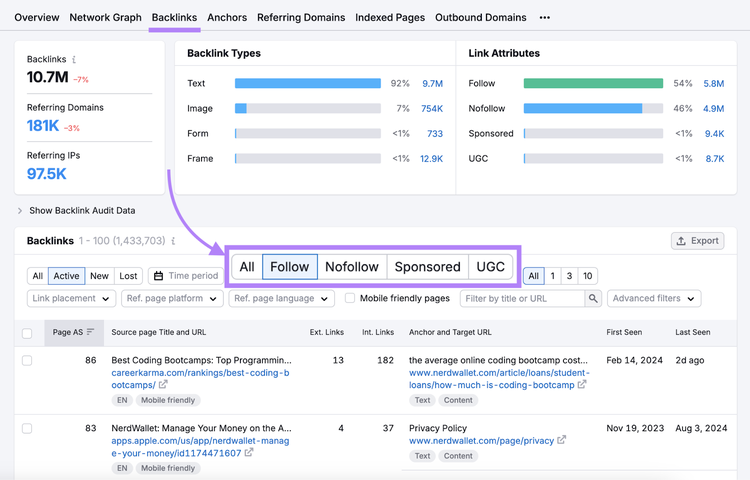
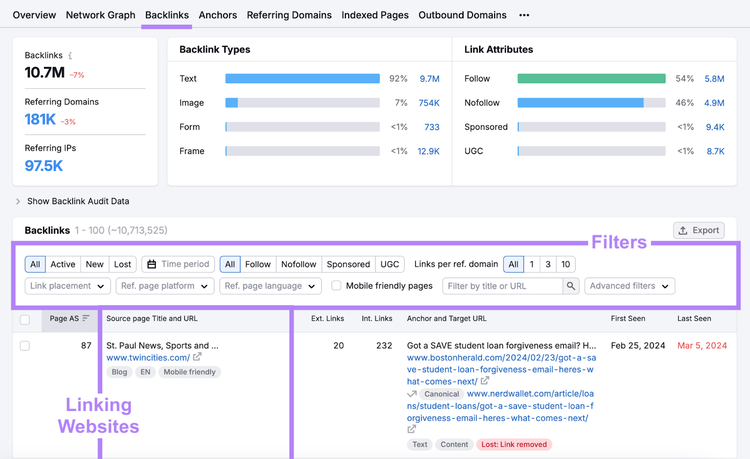
Follow backlinks help your website gain rankings. Find your follow backlinks (and links you’ve lost) with Semrush Backlinks tool.
Just go to the “Backlinks” tab within the tool. And click the “Follow” filter in the “Backlinks” section.
When to Use a Dofollow Link
Aside from internal linking, here are some situations where you should use follow links:
When linking to high-quality external websites and resources
When citing original research or data from other websites
When directing readers to additional information or resources on other sites
When linking to your own social media profiles
When linking to testimonials or reviews that highlight your product or service
When Not to Use a Dofollow Link
Instead of a standard follow link, use link attributes (e.g., nofollow, sponsored, and ugc) when linking to the following:
Paid or sponsored content: If the link is part of a sponsored post or advertisement, it's best to use the rel="sponsored" attribute. This helps ensure compliance with Google guidelines.
User-generated content (UGC): If you’re linking to content generated by users, such as comments or forum posts, use the rel="ugc" attribute. This helps indicate to search engines that the content is user-generated and may not be fully endorsed by your site.
Untrusted or low-quality websites: Avoid using follow links when linking to sites that are potentially unreliable or low quality. Search engines see follow links as votes of confidence. So a follow link to a low-quality site can harm your site's reputation.
Affiliate links: For affiliate links, use a rel="sponsored" attribute. This signals to search engines that the link is part of a commercial arrangement and not a natural endorsement.
How to Check if Your Backlinks Are Dofollow
Given that backlinks are extremely important for ranking, you want to make sure you're getting high-quality follow links to your site.
Here’s how you can check if your backlinks are follow:
Inspect the Link on the Page
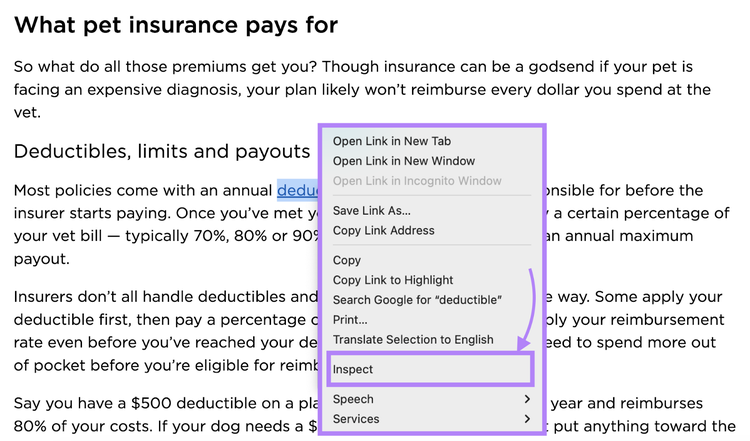
Visit the page containing the backlink to your site. Then, right-click on the link and select "Inspect" from the context menu.
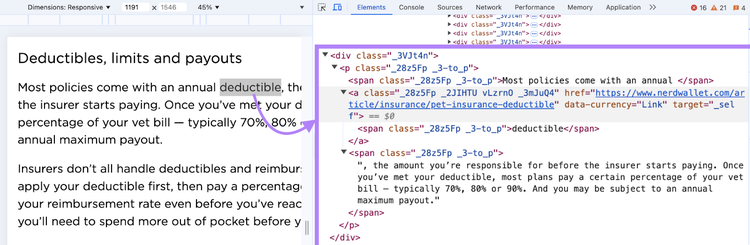
Look at the HTML code for the link.
If it's a simple <a href="your-url">anchor text</a> without any rel attributes, it's a follow link. If you see rel="nofollow", rel="sponsored", or rel="ugc", then it's not a follow link.
Use Semrush’s Backlinks Tool
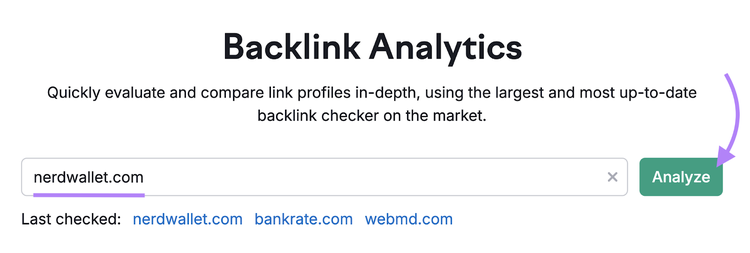
Go to Semrush Backlinks tool. Enter your domain name and click "Analyze"
Then, navigate to the "Backlinks" tab. And use the filters to view different types of links, including follow, nofollow, and those with other attributes.
Sydney has been creating content for over 10 years. She has been a writer, content manager and coordinator, editor, and strategist. At Semrush, she’s a blog editor who makes sure each article is as accurate, optimized, and helpful as possible.
Subscribe to learn more about Link Building
Subscribe
By clicking “Subscribe” you agree to Semrush Privacy Policy and consent to Semrush using your contact data for newsletter purposes
Share
Tells Google to show you more from Semrush in AI, Search, and Discover.