
Each time ChatGPT mentions your brand, it shapes perception and influences purchase decisions.
And since more people now rely on ChatGPT for research, those mentions can impact you before anyone even reaches your site.
You can analyze those mentions manually, but only up to a point—results vary by prompt, context shifts constantly, and there’s usually no traffic data to rely on.
That’s where Semrush’s AI Visibility Toolkit comes in. It aggregates your brand’s mentions and citations across ChatGPT and turns them into actionable insights.
Here’s how you can build a workflow around it.
1. Analyze Your Overall Brand Visibility in ChatGPT
Start by analyzing your brand’s current presence in ChatGPT results to establish a baseline.
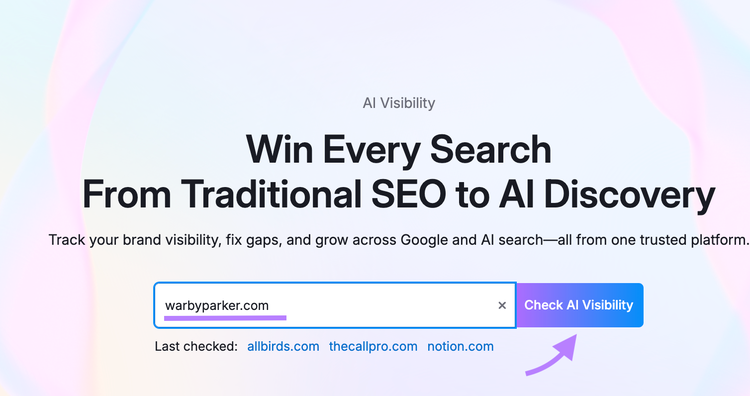
Launch Semrush’s AI Visibility Toolkit and click “Visibility Overview” in the left menu.
Next, enter your site’s domain and click “Check AI Visibility.”
Once the report loads, select “ChatGPT” from the platform filter at the top to focus exclusively on ChatGPT data.
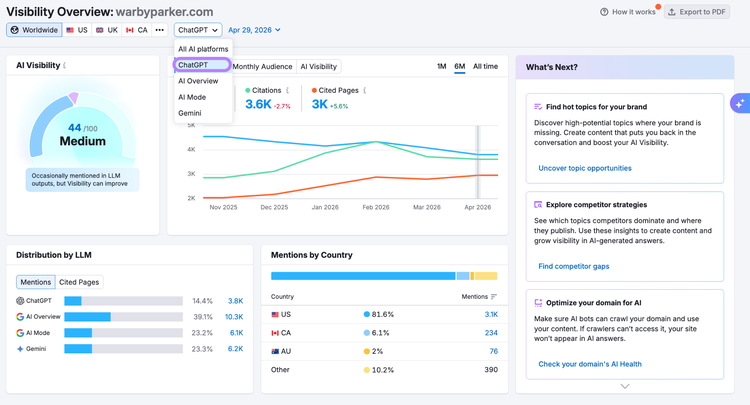
Finally, check the key metrics that showcase your current AI visibility in ChatGPT:
- AI Visibility Score (0-100): Measures how often your brand appears in ChatGPT answers relative to competitors—a quick indicator of how strong your overall footprint is compared to competitors
- Monthly Audience: The combined search volume of prompts that mention your brand. It helps you understand the search demand behind the prompts where your brand appears.
- Mentions: The total number of ChatGPT prompts where your brand is referenced. It reflects how consistently ChatGPT brings your brand into the conversation.
- Cited Pages: Specific URLs from your domain that ChatGPT uses as references. This helps you see which pages are driving your visibility and which ones you should strengthen next.
Use these metrics to capture where you stand now, so you can track progress and set future goals.
Read this guide if you’re curious about how the AI Visibility Toolkit collects its data.
2. Find Topics and Pages That Perform Well for Your Brand
Next, map out where your brand already shows up in ChatGPT answers.
In Semrush’s AI Visibility Toolkit, stay within the Visibility Overview report and scroll to Topics & Sources.
Review the following:
- Performing Topics: Topics and prompts where your brand already appears. Use these to understand what topics and signals help ChatGPT surface your brand.
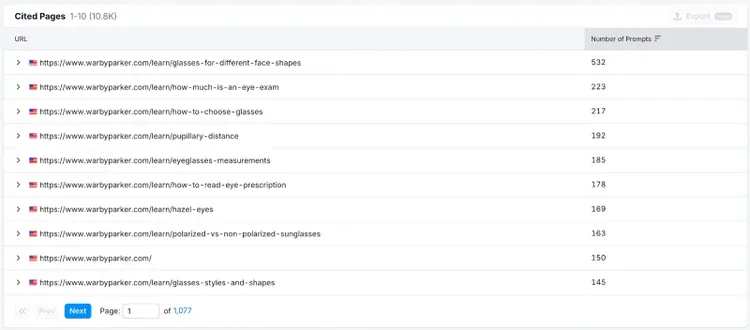
- Cited Pages: URLs from your own site that get cited. These show which pages earn trust and what patterns you can replicate.
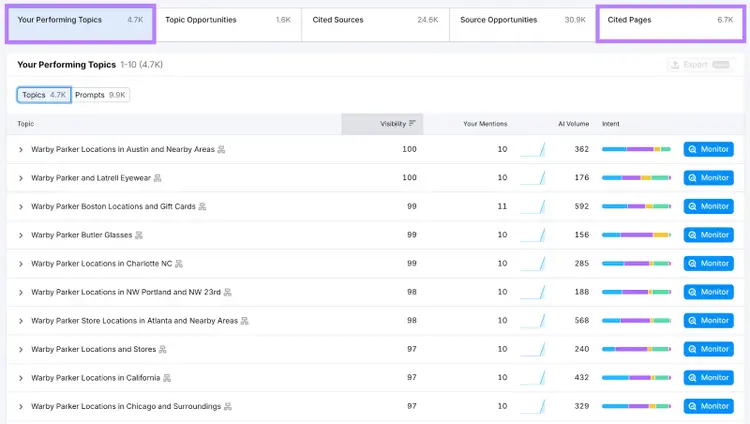
For example, you may notice certain pages get cited more often, which makes them good candidates for updates or additional support.
Like these educational pages from Warby Parker—an eyewear brand—that are cited most often and likely need regular monitoring to keep product information up to date:
3. Identify the Topics and Sources You’re Missing
Next, identify the prompts and citations where competitors show up but you don’t. These are your clearest opportunities to expand visibility.
Focus on these two tabs:
- Topic Opportunities: Prompts where competitors appear but you don’t. These highlight content gaps you can fill with new pages or targeted updates.
- Source Opportunities:Domains that cite competitors but not you. These show which external sites ChatGPT cites for competitors, which gives you targets for outreach and authority building.
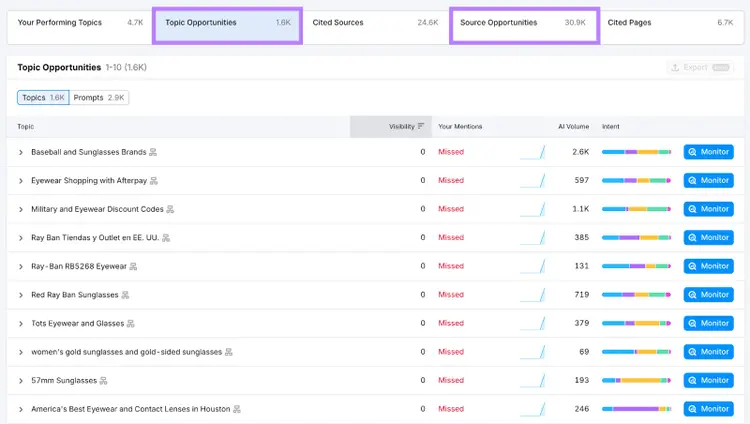
From here, you can create a list of sources to prioritize for PR and media outreach, and list topics to include in your content plan.
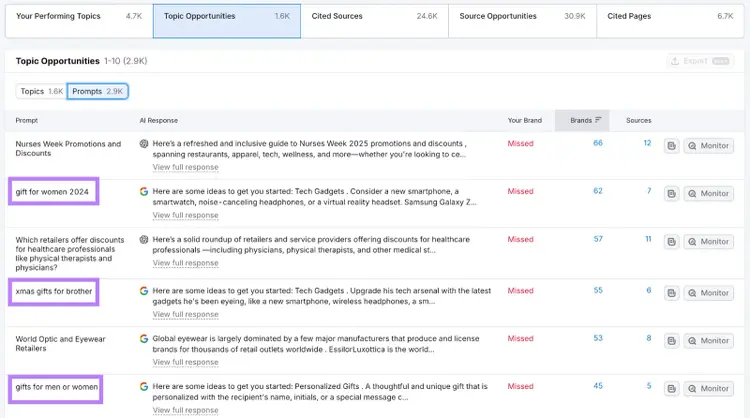
For example, our eyewear brand is missing out on gift-related topics. To change that, they could publish multiple “Best gifts for…” listicles that include Warby Parker sunglasses as one of the options.
4. Benchmark Your ChatGPT Visibility Against Competitors
From here, compare your visibility to competitors to see where they outperform you inside ChatGPT answers—and where you already lead.
You can run this analysis in just a few minutes using the Competitor Research tool.
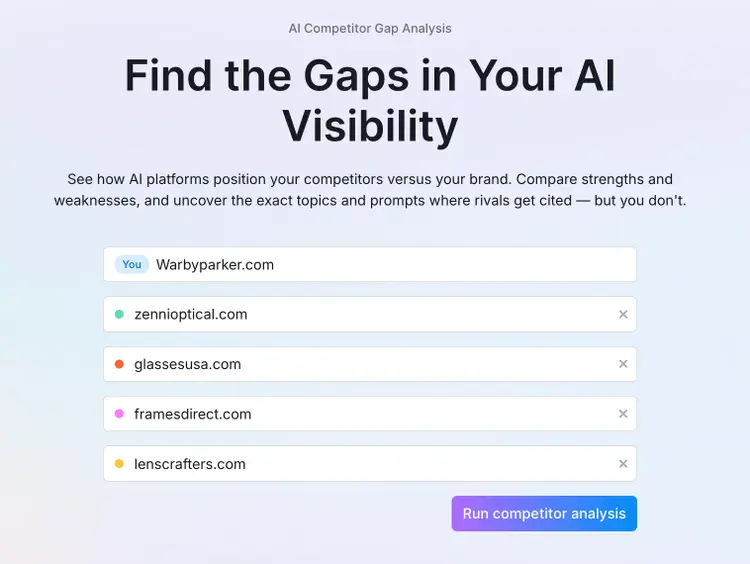
Enter your domain along with up to four competitors, then click “Run competitor analysis.” As you enter, Semrush will also suggest top players based on your category.
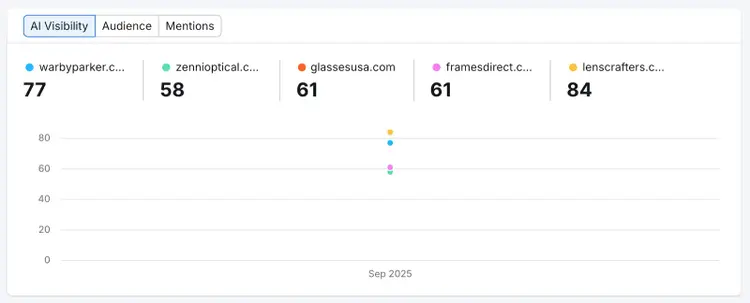
Once the report loads, use the comparison across AI Visibility Score, Audience, and Mentions to spot who’s leading in ChatGPT—and whether you need to strengthen your visibility.
Scroll down to Topics & Prompts and use the side-by-side view to spot topics with high AI volume where competitors gain more visibility.
Use these ideas when planning new content and pages for your website to tap into demand your competitors are already capturing.
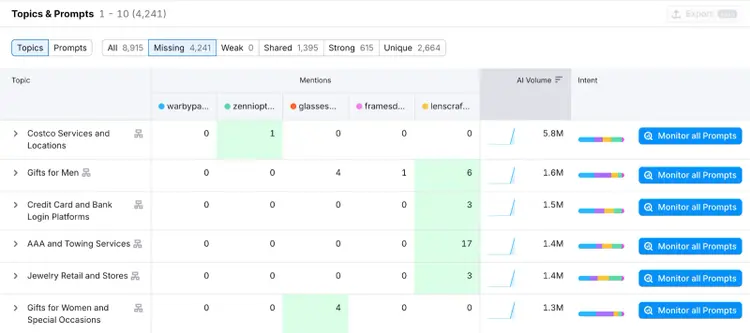
Each tab reveals a different visibility pattern—and helps you decide what to do next.
For example:
Use this data to map your relative performance and identify opportunities for improvement.
5. Evaluate Your Brand Sentiment and Share of Voice
Next, check how ChatGPT talks about your brand. This step helps you understand how often you’re mentioned and whether those mentions paint you in a good light.
Open the Brand Performance report in Semrush’s AI Visibility Toolkit and use the filter at the top to select ChatGPT (or ChatGPT with Web Search on—if you want to include responses that pull in live web data).
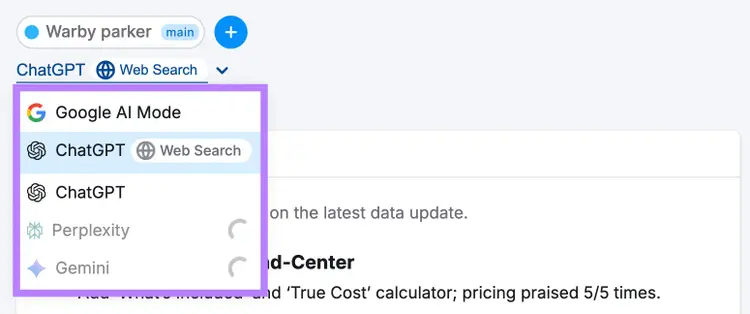
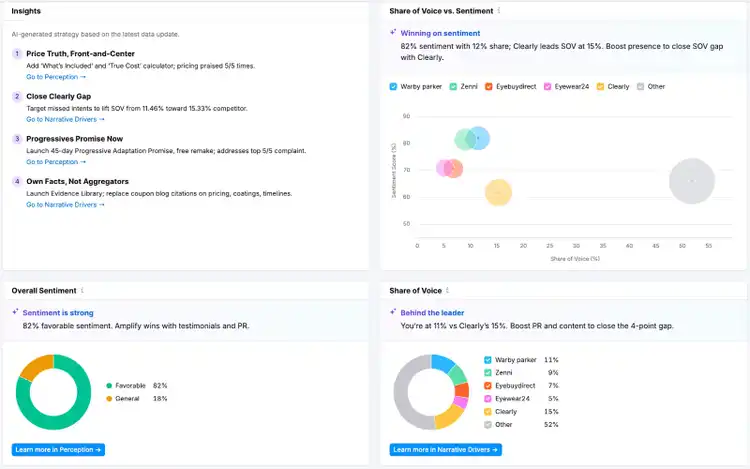
Then, check your key brand visibility and sentiment metrics.
- Share of Voice: Shows your brand’s overall visibility in AI-generated answers to non-branded questions, compared to competitors.
- Overall Sentiment: Shows the split between favorable and neutral mentions in AI-generated
responses. A higher favorable share signals strong and positive brand perception, while more neutral mentions suggest your messaging may need clearer proof or positioning.
You can also see the exact business drivers (cross-brand factors) that influence growth in your niche, such as value, trust, and access.
Use these insights to benchmark your brand against competitors and decide which areas deserve more focus in your messaging and strategy.
For example, Warby Parker leads on omnichannel experience and pricing, but Zenni and GlassesUSA outperform them on assortment and virtual try-on:
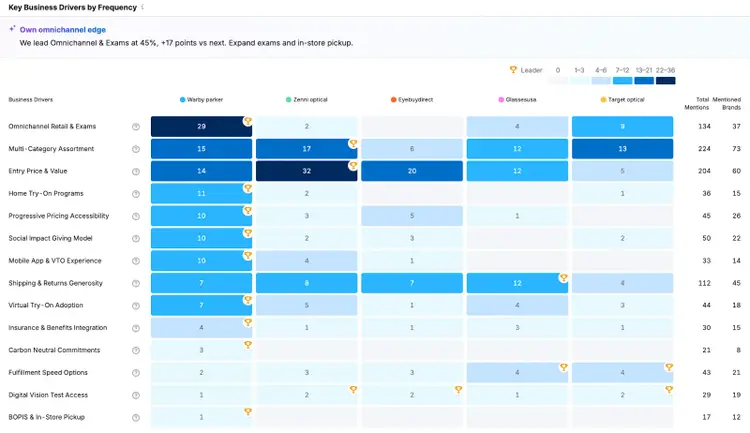
This shows Warby Parker where to lean in (exams, in-store pickup) and where to tighten their strategy (broader assortment, try-on tools).
6. Explore the Key Narrative Drivers in ChatGPT
Next, open the Narrative Drivers report to see which real customer questions ChatGPT answers with your brand—and which sources it relies on.
If your brand consistently shows up in these answers, you influence how people perceive you long before they visit your site.
Scroll to the Dive Deeper area to see both the types of questions ChatGPT answers about your brand and category, and the sources it relies on to generate those answers.
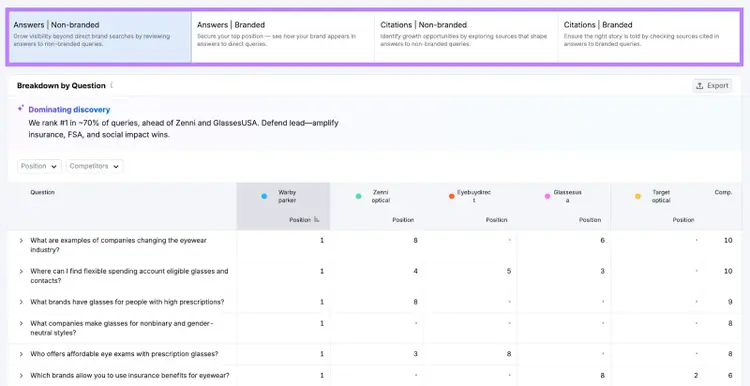
Here, apply filters to spot prompts where you could improve your position—or where your brand is completely missing.
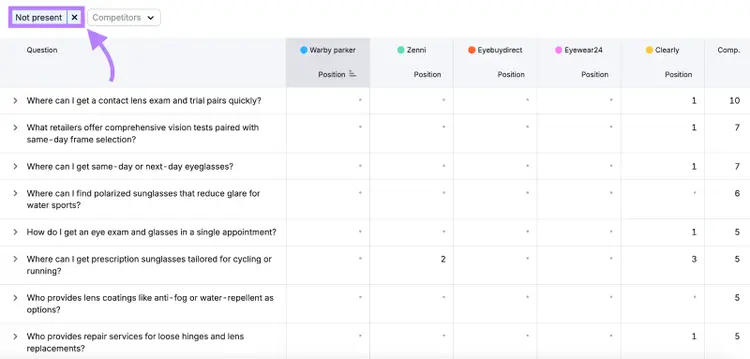
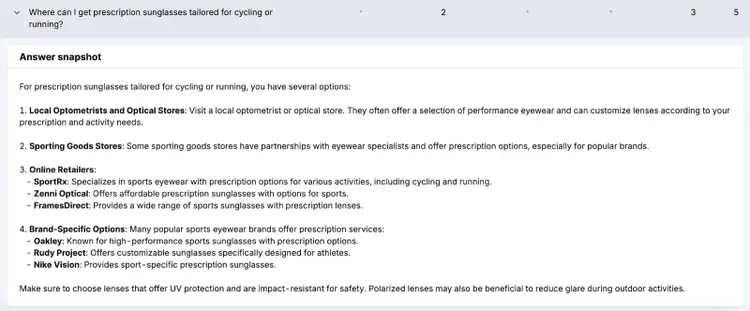
You may find high-intent prompts where your competitors appear but your brand doesn’t—and plan to create content around those gaps.
For example, for Warby Parker, ChatGPT recommends competitors for questions about prescription sunglasses for cycling—highlighting a gap they could address with content on sport-friendly eyewear.
7. Set Up Prompt Tracking to Measure Your ChatGPT Rankings
Finally, prompt tracking helps you measure whether your visibility is improving for the queries that matter most.
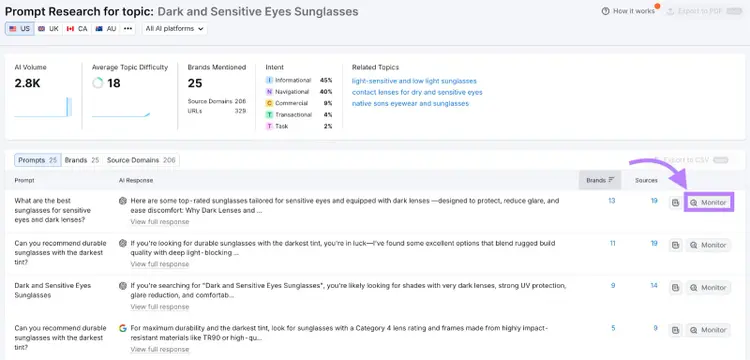
Start by researching potential prompts in the Prompt Research tool: enter your topic idea and review the prompts most relevant to it.
Then, click “Monitor” to begin tracking your brand’s visibility for those queries via Prompt Tracking.
Or, navigate directly to the Position Tracking tool and create a new project. Once set up, it’ll show you metrics like:
- Average Position: Shows how high your domain appears among ChatGPT’s cited sources (e.g., first, second, or third).
- Visibility: Reflects your share of top citations across the prompts you’re tracking.
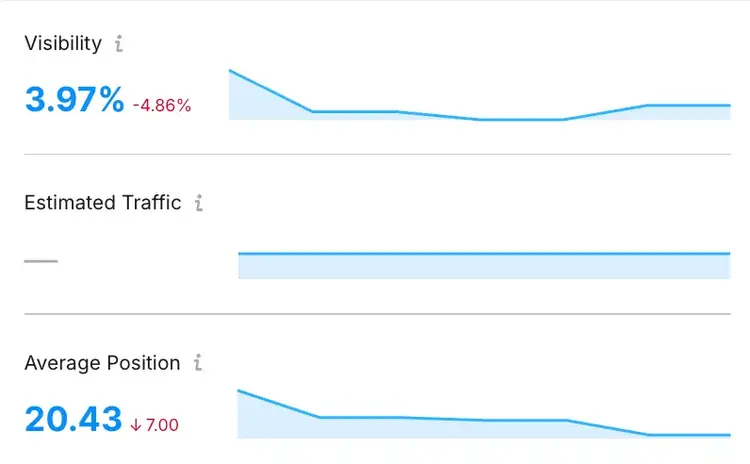
Use this data to evaluate which content updates, backlinks, or topic shifts actually improve your ChatGPT brand visibility—and adjust your strategy based on what drives measurable gains.
Monitor Your ChatGPT Visibility Over Time
Staying visible in AI-generated answers is now essential to how customers research and choose brands.
Semrush’s AI Visibility Toolkit helps you track that presence over time and understand whether your brand is gaining or losing ground.
Here’s a quick recap of the key steps for effective ChatGPT SEO:
- Check your baseline visibility to see how often your brand appears today
- Spot what’s working by reviewing the topics and pages where you already show up
- Find visibility gaps where competitors appear but you don’t
- Review sentiment to see how ChatGPT portrays your brand
- Track key prompts to measure whether your visibility improves over time
Staying on top of these steps helps you keep your brand visible where customers now look first.
Beat Your Competition in ChatGPT
with the Semrush AI Visibility Toolkit

Margarita is a passionate Content Marketer with over 6 years of experience in various tech industries and 3 countries. She also holds two MBA degrees in Marketing.

Tells Google to show you more from Semrush in AI, Search, and Discover.
Table of contents
- 1. Analyze Your Overall Brand Visibility in ChatGPT
- 2. Find Topics and Pages That Perform Well for Your Brand
- 3. Identify the Topics and Sources You’re Missing
- 4. Benchmark Your ChatGPT Visibility Against Competitors
- 5. Evaluate Your Brand Sentiment and Share of Voice
- 6. Explore the Key Narrative Drivers in ChatGPT
- 7. Set Up Prompt Tracking to Measure Your ChatGPT Rankings
- Monitor Your ChatGPT Visibility Over Time