
What Is Semantic HTML? And How to Use It Correctly
Expert reviewed
Our subject matter experts have reviewed this article to ensure it meets the highest standard for accurate information and guidance. Learn more about our editorial standards and process.
What Is Semantic HTML?
Semantic HTML is the use of HTML tags that clearly define the purpose of the content they enclose to make your website code more understandable for both developers and search engines.
These HTML tags are also called semantic elements. And provide a meaningful description of the content's role within a webpage.
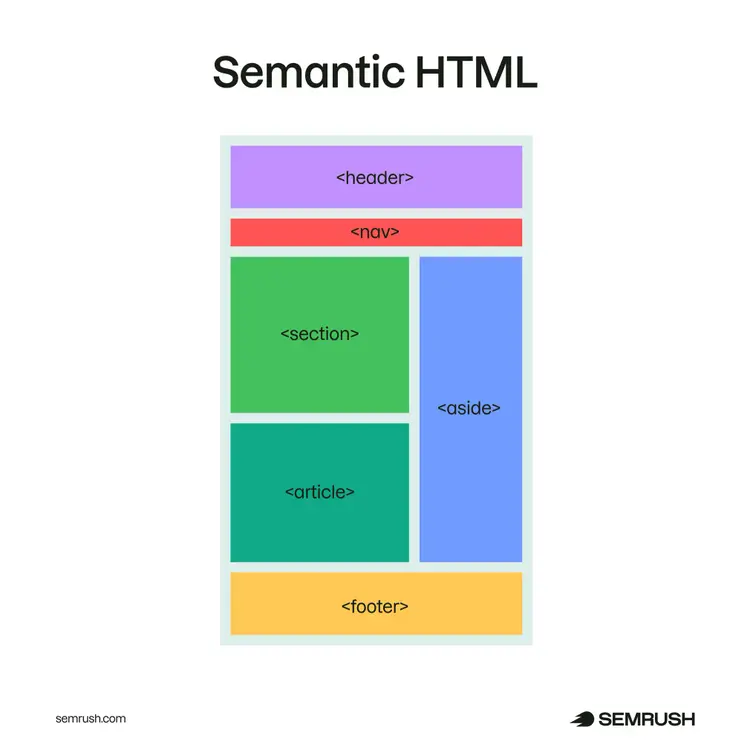
For example, <header>is a semantic HTML tag. It encloses the header section (introductory content) at the top of the page.
You can see this and some other common semantic HTML tags below:
Note
This guide assumes a basic understanding of HTML, a markup language used to structure webpages and content. If you’re new to HTML, read an introductory guide first.
Semantic HTML vs. Non-Semantic HTML
Semantic HTML tags describe the meaning of content, while non-semantic HTML tags are generic and primarily used for styling and layout purposes.
Non-semantic HTML tags don’t convey any specific meaning about the content itself.
Here’s a visual comparison of non-semantic and semantic HTML code blocks:
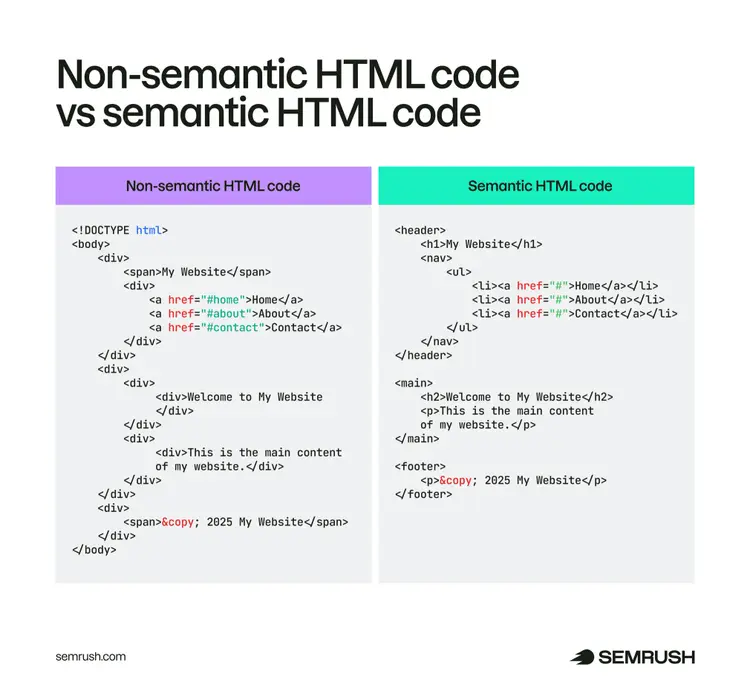
Comparing the two code blocks, you can easily see that the non-semantic code using only <div> and <span> tags doesn’t describe the page’s content or sections.
Whereas the semantic HTML code provides clear descriptions that even non-coders can understand.
For example, the semantic HTML code tells you that “My Website” is a page header.
Why Are Semantic HTML Tags Important?
Semantic HTML tags are important because they improve the accessibility and understanding of your pages for both humans and search engines.
Here are the main benefits of using semantic HTML:
- Better user experience and accessibility: Screen readers and other tools can navigate semantic layouts more effectively and accurately describe your content to users
- Better SEO performance: Semantic tags in HTML help web crawlers like Googlebot accurately identify the relevant parts of your content from your pages' HTML. This can lead to better indexing and potentially higher rankings for relevant keywords.
- Increased chance of appearing for rich results: Semantic elements can enhance schema markup—a code you add to your pages to help Google display rich results. Rich results contain additional information like ratings, prices, or event dates.
- Future-proof code: Semantic HTML follows web standards that make your code more compatible with future technologies
- Clear communication: Developers, designers, and SEOs working collaboratively can easily understand the purpose of each section. Which makes maintaining and updating your website easier.
Further reading: Improve SEO: 11 Steps to Improve Your Rankings
Common Semantic HTML Elements
There are many semantic HTML elements, but let’s look at the most commonly used semantic tags by category:
Semantic HTML Tags for Structure
These HTML semantic elements define the structure and layout of a page:
- <header>: Indicates the introductory or navigational content of a webpage or a section. It often includes elements like headings, navigation menus, search bars, and logos.
- <nav>: Defines a block of navigation links. Use it for site-wide navigation (e.g., links to “Home,” “About Us,” or “Services”) or to group links into specific sections within a page (like “Features,” “Pricing,” or “Table of Contents”).
- <main>: Represents the primary content or main sections of a webpage. Use this tag only once per page.
- <section>: Groups related content that shares a common theme or purpose. For example, you can divide a landing page into sections like “Features,” “Benefits,” or “Use Cases.”
- <article>: Defines standalone content that you can reuse or distribute separately, like blog posts, product reviews, and news articles.
- <aside>: Represents tangential or supplemental content that supports or provides additional context to the main content. Some examples include sidebars, callouts, or a block of related links.
- <footer>: Indicates the footer of a page or section that typically includes navigation links, contact information, and copyright information
Here’s an example HTML code block marked up with the above semantic tags:
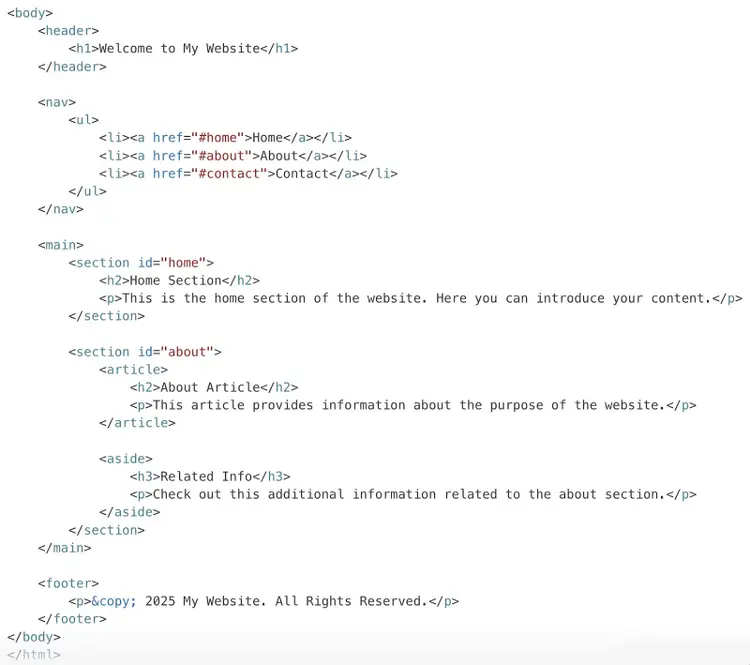
This is what the resulting page can look like (annotated semantic tags show the areas they impact).
Semantic HTML Tags for Text
These html semantic tags convey the meaning and format of the text they’re applied to:
- <h1> to <h6> (headings): Indicate the hierarchy of information on a webpage. For example, <h1> marks the top-level heading, while <h2> through <h6> represent subheadings.
- <p> (paragraph): Represents a block of text—typically a paragraph. Avoid using <p> for single words or phrases.
- <a> (anchor): Marks hyperlinks that lead to other pages or sections within the same document. Use descriptive, relevant anchor text to inform users and search engines where the link leads.
- <ol> (ordered list): Indicates an ordered (numbered) list. Use it for items that need to be presented in a specific sequence (e.g., steps in a recipe).
- <ul> (unordered list): Defines an unordered (bulleted list). Use it for content that doesn’t require order (e.g., a list of features).
- <q> / <blockquote>: Represents text with quotations. Use the <q> tag for shorter, inline quotes and <blockquote> for long, multi-line quotations.
- <em> (emphasis): Marks text to indicate importance, typically displayed in italics. Use sparingly to highlight important information—not for styling.
- <strong> (strong emphasis): Indicates text of strong importance, typically displayed in bold. Use it to highlight critical information.
Check out this example HTML code block with text marked up using the above semantic tags:
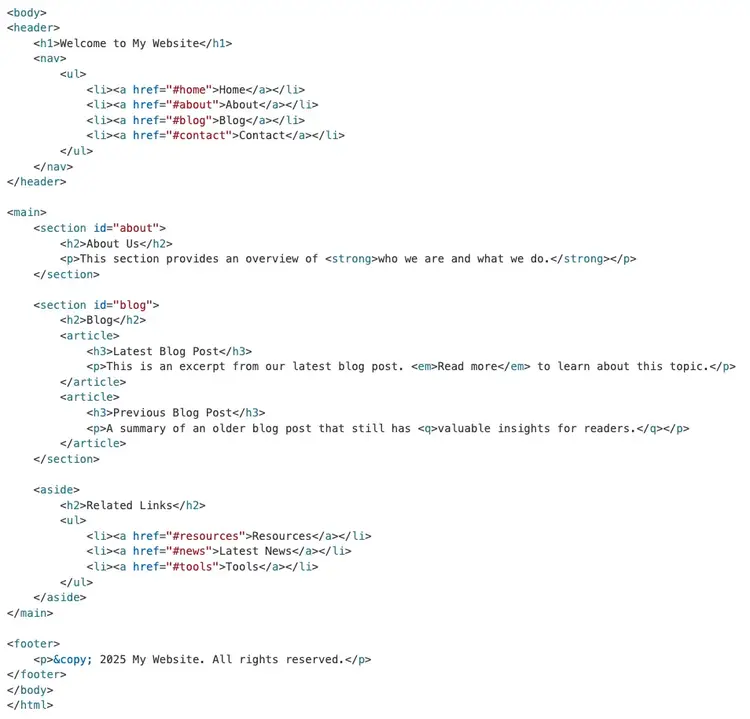
And here’s what the resulting page can look like (annotated semantic tags show the areas they impact).
Other Semantic HTML Tags
These tags serve specialized purposes beyond general structure or text:
- <figure> and <figcaption>: Provide context to grouped media content (e.g., images, diagrams, or charts). Pair the <figure> tag with the <figcaption> element to include a caption or description.
- <mark>: Highlights text relevant to the current context, often used to emphasize search results or key points within text. By default, browsers render <mark> with a yellow background.
- <pre>: Indicates preformatted text and is ideal for displaying code snippets or any other text where formatting is crucial. For example, retaining whitespace, line breaks, etc.
Semantic HTML Best Practices
Follow these best practices to effectively implement semantic HTML elements:
Use the Right Elements for the Right Purpose
Always choose semantic elements that match the content's purpose.
For instance, use <header> for introductory content, <article> for standalone pieces, and <nav> for navigational links. This makes your HTML easy-to-read and SEO-friendly.
Don't Use Semantic HTML Tags for Styling
Don’t use semantic HTML tags merely for their visual effects.
For example, don’t use <h1> to <h6> tags just to make text large. Use them for the main heading and subheadings of your content.
Similarly, don’t apply <strong> or <em> elements just to add bold or italics to text that doesn't need emphasis.
In short, choose semantics only to convey meaning and context. For styling and appearance, use CSS.
Nest Tags Correctly
Make sure to nest the semantic tags in the correct order to maintain a logical structure.
For instance, place headings inside <section> or <article> tags and ensure you place a <footer> within its parent context.
Also, use the <main>element only once per page. And make sure not to nest it within other semantic tags like <header>, <footer>, <article>, or <aside>.
Find and Fix HTML Tag Issues
Well-implemented semantic HTML can improve your website’s SEO performance and its user experience.
However, using them incorrectly can confuse search engines and lead to problems with ranking your content.
You can avoid some of these issues by conducting regular SEO audits for your site.
Quickly spot-check HTML tag signals like titles, headings, and alt text on a URL with our free website SEO checker.
For ongoing monitoring across your full site, Semrush Site Audit flags HTML problems at scale.
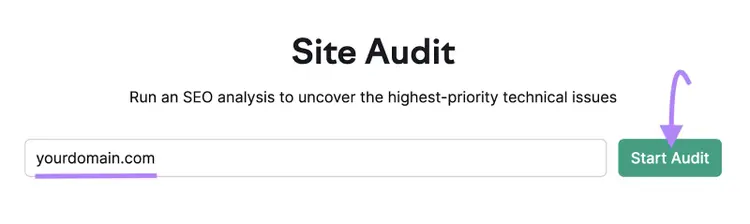
Open the tool, enter your domain, and click “Start Audit.”
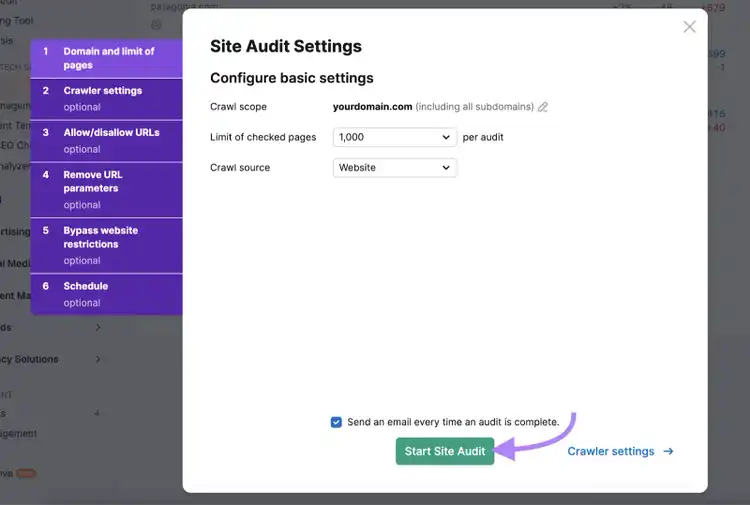
Follow the configuration instructions and click “Start Site Audit.”
Next, head to the “Issues” tab.
And type “tag” into the search box.
You’ll see a list of HTML tag issues if your site has any.
Most of them are related to HTML tags that aren’t semantic elements. But you can also whether there are any issues with your <h1> tags.
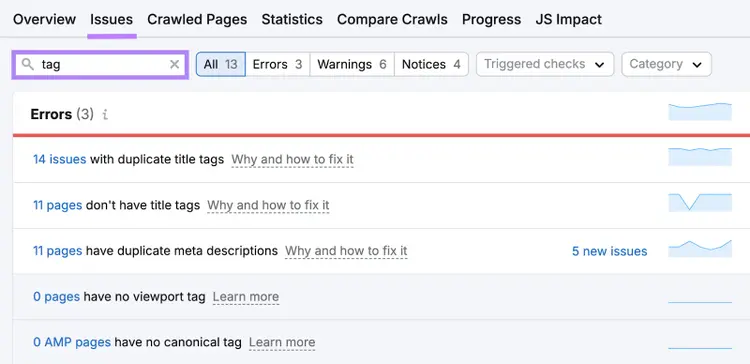
Click on “Why and how to fix it” to learn more about the issues. And follow the recommendations to fix them.
Find and Fix HTML Issues
with the Website SEO Checker

Vlado is a content marketer with 10+ years of experience in SEO, content strategy, and building websites for both clients and personal projects. As Content Operations Lead at Semrush, he streamlines workflows and optimizes processes. He also played a key role in scaling content production and shaping the blog Style Guide. Previously, as Head of Content at Mangools, he led initiatives that made the blog a major driver of organic traffic. He enjoys making complex SEO topics accessible to others.
Vlado Pavlik
Vlado is a content marketer with 10+ years of experience in SEO, content strategy, and website building. As Content Operations Lead at Semrush, he focuses on improving content workflows, optimizing processes, and helping scale content production.

Tells Google to show you more from Semrush in AI, Search, and Discover.