
What Is Small Business SEO?
Small business SEO is the process of optimizing a small business's online presence to improve its visibility in search engines like Google.
SEO can be a huge source of revenue for your small business.
Why?
Because people are already searching for products or services you sell. You just need to make sure they find your business in search results.
Small Business SEO vs. Local SEO: Key Differences
Small business SEO and local SEO overlap but serve different purposes.
Local SEO helps any business with a physical location rank whenever customers search for location-specific terms like "dentist near me" or "coffee shop downtown." Google once said that 46% of all Google searches are looking for local information.
Small business SEO is broader. It covers smaller companies, whether they have physical locations or not.
Here's how they compare:
Most small businesses will need both.
For example, an accounting firm might use small business SEO to rank for searches like “how to reduce tax liability” or “cash flow management tips.”
This will help them establish themselves as an authority in their space and attract clients over time.
At the same time, they would optimize for location-specific searches like “CPA near me” or “tax consultant in Denver.”
Why SEO Matters for Small Businesses
SEO is one of the most cost-effective marketing strategies for small businesses. So small businesses are likely to see better return on investment (ROI) by investing in this channel.
Here’s why SEO is especially valuable:
- You get customers 24/7. Customers search for solutions at all hours. An optimized online presence means your business can show up and generate leads 24/7. Google processes over 9.5 million searches per minute, meaning there are countless opportunities for your business to be discovered.
- It's free to start. Unlike paid advertising, SEO only requires time and effort. No ad spend required.
- Great for brand building. When you consistently show up in search results for relevant topics, you become the go-to expert in your field. This builds recognition and credibility over time.
- Long-term results. While paid ads stop working when you stop paying, SEO continues driving traffic and leads months or years after the initial work.
How to Do SEO for Small Businesses
Follow these steps to optimize your small business for SEO.
1. Find Keywords Related to Your Niche
Find what keywords (search terms) your potential customers are using when searching for businesses like yours.
This is important because you need to optimize for these exact keywords to get relevant traffic.
Let’s say you run a security company that provides VIP bodyguard services to high-profile individuals across the country.
Brainstorm keywords that your potential clients might use when searching for your services. Think about the different ways people might describe what you do.
You might come up with terms like:
- Bodyguard services
- Executive protection services
- Personal security
- Event security services
- VIP protection services
- Celebrity bodyguard
You need to validate these keywords and find more variations. For this, you'll need a keyword research tool like Keyword Overview. Open the tool, enter the first keyword from your list ("bodyguard services"), and click "Search."
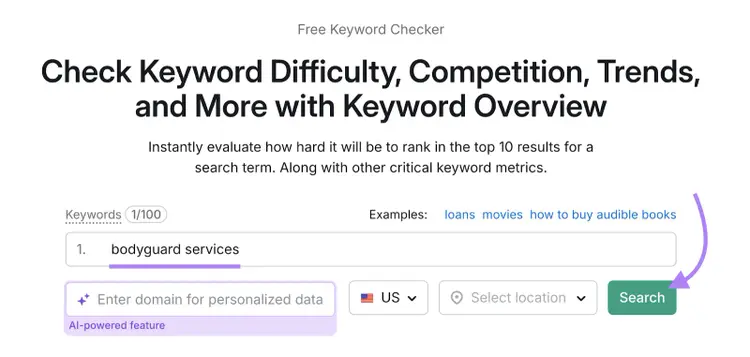
You'll see important data about this keyword.
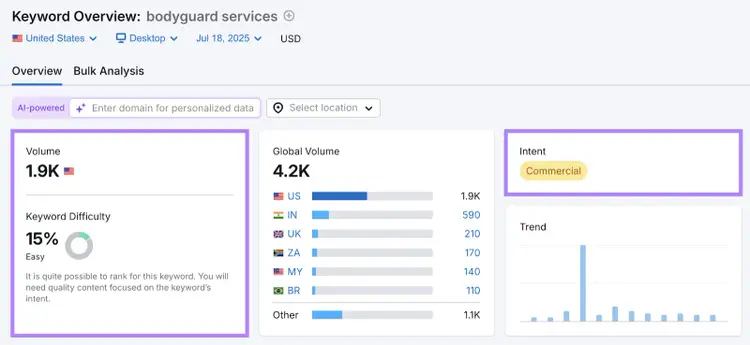
Specifically, look at:
- Volume: This shows you how many people search for that keyword each month on average. This metric is indicative of overall interest in the keyword.
- Search intent: Thistells you why people are searching for that term. Since "bodyguard services" is a commercial term, your keyword likely attracts people who are actively looking to hire protection services.
- Keyword difficulty: This is a score that tells you how hard it would be to rank in Google's top 10 for that keyword. Since you’re a small business, it’s better if you focus on keywords with lower difficulty scores because you're not going to easily outrank bigger, established sites for super competitive terms. “Bodyguard services” has a keyword difficulty score of 15, so that’s well within most small websites’ ranking capabilities.
You should also use the "Keyword ideas" section to find variations that you might want to target.
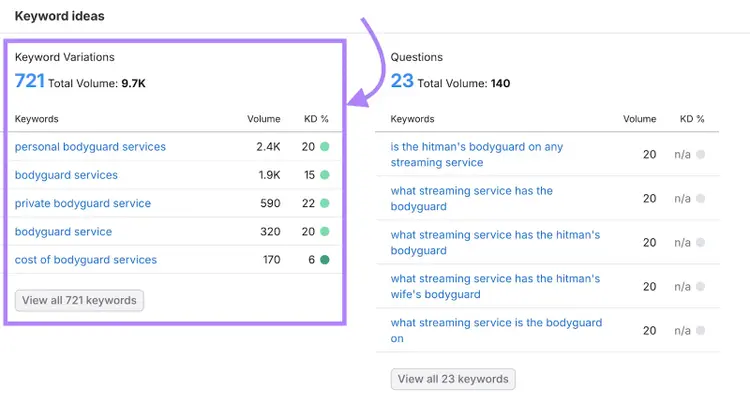
Repeat this research process for each keyword on your list. Soon, you will have a very large number of keyword ideas. Next, it’s time to target them with your website.
2. Create Relevant Pages on Your Site
The best way to tackle this is to create dedicated pages around the services you offer.
For example, you might create pages like:
- Executive protection services –targeting "executive protection" keyword and variations
- Celebrity bodyguard services –targeting "celebrity bodyguard" keyword and variations
- Event security –targeting "event security services" keyword and variations
Each service page should:
- Clearly describe the specific service you offer
- Include testimonials or case studies if possible
- Have clear contact information and calls to action (CTAs)
- Use the relevant keywords in strategic places: Title tag, meta description, URL slug, H1, subheadings, and body content. This is incredibly important from a ranking standpoint.
Additionally, you should also consider creating location-specific pages if your business serves multiple geographic areas.
In our hypothetical example, since this security firm offers services across the state of New York, it makes sense to create targeted pages for major metropolitan areas where there is a significant demand.
Pages like "Bodyguard Services in New York City" or "Executive Protection in Buffalo" can help you rank for local searches.
3. Improve Site Structure and Navigation
Once you have your service and location pages created, you need to organize them in a logical structure that both users and search engines can easily follow.
Keep it as simple as possible. Make sure that:
- All pages are just a few clicks away from the homepage. Search engines can easily crawl and index all your pages without getting lost in complex navigation paths.
- The structure allows you to expand easily by adding more services or city pages without reorganizing your whole site
4. Create Helpful Blog Content
Creating content is one of the most effective ways to attract potential customers and establish your expertise in your field.
The goal is for users to find your content in search results, engage with it, and remember your business when they're ready to make a purchase.
But how do you find blog topic ideas for your small business?
Use Semrush's Topic Research tool. Enter a broad topic related to your industry (like "executive protection" for our security company example) and click "Get content ideas."
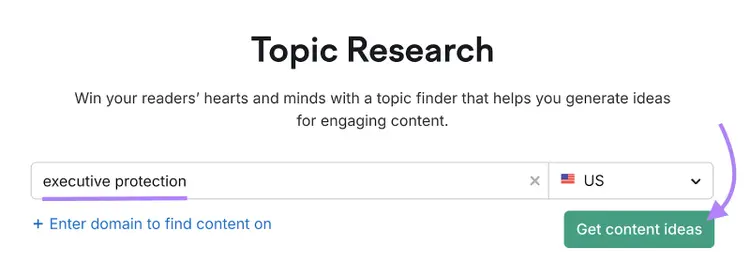
You'll see topic ideas categorized into different cards. Each card includes the topic's monthly search volume, headlines from the top-ranking pages, and common questions related to the topic.
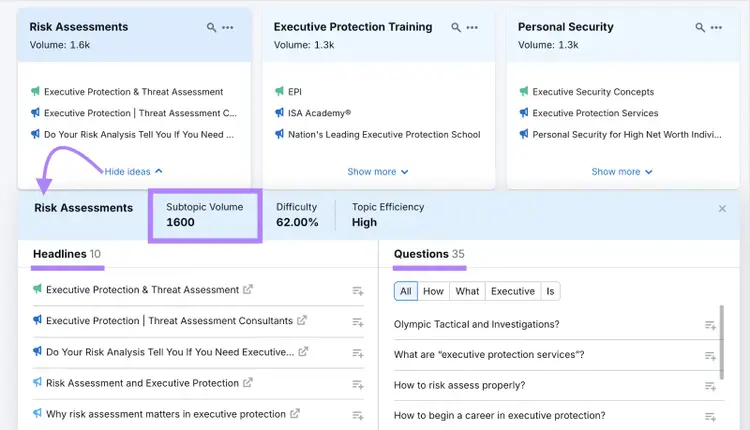
In terms of the actual content creation, here are some tips to follow:
- Make your content genuinely useful. People should be able to understand the topic fully after reading your article.
- Make it easy to read. Break up your content with short paragraphs, subheadings, and bullet points. People usually scan the content to find the information they need quickly.
- Demonstrate Experience, Expertise, Authority, and Trustworthiness (E-E-A-T). Make sure your content is created by someone with real experience in your field. Include credentials in author bios. And cite reputable sources to back up any claims you’ve made in the article.
5. Find and Fix Technical SEO Issues
Find and fix technical issues so search engines can easily crawl (find), understand (make sense of), and index (store) your pages.
This is important because even amazing content won't rank if search engines can't access it properly.
Don’t let the word “technical” scare you. Most issues are actually easy to fix.
Plus, you have a smaller website. That means you likely won’t have many issues.
You can run a free SEO audit to flag technical issues on a key page. For deeper site-wide coverage, use Semrush Site Audit.
Set up a crawl for your website and let the tool scan your pages. It will automatically detect technical issues and organize them by severity.
Once the audit is complete, go to the “Issues” tab to see a categorized list of problems.
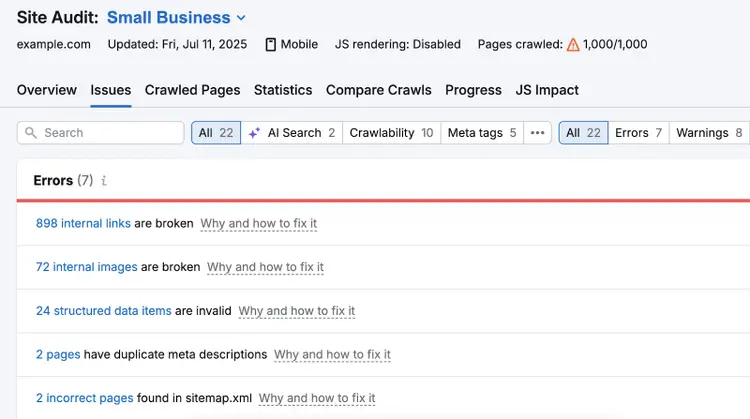
These are the issues that could affect your visibility in search results.
For each issue, you’ll see a “Why and how to fix it” link that explains the problem and tells you exactly how to fix it.
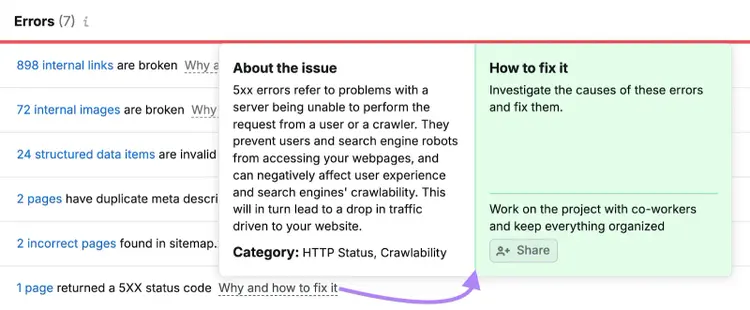
Go through the list and fix the issues one by one.
6. Build Backlinks
Backlinks are links from other websites that point to your site.
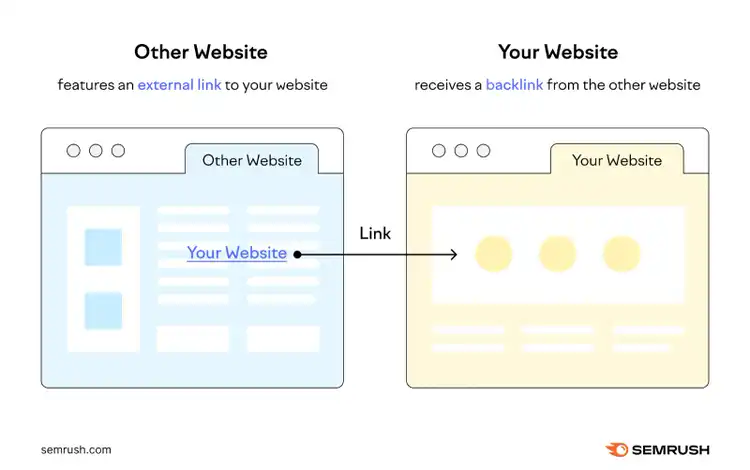
They’re one of the strongest ranking signals for Google. Because when someone links to your site, it acts like a vote of confidence.
The more high-quality backlinks you have, the more authoritative and trustworthy your site appears in the eyes of search engines.
In a study conducted by Backlinko, the number one ranking page had nearly four times more backlinks than those ranking below.
Here are some link building strategies that work well for small businesses:
- Get listed in local directories. Submit your business to reputable directories like Yelp, BBB, chamber of commerce websites, and niche-specific directories. These links are easy to get, so build these first.
- Contact local newspapers and websites to share stories. If you’ve worked with high-profile clients, launched a new service, or contributed to a community initiative, pitch your story to local news sites. They might cover it and add a link to your website.
- Support and sponsor local events. Many event websites link back to their sponsors. This is a win-win situation because they get the funding while you get the valuable backlink in return.
7. Create and Optimize Your Google Business Profile
Google Business Profile (GBP) is absolutely essential if you're a small business that serves customers in a specific geographic area.
This profile can help you appear in the local pack (the map section that shows up for local searches) and gives customers instant access to your business information.
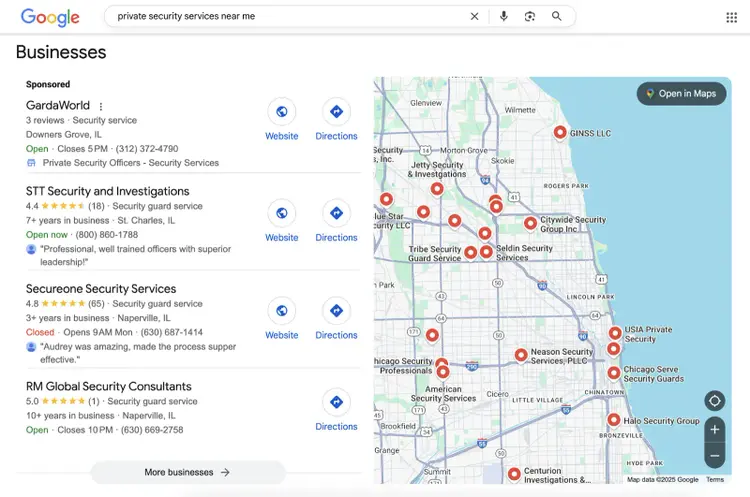
Note that if your business operates from multiple locations, you'll need to create a separate Google Business Profile for each location to maximize your local search visibility.
Google Business Profile is completely free. There are two ways to access your profile:
- Claim your business if it already appears in Google Maps or Search
- Create a new profile at business.google.com if it doesn’t exist yet
Once you get your profile, it’s time to optimize it for maximum visibility:
- Complete every section. Add your business hours, phone number, website, and detailed description. Businesses with complete Google Business Profiles are 70% more likely to be visited by users, according to Google.
- Add high-quality photos. Include photos of your storefront, internal office, team members, product, and services in action. Profiles with photos get more requests for directions and more click-throughs to websites.
- Choose the right categories. Select your primary business category carefully—it affects which searches you appear in. Add secondary categories that describe other services you offer.
- Enable messaging. Let customers contact you directly through your profile. Set up auto-responses for common questions to maintain quick response times.
- Post regular updates. Share news, offers, or events through Google Posts. These appear in your profile and signal to Google that your business is active.
8. Build Local NAP Citations
NAP citations are online mentions of your business's name, address, and phone number. They commonly appear on local directories and social media platforms.
Google uses NAP citations to verify your business information and confirm that you're a legitimate, trustworthy company.
When Google sees your business listed with identical information across multiple trusted websites, it builds trust in your business.
But if your information is inconsistent—different phone numbers, slight address variations, or name differences—it creates confusion.
This confusion can hurt your local search rankings.
The easiest way to build and manage your citations is with Semrush's Listing Management tool.
Enter your business name in the tool and select your company from the results.
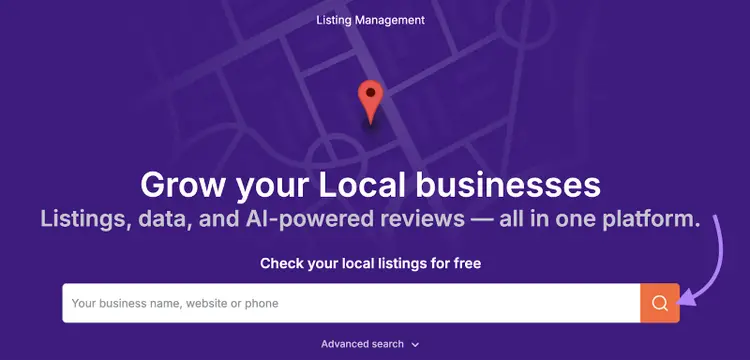
You'll see a report showing:
- Total number of existing listings
- Listings that need corrections
- Your average star rating across platforms
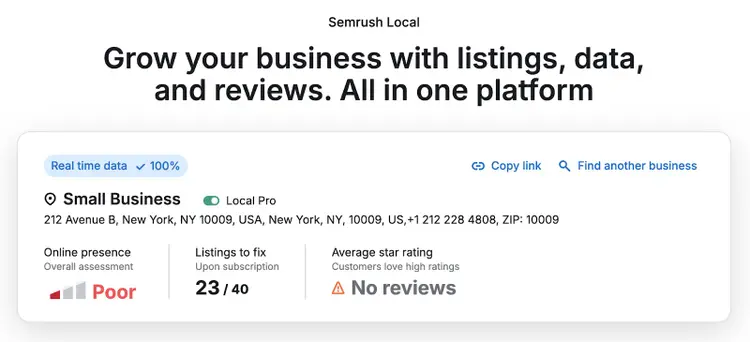
The tool will show the specific errors in your current citations.
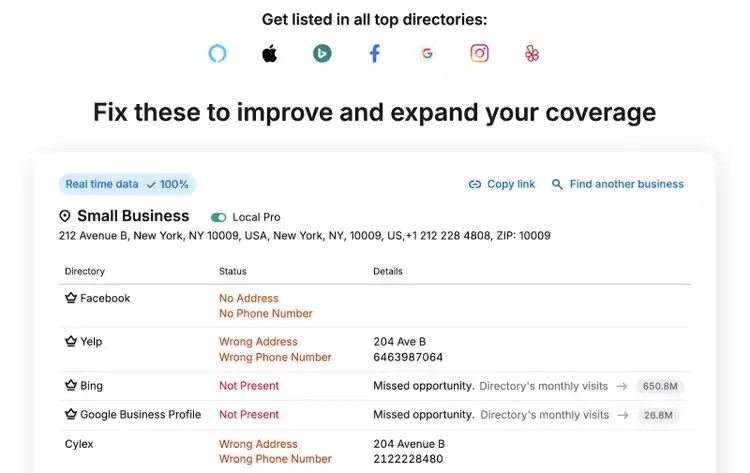
Update your business information on each platform where errors were found. You can either fix them manually or use the tool's automated distribution feature to push correct information to multiple platforms at once.
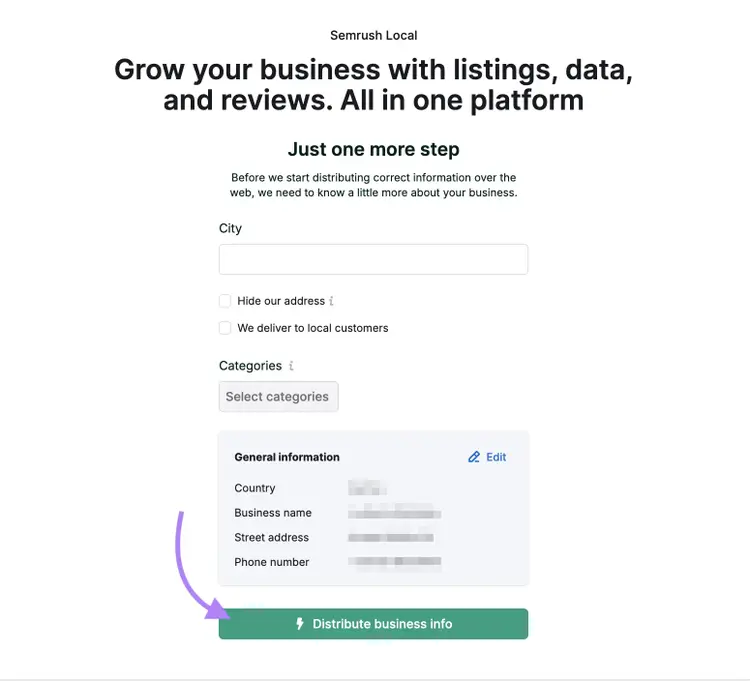
You can even submit your business information to new directories where you don’t have a listing yet.
9. Track Your SEO Progress
You can't improve what you don't measure. That's why tracking your SEO performance is crucial for long-term success.
But which metrics actually matter for small businesses?
Focus on these five key metrics:
- Leads: Track how many phone calls, contact form submissions, and quote requests come from organic search. This could be through your website or your business profile on Google. For tracking website conversions, set up event tracking in Google Analytics. For calls from your Google Business Profile, monitor the "Phone calls" metric in your Google Business Profile insights.
- Organic traffic growth: Monitor the number of visitors coming to your website from search engines. Use Google Analytics or Google Search Console to track this.
- Keyword rankings: Check where your website ranks for your target keywords using Semrush's Position Tracking tool. Focus on 20-30 of your most important service and location-based keywords.
- Organic keyword growth: This shows how many different keywords your website ranks for in search results. Google Search Console provides some of this data, but Semrush's Organic Rankings tool gives you a more complete picture. As you add content and optimize your site, this number should steadily increase, giving you more opportunities to be found.
- Backlink profile: Track the links pointing to your website from other sites. Use the backlink tool to monitor this.
Common Small Business SEO Mistakes to Avoid
Small businesses often make some SEO mistakes that hurt their visibility:
- Ignoring Google Business Profile. Many small businesses that have an offline presence set up their profile once and forget about it. Google rewards active profiles with better visibility. So post regular updates, respond to reviews, and keep your information current.
- Inconsistent business information online. Having different phone numbers or addresses across directories confuses Google and customers. Audit all your online listings to ensure your NAP information matches everywhere.
- Targeting keywords that are too competitive. Trying to rank for hyper-competitive terms when you’re a small business is almost impossible. Always target keywords that are within your ranking capabilities (at least initially).
- Creating thin, unhelpful content. Don't create content just for the sake of it. Your content needs to provide real value to your target audience.
- Neglecting page speed and mobile experience. If your website takes more than three seconds to load or doesn't work well on mobile devices, you'll likely lose customers and search rankings. Most local searches happen on mobile, so this is critical.
Ready to Get Started? Your 30-Day Action Plan
You might feel overwhelmed because there is a lot that goes into SEO. To keep things manageable, we’ve created this 30-day small business SEO action plan for you:
Week 1: Lay the foundation
- Set up (or claim) your Google Business Profile and optimize it properly
- Find 20-30 keywords that are related to the products/services you offer
- Check your existing NAP citations and submit your business information to new directories
Week 2: Build core SEO assets
- Create pages around the services you offer, targeting keywords
- Create location-specific landing pages if you have an offline presence
- Create1-2 blog posts around topics related to your business
- Improve your site structure
Week 3: Fix issues and build authority
- Find and fix any technical issues on your site
- Build a first set of backlinks
- Create more blog articles
Week 4: Monitor and optimize
- Measure your leads, organic traffic, keyword rankings, and other useful SEO metrics
- Monitor your Google Business Profile to make sure it’s up to date
- Continue building backlinks
- Create more blog articles
Frequently Asked Questions About Small Business SEO
1. How Long Does SEO Take to Work?
Most small businesses see initial improvements in 3-6 months, with significant results typically appearing after 6-12 months of consistent effort. SEO takes time, but it’s one of the best long-term marketing investments you can make.
2. Can I Do SEO Myself, or Do I Need to Hire Someone?
Yes, you can handle basic SEO tasks yourself and then bring in freelancers for help with more technical tasks, blog writing, or link building as needed.
3. How Much Should I Budget for SEO?
Expect to budget for SEO tools like Semrush, which start at $139.95 per month and can go higher depending on the plan and add-ons you use.
If you choose to hire freelancers for any help, they’ll likely charge you per hour or per project.
In the U.S., freelance SEO rates typically range from $25 to $150 per hour. Tasks like content writing and link building are billed on a flat-fee basis, typically ranging from $500 to $2,000+ per deliverable.

Zach Paruch is a data-driven SEO strategist with 10+ years of experience driving organic growth through smart, scalable search strategies. His expertise includes on-page and technical SEO, AI search optimization, and content strategy—with a special focus on ideating and implementing AI-driven processes. By leveraging in-depth search intent analysis, refined information architecture, and user-centered design, Zach consistently delivers high-impact content that drives business outcomes.
Zach Paruch
Zach Paruch is a data-driven SEO strategist with 10+ years of experience driving organic growth through scalable search strategies. He specializes in on-page and technical SEO, content strategy, AI search optimization, and AI-driven processes.

Tells Google to show you more from Semrush in AI, Search, and Discover.
Table of contents
-
How to Do SEO for Small Businesses
- 1. Find Keywords Related to Your Niche
- 2. Create Relevant Pages on Your Site
- 3. Improve Site Structure and Navigation
- 4. Create Helpful Blog Content
- 5. Find and Fix Technical SEO Issues
- 6. Build Backlinks
- 7. Create and Optimize Your Google Business Profile
- 8. Build Local NAP Citations
- 9. Track Your SEO Progress