
What Is Website Traffic? And a Quick Guide on Tracking It
What Is Website Traffic?
Website traffic refers to the number of users who visit your site over a specified period of time, which can help you understand how many potential customers you have.
Website platforms (like Shopify) often have built-in tools that let you view information about your site, such as website traffic. These tools are convenient and easy to use.
But built-in tools can lack detailed or custom reporting. Which is why business owners and professionals typically use third-party analytic tools like Google Analytics to track their site’s traffic.
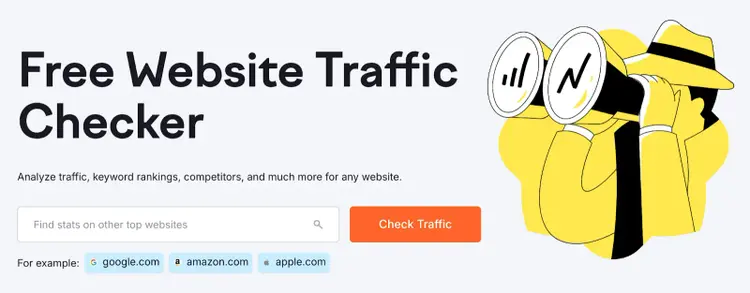
You can also try Semrush’s free Website Traffic Checker to see web traffic for any site—not just your own.
Why Is Tracking Site Traffic Important?
Tracking site traffic lets you better understand your site’s performance and find areas of improvement—like low-performing pages.
Here are some specific benefits of tracking and analyzing site traffic:
- Learn about your visitors: See which pages are most popular with your visitors, so you can create similar content they’ll likely enjoy
- Review your search engine optimization (SEO) efforts: Review unpaid (organic) site traffic to determine your SEO’s effectiveness
- Spot areas for improvement: Analyze and review low-traffic pages to understand why they’re not performing. Make updates to improve those pages.
- Perform competitor analyses: See how much traffic rival sites get and use their traffic as a reference point to gauge how well your site is doing within your industry
- Measure campaign performance: Review relevant metrics for traffic-boosting campaigns (like paid ads intended to generate awareness) to see how many people visit your site as a result of the campaign
How Is Web Traffic Measured?
Overall web traffic is measured by adding all the visits to your site.
But the definition of a visit can vary, depending on what it is you want to track. And you can further evaluate traffic by source—meaning where the visits came from.
Let’s explore both:
Visit Metrics
Website traffic metrics that specify a type of visit can help you broadly understand who's coming to your site and what they're doing once there.
Metrics may include:
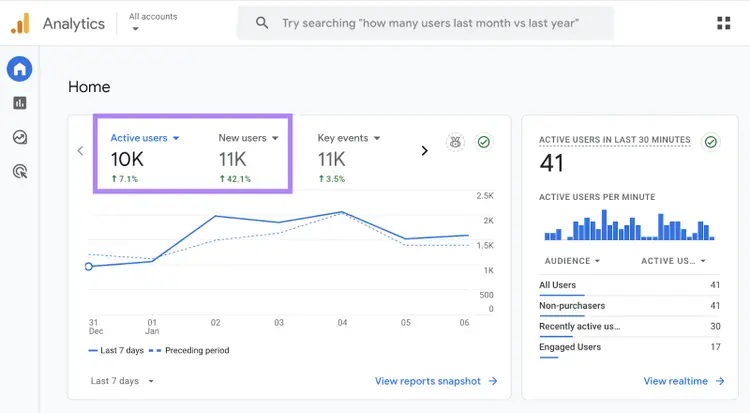
- Users: The number of unique visitors to your site during a specific period—meaning it’s still one user even if they leave and come back later. This metric is called “Active users” in GA4 and can show you the overall size of your site’s audience.
- New users: The people visiting your site for the first time during a specific period. The number of new people can help you understand if your efforts to attract new visitors are successful.
- Returning users: The number of people who’ve visited your site at least once before during the specified period. Comparing new users to returning users helps you understand how well you retain site traffic.
- Views (sometimes called pageviews): The number of times a page has been viewed during a specified period. Views can reveal your site’s most popular pages.
- Sessions: The number of browsing periods on your site during a certain time range. Comparing sessions to other metrics (like views) gives you deeper insight into what people do on your site.
Here’s how reviewing different user traffic metrics can be useful:
Let’s say you review your site traffic and see you have 100 users and 500 views.
The higher number of views suggests that visitors are exploring multiple pages—which might indicate good site navigation or engaging content.
Website Traffic Sources
Web traffic sources tell you where your traffic comes from, so you know which channels to focus on and improve.
Here are some common traffic source types and what they mean:
- Organic search: Unpaid traffic from search engines
- Paid search: Traffic from search ads like those launched via Google Ads
- Direct: Traffic from visitors who enter your URL in the address bar or visit your site through a saved link
- Referral: Traffic from other websites like blogs or news sites that wasn’t from ads hosted on those sites
- Organic social: Traffic from organically placed links on social sites like Facebook or Instagram
- Paid social: Paid traffic from social media ads
- Display: Traffic from display ads (online visual ads like banner ads)
- Email: Traffic from emails like your newsletter
Let’s say your team has dedicated a large portion of your marketing budget to email marketing.
That means reviewing web traffic from email—and comparing it to other sources meant to drive traffic—can show you if your budget is well-spent.
If traffic from email is low, you might consider revising your email campaigns. Or moving the budget to better-performing channels.
How to Track Your Site’s Traffic
Use Google Analytics
Google Analytics 4 (GA4) is a common website traffic tool that gives you a comprehensive look at your site’s traffic and how users behave on your site.
One way to set up GA4 on your site is through a code snippet that looks like this:
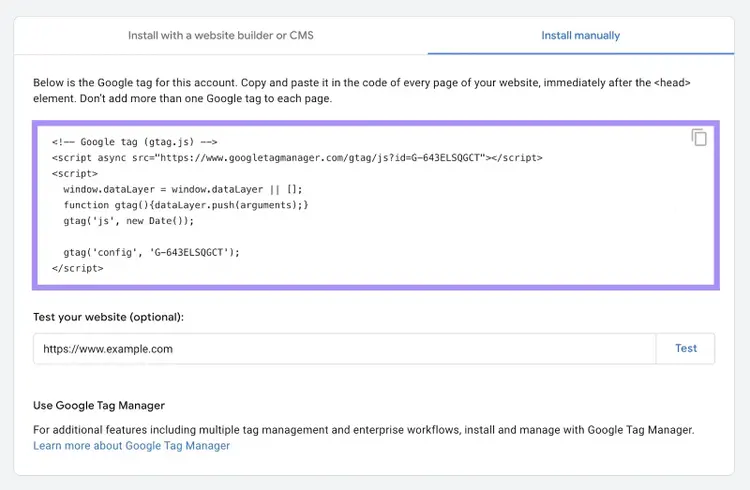
This code lets Google Analytics collect data.
And you can view the data GA4 collects through various reports in your analytics dashboard. Like the homepage report that displays metrics such as active and new users for your site.
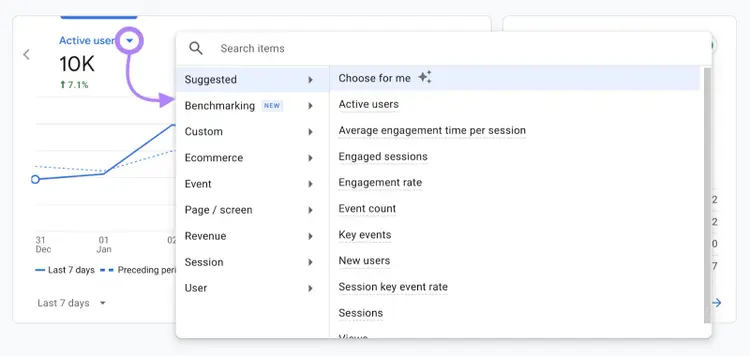
Clicking a metric’s drop-down lets you change to a different metric you want to evaluate.
You can also view page-level traffic information by clicking “Engagement” followed by “Pages and screens.”
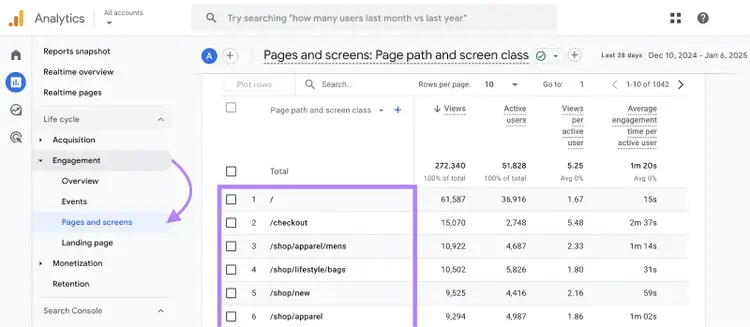
GA4 is a robust tool that’s especially good for more experienced marketing professionals.
Use Organic Traffic Insights
Semrush’s Organic Traffic Insights tool is a website traffic tool that combines data from GA4, Google Search Console, and Semrush to display your site’s organic traffic metrics in one place.
After configuring Organic Traffic Insights, you can access your traffic analytics.
The “Organic Search Traffic” section shows an aggregate view of your organic traffic data. While the “Landing Pages” section breaks down your data for each page displayed.
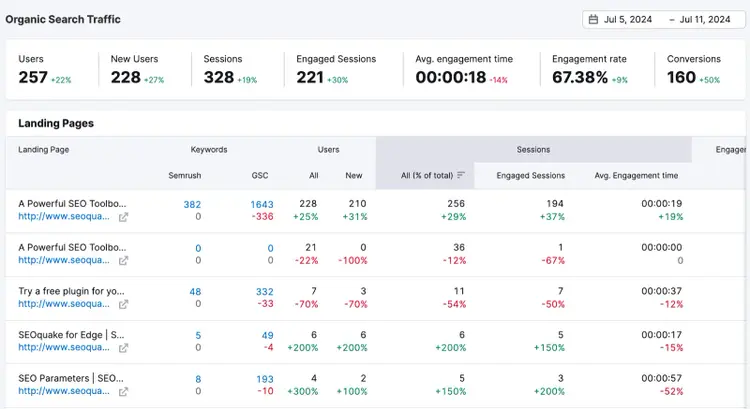
And you can change the location, device, and time period to review more specific data.

Organic Traffic Insights is useful for teams focusing on SEO efforts. As the tool highlights organic search data.
How to Check Your Competitors’ Website Traffic
You can check your competitors’ site traffic with the Traffic Analytics tool.
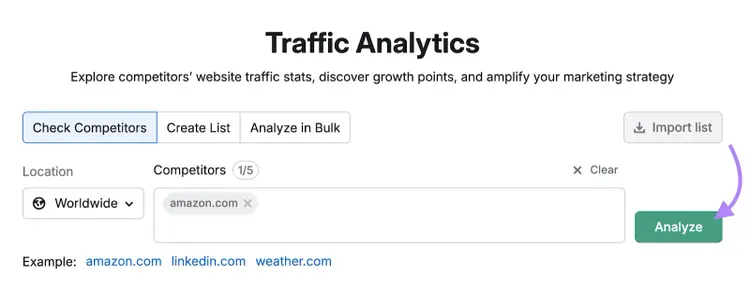
Open the tool, enter up to five competitors’ domains, and click “Analyze.”
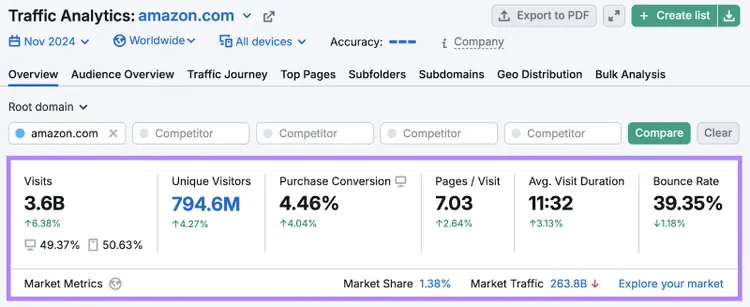
A report will load with information on your competitors’ unique visitors, pages per visit, average visit duration, and more.
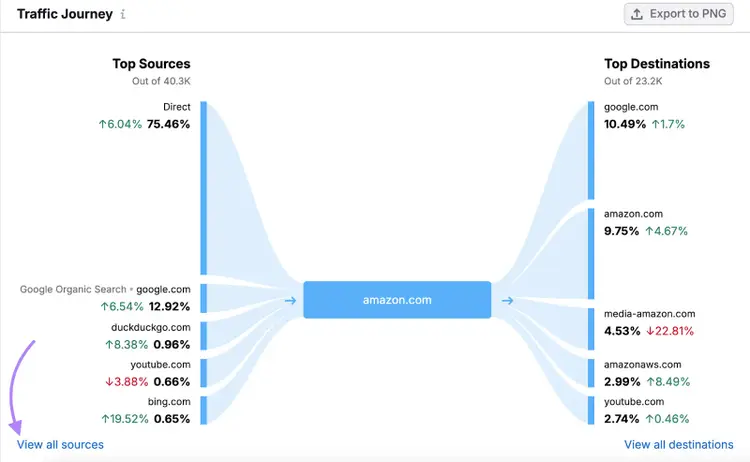
Scroll down to the “Traffic Journey” report and click “View all sources” to see where your competitors’ traffic comes from.
Click into the tabs along the top of the “Traffic Journey Details” section (“Referral,” “Organic Search,” etc.) to get more details on specific source types.
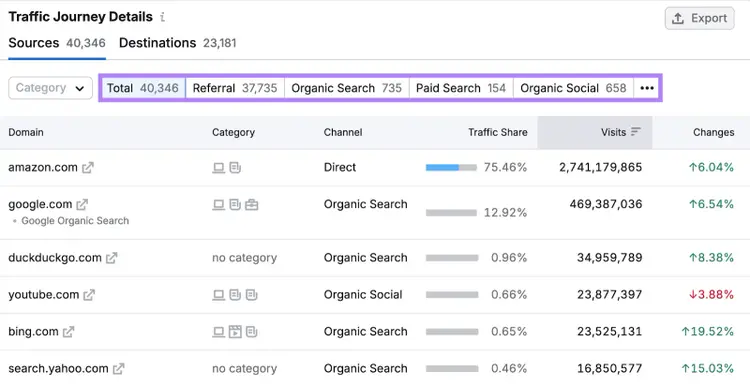
Reviewing competitor site traffic along with traffic data from your own site helps you gauge your competitors' performance. And identify whether there’s room for you to improve.
For instance, you may want to focus on SEO if competitors drive more traffic from organic search compared to your site.
Start Increasing Your Site’s Traffic
Increasing your site’s traffic can help you get more leads (people who are interested in your company) and customers.
Grow your website and its traffic with these tips:
- Find low-competition keywords that are relevant to your niche using tools like our keyword research tool. Then, create pages and blog posts with your chosen keywords to try to rank in the search results and increase organic traffic to your website.
- Promote content on social media to increase traffic from social media to your site
- Invest in paid ads on search engines, social media platforms, etc., to promote your site’s content
- Collaborate with influencers who can share your site’s content with their audiences
- Write guest blog posts (posts you write for someone else that list you as the author) on other relevant websites. You can sometimes include a link back to your site, which helps you gain referral traffic and build backlinks (links from external sites that point to your site) that might translate to more organic traffic later on.
Semrush offers a variety of tools to help you improve your site’s traffic using the above tactics. And makes it easy to track the traffic you get.
Try Semrush for free to see what it can do.
Elevate Your Digital Strategy
with a Semrush Subscription

Dana holds a Bachelor of Business Administration with a major in Marketing and specializes in content writing, copywriting, and SEO strategy. She has over 10+ years of experience helping established organizations within their marketing departments and currently partners with B2B providers to develop content strategies and craft persuasive copy that delights and converts.

Tells Google to show you more from Semrush in AI, Search, and Discover.