
What Is Google SEO? A Beginner’s Guide to Ranking Higher
Google search engine optimization (SEO) is the practice of optimizing your website to appear higher in Google search to get more visibility and drive more traffic.
In this Google SEO starter guide, you’ll learn the most important ways to optimize your website. You can build on them as you advance.
How Does Google SEO Work?
Google SEO works by ensuring your website aligns with Google's expectations for high-quality search results.
This is the process that Google follows to find and display good search results:
- Crawling: Google uses crawlers (also called bots) to discover webpages, primarily by following links
- Indexing: Google analyzes pages and stores those that are eligible in a massive database
- Ranking: Google matches results in the database to search queries and displays them in order of which ones it deems best
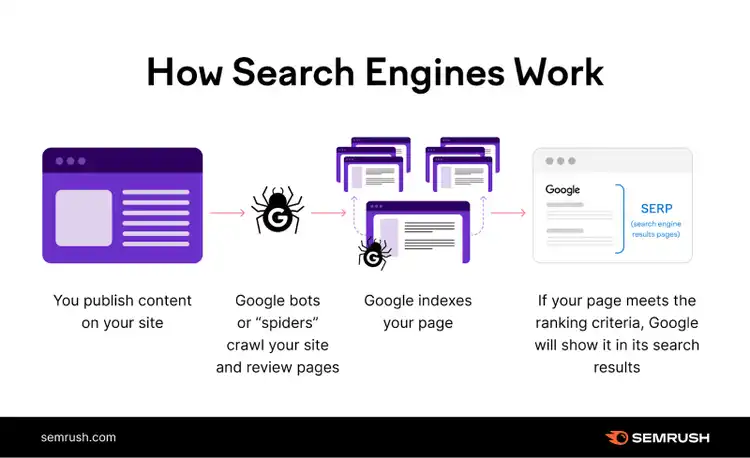
The better you align with Google's various systems for ranking, the more visibility you stand to gain.
The 4 Main Types of Google SEO
The main types of SEO to be aware of when optimizing your website are:
- On-page SEO: Involves optimizing individual webpages for their respective search queries. Common tactics include matching the searcher’s intent (what the user wants to achieve), strategically placing keywords, and using a clear structure.
- Off-page SEO: Focuses on building authority and trustworthiness to help Google see your website as authoritative. Common tactics include link building (getting other sites to link to yours), guest posting, and getting product or company reviews.
- Technical SEO: Involves optimizing your website’s backend to make it easy for Google to find and index your webpages. Speed is an important aspect of technical SEO, alongside website architecture and mobile-friendliness.
- Local SEO: Centers on optimizing your online presence for location-based searches. Collecting and responding to reviews is important for local SEO.
6 Google SEO Recommendations That Can Boost Rankings
When you’re a beginner to Google search optimization, it helps to keep things simple with these main tips:
1. Create High-Quality Content
High-quality content that’s helpful and relevant to a user’s search query is more likely to rank highly, so prioritize aligning with the search intent—the reason someone Googles a search term.
There are four main types of search intent:
- Informational: Users are looking for information
- Transactional: Users want to complete a purchase or other action
- Commercial: Users are researching before making a purchase decision
- Navigational: Users want to find a specific page or website
You can identify intent by analyzing the search results for a specific query.
And tools like our Keyword Checker provide the search intent(s) for specific search terms.
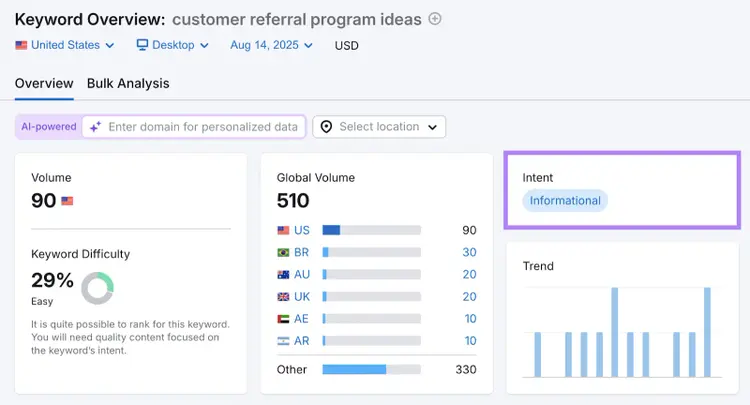
Once you understand the general intent(s), you can dig deeper into analyzing the top-ranking pages. For example, the first page of the search results for “customer referral program ideas” mostly features listicle blog posts.
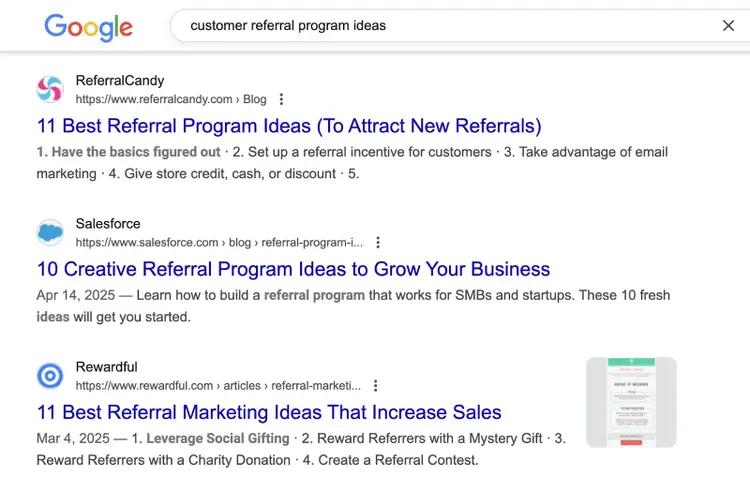
Most of the ranking blog posts provide a minimum of eight ideas. And include a real example with each idea. Some also offer tips on implementing referral programs.
So, if you wanted to optimize a page for the keyword “customer referral program ideas,” you would likely need to write a listicle with real examples.
In addition to fulfilling search intent, make sure to:
- Structure the content logically. The sections shouldn’t overlap, and each section should answer the question or support the topic in the title.
- Cite reputable sources. For example, don’t link to blog posts that compile statistics from elsewhere. Instead, link to the original sources.
- Use AI thoughtfully. Large language model-based tools (LLMs) have made it easy to create an article in a few minutes, but the output is typically thin content unless you provide enough information and context. For example, you can provide audience research, industry reports, and examples of good content to guide the LLM.
Always go beyond what the top-ranking pages provide. Put yourself in the searcher’s shoes and ask what you can do to make the page content as useful as possible.
Discover Search Intent
with the Keyword Checker
2. Add Keywords in the Right Places
Placing keywords in key areas within your content helps Google recognize that your pages are relevant to those queries, which makes you more likely to rank.
Incorporate keywords in the title, introduction, subheadings, and body content.
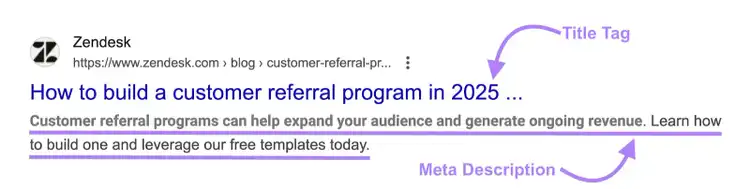
Also, add primary keywords to your title tags (HTML titles that can show in search results) and your meta descriptions (brief page summaries that can show in search results).
And make sure to write titles and descriptions people will want to click on.
Your title tag should:
- Be between 50 and 60 characters long
- Be descriptive and convey the page content accurately
- Match the search intent
A best practice is to analyze the titles of the top-ranking content before writing your own. This gives you a good idea of what Google and users prefer.
A good meta description should:
- Be 105 characters or fewer
- Be direct and persuasive
In the example below, Zendesk uses a simple title to make it clear what the page is about. Adding the year signals that the content is up to date.
The two-sentence meta description grabs users’ attention by highlighting business outcomes that are important to them. And explains how the blog post will help them achieve their goals.
3. Build Quality Backlinks
Accumulating quality backlinks (links from other websites to yours) from relevant and reputable domains builds your authority and can lead to better search engine rankings.
You can acquire links by:
- Publishing quality content that naturally attracts backlinks, such as original research, interviews, or unique takes
- Reaching out to websites with broken links and offering to replace those links with yours
- Responding to media requests, which often link back to the source’s website
- Using business relationships to get backlinks from case studies, testimonials, partnership announcements, etc.
Note that Google doesn’t provide any information on link quality or domain authority.
That said, you can use tools like Semrush’s Domain Overview to learn any website’s Authority Score—a measure of a site’s overall quality and SEO strength—and assess the value of a backlink from it.
4. Make Sure Google Can Crawl and Index Your Site
Your webpages need to be crawled and indexed to appear in search results, so make sure there aren’t any issues preventing either from happening.
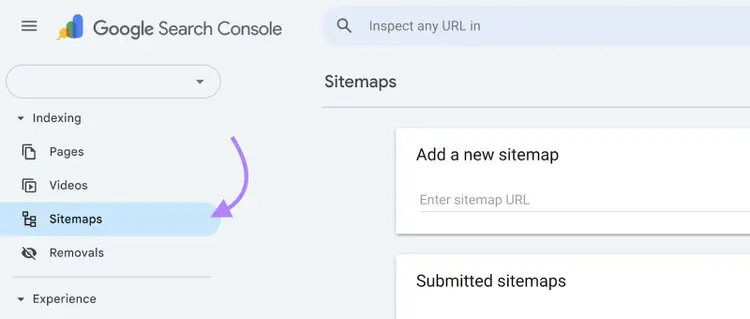
The most reliable way to get Google to index your website is to submit a sitemap in Google Search Console (GSC).
The first step is to generate a sitemap and upload it to your website’s root directory. Then, log in to your GSC account and go to the “Sitemaps” report.
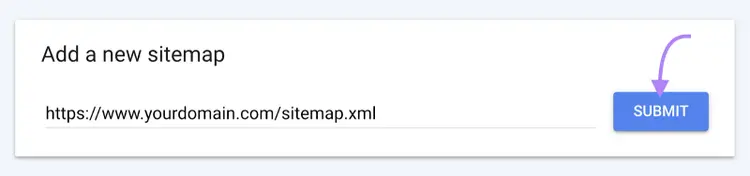
Paste the sitemap’s URL and click “Submit.”
If you’ve submitted a sitemap but you’re seeing a lot of pages you want to rank appearing as “Not indexed” in GSC’s “Page indexing” report, there could be multiple culprits at play. Start by reviewing the reasons listed there.
The most common indexing issues include:
- Blocked by robots.txt: Your website's robots.txt file prevents Google’s crawlers from accessing specific pages.
- Excluded by ‘noindex’ tag: A tag on your website instructs Google’s crawlers not to index a webpage.
- Not found (404): The URL does not exist.
If your website is new, check that no robots.txt blockers or noindex tags carried over from development, when you didn’t want Google to crawl and discover your website.
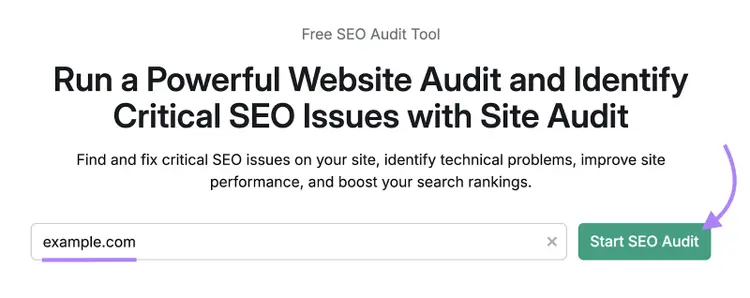
Our free website audit gives you a starting point. To dive even deeper into site issues, use Semrush Site Audit.
To begin, enter your domain and click “Start SEO Audit.”
Configure Site Audit by opting for default or custom settings.
When the audit is ready, go to the “Overview” report, find “Crawlability,” and click “View details.”
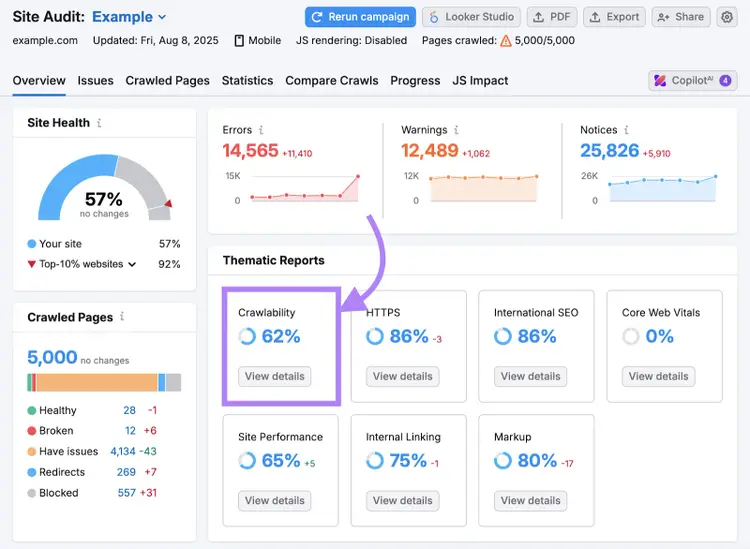
The “Crawlability” report shows a list of issues that impact indexing. To dive deeper into an issue affecting your pages, click on the corresponding bar in the horizontal bar graph.
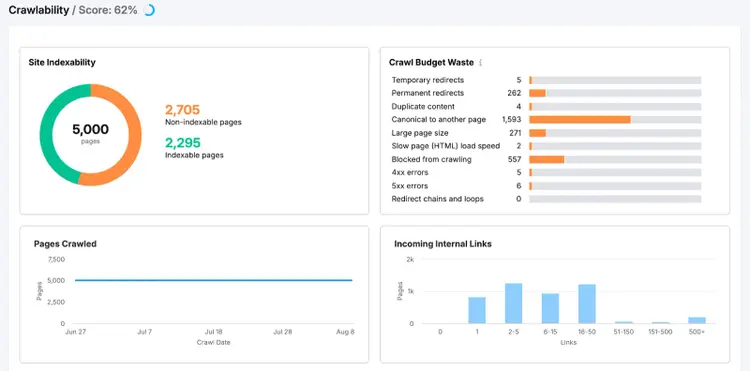
You’ll see a list of all pages affected by the issue you selected. Then you can move forward with resolving the affected pages.
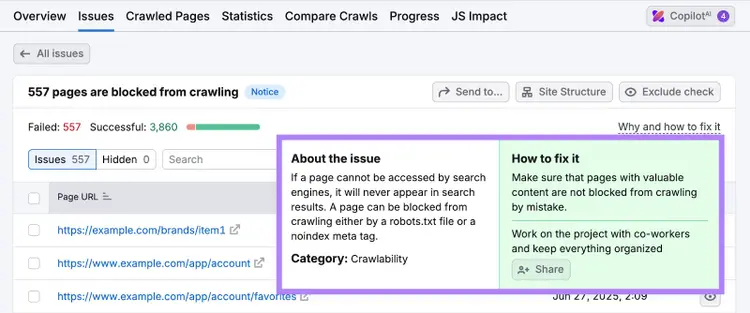
Make sure to run an audit and view this report after every major website update—like deleting webpages or migrating to a new content management system (CMS.) This allows you to catch new crawlability issues early.
5. Improve Page Speed
Page speed impacts the user experience and is a confirmed Google ranking factor, so you want to keep it as fast as possible across your site.
You can monitor the speed of individual webpages using a free tool like PageSpeed Insights.
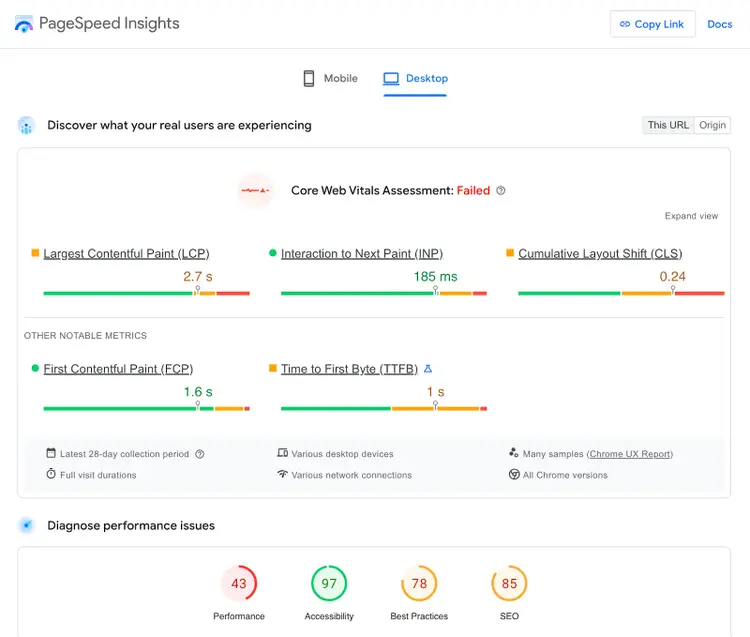
Scroll down to “Insights” to see a list of the top issues that impact load time. Click on each issue to get more information about it and how to fix it.
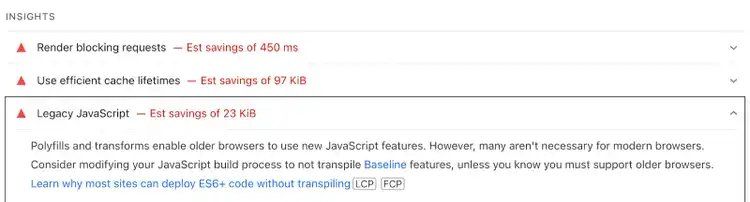
Some issues are easy to fix. For example, you could replace JPEG images with WebP and compress them to reduce their sizes.
But to solve more technical issues, you might need to work with a web developer. For example, reducing unused JavaScript requires expertise in website code to avoid causing issues.
To check speed across multiple crawled pages at once, go to the “Site Performance” report in Semrush’s Site Audit tool.
Important
You don’t need to chase a perfect page speed score. Many websites with average scores still rank well. Instead, focus on resolving the biggest issues that impact the user experience, like oversized images.
6. Optimize Your Google Business Profile
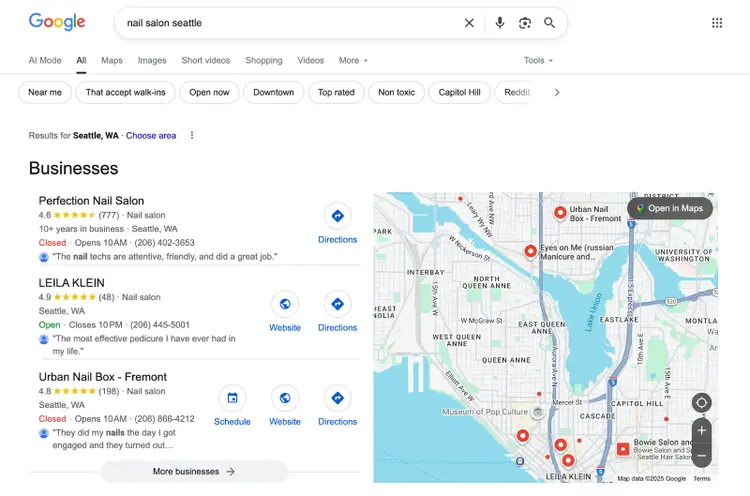
Local businesses can optimize their Google Business Profile (GBP) to increase their visibility in local searches.
Tactics that can optimize your GBP include:
- Writing a clear business description that explains your products and/or services
- Adding keywords that describe your location (e.g. “Ballard Seattle”) and describe your business (e.g. “nail salon”)
- Uploading high-quality photos and videos that follow Google’s guidelines
- Posting regular updates to share special offers, promote events, or provide updates about your business
- Encouraging customers to leave reviews and responding to that feedback
By following these optimization tips, there’s a greater chance you’ll appear in the local pack (a special type of result that prominently features a few businesses). And get more customers.
Is Traditional Google SEO Still Important in the LLM Era?
Google SEO is still useful for gaining visibility from traditional Google searchers, but large language model optimization (LLMO) is becoming important as more people adopt AI tools.
In fact, a survey from Elon University reveals that 52% of surveyed U.S. adults use LLMs like ChatGPT.
David Capone, Managing Director at GrowthX AI, puts it this way:
Traditionally, most marketers have optimized only for Google and not other search engines. The growing use of LLMs forces us to consider different tactics that we wouldn’t have considered in the past.
Google itself is part of the LLM conversation. With AI Mode and AI Overviews, users can ask complex questions and receive AI-generated responses that reference multiple sources.
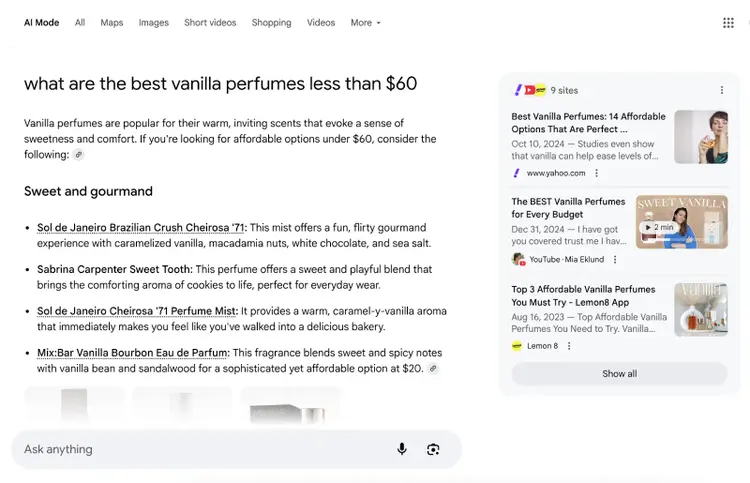
So, how do you adapt? David recommends that you start by thinking beyond the typical Google search results page.
It’s time to break the habit of just optimizing for Google and think more broadly. Consider optimizing for topics, rather than keywords. Look for gaps in knowledge versus your competitors. Research how query fan-out works and map out semantic connections in your content strategy.
Keep in mind that optimizing for LLMs is still an ongoing conversation. Following Google SEO best practices remains a strong foundation because it ensures your website is helpful, structured, and user-friendly.
But as AI search grows, explore new strategies to stay visible wherever your users are.
Ensure Your SEO Success
Following Google SEO best practices is a great way to improve your website’s search visibility. And help you achieve goals like growing sales.
SEO is an ongoing process that involves numerous tasks, so Semrush’s SEO Toolkit is useful for staying on top of on-page, off-page, and technical optimizations.
Sign up for a free trial to get started.
Claim Your Free 7-Day Trial
and Explore Our SEO Tools

Sergei Bezdorozhev is an SEO Lead with over 10 years of experience, specializing in technical, international, and programmatic SEO. He has led large-scale SEO initiatives, cutting localization costs by double digits and driving significant traffic growth across multilingual markets. With a master’s degree in Linguistics, he ensures content ranks effectively in English, Spanish, German, and Japanese. Passionate about SEO growth hacking, he focuses on scaling content and automating processes.
Sergei Bezdorozhev
Sergei Bezdorozhev is an International Blogs Lead at Semrush with 10+ years in SEO. He specializes in International SEO, programmatic SEO, and website growth hacking, driving multilingual content performance and organic growth at scale.

Tells Google to show you more from Semrush in AI, Search, and Discover.