
Optimizing your website for SEO today means optimizing for both search results and AI-generated summaries.
With AI Overviews and similar generative features appearing across Google and Bing, visibility now extends beyond traditional blue links.
Search engines summarize content using AI, often highlighting sources that provide clear, structured, and authoritative information.
Generative AI features like Google’s AI Overviews and Microsoft (Bing) Copilot summarize multiple pages at once. They favor clear, structured, and trustworthy sources. Optimizing for SEO in 2026 means ensuring your content can be read, understood, and cited by both humans and machines.
Instead of overwhelming you with dozens of tactics at once, this guide focuses on strategic, high-impact actions that fit your current website stage, as outlined below:
Now that you've identified your starting point, let's dive into four key areas of SEO optimization.
Each section contains actionable steps you can implement right away.
1. Create High-Quality Content
Creating high-quality content that satisfies user needs allows your other optimization efforts to reach their full potential.
And creating high-quality content starts with understanding what your target audience is searching for in search engines like Google.
Find and Target the Right Keywords
Finding and targeting the right keywords (terms users enter into search engines) is one of the most important steps to creating high-quality content. Because it allows you to understand what your target audience is searching for.
This makes it more likely you’ll appear prominently in search engines.
Like this:
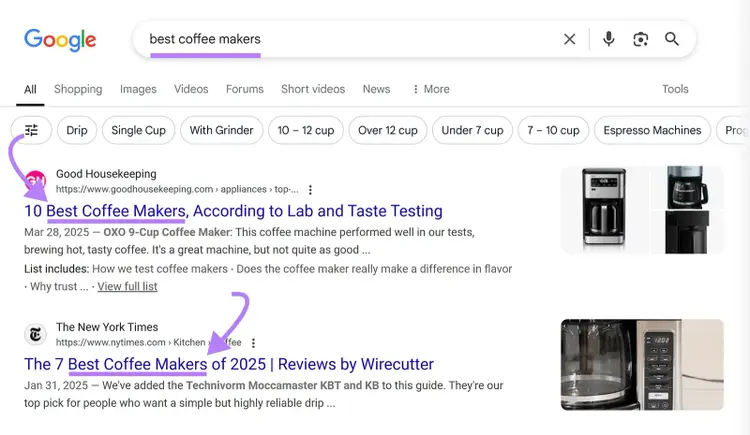
And knowing what your audience is searching for can help decide which topics to start covering on your website.
Here's how to do keyword research for your website:
- Start with a main, broad topic in your niche (like "coffee machines" if you sell coffee equipment)
- Use a keyword research tool to find related searches
- Look for keywords with relatively high search volumes and low difficulty scores
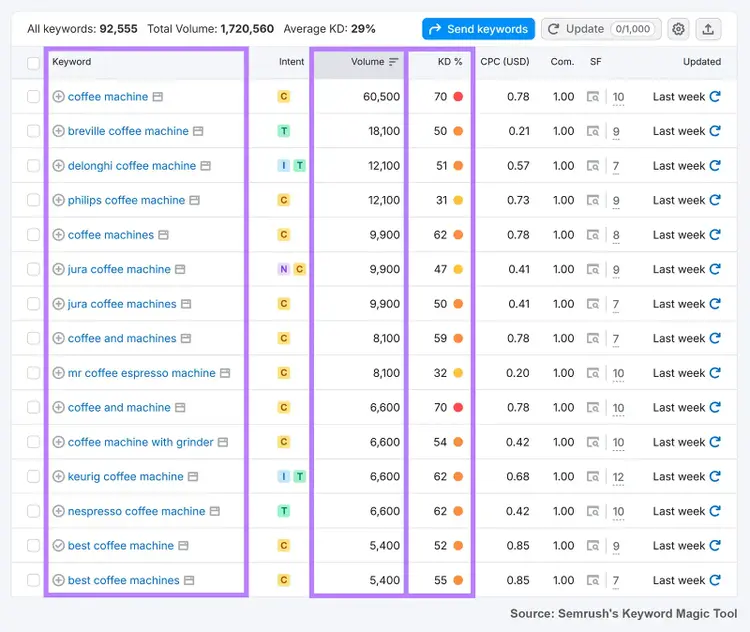
The key is to find keywords in the sweet spot—moderate volume and lower difficulty—that still attract enough traffic to matter. These keywords often perform well in both organic search and AI Overviews because they have less competition and clearer topical intent.
Semrush’s recent analysis of 200,000+ keywords showed that more than 80% of desktop AI Overview triggers and about 76% on mobile occurred for keywords with under 1,000 monthly searches.
This indicates that niche, lower-volume informational queries now offer significant opportunity for visibility in the AI-search era.
So targeting lower-volume keywords can help you gain a competitive advantage.
Let’s say you own a small website and you invest significant resources into creating content that aims to rank for this keyword. But when you’re competing with domains like The New York Times, your content might not even get a chance.
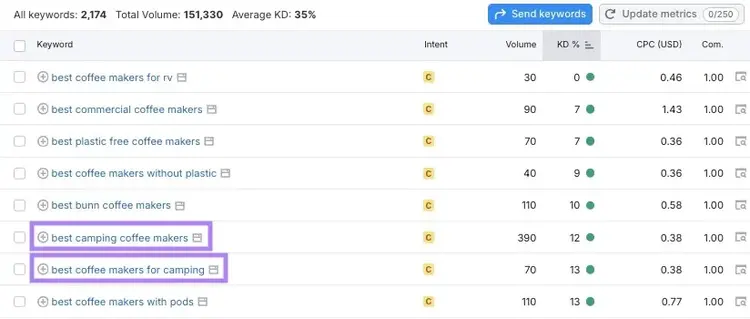
We clicked on “KD%” twice to sort the list based on the lowest keyword difficulty. And found some interesting, lower-volume keywords.
For example, if you’re selling a coffee maker that’s suitable for camping, some of these keywords are much more suitable for your website than the broad “best coffee makers” keyword.
And after we checked what kind of websites are ranking for some of these keywords, we found out that it’s not The New York Times, but smaller websites that are tapping into this opportunity.
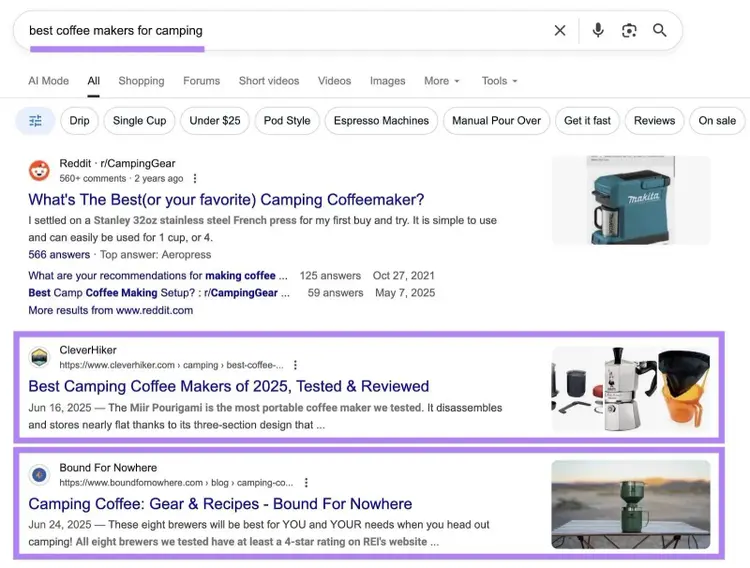
Also, by targeting these niche keywords that don’t have a lot of content created about them, your page/blog post with high-quality information is likely to be featured in AI Overviews.
Once you've identified your keywords, here's how to effectively target them on your website:
- Place keywords strategically. Include your target keyword in your title tag, URL, H1 heading, and within the first 100 words of content.
- Use keywords naturally. Incorporate keywords in a way that sounds natural to readers—keyword stuffing hurts both user experience and rankings.
- Include keyword variations. Use related terms and synonyms throughout your content to reinforce relevance and improve natural language processing signals.
Further reading: How to Choose Keywords for SEO (A 5-Step Guide)
Identify and Match Search Intent
Google’s recent guidance for content that performs well in AI Overviews emphasizes one thing above all: usefulness. This is also one of the key criteria AI systems use to select and summarize web content accurately.
AI systems pull from content that satisfies intent quickly and completely. Matching search intent (what the searcher truly wants) has never been more essential.
When your content clearly answers intent, you improve your odds of ranking and being cited within an AI Overview result.
There are four main types of search intent (or keyword intent):
- Transactional intent: The user wants to complete an action, like buying something (e.g., "where to buy grinds coffee pouches")
- Informational intent: The user wants to learn more about something (e.g., "how to use a coffee grinder")
- Commercial intent: The user is researching options before buying (e.g., "best manual coffee grinder")
- Navigational intent: The user wants to find a specific page or website (e.g., “specialty coffee expo 2026”)
So, your goal is to first identify your main keyword’s intent and create content that satisfies that intent.
Here's how:
- Search for your keyword on Google and look at the top-ranking pages.
- Analyze the type of content Google shows (product pages, how-to guides, videos, etc.).
- Study those pages to see what subtopics they cover and how the content is structured.
- Create content that matches the format and structure you identified.
For instance, if you target "best pour-over coffee maker," you'll see comparison articles ranking—not product pages.
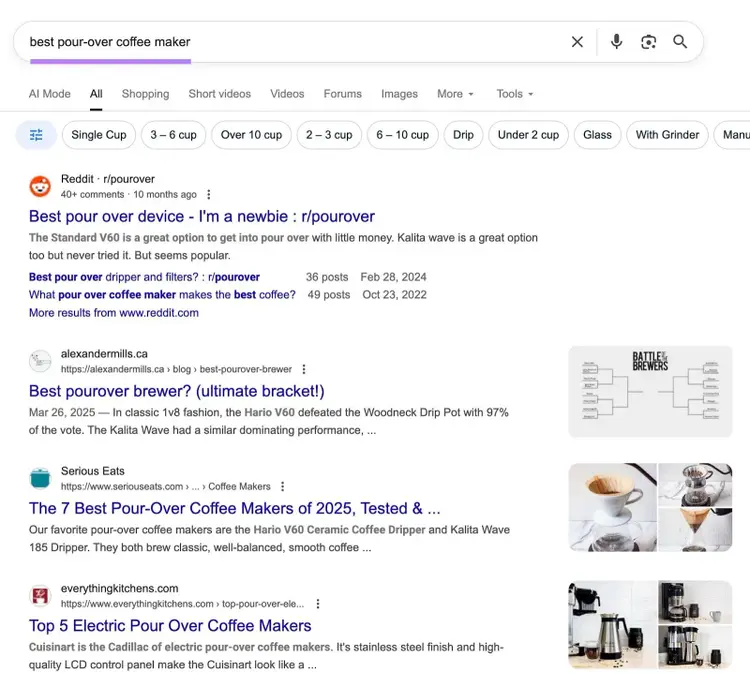
The intent is commercial—people want to compare options before buying.
We can quickly confirm that using the free Keyword Checker:
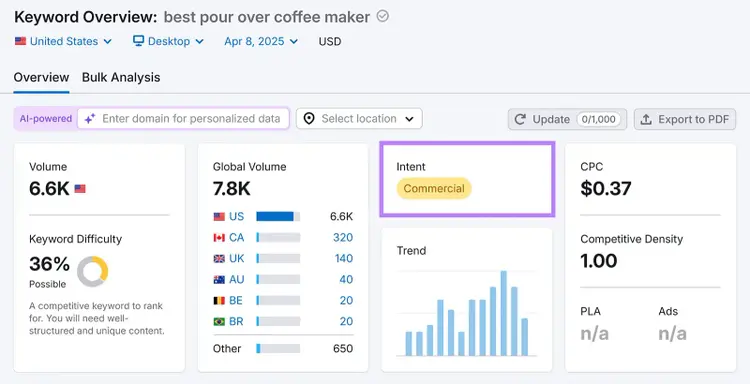
This indicates you should create a comprehensive comparison guide rather than a single product description.
Collect Keyword Metrics
with the Keyword Checker
Offer High-Quality, Useful Information
Offering high-quality, useful information means creating content that provides unique value and solves the reader's problem completely.
Your content needs to be better than what already ranks if you want Google to show it to more people.
Here's what makes content truly valuable:
- Include original insights. Add your own experience or perspective, share data from your own research or surveys, and share unique case studies others don’t have.
- Cover topics thoroughly. Answer the main question completely and address related questions readers might have.
- Make it easy to understand. Break complex ideas into simple steps, use examples that relate to your audience, and include visuals that explain key concepts.
Let’s take the top-ranking result for the keyword "best pour-over coffee maker" (from the website Alexander Mills) and see what makes the content special.
First, the content is easy to understand. They used a battle metaphor to create a comparison post and choose a winner, like this:
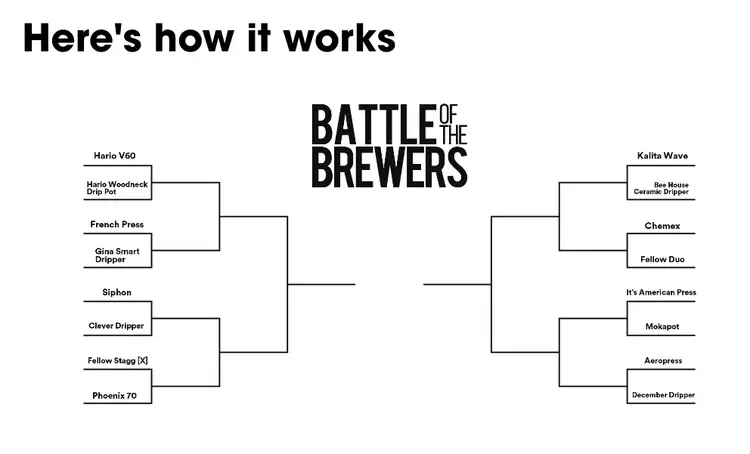
They compared different coffee makers by polling their audience on Instagram and choosing a winner this way:
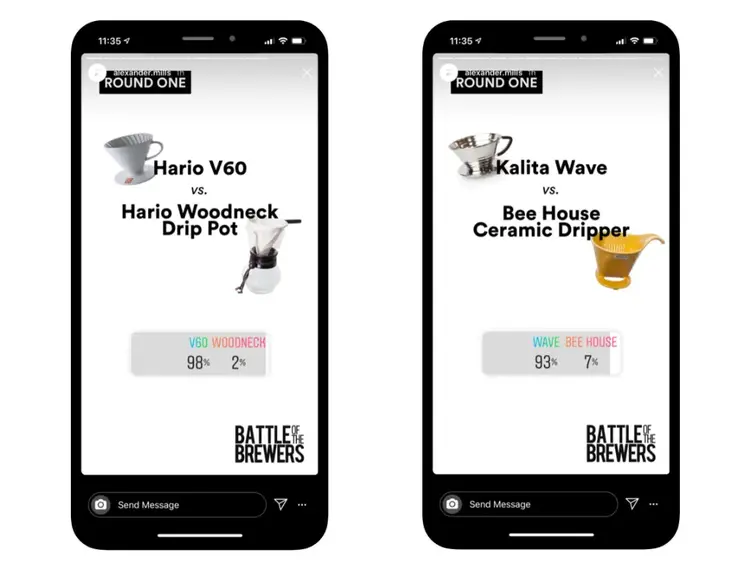
They shared the insights and results of each round:
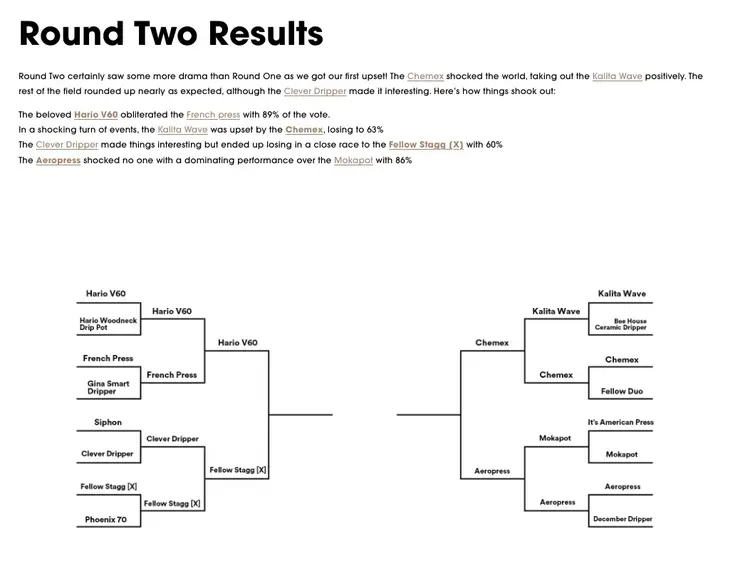
By doing this, they ensured that:
- Their content is unique
- The content matches the audience's needs
- The article is based on original research
- The topic is covered thoroughly
This level of completeness and originality increases your chances of being selected in AI-generated summaries and featured snippets.
Further reading: Quality Content: What It Is + 10 Actionable Tips for Success
Use a Clear Content Structure
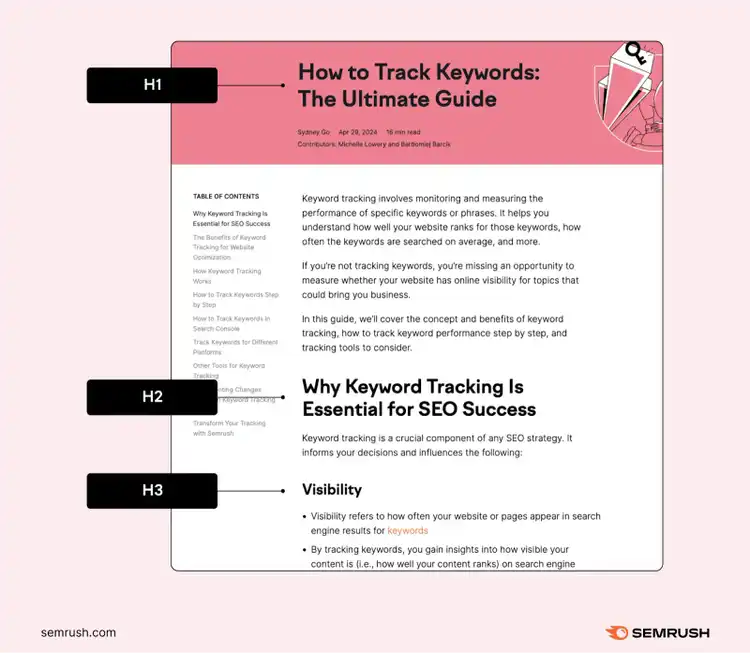
A clear structure with headings (H1, H2, H3, etc.) helps readers and search engines understand your content.
These HTML tags act like signposts that show which parts of your content are most important. And how different sections relate to each other.
Here's how to structure your content effectively:
- Use one H1 tag for your main title. This is typically your page title and should contain your primary keyword.
- Organize major topics with H2 tags. These act like chapters in your content and should cover the main sections.
- Use H3 tags for subtopics. These break down your H2 sections into more specific parts.
- Keep your heading hierarchy in order. Don't skip levels (like going from H2 to H4).
To illustrate, here’s what proper heading tags look like on a live page:
Beyond headings, you can further improve readability with:
- Short paragraphs (three to four sentences at maximum)
- Bulleted or numbered lists for steps and features
- Bolded text for important points
Semrush’s study has also uncovered that AI Overview responses average about 100 words, but can range anywhere from five to 500 words.
What does that mean for the structure of your content?
Google adjusts the depth of the answer depending on the query. You can increase your chances of appearing in AI Overviews by diving deep into the topic, but ensuring the sentence and content structure are concise.
All of this can make your content more approachable for readers and help Google identify what matters most on your page.
And you can even consider adding an overview of content on top of your page.
For example, this AI Overview shows up for the keyword “how to choose a coffee maker” with the website Green Plantation being mentioned as the first on the list of sources Google pulled information from.
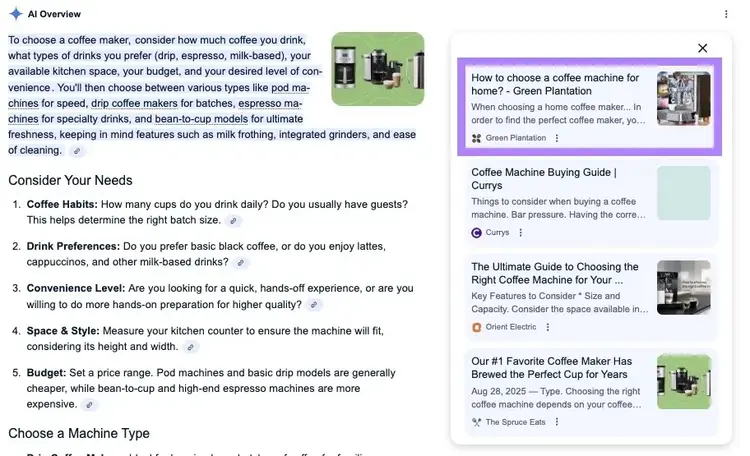
After analyzing their content, we learned that Google pulled information from their second paragraph, which was structured concisely into bullet points:
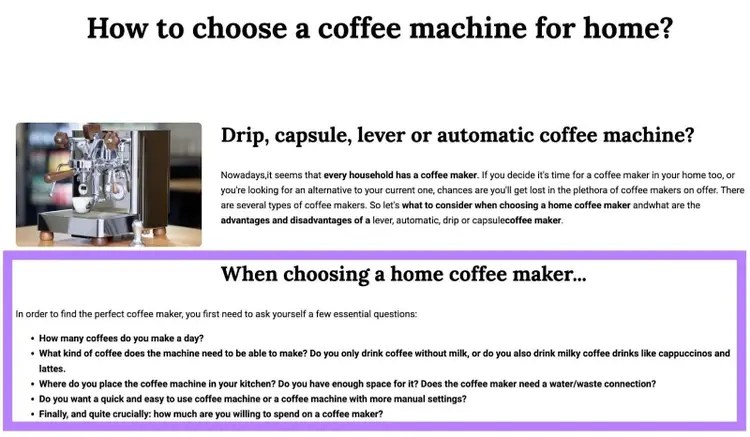
This type of structure makes the content readable and easy to digest for the reader and makes it easier for Google to pull information from.
Tip
Use a “Key takeaways” list at the top of your article or section. AI models scan for concise summaries, and these bullets can increase the odds your content is quoted in AI results.
Further reading: How to Create a Content Outline: A Step-by-Step Guide
2. Make Your Website Easy to Understand
Let’s explore a few elements that can help both visitors and search engines understand and navigate your website.
Write Compelling Titles and Meta Descriptions
Writing compelling title tags and meta descriptions can improve your chances of ranking higher and encourage clicks—if Google chooses to display them in search results (Google frequently rewrites both).
Your title tag is the blue, clickable headline people see in search results and sometimes within AI-generated summaries.
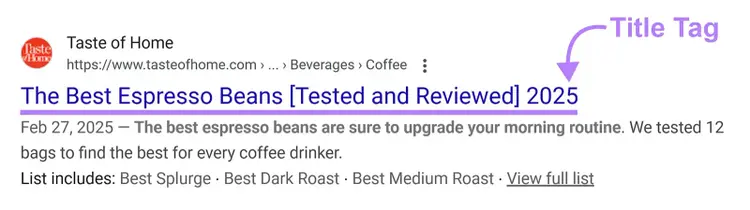
Title tags are an important ranking factor that signals what your page is about. And while Google may rewrite it in search results, crafting an optimized title tag is still a really important SEO best practice.
Here's how to optimize it:
- Put your main keyword near the beginning
- Keep it under 60 characters to avoid getting it cut off
- Match your title with search intent
- Make your title tag and H1 similar
For example, "Best Coffee Grinders: 7 Models Tested for Home Brewers" is better than "Coffee Grinders | Website.com."
The meta description is the short summary that can appear below your title in search results.
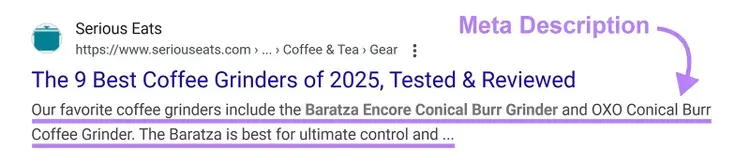
While not a direct ranking factor, a compelling meta description can encourage clicks if Google chooses to display it.
To optimize your meta description:
- Keep it to around 105 characters in length to prevent truncation
- Include your target keyword naturally
- Add a clear call to action ("Learn how," "Discover why," "Find out")
- Highlight a specific benefit or unique selling point
Here's an example: "Find the best coffee grinders for home brewing. We tested 7 models to help you choose."
Connect Your Pages with Internal Links
Connecting your pages with internal links means adding relevant links from one page to another on your site to other pages on your site, which can benefit both visitors and search engines.
For visitors, internal links can lead to related information without the need to return to search results.
For search engines, internal links can help them find new pages on your site, see how pages are related, and understand how your site is structured.
All of which reinforces topical authority, a key signal that can influence whether your pages are selected for AI Overviews.
Here’s a visual representation of how Google discovers pages:
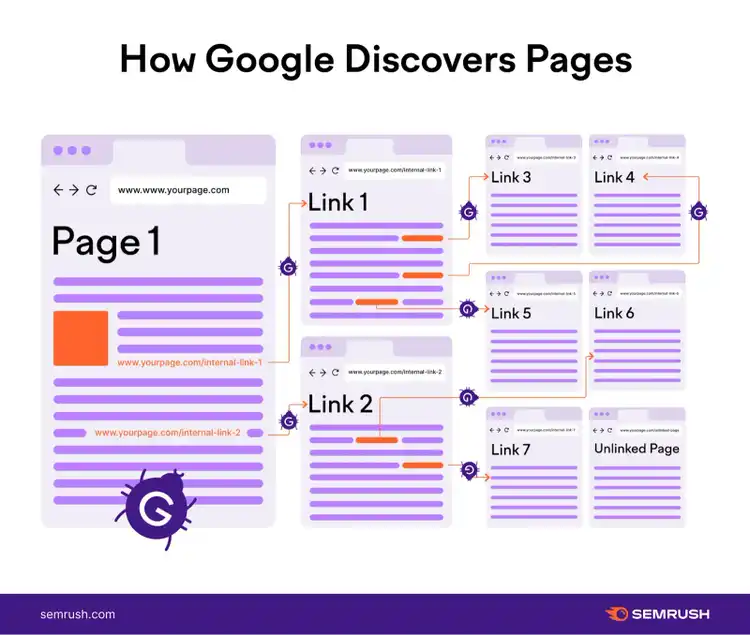
To optimize your internal linking structure:
- Link to related content naturally within your text
- Use descriptive anchor text (the clickable words) that includes keywords when possible
- Link from your popular pages to newer content to help the new content get discovered
- Create topic clusters by linking related content together
For example, here’s how the website Kitchen Aid links out to other resources. This section has four internal links, pointing to relevant blog posts and product pages on their site:
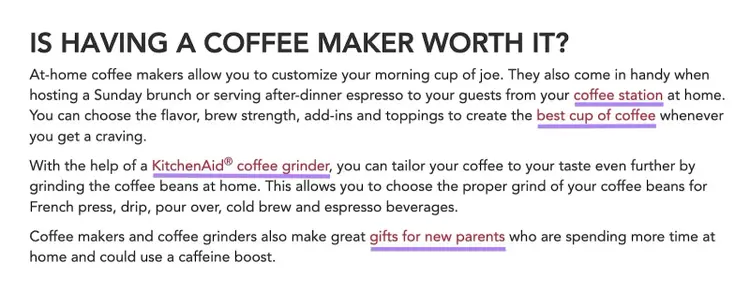
When Google and AI systems see consistent internal linking patterns, it reinforces topical authority and context—both key signals for inclusion in AI-generated summaries.
Use Simple URL Slugs
Use simple URL slugs that include your target keywords to potentially improve rankings and make your links more memorable.
While URLs are a minor ranking signal, they help search engines understand your content's topic and provide users with a clearer idea of where they're navigating when they see or share your links.
For example, look at this URL slug:
https://www.semrush.com/blog/keyword-research-tools/
It’s really easy to understand that this is a blog article about keyword research tools.
Strive to do the same for all the pages on your site.
To optimize your URLs:
- Make them descriptive but concise
- Include your primary keyword
- Use all lowercase letters
- Separate words with hyphens
- Avoid special characters and numbers
For instance, the website Green Plantation structures its URLs like this: “greenplantation.com/travel-coffee-machines,” which is a much better option than “greenplantation.com/p?id=1234&cat=coffee&prod=frpress.”
Include and Optimize Images
Including optimized images improves the user experience and creates opportunities for your site to appear in Google’s image results.
To optimize images for SEO:
- Use descriptive file names before uploading (e.g., french-press-brewing-technique.jpg instead of IMG_0123.jpg)
- Add alt text that accurately describes the image and includes target keywords when possible
- Compress images to reduce file size and improve page speed
- Choose the right file format (JPEG for photos, PNG for graphics with transparency, WebP or AVIF for better compression and quality, SVG for scalable graphics and logos)
- Include relevant captions when they add value to the content
Alt text is especially important because it helps users with vision differences understand your images through screen readers. And gives Google context about your image content.
Good alt text is descriptive but concise, includes keywords naturally, and accurately represents what's in the image.
For example, we checked alt attributes on Green Plantation’s website (by using the Image Alt Text Viewer) and found out that many product images on their site have descriptive alt text, like this:
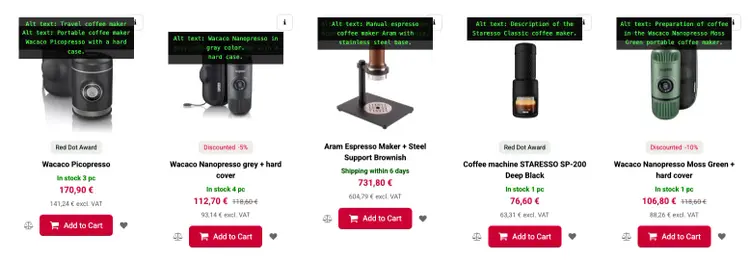
Optimized, well-described visuals can also appear in AI search results or visual carousels, so descriptive alt text and captions now serve double duty for visibility.
Further reading: Image SEO: How to Optimize Images for Search Engines & Users
3. Build Authority with Backlinks
Another important best practice for optimizing your website for SEO is building authority with backlinks.
Getting links from other websites is one of the most powerful ways to improve your Google rankings, as these act like votes of confidence for your content.
Create Link-Worthy Content
Creating link-worthy content (also called link bait) means developing resources that other websites naturally want to reference as valuable sources.
The best backlinks come from content so useful that site owners link to it without you having to ask.
Here are several types of content that tend to naturally attract links:
- Original research: First-party data, industry surveys, or trend analyses that provide insights nobody else has
- Comprehensive guides: In-depth resources that cover topics completely and become the go-to reference in your industry
- Visual assets: Infographics, charts, or custom images that explain complex concepts visually and are easy to share
- Tools and calculators: Free interactive resources that solve specific problems for your audience
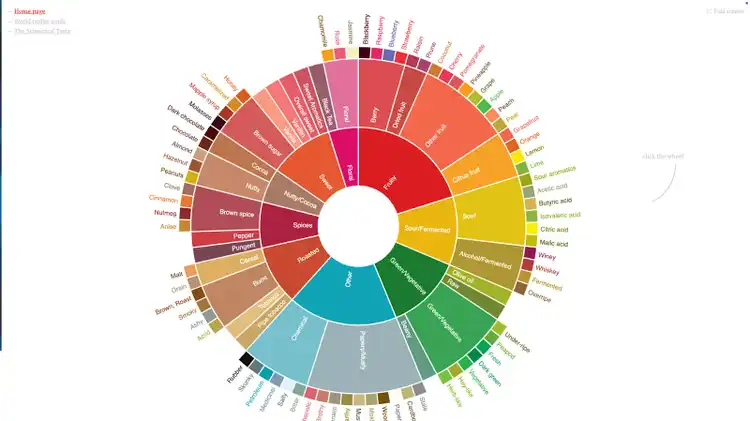
For example, Not Bad Coffee has published this interactive visual asset that allows their users to explore different flavors:
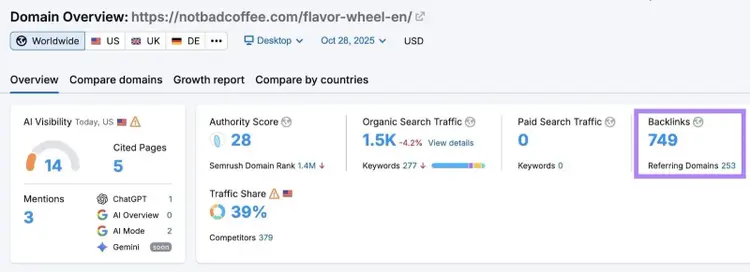
And this page has earned them 700+ backlinks:
A quick tip is to focus on addressing a specific information gap in your industry.
Ask yourself: "What valuable resource doesn't exist yet that would help people in my niche?"
Conduct Simple Link Outreach
Conducting link outreach means reaching out to relevant websites and directly asking them to link to your content.
While creating link-worthy content is the foundation of link building, strategic outreach can significantly accelerate your backlink acquisition.
Here’s a simple, three-step process for link outreach:
- Find potential linking opportunities. Look for sites linking to similar content, resource pages, and mentions of your brand that don’t include links.
- Research before reaching out. Understand the site's audience and content style, identify the right contact person, and find something specific you like about their content.
- Send a personalized, concise email. Mention something specific about their page, explain how your content adds value, and suggest where your link fits.
Here’s an example of what your outreach email could look like:
Subject line: Loved your coffee brewing guide!
Hi Sarah,
I'm Carlos, a coffee enthusiast and writer at coffeecreations.com.
I just read your guide on brewing methods and really enjoyed how you broke down the differences between pour-over and French press. Your explanation of extraction times was particularly insightful!
I noticed you mentioned the importance of water temperature, but didn't include specific temperature ranges for different methods.
I recently published a detailed temperature guide covering 15 brewing methods with exact temperature recommendations based on coffee roast levels. I think it would complement your article perfectly in the "Water Quality" section.
You can check it out here: [link to temperature guide]
I believe your readers would find these specific temperature guidelines helpful for improving their home brewing results.
Let me know what you think!
Cheers,
Carlos
P.S. Love your podcast—keep up the good work!
That’s it. Focus on keeping it simple and showing your value.
Further reading: How to Use Outreach for Link Building
4. Check Your Site’s Technical SEO
Good SEO includes some technical elements that affect how well Google can access and understand your site.
Don’t worry—technical SEO basics are quite simple to check and fix.
Make Sure Google Can Find Your Pages
For your pages to appear in search results, Google must be able to find, read, and index your pages before they can appear in search or AI results.
Here are three simple steps you can take to make sure Google can find your site:
1. Create a Google Search Console Account
Google Search Console (GSC) is a free tool that lets you get insights about how Google sees your site.
After setting up your account, head to “Indexing” > “Pages” to see which pages Google can find and index. Plus, any related issues.
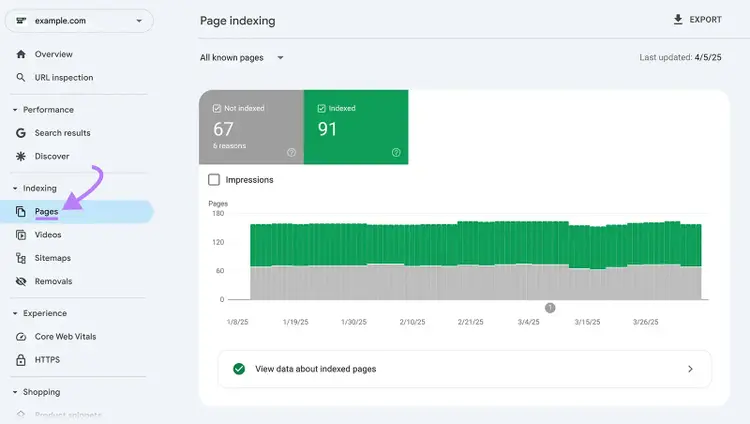
Scroll down to see if any of your pages aren’t indexed. And why.
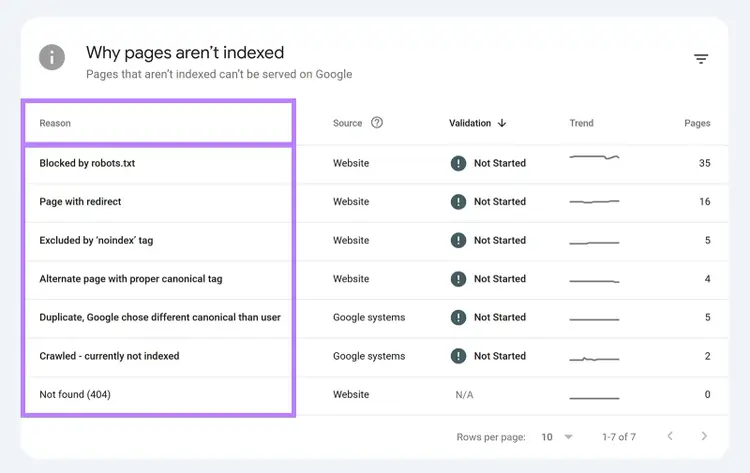
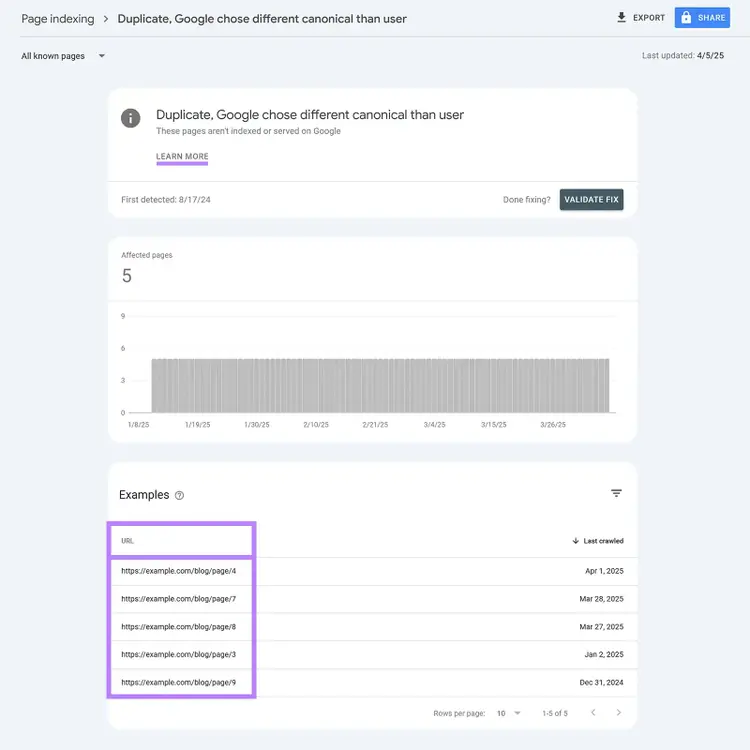
Click on any entry to see a list of affected pages plus a link to learn more about the issue and how to fix it.
2. Submit a Sitemap
A sitemap is a file that tells search engines which URLs on your site should be indexed.
And it can look something like this:
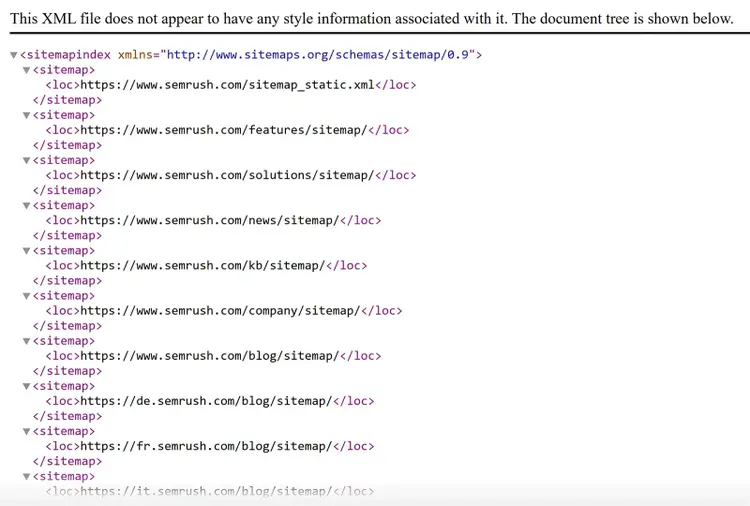
You likely already have one automatically generated from the platform you use to manage your website’s content.
Check by going to yourdomain.com/sitemap.xml in your browser.
If you don’t have one, you can use a sitemap generator tool.
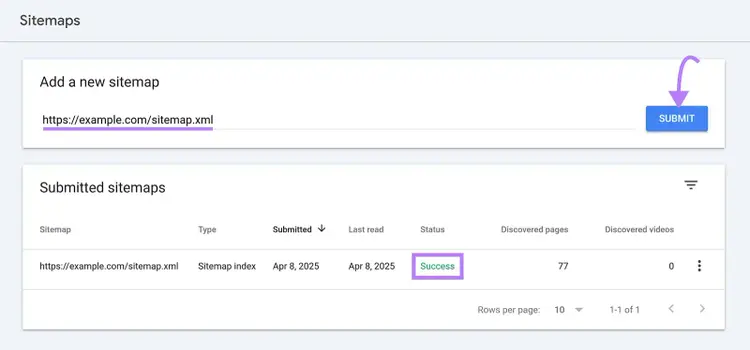
Then, submit your sitemap to Google by using GSC. Head to “Indexing” > “Sitemaps.”
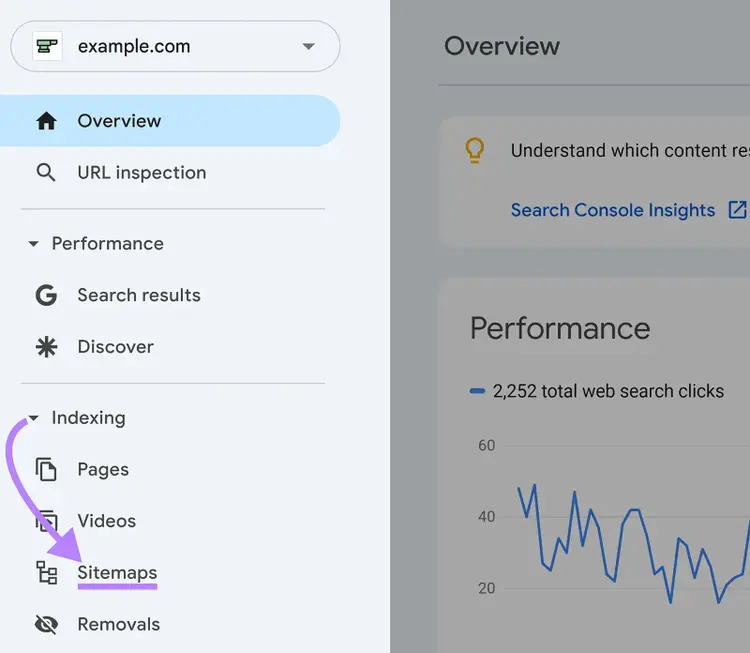
Enter your sitemap’s URL and once you’re done, you’ll see a “Success” notice in the “Status” column.
3. Find and Fix Broken Links
Broken links are URLs that lead to nonexistent pages (pages showing "404 errors"). And having those on your site isn’t good for SEO or the user experience.
These dead ends stop Google from finding all your content and waste crawl budget (the amount of time and resources Google will use to find and digest webpages before moving on).
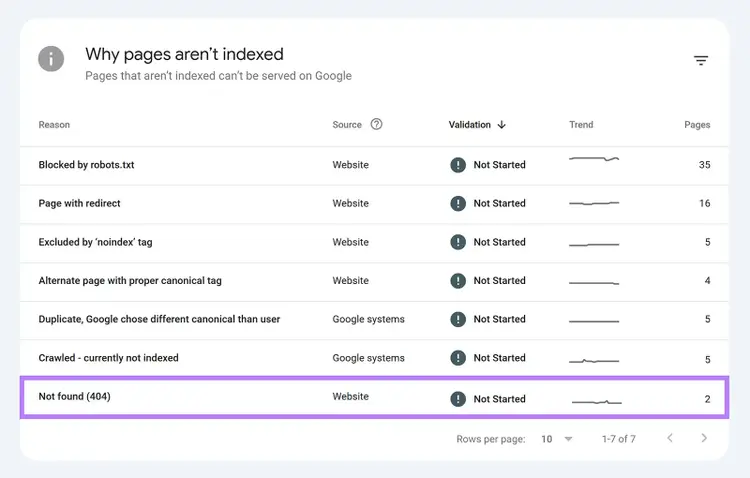
You can use the “Pages” report under “Indexing” in GSC to find broken links. Just look for “(Not found) 404.”
For a more comprehensive approach, use Site Audit, which not only finds broken links but also scans your site for more than 140 technical and on-page issues.
This saves you time by identifying multiple problems in a single audit.
Head to the “Issues” tab, type “broken” in the search bar, and click the blue, linked text in “# internal links are broken” if you see it.
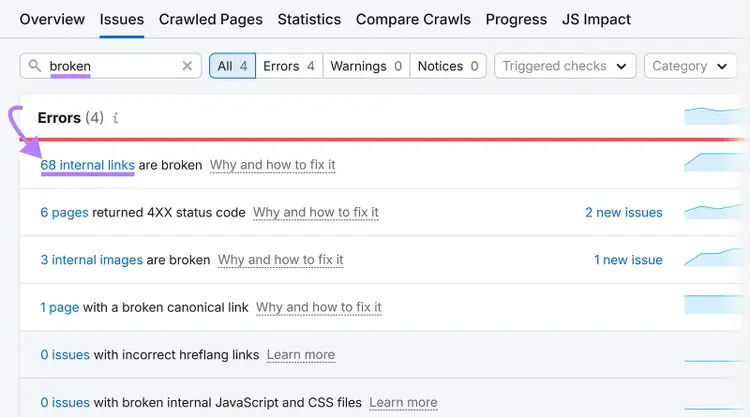
Then, either restore the missing pages or redirect them to relevant existing pages.
Improve Your Page Speed
Improving your page speed can directly improve your SEO performance because Google prioritizes faster websites in search results. And fast loading makes it easier for AI systems to scan and summarize your content accurately.
Plus, faster sites provide a better user experience.
To start checking and improving your site’s page speed:
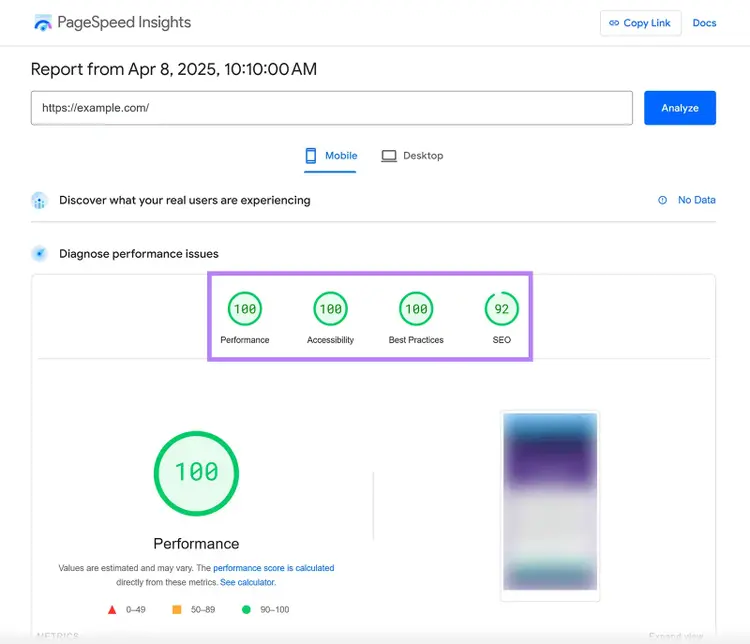
- Test your current speed. Use Google's free PageSpeed Insights tool by entering your URL. This gives you a score out of 100 and highlights specific issues.
- Optimize your images. Compress and resize images before uploading them. Large image files are often a big cause of slow websites.
- Minimize code. Remove unnecessary themes, plugins, or scripts that add extra code to your site. Each additional element makes your site slower.
- Consider better hosting. Affordable hosting plans may put many websites on the same server, slowing everyone down. A hosting upgrade can dramatically improve speed.
Most beginner SEOs can see significant speed improvements by focusing on image optimization alone.
If your site still loads slowly after making these basic changes, consider enabling browser caching and using a content delivery network (CDN). Many CDNs offer free plans that can significantly improve loading times.
For more substantial performance gains, you may consider upgrading your hosting plan.
Further reading: Google PageSpeed Insights: What It Is & How to Boost Your Score
Optimize for Mobile Devices
Optimizing for mobile devices directly impacts your search rankings and AI visibility because Google uses mobile-first indexing for all websites.
This means Google primarily looks at how your site performs on devices like smartphones and tablets, not desktop devices, when determining rankings.
Here's how to make sure your site is mobile-friendly:
- Test your mobile experience. Use PageSpeed Insights and check the "Mobile" tab, specifically. This shows how well your site performs on mobile and highlights opportunities for improvement.
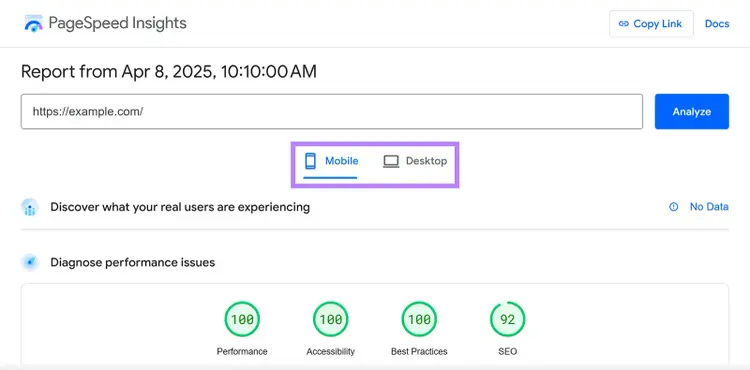
- Use responsive design. Ensure your site automatically adjusts to fit any screen size. Most modern website themes are responsive by default, but older sites may need updating.
- Check text size and spacing. Text should be readable without zooming, and buttons or links must be large enough to tap easily with a finger. A good rule is to make buttons at least 44 pixels tall and wide.
One easy way to verify your mobile experience is to navigate through key pages on your own smartphone.
Pay attention to how easily you can read content, tap buttons, fill out forms, and complete important actions.
If you're building a new website, choose a mobile-friendly theme from the beginning.
For existing sites, most site builders and content management systems offer mobile-friendly templates you can switch to without rebuilding from scratch.
Further reading: The Complete Guide to Mobile SEO: 8 Tips & Best Practices
Take Your First Steps
It's time to start optimizing your site for the dual world of SEO and AI search.
The websites that succeed in 2026 and beyond will be those that treat AI visibility and search optimization as one strategy. That means using structured content, clear expertise, and smart tools to surface everywhere users look for answers.
Identify the area that will have the biggest impact on your site, apply the steps we’ve covered, and let Semrush handle the heavy lifting.
With Semrush, you can:
- Find keywords likely to trigger AI Overviews
- Analyze your site’s AI and organic visibility in one place
- Track changes and opportunities as AI search continues to evolve
Start your free Semrush trial and see how your content performs in both traditional search and AI responses.
Create Your Free Semrush Account
and Explore Our Digital Marketing Tools

Cecilia is a senior editor and strategist with more than 12 years of experience shaping editorial strategies, refining brand messaging, and leading high-impact teams. She began her career in print and digital editorial leadership roles before transitioning to SEO and digital marketing, focusing on data-driven strategies. She‘s passionate about ensuring operational efficiency, upholding editorial standards, and mentoring writers to deliver top-quality, brand-aligned content.
Cecilia Meis
Cecilia is a senior editor and strategist with 12+ years of experience spanning print, digital, and SEO. She’s passionate about optimizing editorial processes, upholding quality standards, and mentoring writers to deliver brand-aligned content.

Tells Google to show you more from Semrush in AI, Search, and Discover.