A keyword phrase (also known as a keyphrase or search query) is a specific series of words you want to focus a webpage around to rank it highly for the phrase in search engines.
For example, the phrase “best coffee shops” is a keyword phrase.
You can find these key phrases through keyword research—the process of uncovering what your target audience searches for in search engines.
Keyword vs. Keyword Phrase
SEO professionals typically use the term “keyword” to refer to both keywords and keyword phrases.
But to get more nuanced, keywords are short, specific terms—often one or two words—whereas keyword phrases tend to be longer, detailed searches.
This is a keyword:
And this is a keyword phrase:
That said, the term “keyword phrase” conveys the idea of a more targeted approach. Because it emphasizes the importance of specific, multi-word terms in modern SEO.
Which means calling keyword phrases “long-tail keywords” is more accurate.
Why Are Keyword Phrases Important for SEO?
Using keyword phrases in your content helps you reach your audience and address their specific needs more easily.
Why?
First, keyword phrases are more targeted and highly specific.
For example, it’s hard to guess what someone searching for the keyword “boots” wants to see on the results pages. Do they want to buy stylish boots? Learn more about specific kinds of boots?
Whereas someone searching for the keyword phrase "waterproof hiking boots" probably wants to buy hiking boots that are waterproof.
So, websites with less authority might have a better chance of ranking high for keyword phrases relevant to their business.
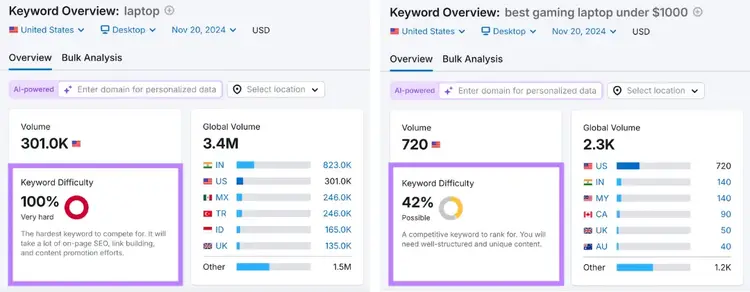
For example, the keyword "laptop" has a keyword difficulty of 100%, according to our keyword difficulty checker, meaning it can be harder for newer websites to rank in the top 10 search results for that keyword.
The keyword phrase “best gaming laptop under $1000,” on the other hand, has a difficulty of 42%. Which means it’s comparatively a lot easier to rank high for.
Selecting the right keyword phrases can help you attract targeted users to your site. Who may be more likely to continue interacting with your content. And eventually, become customers or subscribers.
How to Find and Use Key Phrases for SEO
1. Discover and Use Keyword Phrases You Already Rank For
Improving rankings for keywords you already rank for can be easier than ranking for net new keywords.
If your content ranks for a keyword, that’s an indicator that Google already sees your content as relevant for that keyword. So you’re not starting from scratch.
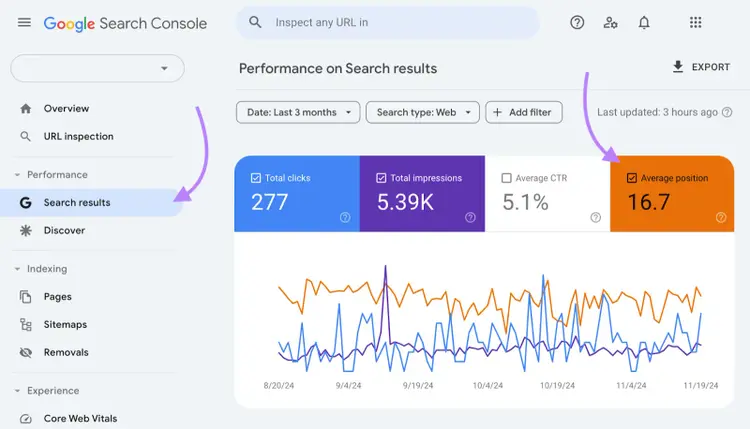
Go to the “Search results” report and toggle on “Average position.”
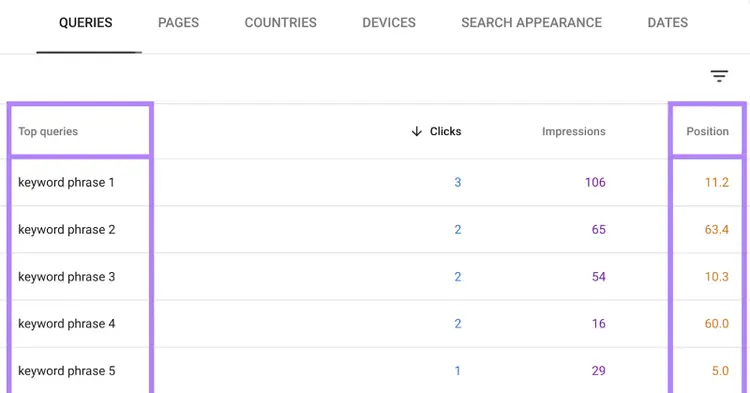
Scroll to the report below the chart. By default, the report shows the keyphrases you rank for (“Top queries”) and their average position (“Position”) in the SERPs.
Identify keyword phrases where your site ranks in position four to 10.
Search pages typically show 10 results per page. That said, the top three results tend to get 68.7% of clicks. So, optimizing queries on the first page but not in the top three spots could help your content rank higher and get more traffic.
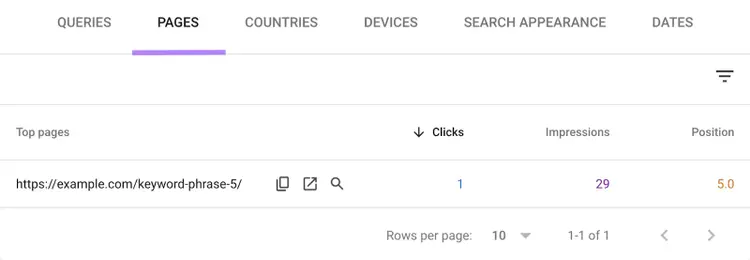
To find the page that corresponds with a given keyword, click the keyword in the table.
Optimize your content with these tips:
Add your keyword phrase in the title tag (the title that appears in search results)
Include your keyword phrase in the H1 tag (the page’s main title)
Add your keyword phrase to your URL slug—the last part of your URL (if you change your URL, you’ll need to redirect the old URL to the new one)
Write an enticing meta description (the brief description that may show up in search results) that includes your keyword phrase
Include your keyword phrase naturally throughout the body copy of your content
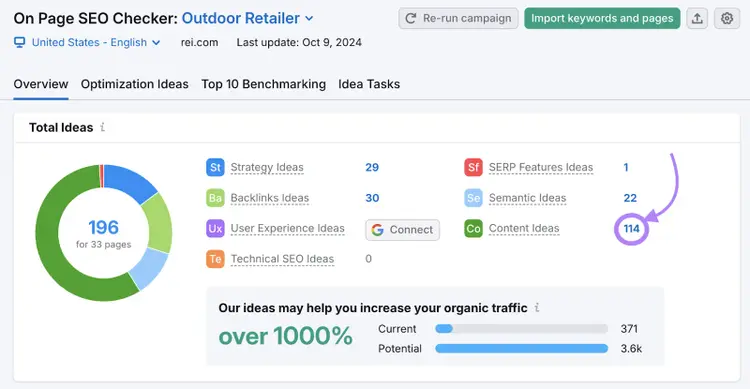
Also use Semrush’s On Page SEO Checker to get personalized content optimization tips.
Open the tool and click the number beside “Content Ideas.”
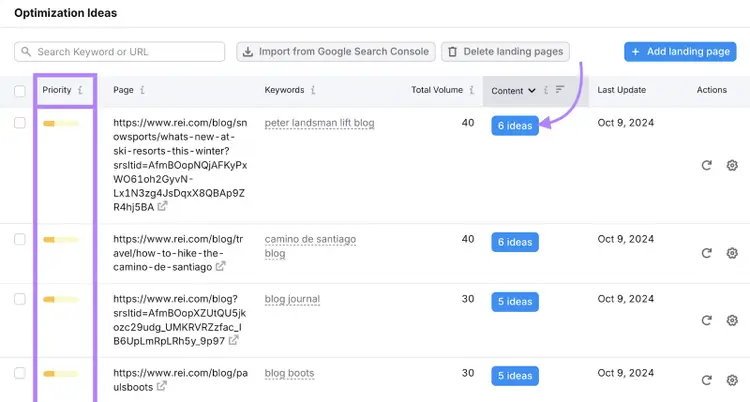
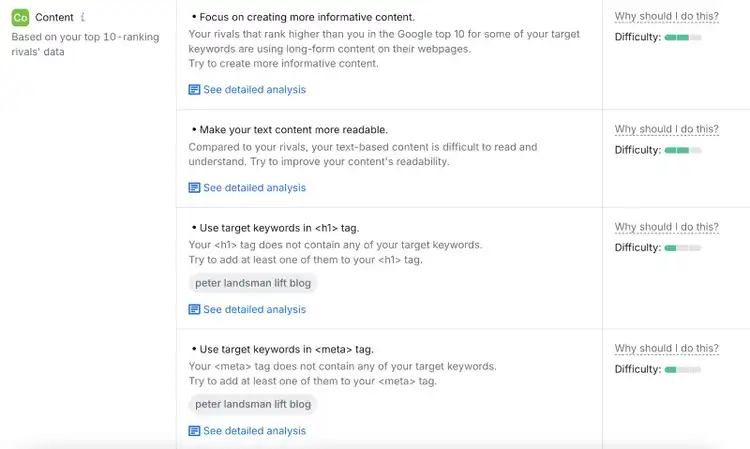
The tool generates a list of pages and gives you a priority rating for each page so you know where to start. Click “# ideas” to get specific optimization tactics.
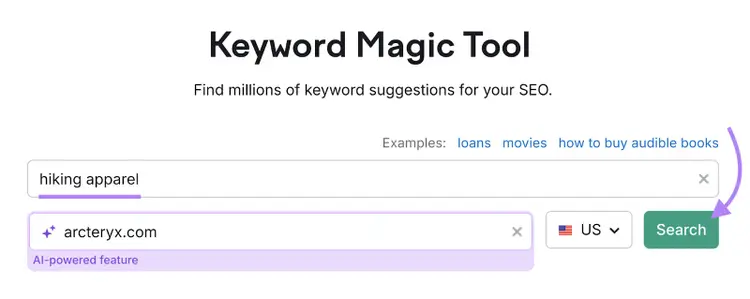
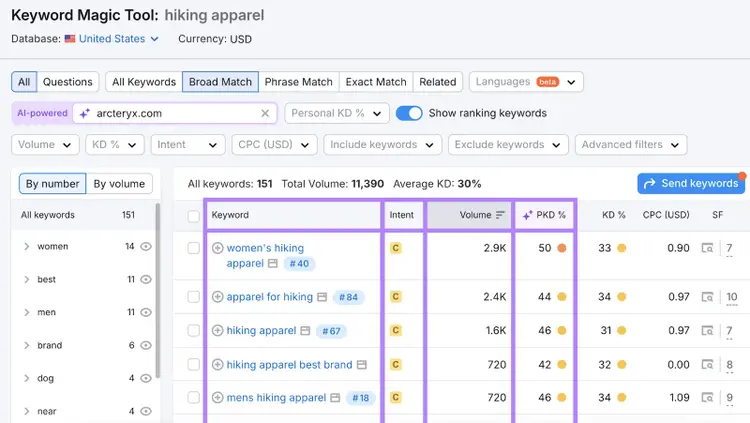
Open the tool, enter your seed keyword (a broad keyword related to your business) and domain, select your country, and click “Search.”
You’ll see a list of keyword and phrase ideas related to your seed keyword with the following metrics:
Intent: The reason behind a search (such as looking for more information or wanting to buy a product). Knowing the search intent helps you understand the kind of content you need to create to help users find the information they need. Meeting search intent can also help you rank higher.
Volume: The estimated average number of searches a keyword gets per month
PKD %: The Personal Keyword Difficulty score tells you how easy it is for your site to rank for a keyword within the top 10 search results
Go through the list and pick keyword phrases you can create content for.
We generally recommend that newer, less authoritative sites choose keywords with low PKD scores (under 50%) and search volumes enough to sustain traffic to your site.
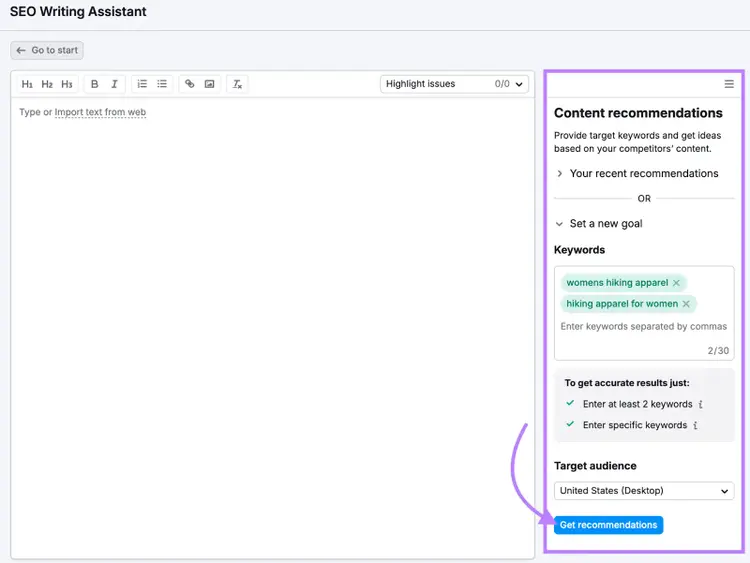
Next, create content for each keyword. Semrush’s SEO Writing Assistant checks your content as you write and gives you suggestions on how you can further optimize your writing.
Open the tool and fill out the details on the right side. And click “Get recommendations.”
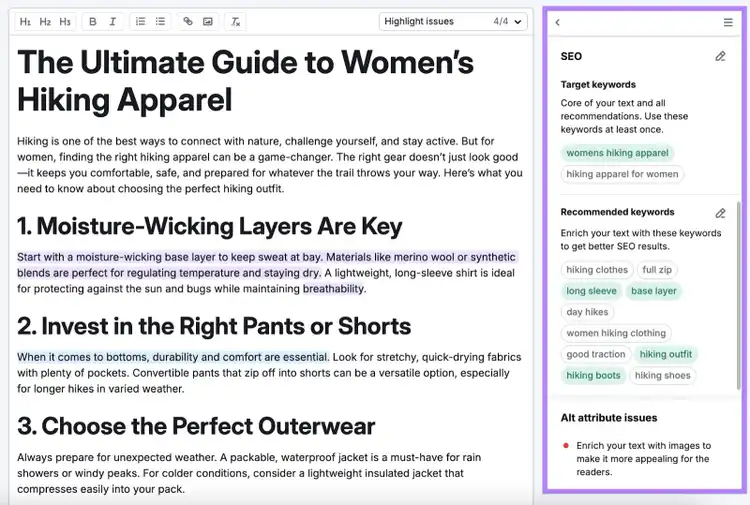
Write your content directly in the editor. To get real-time suggestions based on readability, SEO, originality, and tone of voice. So you have the best chance at ranking high in the SERPs.
Note
You can also paste your content into the editor or tell the tool to pull your content from an existing URL.
Once you’ve optimized your content, you’re ready to publish it to your site.
3. Find Keyword Phrases Your Competitors Rank for (That You Don’t)
A keyword gap analysis reveals which keyword phrases your competitors rank for (that you don’t).
Ranking for these phrases can help you reach your competitors’ audience who may also be members of your target market.
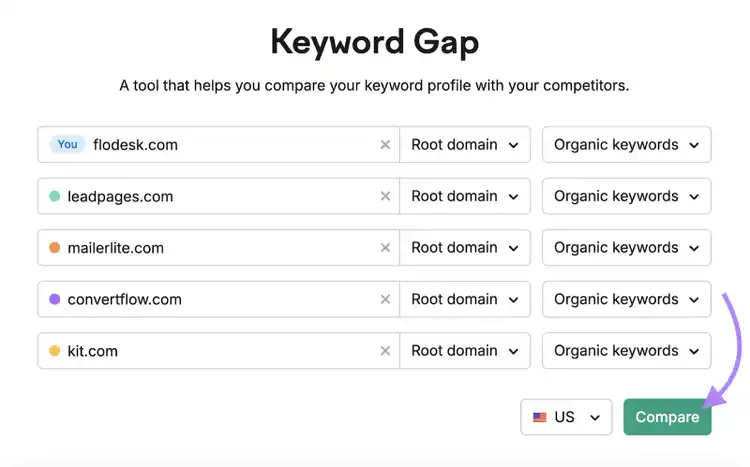
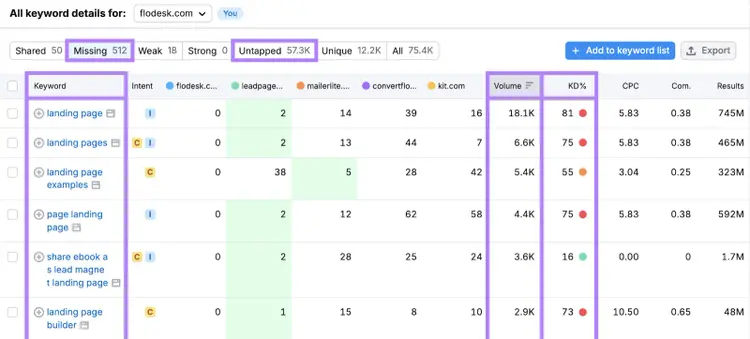
Use Semrush’s Keyword Gap tool to find these keywords.
Enter your domain, up to four competitors, and your country. And click “Compare.”
Click “Untapped” to view keywords you don’t rank for but at least one of the competing sites does. Or “Missing” to view keywords you don’t rank for that all your competitors do. This report also has useful information like each keyword’s difficulty (KD%) and its volume.
Look for keyword phrases with low difficulties and high volumes.
Pro tip
Try the Content Toolkit for free to generate your first SEO-friendly blog post.
Just enter your primary idea or topic. The AI will use real-time SEO data to create a full draft in minutes. Once it’s ready, you can edit, regenerate, or publish it directly to WordPress.
Monitor How You Rank for Your Keyword Phrases
Now you know how to find and use relevant keyword phrases.
But the work doesn’t stop there.
Tracking each key phrase helps you assess whether your efforts are yielding results (and which pages may need further optimization).
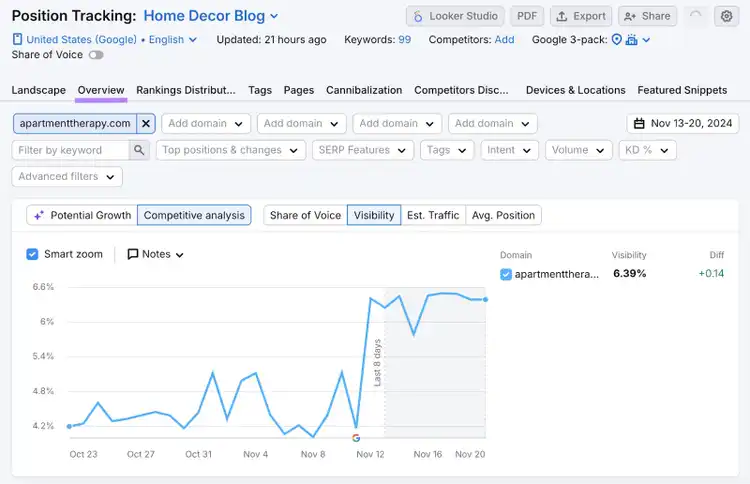
To track your pages’ SEO performance, use Semrush's Position Tracking tool.
It shows your website’s ranking position history for your keyword phrases.
Open the tool and click the “Overview” tab.
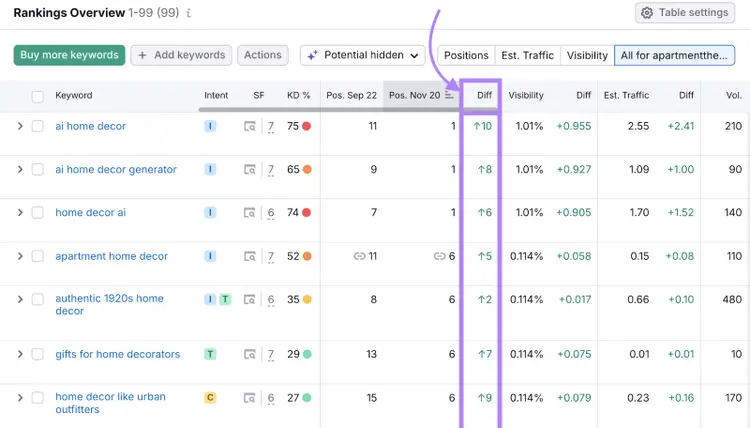
Scroll to the “Rankings Overview” section and review the “Diff” column. This shows the position differences for your selected timeframe.
If you see your rankings increasing over time, it's a sign your optimization efforts are working. But if your rankings are dropping or stagnant, you may need to re-optimize your content.
Dana holds a Bachelor of Business Administration with a major in Marketing and specializes in content writing, copywriting, and SEO strategy. She has over 10+ years of experience helping established organizations within their marketing departments and currently partners with B2B providers to develop content strategies and craft persuasive copy that delights and converts.
Subscribe to learn more about Keyword Research
Subscribe
By clicking “Subscribe” you agree to Semrush Privacy Policy and consent to Semrush using your contact data for newsletter purposes
Share
Tells Google to show you more from Semrush in AI, Search, and Discover.