
We Tested Query Fan-Out Optimization (Here's What We Learned)
Ever since Google launched AI Mode, I’ve had two questions on my mind:
- How do we ensure our content gets shown in AI results?
- How do we figure out what works when AI search is still largely a mystery?
While there’s a lot of advice online, much of it is speculative at best. Everyone has hypotheses about AI optimization, but few are running actual experiments to see what works.
One idea is optimizing for query fan-out. Query fan-out is a process where AI systems (particularly Google AI Mode and ChatGPT search) take your original search query and break it down into multiple sub-queries, then gather information from various sources to build a comprehensive response.
This illustration perfectly depicts the query fan-out process.
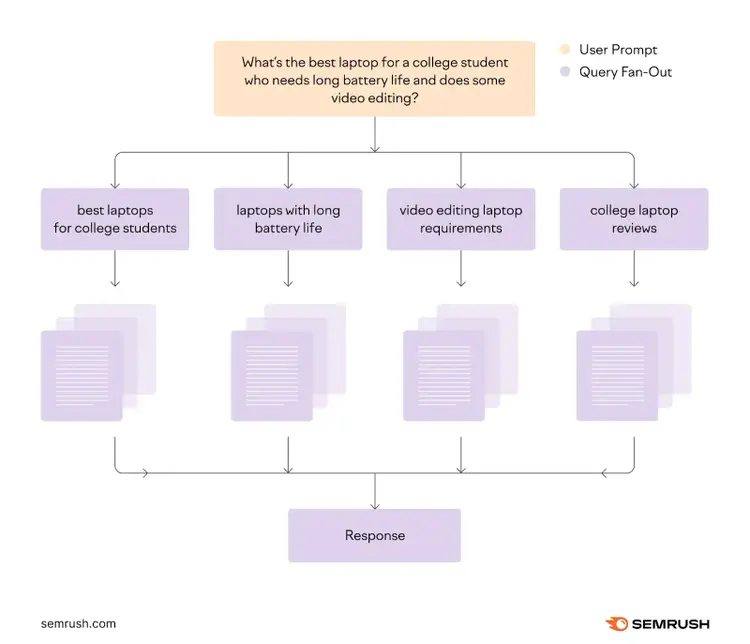
The optimization strategy is simple: Identify the sub-queries around a particular topic and then make sure your page includes content targeting those queries. If you do that, you have better odds of being selected in AI answers (at least in theory).
So, I decided to run a small test to see if this actually works. I selected four articles from our blog, had them updated by a team member to address relevant fan-out queries, and tracked our AI visibility for one month.
The results? Well, they reveal some interesting insights about AI optimization.
Here are the key takeaways from our experiment:
Key Takeaways
- Optimizing for fan-out queries significantly increases AI citations: In our small sample of four articles, we more than doubled citations in tracked prompts from two to five. While the absolute numbers are small given the sample size, citations were the main metric we aimed to influence, and the increase is directionally indicative of success.
- AI citations can be unpredictable: I checked in periodically during the month, and at one point, our citations went as high as nine before dropping back down to five. There have been reports of ChatGPT drastically reducing citations for brands and publishers across the board. It just shows how quickly things can change when you're relying on AI platforms for visibility.
- Our brand mentions dropped for tracked queries, and so did everyone else's: Overall, we noticed fewer brand references appearing in AI responses to the queries we were monitoring. This affected our share of voice, brand visibility, and total mention metrics. Other brands also experienced similar drops. This appears to be a distinct issue from citation changes—more about how AI platforms handled brand mentions during our experiment period.
We’ll discuss the results of this experiment in detail later in the article. First, let me walk you through exactly how we conducted this experiment, so you can understand our methodology and potentially replicate or improve upon our approach.
How We Ran the Query Fan-Out Experiment
Here’s how we set up and ran our experiment:
- I selected four articles from our blog
- For each selected article, I researched 10 to 20 fan-out queries
- I partnered with Tushar Pol, a Senior Content Writer on our team, to help me execute the content changes for this experiment. He edited the content in our articles to address as many fan-out queries as possible.
- I set up tracking for the fan-out queries so we could measure before and after AI visibility. I used the Semrush Enterprise AIO platform for this. We were mainly interested in seeing how our content changes impacted visibility in Google's AI Mode, but our optimizations could also boost visibility on other platforms like ChatGPT Search as a side effect, so I tracked performance there as well.
Let’s take a closer look at each of these steps.
1. Selecting Articles
I had specific criteria in mind when selecting the articles for this experiment.
First, I wanted articles that had stable performance over the last couple of months. Traffic has been volatile lately, and testing on unstable pages would make it impossible to tell whether any changes in performance were due to our modifications or just normal fluctuations.
Second, I avoided articles that were core to our business. This was an experiment, after all. If something went wrong, I didn't want to negatively affect our visibility for critical topics.
After reviewing our content library, I found four perfect candidates:
- A guide on how to create a marketing calendar
- An explainer on what subdomains are and how they work
- A comprehensive guide on Google keyword rankings
- A detailed walkthrough on how to conduct technical SEO audits
2. Researching Fan-Out Queries
Next, I moved on to researching fan-out queries for each article.
There's currently no way to know which fan-out queries (related questions and follow-ups) Google will use when someone interacts with AI Mode, since these are generated dynamically and can vary with each search.
So, I had to rely on synthetic queries. These are AI-generated queries that approximate what Google might generate when people search in AI Mode.
I decided to use two tools to generate these queries.
First, I used Screaming Frog. This tool let me run a custom script against each article. The script analyzes the page content, identifies the main keyword it targets, and then performs its own version of query fan-out to suggest related queries.
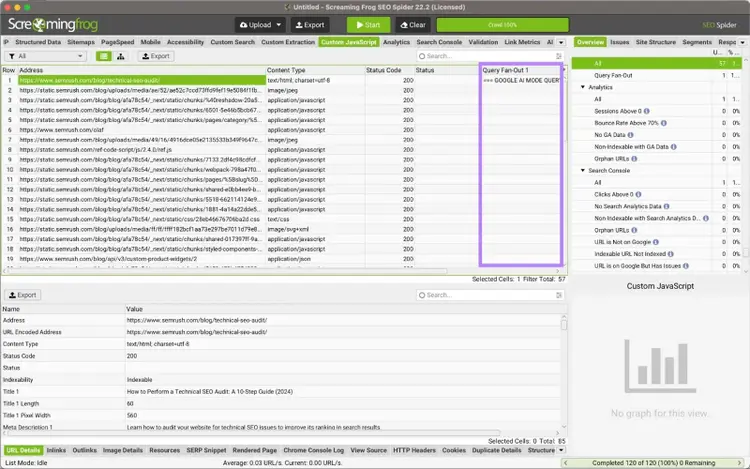
Unfortunately, the data isn’t properly visible inside Screaming Frog—everything got crammed into a single cell. So, I had to copy and paste the entire cell contents into a separate Google Sheet.
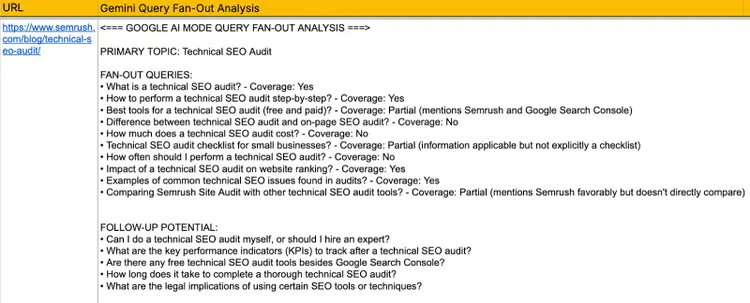
Now I could actually see the data.
The good thing is that the script also checks whether our content already addresses these queries. If some queries were already addressed, we could skip them. But if there were new queries, we needed to add new content for them.
Next, I used Qforia, a free tool created by Mike King and his team at iPullRank.
The reason I used another tool is simple: Different tools often surface different queries. By casting a wider net, I'd have a more comprehensive list of potential fan-out queries.
Plus, if certain queries are common across both tools, that's a signal that addressing them may be important.
The way Qforia works is straightforward: Enter the article's main keyword in the given field, add a Gemini API key, select the search mode (either Google AI Mode or AI Overview), and run the analysis. The tool will generate related queries for you.
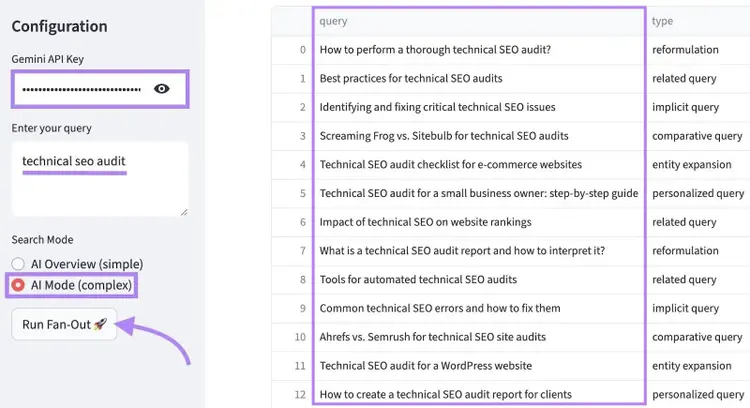
After running the analysis for each article, I saved the results in the same Google Sheet.
3. Updating the Articles
With a spreadsheet full of fan-out queries, it was time to actually update our articles. This is where Tushar stepped in.
My instructions were simple:
Check the fan-out queries for each article and address those that weren’t already covered and were feasible to add. If some queries felt like they were beyond the article's scope, it was OK to skip them and move on.
I also told Tushar that including the queries verbatim wasn't always necessary. As long as we were answering the question posed by the query, the exact wording didn't matter as much. The goal was making sure our content included what readers were actually looking for.
Sometimes, addressing a query meant making small tweaks—just adding a sentence or two to existing content. Other times, it required creating entirely new sections.
For example, one of the fan-out queries for our article about doing a technical SEO audit was: "difference between technical SEO audit and on-page SEO audit."
We could’ve addressed this query in many ways, but one smart option was to make a comparison right after we define what a technical SEO audit is.
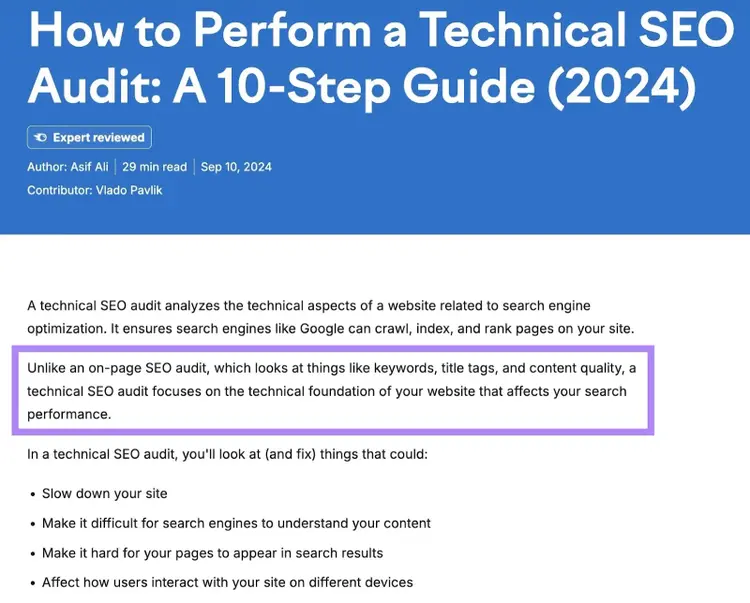
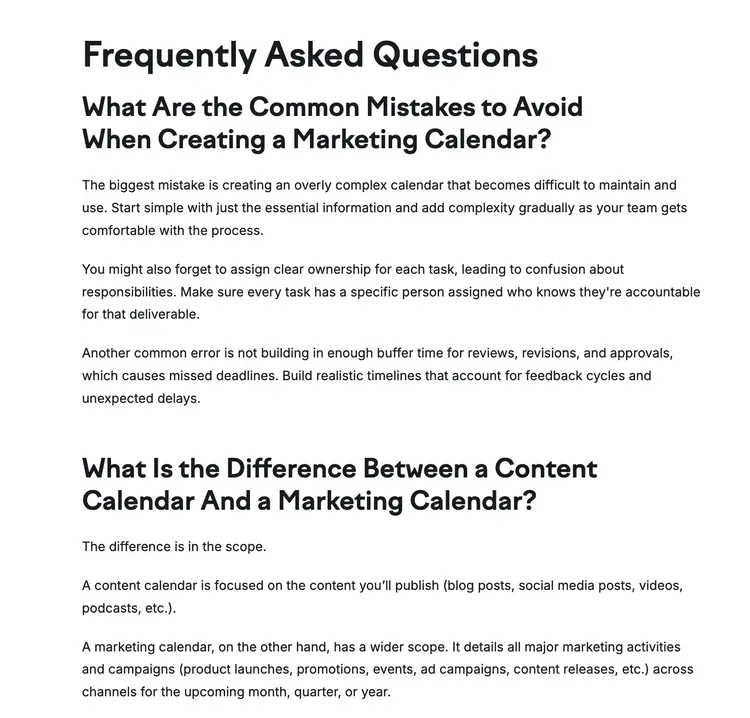
Sometimes, it wasn't easy (or even possible) to integrate queries naturally into the existing content. In those cases, we addressed them by creating a new FAQ section and covering multiple fan-out queries in that section.
Here’s an example:
Over the course of one week, we updated all four articles from our list. These articles didn't go through our standard editorial review process. We moved fast. But that was intentional, given this was an experiment and not a regular content update.
4. Setting Up Tracking
Before we pushed the updates live, I recorded each article’s current performance to establish a baseline for comparison. This way, we would be able to tell if the query fan-out optimization actually improved our AI visibility.
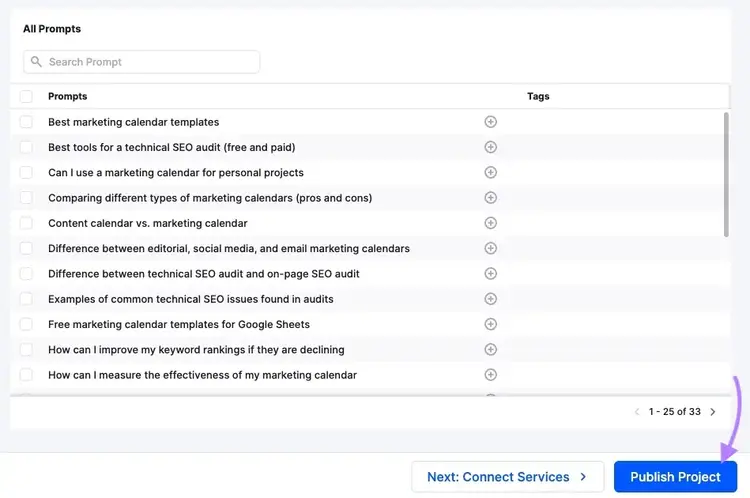
I used our Enterprise AIO platform to track the results. I created a new project in the tool and plugged in all the queries we were targeting. The tool then began measuring our current visibility in Google AI Mode and ChatGPT.
Side note
Since we generated fan-out queries using two tools, there were some similar queries across both reports. I had to consolidate the data to avoid tracking duplicates. For example, queries like "marketing calendar software and tools" and "marketing calendar software recommendations" effectively have the same intent, so I only tracked one of them.
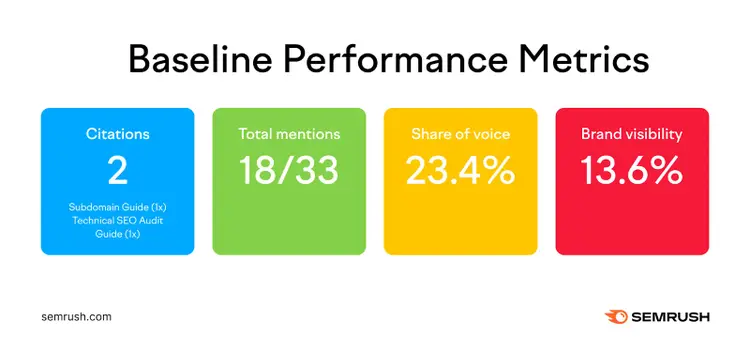
Here’s what performance looked like at the start of this experiment:
- Citations: This measures how many times our pages were cited in AI responses. Initially, only two out of our four articles were getting cited at least once.
- Total mentions: This metric shows the ratio of queries for which our brand was directly mentioned in the AI response. That ratio was 18/33—meaning out of 33 tracked queries, we were being mentioned for 18 queries.
- Share of voice: This is a weighted metric that considers both brand position and mention frequency across tracked AI queries. Our score was 23.4%, which indicated we were present in some responses but not all or in the lead positions.
- Brand visibility: This told us what percentage of prompt responses mentioned our brand at least once, regardless of the position.
I decided to wait one month before logging metrics again. Then, it was time to conclude our experiment.
The Results: What We Learned About Query Fan-Out Optimization
The results were honestly a mixed bag.
First off, some good news: our total citations increased.
Our four articles went from being cited two times to five times—a 150% increase. For example, one of the edits we made to the technical SEO article (which we showed earlier) got used as a source in the AI response.
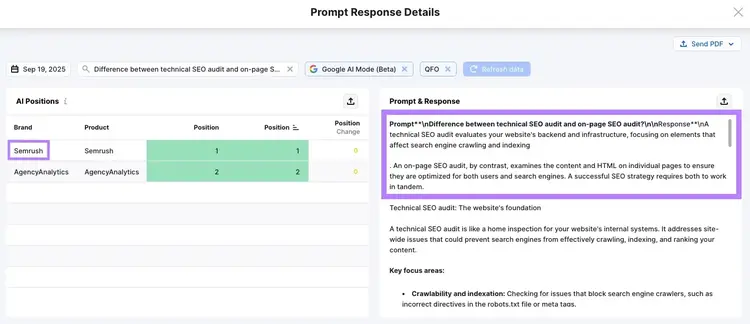
Seeing our content cited is exactly what we hoped for, so this is a win. (Despite the small sample size.)
Interestingly, our final results could’ve been more impressive if we ended our experiment earlier. At one point, we got to nine citations, but then they decreased when ChatGPT significantly reduced citations for all brands.
This just shows how unpredictable AI platforms can be, and that factors completely outside your control could impact your visibility.
But what about the other metrics we tracked?
Our share of voice went down from 23.4% to 20.0%, brand visibility fell from 13.6% to 10.6%, and our brand mentions dropped from 18 to 10.
According to our data, we're not the only ones who saw declines in brand metrics. Here's a chart showing how many brands’ share of voice went down at the same time.
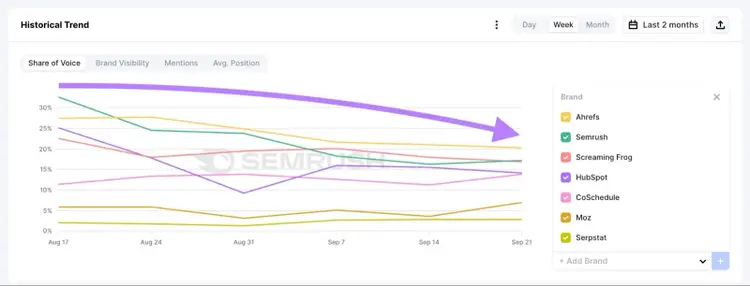
This happened because AI platforms mentioned fewer brand names overall when generating responses to our tracked queries. This was a completely different issue from the citation fluctuations I mentioned earlier.
Considering the external factors, I believe our optimization efforts performed better than the data shows. We managed to increase our citations despite the things working against us.
So, now the question is:
Does Query Fan-Out Optimization Work?
Based on what we learned in our experiment, I'd say yes—but with a huge asterisk.
Query fan-out optimization can help you get more citations, which is valuable. But it’s hard to drive predictable growth when things are this volatile. Keep this in mind when you’re optimizing for AI.
If you’re interested in learning more about AI SEO, keep an eye out for the new content we regularly publish on our blog. Here are some articles you should check out next:
- How AI Search Really Works: Findings from Our AI Visibility Study
- What Is LLMs.txt & Should You Use It?
- Why Your Brand Is Your Most Important SEO Asset in 2026
Want to Monitor Your AI Visibility?
Try Semrush Enterprise AIO

Zach Paruch is a data-driven SEO strategist with 10+ years of experience driving organic growth through smart, scalable search strategies. His expertise includes on-page and technical SEO, AI search optimization, and content strategy—with a special focus on ideating and implementing AI-driven processes. By leveraging in-depth search intent analysis, refined information architecture, and user-centered design, Zach consistently delivers high-impact content that drives business outcomes.
Zach Paruch
Zach Paruch is a data-driven SEO strategist with 10+ years of experience driving organic growth through scalable search strategies. He specializes in on-page and technical SEO, content strategy, AI search optimization, and AI-driven processes.

Tells Google to show you more from Semrush in AI, Search, and Discover.