
Keyword Rankings: What They Are & How to Check Yours
What Are Keyword Rankings?
Keyword rankings are your webpages’ positions in organic (unpaid) search results for the specific queries those pages are focused on.
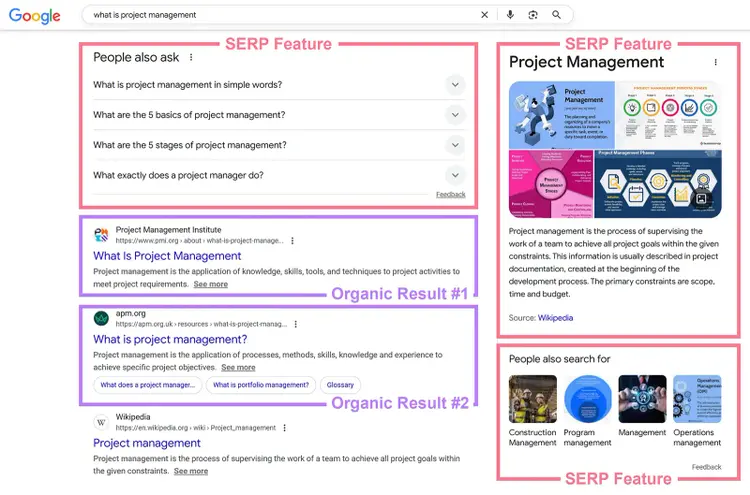
For example, an article ranking #2 for “what is project management” appears as the second organic result when someone searches for that term. And may appear alongside paid search ads and special results called search engine results page (SERP) features.
Keyword rankings aren’t static. They can change based on factors like:
- New content from competitors
- Google algorithm updates
- Evolving search intent (the reason behind a user’s query)
Why Are Keyword Rankings Important in 2025?
Keyword rankings can affect your visibility in ways that drive business results for a few main reasons:
Traditional Search Engines Still Outpace AI Tools
Despite the rapid rise of AI search, traditional search engines like Google still lead in overall web search volume.
A Semrush study of 500 high-value digital marketing and SEO topics confirms that traditional search still drives significantly more traffic than AI platforms—at least for now.
Even if users don’t visit your website immediately from search results, ranking higher can build brand awareness. That may drive future site visits and conversions.
This is true for all kinds of businesses, whether you’re running a global ecommerce brand, a small local business, or a content-focused site like a blog or news publication. Keyword rankings are incredibly important.
High Keyword Rankings Often Correlate with High AI Visibility
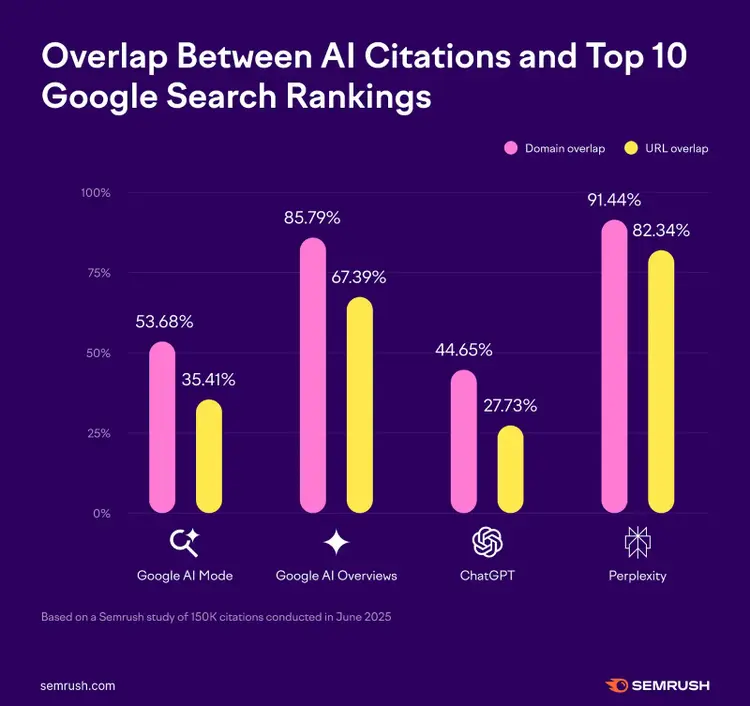
A Semrush study identified a fair amount of overlap between Google’s top 10 results and the URLs cited by major AI tools:
- Perplexity: 82.34%
- Google AI Overviews: 67.39%
- Google AI Mode: 35.41%
- ChatGPT: 27.73%
Muskan Garg, SEO Consultant, has noticed this firsthand:
“From what I’ve observed, whenever my blog posts make it to the first page, and there’s an AI Overview showing up for that query, the blog posts often get picked up."
So, how do you know your keyword rankings? Let’s go over that next.
How to Check Google Keyword Rankings
Consider what Dena Warren, SEO Lead at Techquity, recommends about how frequently to check your rankings before you start digging into the numbers:
“I see overall trends on a weekly basis to catch any quick changes but look deeper on a monthly basis when doing reporting. This ensures the strategy is moving in the right direction and we can pivot when necessary.”
With that, here are three ways to check your keyword rankings:
Track Manually Using Incognito Mode
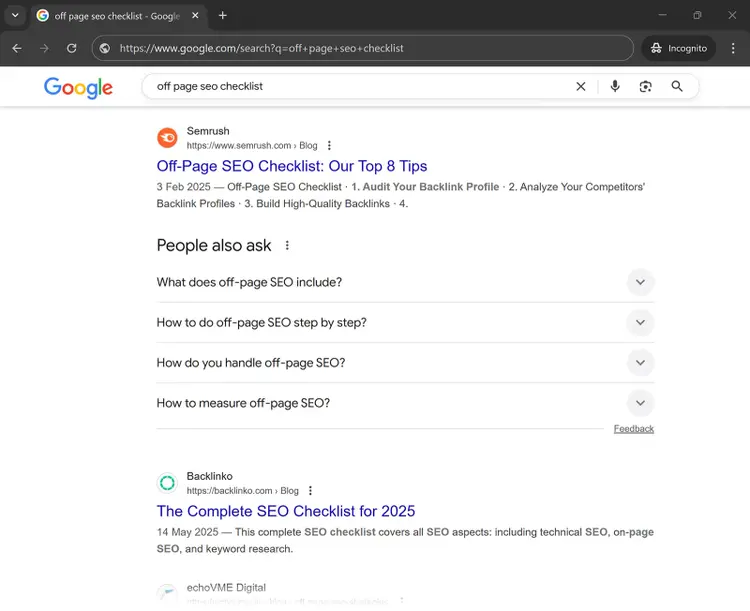
Using incognito mode to search your keywords can show results without personalization, so you can manually find where you rank.
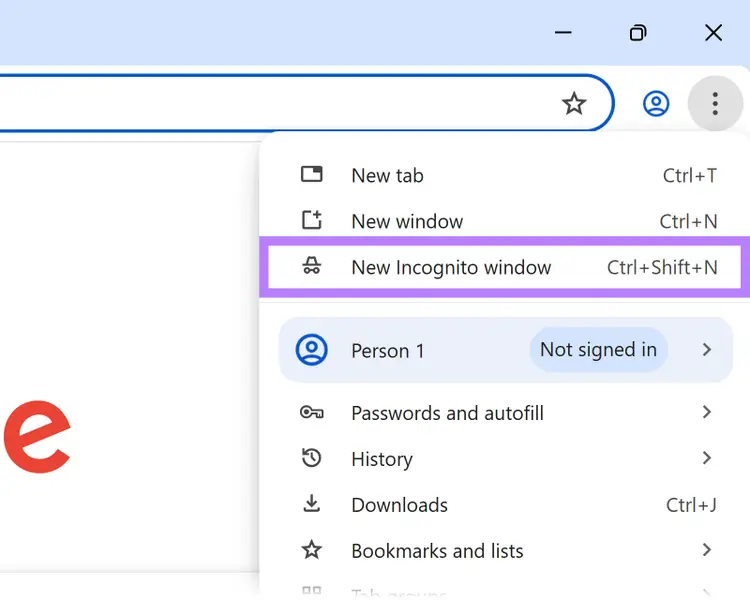
To open an incognito window in a Chrome browser, select the three dots in the upper right corner, and select “New Incognito Window.”
Search your target keyword and scroll through the results to see where your page appears.
Just know there are a few limitations:
- You won’t get alerts if your rankings drop or improve
- You can’t track performance over time—at least without using a separate tool to log your positions periodically
- Your physical location can still affect results, so what you see may not reflect rankings in other regions
Use Google Search Console
Google Search Console (GSC) is a free tool from Google that shows how your site performs in Google Search, and you can use it to check your keyword rankings for up to 1,000 queries.
Go to the “Search results” tab under the “Performance” section in the left-hand menu.
At the top, you’ll see the average position your site ranks for across all queries the tool is tracking.
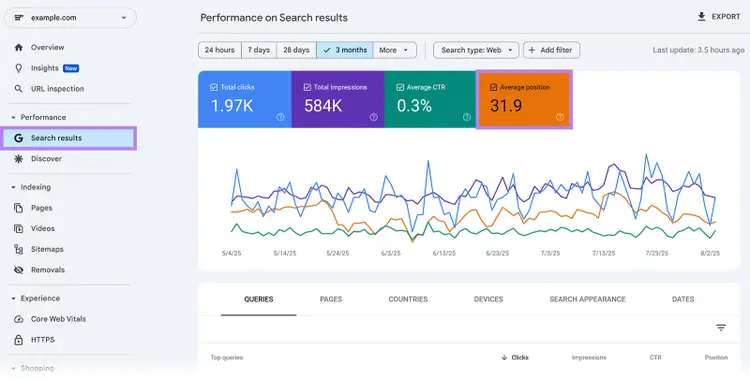
Scroll down and go to the “Queries” tab to see your site’s average position in Google Search results for each keyword over your selected date range.
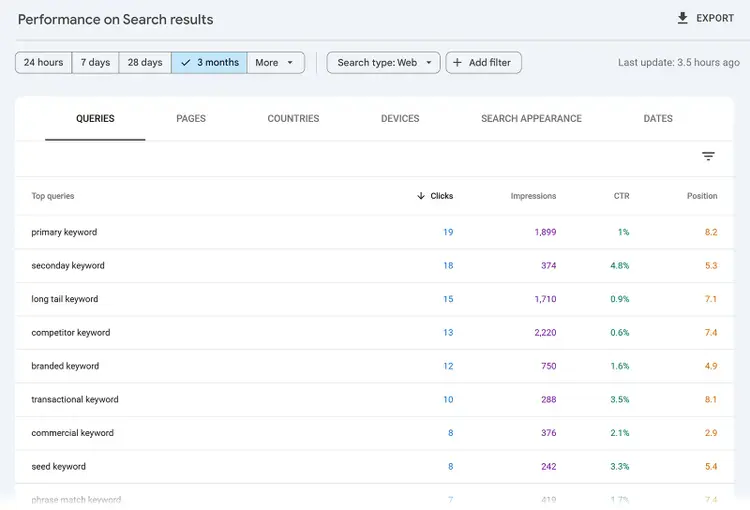
If you don’t see the “Position” column, make sure the box next to “Average position” is selected at the top.
Use a Dedicated Keyword Rank Checker
A keyword rank checker lets you track how you rank for the specific terms that are most valuable to you.
Semrush’s Position Tracking tool allows you to track your site’s keyword rankings on Google, Bing, and Baidu. You can even monitor your visibility on ChatGPT.
To set it up, follow this configuration guide.
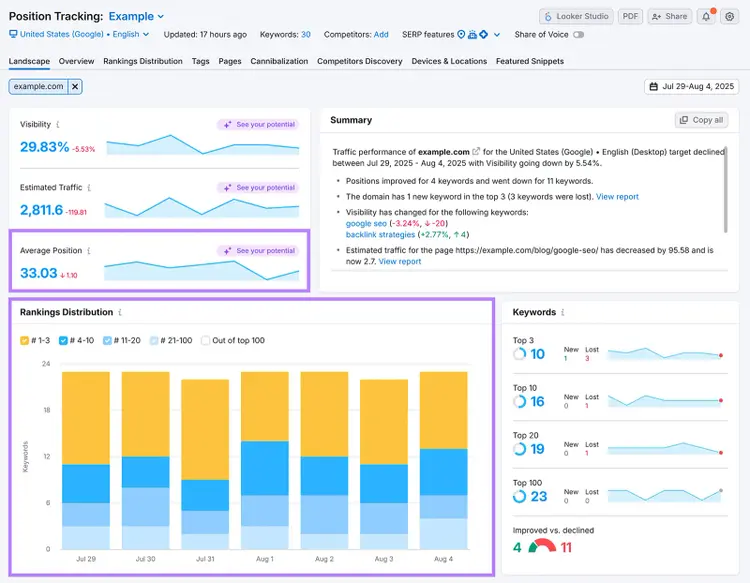
Once that’s done, you’ll land on the “Landscape” report, which gives you a high-level view of your keyword performance.
You’ll see metrics like:
- Average Position: The mean ranking of all your tracked keywords
- Rankings Distribution: How your keywords are spread out across the top three, top 10, top 20, and top 100 positions in organic search
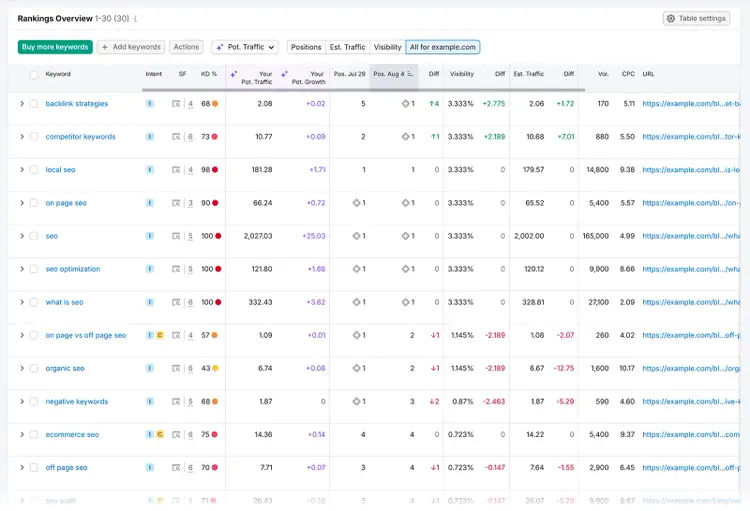
To view performance at the individual keyword level, go to the “Overview” report.
With Position Tracking, you can also set up email alerts. So you’re notified whenever important changes happen.
Track Your Rankings
with the Position Tracking Tool
How to Interpret Changes in Keyword Rankings
Keyword rankings fluctuate, and interpreting why those changes happen can give you a strategic edge.
If rankings increase, it often signals that:
- Your site’s topical authority has improved
- Your content is high in quality
- You’re adequately addressing what searchers care about
If rankings decline, it could be for reasons like the following:
- Google updated its algorithm (Volatility is common following updates.)
- Competitors are better aligning with what searchers want
- Your content is outdated
For every important page that dropped in rankings, it’s worth digging deeper.
Start by looking into whether there was an algorithm update. Google posts about updates and any considerations for publishers on the Google Search Central Blog.
If no algorithm change took place, the below tactics can help you recover your rankings.
5 Ways to Improve Your Keyword Rankings
To improve your keyword rankings, implement these five tactics:
1. Create Better Content Than What’s Currently Ranking
Study the top-ranking pages to figure out what those pages are doing well that you might want to emulate. And what you can do better to outperform them.
Ben Goodey, Founder of the SEO agency Spicy Margarita, explains what to consider if you’re trying to improve a current page’s rankings:
“Do they have more topically relevant content? Or are they covering this topic in more depth than you? Look out for content gaps, whether they’re missing key subtopics, visual support, or clear examples. ”
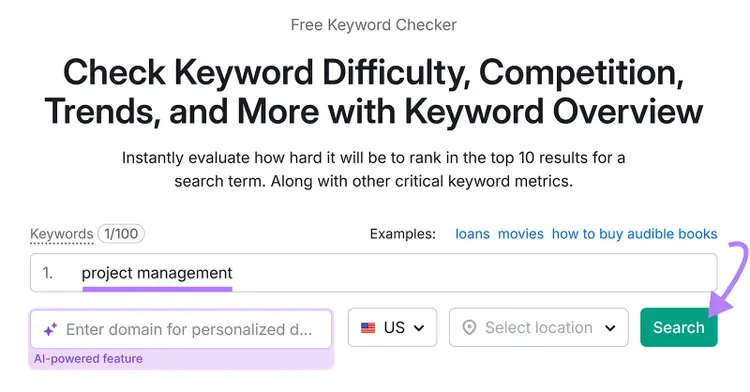
To quickly view the top results for a given term, enter it into our Keyword Checker.
Scroll down to the “SERP Analysis” section. This shows the top-ranking pages for that keyword.
Next, open each of the top-ranking pages and look for:
- Content focus and depth: What subtopics, examples, or frameworks are competitors including? Look for opportunities to add unique takes or more depth.
- Visuals: Are they using visuals to break down ideas or guide the reader? Take that as a signal you need elements to boost engagement.
- Experience and expertise: Are they quoting subject-matter experts or sharing first-hand insights? Search engines aim to prioritize trustworthy content.
You can also use the Wayback Machine to see how a top-ranking page has evolved over the years, which can help you reverse-engineer what worked for them. And guide how you improve your own content.
It’s worth keeping Google’s Experience, Expertise, Authoritativeness, and Trustworthiness (E-E-A-T) guidelines in mind. Because doing so helps you create the kind of content Google wants to prioritize.
Here are a few tactics to try:
- Interview subject matter experts (SMEs). Reach out to relevant SMEs and ask them to share their expertise. You can schedule a call or send a short Google Form with focused questions. Add their insights directly to your piece.
- Write from first-hand experience. If you’ve personally done work that relates to what you’re writing about, say so. Share what worked, what didn’t, and what you’d do differently next time.
- Perform original research. Run small-scale experiments, conduct surveys, or collect data to gather valuable information that no one else has
- Cite trusted sources. Back up claims with data from reputable third-party sources (e.g., government websites, peer-reviewed studies, and well-known industry publications)
2. Satisfy Search Intent
If a webpage satisfies search intent for the target keyword, it’s likely to rank well. Because search engines like Google aim to show the most relevant and helpful results.
For example, someone searching “how to write a business proposal” is likely looking for a step-by-step guide or a free template. Not a product page promoting software.
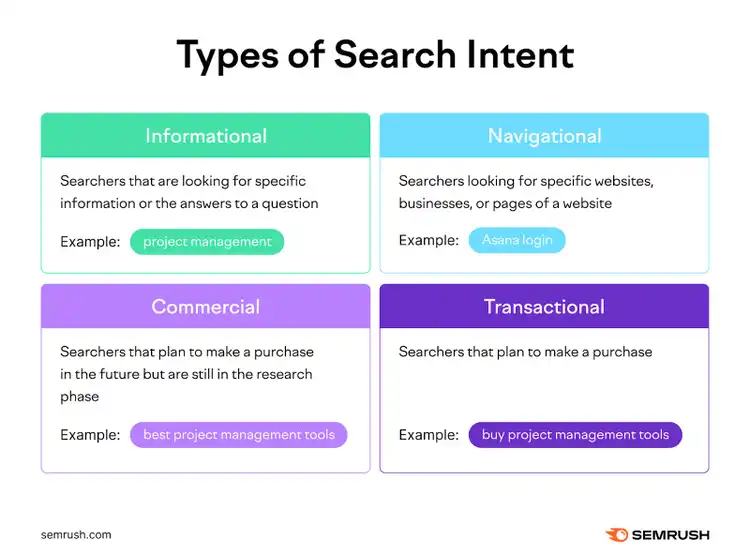
Search intent usually falls into one of four types:
- Informational: The user wants to learn about a topic
- Navigational: The user is looking for a specific brand or page
- Commercial: The user is comparing options
- Transactional: The user is ready to take action
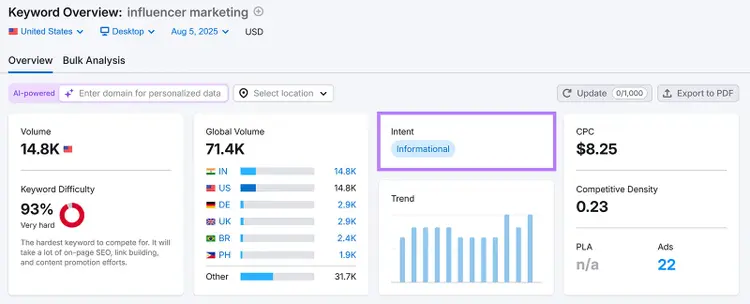
Use our free Keyword Checker to find the intent behind any keyword. For example, the search intent for the keyword "influencer marketing" is informational.
Scroll down to the “SERP Analysis” section to see the top-ranking pages. And visit each of them to see what type of format searchers are looking for.
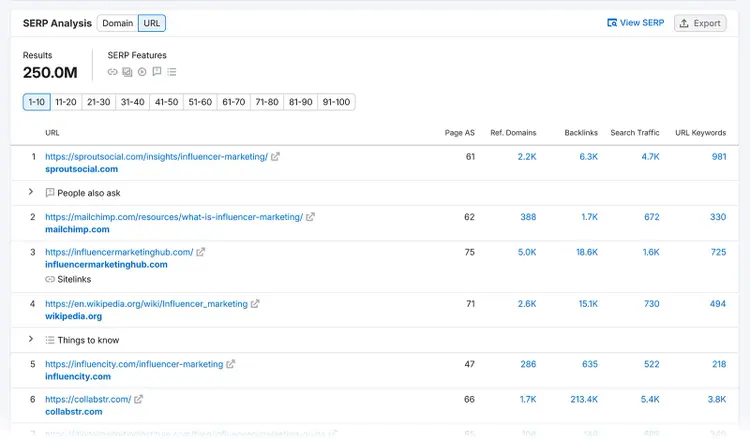
In this case, it makes sense to create a beginner-friendly guide that explains what influencer marketing is, how it works, and why it matters.
3. Refresh Your Content Periodically
Updating your existing content can boost relevancy to improve its keyword rankings.
When done right, refreshing content can also lead to more traffic and conversions.
You can update old content by:
- Replacing outdated information and statistics
- Updating step-by-step instructions and screenshots based on UI or product changes
- Adding more visual breaks
- Improving formatting, flow, and clarity to improve readability
Even small updates can make a difference.
But which pages should you refresh?
Keep an eye on pages that used to rank well but no longer do, particularly pages focused on high-intent keywords. These are often the keywords that can bring in qualified traffic and drive conversions.
4. Build High-Quality Backlinks
SEO Backlinks (links from other sites to yours) are still one of the strongest ranking signals in Google’s algorithm.
When trusted websites link to your content, it signals to Google that your page is credible and valuable. Which means accumulating many relevant and high-quality links can improve rankings over time.
Here are a few tips for building backlinks:
- Create content people want to link to. Publishing content that contains original research, fresh perspectives, and helpful tools is a great way to naturally attract backlinks.
- Write guest posts. Contribute to authoritative publications in your industry. They may link back to you. And even if they don’t, you may get a brand mention that can contribute to more branded searches and better visibility in AI tools.
- Get links from partners in your industry. Collaborate with organizations you partner with to get links from their websites.
- Reverse-engineer competitors’ backlinks: Look at which sites are linking to your competitors, then reach out to provide a useful resource that you think they might want to link to
Use the Link Building Tool within Semrush’s SEO Toolkit to get a list of prospects you should reach out to based on your target keywords and your competitors.
To set it up, follow this configuration guide.
Once that’s done, head to the “Prospects” tab to view a list of potential opportunities.
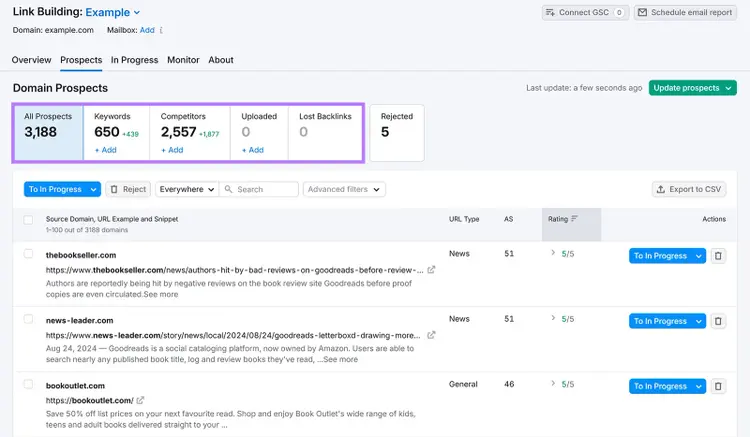
You can move any relevant prospects to the “In Progress” tab to reach out to them.
Secure Valuable Backlinks
with the Link Building Tool
5. Improve Your Site’s Technical SEO
Addressing any technical SEO issues with your site helps search engines to find, understand, and store your content for ranking purposes
Here are a few technical areas to focus on:
- Use HTTPS. Switching to HTTPS (if you haven't already) ensures secure data transfer between users’ browsers and your server. It’s a basic trust signal and a confirmed ranking signal.
- Improve your site’s speed. Improving your website speed can improve user experience, which may improve your keyword rankings.
- Make your site mobile-friendly. Google uses mobile-first indexing, which means it evaluates the mobile version of your site when determining rankings. So, use responsive design, adjust tap targets, and fix any layout issues to create a seamless mobile experience.
- Use structured data. Add schema markup to your website to help search engines understand your content better. Choose the right type for your page and make sure to validate it to ensure it’s properly formatted.
Our free SEO audit flags these technical issues fast. To dig in and fix them across your full site, use Semrush Site Audit.
Start by setting up your project in Semrush. You can refer to this configuration guide.
Head to the “Issues” tab to see a full list of problems that may be hurting your site’s performance.
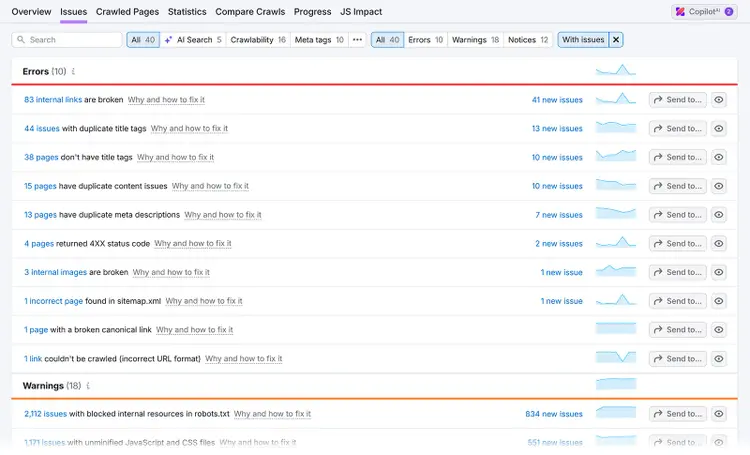
Issues are categorized into three types:
- Errors: Critical issues that may hurt your site’s visibility or performance
- Warnings: Moderate issues that could impact SEO if left unaddressed
- Notices: Minor items that aren’t urgent but still worth reviewing
Look through each category to explore specific issues, view affected URLs, and get recommendations on how to fix them.
Prioritize fixing errors first, then work through warnings and notices to maintain a healthy site.
The best way to track ROI after making changes is to monitor ranking improvements over time. You can use Google Search Console and our Position Tracking tool for this. Both tools can help you make before-and-after comparisons to measure success.
Frequently Asked Questions
Before we wrap things up, let’s cover some questions people have when they’re working with keywords.
How Long Does It Take to Rank On Google for a Keyword?
The time it takes to rank for a keyword varies significantly based on several factors, but here's what you can generally expect:
- New websites: 6-12 months or longer to reach first-page rankings, as it takes time to establish trust and authority for your domain in the eyes of Google.
- Established websites: 3-6 months for competitive keywords, though you might see improvements sooner for less competitive terms like long-tail keywords.
What Are Some Common Mistakes to Avoid When Trying to Improve Keyword Rankings?
Avoid these critical mistakes that can hurt your ranking efforts:
- Keyword stuffing: Unnaturally forcing keywords into your content to manipulate search rankings. This practice is considered spammy and doesn’t work anymore.
- Ignoring search intent: Creating content that doesn't match what users actually want will result in low rankings, even if you target the right keywords perfectly
- Publishing low-quality content: Content that’s poorly written, shallow, and just unhelpful to the reader will struggle to rank higher
- Neglecting technical SEO: Slow load speed, bad mobile experience, and crawl errors can negatively affect your performance
There are many other factors that can impact rankings, but these are some of the most common ones.
What Are Some Key Factors that Influence Keyword Rankings?
There are hundreds of ranking factors, but these are among the most impactful:
- Quantity and quality of backlinks pointing to your site
- The quality of your content
- Technical SEO factors such as page speed, mobile-friendliness, and HTTPS
- Proper on-page optimization, such as strategically using keywords in meta tags, headings, and throughout your content in a natural way
- User engagement signals like click-through rates, time spent on page, and bounce rates
What Are the Latest Google Algorithm Updates and How Have They Impacted Keyword Rankings?
The three most recent major updates were the June 2025 core update, March 2025 core update, and December 2024 spam update.
These updates triggered substantial ranking volatility across industries, and many sites experienced sharp declines depending on content quality, topical authority, and compliance with Google’s spam and quality guidelines.
How to Analyze a Competitor’s Keyword Rankings?
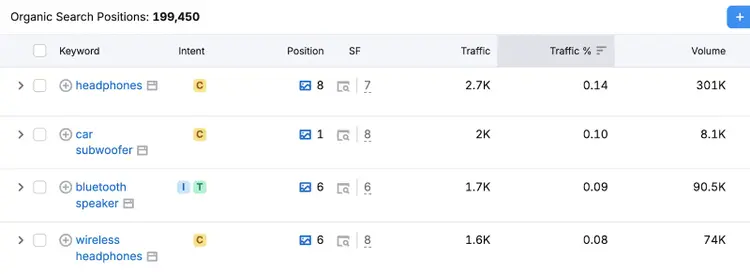
The best way to analyze a competitor’s keyword rankings is through specialized tools like Organic Rankings and Position Tracking.
Organic Rankings shows you which keywords your competitors are ranking for, their positions, and the estimated traffic they are getting.
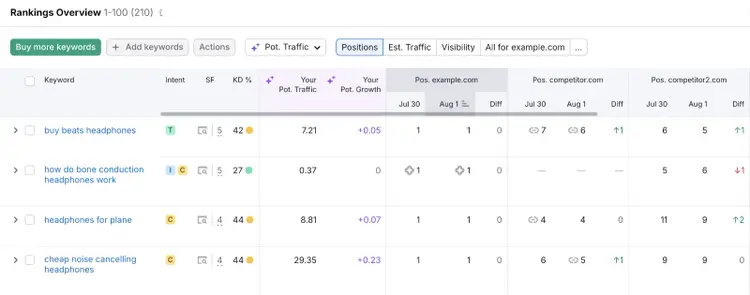
Position Tracking allows you to track competitors' rankings for a custom set of keywords. You can track multiple competitors simultaneously, compare your performance against theirs, and get alerts when significant ranking shifts occur.

Rachel is a Senior Content Writer with 12+ years‘ experience in content marketing and SEO. In a previous role as Head of Content at a digital marketing agency, Rachel developed and executed search-driven content strategies for a diverse range of clients, including global ecommerce brands and local B2B companies. She later transitioned to an in-house role at an SaaS startup, where she focused on scaling content operations and driving organic growth.
Rachel Handley
Rachel is a Senior Content Writer with 12+ years‘ experience in content marketing and SEO. She has worked agency-side, developing and executing content strategies for a wide range of brands, and in-house, driving organic growth for a SaaS startup.

Tells Google to show you more from Semrush in AI, Search, and Discover.
Table of contents
-
- How Long Does It Take to Rank On Google for a Keyword?
- What Are Some Common Mistakes to Avoid When Trying to Improve Keyword Rankings?
- What Are Some Key Factors that Influence Keyword Rankings?
- What Are the Latest Google Algorithm Updates and How Have They Impacted Keyword Rankings?
- How to Analyze a Competitor’s Keyword Rankings?