
URL parameters pass data through a URL, so a single page can behave differently without needing a separate page for every variation. You’ve probably seen this with product filtering or site searches.
But if parameters are incorrectly set up, they can waste crawl budget and leave search systems unsure of which version of a page actually matters.
This guide covers exactly what URL parameters are, how they're structured, the difference between active and passive parameters, and how to keep them from harming your SEO and AI visibility.
What are URL parameters?
URL parameters are extra pieces of information added to the end of a URL that tell a website how to customize the content, filter results, or track browsing sessions.
Here's a simple URL parameter example that would be used to filter ecommerce results:
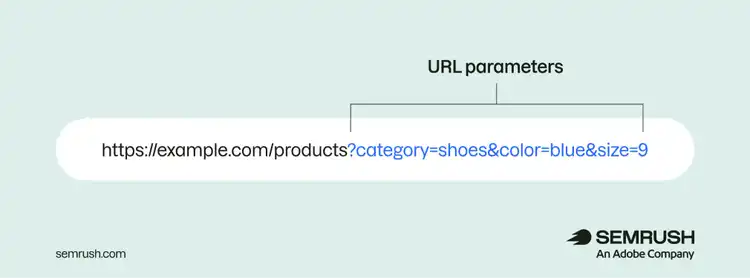
URL parameters are just one part of a full URL, which typically includes a scheme, domain name, top-level domain, and path.
URL parameter structure
URL parameters appear after a question mark (?) and include key-value pairs that are separated by one or more ampersands (&). This means:
- Everything before the question mark (?) is a standard URL
- All parameters come after the question mark (?)
- Each parameter is written as a key and value separated by an equal sign (category=shoes)
- Multiple parameters are separated with an ampersand (&)
URL parameters vs. query strings
URL parameters are the individual key-value pairs, and a query string is the entire string of parameters — including the question mark and ampersands.
These are URL parameters (sometimes called query parameters):
category=shoescolor=bluesize=9
And here is a query string:
?category=shoes&color=blue&size=9
That said, many marketers use the terms URL parameters and query strings interchangeably. That’s perfectly fine in most contexts.
How are URL parameters used?
URL parameters are used to enhance a website's functionality, track campaigns, and improve the user experience.
Specifically, URL parameters are used for:
- Filtering and sorting content: You can use URL parameters to filter or sort content dynamically without users needing to reload the entire page. This is especially useful for ecommerce websites with numerous product categories and variations. Or sites that need to help users narrow down large collections of items.
- Pagination: URL parameters help display large sets of content across multiple pages (?page=2, ?page=3, ?page=4, and so on) to let users navigate through them. This is especially useful for websites with large collections, such as blog posts and product listings.
- Search functionality: URL parameters can also be used in a website's search functionality. When a user submits a search query, the query is appended to the URL (https://example.com/?search=running+shoes), which allows the website to display relevant search results.
- Campaign tracking: Marketers use URL parameters called UTM parameters to track where traffic comes from and measure campaign performance in analytics platforms. They’re passive, meaning they don’t change the page’s content but send data to your analytics tools. Create UTM parameters manually or with a tool like Google's Campaign URL Builder.
Note
URL parameters were previously used to serve localized content and manage session data (like remembering a shopping cart’s contents during browsing). Today, dedicated URLs with hreflang tags give search engines clearer geotargeting signals, and cookies handle session tracking more securely.
What are the main types of URL query parameters?
The main types of URL query parameters are active and passive.
Active parameters
Active parameters directly affect the content or behavior of a webpage.
When active parameters appear in a URL, the website uses these values to change what the page shows or how it functions to create a dynamic and interactive experience tailored to the user's needs.
Common examples of active parameters include
- Filtering product listings
- Loading a specific page from a paginated series
- Displaying search results
Passive parameters
Passive parameters don't change the visible content of a page but work behind the scenes to support functions like tracking user behavior.
Passive parameters are most commonly used to monitor traffic sources, primarily through UTM parameters.
How do parameters in URLs affect SEO?
Parameters in URLs affect SEO performance and AI visibility largely because they result in many pages with similar content.
For example, a page ending in "?sort=asc" and another ending in "?sort=desc" may display the same content in a different order. And when you have pages with highly similar content, you run the risk of:
- Duplicate content: When parameters create multiple versions of the same page, search engines struggle to determine which version to prioritize, reducing overall visibility. That issue can affect AI systems as well.
- Crawl budget waste: Search engine and AI crawlers only allocate a certain amount of time and resources to crawling (reading) a website in a given timeframe. If your site generates numerous URLs with parameters that lead to similar content, website crawlers might waste time on these variations instead of discovering other valuable content.
- Keyword cannibalization: Multiple URLs with different parameters often target the same group of queries. This means your pages are essentially competing against each other in search results. This internal competition can prevent any single page from performing well in organic search and AI-powered search results.
- Diluted value signals: The value of incoming links weakens when external and internal sources point to multiple parameterized versions of the same page. This can weaken the page’s visibility potential in organic and AI search results.
Key considerations when using URL parameters
URL parameters require careful planning and management because of how they can impact your search visibility.
So, keep the following considerations in mind when using URL parameters on your website:
Parameter order matters
Parameter order matters because search engines and AI systems can treat URLs with the same parameters in different orders as separate pages, even when they display identical content.
For example, pages ending in "?color=blue&size=9" and "?size=9&color=blue" may be seen as distinct URLs. This creates even more duplicate content that can affect search performance.
Most modern CMS and website platforms enforce a consistent parameter order automatically, so this is often already handled for you. For campaigns that involve manually creating URL parameters, align your team on the correct order.
Parameters lead to performance trade-offs
Parameters lead to performance trade-offs because URLs with parameters often bypass caching mechanisms (shortcuts that let a server display a saved copy of a page), which leads to slower load times as servers fetch content.
If your parameters don't significantly change the content, consider whether the functionality justifies the performance cost. A "sort by price" parameter on a page with five products, for instance, probably isn't worth it.
Parameters are case-sentitive
URL parameters are case-sensitive in many systems, which means“?Color=Blue” and “?color=blue” could be seen as different parameter values.
The safest approach is to standardize parameter casing in your implementation, and use canonical tags (HTML that specifies the main version of a page) to consolidate any variations that exist.
Parameters are visible in multiple places
URL parameters are visible to users and also captured by web servers, analytics platforms, browser history, logs, and other tools that process traffic data.
So, avoid using sensitive data (like personal information) in your URL parameters.
5 search-friendly practices for using URL parameters
Here are five search-friendly practices for using URL parameters:
1. Add canonical tags
All parameterized URLs should include a canonical tag identifying the page that doesn’t contain parameters as the main page.
Canonical tags tell search engines which URLs should be indexed (stored in a database) for ranking, which consolidates link equity (ranking power) to the main page and prevents issues with duplicate content.
Plus, search engines will prioritize crawling canonical pages over the parameterized variations as time passes, resulting in crawl efficiency for your site.
Clear canonical signals also help your preferred page show in AI-powered search systems.
Adding canonical tags is especially important for sites with extensive filtering options, such as:
- Ecommerce sites with filters for color, size, brand, price, etc.
- Real estate sites with filters for location, price range, amenities, etc.
- Job boards with multiple filter combinations for role, experience, location, etc.
- Any site where similar content is accessible through many parameter combinations
Implementing canonical tags is relatively straightforward. Work with your developer to add this line to the <head> section of your parameterized pages and to the canonical version (just replace the example URL with the main page URL you want to specify):
<link rel="canonical" href="https://www.yourdomain.com/your-main-page" />
2. Block URLs containing parameters with robots.txt
You might want to block some parameterized URLs with robots.txt (a set of instructions for crawlers) to tell bots not to crawl those pages.
Bots check the robots.txt file before they crawl your website, and they generally follow its instructions on which pages to avoid crawling. Consider these scenarios where blocking URLs with parameters can be useful:
- You have parameters that generate near-infinite URLs with little unique content
- You're experiencing crawl budget issues, and search engines aren't able to crawl all of your important pages due to the sheer number of URLs with parameters
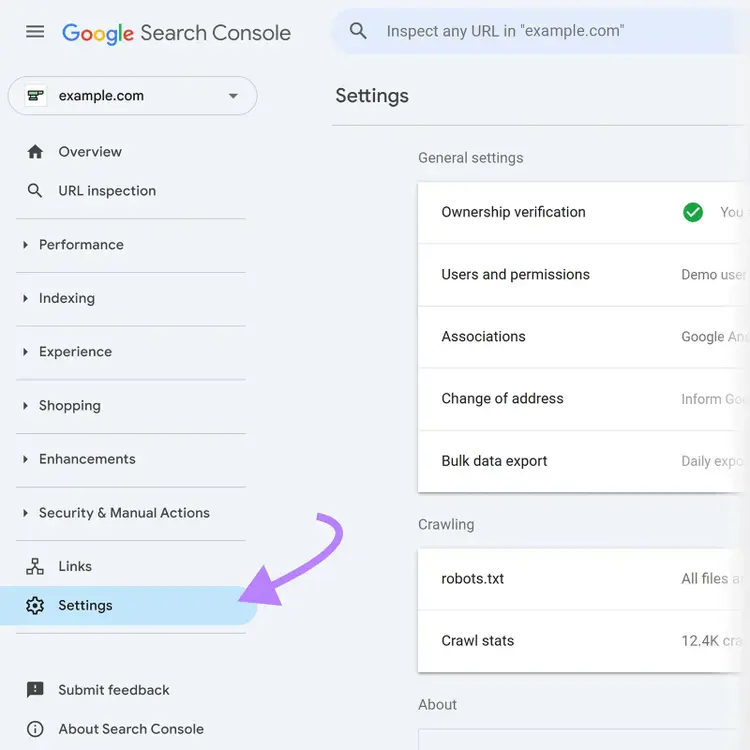
To view Google's crawl activity and identify problematic parameters, go to Google Search Console (GSC), and navigate to "Settings."
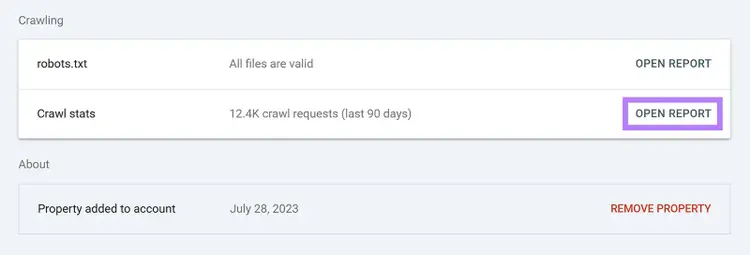
Find the "Crawl stats" report and click "Open Report."
Scroll to "By file type" and click "HTML" to see Google's crawl activity on your site.
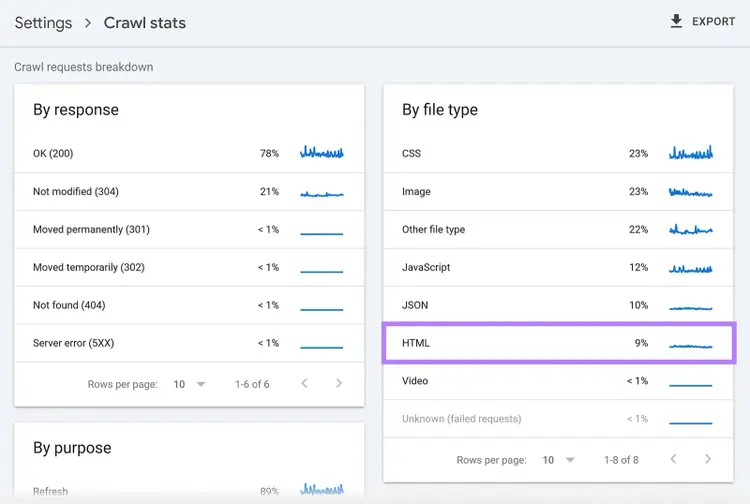
Under "Examples," look for recurring parameterized URLs that may be wasting your crawl budget.
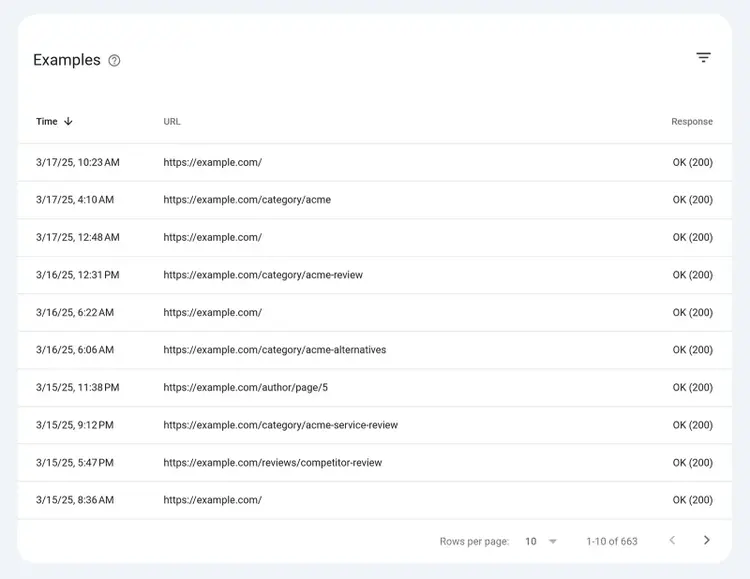
Once you've identified the problematic parameters, block them in your robots.txt file. For example, the below block tells crawlers not to crawl URLs containing "?sort=," which saves crawl budget for more important content:
User-agent: *Disallow: /*?sort=
3. Avoid URL parameters for localization
Avoid URL parameters for localizing your site to customers in different regions and/or languages because they aren't very user-friendly and can cause problems with your search results.
Plus, Google has explicitly stated that URL parameters shouldn't be used for localization.
It's better to use dedicated URLs for each region, combined with hreflang tags, to signal to search engines which version of a page to serve to users in different countries or language markets. This approach is more user-friendly and provides clearer geotargeting signals.
Common URL structures for region-specific pages include:
- Subdirectories (e.g., example.com/fr/)
- Subdomains (e.g., fr.example.com)
- Country-specific domains (e.g., example.co.fr)
4. Use consistent internal linking
Using consistent internal linking consolidates link equity and sends clear signals to search engines and AI systems about which page to prioritize in search results.
Internal links should point to the clean, canonical version of each page — not parameterized variations.
5. Exclude parameterized URLs from technical audits
Excluding parameterized URLs from technical audits keeps the audit focused on your core website content.
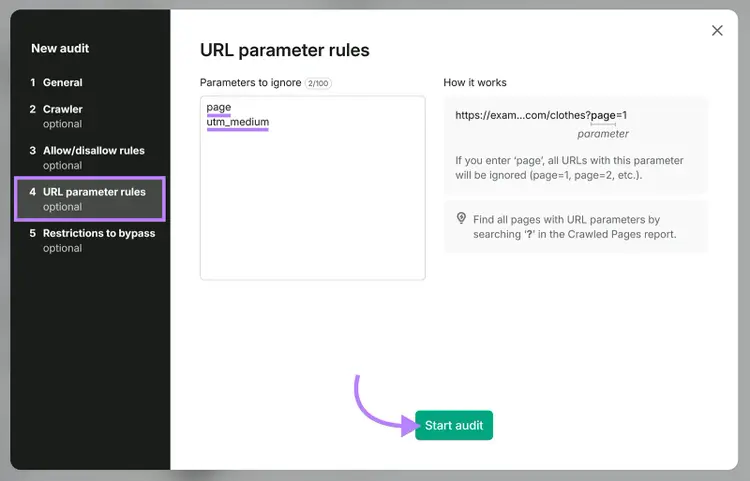
Semrush Site Audit lets you configure the tool to exclude parameterized URLs from crawling. In the setup wizard, select "URL parameter rules" and list the parameters you want to exclude from crawling. For example, entering "page" would exclude pagination parameters like “?page=1.”
After listing the parameters you want to ignore, click "Start audit."
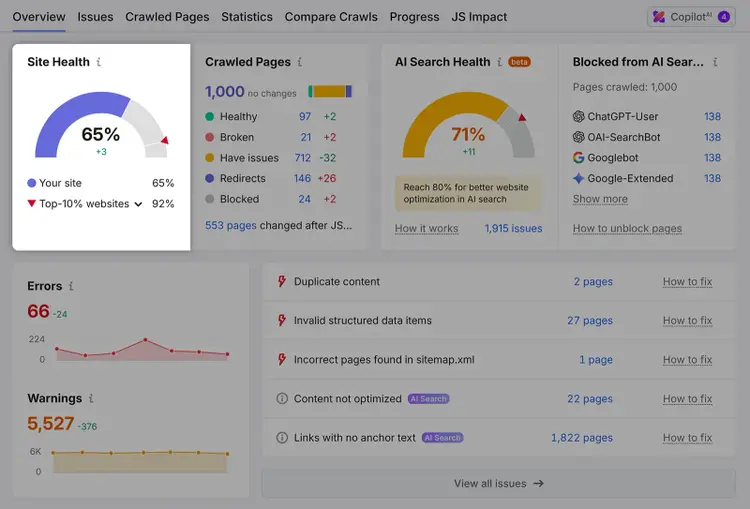
When the crawl is finished, Site Audit generates a report showing your site's overall technical health.
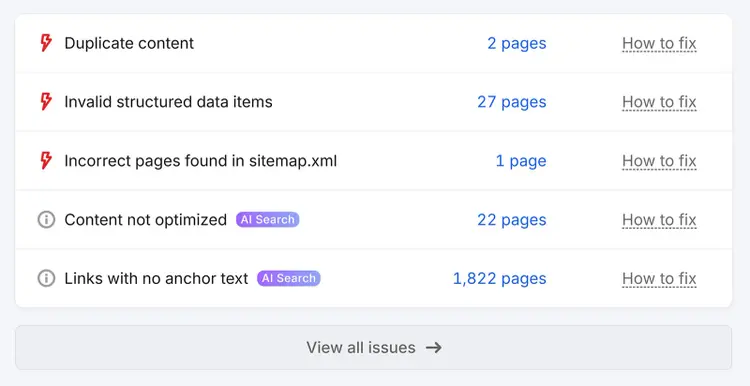
You'll also see a list of issues affecting your important content. Review Site Audit’s findings and focus implementing fixes that are most likely to have the biggest impact.
Use the right tools for better URL parameter management
Managing URL parameters well comes down to generating links correctly and properly indicating which page is your preferred version.
If you suspect that many of the technical issues on your site are the result of improperly managed URL parameters, run Site Audit without excluding parameterized URLs. For example, you’ll clearly see duplicate pages that can be addressed by implementing canonical tags.
Try Site Audit today.
Find and fix website issues
with the Site Audit tool

Carlos Silva leads the editorial pipeline for the English blog—coordinating writers, editors, strategy, and building AI workflows that boost content quality and AI visibility. With 10+ years of experience writing and editing across in-house and agency roles, Carlos blends content strategy, SEO, and AI to help marketers stay ahead of an evolving search landscape.
Carlos Silva
Carlos Silva leads the editorial pipeline for the English blog and builds AI workflows that boost content quality and AI visibility. 10+ years writing and editing across in-house and agency roles.

Tells Google to show you more from Semrush in AI, Search, and Discover.