
Appearing prominently in search results comes down to avoiding SEO mistakes that are easy to fix once you know what to look for.
Here are the biggest SEO mistakes people make, how to spot them, and how to fix each one.
1. Duplicate content
Duplicate content is when one webpage has the same or nearly the same content as another webpage.
When your own site contains duplicate content, it can cause poor or chaotic page rankings and potentially prioritize the wrong page on search engine results pages (SERPs) or AI search results.
Duplicate content can be an exact copy of a page or a near-identical version with minor variations.Think of templated pages with a few words changed. Or a U.S. and a U.K. version of the same page.
How to fix duplicate content
Fix duplicate content on your site by finding duplicate pages, then either making each page unique or using redirects and canonical tags (HTML that specifies a “main” version) to point search engines to the right page.
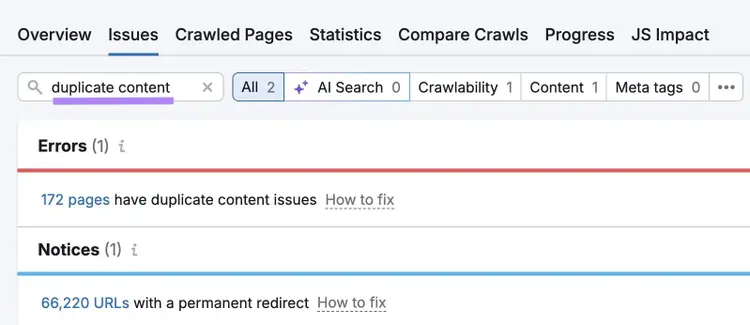
To find duplicate content on your site, enter your domain into Semrush’s Site Audit tool and set up your crawl.
Once your audit is complete, click on the “Issues” tab.
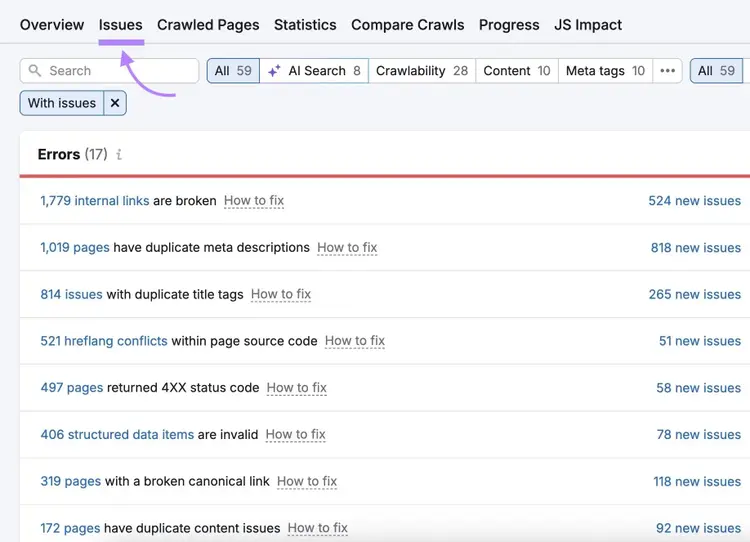
Enter “duplicate content” in the search bar in the upper left. If Site Audit has detected duplicate pages, you’ll see “# pages have duplicate content issues.” Click the number to see the affected pages.
Possible solutions to your duplicate content issues include:
- Making the content on one of the duplicate pages unique
- Using rel="canonical" tags to tell search engines which page is your preferred version
- Adding a 301 redirect from a duplicate page to the original one if the duplicate version isn’t needed
For a more detailed breakdown of when and how to address duplicate content issues, read our duplicate content guide.
2. Under-optimized meta tags
Under-optimized meta tags (snippets of HTML that give users and search system crawlers more information about your website) are missed opportunities to improve your site’s performance and can affect the way search systems and users interpret your pages.
Two common meta tags are meta descriptions and title tags (title tags aren’t technically meta tags, but most SEOs include them in this category).
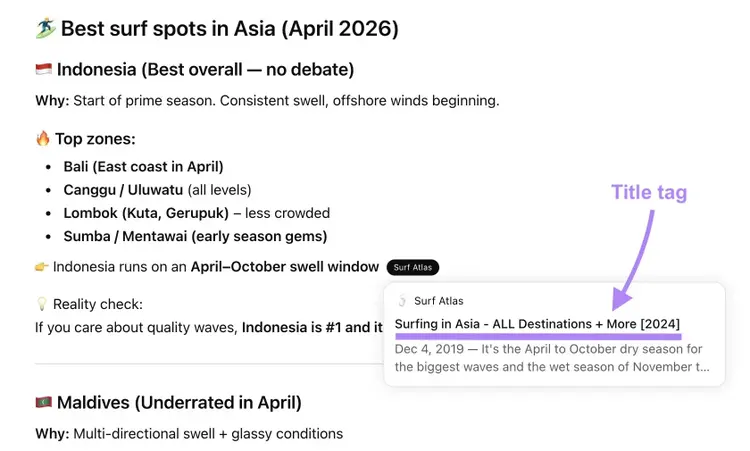
Title tags can show in search results (displayed below) and influence whether users click your result:
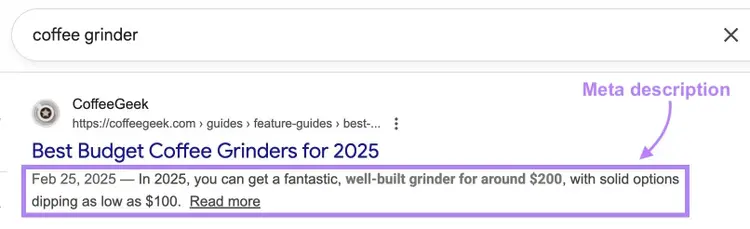
Meta descriptions can also appear in search results. While they don’t directly affect your ability to appear in search results, they can influence whether users click your results.
Here’s what a meta description looks like on a search engine results page (SERP):
Common causes of meta tag under-optimization include:
- Missing tags
- Tags that are too long or too short
- Duplicate tags on different pages
How to fix under-optimized meta tags
To find missing tags quickly, run a free SEO audit. To address under-optimized tags across your entire site, use Semrush Site Audit.
Go to the tool, click on the “Issues” tab, and search for the term “tag.”
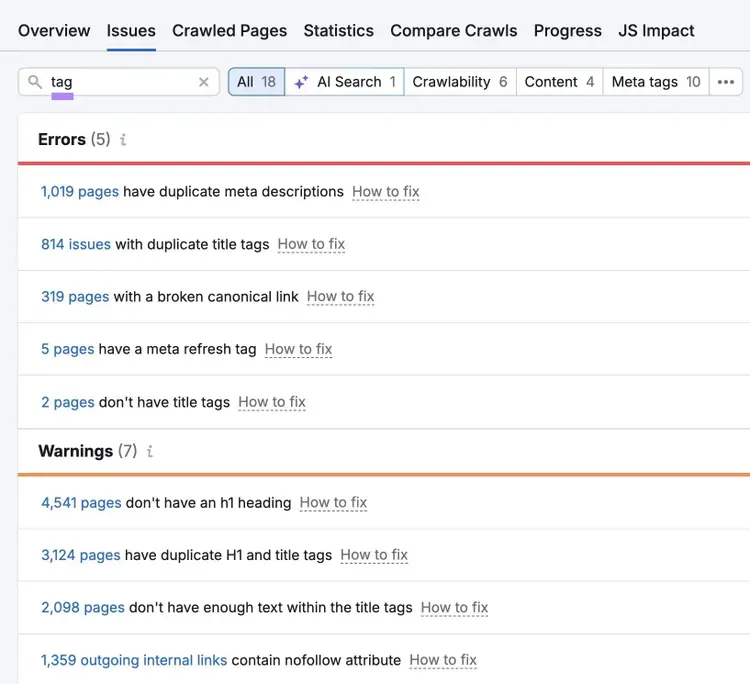
If Site Audit shows that you have missing or duplicate tags, you can easily fix the problems by adding tags where needed or altering duplicates to be original.
To avoid common meta tag issues, optimize them from the beginning. For example, a page’s title tag and meta description should:
- Contain your primary keyword
- Be unique to that page
- Summarize what a user can expect to find on the page
- Stick to recommended length limits (50-60 characters for title tags and 105 characters or fewer for meta descriptions)
3. Image issues
Image issues (like overly large image files) can hurt the user experience (UX), slow down your site, and lessen your chances of appearing in search — so you should optimize images on your site.
Common SEO image issues include:
- Lack of alt text: Alt text is HTML that briefly explains what the image is showing. It allows screen readers to convey what the image depicts to users who may be unable to see. And provide additional image context for crawlers.
- Oversized images: Oversized images can slow down your site’s page speed — and that can impact your search visibility
- Broken images: Broken images are images on your site that can’t be displayed because the image no longer exists, the URL is missing or incorrect, or the file path is invalid. Broken images undermine the user experience and signal a poor-quality webpage.
How to fix image issues
Here’s how to fix three of the most common image issues:
Add alt text
Add alt text to each image within your content management system (like WordPress) or website platform.
To quickly find missing alt text, use our free website SEO checker. To catch duplicates across your entire site, use Semrush Site Audit.
Moving forward, assign alt text to every image you publish on your site. Best practices for alt text include being descriptive, unique, and natural (that is, don’t try to stuff in keywords).
Compress and resize images
Compressing and resizing images makes images load faster, and you can usually resize and compress without compromising quality.
Start by resizing your image using a free tool like Squoosh. Turn on “Resize” and adjust the dimensions.
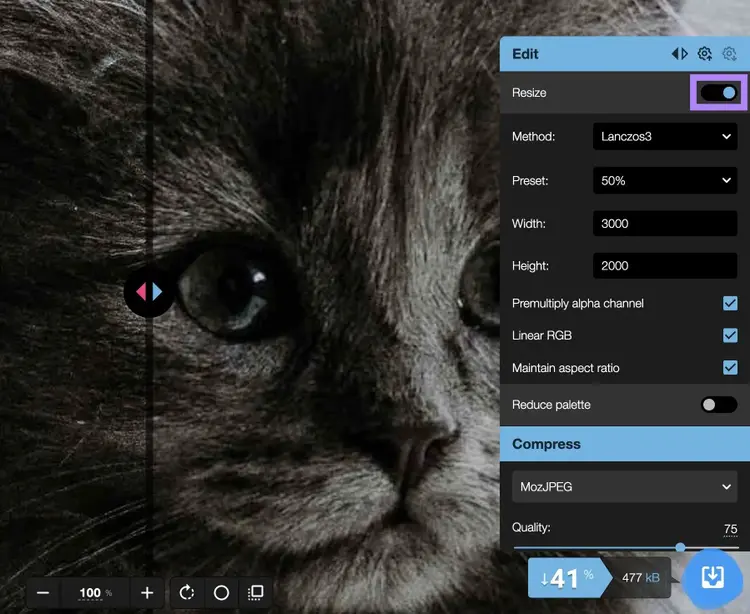
Then, drag the slider under the “Compress” section. View the before/after version of your image side-by-side to check its quality.
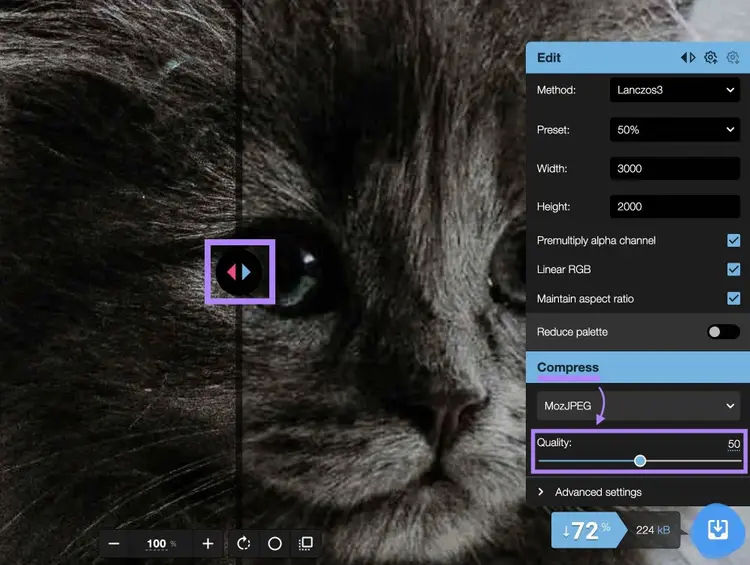
Fix broken images
Address broken images to provide a better experience for users and convey to search systems that your site is well-maintained.
To find broken images on your site, go back to the “Issues” tab in Site Audit and search “image” to find notices about broken images.
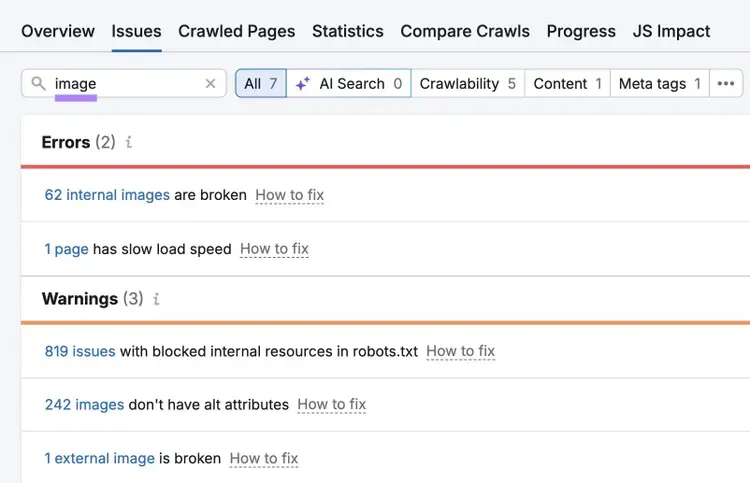
Once you’ve found the broken images, there are a few ways you can fix them, such as:
- Changing the image URL
- Replacing the image
- Simply removing the image from the page
4. Slow load speed
Slow page speed harms your chances of appearing in search results — load speed is a confirmed Google ranking factor and also likely to impact your appearance in AI tools.
Load speed measures how quickly your webpage’s content loads andaffects how likely a user is to engage with your site.
Users are much more likely to abandon a page that takes a long time to load, whereas fast loading pages can keep users on your site for longer.
How to fix slow load speed
Fix slow load speed by addressing the most common culprits like large image files, bloated code, and server performance.
Start by opening Site Audit. Scroll down to “Thematic Reports” and locate the “Site Performance” box. Click on “View details.”
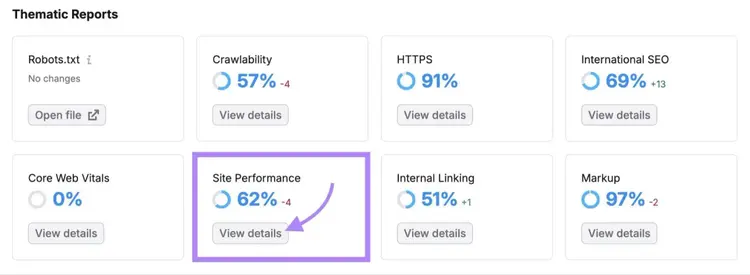
This report will highlight issues with your website’s load speed and performance.
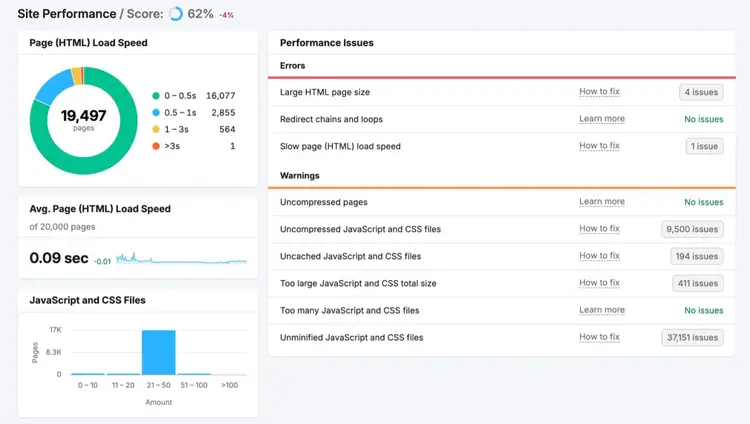
Prioritize fixing anything listed as an “Error.” Then, focus on “Warnings” and “Notices.”
Some common solutions for resolving slow load speed include:
- Compressing your images
- Optimizing your HTML code
- Moving to a different hosting service (if the problem is coming from your web server)
- Minimizing your files or code through minification (ask a developer if you need help with this)
- Enabling browser caching
You can find more information about fixing your load speed issues directly in Site Audit by clicking “Learn more” or “How to fix.”
5. Poor crawlability
Poor crawlability is when bots struggle to access your website, and it can prevent you from showing in traditional and AI search results.
Basically, your site needs to be crawled to be eligible for indexing. So, you need to make sure Googlebot, OAI-SearchBot, and other crawlers are able to access your important pages.
Bad crawlability can be the result of different SEO issues, including:
- Pages blocked in a robots.txt file
- Link issues (like broken links, nofollow links, and lack of internal links)
- Redirect loops (when Page A redirects to Page B, which redirects back to Page A, and so on)
- 4xx errors (a page cannot be accessed)
- 5xx errors (a server cannot perform a request)
- Poor site architecture
How to fix poor crawlability
You can fix poor crawlability by updating broken links, improving your site architecture, and fixing broken pages.
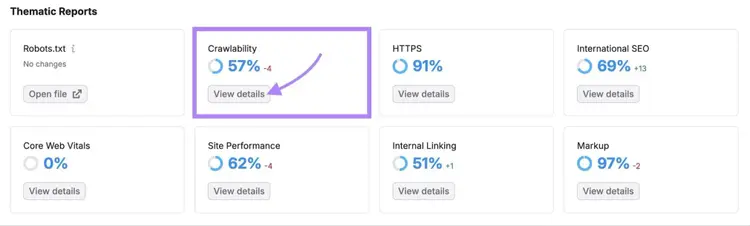
Go to Site Audit and scroll down to “Thematic Reports.” Here, you’ll see your site’s “Crawlability” score. Click on “View details” under your score.
This report shows where crawl budget (the amount of time and resources crawlers will devote to your website within a specific timeframe before moving on) is being wasted.
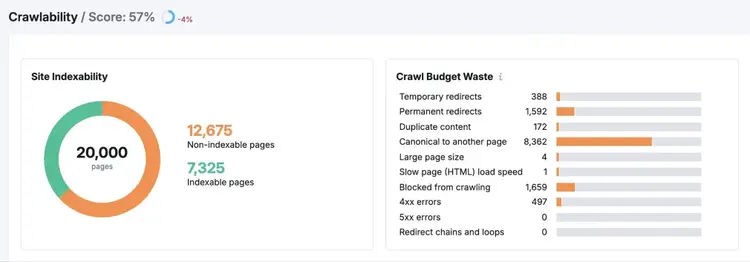
You can also click over to the “Issues” tab and select “Crawlability” to see a breakdown of crawl-related errors affecting your site.
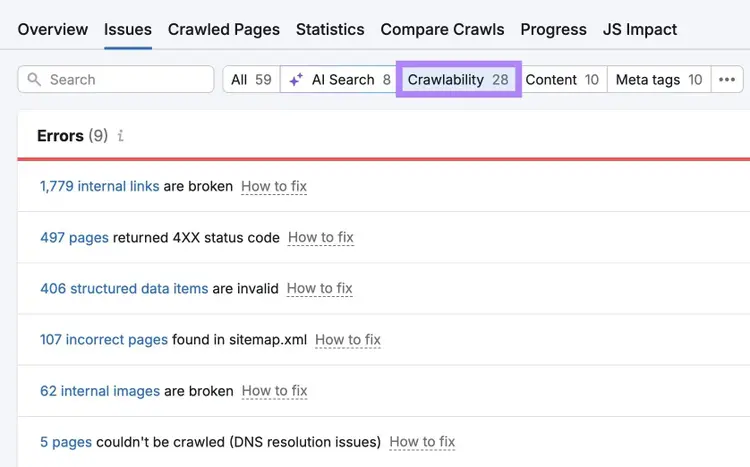
Usually, these problems are easy to fix.
6. Lack of mobile optimization
If your site isn’t optimized for mobile, it’s less likely to show in search results and also isn’t suitable for the majority of users who are browsing on their phones.
There are three primary methods of making a site mobile-friendly:
- Responsive design: This lets you serve the same page to desktop and mobile users. The link stays the same, but the page displays differently depending on the device. Responsive design is Google’s recommended method.
- Dynamic serving: The URL stays the same, but the HTML changes based on the device
- Separate URLs: The URL changes depending on the device (generally not recommended)
How to fix a lack of mobile optimization
Fix a lack of mobile optimization by establishing a mobile-friendly site using one of the methods mentioned above — ideally by opting for responsive design.
But your mobile efforts shouldn’t end there.
To assess your mobile-friendliness, start with a free SEO check. For deeper mobile analysis across your site, use Semrush Site Audit.
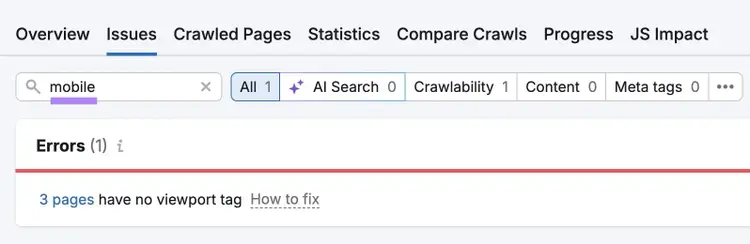
Go to the "Issues" report, and search for "mobile." The tool will then show issues relating to mobile performance. Like missing viewport tags.
There are also non-technical ways to optimize your site for mobile:
- Writing shorter paragraphs (for enhanced mobile readability)
- Using white space
- Avoiding intrusive pop-ups
- Ensuring buttons are easy to tap
7. Assuming AI search optimization is the same as SEO
Relying exclusively on SEO techniques for AI search optimization hurts your chances of appearing in AI-generated responses within tools like ChatGPT.
SEO and AI search optimization — also called answer engine optimization (AEO) — have many overlapping best practices Like creating unique content.
But SEO and AEO have differences that you need to consider if you want to gain visibility in large language model tools (LLMs).
How to fix AI search optimization mistakes
One of the simplest AI search optimization mistakes to fix is to structure your content for chunk-level retrieval, where each section opens with a direct answer to its heading.
Here are some additional tips:
- Build entity context throughout your content by naming your brand, your tools, and your areas of expertise consistently
- Optimize for the conversational queries AI systems handle (i.e., “what is the best laptop for graphic design students on a budget?” instead of “best laptop for students”)
- Build a positive reputation online through reviews and testimonials
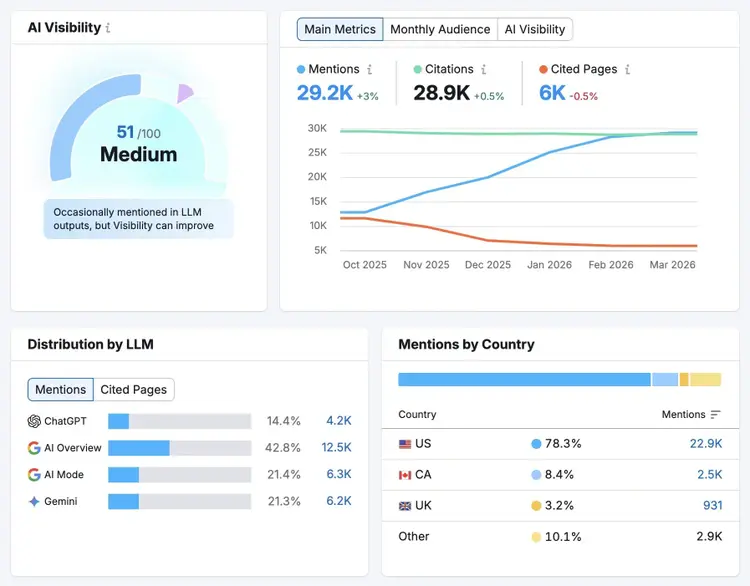
Then, measure your AI visibility to make sure your efforts are working using Semrush's AI Visibility Toolkit. It tracks how often your brand appears in AI-generated responses across LLMs and benchmarks your presence against competitors.
Here’s what the Visibility Overview report looks like, where you can track if your AI visibility is growing.
8. Neglecting local SEO
Neglecting local SEO can prevent your business from appearing in local search results, including in Google Maps and the local pack that appears at the top of Google results for many location-based searches.
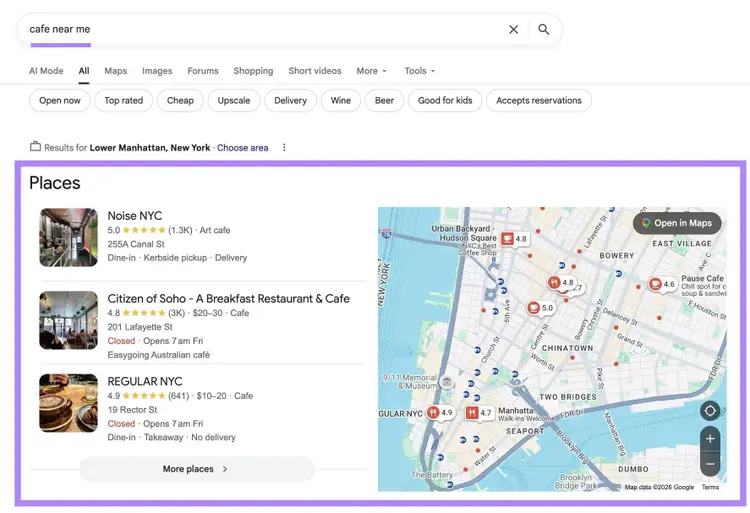
And local searches can be highly valuable to businesses, as people tend to perform local searches when they’re ready to buy.
How to fix local SEO issues
Fix local SEO issues by keeping your business information consistent online.
Start by optimizing your Google Business Profile and adding your business to other business directories. And ensure your listings include the following whenever possible:
- Accurate business name, address, and phone number
- Complete business hours (including special hours for holidays)
- High-quality photos of your business, products, or services
- Detailed business description with relevant local keywords
- Correct business category and attributes
Use Semrush's Listing Management tool to make sure your business details are consistent across directories. Even small variations — like including a suite number in some places but not others — can mislead both users and search systems.
After entering your business name, you’ll get an assessment that grades your online presence. Click “Continue setup” and follow the prompts.
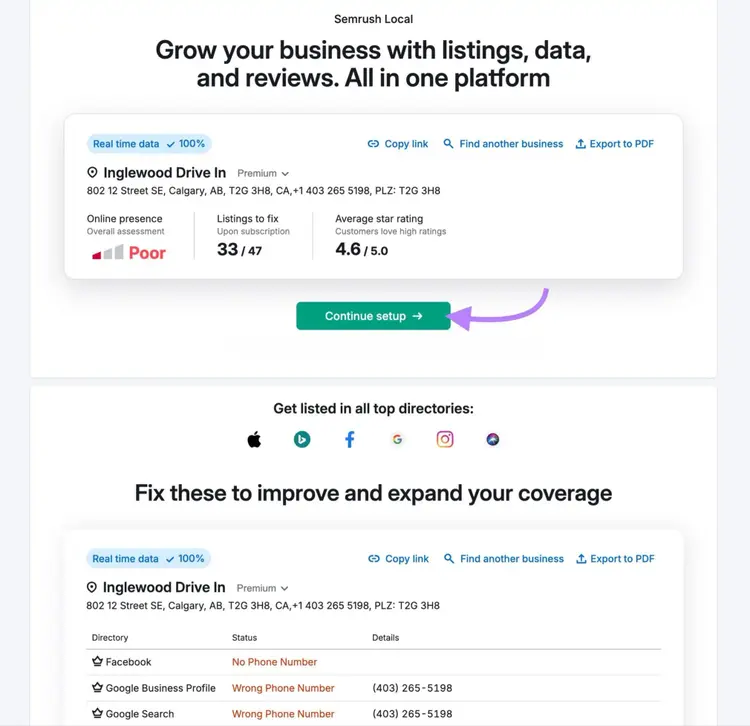
Make sure your business information is correct, as the tool will update and distribute your business information across a range of directories.
You should also create location-specific content for multiple service areas. For example, if you're a plumber serving three cities, build a dedicated landing page for each one with unique copy and city-specific keywords. This helps you appear in more local searches.
9. Ignoring search intent
Ignoring search intent (the goal behind a query) hurts search visibility as search systems are unlikely to prioritize content that doesn’t match what the user is looking for.
There are four main types of search intent:
- Informational: The user wants to learn something (e.g., "how to change a tire" and "what is seo")
- Navigational: The user wants to find a specific website or page (e.g., "facebook login" and "semrush blog")
- Commercial: The user is researching products or services before making a decision (e.g., "best running shoes" and "mailchimp vs brevo")
- Transactional: The user is ready to take action or make a purchase (e.g., "buy iphone 15" and "plumber near me")
For example, creating an informational blog post for a transactional keyword wastes your effort. Because you almost certainly won’t appear.
How to fix search intent misalignment
Fix search intent misalignment by analyzing a keyword’s search intent before creating content.
Analyze an individual query’s intent by searching for the keyword and reviewing the top content that appears. If you’re using Google, also review which SERP features (non-traditional elements of the search results) are present:
- Featured snippets and "People Also Ask" boxes indicate informational intent
- Product listings and shopping ads signal transactional intent
- Review sites and comparison articles suggest commercial intent
- Brand-specific results point to navigational intent
Use our keyword research tool to identify search intent at scale. Enter your seed keyword and click “Search.”
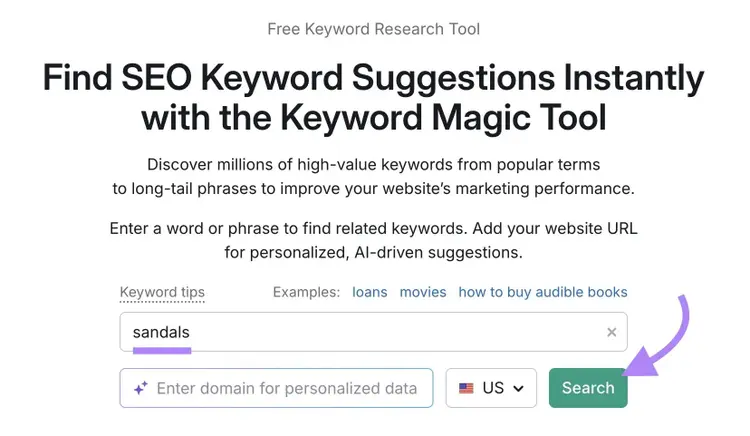
You’ll get a list of related keywords, their intent, and other useful information.
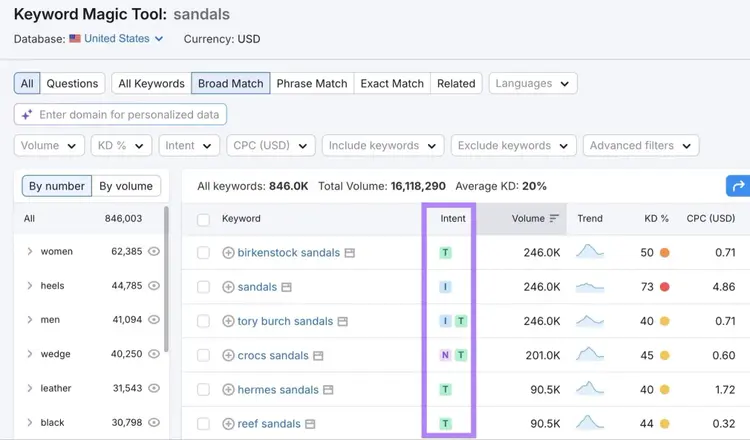
Reviewing search intent before you create helps you plan content that matches intent from the start, rather than discovering the mismatch after your content fails to show in search results.
10. Low-quality content
Low-quality content is unlikely to rank well on Google and be cited in AI tools like ChatGPT, as those systems are designed to deliver relevant and authoritative content to users.
Whereas good content can improve conversion rates, increase search visibility, and attract more high-quality backlinks.
Low-quality content generally includes some or all of the following:
- Misinformation
- Outdated facts
- Grammatical/spelling errors
- Misalignment with search intent
Like other aspects of SEO, what’s considered high-quality content can evolve based on changing search algorithms and user needs.
How to fix low-quality content
Fix low-quality content by producing high-quality content that’s accurate, relevant, useful, error-free, and credible.
One framework to help you create quantity content is Google’s Experience, Expertise, Authoritativeness, and Trustworthiness (E-E-A-T) framework. As you create content, consider the ways in which you can convey these four elements.
Some ideas include:
- Adding author bios that highlight credentials, years of experience, and relevant expertise
- Citing credible sources like original research, industry reports, and recognized experts
- Including first-hand experience such as original data, case studies, screenshots, or personal testing
- Ensuring facts, statistics, and examples reflect current information
- Earning backlinks from authoritative sites in your niche, which signals credibility to Google
- Building a consistent publishing record that demonstrates ongoing topical authority over time
- Displaying trust signals like clear authorship, an about page, contact information, and transparent editorial standards
Writing content with the above practices can also help AI visibility, as AI systems want to cite reputable sources.
11. Keyword stuffing
Keyword stuffing is overusing keywords unnaturally in your content in an attempt to manipulate your way to higher search visibility.
In reality, keyword stuffing makes your content difficult to read and can send negative signals to Google.It can even result in a Google penalty that may lead to some or all of your webpages being removed from search results.
Because many AI tools rely on Google to select and display results, keyword stuffing that impacts your presence on Google can also impact your AI visibility.
How to fix keyword stuffing
Fix keyword stuffing by using keywords naturally, rather than trying to force them into your content.
For example, your target keyword can appear in your page’s:
- Title
- Meta description
- Opening paragraph
- Body (when it naturally comes up)
- Alt tags
- Headers (some but not all)
Don’t be afraid to use keyword variations, either. For example, “how to bake a gluten-free cake” sounds more natural than “how to bake a cake gluten free” and still conveys the same meaning.
Semrush’s On Page SEO Checker highlights any content that has keyword stuffing.
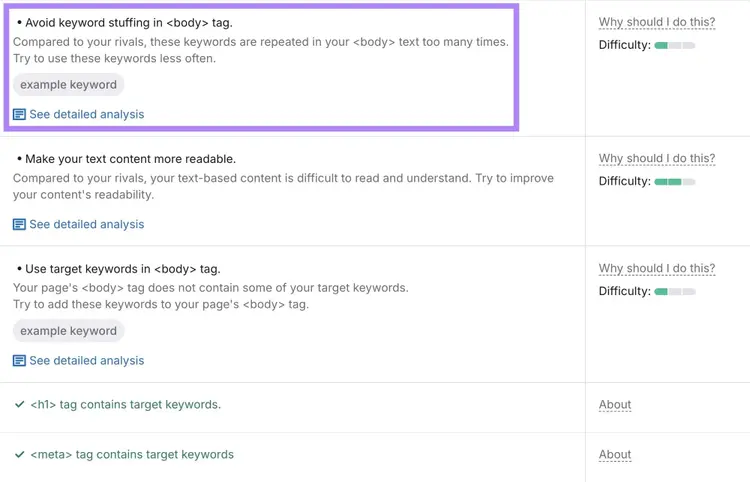
12. Keyword cannibalization
Keyword cannibalization is when you have a page on your website targeting the same keyword as another page, which can hurt your rankings for one or both pages.
Keyword cannibalization can happen when you have duplicate content or if you’ve published similar content over time. It can even be caused by subcategory pages that aren’t distinct enough from their parent pages.
How to fix keyword cannibalization
Fix keyword cannibalization by creating unique pages that each serve a distinct purpose.
To uncover keyword cannibalization you may not know exists on your site, go to Semrush’s Position Tracking tool. Configure the tool for your site.
When Position Tracking is ready, click the “Cannibalization” tab to view a report of pages that are possibly cannibalizing each other.
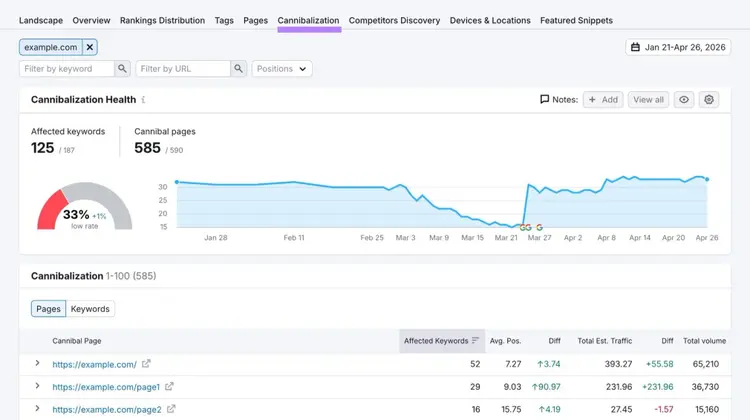
If you find pages that are competing for keywords with the same intent, choose a page to serve as the main version and use canonical tags to indicate your main version. Or redirect other pages to your preferred version if you don’t need the duplicates.
If the competing pages could each serve a distinct purpose, adjust the content on each to target a unique angle.
13. Over-optimized anchor text
Over-optimized anchor text (the clickable text that links to another webpage) usually isn’t descriptive or helpful for users or bots — and it can hurt your SEO.
Here’s an example of over-optimized anchor text directly from Google:

This anchor text over-optimization is an attempt to associate the original page with the linked keywords with the hopes of gaining better search visibility.
However, over-optimized anchor text can confuse search systems if it doesn’t appropriately represent the linked pages. It’s also confusing for users.
How to fix over-optimized anchor text
Fix over-optimized anchor text by keeping it natural, descriptive, and concise.
In its guidelines on best linking practices, Google says:
“Try reading only the anchor text (out of context) and check if it's specific enough to make sense by itself. If you don't know what the page could be about, you need more descriptive anchor text.”
14. Not tracking performance
Not tracking your site’s performance means you can’t identify what’s working, what’s failing, or where to focus your efforts.
Without proper tracking, you risk wasting time and resources on tactics that don't help you reach your goals.
How to fix your performance tracking
Fix performance tracking by outlining clear goals and setting up an analytics platform to help you monitor the metrics that support your goals.
Use a tool like Google Analytics 4 to track website analytics. Look at metrics like:
- Traffic volume and trends
- User behavior (bounce rate, time on page, pages per session, etc.)
- Conversion rates
- Traffic sources
- Audience demographics
And use Google Search Console monitor:
- Which queries drive impressions and clicks
- Your average position for important keywords
- Click-through rates for different pages
- Indexing issues
Avoid common mistakes and improve your SEO
Fixing SEO mistakes (like ignoring search intent and publishing low-quality content) gives your content a better chance of ranking in search engines.
And although SEO and AEO have different approaches, strong foundational SEO can help you appear in AI-generated answers.
Start addressing SEO mistakes today with a free trial of Semrush’s SEO Toolkit.
Fix SEO mistakes
with Semrush’s suite of tools

Carlos Silva leads the editorial pipeline for the English blog—coordinating writers, editors, strategy, and building AI workflows that boost content quality and AI visibility. With 10+ years of experience writing and editing across in-house and agency roles, Carlos blends content strategy, SEO, and AI to help marketers stay ahead of an evolving search landscape.
Carlos Silva
Carlos Silva leads the editorial pipeline for the English blog and builds AI workflows that boost content quality and AI visibility. 10+ years writing and editing across in-house and agency roles.

Tells Google to show you more from Semrush in AI, Search, and Discover.
Table of contents
- 1. Duplicate content
- 2. Under-optimized meta tags
- 3. Image issues
- 4. Slow load speed
- 5. Poor crawlability
- 6. Lack of mobile optimization
- 7. Assuming AI search optimization is the same as SEO
- 8. Neglecting local SEO
- 9. Ignoring search intent
- 10. Low-quality content
- 11. Keyword stuffing
- 12. Keyword cannibalization
- 13. Over-optimized anchor text
- 14. Not tracking performance
- Avoid common mistakes and improve your SEO