
Managing your Google Business Profile is key for improving local search visibility, and some tools can help you do it more efficiently.
Whether you’re a local business or an agency with local SEO clients, GBP management is an ongoing task. It involves updating listings, posting new content, and responding to reviews and messages.
When done manually, it can be time-consuming. Thankfully, Google Business Profile management tools are designed to assist you, and we’ve done the legwork to find and test out the best ones.
What Is Google Business Profile? (Formerly Google My Business)
Google Business Profile is a free tool that allows businesses to create custom listings that may get prominent placement in Google search results.
Like this one:
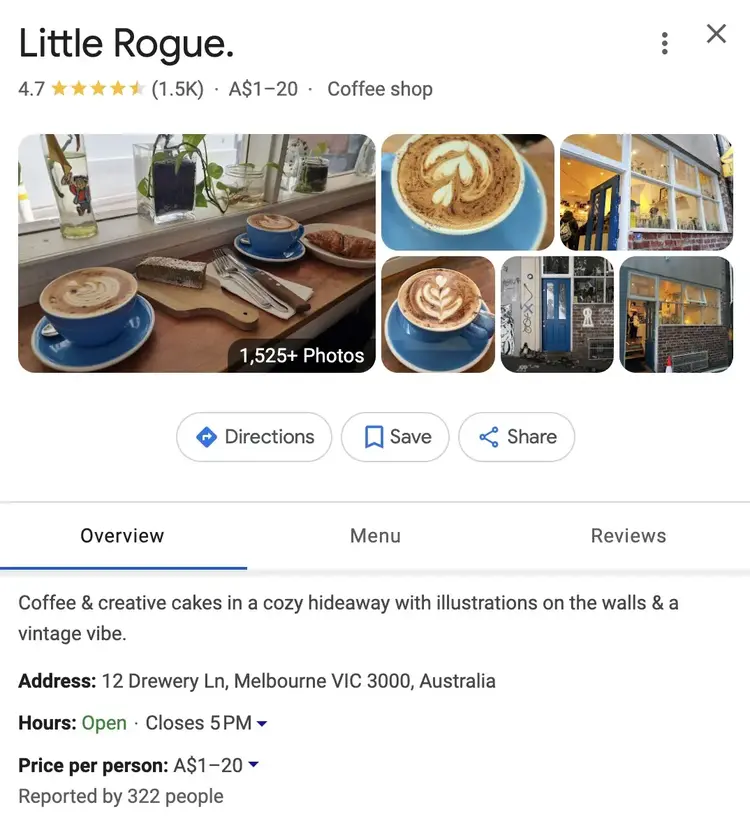
It can help your business:
- Reach new audiences looking for businesses like yours
- Rank for more local keywords in Google search results
- Generate phone calls and inquiries to your business
- Get more clicks to your website
Plus, updating your profile with accurate and fresh content can help you gain visibility in the Google Local Pack. Which Google shows to users looking for nearby businesses.
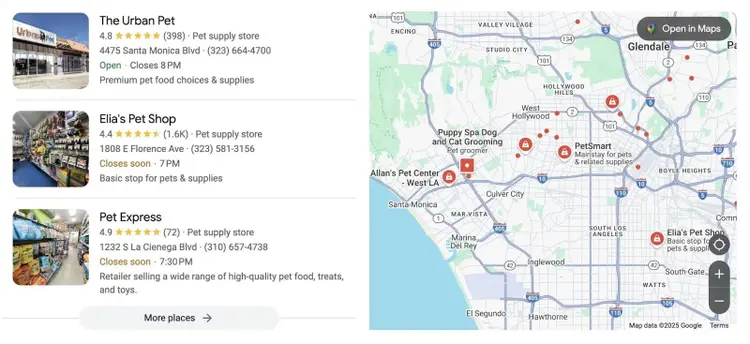
The tool was formerly called “Google My Business” (GMB) but was renamed “Google Business Profile” (GBP) in 2021.
Why Should You Use a Google Business Profile Tool?
A dedicated Google Business Profile tool can increase the visibility of your business in Google search results and ease the workload of managing your profiles.
According to Birdeye, verified Google Business Profile listings average 200 clicks per month. And local businesses average 105 website visits.
Use GBP tools to:
- Help your listing rank for keywords relevant to your business
- Provide more information to users who are considering your services
- Gain higher positions in the Google Local Pack (and possibly more clicks, calls, or foot traffic)
- Track, respond, and generate more reviews on your listing
But which tool is best for you may depend on how many listings you manage. Or what you need the most help with.
This article covers key features, best use cases, and what we like most about each tool. Below is a summary of our findings. Click the tool name to learn more about each one.
9 Google Business Profile Management & Optimization Tools
Here are nine of the best Google Business Profile management software tools.
1. GBP Optimization
Best overall GBP optimization tool
- Website: Semrush
- Price: This tool can be added to any Semrush subscription for $30-$60/month per location.
This tool from Semrush provides recommendations for optimizing your Google Business listing, which you can do directly from the tool’s dashboard.
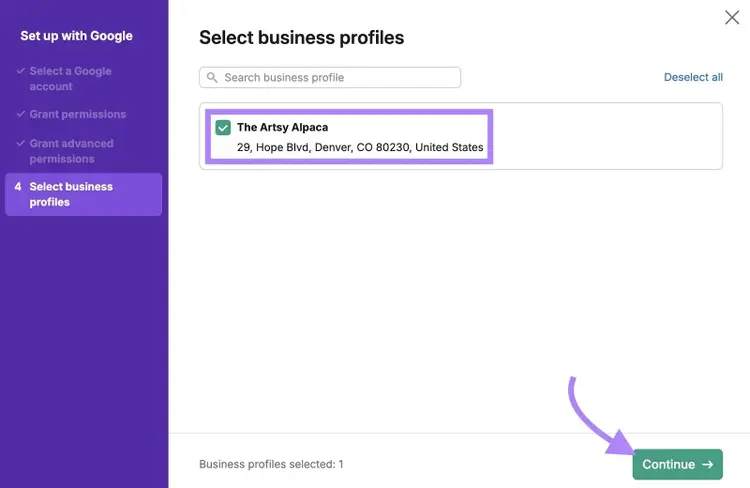
After connecting your Google account, configure your settings and select the GBP listings you want to manage. Then, click “Continue.”
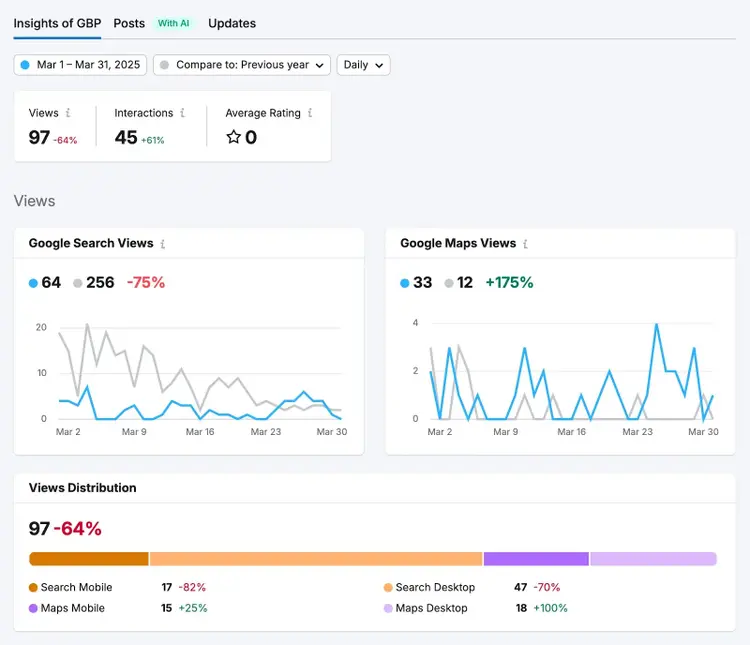
Follow the suggestions to improve your profiles. And make changes to your listings directly from the tool.
Key Features:
- Generates GBP Posts with AI and lets you schedule them well in advance
- Includes a Review Responder that lets you reply to reviews and alerts you to any negative reviews
- Detailed reports that highlight your GBP listings’ search visibility and performance
My Favorite Part:
I use the tool to automate review responses, which saves time and shows users that my business is responsive and cares about their feedback.
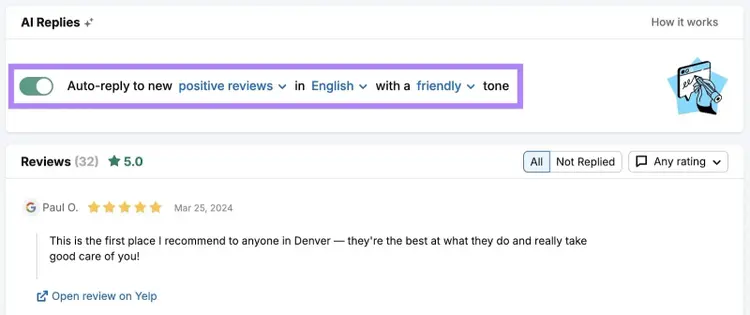
The AI can detect both positive and negative reviews and respond appropriately. It will also generate unique outputs each time, so your responses feel authentic and personalized.
2. Listing Management
Best GBP tool for local SEO visibility
- Website: Semrush
- Price: $139.95/month plus $30-$60 per location
Listing Management lets you transfer business information from your Google Business Profile to other online directories for local citations (i.e., online mentions of your business’s name, address, and phone number).
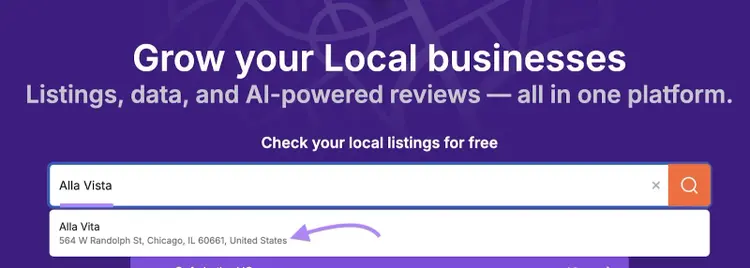
Google may have an easier time ranking local businesses with third-party listings that match their Google Business Profiles. And this tool makes it easy to keep your information consistent.
Key Features:
- Distributes citations across hundreds of directories, which is way faster than submitting individually
- Alerts you of inconsistencies so you can update your information quickly
- Identifies duplicate listings so you can remove outdated or repetitive information
My Favorite Part:
I like that Listing Management includes access to tracking maps that let you see the exact GPS locations where users see your listing.
Like this:
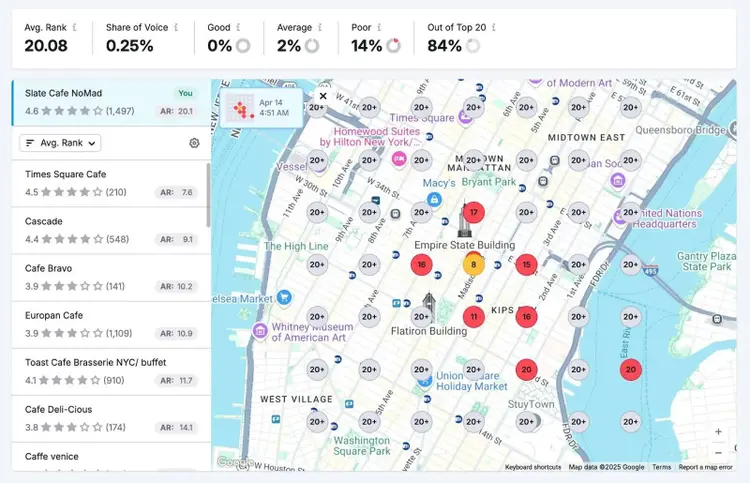
It’s visually compelling when you’re doing reporting for clients or stakeholders. And helps you identify the specific areas where your visibility can improve.
Increase Your GBP Visibility
with the Listing Management Tool
3. RecurPost
Best for GBP post scheduling
- Website: RecurPost
- Price: The starter account is $9/month.
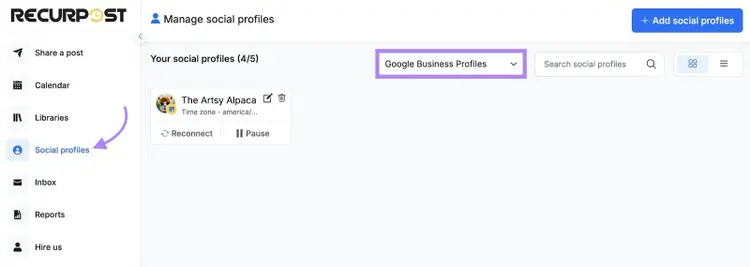
RecurPost is a social media management tool that lets you schedule Google Business Profile posts alongside other social media accounts.
Once you connect your accounts, you can start scheduling posts or creating content calendars for your GBP listings.
Key Features:
- Manage content calendars for your GBP profiles and stay on schedule more easily
- Use AI to generate GBP post ideas in bulk
- See all of your scheduled GBP posts in one place and easily reorder posting dates
My Favorite Part:
I like that you can create personas for your Google Business Profiles that reflect your brand’s image, voice, and tone.
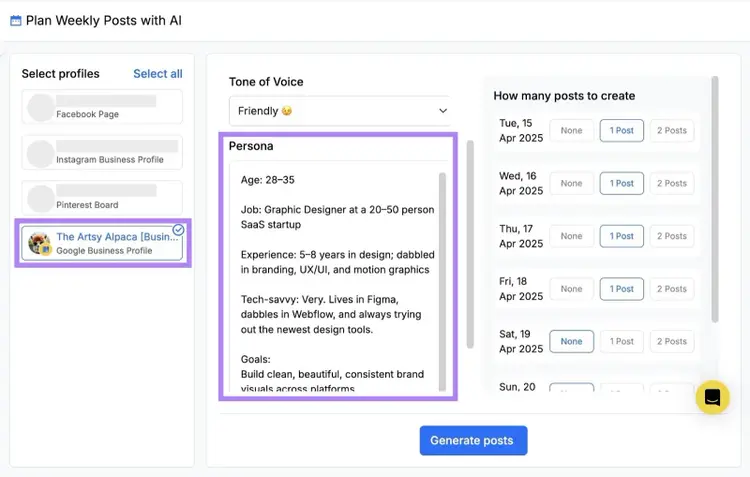
This can improve the quality of the outputs the AI generates. To save you time on editing and revisions.
4. GMB Briefcase
Best Google Business Profile tool for marketing agencies
- Website: GMB Briefcase
- Price: $99-$299/month, depending on your total listings
GMB Briefcase is an all-in-one Google Business Profile management software designed for marketing agencies and freelancers who manage multiple listings.
It lets you add up to 200 listings and includes the tools you need for comprehensive management services.
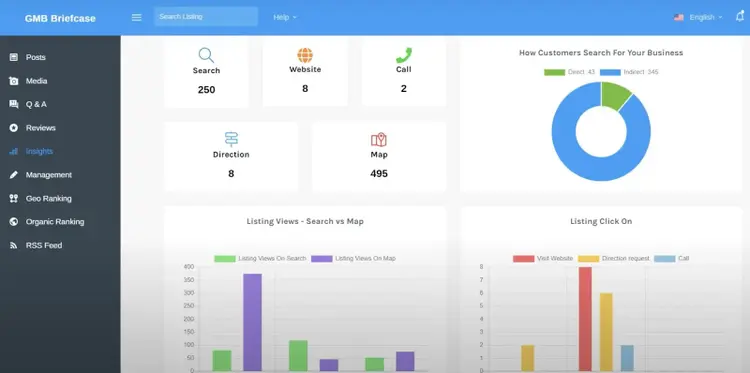
Key Features:
- Unlimited GBP posting, which is helpful for driving growth and keeping costs down
- An integrated GBP chatbot that can auto-respond to any queries that users submit on your listings
- Includes a white label subdomain option so you can present the dashboard with your own branding
My Favorite Part:
I like to start with the Google Business Profile audit tool to identify any issues with my listings and get ideas for improvement.
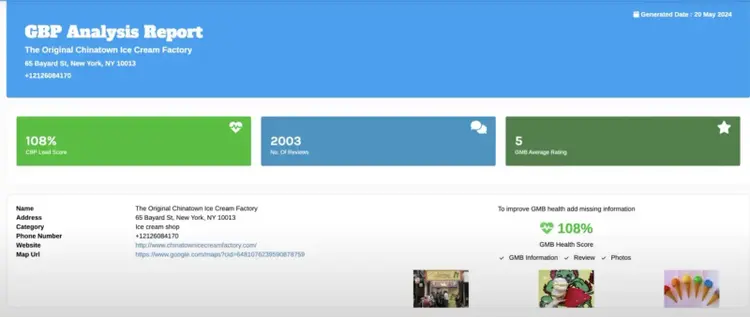
The report will also summarize all of your Google reviews. So you can identify common trends in customer feedback.
5. Whitespark
Best for tracking Google Business Profile updates
- Website: Whitespark
- Price: $1/month per location
Whitespark’s Local Platform helps you manage your profiles more efficiently and protects your listings from unwanted changes.
If multiple people have access to your listing, the tool tracks every update that’s been made (and when). So you can identify and fix mistakes quickly.
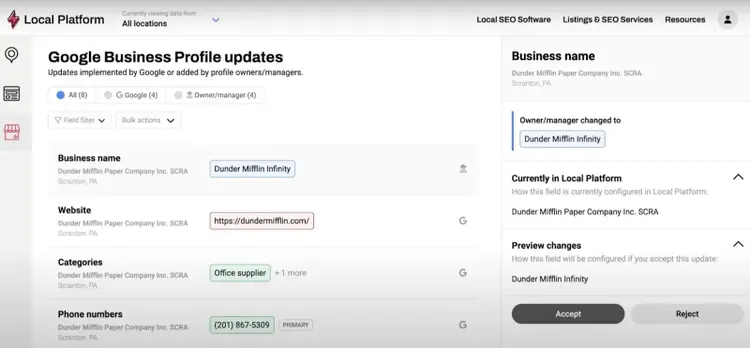
Key Features:
- Alerts you when there are changes to your profile and lets you reject them in one click
- Bulk editing feature lets you change multiple profiles at once, helping you keep your information consistent
- Google review links that you can generate and send to customers to acquire more reviews
My Favorite Part:
If you don’t have a website for your local business, Whitespark can create a basic one from your Google Business Profile data.
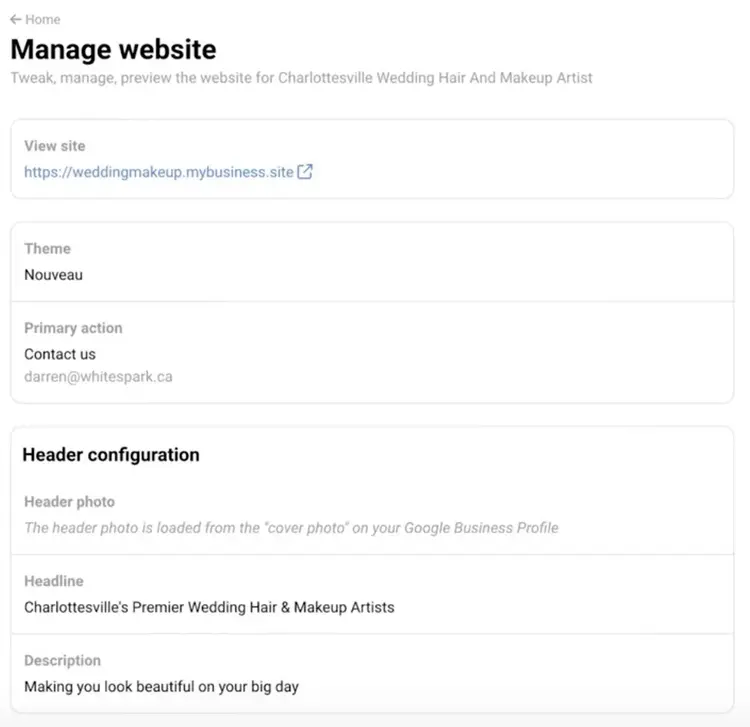
Although your local business may not need a website to be successful, it can help your GBP rank higher. If you don’t have the time (or budget) to build a site, this offers a quick solution.
6. Local Viking
Best GBP tool for white labeling
- Website: Local Viking
- Price: $39-$200/month, depending on number of listings
Local Viking is a Google Business Profile management software for agencies that offers comprehensive management services.
It includes a review management tool that makes it easy to filter through reviews to understand customer sentiment.
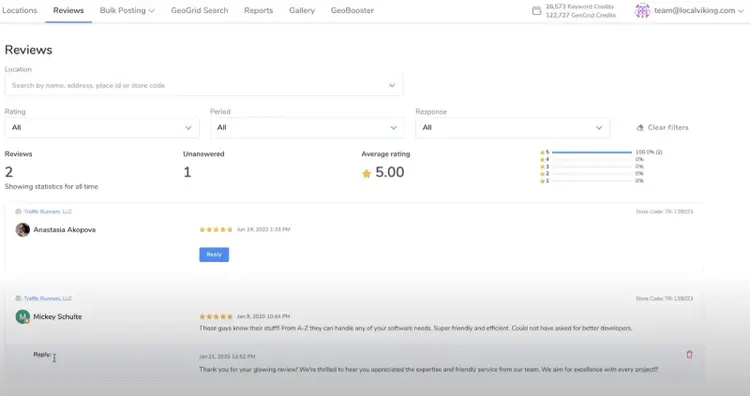
Key Features:
- Includes GeoGrids (i.e., interactive maps) that can make your local rank tracking more impactful and interactive
- Allows keyword tracking for local keywords, regardless of whether you’re a local service business or not
- Offers an optional mobile app called GeoBooster that syndicates content from your websites to your profile listings
My Favorite Part:
Local Viking’s white label option lets you personalize your dashboard with your own branding, including your domain, company name, logo, and primary brand color.
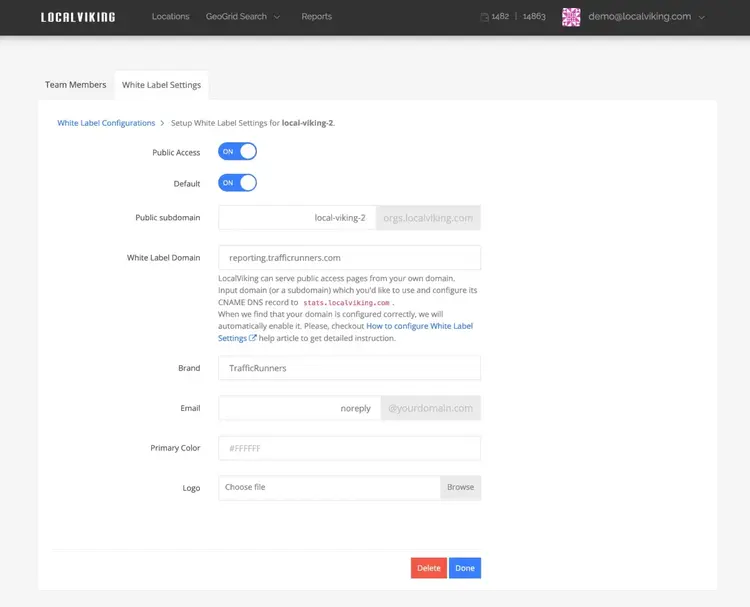
This puts your brand front and center when collaborating with team members or clients in the tool.
7. Sendible
Best GBP scheduling tool for one-person businesses
- Website: Sendible
- Price: Individual plans start at $29/month
Sendible is a social media scheduling tool that helps you plan Google Business Profile content months in advance (and in bulk).
After you connect your listing in the “Add profiles” menu, you can start planning and scheduling your posts.
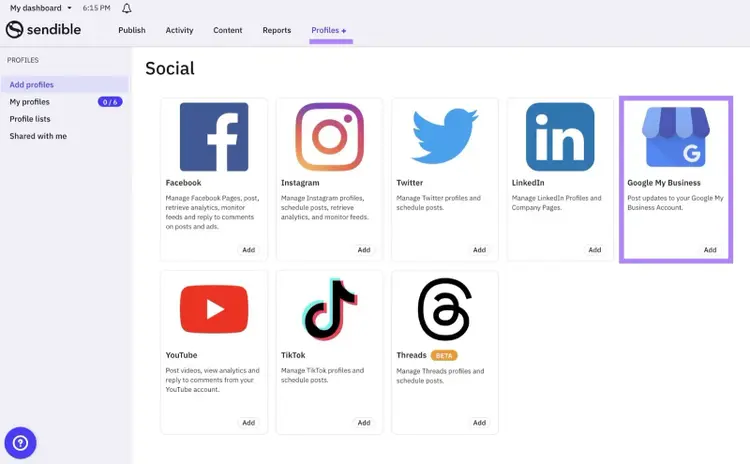
Key Features:
- Social media calendar that lets you see all of your scheduled posts at a glance
- Drafts option that makes it easy to save or edit posts that aren’t ready for publication
- Social feed option that lets you track social media engagements in the dashboard
My Favorite Part:
I like the built-in Canva integration, which can help you improve the quality and appearance of your Google image posts.
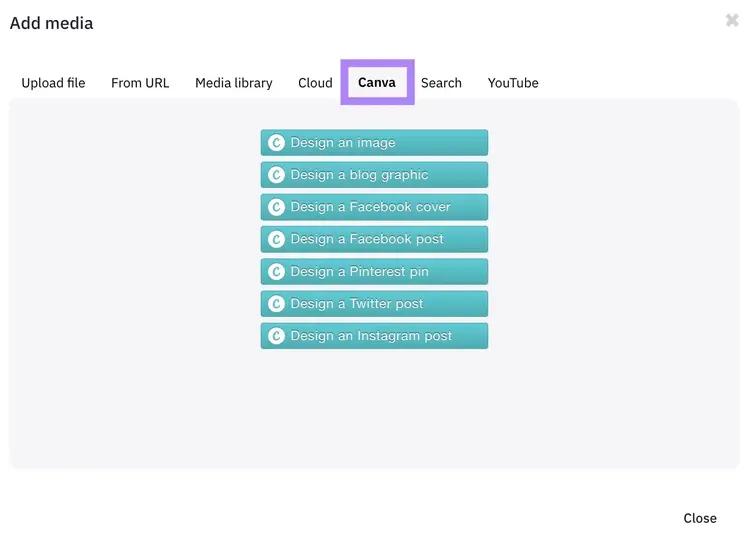
It’s a fast way to make improvements that may lead to more engagement on your listing.
8. Local Brand Manager
Best GBP tool for multi-location businesses
- Website: Local Brand Manager
- Price: $39-$200/month, depending on your total listings
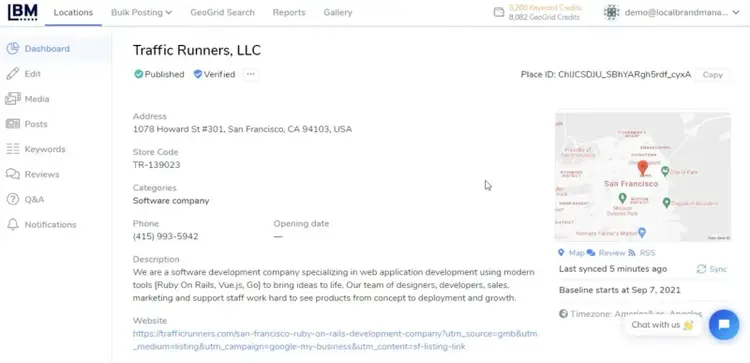
Local Brand Manager lets you manage unlimited Google Business Profiles. It’s ideal for enterprise businesses that do GBP management at scale.
Enterprise clients can manage up to 7,500 listings from the dashboard and complete optimizations in bulk.
Key Features:
- Bulk GBP posting, which lets you upload content from a spreadsheet or CSV file
- Embeds location-rich metadata into your Google Business Profile photos (i.e., geotagging)
- Syncs information across multiple listings so you don’t have to update listings individually
My Favorite Part:
This tool’s automated reporting feature will group insights for multiple locations into one document.
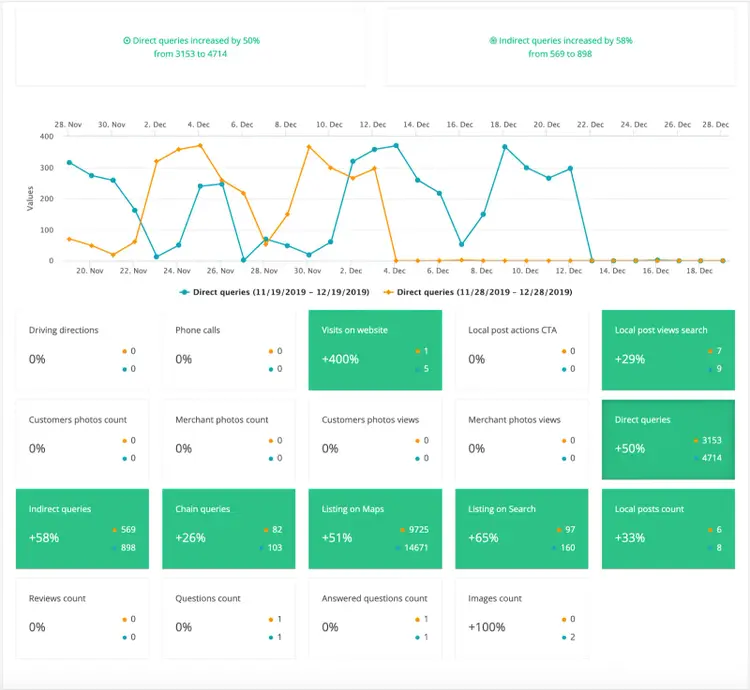
Which lets you draw insights quickly. And showcases the impact of your GBP management across the entirety of your brand. Not just one location.
9. Sekel Tech
Best for GBP lead generation and tracking
- Website: Sekel Tech
- Price: Contact vendor
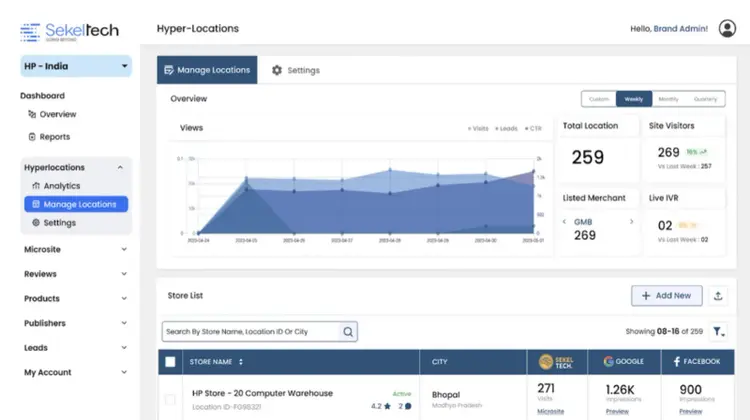
Sekel Tech is a comprehensive platform for businesses to connect with more local customers online, including via their Google Business Profiles.
The platform is focused on lead generation, helping you optimize your profiles to generate more phone calls, appointments, and foot traffic.
Key Features:
- Lets you manage all of your listings in one place
- Integrates with45-plus other popular marketing tools, so you can leverage all of your data in your local SEO strategy
- Retargeting options let you reconnect with users on other platforms who have visited or interacted with your Google Business Profile
My Favorite Part:
You can track how many location views, phone calls, and form submissions you get on your GBP listings.
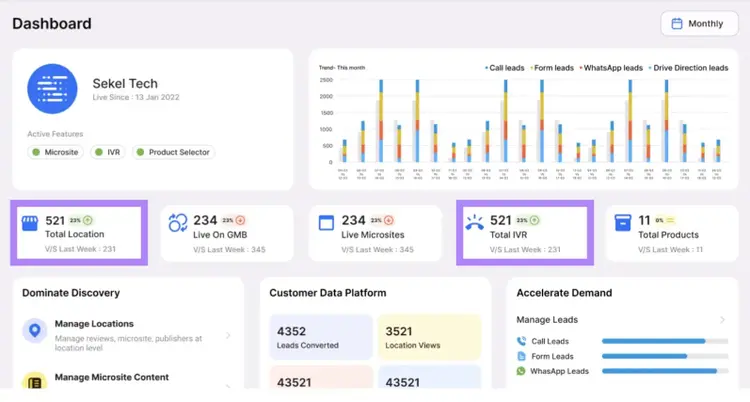
To help you quantify the value of your local SEO strategy to your business or agency clients. And help you make a compelling case for continued efforts.
How to Choose a Google Business Profile Management Tool
The best local SEO tools for you will always depend on your unique needs and pain points.
But here’s a process you can follow when evaluating and choosing tools:
- Confirm how many listings you have (Note: Some tools won’t support hundreds of listings)
- Determine the features that are most helpful to your marketing workflows
- Compare subscription prices and check for feature quotas or limitations (which may add costs)
- Test out your top tools and determine your favorites before committing
Keep Growing Your Local Business
Regardless of the GBP management tool you choose, your Google Business Profile is just one of many third-party listings your business can have online.
You’ll still need to track the hundreds of other places where your business information appears. Listing Management can help you monitor all of them.
Start by entering your local business information and checking your listings.
You’ll see all your current listings in the “Listings” tab. If there are any issues, the tool will flag them.
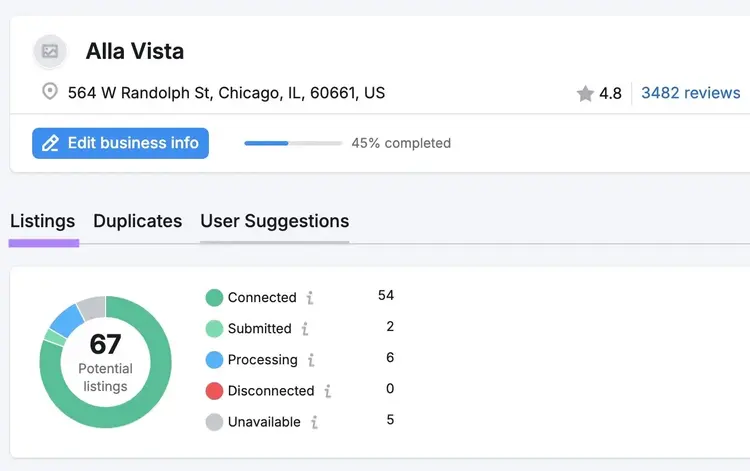
Make sure to check back regularly to confirm your listings match the information on your Google Business Profile.
Increase Your Local Visibility
with the Listing Management Tool

Cecilia is a senior editor and strategist with more than 12 years of experience shaping editorial strategies, refining brand messaging, and leading high-impact teams. She began her career in print and digital editorial leadership roles before transitioning to SEO and digital marketing, focusing on data-driven strategies. She‘s passionate about ensuring operational efficiency, upholding editorial standards, and mentoring writers to deliver top-quality, brand-aligned content.
Cecilia Meis
Cecilia is a senior editor and strategist with 12+ years of experience spanning print, digital, and SEO. She’s passionate about optimizing editorial processes, upholding quality standards, and mentoring writers to deliver brand-aligned content.

Tells Google to show you more from Semrush in AI, Search, and Discover.