If you want to know how to start a blog for personal or business purposes, you’ve come to the right place.
This post contains everything you need to know to launch a space for articles and start attracting readers.
But before going over how to create a blog, let’s start with some foundational knowledge.
What Is a Blog?
A blog is a website or part of a website where you publish written articles (blog posts) aimed at a particular audience.
And there are two main types of blogs.
Personal blogs are run by individuals who share their thoughts, experiences, expertise, or hobbies (sometimes a combination). These blogs can be monetized through advertising, sponsorships, etc.
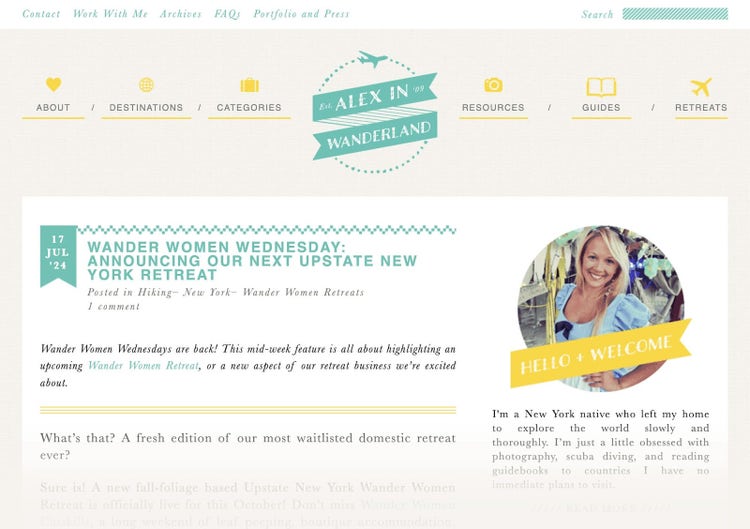
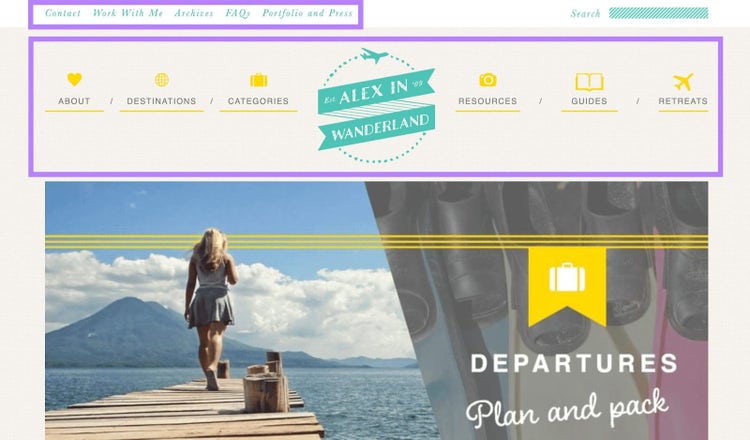
Alex in Wanderland is an example of a personal travel blog:
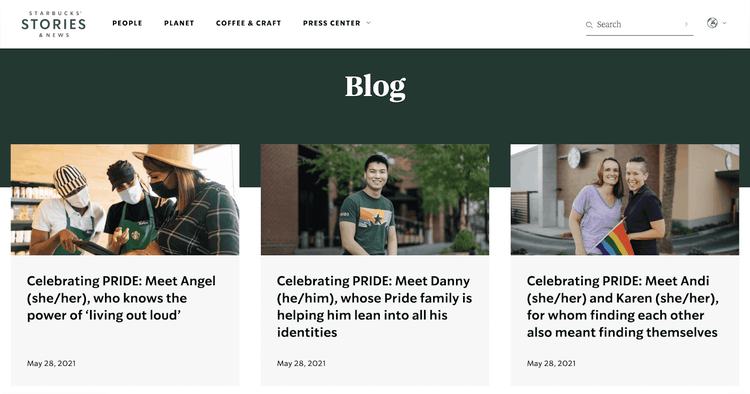
Business blogs are usually part of a company’s website. They’re typically used as a marketing tool to attract and engage potential customers.
For example, here’s a snapshot from the Starbucks blog:
Should You Start a Blog?
You should consider starting a blog if you have knowledge, experiences, and/or ideas to share. And are willing and able to write on a regular basis.
As a personal blogger, you can use your blog as a creative outlet. And a way to connect with like-minded people in your community.
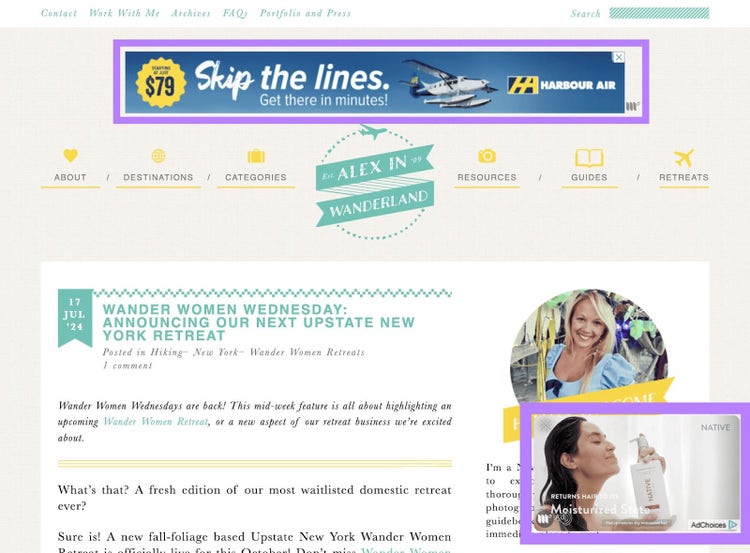
Plus, it’s possible to monetize your blog through advertising, including affiliate links, publishing sponsored posts, or other means.
Here’s an example of how a blog can run ads:
Some people treat their blog as a side hustle. But others make a full-time income from blogging.
As a business blogger, you can use your blog to generate leads and sales.
That’s because blog posts can help you attract website traffic, increase brand authority, and foster relationships with your audience. Which eventually translates to business goals.
How to Start a Blog in 10 Steps
Starting a blog in 2024 is more straightforward than it might seem.
Here’s a 10-step process to help you create a successful blog from scratch.
1. Choose a Niche for Your Blog
Your blog niche is the topic your blog focuses on—e.g., personal finance, health, or technology.
As a personal blogger, consider these factors when choosing a niche:
Personal interest and expertise: Choose a topic you’re passionate and knowledgeable about. This will help you stay motivated and produce quality content.
Demand: The level of appetite for content in this niche. It depends on the popularity of the topic and the amount of competition from other bloggers. Specialist topics (e.g., folk music in the U.K.) tend to have smaller audiences but attract less competition than broad topics (e.g., pop music).
Profitability: If you’re looking to monetize your blog, consider the profit potential. Some niches are easier to monetize because they have more commercial appeal, for example.
As a business blogger, focus on topics related to your business. It’s the only way to attract the right kinds of readers and build industry authority.
Tip
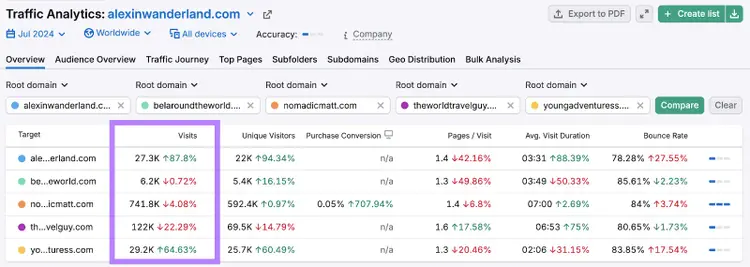
Use the Traffic Analytics tool to find out how much traffic other blogs in your chosen niche get. This helps you understand the size of your potential audience.
Support and community: Consider the availability of customer support and community resources if you need help
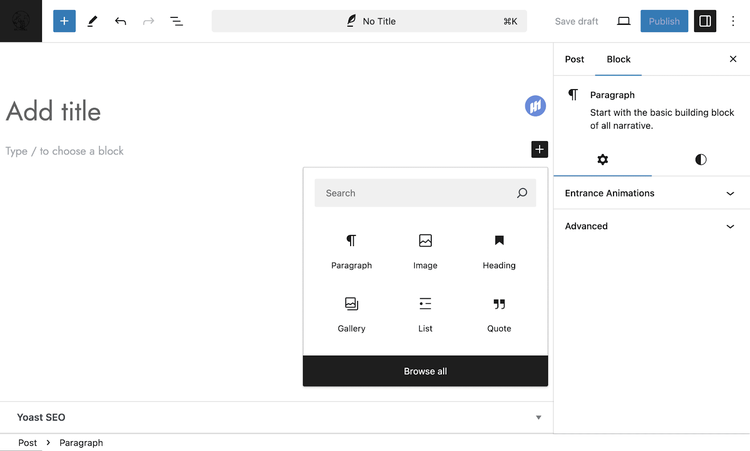
WordPress is one of the most popular blogging platforms. Because it does well regarding many of the factors listed above.
But you do need some technical knowledge to get going. And make the most of the platform.
Here’s a quick guide to some alternative blogging platforms:
Wix: Best for beginners who want a simple, intuitive platform with decent customization—without coding
Squarespace: Best for professional design and integrated ecommerce. It’s also good for bloggers who want a visually appealing site with easy-to-use tools and shop functionality.
Ghost: Best for publishing-focused websites and membership sites (like those focused on education or coaching). And excellent for those seeking a clean, fast platform with strong SEO and membership capabilities.
Blogger: Best for simplicity and free blogging. Also ideal for beginners or hobbyists who want a no-cost, easy-to-use platform with basic features.
Substack: Best for newsletters and monetization through subscriptions. And great for writers who want to build a direct relationship with their readers via email.
Medium: Best for ease of use and reaching a built-in audience. Also suitable for personal bloggers focused on content creation who don’t want to worry about design or technical aspects.
3. Register Your Domain Name
Your domain name is the main web address where visitors find your blog. And it’s best to have it reflect your blog’s name (e.g., Alex in Wanderland’s domain name is “alexinwanderland.com”).
Some blogging platforms let you host your blog on their domain. Which means you end up with a URL like “example.wordpress.com” or “example.blogger.com.”
But we recommend that you pay for a custom domain name. Because it’s better for branding and SEO purposes. And it gives you more control over your website.
Here are some best practices for naming your blog:
Aim for a short, simple name that reflects your blog’s topic
Don’t use numbers or special characters
Choose something that’s easy to spell and read aloud
Avoid names that are too similar to other brand names
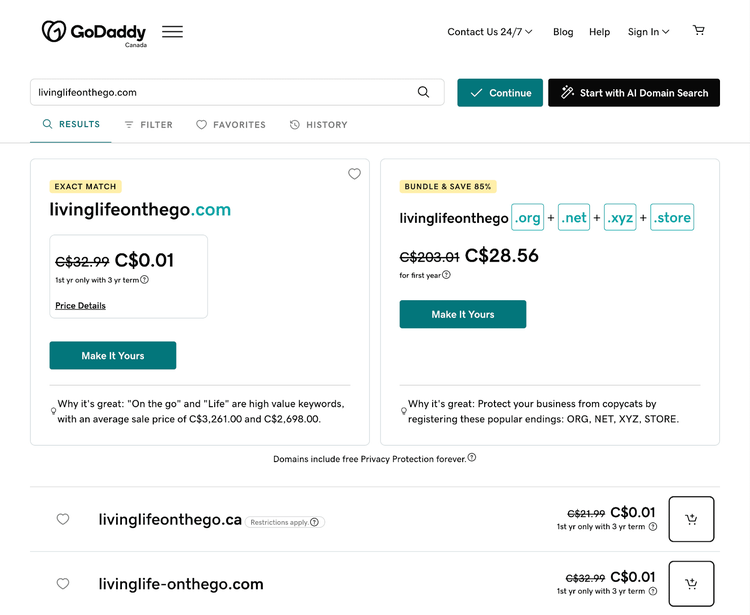
Once you’ve shortlisted some names, use a domain registrar like GoDaddy to see which ones are available.
Tip
It’s a good idea to reserve the “.com” domain name because that’s what many users will type by default.
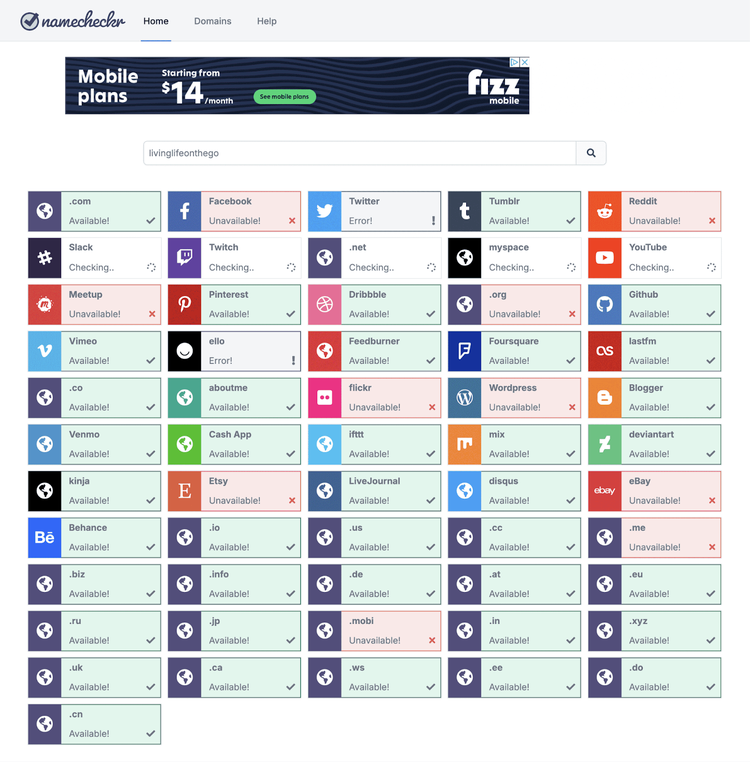
Next, use Namecheckr to see whether your blog name is available to use as a handle on social media platforms.
This is important for maintaining consistent branding across the web. And it makes it easier for people to find you.
If you’re happy with what you discover during research, purchase and register your chosen domain. (You can do this using GoDaddy or a similar service.) And reserve the usernames on any social media platforms you might use.
4. Select a Hosting Provider
A hosting provider stores your blog’s files and makes them accessible online. And the provider you go with can have implications for your blog.
Some blogging platforms offer free hosting or integrated hosting services. Otherwise, you’ll need to organize your own hosting.
The main types to choose from are:
Shared hosting: This type involves sharing server resources with other sites and is usually the most affordable. It’s typically best for small blogs that have relatively low traffic volumes.
Virtual private server (VPS): This kind of hosting involves sharing a physical server but getting a dedicated virtual space for your blog. It offers slightly more control and works better for growing businesses.
Dedicated hosting: This option gives you a dedicated server and offers high performance. It’s better for larger, higher-traffic websites.
Cloud hosting: This type uses a virtual server network to host multiple websites. It’s best for those who need flexibility and scalability.
When deciding on a hosting plan, consider factors like:
Server speed: This affects how quickly your site loads for visitors
Uptime guarantees: These ensure that your blog remains accessible to readers without frequent interruptions
Customer support: Good support helps you resolve issues swiftly and keeps your blog running smoothly
When you’re just starting a blog, it’s wise to pick a basic hosting plan. And one that offers the flexibility to upgrade as your audience grows.
5. Create Reader Personas
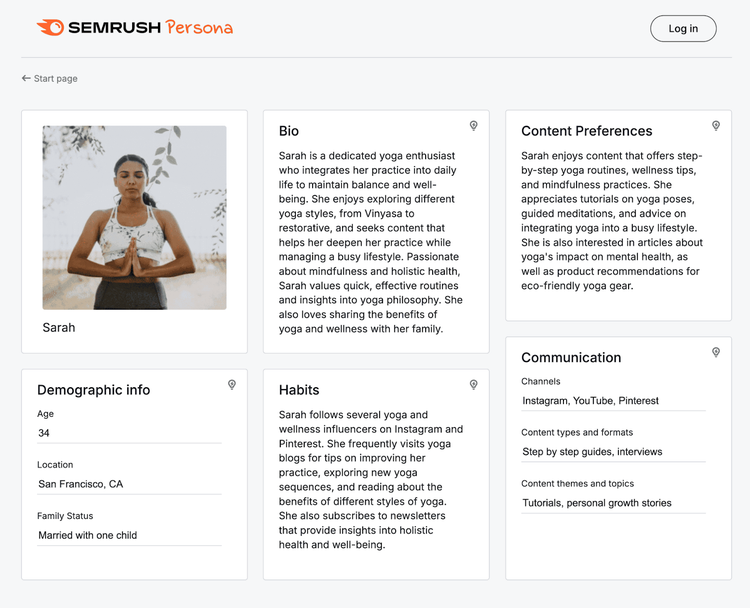
Reader personas are character profiles that represent the kinds of people you want to read your blog.
They help you understand and visualize your target audiences. So you can engage them more effectively.
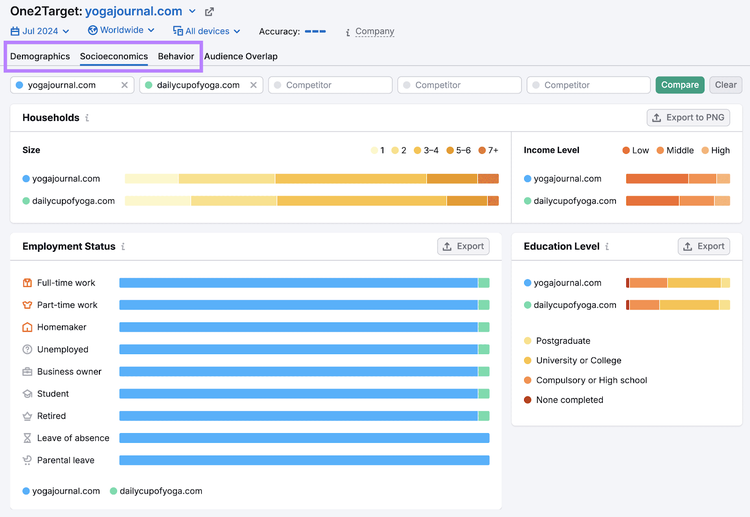
For example, a yoga blog might create a reader persona like this:
You can create personas like the one above with the Semrush Persona tool.
The quickest way to do that is to use the One2Target tool to study your competitors’ audiences. And uncover demographic, socioeconomic, and behavior data.
Setting up your blog correctly ensures it gets off to the best possible start. And reduces the risk of issues in the future.
Here’s how to do it:
Design Your Blog
A well-designed blog enhances the user experience, making it more likely that readers will stay and explore your content.
We recommend that you browse other blogs in your niche. To see what kinds of designs are likely to work well and meet your audience’s expectations.
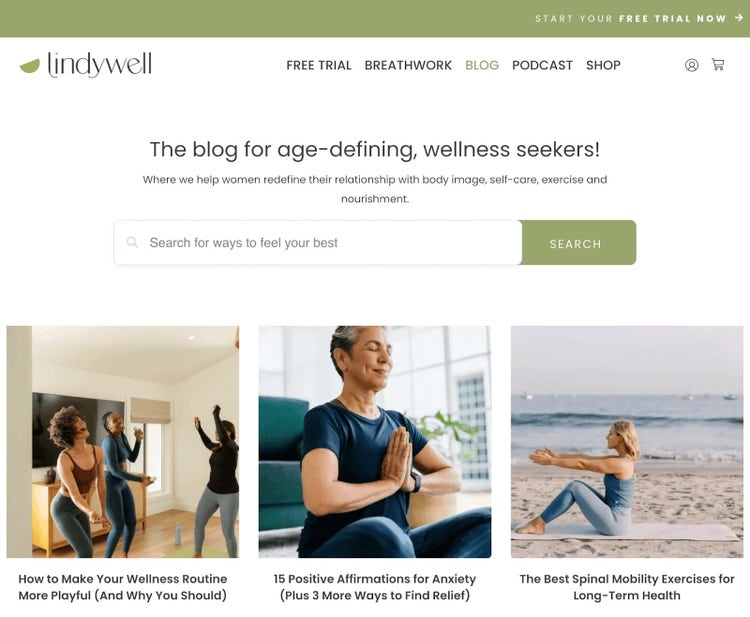
For example, wellness blogs tend to have minimalist designs in calming colors. Like the Lindywell blog:
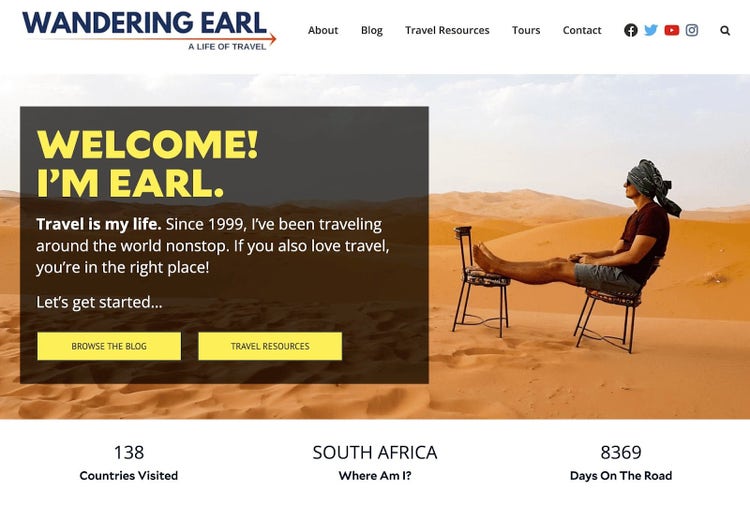
And travel blogs tend to be bold and vibrant, to convey a sense of adventure. Like Wandering Earl:
Here are the main elements to consider when designing your blog:
Logo: Create or commission a strong, memorable logo to represent your blog. This will help you strengthen your branding across the web.
Typography: For a consistent look, restrict your blog to two or three complementary fonts. Make sure they’re all readable and reflective of your overall aesthetic.
Layout and navigation: Ensure your blog has a clear, intuitive structure. Add easy-to-navigate menus and organized content sections.
Color scheme: Stick to a palette of three to five colors. To maintain a cohesive and visually appealing look.
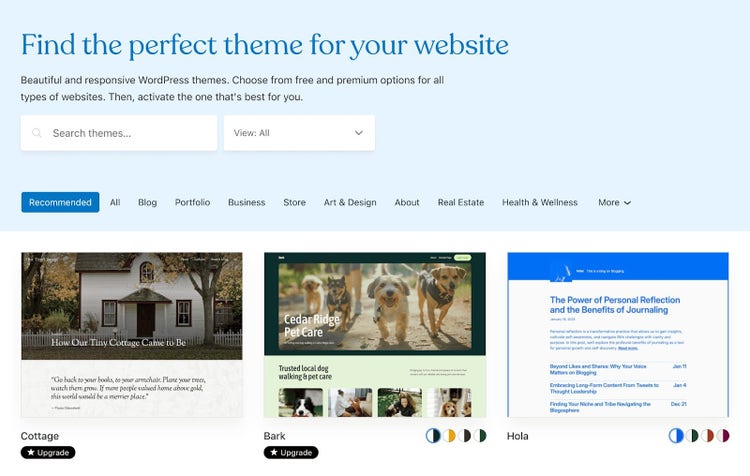
Most blogging platforms offer customizable templates or themes that make it easy to re-style your blog.
For example, here’s a peek at the WordPress theme library:
Just ensure the theme supports the functionalities you need. Like social media integration and responsive design (which is best for ensuring it’s easy to visit your site on any device).
Add Static Pages
In addition to publishing blog posts, you need to create static pages that provide critical information to your readers. So they don’t have to dig for answers.
Here are some of the pages you might want to create:
Homepage: Serves as the first impression, showcasing your blog’s focus and inviting visitors to explore further. It’s a good idea to automatically showcase your latest posts here.
About page: Offers insight into who you are and what your blog is about. To help you build a connection with your readers.
Contact page: Contains contact information and/or a contact form. This allows visitors (or potential sponsors) to get in touch with you directly.
Privacy policy/terms of service: These pages outline your blog’s privacy practices, terms of use, and legal disclaimers. They’re often required if you collect user data or run ads.
You should link to the most important pages from your main navigation. Like this:
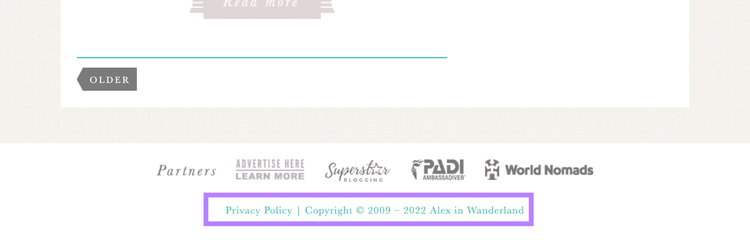
Link to less important pages from the footer. Like this:
Make Sure Search Engines Can Index Your Blog
When your blog is indexable, search engines can list your pages in search results. Meaning readers are more likely to discover your content.
Here are three main elements you need to check:
XML sitemap: This website file should list all the pages you want to show in search results. Some blogging platforms create it for you automatically. And it’s a good idea to submit your sitemap to Google through Google Search Console.
Robots.txt: This website file tells search engines which pages should and shouldn’t be crawled. It’s likely that the blogging platform will create this automatically. But you might want to check for yourself.
Meta robots tags: Tags that tell search engine bots how to crawl, index, and display a page. You can typically control these through a plugin like Yoast SEO.
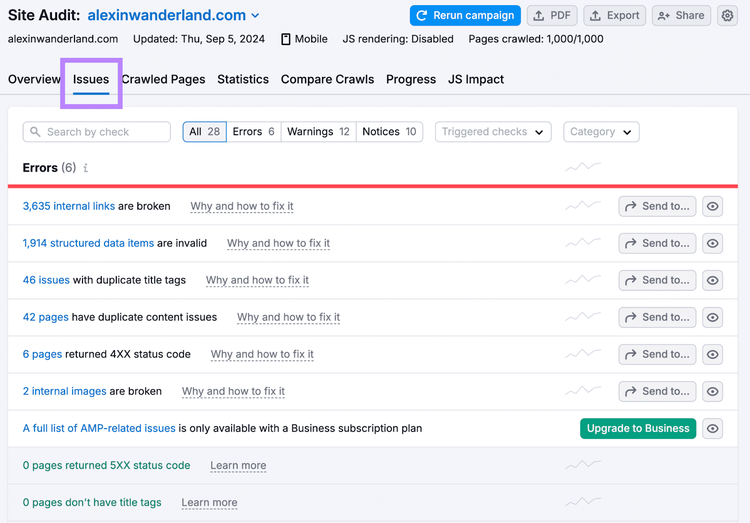
We recommend that you scan your blog with Semrush’s Site Audit tool.
It checks for crawling and indexing issues (and lots of other SEO problems) on your site. And provides advice on why and how to fix them.
7. Plan Your Blog Content
At this stage, plan the types of content you’ll create and decide how frequently you’ll publish.
This will help ensure that your content aligns with your audience’s interests. And that you’re able to maintain a consistent posting schedule.
Here’s how to make a blog plan:
Find Target Keywords
Keywords are words or phrases that users enter into search engines to discover content.
Finding and analyzing keywords allows you to identify popular topics in your niche. And create blog posts that get more traffic from search engines.
To start, brainstorm core ideas related to your blog’s niche. Think about the main subjects your audience might be interested in.
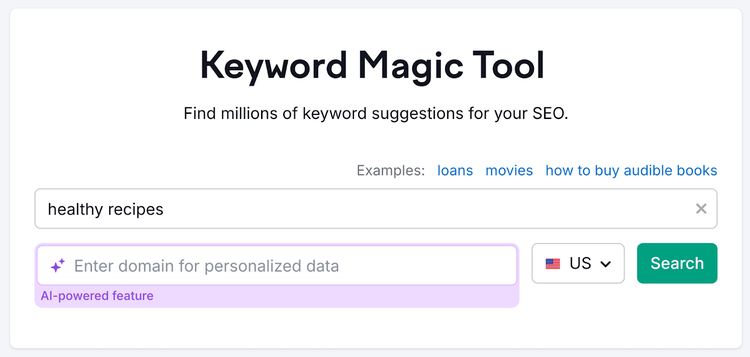
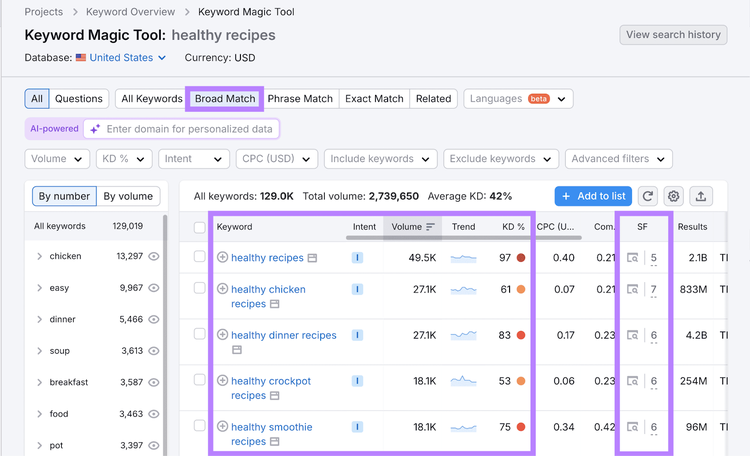
The tool will show “Broad Match” keywords that include your starting term or a close variation.
And you’ll see these useful metrics:
Intent: The type of search intent, which indicates what the user wants to achieve. Blog posts typically perform best when focused on informational keywords, but they can rank for other types.
Volume: The keyword’s search volume, which refers to the average number of monthly Google searches. The higher the volume, the higher your content’s potential reach.
Trend: How search volumes have fluctuated over the past 12 months. You might want to avoid keywords that are declining in interest or are out of season.
KD%: The keyword difficulty score, which indicates how hard it'll be to earn a high organic ranking. As a new blogger, it's a good idea to target keywords with a score from 0% to 29%.
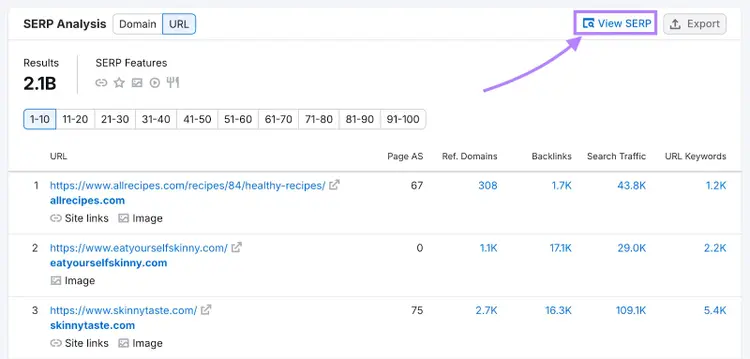
SF: The number of SERP features (non-standard results) that appear in Google’s results. You can click the icon to view the results page for yourself.
Consider all these metrics as you home in on terms that are most relevant to your blog. And use them to inform your decisions.
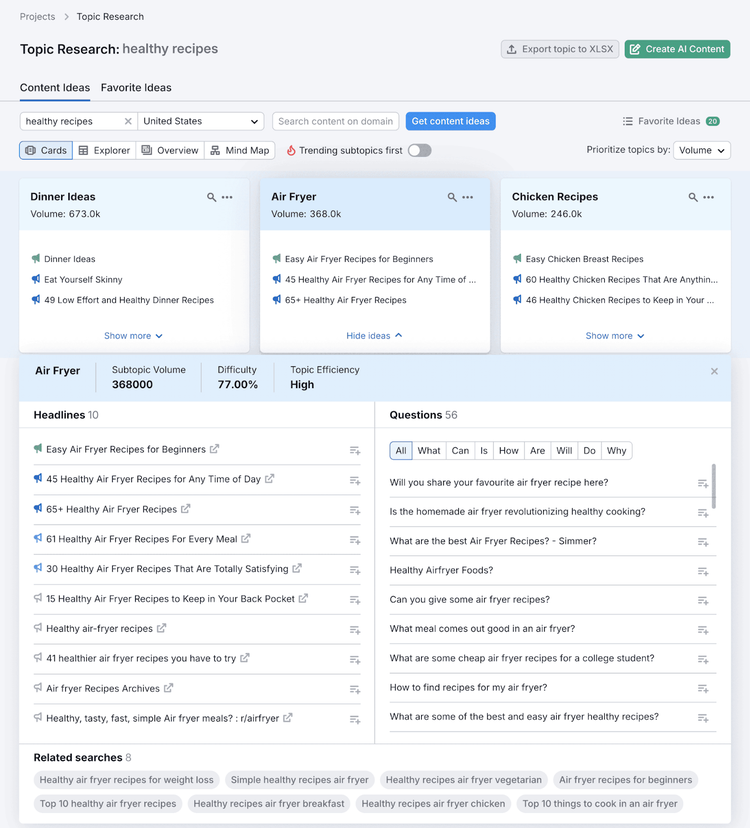
Also enter your core topic into Semrush’s Topic Research tool. To discover popular and trending subtopics.
Tip
Check out our dedicated guide for more ways to come up with blog ideas.
Map Topic Clusters
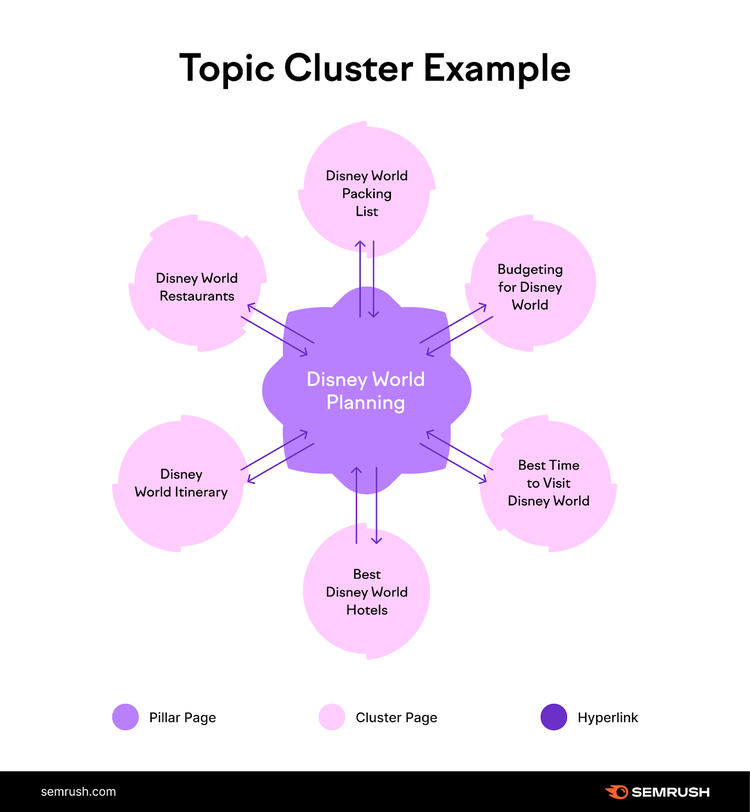
Topic clusters are groups of pages that work together to comprehensively cover a subject. Which can boost reader engagement and build topical authority that ultimately leads to more traffic from search engines.
There’s a central pillar page that provides an overview of the core topic. And cluster pages that cover associated subtopics.
These pages are linked together like this:
Use your list of keywords and topics to plan topic clusters like the one above. (Keep in mind that multiple keywords can relate to one topic and be targeted together on one page.)
Tip
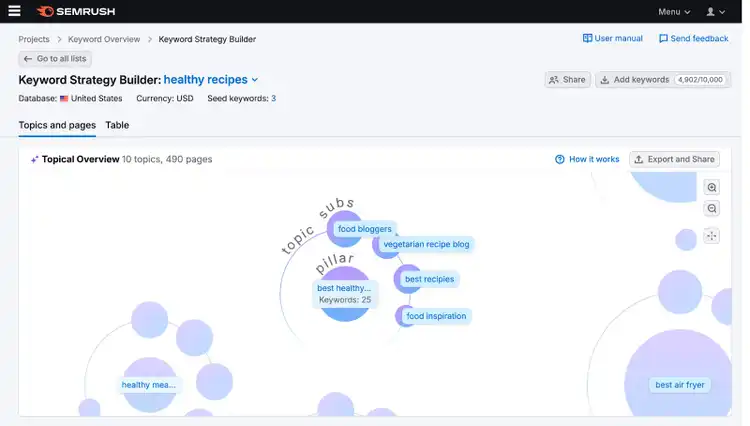
Enter a keyword or keyword list into Semrush’s Keyword Strategy Builder to create topic clusters using AI.
As a rule of thumb, it’s good to publish at least one blog post per week. To keep your audience supplied with a steady stream of content and encourage them to build a reading habit.
To design your ideal posting schedule, consider your:
Niche and reader personas: For example, if you’re writing news-related articles, it might be important to publish at least once per day
Available resources: Evaluate how much time you have to create quality content. And remember that quality beats quantity.
Goals: If you’re blogging as a hobby, the posting frequency doesn’t matter too much. But if you’re keen to build your readership and revenue, you’ll need to treat your schedule more seriously.
If you’re unsure of the proper cadence, start blogging slowly and build your way up. You don’t want to overwhelm yourself or promise your readers something you can’t deliver.
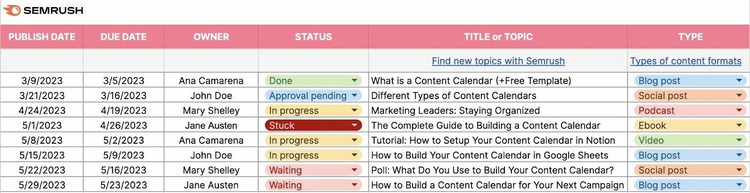
Create a Blog Calendar
A blog calendar outlines what posts to create and when to publish them. It can also help you track the status of your posts and other useful information about them.
We recommend planning posts at least one month in advance. That should give you enough time to prepare your content. And help you maintain a regular posting schedule.
Don’t forget to consider any seasonal trends or upcoming events.
8. Write & Optimize Your First Blog Post
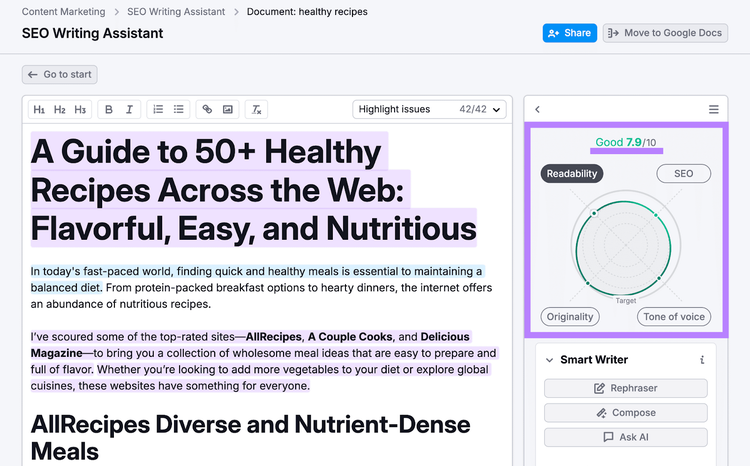
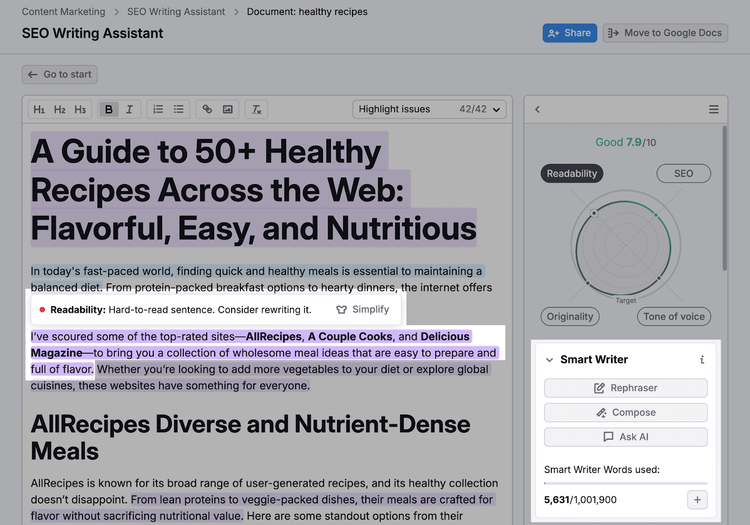
You’ll want to launch your blog with at least one post. So, let’s go over how to write a blog post. And optimize it for users and search engines.
Avoid duplicate meta descriptions across different pages
Reflect your overall blog’s tone and style
Use active language to engage readers
Tip
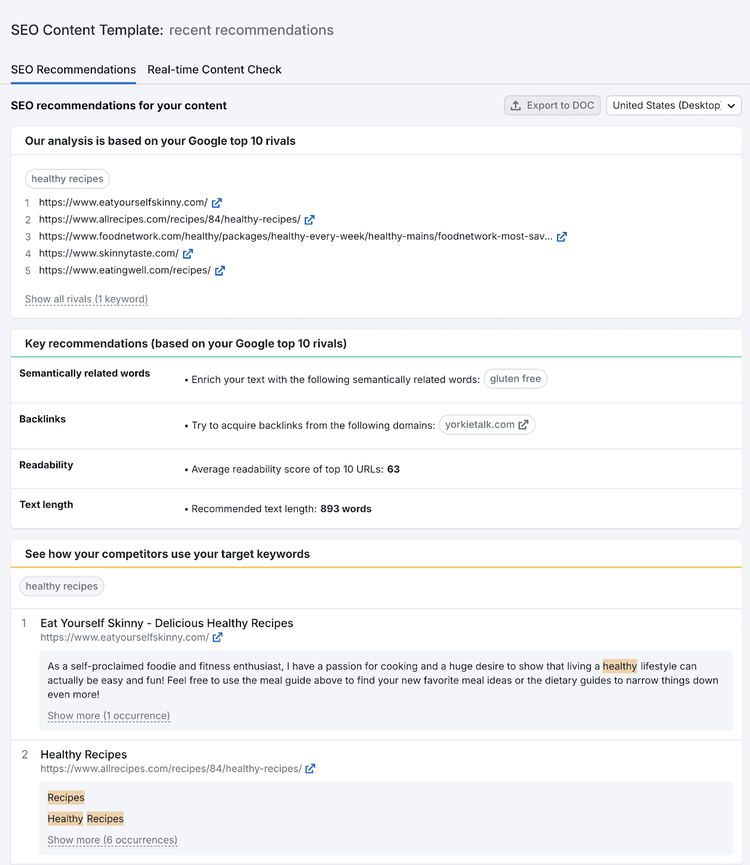
View the non-personalized search results for your target location with Semrush’s Keyword Overview tool. That way, you can get inspiration from your competitors’ titles and descriptions.
Create a Content Outline
A content outline details the structure you’ll use in your blog post. And summarizes the main things you want to include or achieve.
It helps you plan your content effectively and streamline the writing process.
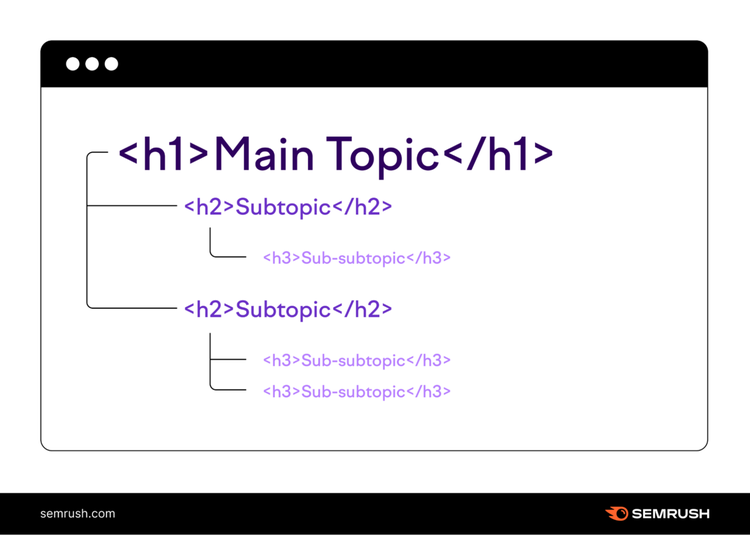
First, plan a logical heading structure.
A well-structured heading layout improves the user experience by making content more accessible and digestible. And also helps search engines index your pages accurately—to enhance your SEO efforts.
To craft an effective heading structure, start with a single H1 for your main title and use H2s for major sections. You can then nest H3s under H2s, H4s under H3s, etc., as needed.
Like this:
Keep headings concise yet descriptive to convey what each section is about.
Then, use bullet points to note what you’ll include where.
Write Your First Draft
You’re now ready to write the first draft of your blog post.
To ensure it performs well with users and search engines, follow these best practices:
Focus on satisfying search intent—i.e., giving the target reader what they want
Tailor your tone of voice to suit your reader persona(s)
Apply the bottom line up front (BLUF) principle—i.e., in each section, provide the most important information first and go into more detail later
Incorporate your target keywords into the content, where natural
Add internal links to other pages on your blog, where relevant
Add external links to your sources or useful resources, where relevant
Images play a crucial role in making your blog posts engaging and visually appealing. Because they help capture readers’ attention and may enhance your blog’s visibility in search results.
Here are some best practices for using images in your blog posts:
Optimize file sizes. Ensure images are compressed to reduce load time without compromising quality.
Choose the right format. Use JPEG for photographs and PNGs with transparent backgrounds for graphics (to ensure they display properly).
Include descriptive alt text. Alt text helps search engines understand image content and improves accessibility.
Use relevant file names. Name files with keywords related to the content, which aids in search engine indexing.
Ensure responsive design. Images should adjust properly on different devices for a seamless user experience.
Maintain consistent style. Use a consistent visual style that aligns with your brand to create a cohesive look.
By following these practices, you enhance your blog’s user experience and SEO.
Tip
Check out our image SEO guide for more information.
9. Launch & Promote Your Blog
Launching your blog is likely as simple as clicking a button. But it depends on the platform you’ve used.
Promoting it means engaging in activities that increase its visibility and attract readers.
Here are some effective ways to promote your blog:
Share It on Social Media
Social media marketing is a great way to promote your blog. Because it offers huge potential for reach and engagement.
It allows you to directly connect with your audience, drive traffic to your blog, and build a community around your brand.
To promote your blog effectively:
Share links to your posts and other types of content
Engage with followers by replying to comments
Use eye-catching visuals
Use hashtags to expand your reach
Collaborate with fellow bloggers to tap into each other’s audiences
Tip
Semrush Social helps manage your accounts. It lets you schedule posts and track performance across multiple platforms.
Create a Newsletter
A newsletter is an email you send to subscribers with blog updates and other info. Which helps you keep readers informed, drive traffic to your blog, and build a loyal audience.
And most email marketing solutions offer detailed analytics. So you can see how many people opened your newsletter, how many clicks it got, etc.
To create a newsletter:
Choose an email marketing platform or plugin
Design a template that complements your blog
Add a sign-up form on your blog
Send regular updates (and exclusive content, if possible) to your subscribers
Use analytics to improve
Collaborate with Other Bloggers
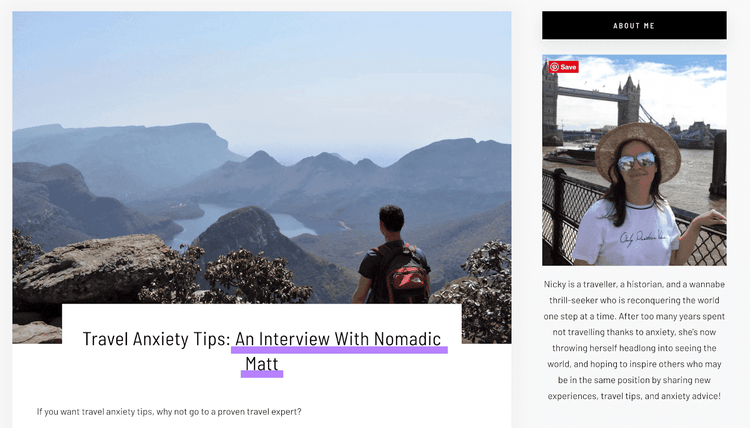
Collaborating with other bloggers in your niche (or related niches) can be an effective way to reach new audiences.
For example, Nomadic Matt gave an interview to That Anxious Traveller:
You could also try writing a guest post for another blog.
Reach out to your favorite bloggers with your ideas. And see what they have to say.
While your blog is still in its infancy, you may have to do a little more persuading. So, try attaching other samples of your writing or providing in-depth proposals for them to consider.
10. Monitor Your Blog’s Performance
Monitoring your blog’s performance helps you see what’s working and what isn’t. So you can improve over time.
It also allows you to gather data (e.g., about reader numbers) that could help you monetize your blog in the future. Or prove its value to stakeholders.
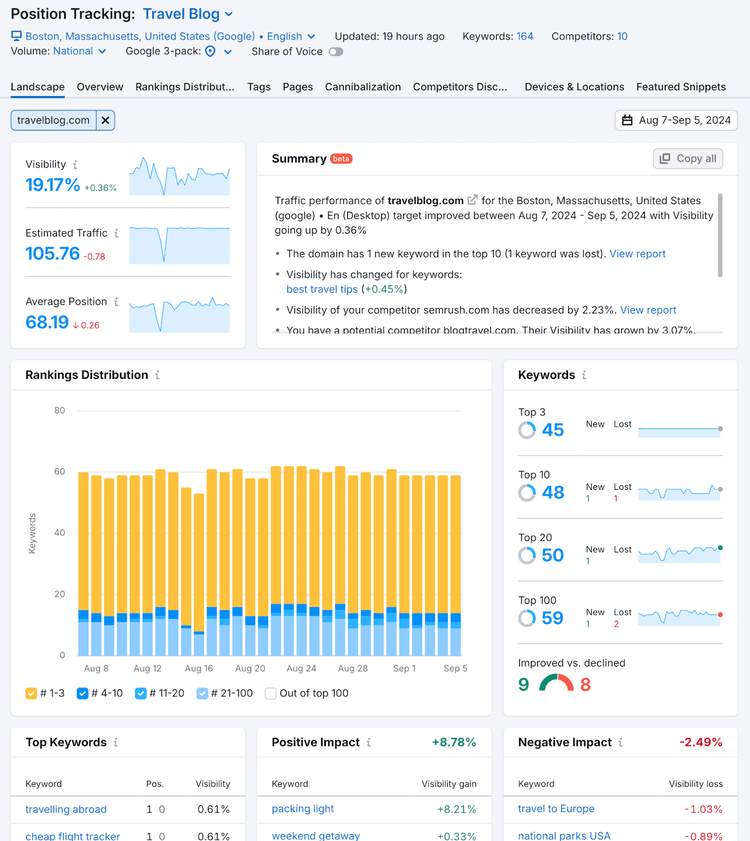
To see how your blog is performing in Google Search, use Semrush’s Position Tracking tool.
It shows where your blog appears in search results (i.e., where it “ranks”) for target keywords. And makes it easy to monitor your visibility over time.
Visitors: The number of unique users who come to your blog
Average time on page: How long the average user remains on a given page
Conversions: How many readers take a desired action (e.g., sign up for your newsletter)
You can also see if you’re attracting the right kinds of demographics, discover which promotional efforts drive the most traffic, and much more.
11. Monetize Your Blog (Optional)
If you’re looking to monetize your blog, here are some options to consider:
Affiliate marketing: Promote products or services on your blog and earn a commission for every sale made through your referral links. This works well if you can align affiliate products with your blog’s content and audience interests.
Display ads: Sign up for ad networks like Google AdSense to display ads on your blog. You earn revenue based on clicks or impressions. This is a straightforward way to generate passive income, especially with high traffic.
Digital products: Create and sell digital products such as ebooks, online courses, or printable assets. This method allows you to leverage your expertise and offer valuable resources directly to your audience.
Sponsored content: Collaborate with brands to create content that promotes their products or services. Sponsored posts can be lucrative and provide additional value to your readers when done authentically.
Paid memberships: Offer exclusive content, forums, or other perks through a subscription model. This approach builds a community of loyal readers who financially support your work.
Choose methods that align with your readers’ interests while maintaining your content’s authenticity and integrity.
Also bear in mind that it may be difficult to monetize your content in the early stages. But it will likely become easier as your blog grows and attracts more readers.
Start Growing Your Blog Today
Now that you know how to start blogging, you can focus on growing.
And you can do that more effectively if you establish editorial guidelines, plan your content in advance, write multiple posts at a time, and take breaks when needed to ensure your creativity doesn’t run dry.
Last but not least, use Semrush tools to streamline and improve your blogging.
They can help you come up with blog ideas, write optimized posts, track results, and much more.
Rachel is a Senior Content Writer with 12+ years‘ experience in content marketing and SEO. In a previous role as Head of Content at a digital marketing agency, Rachel developed and executed search-driven content strategies for a diverse range of clients, including global ecommerce brands and local B2B companies. She later transitioned to an in-house role at an SaaS startup, where she focused on scaling content operations and driving organic growth.
Subscribe to learn more about General Marketing
Subscribe
By clicking “Subscribe” you agree to Semrush Privacy Policy and consent to Semrush using your contact data for newsletter purposes
Rachel Handley
Rachel is a Senior Content Writer with 12+ years‘ experience in content marketing and SEO. She has worked agency-side, developing and executing content strategies for a wide range of brands, and in-house, driving organic growth for a SaaS startup.
Share
Tells Google to show you more from Semrush in AI, Search, and Discover.