Google Ads keywords are words or phrases used to match your ads with the terms your potential customers are searching for.
Choosing relevant keywords can help you reach the right users when they’re searching for businesses like yours.
Let’s say you own a hair salon. And want to attract more clients.
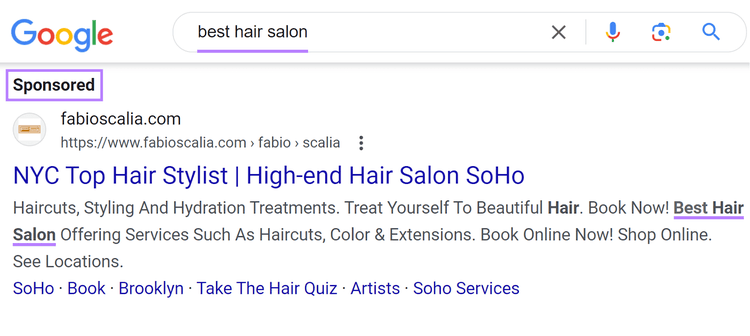
You would likely target certain keywords with your ads. Like "haircut near me,” “best hair salon,” or “hair stylist.” To connect with potential clients seeking your services.
But targeting keywords like “hair salon jobs” or “how to color your own hair” might attract the wrong crowd.
Because they don’t align with your services. And don’t match what the user is trying to find (also known as search intent).
The keywords you select are just one of the ways to control who sees your ads. And when.
How Do Google Ads Keywords Work?
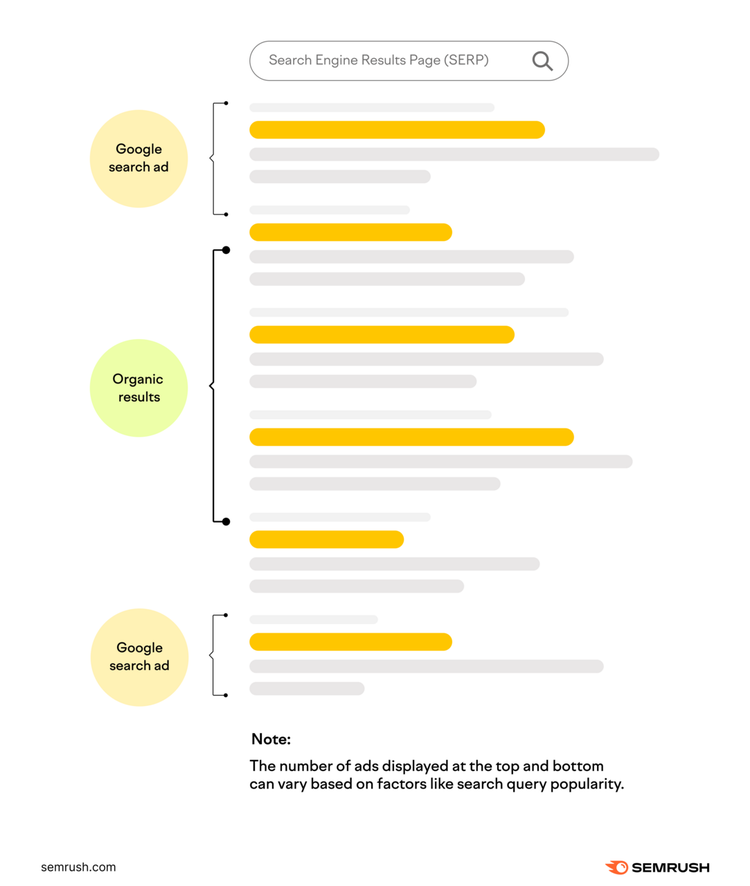
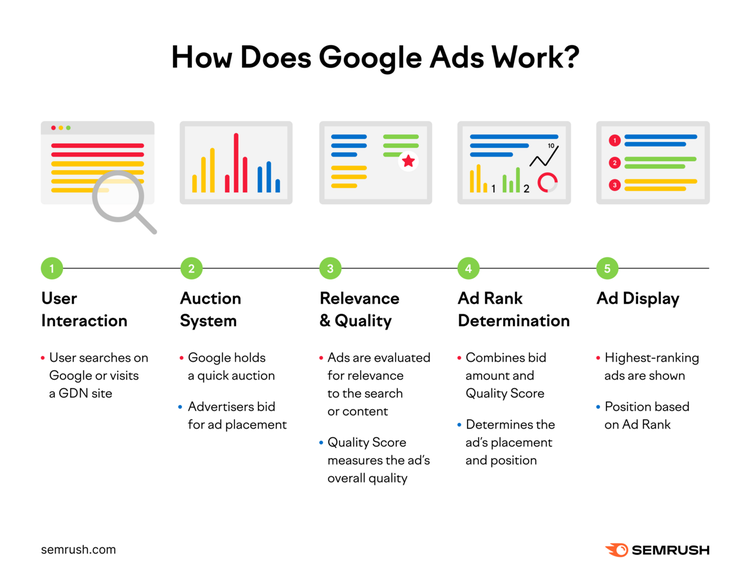
When someone enters a search query like “haircut near me” on Google, an automated auction starts in the background.
Quality and relevance: Things like expected click-through rates, ad relevance, and landing page experience
Ad rank thresholds: The minimum price required to show your ad
Competitiveness: How many other businesses are bidding on the same keywords
Search context: The searcher’s location, device, time of search, other search results displayed on the page, and user signals
This ranking system helps ensure the most relevant ad is shown for any given query. At any time. The rank of any ad can change whenever it is eligible to appear.
Using the earlier example, even if you bid less than your competitors on the keyword “best hair salon,” you could still rank in a higher position.
If your ad is higher quality. And more relevant to the search.
Click-through rates (CTR) and quality scores are important metrics in evaluating keyword performance.
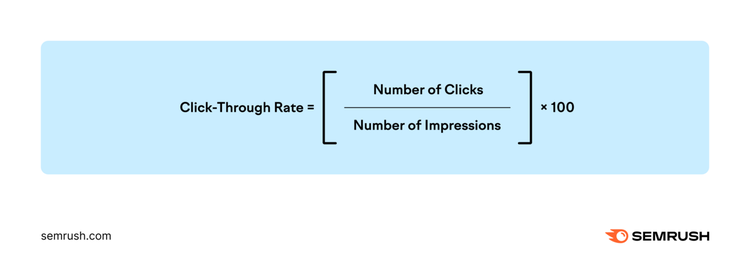
CTR is the percentage of people who click on an ad compared to the total number of people who see it (aka impressions).
Use this metric to determine if you’re targeting the right searchers with the right keywords.
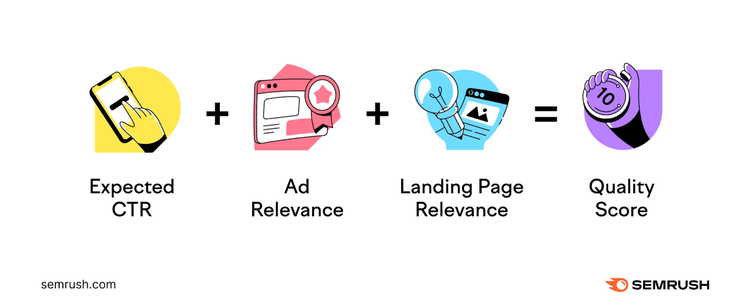
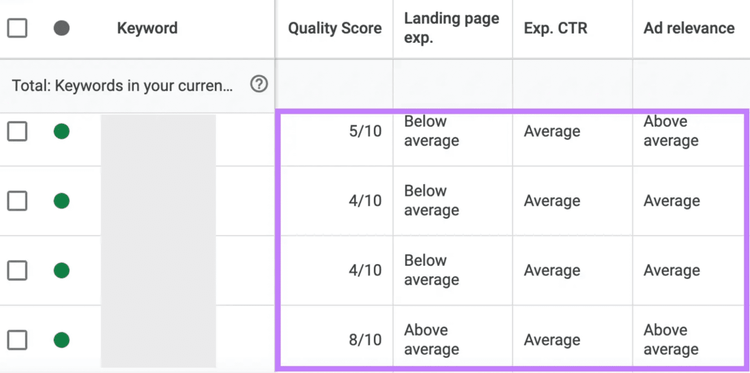
Quality Scores are used to gauge ad quality compared to other advertisers. Or competitors. Each ad is scored on a scale from one to 10.
Google uses three factors to calculate quality score:
Expected click-through rate: Estimates how often people who search your keyword will click on your ad
Ad relevance: How closely your ad’s target keyword and content align with what users are searching for
Landing page experience: The quality of the page users land on after clicking your ad.
Your ad is then rated by comparing it to other ads bidding on the same keyword. Using "below average," "average," or "above average" across each of the three quality factors.
Higher quality scores typically mean your ad is relevant, helpful, and matches what someone is looking for.
But benchmarks for quality scores depend on the keyword you’re targeting.
Branded keywords specific to your brand name or your named products should aim for a score of 9+
Commercial intent keywords, or keywords indicating a user is likely to purchase or convert, should target the 8+ range
Low-intent keywords, or keywords where users are looking for information and not intending to take action, should score within the 6+ range
What Makes a Good Google Ads Keyword?
A "good" Google Ads keyword should bridge the gap between what you offer and what your potential customer is searching for. Accounting for things like search intent. And user behaviors.
Let’s continue our example from above.
Keywords like “haircuts” or “hair salon near me” are basic but relevant. And align with your business. And what you offer.
But these keywords are broad. And may not reach your target market. Or niche.
Adding highly specific keywords like “haircuts for curly hair” or “best hair salon for textured hair” helps direct your ads to potential customers more likely to convert.
Long tail keywords generally have lower search volumes and keyword difficulty. Meaning they’re often easier to rank for. Because they tend to have lower competition. And lower CPCs. Helping to maximize the ROI of your ad campaigns.
Why Are Google Ads Keywords Important?
Google Ads keywords are the key to connecting your ads with your potential customers.
Selecting the right keywords for your ad campaigns can help you:
Target the right audience based on their search queries. And interest in businesses like yours.
Improve ad relevance by using targeted keywords in ad copy. And on landing pages.
Optimize spend by showing ads to potential customers who are more likely to click on them. While avoiding showing ads to users who may be looking for something else.
Improve user experience by ensuring potential customers find what they’re looking for. When they click on your ad.
Choosing the “right” keywords can improve your return on investment (ROI). By leading to better ad positions, higher engagement and conversion rates, and lower costs-per-click (CPC).
How to Research and Select the Right Google Ads Keywords
The best way to select keywords is to start thinking like your customer. Brainstorm phrases potential customers would search to find your business.
For example, if you own a landscaping business, your initial list may look something like this:
Landscaping
Yard work
Lawn care
Yard maintenance services
Landscaping services in [location]
This list serves as a starting point for keyword research. But you’ll need to dig deeper to create a high-performing Google Ads campaign.
Conduct Keyword Research
Use a keyword tool to discover what customers search for. It’s the best way to analyze which keywords will perform best for you in the long run.
Semrush
Our Keyword Magic Tool can help you identify the terms your target audiences uses to find businesses like yours.
Here’s how:
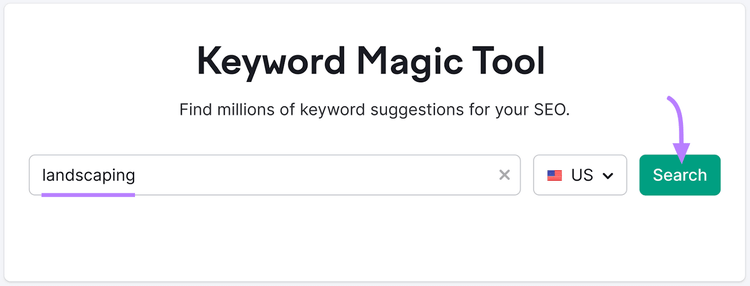
Open the tool in Semrush. In the left-hand navigation, go to “Advertising” > “Keyword Magic Tool.”
Start by entering a primary keyword from your list. Select your target country. And click "Search."
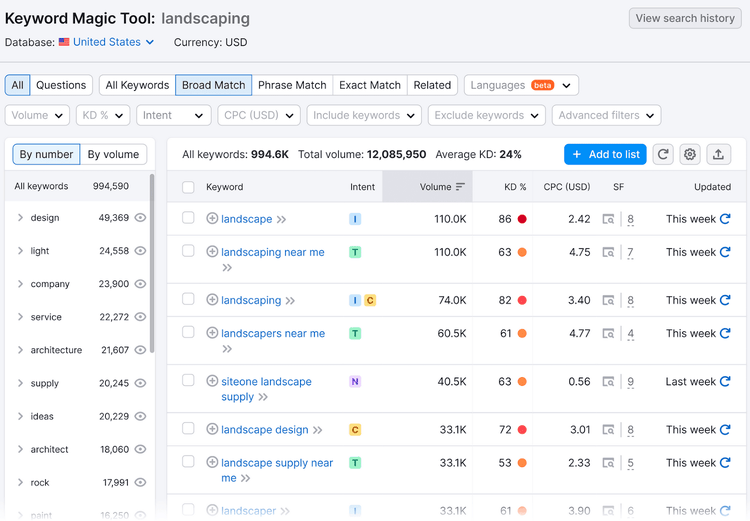
The tool will generate a list of related terms.
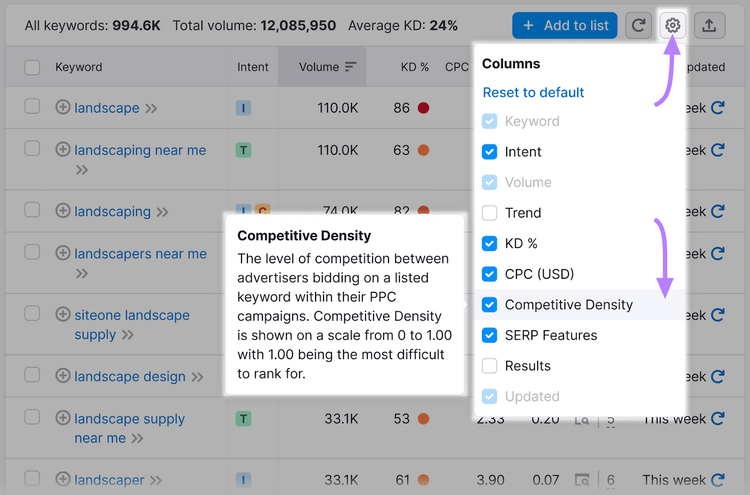
Sort by Competitive Density. To see how many advertisers bid on a keyword.
To add Competitive Density (frequently denoted as “Com.”) to the columns in your report, click the gear icon in the top right. And select “Competitive Density.”
Continue until you have a list of keywords to target with ads.
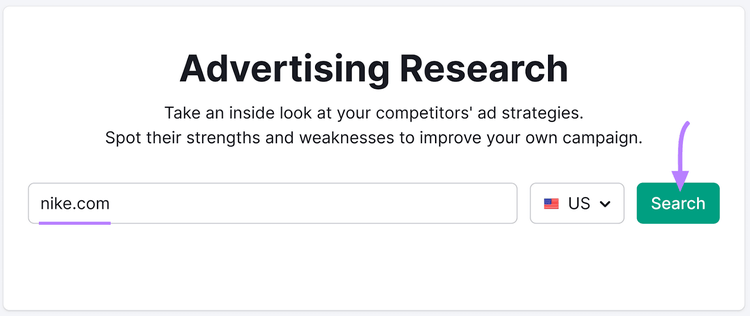
Then, use our Advertising Research tool to identify the keywords your competitors bid on.
To start, hover over “Ad” in the left-hand navigation bar and click “Advertising Research.” Enter a competitor's domain, and click “Search."
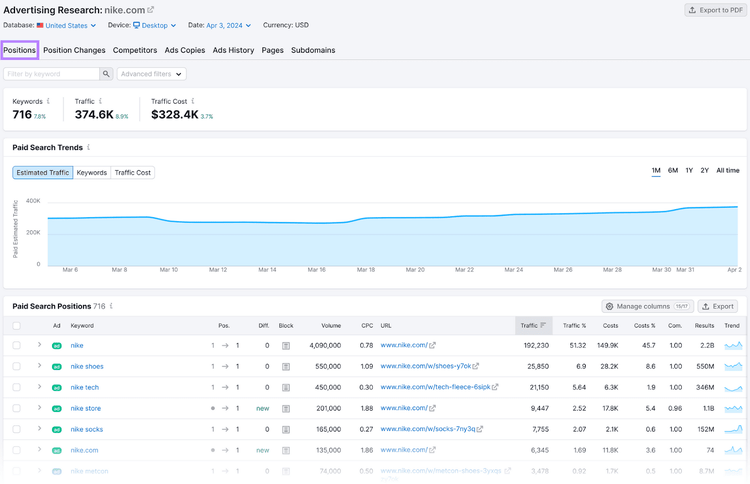
You will see the following dashboard. There are multiple tabs at the top, but for now, we'll focus on the "Positions" tab.
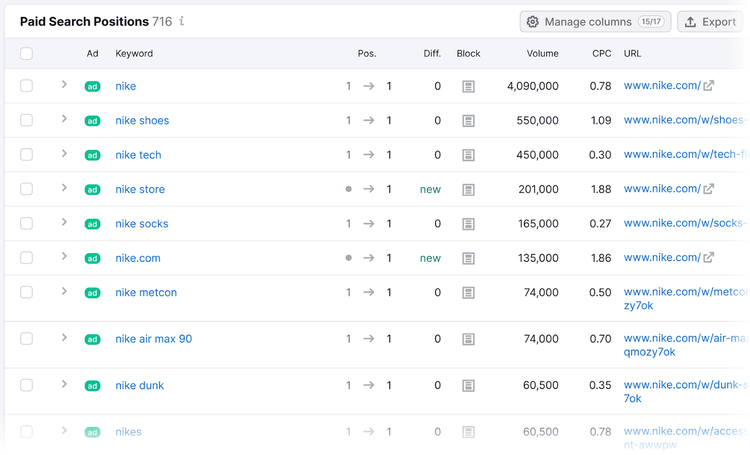
Scroll down to see a list of keywords your competitor's ads are ranking for under “Paid Search Positions.”
These keywords show you the words or phrases your potential customers use to find products or services like yours. Include these terms in your campaigns.
Google Keyword Planner is a free tool that helps you research keywords for Google Ads campaigns.
Search for new keywords, get ideas for keyword variants, and add or update keywords in your Ads campaigns.
Because Keyword Planner is a tool within Google Ads, you'll need to create a free Google Ads account before you can access it.
To learn how to add keywords to Google Ads Keyword Planner, go to Google Ads. Click "Start now" and sign in with your Google account credentials.
Then, click on the link that says "Skip campaign creation."This will allow you to set up your account. Without creating an ad campaign.
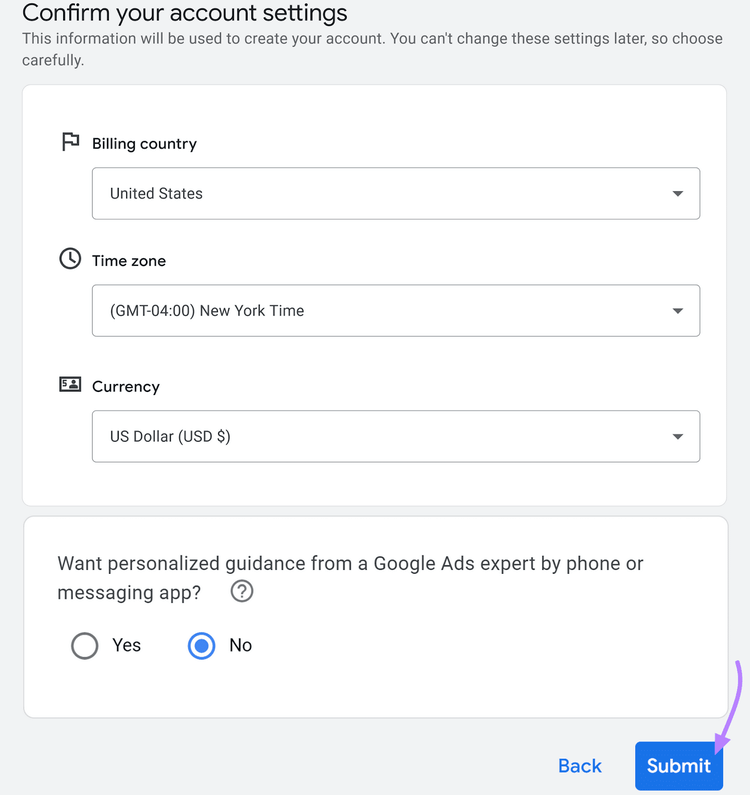
Next, confirm your account settings. Like country, time zone, and currency. And click "Submit."
Once you reach the confirmation page, click "Explore your account."
Your Google Ads setup is now complete.
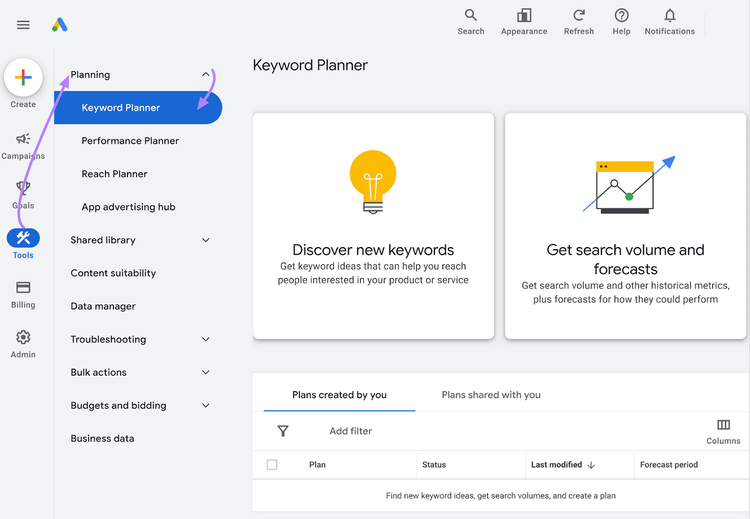
From the menu bar on the left, click "Tools." Then, click "Keyword Planner” under “Planning.”
This is where you'll find potential keywords for your Google ads.
For example, let’s say you’re running a “New Customer” campaign for your landscaping business.
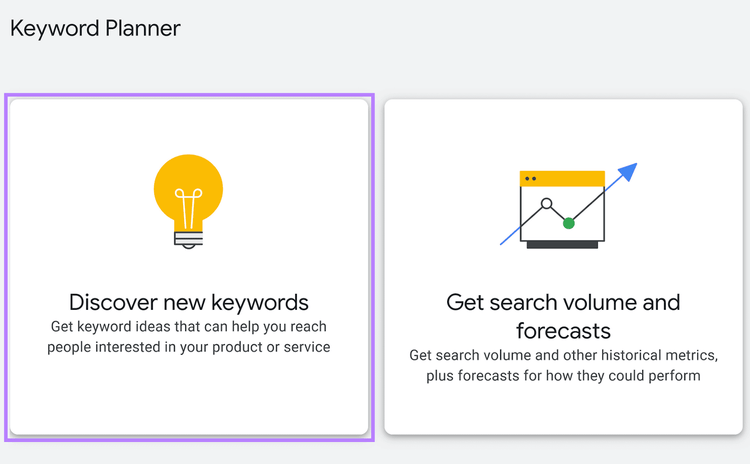
The “Discover new keywords” option in Google Keyword Planner can help you build on your keyword list.
Start by selecting "Discover new keywords."
You'll see three options for keyword discovery:
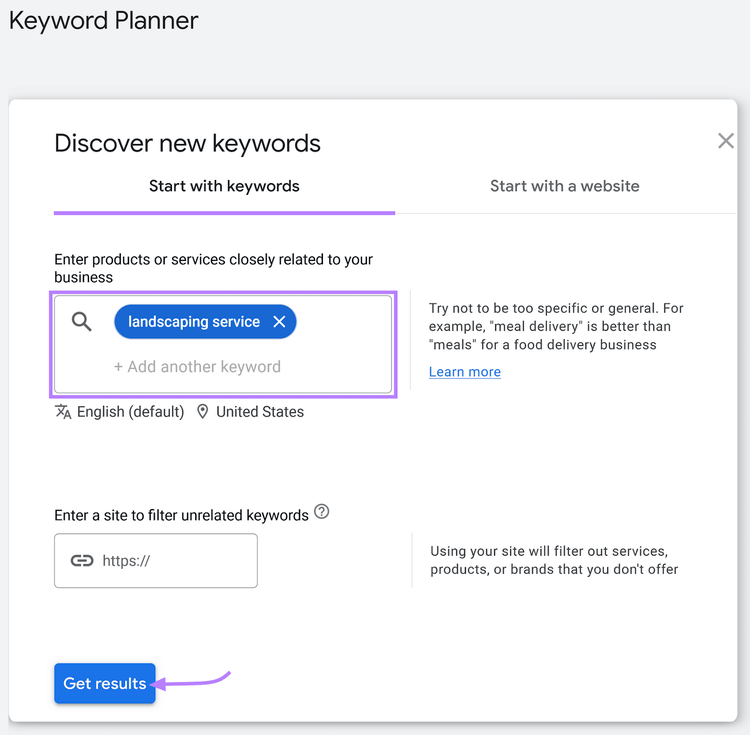
Start with keywords: Enter a phrase or keyword. Like “lawn maintenance in [location].”
Start with a website: Enter your website or a competitor's site to generate a list of keywords relevant to the domain
Start with both: Enter keywords and a website's URL to generate a list of relevant keywords.
We’ll focus on “Start with keywords” for now.
Enter your selected keywords. Like:
”Lawn maintenance”
“Yard care”
“Landscaping”
“Yard maintenance”
Enter your selected keyword in the search bar. And click "Get results."
Pro tip
Entering your site's URL in the "filter unrelated keywords" box will help Google remove any services, products, or brands you don't offer.
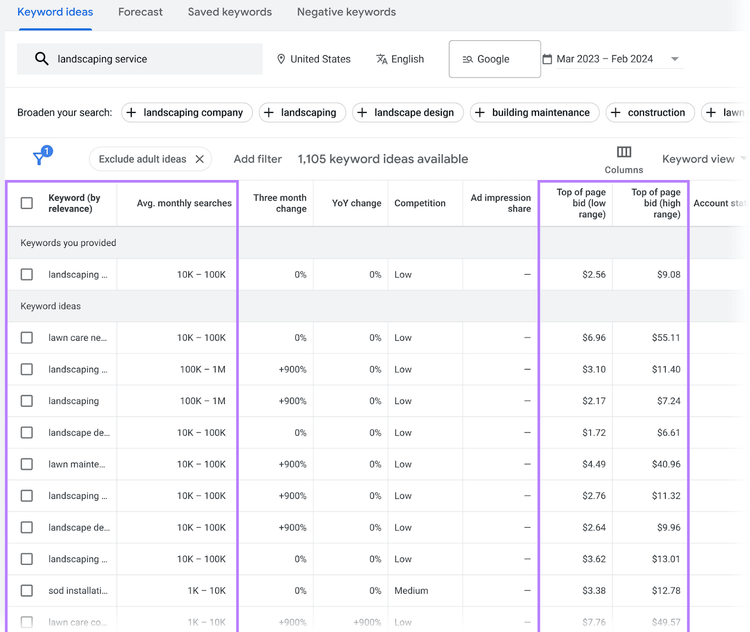
The resulting page will display words and phrases related to "landscaping service." With details on search volume (the average amount of monthly searches). And competitor bids.
Types of Keywords in Google Ads
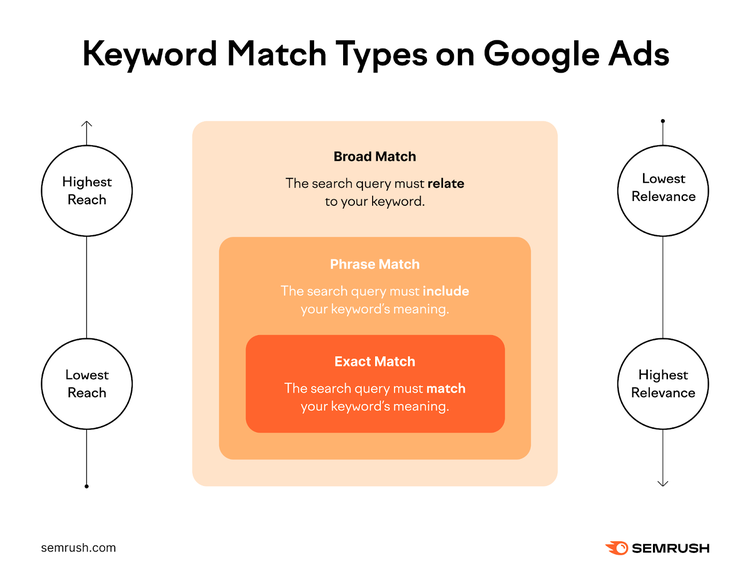
To best match ads with the terms people are searching for, Google uses keyword match types.
Match types help Google determine the scope of search queries that could trigger your ads.
The match type you choose for any given keyword directly impacts the reach, visibility, and relevance of your ad.
Three types of keyword match types exist in Google Ads: Broad Match, Phrase Match, and Exact Match.
What Are Broad Match Keywords?
Broad match keywords can trigger your ad when potential customers use your keyword, similar words, or related phrases (as determined by Google's AI). They target the broadest, or widest range, of potential customer searches.
When you choose broad match as the keyword match type, potential customers may see your ad when they search other related keywords.
Note
Broad match is the default match type for Google Ads keywords.
For example, let's use the keyword "women's hats.”
If you bid on “women's hats,” your ad should appear for searches like “women’s accessories.” And “women’s fashion trends.” These searches are related topics. Or broad match keywords.
It could also show for “women’s clothing.” Or even “women’s scarves.” These may be related searches. Or close variations of the keyword.
Your ads should not show for any searches that are vague. Or irrelevant to the keyword. Like “men’s clothing store.”
This means your ad can reach more people looking for women's hats in various ways. Helping to increase brand awareness. And attract more visitors. In the early stages of advertising your business, broad match keywords can be a great tool.
They help you gather data and insights into how potential customers are searching for you.
But when you target a broader audience, you also risk your ads showing for less relevant queries that are still broadly related. Like “women’s scarves.’
If you don’t sell scarves, but your ads drive clicks from “women’s scarves.” your return on ad spend (ROAS) will likely suffer. You’ll be paying for irrelevant clicks that don’t result in conversions.
What Are Phrase Match Keywords?
Phrase match keywords show your ads to potential customers using an exact phrase. Or close variations of your phrase. These queries can include additional words before or after the selected phrase, too. But the meaning—or intent—must remain the same.
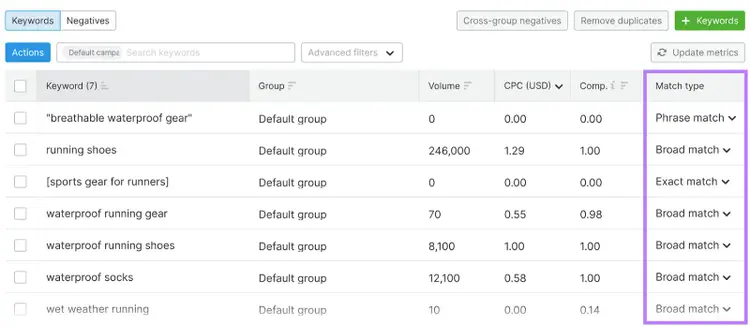
Put your keyword in quotation marks to indicate phrase match keywords in Google Ads..
Let’s use the same example as above. If you bid on "women's hats," your ad may show for searches like "cheap women's hats" or "where is the best place to buy women’s hats."
The phrase and meaning of "women's hats" are still included.
Ads will show fewer queries than broad matches. Which means your ads may have less reach.
But they'll show on SERPs that are more closely related to your business. Which could improve ROAS. And lower costs per conversion.
Tip
Design and optimize your Google Ads campaigns with Semrush’s PPC Keyword Tool. Easily plan keyword match types, remove duplicate keywords, and more.
What Are Exact Match Keywords?
Exact match keywords only show your ads to potential customers when their search query has the same meaning as your keyword. They are the opposite of broad match keywords.
These keywords are denoted with [square brackets] in Google Ads.
If you bid on [women's hats], your ad could show for searches that are the exact term. Or very close variations of the keyword, like "women's hat" or "hats for a woman." These have the same meaning or intent as your keyword.
But your ads shouldn't show for any searches that change the meaning of the search. Like "derby hats for ladies” or "buy men’s hats.”
The terms are related. But they don't align closely enough. And the search intent likely differs.
Exact match keywords are a great strategy for maximizing the relevance of your ads to your potential customers. Especially when you're targeting a highly specific audience.
They're also beneficial when your campaigns have limited budgets. They ensure every searcher has a high potential to convert.
Pro tip
Dig deeper into match types for both Google Ads and SEO in our Keyword Match Typesguide.
What Are Negative Keywords in Google Ads?
Add negative keywords in Google Ads to prevent your ads from showing for specific searches.
Negative keywordshelp filter out potential customers you don't want to target with your ads. Giving you more control over ad visibility. And often reducing wasted spend by eliminating irrelevant searches.
Negative keywords use the same match types as above, but they work differently:
Negative broad match keyword: Exclude your ads from showing for queries containing your negative keyword. For example, adding “casual” will ensure your ads don't show for queries like "casual accessories" or "casual headwear."
Negative phrase match: Keywords exclude ads from showing if the query contains your keyword or phrase in the exact order. For example, adding “cheap women’s hats” will prevent your ads from showing for “buy cheap women’s hats” or “cheap women’s hats online.”
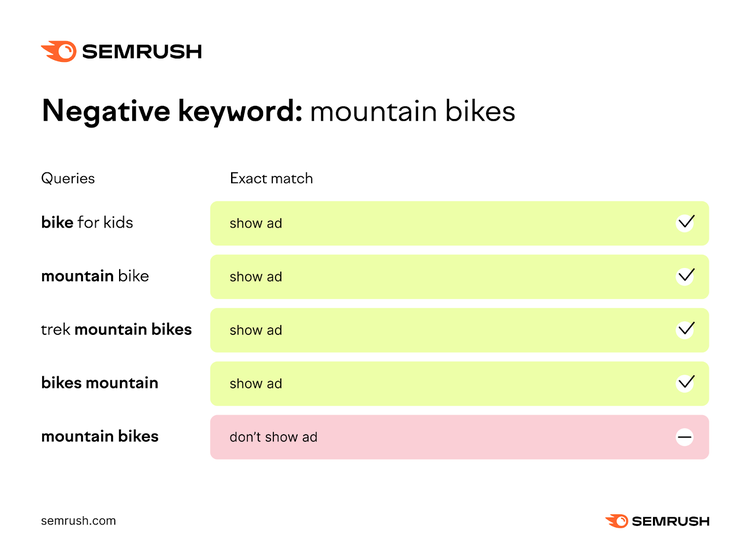
Negative exact match: Keywords exclude your ads from showing if the query is identical to your keyword. But it will still show for similar keywords. If your negative keyword is “cowboy hats” for example, your ad won’t show for searches for “cowboy hats.” But it might show for “women’s cowboy hats.”
Strategies for Google Ads Keyword Optimization
Keyword optimization is the strategy of using ad performance data to make changes to keywords.
Let's say you identified several keywords and negative keywords for your "women's hats" ad campaign.
For the first month or two, those keywords were top performers that led to clicks and sales.
But in the third month, you notice the keywords are driving up your cost per click. They’re using up more of your budget than before.
What do you do?
Optimize and adjust.
Balance Keyword Relevance and Competition
The keywords (and negative keywords) you add to your campaigns have the potential to drive a lot of traffic to your business.
But the competition for those keywords in the Ad Auction can make it difficult for your ads to rank.
Highly competitive keywords often have a higher CPC. This means you could be spending more of your budget than necessary to reach your potential customers. Even if your ad is considered relevantfor that keyword.
If you only bid on popular keywords, you may not reach all your potential customers. This can result in less reach and fewer conversions.
Organize Keywords in Ad Groups
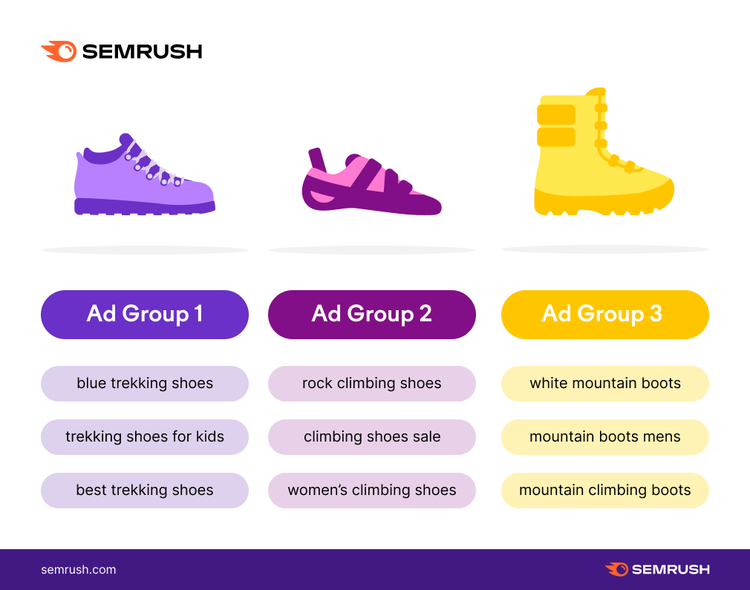
Ad groups consist of ads that have a common set of keywords. And target the same audience.
By grouping related ads together, it becomes easier to serve relevant ads to your potential customers.
One of the easiest ways to organize ad groups is by referencing your website architecture.
For example, say you have collections like "skin care" and "makeup" on your website. You can create a "skin care" ad group that contains all the skin care-related ads. Like ads for "moisturizers" and "serums."
Grouping similar ads and keywords allows your ads to be displayed to potential customers searching for similar things.
Google doesn't provide direct guidance on how many keywords to use per ad group. But it's generally considered best practice to keep your ad groups to less than 20 or 30 keywords per group.
Pro tip
Semrush's PPC Keyword Tool can help you optimize your Google Ads keywords. After you import your keyword list, the tool will automatically make recommendations to improve your ad campaigns' performance. It can even create automatic groups based on similar keywords.
Avoid Keyword Stuffing
Using too many keywords (or irrelevant keywords) can negatively affect ad performance.
Google's main goal is to show the best, most relevant ad to the user for any given query. The keywords you use are one of the main indicators of what is considered the "best" option of ads to serve.
Keyword stuffing can lead to low-quality ads (and lower Ad Rank). And it violates Google's spam policies. This means the potential risks far outweigh any short-term gains you may see.
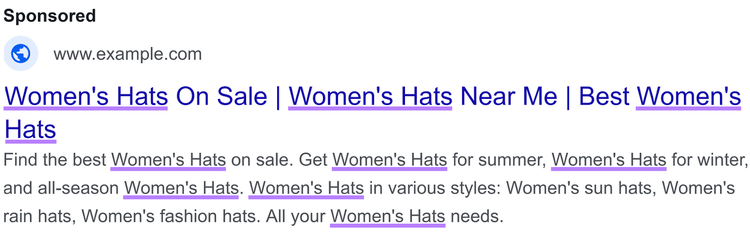
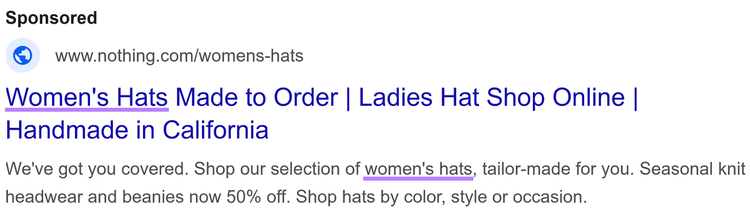
Imagine a potential customer searches for "women's hats" and sees this ad.
The overuse of the "women's hats" is unnatural. And would likely discourage users from clicking.
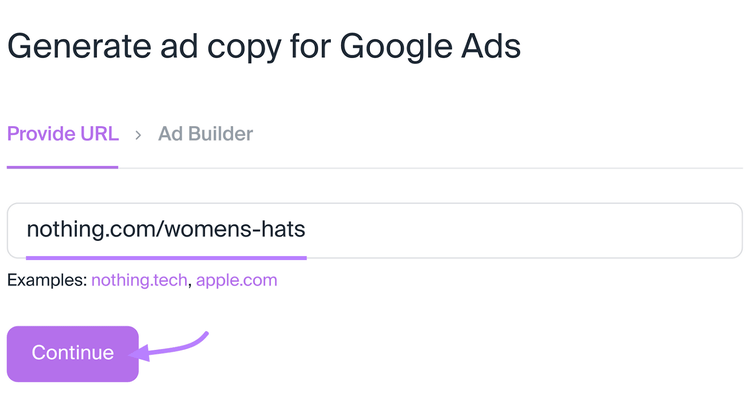
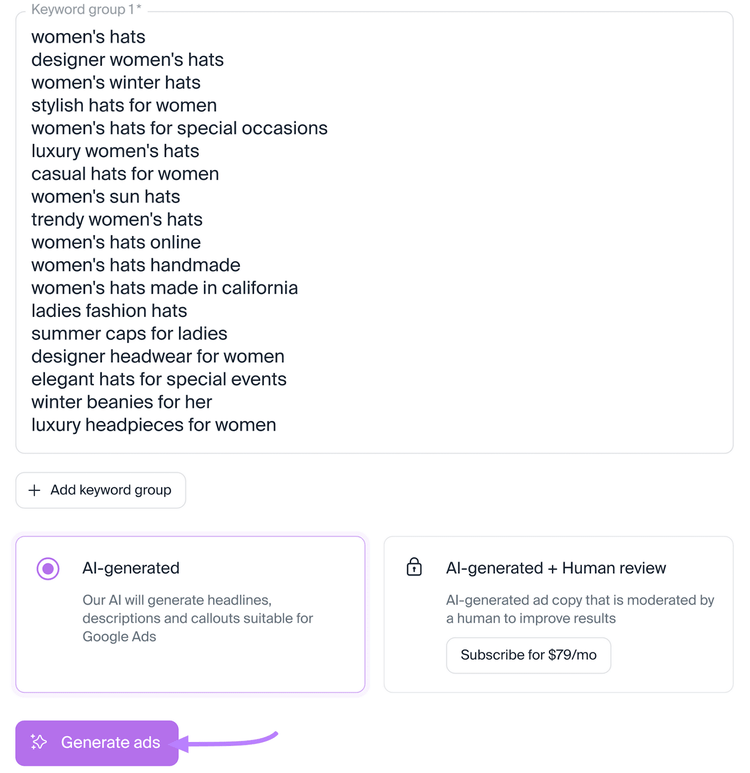
Avoid this by using AI Ad Copy Generator. Our tool can help you generate engaging headlines and descriptions for your ads. Simply enter your URL to start.
Then, enter your keyword list for your ad group. These should be keywords related to your theme. Like “women’s hats.” Click “Generate ads.”
The app will then generate ad copy you can easily export and integrate with your ads account.
A more engaging, quality ad for “women’s hats” would look something like this:
How to Check for Keyword Stuffing
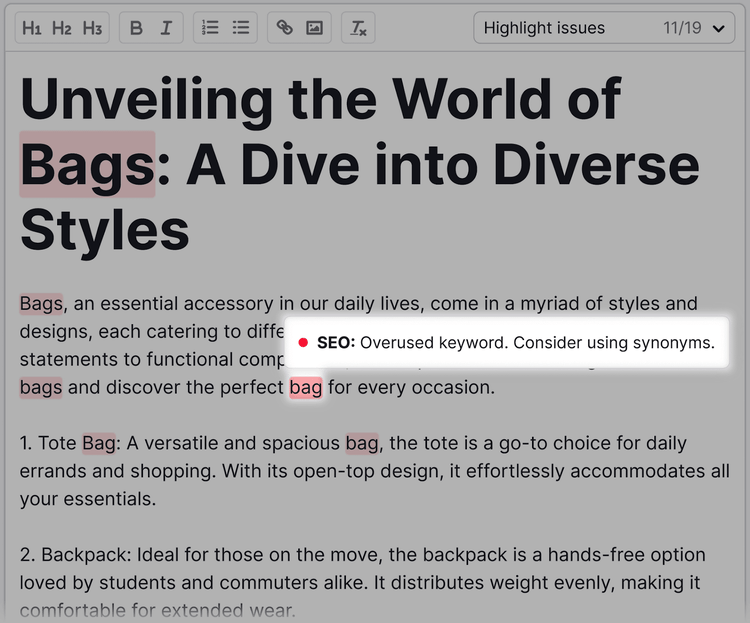
Check for keyword stuffing with the SEO Writing Assistant. It calculates keyword density (the percentage of words that are keywords).
And notifies you if you’re using your target keyword too many times.
It also suggests semantic keywords (related words or phrases to your keyword). These keywords can help your ad read more naturally. Which can help you tailor your ad copy and keyword usage to the way potential customers search for your business.
Smart Bidding is an automated bidding strategy that uses AI and machine learning to optimize your bids for conversions or conversion value. It adjusts bids in real time based on user and device signals.
Google recommends using broad match keywords in conjunction with Smart Bidding to adjust your bids based on expected conversions.
Make Data-Driven Optimization
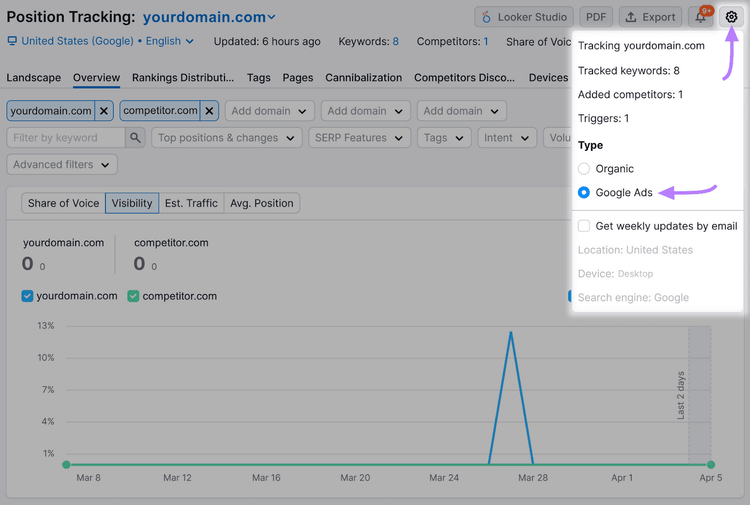
Use Position Tracking to measure the impact of your keyword optimizations. And identify what adjustments need to be made to your keywords. Or ad groups.
Monitor changes in ad positions. And compare the top paid SERP results for any of your keywords.
Compare your paid keyword performance amongst your competitors by selecting "Google Ads" in the top right settings.
Regularly monitoring fluctuations in ad positions can give insight into how user engagement and conversion rates are impacted by your keyword optimizations.
Dive deeper into engagement and behavior changes by reviewing ad performance in Google Ads.
Google Ads reports on various key metrics to help you interpret how well your keywords are performing.
Pages lacking in engagement are often strong indicators of where optimizations should be focused. Metrics like bounce rate, average session duration, and pages per session can provide insight into how customers engage with your site.
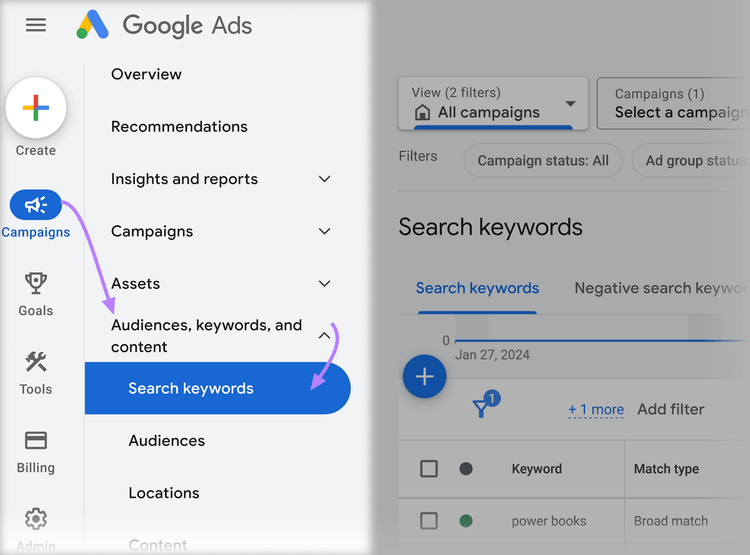
To view your keywords' performance, log in to Google Ads and click "Campaigns." Then, click "Search keywords" under "Audiences, keywords, and content."
This is where you'll find all of the performance data for your added keywords. Like click-through rates, conversion rates, costs-per-click, and Quality Score.
Maximize Your ROI with Smart Keyword Choices
The right keywords can make or break your Google Ads campaigns. But it’s not hard to identify the ideal terms.
You just need to understand which keywords your target audience searches for—and your competitors’ bidding strategies.
Sydney has been creating content for over 10 years. She has been a writer, content manager and coordinator, editor, and strategist. At Semrush, she’s a blog editor who makes sure each article is as accurate, optimized, and helpful as possible.
Subscribe to learn more about Keyword Research
Subscribe
By clicking “Subscribe” you agree to Semrush Privacy Policy and consent to Semrush using your contact data for newsletter purposes
Share
Tells Google to show you more from Semrush in AI, Search, and Discover.