
What Is a Local SEO Audit?
A local SEO audit is an evaluation of how well your business is optimized for online visibility in your area.
It helps you uncover issues you can fix to reach more people, stay on top of your online reputation, and drive more customers.
How Are Businesses Managing Local SEO in 2025?
We surveyed 100 business owners about their approach to local SEO and found that more than half (56%) manage local SEO for their business themselves. And 25% have another team member do the local SEO work.
The vast majority of local businesses understand the importance of SEO, too—70% of them have performed a local SEO audit at some point.
And 69% use SEO tools or keyword tracking software to measure their rankings for relevant local search terms.
How to Do a Local SEO Audit
A local SEO audit involves activities like checking your online listings, monitoring your reputation, tracking your keyword rankings, evaluating your content, and analyzing your backlinks.
Follow these steps to perform a local SEO audit for your business:
1. Review Your Google Business Profile
Reviewing and optimizing your Google Business Profile (GBP)—a free listing that lets you manage how you appear—helps you show prominently in services like Google Search and Google Maps.
Customers can use your Google Business Profile to get directions to your physical location, ask questions, and leave reviews.
According to our research, only 39% of businesses update their Google Business Profile every month. This means keeping your GBP updated can help you stand compared to competitors that have outdated information on their profiles.
Here’s what you need to check to ensure you’re getting the most out of your Google Business Profile:
- Essential business information: Fill out all the essential information about your business (such as your physical address, phone number, website, description, and hours). This allows Google and potential customers to get all the key information.
- Business category: Select the right business category for your Google Business Profile, so Google knows which local search queries to display your business for. You can select one primary category and up to nine secondary categories for your GBP.
- Attributes: Google lets you add a variety of different attributes to your GBP, such as “pet-friendly,” “great for groups,” “outdoor seating,” etc. They provide information that may help prospective customers make decisions.
- Photos: Adding photos helps potential customers find you and shows them what to expect. Consider uploading photos of your storefront, interior, products, menu, or team.
2. Check Your Other Business Listings for Accuracy
Having accurate and consistent name, address, and phone number (NAP) information across all your listings lets search engines see that your business is legitimate. And helps them determine whether it’s relevant for specific local searches.
It also allows potential customers to find your business and contact you more easily.
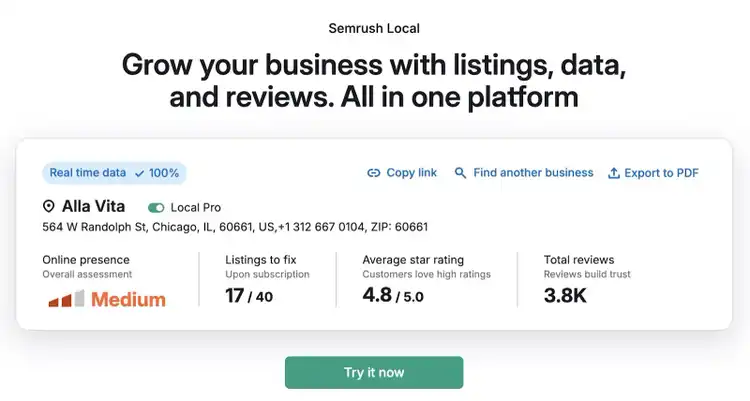
You can use Semrush’s Listing Management tool to find all your business’s listings across the web and ensure they all have correct NAP information.
Just enter your business name and select it from the list.
The tool will then search for and analyze your business’s listings and present you with a detailed report.
You’ll be able to see an overall score of your business’s online presence, your average star rating, and how many listings need to be fixed.
Scroll down and click “Show all directories” to see all the listings that contain errors. The exact information that needs to be fixed (e.g., phone number) is shown in the “Status” column next to each listing.
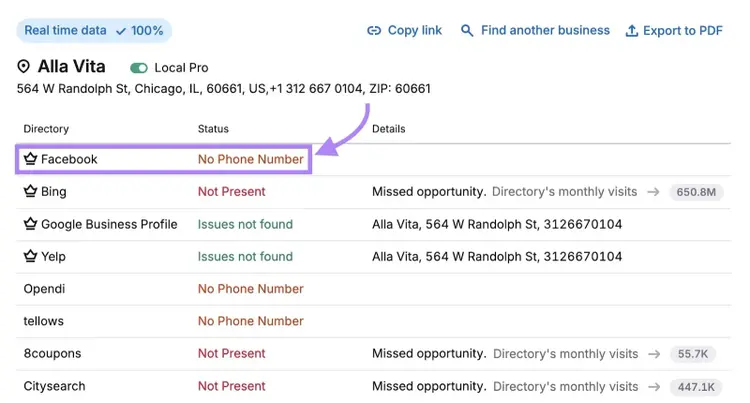
You can manually fix these issues.
To streamline the process, sign up for the Semrush Local Toolkit. Which will allow you to automatically distribute your information across listings.
3. Analyze Your Online Reputation
Monitoring your online reputation is important because how your business is perceived impacts Google's prominence factor that's used for local rankings.
Google uses information from articles, directories, and other places to determine your business’s prominence. The number of reviews and the overall star rating of your business also play a part.
This makes it crucial that you keep an eye on your business’s online reputation.
Check the following to understand how your business is currently perceived online:
- Search results: Search for your business on Google and review the search results that show up, especially those from news articles, blog posts, and third-party sites. Do they present your business in a positive light?
- Social media: Find mentions of your business across Facebook, Instagram, X, and other relevant social platforms to see what people are saying about you
- Review sites: Find reviews of your business on Google, Yelp, Tripadvisor, and other review sites. How many reviews do you have? Is the overall sentiment positive?
- Online communities: Check local and industry forums, Reddit, and Quora for mentions of your business to understand what kinds of conversations people are having about your business
This should give you a good understanding of the overall sentiment about your business online. And provide you with insights on what you’re doing well and what you might need to improve.
Ideally, you should monitor your business’s online reputation consistently. So you can react quickly whenever there’s an issue (e.g., a negative review) that might harm your reputation.
Semrush’s Review Management tool allows you to monitor your business across dozens of review sites. And read and respond to all the reviews from one central location.
The tool even lets you generate Google review responses using AI. Which allows you to respond to dozens of reviews within minutes.
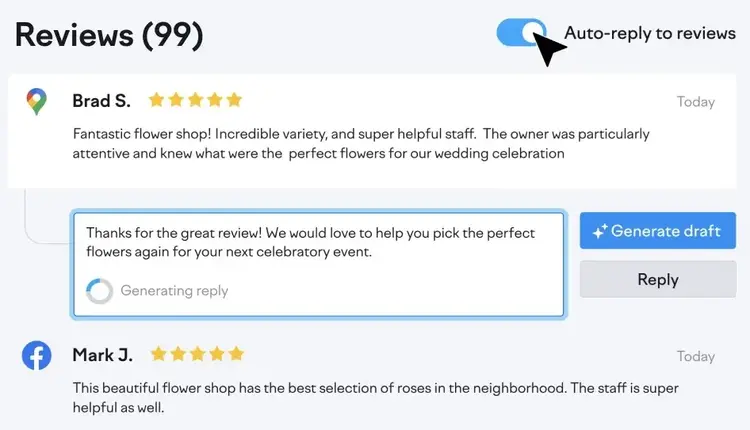
Our research shows that 61% of local businesses are already using some sort of review management software. Which is a clear sign it’s a good investment.
4. Examine Local Keyword Rankings
Tracking how your business ranks for relevant local keywords helps you understand your business’s visibility and allows you to identify opportunities for outperforming the competition.
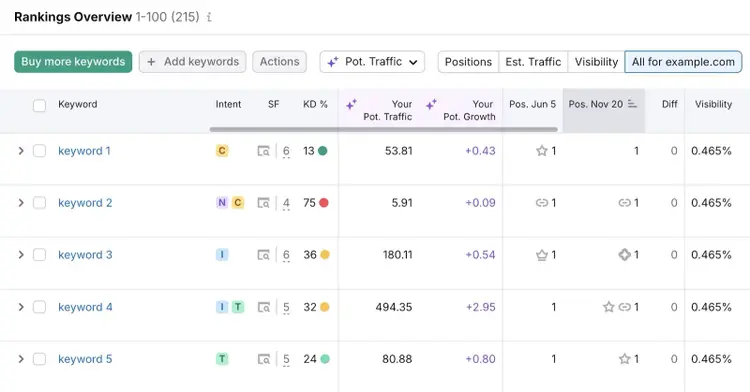
Use Semrush’s Position Tracking tool to examine your keyword rankings.
Follow the prompts to create a new project.
Don’t forget to choose the location you’d like to track rankings for. The tool even lets you track rankings for a specific ZIP code.
Once you’ve set up tracking, visit the “Positions” tab to review all your keyword rankings for your specified location.
To precisely monitor how your business ranks in Google Maps, use the Map Rank Tracker tool.
Visit the “Keywords” tab to see your average rank and share of voice across all the map points you’re tracking.
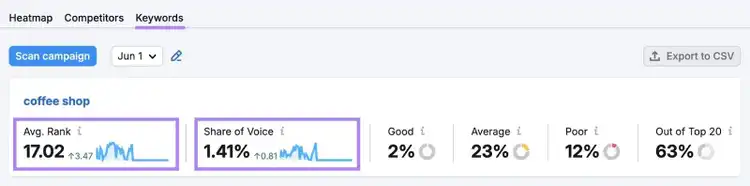
Once you’ve set up tracking, you’ll want to identify the following:
- Your top-ranking keywords: Which keywords are driving visibility for your business? Are they high-intent terms (e.g., “emergency dentist near me”) that are likely to convert? Or educational keywords (e.g., “how much does a dental implant cost”) that might require you to nurture visitors?
- Gaps in geographic coverage: Are there any parts of your service area where you lack visibility (e.g., you rank well for “plumber queens” and “plumber long island” but not for “plumber manhattan”)? If so, create additional location-specific content or pages.
- Low-hanging fruit: Are there any keywords where you’re ranking in positions 4-10? Often, all these keywords need to reach the top 3 spots is a small push in terms of content, reviews, or backlinks.
- Ranking trends: Are your keyword rankings in the search results and the local map pack improving, declining, or stagnating? Was there a drop in rankings after a site change or a search engine algorithm update? Identifying these kinds of trends can help you understand what’s working and where to focus your optimization efforts.
5. Evaluate Your Content
Studying your content is a key part of a local SEO site audit and one of the main ways to find ways to improve your rankings in search results.
When it comes to ranking for local searches, the main thing your content needs to do is signal who you are, what you do, and where you do it.
Here are the types of content you should focus on:
- Location pages: You should have a dedicated page for every location your business serves, each with its own unique and helpful content tailored to the location. You can include customer testimonials, frequently asked questions, and directions on each page.
- Service pages: Each of your services should have a standalone page with a detailed description and that’s optimized with local intent in mind. Include a clear explanation of each service, who it’s for, and how it’s delivered.
- Informational content: Publish helpful content that answers location-specific questions to build trust and signal to search engines that you’re relevant for local search queries. To establish your business as a local authority for your industry.
All the pages on your site should also follow on-page SEO best practices. Such as including location-specific keywords, consistent business information (name, address, and phone number) and helpful internal links.
6. Check for Technical SEO Issues
Technical SEO involves optimizing your site to make it easy for search engines to crawl and index (find and store) your content and to create a better user experience.
Use Semrush’s Site Audit tool to check your website for technical problems.
Once the tool crawls your site, visit the “Issues” tab to find a list of all the uncovered problems.
From here, click on the linked part of an issue to see a list of all the affected pages. Or click on “Why and how to fix it” to learn more about the issue.
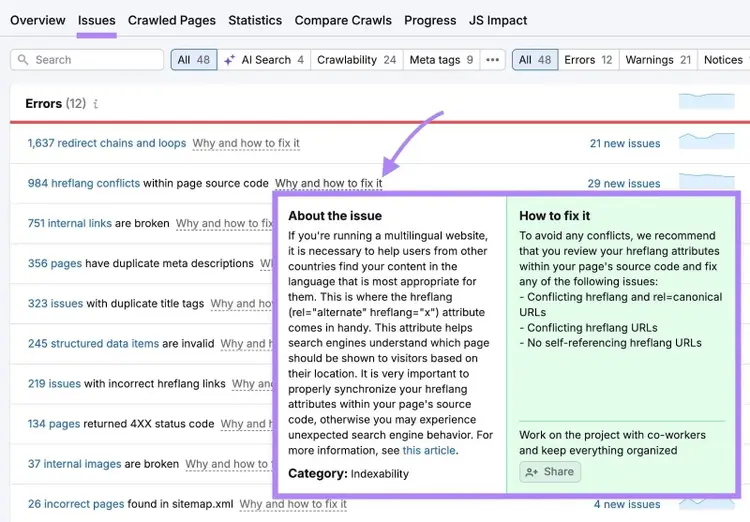
Pay particular attention to issues related to the following:
- Crawlability and indexability: Can Google crawl and index all your pages? Pages that haven’t been crawled and indexed won’t be able to appear properly in search results.
- Mobile-friendliness: Does your site look great and work well on mobile devices? Over 80% of consumers use their mobile devices for local searches, so it’s crucial that your site is mobile-friendly.
- Page speed: Your page load speed impacts your site’s rankings in search results
- Schema markup: Does your website use local business structured data? This can help Google find all the important information about your business, such as your business’s name, address, phone number, opening hours, and more.
Addressing these issues can help give your site the performance boost it needs to potentially achieve higher rankings in search results.
And considering 67% of businesses have never performed a technical SEO audit, doing this could give you a significant edge in your local market.
7. Perform a Backlink Analysis
Backlinks are links from other sites pointing to your site that show search engines your website is authoritative and relevant.
But not all backlinks are the same.
So, you’ll want to periodically analyze the health of your backlink profile.
Semrush’s Backlink Audit tool makes this easy to do:
After analyzing your backlink profile, the tool will generate a report showing you the overall toxicity score for your domain.
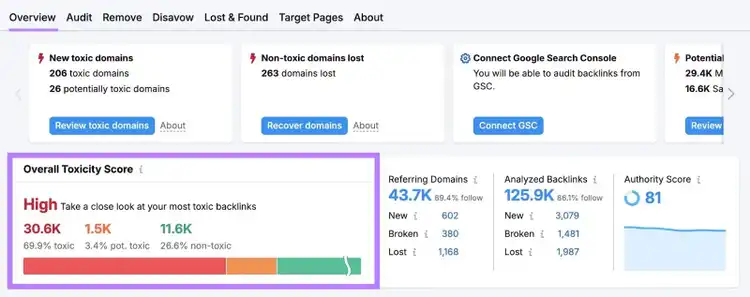
If your toxicity score is medium or high, you’ll need to work on building more high-quality backlinks to your site.
Improve Your Local Business’s Online Visibility
A comprehensive local SEO audit can help you find ways to make changes that improve your visibility in local search.
And that can drive more customers to your business.
Streamline your audit process with the Semrush Local Toolkit. You can use it to optimize business listings, manage online reviews, and more.
Run a Comprehensive Local SEO Audit
with the Semrush Local Toolkit

Connor Lahey is a content strategist with over 10 years of experience in content and SEO. His past roles and responsibilities include directing SEO and content strategy for dozens of local businesses, managing organic growth and strategy partnerships with fortune 500 companies, and working at Semrush on SEO and content strategy for its blog and other entities within the site. Connor‘s main interests revolve around advanced SEO, content strategy and development, SERP analysis and, AI.
Connor Lahey
Connor Lahey is a content strategist with over a decade of experience in content and SEO roles for both local businesses and large companies. He specializes in content strategy, search intent analysis, on-page SEO, local SEO, and SaaS SEO.

Tells Google to show you more from Semrush in AI, Search, and Discover.