
SEO for Publishers: How to Maximize Content Visibility
What Is SEO for Publishers & Why Is It Important?
Search engine optimization (SEO) for publishers is the process of improving online publications to make them more visible in search engine and AI tool results—though appearing in AI tools is often called generative engine optimization (GEO).
Publishers can use SEO to better attract traffic and generate revenue—especially if they rely on ad revenue for profitability.
Here’s an illustration of how SEO can improve a publisher’s results in a tangible way:
Let’s say a publisher displays an awareness ad that involves the advertiser paying a certain sum for every 1,000 views.

Perhaps the publisher is currently earning about $5,000 per day from running ads like this.
If the publisher implements a new SEO strategy that generates more traffic from search results, it may reap more ad views and revenue.
5 Publishing SEO Challenges and How to Overcome Them
Here are five challenges in implementing SEO for publishers. And tips for overcoming them.
1. AI Tools are Reducing Site Traffic
AI tools, like ChatGPT and Google’s AI Overviews and AI Mode, can reduce publishers’ organic traffic (unpaid traffic). Because those tools directly provide users with information that often eliminates the need to visit the source websites.
Just take the Google search engine results page (SERP) for “how to get toned arms” as an example. It has an AI Overview featuring a detailed answer that pushes all organic listings down and away from immediate view.
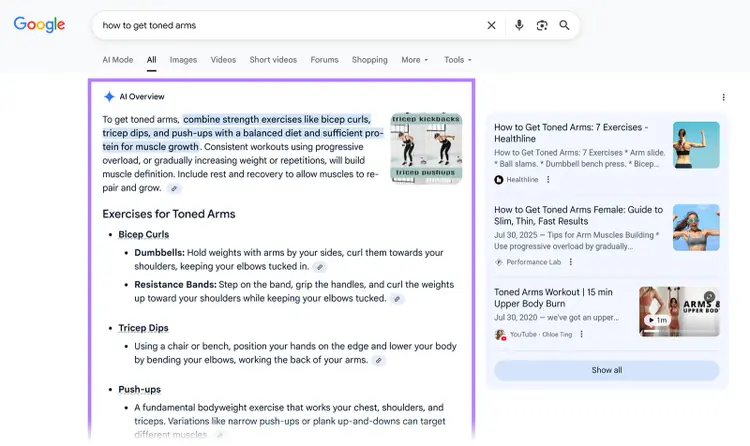
The answer cites sources from publishers, but the citations are subtle and can be easy to miss. And the AI Overview occupies a large amount of space on the SERP.
ChatGPT and AI Mode tend to provide even more detail. And also allow users to ask follow-up questions.
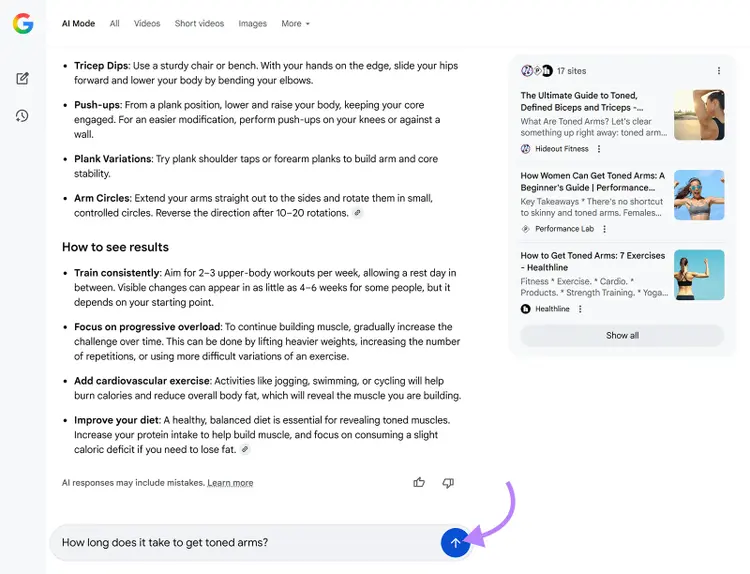
If users are satisfied with this information, they may not need to visit the cited publications for answers. When AI tools cite publishers’ content like this, publishers may see plenty of impressions but fewer clicks through to their sites.
Want firsthand proof?
Here’s a Google Search Console report showing impressions and clicks from search results for a publisher site I manage:
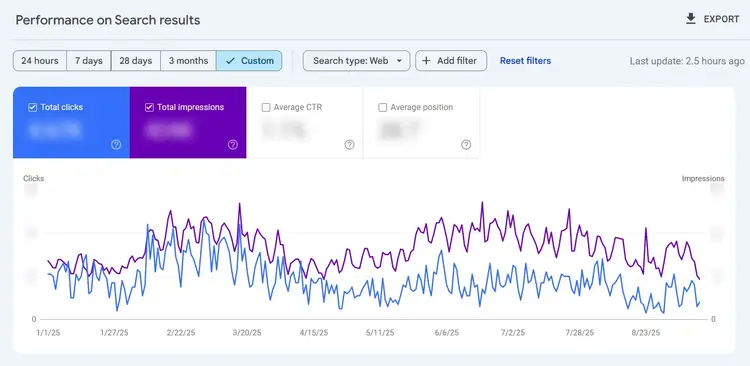
The impressions and click graphs used to closely correlate. But they started diverging noticeably in April 2025. This aligns with when Google began rolling out AI Mode.
SEOs have termed this phenomenon of high impressions and comparatively low clicks “The Great Decoupling.” You can work to overcome it by taking steps like:
- Covering topics you’re knowledgeable of. Once people are familiar with your brand and trust it, they may conduct branded searches for information from your publication—or even go directly to your site—instead of searching generically with Google or other AI tools
- Publishing original research, like surveys and studies. If AI tools cite your research, users wanting to learn more may click to read your full report.
2. Crawlers Can Struggle with Frequent Content Updates
Web crawlers from Google and AI tools may struggle to keep up with sites that publish tons of new content daily, which may delay how quickly those pages show in search results and AI responses.
The fix?
Direct crawlers toward the pages you want users to find (e.g., up-to-date content with ads and affiliate links). And steer it away from less important pages, like older articles and privacy policies.
Here are some tactics that help crawlers prioritize your most important content:
- Create a logical site structure. Organize menus and articles hierarchically for easy navigation. Categorize your content by topics and subtopics to create a site architecture both humans and machines can understand.
- Optimize your meta tags. These are part of your site’s HTML and include meta descriptions and title tags. They signal page relevance, and you can optimize them in ways like adding your target keywords to them.
- Optimize your sitemap. Update your sitemap routinely to help relevant crawlers index your most important pages and articles. Check out this XML sitemap for an example of what a sitemap file looks like.
- Use robots.txt. Include “disallow” commands in your robots.txt (a text file with instructions for crawlers) to focus crawlers on your most important pages
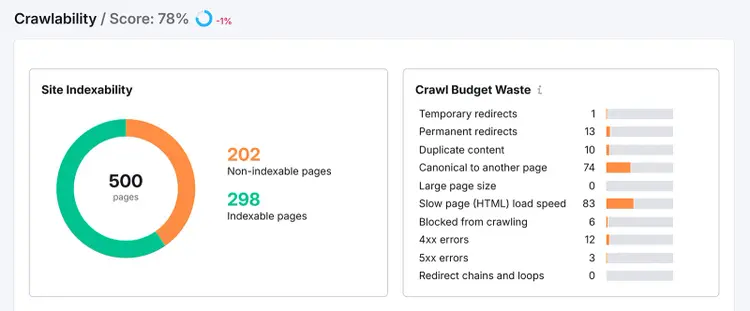
Even if you’ve followed these tips, it’s a good idea to check whether Google can access your content using the “Crawlability” report in Semrush Site Audit tool.
It’ll show you issues that could prevent Google from finding and/or indexing important content on your site. And since we know some AI tools rely on Google’s index, this has implications for your visibility in these tools as well.
3. Crawlers Can’t Discover Paywalled Content
Crawlers from Google and AI platforms can’t discover paywalled content, and this prevents content from being shown in search results and AI answers.
To overcome this challenge, use Google’s flexible sampling guidelines to make part of paywalled pages discoverable while maintaining content protection.
Flexible sampling is letting subscribers (and bots) explore a portion of your content. Some models are:
- Lead-in: Offer part of the content (e.g., the first third) and require a subscription to see the rest
- Metering: Offer an article quota (e.g., give readers access to a few articles per month) and require a subscription for additional articles
This is an example of metering:

And use structured data (also known as schema markup) to clearly label paywalled content.
First, add HTML class names around your pages’ paywalled sections. Google offers this example:
<body><p>This content is outside a paywall and is visible to all.</p><div class="paywall">This content is inside a paywall and requires a subscription or registration.</div></body>
Then, add NewsArticle structured data to indicate that the page content is behind a paywall:
{ "@context": "https://schema.org", "@type": "NewsArticle", "mainEntityOfPage": { "@type": "WebPage", "@id": "https://example.org/article" }, (...)"isAccessibleForFree": "False", "hasPart": { "@type": "WebPageElement", "isAccessibleForFree": "False", "cssSelector": ".paywall" }}
4. Tracking Pixels Can Worsen Page Speed
Poor use of pixels that track visits and conversions can worsen page speeds and cause your pages to lose search visibility.
Minimize the impact of tracking pixels on page speed by:
- Limiting pixel use: The more code you add to a page, the slower it might get. Prioritize essential pixels (e.g., conversion pixels). And don’t add pixels to pages you don’t need to track.
- Using asynchronous code: This allows your page to load content and tracking pixel code simultaneously
- Tracking the impact of changes: After adding or updating pixels, check the impact by entering the affected page’s URL into Google’s PageSpeed Insights tool
5. Highly Similar Pages Can Hinder Performance
Having multiple pages focused on the same keywords forces them to compete and can lead to lower rankings for these pages—this is called keyword cannibalization.
Keyword cannibalization can be hard to avoid for publishers that create multiple pieces of content on similar topics at scale. But you can use Semrush’s Position Tracking tool to address it by finding pages where keyword cannibalization occurs.
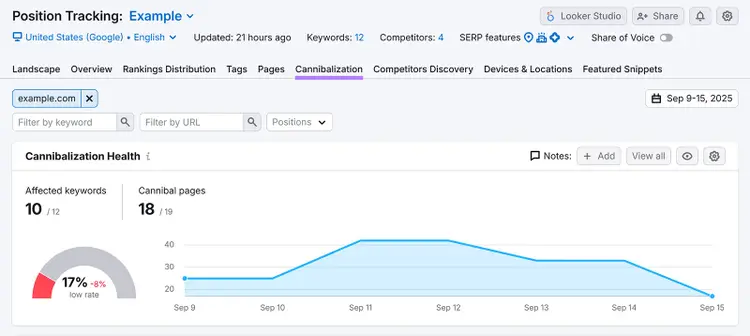
First, set up your project, and then go to the “Cannibalization” tab.
At the top of the report, you’ll see:
- The number of affected keywords: Keywords where you have more than one page ranking in the top 100
- The number of cannibal pages: URLs that share a top-100 keyword ranking with one or more other URLs
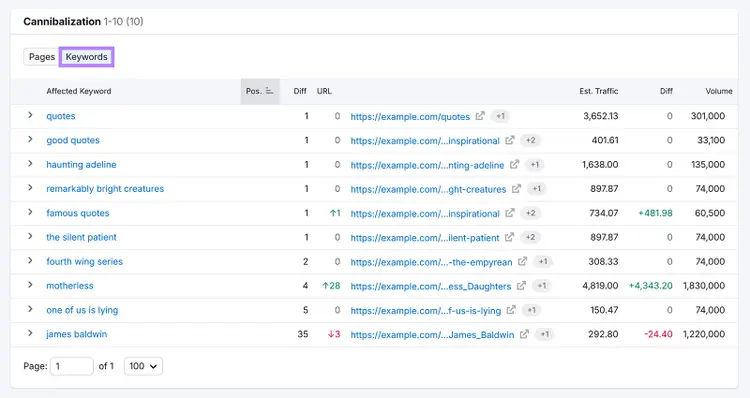
Then, scroll down to the “Cannibalization” section. And click “Keywords” to get a list of affected keywords.
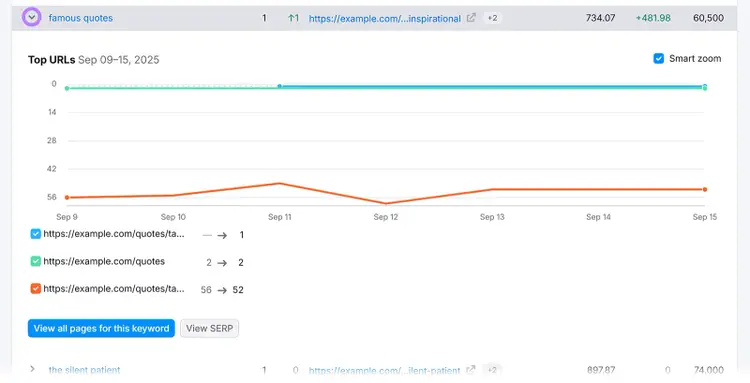
Click any keyword’s downward arrow to see the URLs competing for it. And each page’s ranking for the keyword (on the latest date in view).
Then, address the cannibalization by:
- Combining pages with similar content into a single, comprehensive page. And redirecting the alternative pages to the main page.
- Editing your pages to focus on distinct subtopics
Mapping your keywords—and checking for overlap with existing pages’ target keywords—before creating new content for them can also prevent keyword cannibalization issues from cropping up.
9 SEO Tips for Publishers
Here are nine SEO (and GEO) tips for publishers to increase visibility and possibly conversions:
1. Create Quality Content for Readers
Creating reliable content that compels readers to share, link, and return to your site will likely improve your visibility and traffic more than writing for either search engine or AI platform algorithms.
Google emphasizes this point:
“Google’s automated ranking systems are designed to present helpful, reliable information that's primarily created to benefit people, not to gain search engine rankings, in the top Search results.”
Do the following to create quality content that resonates with readers:
- Ensure your content meets search intent (i.e., the motivation behind a search). For example, if users are looking for places to visit in Mexico, create an article that recommends tourist destinations in Mexico instead of discussing the country’s history.
- Add original insights and research. Interview experts to enrich your content with insights gleaned over years of experience. Or, conduct surveys and present data to back up your claims. These additions are particularly helpful for gaining visibility in AI platforms.
- Avoid keyword stuffing, which is using keywords repeatedly and unnaturally. This practice makes the content difficult to follow and also comes across as spammy.
2. Do Keyword Research
Do keyword research to uncover phrases your target readers type into search engines and AI tools, so you can create relevant content for your niche.
Semrush Keyword Magic Tool can show you relevant search terms for topics worth covering.
Enter your target topic and domain into the Keyword Magic Tool, choose your target location, and then click “Search.”
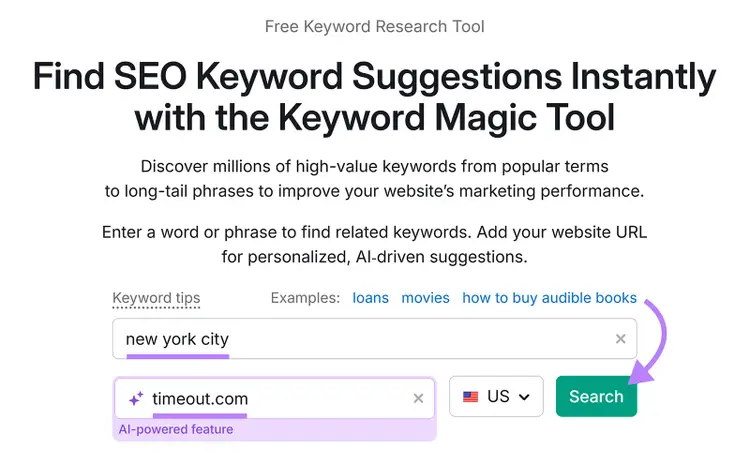
You’ll see keyword suggestions based on your initial phrase, plus information like:
- Intent: The keyword’s search intent
- Volume: The keyword’s average monthly Google search volume. Keywords with higher search volumes can bring in more traffic, but can also be more competitive.
- Personal Keyword Difficulty (PKD %): A percentage score of your site’s chances of ranking in the top 10 for that keyword. The lower the score, the higher your chances.
- Potential Traffic (Pot. Traffic): How much traffic you could get from ranking highly for the keyword
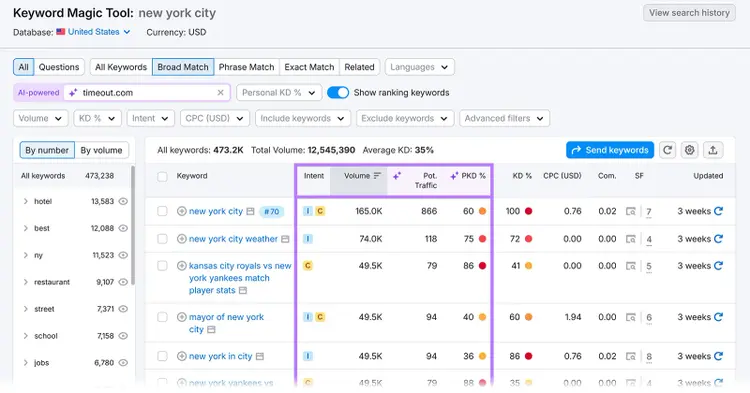
You can also click the topics on the left to filter by subtopic and choose the keywords that best fit your content strategy. Or use the filters at the top to show only terms that meet certain criteria.
For instance, if you intend to publish pieces containing affiliate links, targeting keywords with commercial intent may be ideal. Since readers may click these links to buy items you promote in the content.
You could also go for keywords with low PKD %, as these may be easier to rank for.
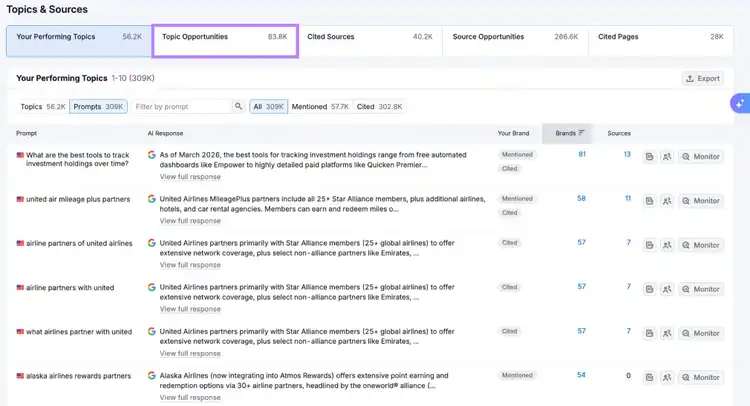
To specifically research prompts that users enter into AI tools, use Semrush’s Visibility Overviewtool. Which lets you easily find relevant prompts that yield responses featuring your competitors but not you.
3. Keep Your Content Fresh
Keep your content fresh—meaning, updated and relevant—so it’s highly visible for news-related and other time-sensitive search queries.
Examples of queries that require content freshness include:
- “trending memes”—where searchers are looking for the latest viral memes
- “nfl results”—where searchers want the latest National Football League results
- “train breakdown”—if a train wreck has just happened in the searcher’s city
- “blackpink concert dates 2026”—where searchers want dates for Blackpink concerts happening in 2026
People who search these queries want the most recent and up-to-date information. So, search engine algorithms will prioritize ranking content that provides it.
Plus, AI tools tend to highlight the latest content when responding to prompts. Even for queries that don’t explicitly ask for the most up-to-date information.
Keep your content fresh by:
- Using social media monitoring tools to closely follow discussions in your niche. This way, you’ll be in the know about recent events. And can update your pages—or create new ones—to cover them.
- Updating your pages in response to the latest developments. For example, information can become inaccurate following a change to the law. Update any pages containing references to that law as soon as possible.
- Regularly auditing your pages for underperforming content. Auditing your site reveals pages that have started slipping in performance. Updating these pages with more recent information can improve your visibility.
4. Optimize for Google News
Optimize your content to appear on Google News, which provides users with a feed of news articles from various publishers that’s personalized to match their preferred topics.
Google ranks publishers’ content in Google News using factors like:
- Relevance to a news topic
- Authoritativeness
- Freshness
So, optimize your content accordingly. For example, you can:
- Research keywords relevant to a news topic you want to cover, and then add these keywords to your content
- Publish your content promptly after relevant incidents happen
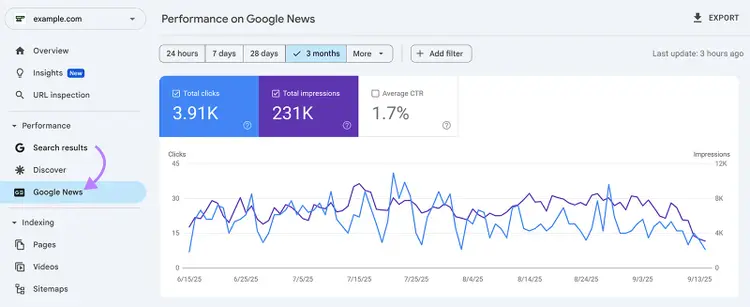
Then, track your content’s Google News performance in Google Search Console by going to the “Performance on Google News” report.
5. Use Structured Data
Use structured data so that Google and AI tools can better understand your content. Google can even use structured data to create more eye-catching and clickable search listings.
Types of structured data relevant to publishers include:
- Article
- NewsArticle
- Review
- Video
- Speakable
For example, the product review shown below uses “Review” structured data to display the reviewer’s name and rating on the SERP:

Google’s Structured Data Markup Helper makes it easy to generate structured data.
First, choose the appropriate data type from the list.
Enter the URL or paste the HTML for the page you want to apply the markup to. Then, select “Start Tagging.”
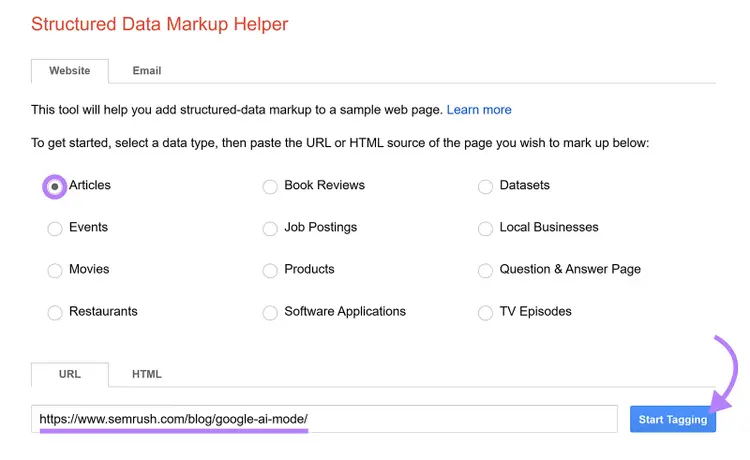
Mark up your pages’ elements by highlighting them and selecting the corresponding data point.

You can also tag items on your page manually by clicking the “Add missing tags” button at the bottom right of the screen.
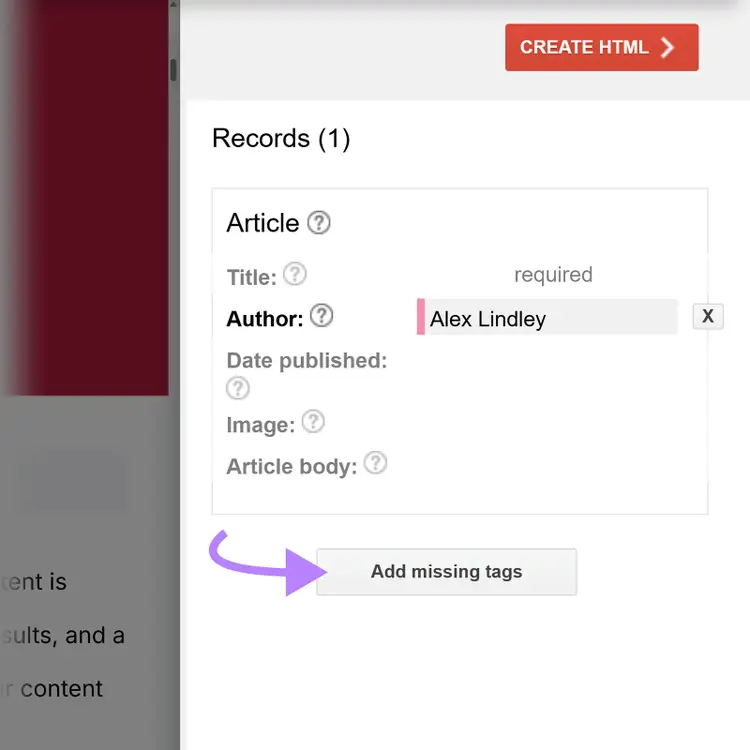
When you’re done marking up items, click the “Create HTML” button at the top right of the screen to generate your structured data.
Copy the generated structured data. Then, go to your content management system (CMS) or other site platform and paste the structured data into your page’s <head> section.
Finally, validate your page's structured data with our free SEO checker.
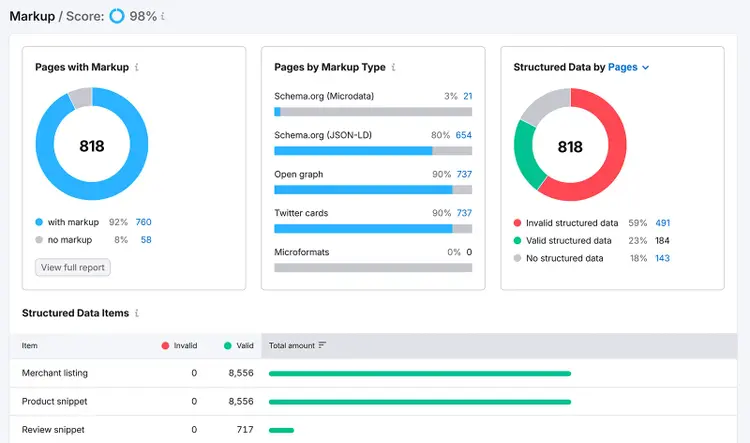
For full-site schema monitoring, use Semrush Site Audit's "Markup" report.
It’ll show you which pages have structured data and if any of the markup is invalid.
6. Optimize Your Images
Optimize your images, so your pages load faster and are easier for search engines and AI tools to understand.
Here are some image optimization methods:
- Compress your images (i.e., reducing file sizes) to improve their load speeds. Find a good balance between file size and image quality.
- Set up lazy-loading on your site so that images load only when they appear on the screen, which can help your pages load faster
- Add alternative text (usually called alt text) to your images to help search engines and AI tools understand them. Make your alt text descriptive and concise, and add relevant keywords where appropriate.
7. Add Internal Links
Add internal links—links that connect pages within the same site—to distribute ranking authority, guide crawlers, and help convey relationships between your pages.
To find authoritative pages and orphan pages (i.e., pages with no internal links pointing to them), use Semrush Site Audit.
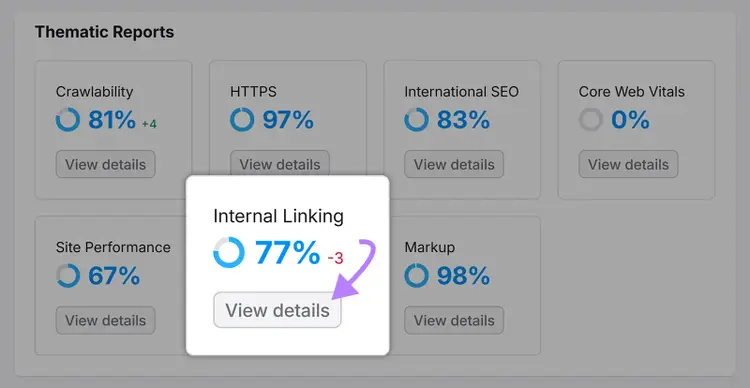
Create a project within the tool. On the “Overview” tab, click “View details” under the “Internal Linking” report.
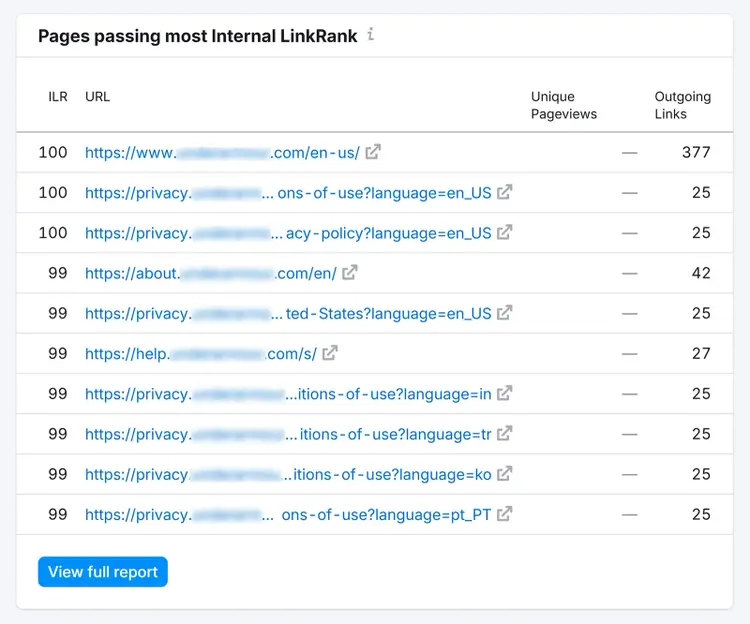
The report’s “Pages passing most Internal LinkRank” section shows the pages with the most authority:
And the “Internal Link Issues” section shows the number of pages with no or only one internal link.
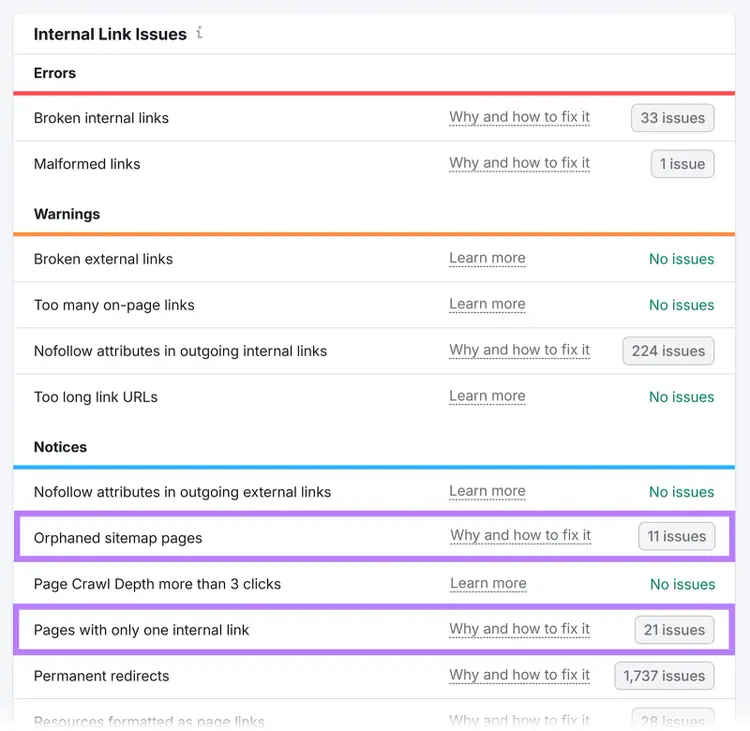
Click “# issues” beside “Orphaned sitemap pages” or “Pages with only one internal link” to view the respective lists of these pages.
Add links from your authoritative pages to these pages.
8. Build Backlinks
Getting backlinks (links from other sites to yours) from authoritative sites can grow referral traffic and signal to Google that it can trust your content, which can lead to higher rankings.
Here’s an example of a backlink on a publisher’s site:

Newsworthy stories and in-depth features naturally attract shares. So, you may earn backlinks with minimal effort.
You can also publish content in partnership with another publication, influencer, or brand. Or encourage them to link to what you’ve created.
Or, use Semrush Backlinks tool to see the sites that have linked to your competitors. Because you may be able to persuade those same sites to link to you.
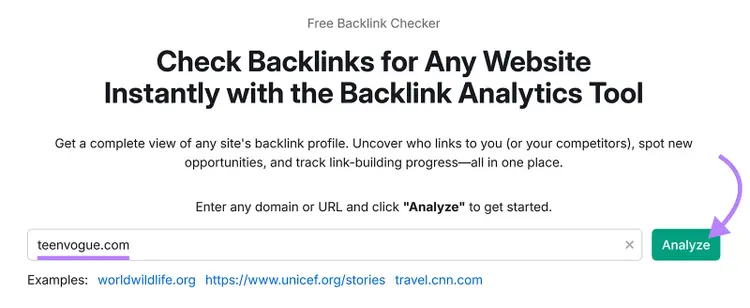
Type a competitor URL into Backlinks and click “Analyze.”
Click the “Indexed Pages” tab at the top of the tool.
You’ll see which of your entered competitor’s pages have the most referring domains. Browse this list and look at the actual content to find pages you have suitable substitutes for.
Once you find a page that’s a match for something on your site, click the corresponding number in the “Domains” column next to that page.
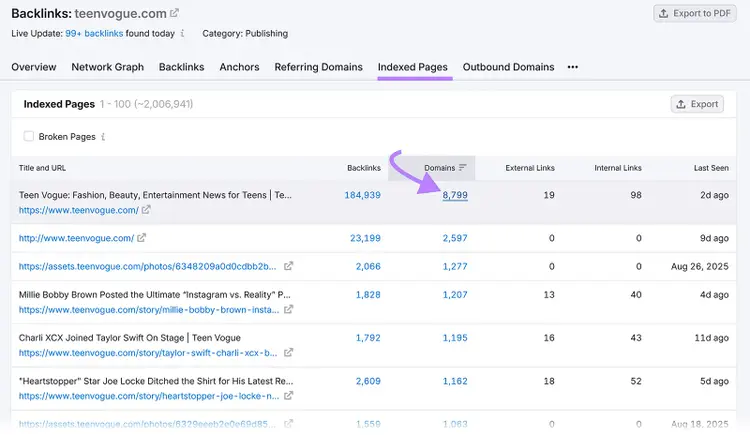
You’ll then see a list of the sites that link to the competitor’s page that you can reach out to. When you do, explain why your content is better and ask them to link to you instead.
9. Use Canonical Tags
Use canonical tags (HTML that signifies the main version of a page) to help web crawlers index and attribute ranking power to the page URL you want to serve as the main page.
A canonical tag is HTML that looks like this:
<link rel="canonical" href="https://example.com/" />
Using canonical tags is important if your publication has parameterized URLs due to filtering, tags, or archiving.
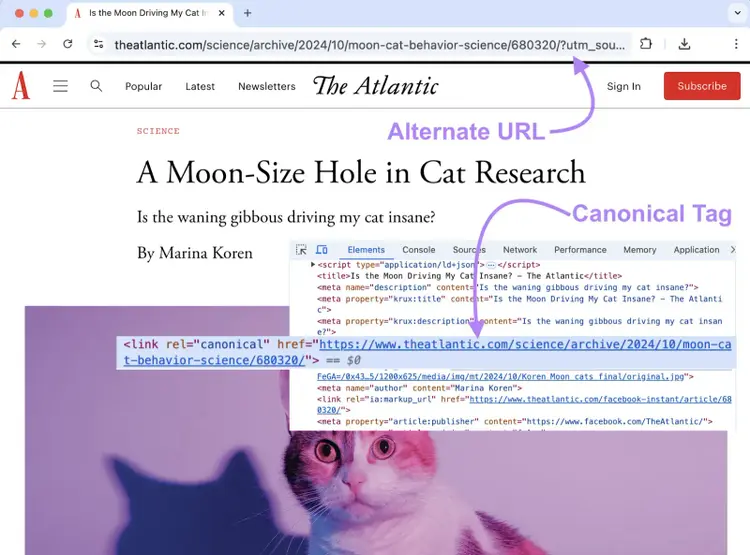
For example, here are two URLs that direct to the same article:
- “https://www.theatlantic.com/science/archive/2024/10/moon-cat-behavior-science/680320/”—which is the page’s official URL
- “https://www.theatlantic.com/science/archive/2024/10/moon-cat-behavior-science/680320/?utm_source=ground.news&utm_medium=referral”—which contains parameters identifying where the reader came from
It’s more useful to have all ranking authority go to the official URL—not the parameterized one. So, the publication can add a canonical tag pointing to the official URL.
Your CMS should offer options for setting up canonical URLs.
For instance, you can use the Yoast SEO plugin on a WordPress site to automatically add canonical tags to your pages.
Note
Don’t use canonical tags for syndicated content. Instead, syndication partners should block indexing with meta tags.
Boost Readership and Revenue with SEO for Publishers
Boost readership and revenue through search engines by investing in SEO and GEO tools to implement the tips above.
Semrush provides a whole host of options. Including a dedicated toolkit for improving your visibility in AI platforms.
Try the AI Visibility Toolkit today.
Beat Your Competition in LLMs
with the Semrush AI Visibility Toolkit

Carlos Silva leads the editorial pipeline for the English blog—coordinating writers, editors, strategy, and building AI workflows that boost content quality and AI visibility. With 10+ years of experience writing and editing across in-house and agency roles, Carlos blends content strategy, SEO, and AI to help marketers stay ahead of an evolving search landscape.
Carlos Silva
Carlos Silva leads the editorial pipeline for the English blog and builds AI workflows that boost content quality and AI visibility. 10+ years writing and editing across in-house and agency roles.

Tells Google to show you more from Semrush in AI, Search, and Discover.